cooling LEXUS RC350 2019 Owners Manual
[x] Cancel search | Manufacturer: LEXUS, Model Year: 2019, Model line: RC350, Model: LEXUS RC350 2019Pages: 390, PDF Size: 7.88 MB
Page 190 of 390
1904-5. Using the driving support systems
RC350AWD_RC350_RC300AWD_RC30
0_OM_(U)_1810
Vehicles without Adaptive Variable
Suspension System
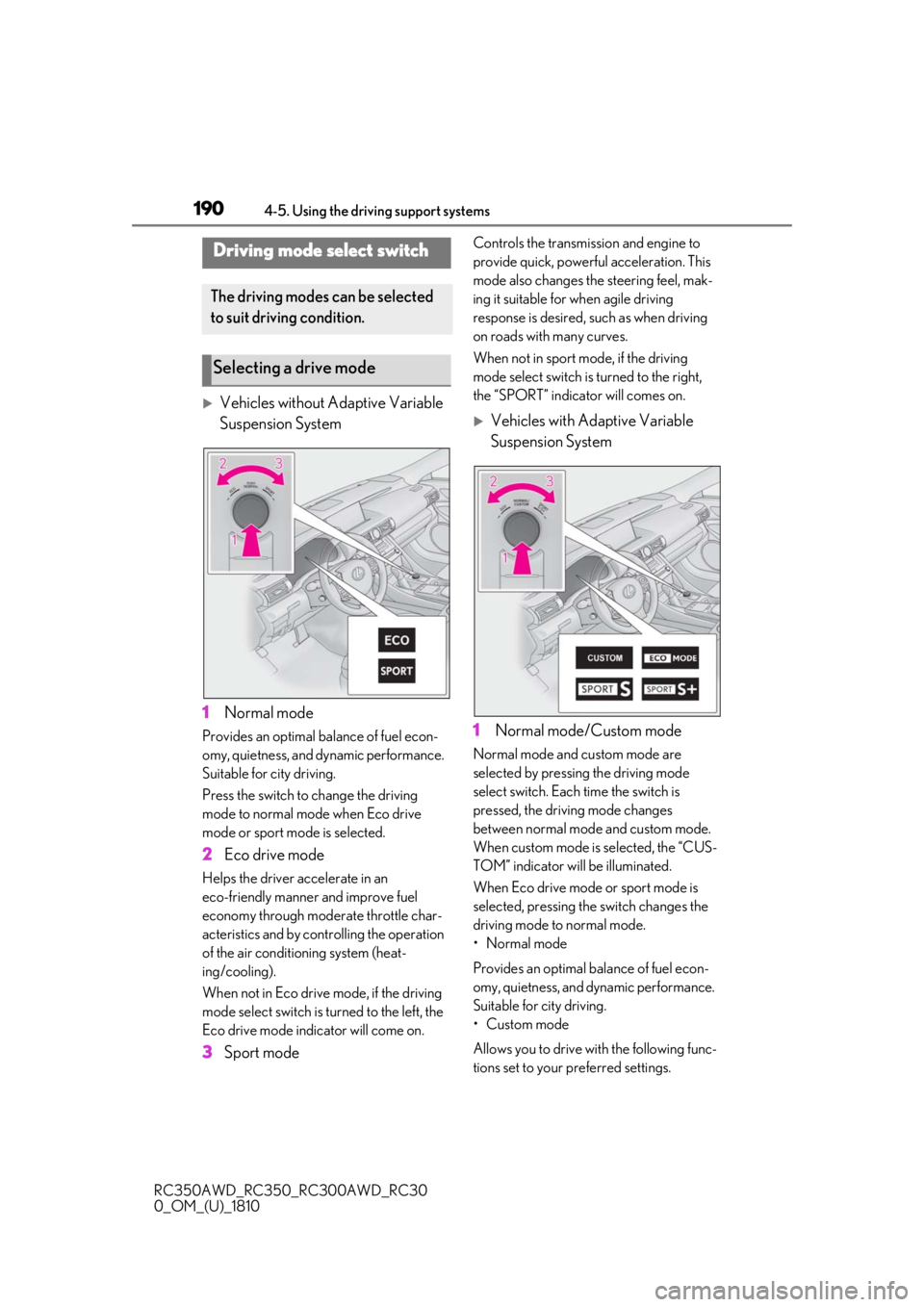
1 Normal mode
Provides an optimal ba lance of fuel econ-
omy, quietness, and dynamic performance.
Suitable for city driving.
Press the switch to change the driving
mode to normal mode when Eco drive
mode or sport mode is selected.
2 Eco drive mode
Helps the driver accelerate in an
eco-friendly manner and improve fuel
economy through moderate throttle char-
acteristics and by controlling the operation
of the air conditioning system (heat-
ing/cooling).
When not in Eco drive mode, if the driving
mode select switch is turned to the left, the
Eco drive mode indicator will come on.
3Sport mode
Controls the transmission and engine to
provide quick, powerful acceleration. This
mode also changes the steering feel, mak-
ing it suitable for when agile driving
response is desired, such as when driving
on roads with many curves.
When not in sport mode, if the driving
mode select switch is turned to the right,
the “SPORT” indicator will comes on.
Vehicles with Adaptive Variable
Suspension System
1 Normal mode/Custom mode
Normal mode and custom mode are
selected by pressing the driving mode
select switch. Each time the switch is
pressed, the driving mode changes
between normal mode and custom mode.
When custom mode is selected, the “CUS-
TOM” indicator will be illuminated.
When Eco drive mode or sport mode is
selected, pressing th e switch changes the
driving mode to normal mode.
• Normal mode
Provides an optimal ba lance of fuel econ-
omy, quietness, and dynamic performance.
Suitable for city driving.
• Custom mode
Allows you to drive with the following func-
tions set to your preferred settings.
Driving mode select switch
The driving modes can be selected
to suit driving condition.
Selecting a drive mode
Page 191 of 390
1914-5. Using the driving support systems
RC350AWD_RC350_RC300AWD_RC30
0_OM_(U)_1810
4
Driving
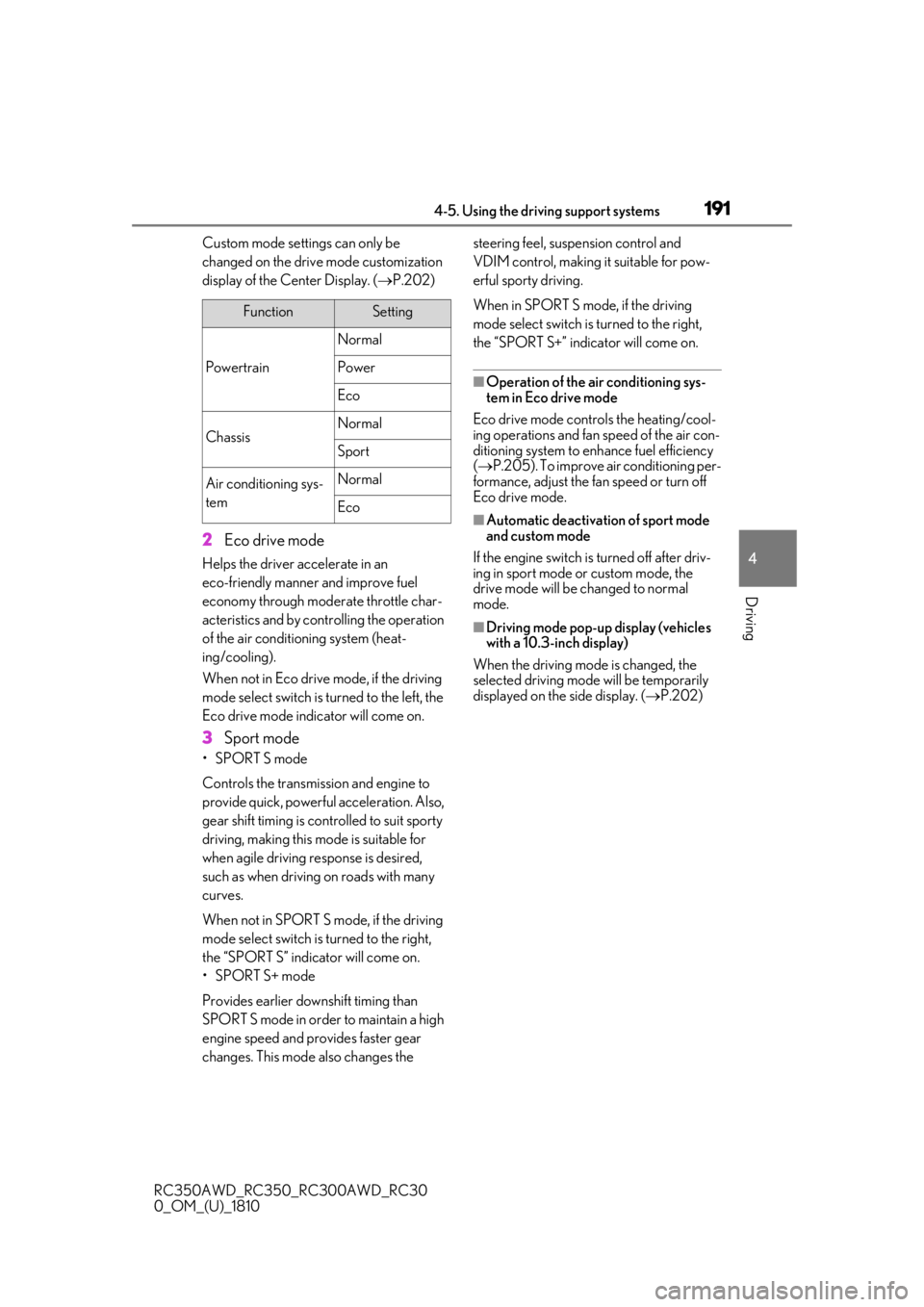
Custom mode settings can only be
changed on the drive mode customization
display of the Center Display. ( P.202)
2 Eco drive mode
Helps the driver accelerate in an
eco-friendly manner and improve fuel
economy through moderate throttle char-
acteristics and by controlling the operation
of the air conditioning system (heat-
ing/cooling).
When not in Eco drive mode, if the driving
mode select switch is turned to the left, the
Eco drive mode indicator will come on.
3Sport mode
•SPORT S mode
Controls the transmission and engine to
provide quick, powerful acceleration. Also,
gear shift timing is co ntrolled to suit sporty
driving, making this mode is suitable for
when agile driving response is desired,
such as when driving on roads with many
curves.
When not in SPORT S mode, if the driving
mode select switch is turned to the right,
the “SPORT S” indicator will come on.
•SPORT S+ mode
Provides earlier down shift timing than
SPORT S mode in order to maintain a high
engine speed and provides faster gear
changes. This mode also changes the steering feel, susp
ension control and
VDIM control, making it suitable for pow-
erful sporty driving.
When in SPORT S mode, if the driving
mode select switch is turned to the right,
the “SPORT S+” indicator will come on.
■Operation of the air conditioning sys-
tem in Eco drive mode
Eco drive mode controls the heating/cool-
ing operations and fan speed of the air con-
ditioning system to enhance fuel efficiency
( P.205). To improve air conditioning per-
formance, adjust the fan speed or turn off
Eco drive mode.
■Automatic deactivation of sport mode
and custom mode
If the engine switch is turned off after driv-
ing in sport mode or custom mode, the
drive mode will be changed to normal
mode.
■Driving mode pop-up display (vehicles
with a 10.3-inch display)
When the driving mode is changed, the
selected driving mode will be temporarily
displayed on the side display. ( P.202)
FunctionSetting
Powertrain
Normal
Power
Eco
ChassisNormal
Sport
Air conditioning sys-
temNormal
Eco
Page 207 of 390
2075-2. Using the air conditioning system
RC350AWD_RC350_RC300AWD_RC30
0_OM_(U)_1810
5
Interior features
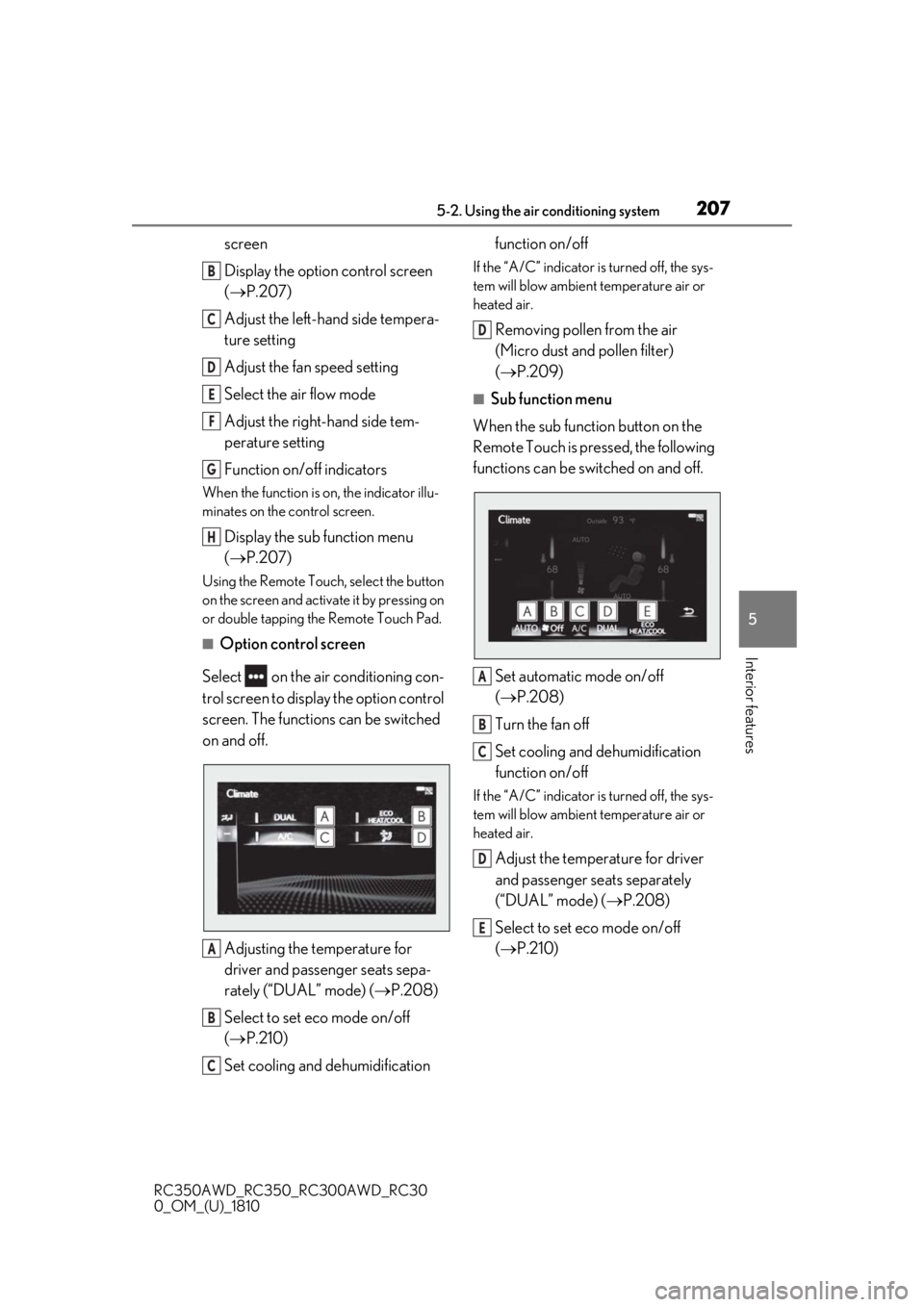
screen
Display the option control screen
( P.207)
Adjust the left-hand side tempera-
ture setting
Adjust the fan speed setting
Select the air flow mode
Adjust the right-hand side tem-
perature setting
Function on/off indicators
When the function is on, the indicator illu-
minates on the control screen.
Display the sub function menu
( P.207)
Using the Remote Touch, select the button
on the screen and activate it by pressing on
or double tapping the Remote Touch Pad.
■Option control screen
Select on the air conditioning con-
trol screen to display the option control
screen. The functions can be switched
on and off.
Adjusting the temperature for
driver and passenger seats sepa-
rately (“DUAL” mode) ( P.208)
Select to set eco mode on/off
( P.210)
Set cooling and dehumidification function on/off
If the “A/C” indicator is turned off, the sys-
tem will blow ambient temperature air or
heated air.
Removing pollen from the air
(Micro dust and pollen filter)
(
P.209)
■Sub function menu
When the sub function button on the
Remote Touch is pressed, the following
functions can be switched on and off.
Set automatic mode on/off
(P.208)
Turn the fan off
Set cooling and dehumidification
function on/off
If the “A/C” indicator is turned off, the sys-
tem will blow ambient temperature air or
heated air.
Adjust the temperature for driver
and passenger seats separately
(“DUAL” mode) ( P.208)
Select to set eco mode on/off
( P.210)
B
C
D
E
F
G
H
A
B
C
D
A
B
C
D
E
Page 208 of 390
2085-2. Using the air conditioning system
RC350AWD_RC350_RC300AWD_RC30
0_OM_(U)_1810
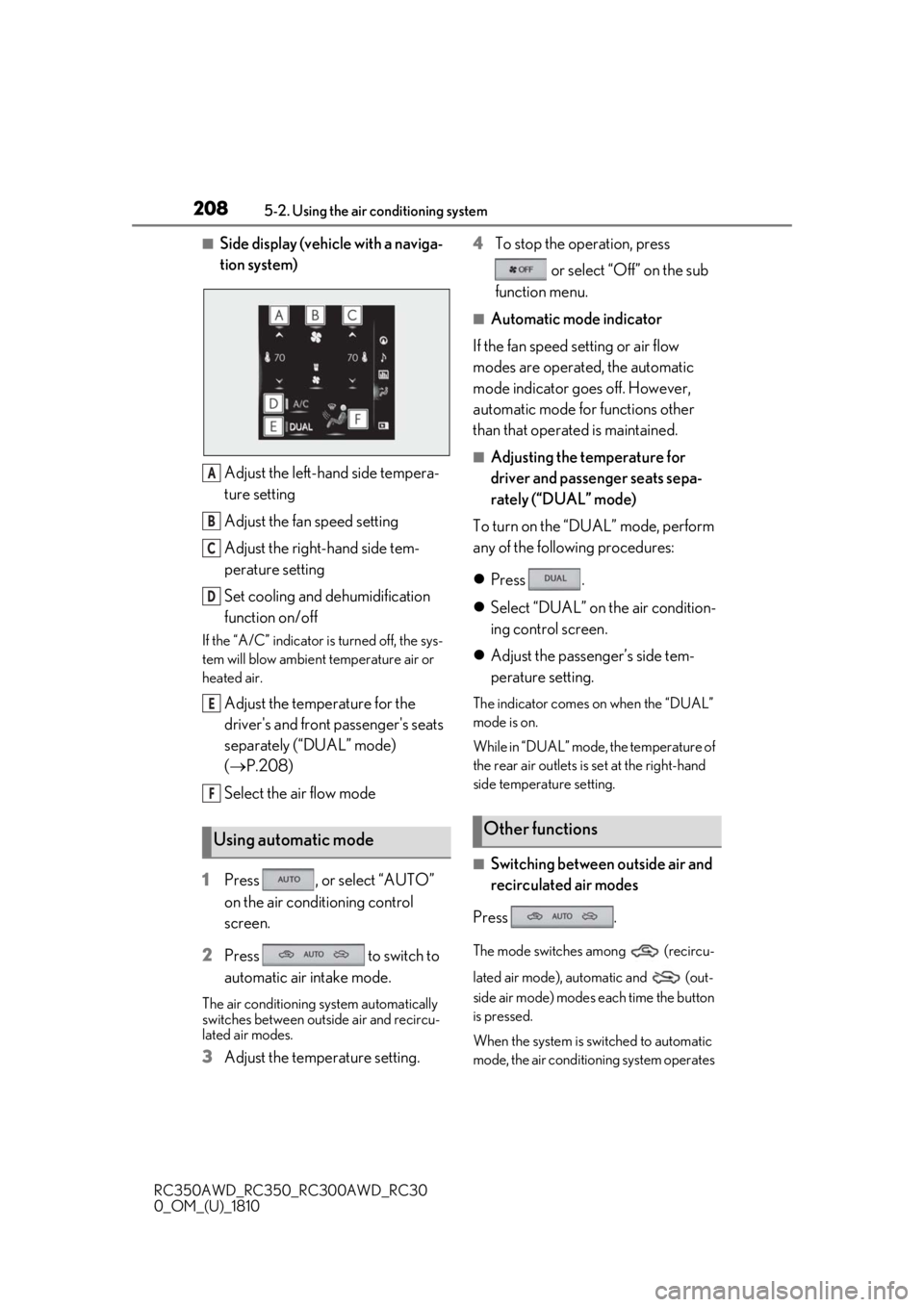
■Side display (vehicle with a naviga-
tion system)Adjust the left-hand side tempera-
ture setting
Adjust the fan speed setting
Adjust the right-hand side tem-
perature setting
Set cooling and dehumidification
function on/off
If the “A/C” indicator is turned off, the sys-
tem will blow ambient temperature air or
heated air.
Adjust the temperature for the
driver's and front passenger's seats
separately (“DUAL” mode)
( P.208)
Select the air flow mode
1 Press , or select “AUTO”
on the air conditioning control
screen.
2 Press to switch to
automatic air intake mode.
The air conditioning system automatically
switches between outside air and recircu-
lated air modes.
3Adjust the temperature setting. 4
To stop the operation, press
or select “Off” on the sub
function menu.
■Automatic mode indicator
If the fan speed setting or air flow
modes are operated, the automatic
mode indicator goes off. However,
automatic mode for functions other
than that operated is maintained.
■Adjusting the temperature for
driver and passenger seats sepa-
rately (“DUAL” mode)
To turn on the “DUAL” mode, perform
any of the following procedures:
Press .
Select “DUAL” on the air condition-
ing control screen.
Adjust the passenger’s side tem-
perature setting.
The indicator comes on when the “DUAL”
mode is on.
While in “DUAL” mode, the temperature of
the rear air outlets is set at the right-hand
side temperature setting.
■Switching between outside air and
recirculated air modes
Press .
The mode switches among (recircu-
lated air mode), automatic and (out-
side air mode) modes each time the button
is pressed.
When the system is switched to automatic
mode, the air conditioning system operates
Using automatic mode
A
B
C
D
E
F
Other functions
Page 210 of 390

2105-2. Using the air conditioning system
RC350AWD_RC350_RC300AWD_RC30
0_OM_(U)_1810your Lexus dealer.
*: The doors that can recall the driving
position memory are changed at the
same time.
■Using automatic mode
Fan speed is adjusted automatically accord-
ing to the temperature setting and the
ambient conditions.
Therefore, the fan may stop for a while until
warm or cool air is ready to flow immedi-
ately after is pressed or “AUTO” is
selected.
■Using the voice command system
Air conditioning system can be operated
using voice commands. Fo r details, refer to
the “NAVIGATION AND MULTIMEDIA
SYSTEM OWNER’S MANUAL”.
■Fogging up of the windows
The windows will easily fog up when the
humidity in the vehicle is high. Turning (“A/C”) on will dehumidify the air
from the outlets and defog the windshield
effectively.
●If you turn (“A/C”) off, the win-
dows may fog up more easily.
●The windows may fog up if the recircu-
lated air mode is used.
■Outside/recirculated air mode
●When driving on dusty roads such as tun-
nels or in heavy traffic, set the out-
side/recirculated air mode button to the
recirculated air mode. This is effective in
preventing outside air from entering the
vehicle interior. During cooling opera-
tion, setting the recirculated air mode will
also cool the vehicle interior effectively.
●Outside/recirculated air mode may auto-
matically switch de pending on the tem-
perature setting or the inside
temperature.
■When the outside temperature exceeds
75°F (24°C) and the air conditioning
system is on
●In order to reduce the air conditioning
power consumption, the air conditioning system may switch to recirculated air
mode automatically. This may also
reduce fuel consumption.
●Recirculated air mode is selected as a
default mode when the engine switch is
turned to IGNITION ON mode.
●It is possible to switch to outside air mode
at any time by pressing
.
■Automatic mode for air intake control
In automatic mode, the system detects
exhaust gas and other pollutants and auto-
matically switches between outside air and
recirculated air modes.
When the dehumidification function is off,
and the fan is operating, turning automatic
mode on will activate the dehumidification
function.
■Operation of the air conditioning sys-
tem in Eco drive mode
In Eco drive mode, the air conditioning sys-
tem is controlled as follows to prioritize fuel
efficiency:
●Engine speed and compressor operation
controlled to restrict heating/cooling
capacity
●Fan speed restricted when automatic
mode is selected
To improve air condit ioning performance,
perform the following operations:
●Adjust the fan speed
●Turn off Eco drive mode
■When the outside temperature falls to
nearly 32°F (0°C)
The dehumidification function may not
operate even when is pressed or
“A/C” is selected.
■Ventilation and air conditioning odors
●To let fresh air in, set the air conditioning
system to the outside air mode.
●During use, various odors from inside and
outside the vehicle may enter into and
accumulate in the air conditioning sys-
tem. This may then cause odor to be
emitted from the vents.
Page 244 of 390
2446-3. Do-it-yourself maintenance
RC350AWD_RC350_RC300AWD_RC30
0_OM_(U)_1810
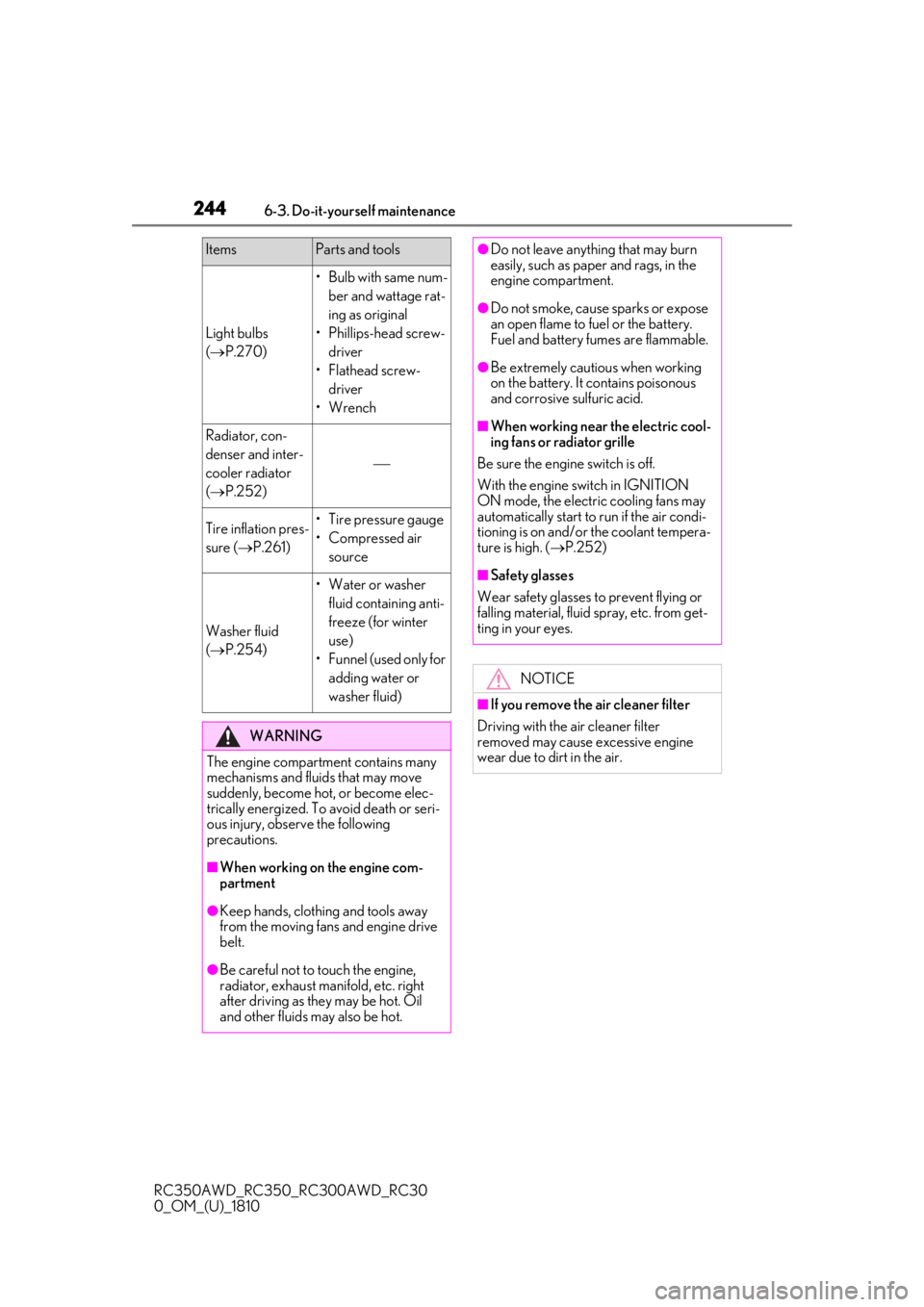
Light bulbs
( P.270)
• Bulb with same num-
ber and wattage rat-
ing as original
• Phillips-head screw- driver
• Flathead screw- driver
• Wrench
Radiator, con-
denser and inter-
cooler radiator
( P.252)
Tire inflation pres-
sure ( P.261)• Tire pressure gauge
• Compressed air
source
Washer fluid
( P.254)
• Water or washer
fluid containing anti-
freeze (for winter
use)
• Funnel (used only for adding water or
washer fluid)
WARNING
The engine compartment contains many
mechanisms and fluids that may move
suddenly, become hot, or become elec-
trically energized. To avoid death or seri-
ous injury, observe the following
precautions.
■When working on the engine com-
partment
●Keep hands, clothi ng and tools away
from the moving fans and engine drive
belt.
●Be careful not to touch the engine,
radiator, exhaust manifold, etc. right
after driving as they may be hot. Oil
and other fluids may also be hot.
ItemsParts and tools●Do not leave anything that may burn
easily, such as paper and rags, in the
engine compartment.
●Do not smoke, cause sparks or expose
an open flame to fuel or the battery.
Fuel and battery fumes are flammable.
●Be extremely cautious when working
on the battery. It contains poisonous
and corrosive sulfuric acid.
■When working near the electric cool-
ing fans or radiator grille
Be sure the engine switch is off.
With the engine switch in IGNITION
ON mode, the electric cooling fans may
automatically start to run if the air condi-
tioning is on and/or the coolant tempera-
ture is high. ( P.252)
■Safety glasses
Wear safety glasses to prevent flying or
falling material, fluid spray, etc. from get-
ting in your eyes.
NOTICE
■If you remove the air cleaner filter
Driving with the air cleaner filter
removed may cause excessive engine
wear due to dirt in the air.
Page 247 of 390
2476-3. Do-it-yourself maintenance
RC350AWD_RC350_RC300AWD_RC30
0_OM_(U)_1810
6
Maintenance and care
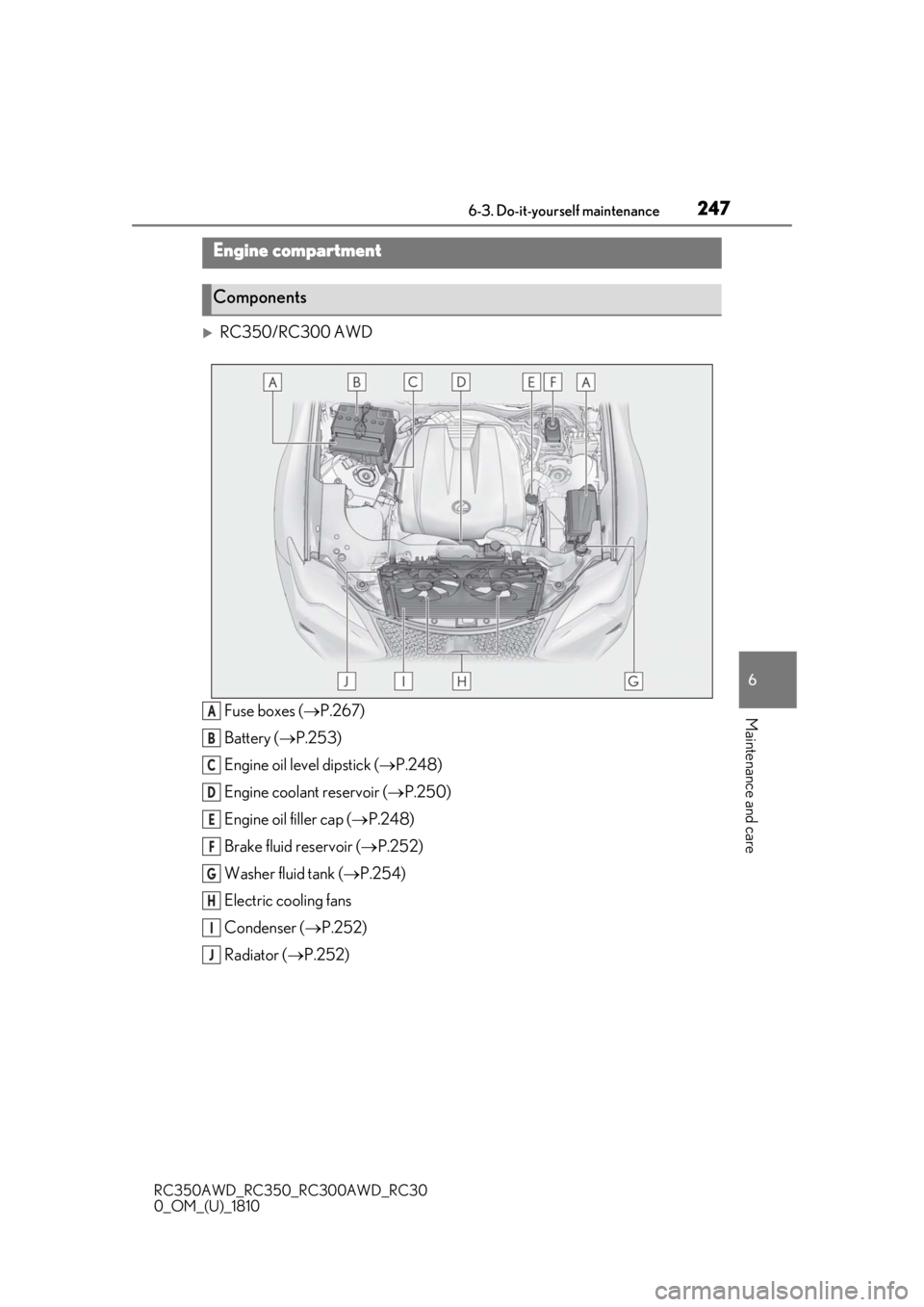
RC350/RC300 AWD Fuse boxes ( P.267)
Battery ( P.253)
Engine oil level dipstick ( P.248)
Engine coolant reservoir ( P.250)
Engine oil filler cap ( P.248)
Brake fluid reservoir ( P.252)
Washer fluid tank ( P.254)
Electric cooling fans
Condenser ( P.252)
Radiator ( P.252)
Engine compartment
Components
A
B
C
D
E
F
G
H
I
J
Page 248 of 390
2486-3. Do-it-yourself maintenance
RC350AWD_RC350_RC300AWD_RC30
0_OM_(U)_1810
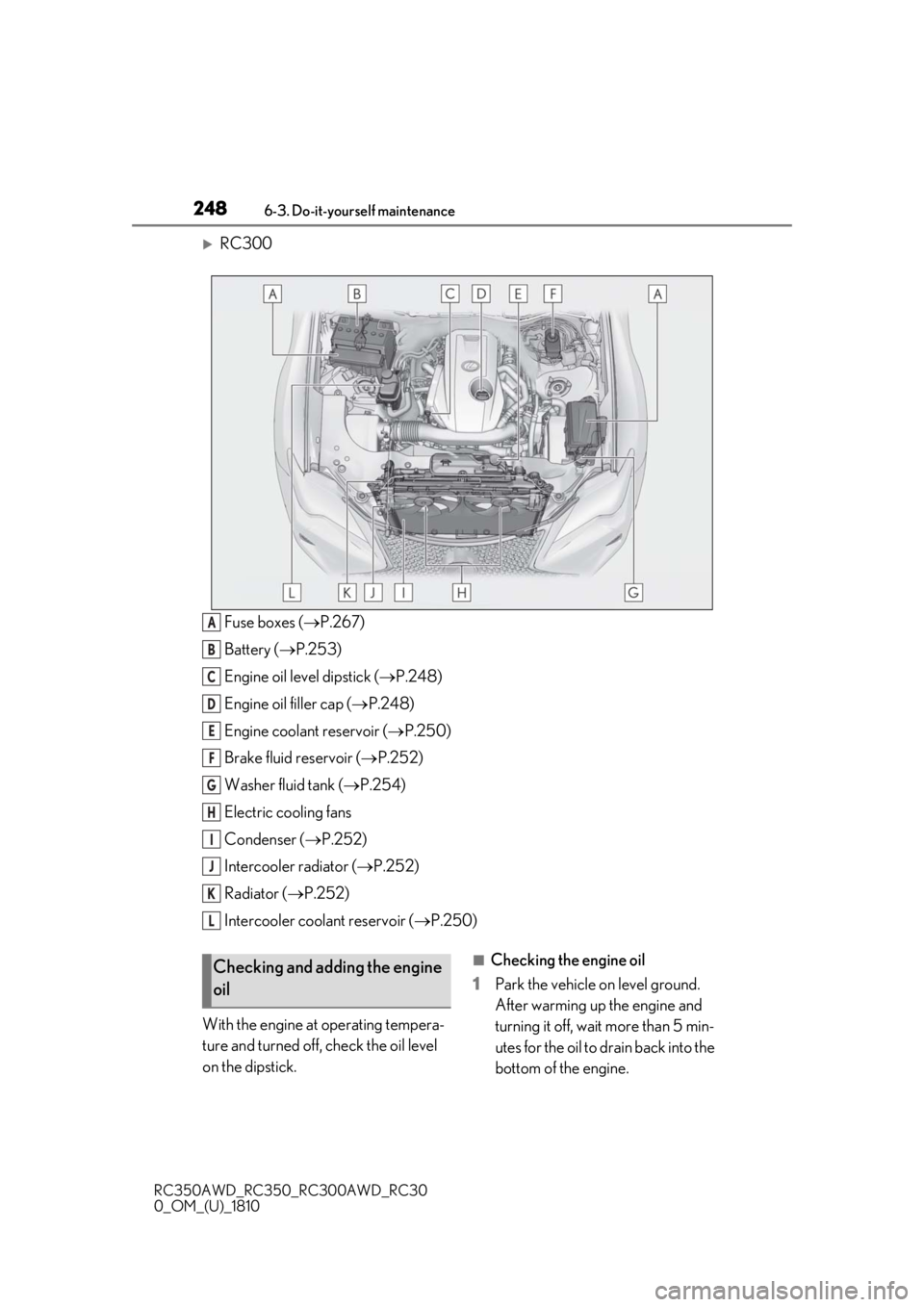
RC300Fuse boxes ( P.267)
Battery ( P.253)
Engine oil level dipstick ( P.248)
Engine oil filler cap ( P.248)
Engine coolant reservoir ( P.250)
Brake fluid reservoir ( P.252)
Washer fluid tank ( P.254)
Electric cooling fans
Condenser ( P.252)
Intercooler radiator ( P.252)
Radiator ( P.252)
Intercooler coolant reservoir ( P.250)
With the engine at operating tempera-
ture and turned off, check the oil level
on the dipstick.
■Checking the engine oil
1 Park the vehicle on level ground.
After warming up the engine and
turning it off, wait more than 5 min-
utes for the oil to drain back into the
bottom of the engine.
A
B
C
D
E
F
G
H
I
J
K
L
Checking and adding the engine
oil
Page 251 of 390
2516-3. Do-it-yourself maintenance
RC350AWD_RC350_RC300AWD_RC30
0_OM_(U)_1810
6
Maintenance and care
on the reservoir when the engine is
cold.
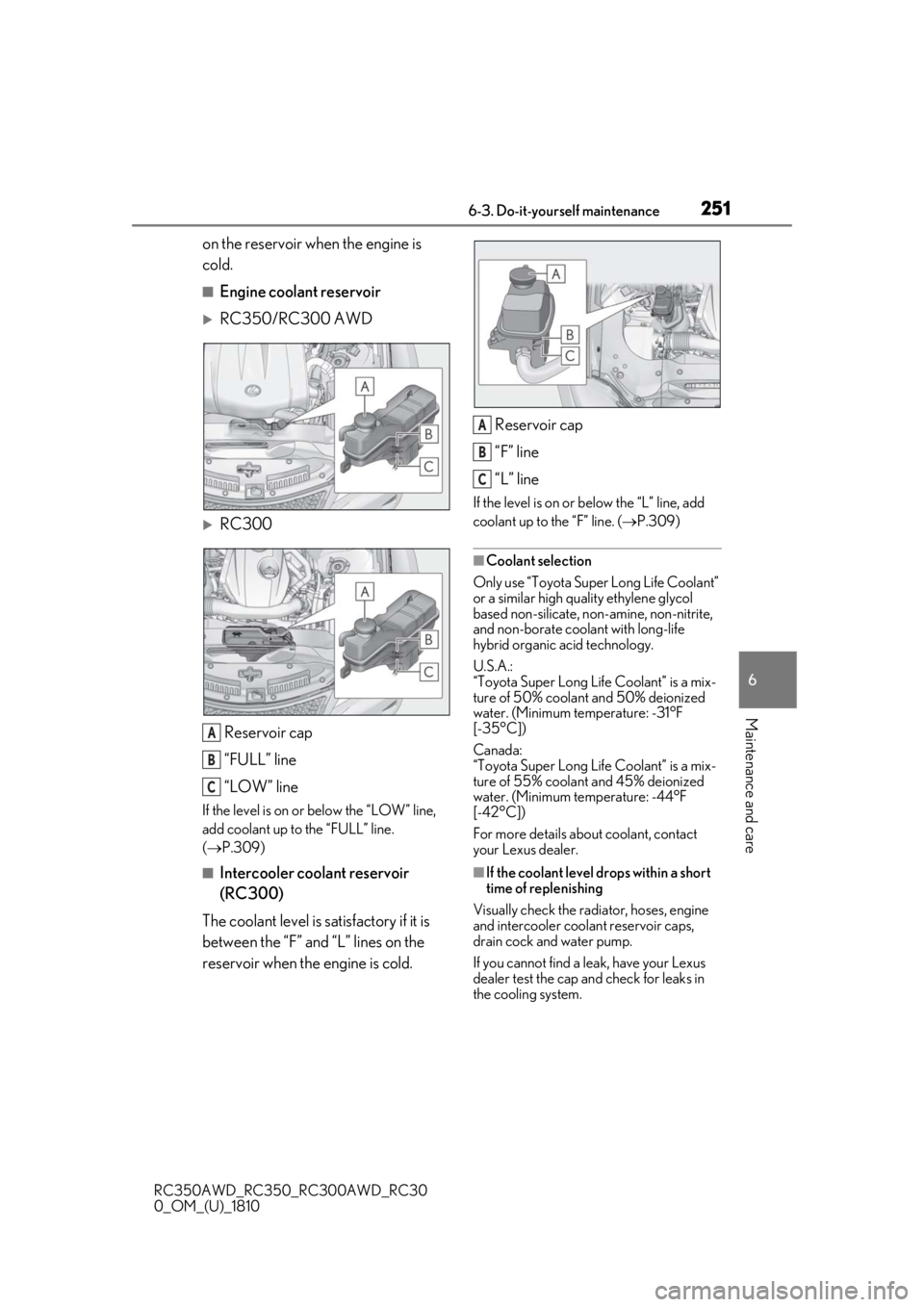
■Engine coolant reservoir
RC350/RC300 AWD
RC300 Reservoir cap
“FULL” line
“LOW” line
If the level is on or below the “LOW” line,
add coolant up to the “FULL” line.
( P.309)
■Intercooler coolant reservoir
(RC300)
The coolant level is satisfactory if it is
between the “F” and “L” lines on the
reservoir when the engine is cold. Reservoir cap
“F” line
“L” line
If the level is on or
below the “L” line, add
coolant up to the “F” line. ( P.309)
■Coolant selection
Only use “Toyota Super Long Life Coolant”
or a similar high qua lity ethylene glycol
based non-silicate, non-amine, non-nitrite,
and non-borate coolant with long-life
hybrid organic acid technology.
U.S.A.:
“Toyota Super Long Life Coolant” is a mix-
ture of 50% coolant and 50% deionized
water. (Minimum temperature: -31°F
[-35°C])
Canada:
“Toyota Super Long Life Coolant” is a mix-
ture of 55% coolant and 45% deionized
water. (Minimum temperature: -44°F
[-42°C])
For more details about coolant, contact
your Lexus dealer.
■If the coolant level drops within a short
time of replenishing
Visually check the radi ator, hoses, engine
and intercooler coolant reservoir caps,
drain cock and water pump.
If you cannot find a leak, have your Lexus
dealer test the cap and check for leaks in
the cooling system.
A
B
C
A
B
C
Page 252 of 390
2526-3. Do-it-yourself maintenance
RC350AWD_RC350_RC300AWD_RC30
0_OM_(U)_1810
Check the radiator, condenser and
intercooler radiator and clear away
any foreign objects.
If any of the above parts are extremely
dirty or you are not sure of their condi-
tion, have your vehicle inspected by
your Lexus dealer.
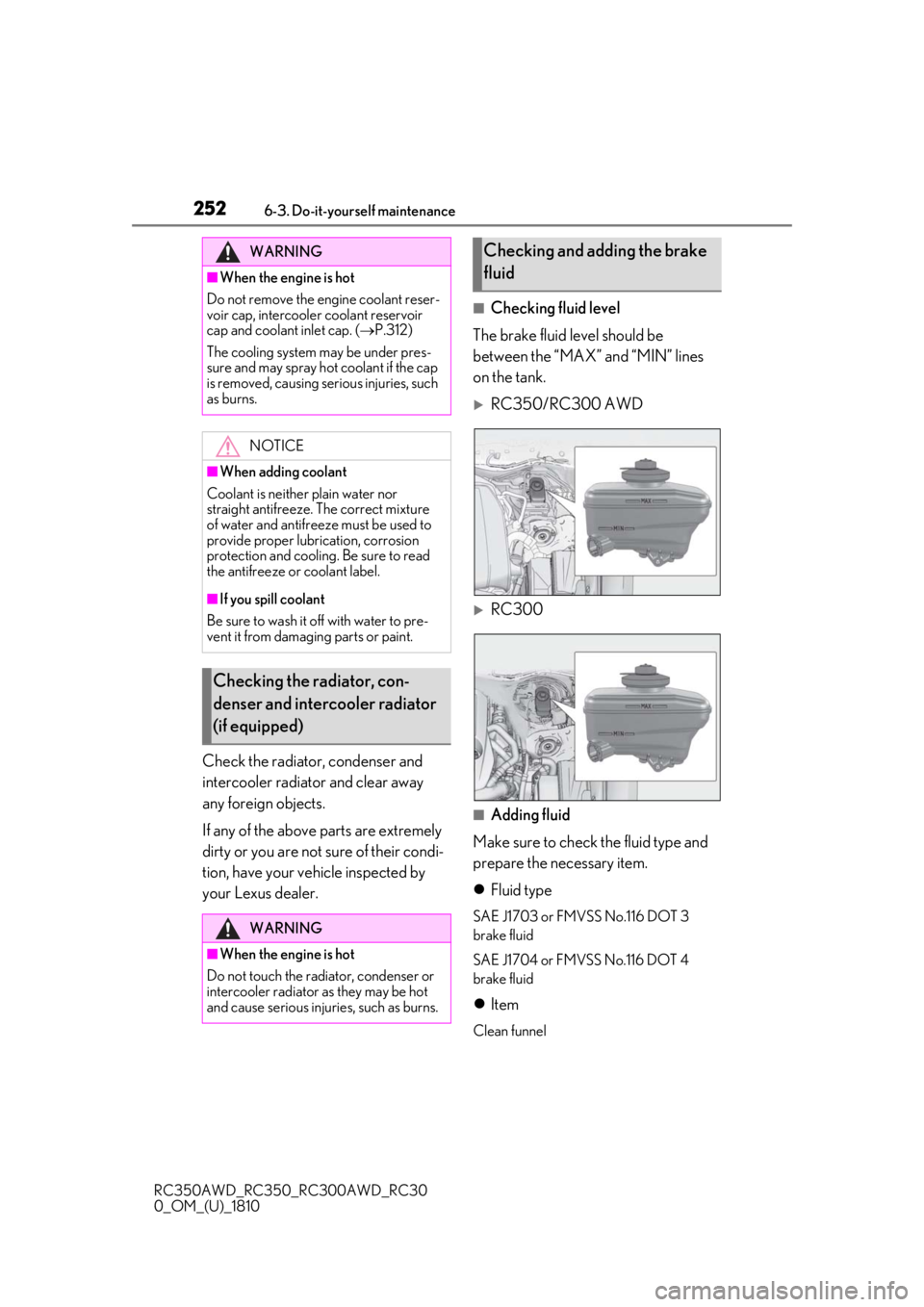
■Checking fluid level
The brake fluid level should be
between the “MAX” and “MIN” lines
on the tank.
RC350/RC300 AWD
RC300
■Adding fluid
Make sure to check the fluid type and
prepare the necessary item.
Fluid type
SAE J1703 or FMVSS No.116 DOT 3
brake fluid
SAE J1704 or FMVSS No.116 DOT 4
brake fluid
Item
Clean funnel
WARNING
■When the engine is hot
Do not remove the engine coolant reser-
voir cap, intercooler coolant reservoir
cap and coolant inlet cap. ( P.312)
The cooling system may be under pres-
sure and may spray hot coolant if the cap
is removed, causing serious injuries, such
as burns.
NOTICE
■When adding coolant
Coolant is neither plain water nor
straight antifreeze. The correct mixture
of water and antifreeze must be used to
provide proper lubrication, corrosion
protection and cooling. Be sure to read
the antifreeze or coolant label.
■If you spill coolant
Be sure to wash it off with water to pre-
vent it from damagi ng parts or paint.
Checking the radiator, con-
denser and intercooler radiator
(if equipped)
WARNING
■When the engine is hot
Do not touch the radiator, condenser or
intercooler radiator as they may be hot
and cause serious injuries, such as burns.
Checking and adding the brake
fluid