park assist LEXUS RC350 2022 User Guide
[x] Cancel search | Manufacturer: LEXUS, Model Year: 2022, Model line: RC350, Model: LEXUS RC350 2022Pages: 400, PDF Size: 27.73 MB
Page 188 of 400
1864-5. Using the driving support systems
RC350/RC300 Owner's Manual
parking assist sensors in the vicinity.
●A sensor is coated with a sheet of spray
or heavy rain.
●If a sensor is hit by a large amount of
water, such as when driving on a flooded
road.
●If the vehicle is significantly tilted.
●The vehicle is approaching a tall or
curved curb.
●If objects draw too close to the sensor.
■Objects which may not be properly
detected
The shape of the object may prevent the
sensor from detecting it. Pay particular attention to the
following objects:
●Wires, fences, ropes, etc.
●Cotton, snow and other materials that
absorb sound waves
●Sharply-angled objects
●Low objects
●Tall objects with upper sections project-
ing outwards in the direction of your vehi-
cle
People may not be de tected if they are
wearing certain types of clothing.
■Customization
Settings can be changed. ( P.355)
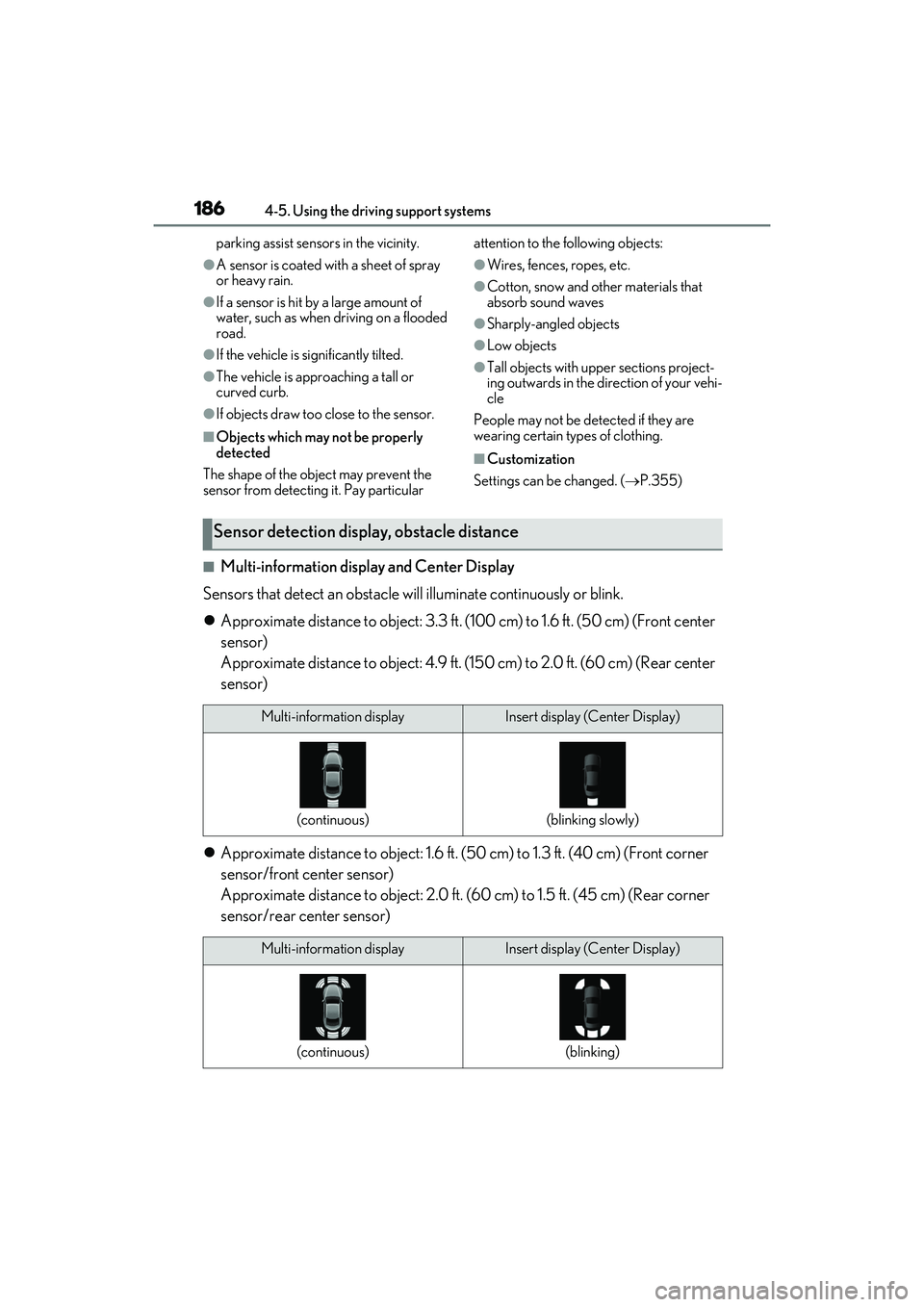
■Multi-information display and Center Display
Sensors that detect an obstacle will illuminate continuously or blink.
Approximate distance to object: 3.3 ft. (1 00 cm) to 1.6 ft. (50 cm) (Front center
sensor)
Approximate distance to object: 4.9 ft. (1 50 cm) to 2.0 ft. (60 cm) (Rear center
sensor)
Approximate distance to object: 1.6 ft. (5 0 cm) to 1.3 ft. (40 cm) (Front corner
sensor/front center sensor)
Approximate distance to object: 2.0 ft. (60 cm) to 1.5 ft. (45 cm) (Rear corner
sensor/rear center sensor)
Sensor detection display, obstacle distance
Multi-information displayInsert display (Center Display)
(continuous)(blinking slowly)
Multi-information displayInsert display (Center Display)
(continuous)(blinking)
Page 190 of 400

1884-5. Using the driving support systems
RC350/RC300 Owner's Manual
Approximately 3.3 ft. (100 cm)
Approximately 4.9 ft. (150 cm)
Approximately 1.6 ft. (50 cm)
Approximately 2.0 ft. (60 cm)
The diagram shows the detection range of
the sensors. Note that the sensors cannot
detect obstacles that are extremely close
to the vehicle.
The range of the sensors may change
depending on the shap e of the object, etc.
You can change the warning beep vol-
ume and Center Display operating
conditions.
1Press the “MENU” button on the
Remote Touch. ( P.208)
2 Select “Setup” on the “Menu”
screen.
3 Select “Vehicle” on the “Setup”
screen.
4 Select “LEXUS Park Assist” on the
vehicle settings screen. 5
Select the desired button.
The alert volume can be adjusted.
Front center sensor display and
tone indication can be set.
Rear center sensor display and
tone indication can be set.
Detection range of the sensors
Setting up intuitive parking assist
A
B
C
D
A
B
C
Page 202 of 400

2004-5. Using the driving support systems
RC350/RC300 Owner's Manual
and release the switch.
The “Traction Control Turned Off” will be
shown on the multi-information display.
Press the switch again to turn the sys-
tem back on.
■Turning off both TRAC and VSC sys-
tems
To turn the TRAC and VSC systems off,
press and hold the switch for more
than 3 seconds while the vehicle is stopped.
The VSC OFF indicator light will come on
and the “Traction Control Turned Off” will
be shown on the mult i-information display.
*
Press the switch again to turn the sys-
tems back on.
*: On vehicles with PCS (Pre-Collision
System), pre-collision brake assist,
pre-collision braking, and steering con-
trol (performed through cooperative
control of PCS and LDH) (if equipped)
will also be disabl ed. The Pre-Collision
System warning light will come on and a
message will be displayed on the
multi-information display. ( P.166)
■When the message is displayed on the
multi-information display showing that
TRAC has been disabled even if the
switch has not been pressed
TRAC is temporary deactivated. If the infor-
mation continues to show, contact your
Lexus dealer.
■Operating conditions of hill-start assist
control
When the following four conditions are met,
the hill-start assist control will operate:
●The shift lever is in a position other than P
or N (when starting off forward/back-
ward on an upward incline).
●The vehicle is stopped.
●The accelerator pedal is not depressed.
●The parking brake is not engaged.
●Engine switch is turned to IGNITION
ON mode
■Automatic system cancelation of
hill-start assist control
The hill-start assist control will turn off in any
of the following situations:
●The shift lever is moved to P or N.
●The accelerator pedal is depressed.
●The parking brake is engaged.
●2 seconds at maximum elapsed after the
brake pedal is released
●Engine switch is turned to off
■VGRS is disabled when
VGRS may stop operat ing in the following
situations.
In this event, the steering wheel may move
from its straight forward position, but it will
return when the system restarts.
●When the steering wheel is operated for
an extended period of time while the
vehicle is stopped or is moving very
slowly
(on vehicles with LDH, DRS is disabled
together with VGRS)
●When the steering wheel has been held
fully to the left or right
The center position of the steering wheel
may change when VGRS is disabled. How-
Page 204 of 400

2024-5. Using the driving support systems
RC350/RC300 Owner's Manual
WARNING
■Hill-start assist control does not oper-
ate effectively when
●Do not overly rely on hill-start assist
control. Hill-start assist control may
not operate effectively on steep
inclines and roads covered with ice.
●Unlike the parking brake, hill-start
assist control is not intended to hold
the vehicle stationary for an extended
period of time. Do not attempt to use
hill-start assist control to hold the vehi-
cle on an incline, as doing so may lead
to an accident.
■When the TRAC/VSC is activated
The slip indicator light flashes. Always
drive carefully. Re ckless driving may
cause an accident. Exercise particular
care when the indicator light flashes.
■When the TRAC/VSC systems are
turned off
Be especially careful and drive at a speed
appropriate to the road conditions. As
these are the systems to help ensure
vehicle stability and driving force, do not
turn the TRAC/VSC systems off unless
necessary.
■Replacing tires
Make sure that all ti res are of the speci-
fied size, brand, tread pattern and total
load capacity. In addition, make sure that
the tires are inflated to the recom-
mended tire inflation pressure level.
The ABS, TRAC and VSC systems will
not function correctly if different tires are
installed on the vehicle.
Contact your Lexus dealer for further
information when replacing tires or
wheels.
■Handling of tires and the suspension
Using tires with any kind of problem or
modifying the suspension will affect the
driving assist systems, and may cause a
system to malfunction.
Page 292 of 400

2907-2. Steps to take in an emergency
RC350/RC300 Owner's Manual
3Insert the towing eyelet into the
hole and tighten partially by hand.
4 Tighten down the towing eyelet
securely using a wheel nut wrench
or hard metal bar.
5 Securely attach cables or chains to
the towing eyelet.
Take care not to damage the vehi-
cle body.
6 Enter the vehicle being towed and
start the engine.
If the engine does not start, turn the
engine switch to ON. 7
Shift the shift lever to N and release
the parking brake.
Turn automatic mode off. (P.136)
When the shift lever cannot be shifted:
P.130
■While towing
If the engine is not running, the power assist
for the brakes and steer ing will not function,
making steering and braking more difficult.
■Wheel nut wrench
Wheel nut wrench is installed in trunk.
( P.305)
Page 313 of 400

3117-2. Steps to take in an emergency
RC350/RC300 Owner's Manual
7
When trouble arises
■When the spare tire is equipped
The vehicle becomes lower when driving
with the spare tire compared to when driv-
ing with standard tires.
■If you have a flat rear tire on a road cov-
ered with snow or ice (vehicles with
front and rear tires of the same size
except for vehicles with LDH and
19-inch tires)
Install the spare tire on one of the front
wheels of the vehicle. Perform the following
steps and fit tire chains to the rear tires:
1 Replace a front tire with the spare tire.
2 Replace the flat rear tire with the tire
removed from the front of the vehicle.
3 Fit tire chains to the rear tires.
WARNING
■When using the spare tire
●Remember that the spare tire provided
is specifically desi gned for use with
your vehicle. Do not use your spare
tire on another vehicle.
●Do not use more than one spare tire
simultaneously.
●Replace the spare tire with a standard
tire as soon as possible.
●Avoid sudden acceleration, abrupt
steering, sudden braking and shifting
operations that cause sudden engine
braking.
■When the spare tire is attached
The vehicle speed may not be correctly
detected, and the following systems may
not operate correctly:
• ABS & Brake assist
•VSC
•TRAC
• Dynamic radar cruise control with full-speed range
•PCS
•EPS
• Adaptive Variable Suspension System (if equipped)
• LDA (Lane Departure Alert with steering control)
• VGRS (if equipped)
• LDH (Lexus Dynamic Handling sys- tem) (if equipped)
• DRS (Dynamic Rear Steering) (if equipped)
• VDIM (Vehicle Dynamics Integrated Management)
• Tire pressure warning system
•Lexus parking assist monitor
• Intuitive parking assist (if equipped)
• Navigation system (if equipped)
Also, not only can the following system
not be utilized fully, bu t it may even nega-
tively affect the drive-train components:
• AWD system (if equipped)
■Speed limit when using the spare tire
Do not drive at speeds in excess of 50
mph (80 km/h) when a spare tire is
installed on the vehicle.
The spare tire is not designed for driving
at high speeds. Failure to observe this
precaution may lead to an accident caus-
ing death or serious injury.
■After using the tools and jack
Before driving, make sure all the tools
and jack are securely in place in their
storage location to reduce the possibility
of personal injury during a collision or
sudden braking.
Page 351 of 400

3498-2. Customization
RC350/RC300 Owner's Manual
8
Vehicle specifications
8-2.Customization
■Changing by using the meter con-
trol switches
1 Press or to select .
2 Operate the switches to select a
desired item.
3 Change the setting by referring to
the message displayed on the
screen.
■Changing by using the Remote
Touch
1 Press the “MENU” button on the
Remote Touch.
2 Select “Setup” on the menu screen
and select “Vehicle”.
3 Select “Vehicle Customization”,
“LEXUS Park Assist” or “Drive
Mode Customization”. Various setting can be changed. Refer
to the list of settings that can be
changed for details.
For details on the Remote Touch, refer
to the “NAVIGATION AND MULTI-
MEDIA SYSTEM OWNER’S MAN-
UAL”.
■When customizing using the Remote
Touch
Stop the vehicle in a safe place, apply the
parking brake, and shift the shift lever to P.
Also, to prevent battery discharge, leave
the engine running while customizing the
features.
Some function settings are changed simultaneously with other functions being cus-
tomized. Contact your Lexus dealer for further details.
Settings that can be changed using the Remote Touch
Settings that can be changed using the meter control switches
Settings that can be changed by your Lexus dealer
Customizable features
Your vehicle includes a variety of
electronic features that can be per-
sonalized to your preferences. The
settings of these features can be
changed by using the meter control
switches, the Remote Touch or at
your Lexus dealer.
Customizing vehicle features
WARNING
■During customization
As the engine needs to be running
during customization, ensure that the
vehicle is parked in a place with ade-
quate ventilation. In a closed area such as
a garage, exhaust gases including harm-
ful carbon monoxide (CO) may collect
and enter the vehicle. This may lead to
death or a serious health hazard.
NOTICE
■During customization
To prevent battery discharge, ensure that
the engine is running while customizing
features.
Customizable features
A
B
C
Page 357 of 400

3558-2. Customization
RC350/RC300 Owner's Manual
8
Vehicle specifications
■LDA (Lane Departure Alert with steering control) (P.167)
■Intuitive parking assist*( P.183)
*:If equipped
■Driving mode select switch ( P.196)
*:If equipped
■Automatic air conditioning system ( P.213)
FunctionCustomized setting
Steering assist functionOn, Off—O—
Alert typeSteering wheel vibration, Buzzer—O—
Alert sensitivityHigh, Standard—O—
Vehicle sway warning functionOn, Off—O—
Vehicle sway warning sensitivityHigh, Standard, Low—O—
ABC
FunctionDefault settingCustomized setting
Detection distance of the
front center sensorFarNearO—O
Detection distance of the rear
center sensorFarNearO—O
Buzzer volume21 to 3O—O
ABC
FunctionDefault settingCustomized setting
Powertrain control in custom
mode
*NormalPowerO——Eco
Chassis control in custom
mode
*NormalSportO——
Air conditioning operation in
custom mode
*NormalEcoO——
ABC
FunctionDefault settingCustomized setting
A/C auto switch operationOnOffO—O
Exhaust gas sensor sensitivityStandard-3 to 3O—O
ABC
Page 380 of 400
378Certifications
RC350/RC300 Owner's Manual
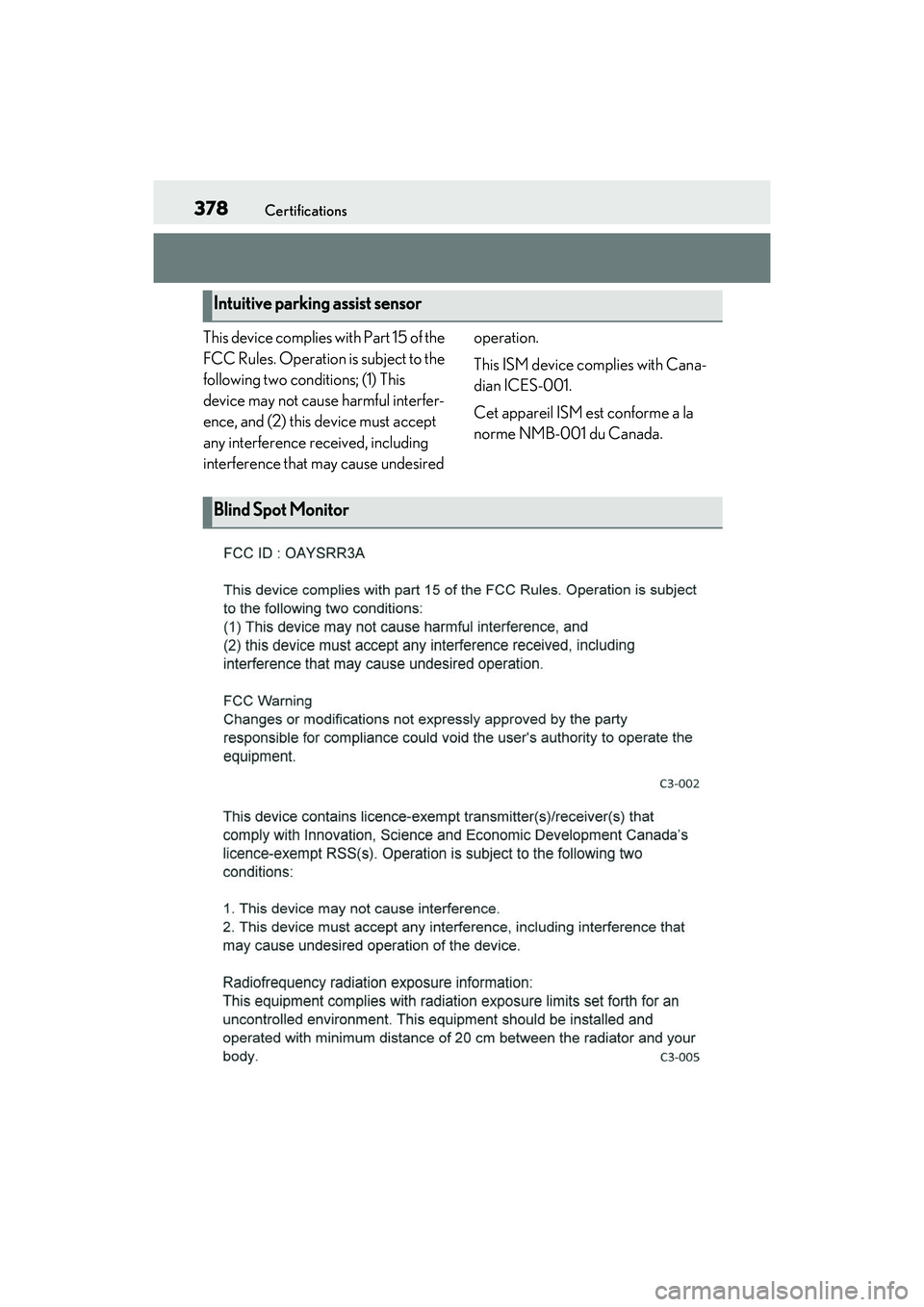
This device complies with Part 15 of the
FCC Rules. Operation is subject to the
following two conditions; (1) This
device may not cause harmful interfer-
ence, and (2) this device must accept
any interference received, including
interference that may cause undesired operation.
This ISM device complies with Cana-
dian ICES-001.
Cet appareil ISM est conforme a la
norme NMB-001 du Canada.
Intuitive parking assist sensor
Blind Spot Monitor
Page 386 of 400
384Alphabetical Index
RC350/RC300 Owner's Manual
Alphabetical Index
A
A/CAir conditioning filter ............................... 273
Automatic air conditioning system ..... 213
Micro dust and pollen filter..................... 217
ABS (Anti-lock Brake System)............... 198 Warning light ............................................... 295
Active Sound Control (ASC) ..................139
Adaptive Variable Suspension System 199
Air conditioning filter ................................. 273
Air conditioning system Air conditioning filter ............................... 273
Automatic air conditioning system ..... 213
Micro dust and pollen filter..................... 217
Airbags Airbag operating conditions................... 30
Airbag precautions for your child .........32
Correct driving posture .............................23
Curtain shield airbag operating condi-tions .................................................................. 30
Curtain shield airbag precautions ........32
Front passenger occupa nt classification
system ............................................................. 36
General airbag precautions ....................32
Locations of airbags.................................... 28
Modification and disposal of airbags . 35
Side airbag operating conditions ......... 30
Side airbag precautions .............................32
Side and curtain shield airbags operating conditions ...................................................... 30
Side and curtain shield airbags precau- tions ...................................................................32
SRS airbags ..................................................... 28
SRS warning light ...................................... 294
Alarm ....................................................................57 Warning buzzer ......................................... 293
Anchor brackets .......................................41, 49
Antennas (smart access system with push-button start)........................................ 93
Anti-lock Brake System (ABS)............... 198 Warning light ............................................... 295 Approach warning........................................ 179
ASC (Active Sound Control) ..................139
Assist grips ..................................................... 228
Audio system-linked display .......................76
Automatic air conditioning system ........213
Automatic headlight leveling system ..... 141
Automatic High Beam ................................ 142
Automatic light control system............... 140
Automatic transmission ..............................129
M mode ............................................................132
Paddle shift switches ......................... 131, 132
Snow mode...................................................... 131
Average fuel economy..................................73
Average vehicle speed .................................73
B
Back-up light Replacing light bulbs............................... 280
Wattage ..........................................................336
Battery Battery checking ..........................................261
If the battery is discharged ......................317
Preparing and checking before winter..........................................................................203
Warning light ............................................... 294
Blind Spot Monitor (BSM)........................ 189
Boost gauge.......................................................74
Brake Brake hold .......................................................137
Fluid................................................................... 332
Parking brake ............................................... 135
Warning light ...............................................293
Brake assist ..................................................... 198
Break-in tips...................................................... 117
Brightness control Instrument panel light control................. 70
BSM (Blind Spot Monitor)........................ 189
C
Card key ............................................................ 82