lock LEXUS RC350 2022 Repair Manual
[x] Cancel search | Manufacturer: LEXUS, Model Year: 2022, Model line: RC350, Model: LEXUS RC350 2022Pages: 400, PDF Size: 27.73 MB
Page 167 of 400
1654-5. Using the driving support systems
RC350/RC300 Owner's Manual
4
Driving
road or a wall that may be mistaken for a
vehicle or pedestrian
• When driving near an object that reflects
radio waves, such as a large truck or
guardrail
• When driving near a TV tower, broad-
casting station, electric power plant, or
other location where strong radio waves
or electrical noise may be present
■Situations in which the system may not
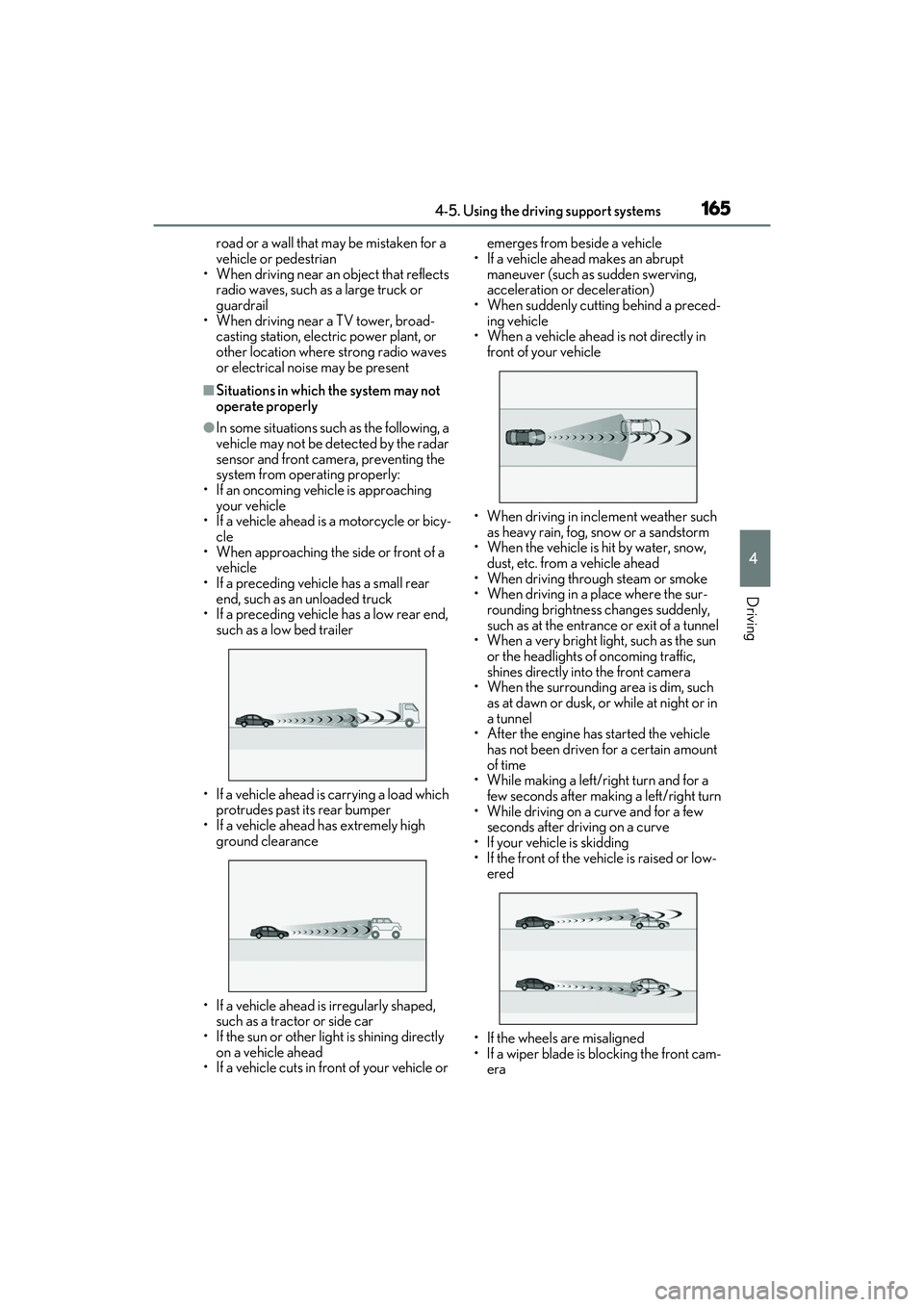
operate properly
●In some situations such as the following, a
vehicle may not be detected by the radar
sensor and front camera, preventing the
system from operating properly:
• If an oncoming vehicle is approaching your vehicle
• If a vehicle ahead is a motorcycle or bicy-
cle
• When approaching the side or front of a vehicle
• If a preceding vehicle has a small rear end, such as an unloaded truck
• If a preceding vehicle has a low rear end,
such as a low bed trailer
• If a vehicle ahead is carrying a load which protrudes past its rear bumper
• If a vehicle ahead has extremely high ground clearance
• If a vehicle ahead is irregularly shaped, such as a tractor or side car
• If the sun or other light is shining directly
on a vehicle ahead
• If a vehicle cuts in front of your vehicle or emerges from beside a vehicle
• If a vehicle ahead makes an abrupt maneuver (such as sudden swerving,
acceleration or deceleration)
• When suddenly cutting behind a preced- ing vehicle
• When a vehicle ahead is not directly in front of your vehicle
• When driving in incl ement weather such
as heavy rain, fog, snow or a sandstorm
• When the vehicle is hit by water, snow,
dust, etc. from a vehicle ahead
• When driving through steam or smoke
• When driving in a place where the sur- rounding brightness changes suddenly,
such as at the entrance or exit of a tunnel
• When a very bright light, such as the sun
or the headlights of oncoming traffic,
shines directly into the front camera
• When the surrounding area is dim, such
as at dawn or dusk, or while at night or in
a tunnel
• After the engine has started the vehicle
has not been driven for a certain amount
of time
• While making a left/r ight turn and for a
few seconds after making a left/right turn
• While driving on a curve and for a few seconds after driving on a curve
• If your vehicle is skidding
• If the front of the vehicle is raised or low- ered
• If the wheels are misaligned
• If a wiper blade is blocking the front cam- era
Page 200 of 400

1984-5. Using the driving support systems
RC350/RC300 Owner's Manual
steering feel, suspension control and
VDIM control, making it suitable for pow-
erful sporty driving.
When in SPORT S mode, if the driving
mode select switch is turned to the right,
the “SPORT S+” indicator will come on.
■Operation of the air conditioning sys-
tem in Eco drive mode
Eco drive mode contro ls the heating/cool-
ing operations and fan speed of the air con-
ditioning system to enhance fuel efficiency
( P.213). To improve air conditioning per-
formance, adjust the fan speed or turn off
Eco drive mode.
■Automatic deactivation of sport mode
and custom mode
If the engine switch is turned off after driv-
ing in sport mode or custom mode, the
drive mode will be changed to normal
mode.
■Driving mode pop-up display (vehicles
with a 10.3-inch display)
When the driving mode is changed, the
selected driving mode will be temporarily
displayed on the side display. (P.210)
■ABS (Anti-lock Brake System)
Helps to prevent wheel lock when the
brakes are applied suddenly, or if the
brakes are applied while driving on a
slippery road surface
■Brake assist
Generates an increased level of brak-
ing force after the brake pedal is
depressed when the system detects a
panic stop situation
■VSC (Vehicle Stability Control)
Helps the driver to control skidding
when swerving suddenly or turning on
slippery road surfaces
■Enhanced VSC (Enhanced Vehi-
cle Stability Control)
Provides cooperative control of the
ABS, TRAC, VSC and EPS.
Helps to maintain directional stability
when swerving on slippery road sur-
faces by controlling steering perfor-
mance.
Driving assist systems
To keep driving safety and perfor-
mance, the following systems oper-
ate automatically in response to
various driving situations. Be aware,
however, that these systems are
supplementary and should not be
relied upon too heavily when oper-
ating the vehicle.
Summary of the driving assist
systems
Page 206 of 400

2044-6. Driving tips
RC350/RC300 Owner's Manual
warm water over the frozen area to
melt the ice. Wipe away the water
immediately to prevent it from
freezing.
To ensure proper operation of the
climate control system fan, remove
any snow that has accumulated on
the air inlet vents in front of the
windshield.
Check for and remove any excess
ice or snow that may have accumu-
lated on the exterior lights, vehicle’s
roof, chassis, around the tires or on
the brakes.
Remove any snow or mud from the
bottom of your shoes before getting
in the vehicle.
Accelerate the vehicle slowly, keep a
safe distance between you and the
vehicle ahead, and drive at a reduced
speed suitable to road conditions.
Park the vehicle and move the shift
lever to P without setting the park-
ing brake. The parking brake may
freeze up, preventing it from being
released. If the vehicle is parked
without setting the parking brake,
make sure to block the wheels.
Failure to do so may be dangerous
because it may cause the vehicle to
move unexpectedly, possibly lead-
ing to an accident.
When the parking brake is in automatic mode, release the parking brake after shift-
ing the shift lever to P. (
P.135)
If the vehicle is parked without set-
ting the parking brake, confirm that
the shift lever cannot be moved out
of P
*.
*: The shift lever will be locked if it is
attempted to be shifted from P to any
other position with out depressing the
brake pedal. If the shift lever can be
shifted from P, ther e may be a problem
with the shift lock sy stem. Have the vehi-
cle inspected by your Lexus dealer
immediately.
Vehicles with front and rear tires of
the same size except for vehicles
with LDH and 19-inch tires
Use the correct tire chain size when
mounting the tire chains.
Chain size is regulated for each tire
size.
Side chain (0.12 in. [3 mm] in diam-
eter)
Cross chain (0.16 in. [4 mm] in
diameter)
When driving the vehicle
When parking the vehicle
Selecting tire chains
A
B
Page 219 of 400
2175-2. Using the air conditioning system
RC350/RC300 Owner's Manual
5
Interior features
automatically.
The indicator above the selected button
comes on.
■Micro dust and pollen filter
Pollen is removed from the air and the
air flows to the upper part of the body.
Select on the option control
screen.
When the micro dust and pollen filter is on, is displayed on the air conditioning
control screen.
In order to prevent the windshield from
fogging up when the outside air is cold, the
dehumidification function may operate.
Pollen is filtered even if the micro dust and
pollen filter is turned off.
■Defogging the windshield
Defoggers are used to defog the wind-
shield and side windows.
Press .
Set the outside/recirc ulated air mode but-
ton to outside air mode if the recirculated
air mode is used. (It may switch automati-
cally.)
To defog the windshield and the side win-
dows early, turn the air flow and tempera-
ture up.
To return to the previous mode, press
again when the windshield is
defogged.
■Defogging the rear window and
outside rear view mirrors
Defoggers are used to defog the rear
window, and to remove raindrops, dew
and frost from the outside rear view
mirrors. Press .
The defoggers will automatically turn off
after a period of time.
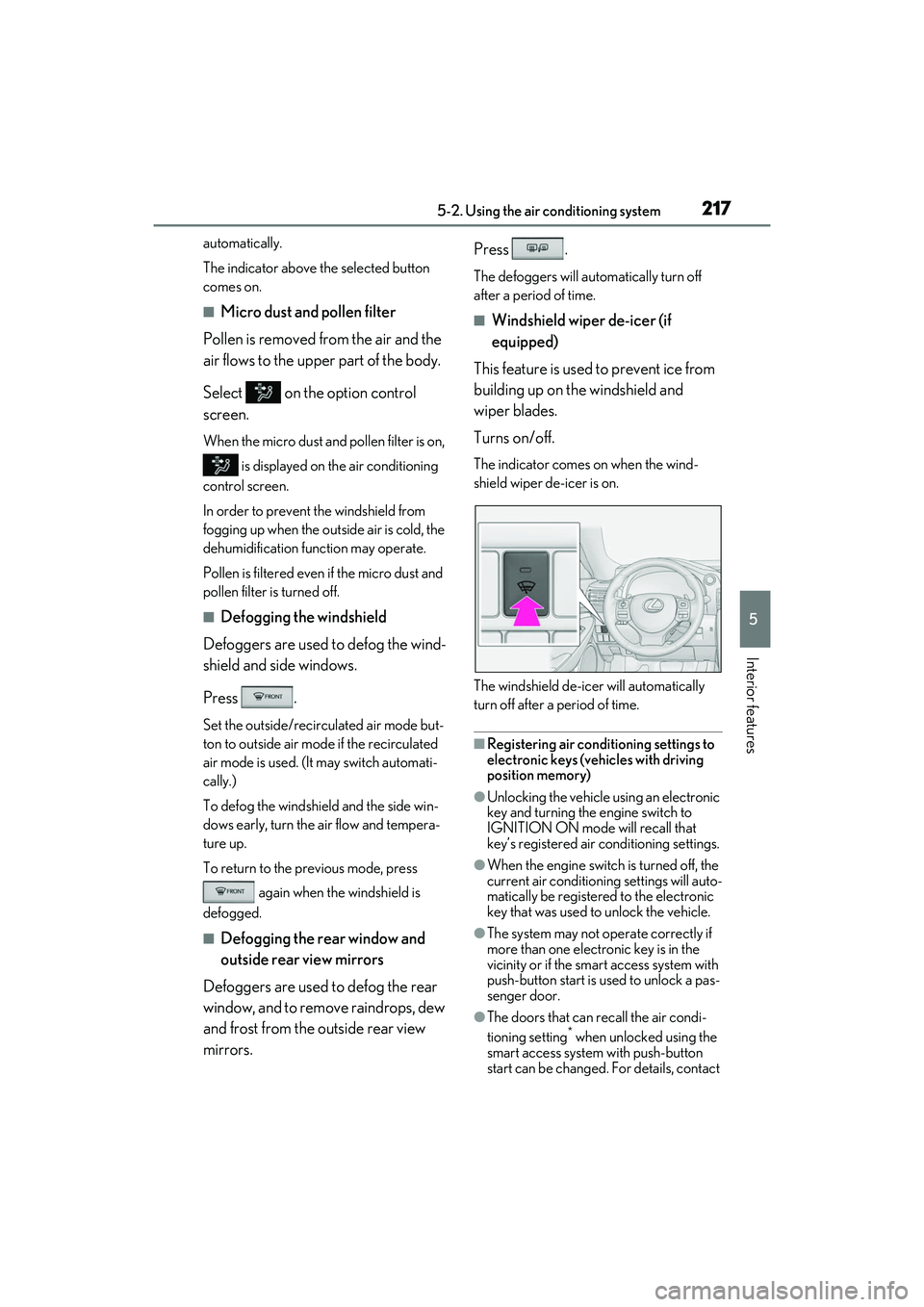
■Windshield wiper de-icer (if
equipped)
This feature is used to prevent ice from
building up on the windshield and
wiper blades.
Turns on/off.
The indicator comes on when the wind-
shield wiper de-icer is on.
The windshield de-icer will automatically
turn off after a period of time.
■Registering air conditioning settings to
electronic keys (vehicles with driving
position memory)
●Unlocking the vehicle using an electronic
key and turning the engine switch to
IGNITION ON mode will recall that
key’s registered air conditioning settings.
●When the engine switch is turned off, the
current air conditioning settings will auto-
matically be registered to the electronic
key that was used to unlock the vehicle.
●The system may not operate correctly if
more than one electronic key is in the
vicinity or if the smart access system with
push-button start is used to unlock a pas-
senger door.
●The doors that can recall the air condi-
tioning setting* when unlocked using the
smart access system with push-button
start can be changed. For details, contact
Page 221 of 400

2195-2. Using the air conditioning system
RC350/RC300 Owner's Manual
5
Interior features
●During use, various odors from inside and
outside the vehicle may enter into and
accumulate in the air conditioning sys-
tem. This may then cause odor to be
emitted from the vents.
●To reduce potential odors from occur-
ring:
• It is recommended that the air condition-
ing system be set to outside air mode
prior to turning the vehicle off.
• The start timing of the blower may be
delayed for a short period of time imme-
diately after the air conditioning system is
started in automatic mode.
■Air conditioning filter
P.273
■Air conditioning system refrigerant
●A label regarding the refrigerant of the
air conditioning system is attached to the
hood at the location shown in the follow-
ing illustration.
●The meaning of each symbol on the label
are as follows:
■Customization
Some functions can be customized.
( P.349)
Caution
Air conditioning system
Air conditioning system
lubricant type
Requires registered tech-
nician to service air condi-
tioning system
Flammable refrigerant
WARNING
■To prevent the windshield from fog-
ging up
●Do not use during cool air
operation in extremely humid weather.
The difference between the tempera-
ture of the outside air and that of the
windshield can cause the outer surface
of the windshield to fog up, blocking
your vision.
●Do not place anything on the instru-
ment panel which may cover the air
outlets. Otherwise, air flow may be
obstructed, preventing the windshield
defoggers from defogging.
■To prevent burns
●Do not touch the rear view mirror sur-
faces when the outside rear view mir-
ror defoggers are on.
●Do not touch the glass at lower part of
the windshield or to the side of the
front pillars when th e windshield wiper
de-icer is on.
NOTICE
■To prevent battery discharge
Do not leave the air conditioning system
on longer than necessary when the
engine is stopped.
Page 226 of 400
2245-3. Using the interior lights
RC350/RC300 Owner's Manual
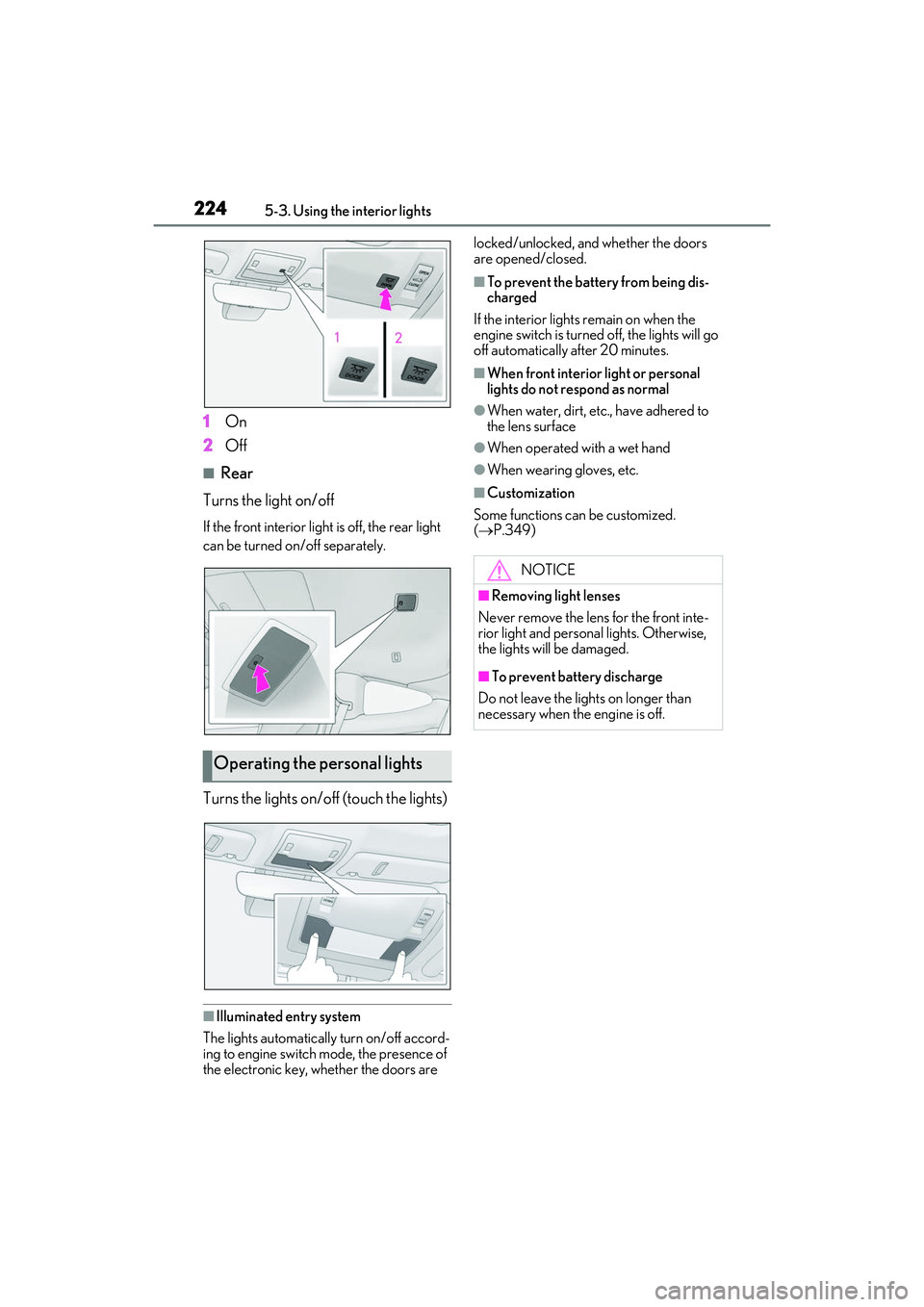
1On
2 Off
■Rear
Turns the light on/off
If the front interior light is off, the rear light
can be turned on/off separately.
Turns the lights on/off (touch the lights)
■Illuminated entry system
The lights automatically turn on/off accord-
ing to engine switch mode, the presence of
the electronic key, whether the doors are locked/unlocked, and whether the doors
are opened/closed.
■To prevent the battery from being dis-
charged
If the interior lights remain on when the
engine switch is turned off, the lights will go
off automatically after 20 minutes.
■When front interior light or personal
lights do not respond as normal
●When water, dirt, etc., have adhered to
the lens surface
●When operated with a wet hand
●When wearing gloves, etc.
■Customization
Some functions can be customized.
( P.349)
Operating the personal lights
NOTICE
■Removing light lenses
Never remove the lens for the front inte-
rior light and personal lights. Otherwise,
the lights will be damaged.
■To prevent battery discharge
Do not leave the lights on longer than
necessary when the engine is off.
Page 227 of 400

2255-4. Using the storage features
RC350/RC300 Owner's Manual
5
Interior features
5-4.Using the storage features
Glove box (P.225)
Cup holders ( P.226)
Console box ( P.226)
1Open (press the button)
2 Unlock with the mechanical key
3 Lock with the mechanical key
List of storage features
Location of the storage features
A
B
C
WARNING
■Items that should not be left in the
storage spaces
Do not leave glasses, lighters or spray
cans in the storage spaces, as this may
cause the following when cabin tempera-
ture becomes high:
●Glasses may be deformed by heat or
cracked if they come into contact with
other stored items.
●Lighters or spray can s may explode. If
they come into contact with other
stored items, the lighter may catch fire
or the spray can may release gas,
causing a fire hazard.
Glove box
Page 230 of 400

2285-5. Using the other interior features
RC350/RC300 Owner's Manual
5-5.Using the other interior features
An assist grip installed on the ceiling
can be used to support your body
while sitting on the seat.
To use the coat hook, push it in.The GPS clock’s time is automatically
adjusted by utilizing GPS time infor-
mation. For details, refer to “NAVIGA-
TION AND MULTIMEDIA SYSTEM
OWNER’S MANUAL”.
Please use as a power supply for elec-
tronic goods that use less than 12
VDC/10 A (power consumption of
120 W).
Open the lid.
Other interior features
Assist grips
WARNING
■Assist grip
Do not use the assist grip when getting in
or out of the vehicle or rising from your
seat.
NOTICE
■To prevent damage to the assist grip
Do not put a heavy load on the assist grip.
Coat hooks
WARNING
■Items that cannot be hung on the coat
hook
Do not hang coat hangers or other hard
or sharp objects on the hook. If the SRS
curtain shield airbags deploy, these items
may become projectiles, causing death
or serious injury.
Clock
Power outlet
Page 232 of 400
2305-5. Using the other interior features
RC350/RC300 Owner's Manual
■HomeLink® programming procedure
The programming procedures can also be
found at the following URL.
Website: www.homelink.com/lexus
For support, contact customer support at
the following.
Help Line: 1-800-355-3515
The HomeLink® wireless control sys-
tem in your vehicle has 3 buttons which
can be programmed to operate 3 dif-
ferent devices. Refer to the program-
ming methods on the following pages
to determine the method which is
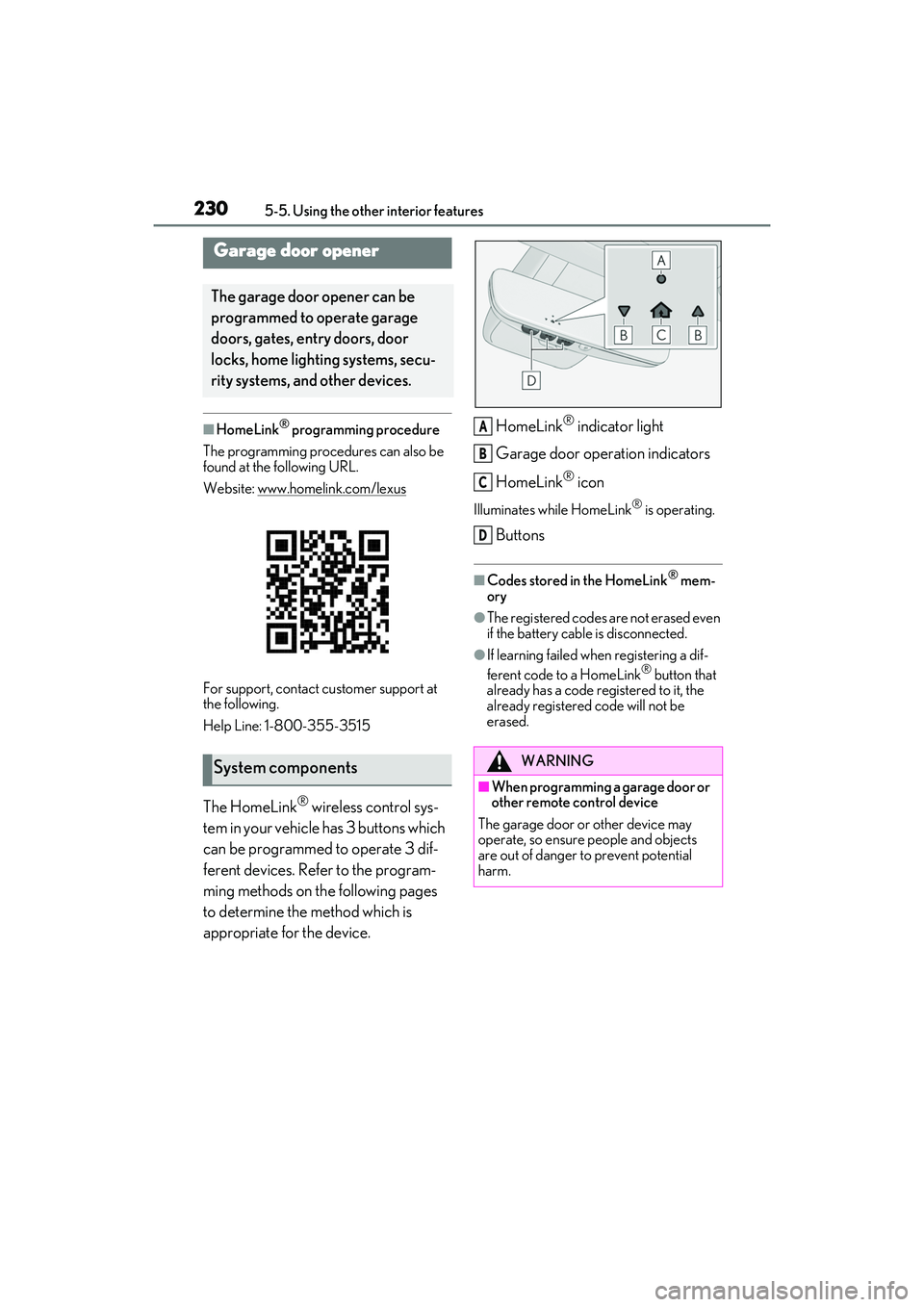
appropriate for the device. HomeLink
® indicator light
Garage door operation indicators
HomeLink
® icon
Illuminates while HomeLink® is operating.
Buttons
■Codes stored in the HomeLink® mem-
ory
●The registered codes are not erased even
if the battery cable is disconnected.
●If learning failed when registering a dif-
ferent code to a HomeLink® button that
already has a code registered to it, the
already registered code will not be
erased.
Garage door opener
The garage door opener can be
programmed to operate garage
doors, gates, entry doors, door
locks, home lighting systems, secu-
rity systems, and other devices.
System componentsWARNING
■When programming a garage door or
other remote control device
The garage door or other device may
operate, so ensure people and objects
are out of danger to prevent potential
harm.
A
B
C
D
Page 239 of 400
2375-5. Using the other interior features
RC350/RC300 Owner's Manual
5
Interior features
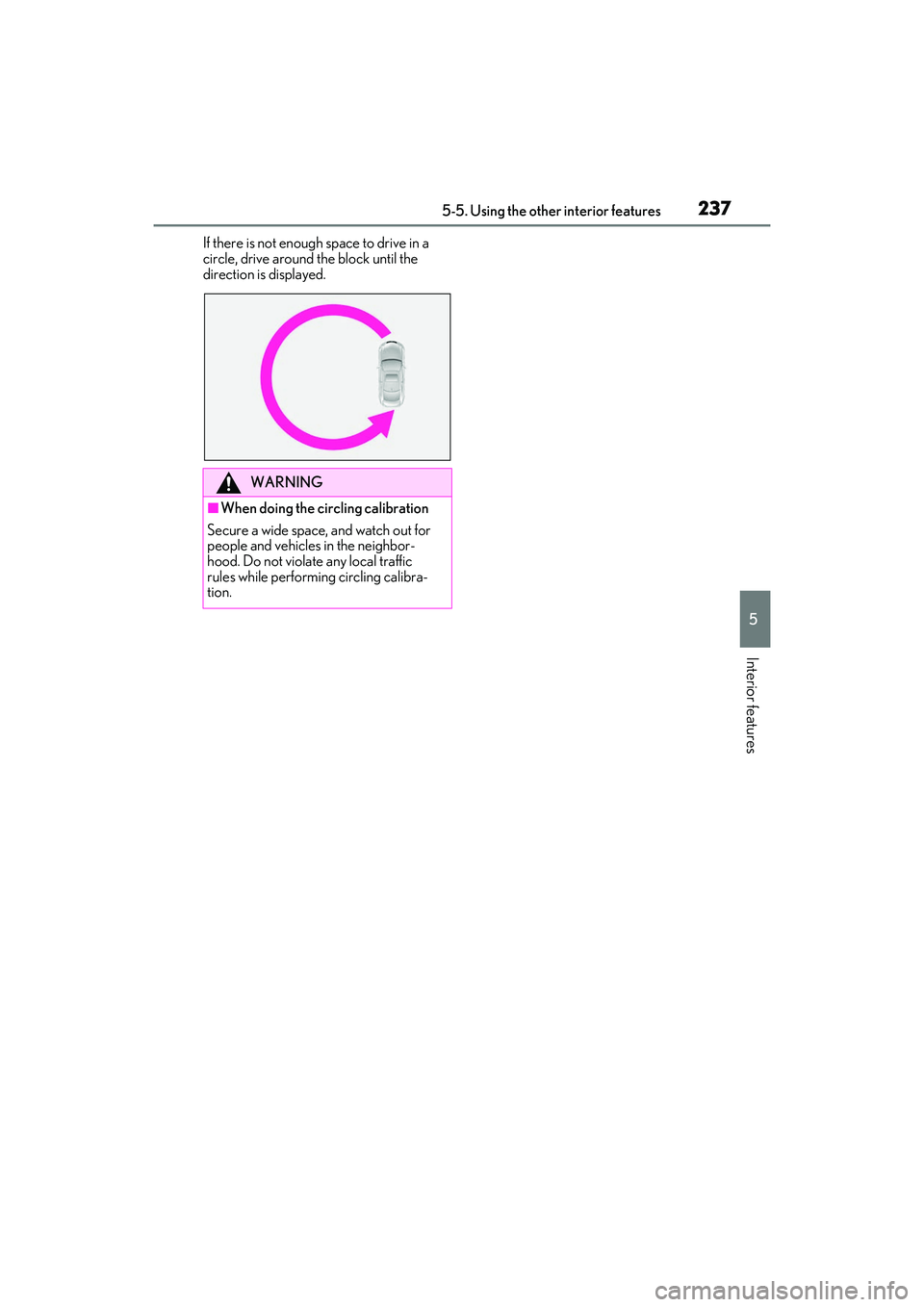
If there is not enough space to drive in a
circle, drive around the block until the
direction is displayed.
WARNING
■When doing the circling calibration
Secure a wide space, and watch out for
people and vehicles in the neighbor-
hood. Do not violate any local traffic
rules while performing circling calibra-
tion.