audio LEXUS RCF 2018 User Guide
[x] Cancel search | Manufacturer: LEXUS, Model Year: 2018, Model line: RCF, Model: LEXUS RCF 2018Pages: 636, PDF Size: 6.88 MB
Page 209 of 636
2094-2. Driving procedures
4
Driving
RC350_RC300 AWD_RC3 00_RC F_U(OM24748U)
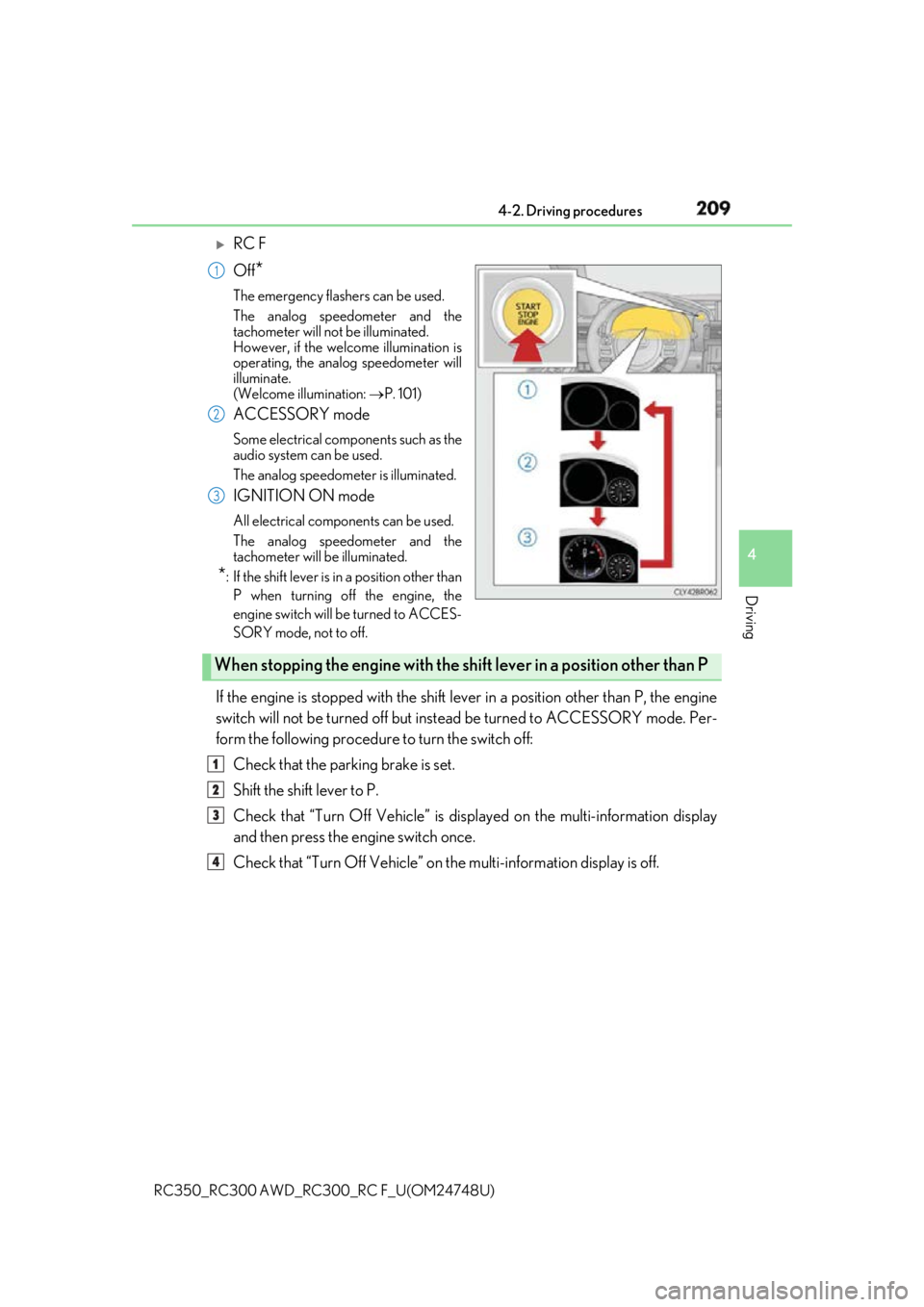
RC F
Off
* The emergency flashers can be used.
The analog speedometer and the
tachometer will not be illuminated.
However, if the welcome illumination is
operating, the analog speedometer will
illuminate.
(Welcome illumination: P. 101)
ACCESSORY mode Some electrical components such as the
audio system can be used.
The analog speedometer is illuminated.
IGNITION ON mode All electrical components can be used.
The analog speedometer and the
tachometer will be illuminated.
* : If the shift le ver is in a position other than
P when turning off the engine, the
engine switch will be turned to ACCES-
SORY mode, not to off.
If the engine is stopped with the shift le ver in a position other than P, the engine
switch will not be turned off but inst ead be turned to ACCESSORY mode. Per-
form the following procedure to turn the switch off:
Check that the parking brake is set.
Shift the shift lever to P.
Check that “Turn Off Vehicle” is disp layed on the multi-information display
and then press the engine switch once.
Check that “Turn Off Vehicle” on th e multi-information display is off.1
2
3
When stopping the engine with the shift lever in a position other than P1
2
3
4
Page 266 of 636

266 4-5. Using the driving support systems
RC350_RC300 AWD_RC3 00_RC F_U(OM24748U)■
Operation conditions of each function ●
Lane departure alert function
This function operates when all of the following conditions are met.
• LDA is turned on.
• Vehicle speed is approximatel y 32 mph (50 km/h) or more.
• System recognizes white (yellow) lines.
• Width of traffic lane is approx imately 9.8 ft. (3 m) or more.
• Turn signal lever is not operated.
• Vehicle is driven on a stra ight road or around a gentle curve with a radius of more
than approximately 492 ft. (150 m).
• No system malfunctions are detected. ( P. 453)●
Steering control function
This function operates when all of the follo wing conditions are met in addition to the
operation conditions for the lane departure alert function.
• Setting for Steering Assist in of th e multi-information display is set to On.
( P. 111)
• Vehicle is not accelerated or dece lerated by a fixed amount or more.
• Steering wheel is not operated with a steering force level suitable for changing
lanes.
• ABS, VSC, TRAC and PCS are not operating.
• TRAC or VSC is not turned off.
• Hands off steering wheel alert is not displayed. ( P. 266)●
Vehicle sway warning function
This function operates when all of the following conditions are met.
• Setting for Sway Warning in of the multi-information display is set to On.
( P. 111)
• Vehicle speed is approximatel y 32 mph (50 km/h) or more.
• Width of traffic lane is approx imately 9.8 ft. (3 m) or more.
• No system malfunctions are detected. ( P. 453)■
Temporary cancellation of functions
When operation conditions are no longer met, a function may be temporarily canceled.
However, when the operation co nditions are met again, operat ion of the function is auto-
matically restored. ( P. 266)■
Steering control function
Depending on the vehicle speed, lane depart ure situation, road conditions, etc., the
driver may not feel the function is operat ing or the function may not operate at all.■
Lane departure alert function
The warning buzzer may be difficult to hear due to external noise, audio playback, etc.
Also, it may be difficult to f eel steering wheel vibrations due to the road conditions, etc.■
Hands off steering wheel alert
When the system determines that the driver has removed the hands from the steering
wheel while the steering control function is operating, a warning message is displayed on
the multi-information display.
If the driver continues to keep the hands of f of the steering wheel, a warning message is
displayed and the function is temporarily canc eled. This alert also operates in the same
way when the driver continuously operates the steering wheel only a small amount.
However, depending on the road conditions, etc., the function may not cancel.
Page 289 of 636
2894-5. Using the driving support systems
4
Driving
RC350_RC300 AWD_RC3 00_RC F_U(OM24748U)WARNING ●
The shape of an object may prevent the sens or from detecting it. Pay particular atten-
tion to the following:
• Wires, fences, ropes, etc.
• Cotton, snow and other materi als that absorb sound waves
• Sharply-angled objects
• Low objects
• Tall objects with upper sections projecting outwards in the direction of your vehi-
cle
• People, animals and other moving objects
• People wearing certain types of clothing ●
The following situations may occur when using the Lexus parking assist-sensor.
• Depending on the shape of the object and other factors, the detection distance
may be shortened, or detection may not be possible.
• Objects may not be detected if they are too close to a sensor.
• There will be a short delay between the de tection of an object and display of the
detection. Even at slow speeds, there is a possibility that the object will come
within a sensor’s detection area before the display is shown and a warning beep
sounds.
• Thin posts or objects lower than a sensor may not be detected when approached,
even if they have been detected once.
• It might be difficult to hear beeps due to the volume of the audio system or air flow
noise of the air co nditioning system.
NOTICE ■
When using intuitive parking assist
In the following situations, the system may not function correctly due to a sensor mal-
function etc. Have the vehicle checked by your Lexus dealer. ●
The intuitive parking assist operation display flashes, and a beep sounds when no
obstacles are detected. ●
If the area around a sensor co llides with something, or is subjected to strong impact.●
If the bumper or grille collides with something. ●
If the display flashes or is displayed contin uously and a buzzer does not sound, except
when the mute function has been turned on.●
If a display error occurs , first check the sensor.
If the error occurs even when there is no ice, snow or mud on the sensor, it is likely that
the sensor is malfunctioning.■
Notes when washing the vehicle
Do not apply intensive bursts of water or steam to the sensor area.
Doing so may result in th e sensor malfunctioning.
Page 292 of 636
292 4-5. Using the driving support systems
RC350_RC300 AWD_RC3 00_RC F_U(OM24748U)■
Outside rear view mirro r indicator visibility
In strong sunlight, the outside rear view mirror indicator may be difficult to see.■
Hearing the RCTA buzzer
The RCTA buzzer may be difficult to hear over loud noises, such as if the audio system
volume is high. ■
When there is a malfunction in the Blind Spot Monitor
If a system malfunction is detected due to any of the following, a warning message will be
displayed: ( P. 460)●
A sensor is malfunctioning ●
A sensor is dirty or covere d with snow or a sticker●
The outside temperature is extremely high or low ●
Sensor voltage is abnormal ●
A sensor is misaligned
WARNING ■
Handling the radar sensor
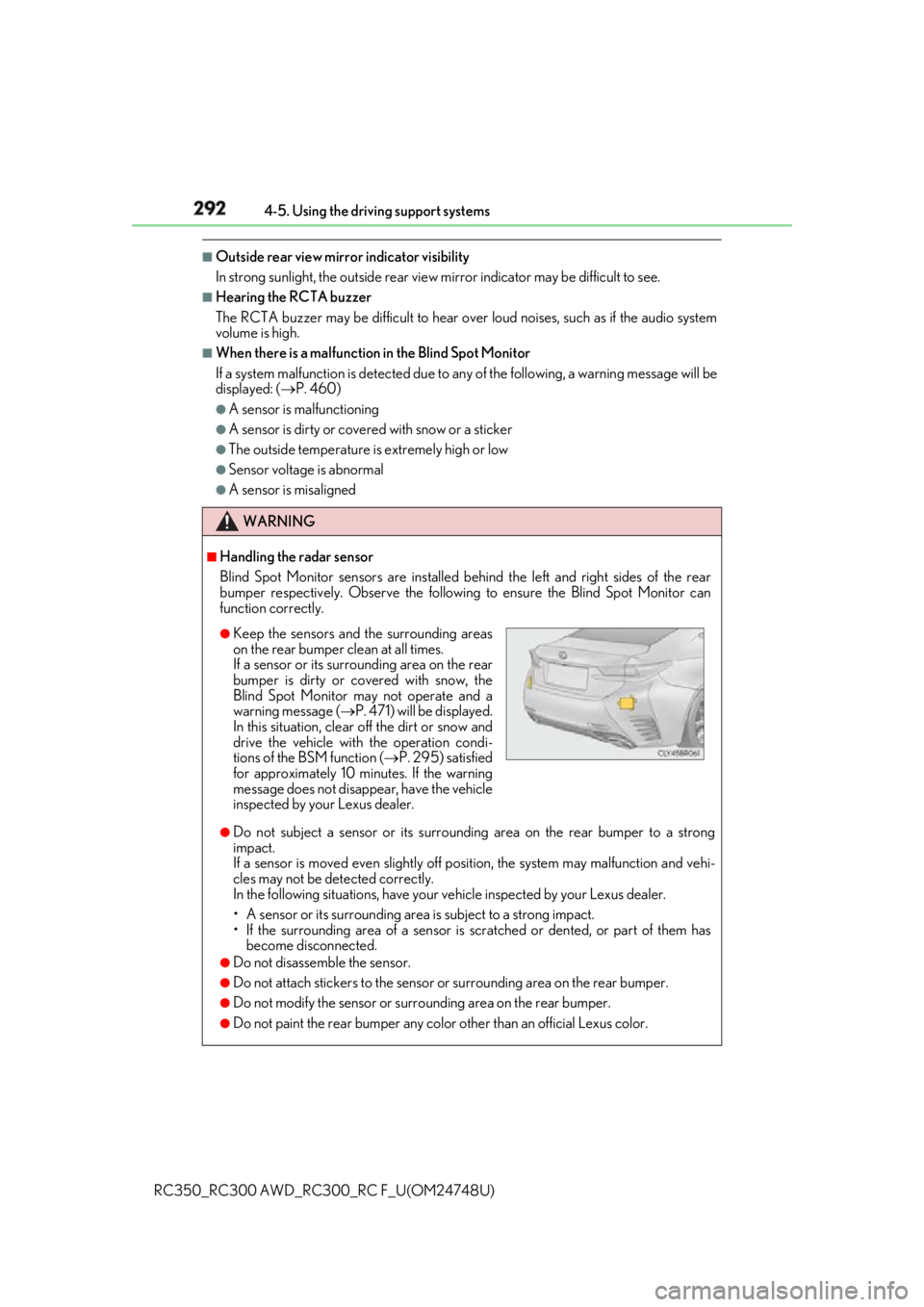
Blind Spot Monitor sensors ar e installed behind the left and right sides of the rear
bumper respectively. Observe the following to ensure the Blind Spot Monitor can
function correctly.
●
Do not subject a sensor or its surrounding area on the rear bumper to a strong
impact.
If a sensor is moved even slightly off po sition, the system may malfunction and vehi-
cles may not be detected correctly.
In the following situations , have your vehicle inspected by your Lexus dealer.
• A sensor or its surrounding area is subject to a strong impact.
• If the surrounding area of a sensor is sc ratched or dented, or part of them has
become disconnected. ●
Do not disassemble the sensor. ●
Do not attach stickers to the sensor or surrounding area on the rear bumper.●
Do not modify the sensor or surro unding area on the rear bumper.●
Do not paint the rear bumper any colo r other than an official Lexus color.●
Keep the sensors and the surrounding areas
on the rear bumper clean at all times.
If a sensor or its surrounding area on the rear
bumper is dirty or covered with snow, the
Blind Spot Monitor may not operate and a
warning message ( P. 471) will be displayed.
In this situation, clear off the dirt or snow and
drive the vehicle with the operation condi-
tions of the BSM function ( P. 295) satisfied
for approximately 10 minutes. If the warning
message does not disappear, have the vehicle
inspected by your Lexus dealer.
Page 331 of 636
3315-1. Using the air conditioning system
5
Interior features
RC350_RC300 AWD_RC3 00_RC F_U(OM24748U)■
Full screen display
The following functions can be displayed full screen:
• Initial screen
•“Menu” screen ( P. 330)
• Map screen
*
* : Refer to the “NAVIGATION AND MULTIMEDIA SYSTEM OWNER’S MAN-
UAL”.■
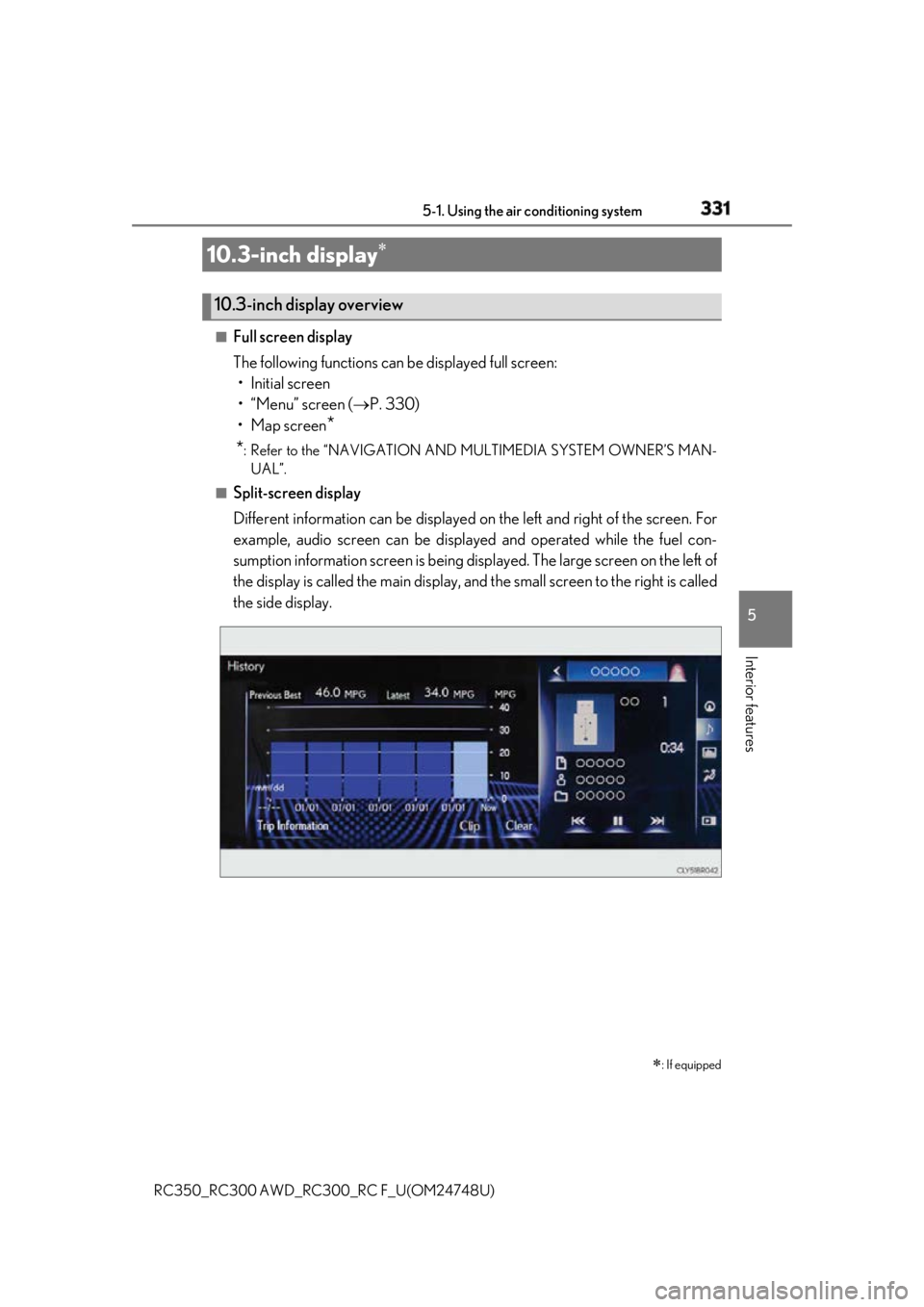
Split-screen display
Different information can be displayed on the left and right of the screen. For
example, audio screen can be displa yed and operated while the fuel con-
sumption information screen is being disp layed. The large screen on the left of
the display is called the main display, and the small screen to the right is called
the side display.10.3-inch display
: If equipped10.3-inch display overview
Page 332 of 636
332 5-1. Using the air conditioning system
RC350_RC300 AWD_RC3 00_RC F_U(OM24748U)■
Main display
For details about the functions and operat ion of the main display, refer to the
respective section and “NAVIGATION AND MULTIMEDIA SYSTEM
OWNER’S MANUAL”. ■
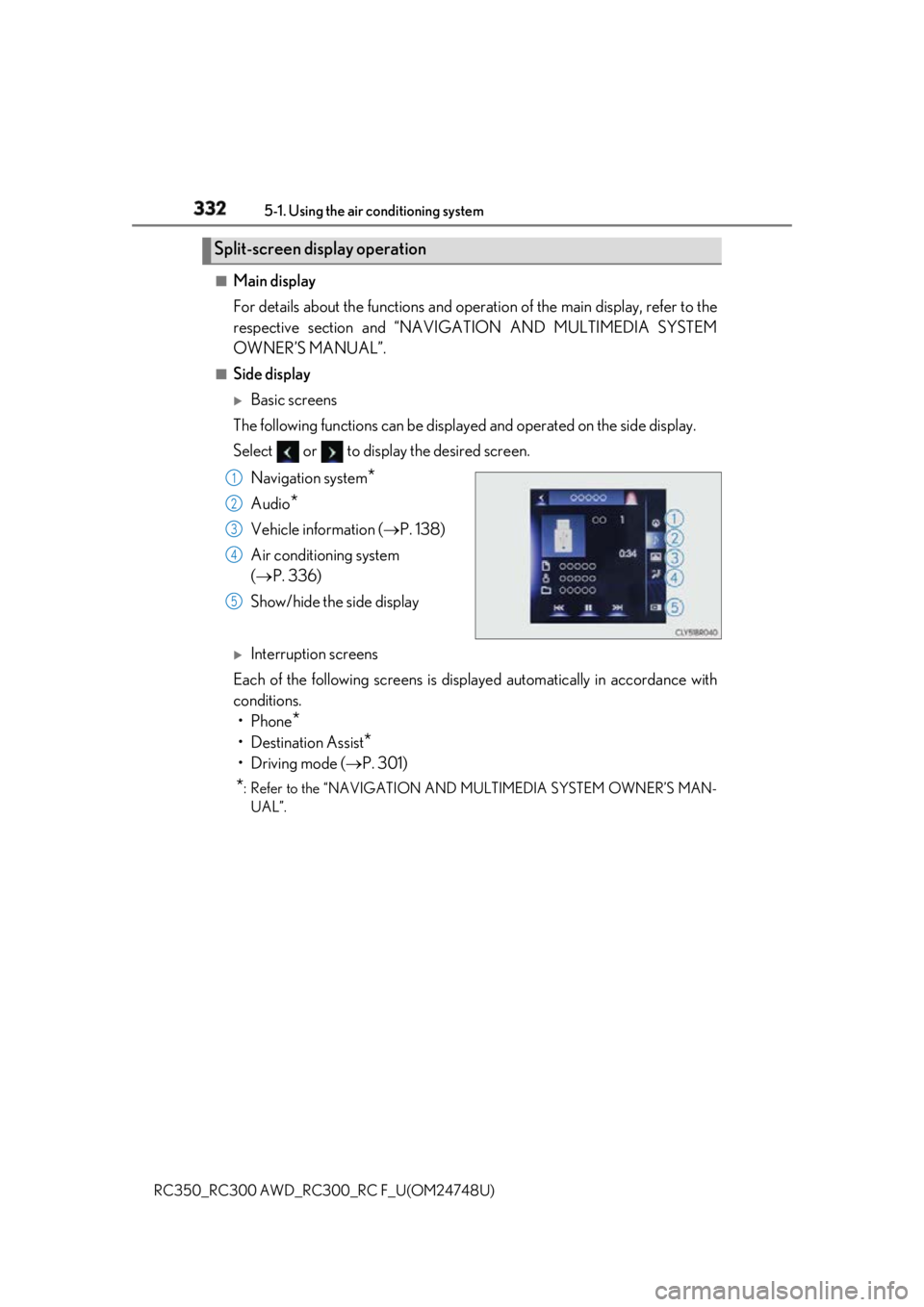
Side display
Basic screens
The following functions can be displaye d and operated on the side display.
Select or to display the desired screen.
Navigation system
*Audio
* Vehicle information ( P. 138)
Air conditioning system
( P. 336)
Show/hide the side display
Interruption screens
Each of the following screens is displayed automatically in accordance with
conditions.
•Phone
*• Destination Assist
*•Driving mode ( P. 301)
* : Refer to the “NAVIGATION AND MULTIMEDIA SYSTEM OWNER’S MAN-
UAL”.Split-screen display operation 1
2
3
4
5
Page 383 of 636
3836-1. Maintenance and care
6
Maintenance and care
RC350_RC300 AWD_RC3 00_RC F_U(OM24748U)NOTICE ■
Cleaning detergents ●
Do not use the following liquids, as they ma y discolor the vehicle interior or cause
streaks or damage to painted surfaces:
• Center Display: Organic substances such as benzine or gasoline, alkaline solu-
tions, and alcohol
• Seats: Alkaline solutions, or ganic substances such as thinner or benzine, and alco-
hol
• Other parts: Organic substances such as benzine or gasoline , alkaline or acidic
solutions, dye, and bleach ●
Do not use polish wax or polis h cleaner. The instrument pane l’s or other interior part’s
painted surface may be damaged. ■
Preventing damage to leather surfaces
Observe the following precautions to avoid damage to and deterioration of leather
surfaces: ●
Remove any dust or dirt from leather surfaces immediately.●
Do not expose the vehicle to direct sunlight for extended periods of time. Park the
vehicle in the shade, especially during summer. ●
Do not place items made of vinyl, plastic, or containing wax on the upholstery, as they
may stick to the leather su rface if the vehicle interior heats up significantly.■
Water on the floor
Do not wash the vehicle floor with water.
Vehicle systems such as the audio system ma y be damaged if wate r comes into contact
with electrical components such as the au dio system above or un der the floor of the
vehicle. Water may also cause the body to rust. ■
When cleaning the inside of the windshield
Do not allow glass cleaner to contact the lens. Also, do not touch the lens. ( P. 247)■
Cleaning the inside of the rear window ●
Do not use glass cleaner to clean the rear window, as this may cause damage to the
rear window defogger heater wires or antenna. Use a cloth dampened with luke-
warm water to gently wipe the window clean. Wipe th e window in strokes running
parallel to the heater wires or antenna. ●
Be careful not to scratch or damage the heater wires or antenna.
Page 457 of 636
4577-2. Steps to take in an emergency
RC350_RC300 AWD_RC3 00_RC F_U(OM24748U) 7
When trouble arises ■
SRS warning light
This warning light system monitors the airbag sensor assembly, front impact sensors, side
impact sensors (door), side impact sensors (front), side im pact sensors (rear), driver’s
seat position sensor, driver’s seat belt buckle switch, front passenger occupant classifica-
tion system, “AIR BAG ON” indicator light, “A IR BAG OFF” indicator light, front passen-
ger’s seat belt buckle switch, seat belt pretensioners, airbags, interconnecting wiring and
power sources. ( P. 41) ■
Front passenger detection sensor, seat belt reminder and warning buzzer
If luggage is placed on the front passenger seat, the front passenger detection sensor
may cause the warning light to flash and the warning buzzer to sound even if a passenger
is not sitting in the seat. ■
If the malfunction indicator lamp comes on while driving
First check the following: ●
Is the fuel tank empty?
If it is, fill the fu el tank immediately.●
Is the fuel tank cap loose?
If it is, tighten it securely.
The light will go off after several driving trips.
If the light does not go off even after severa l trips, contact your Lexus dealer as soon as
possible. ■
Electric power steering system warning light (warning buzzer)
When the battery charge becomes insufficien t or the voltage temporarily drops, the
electric power steering system warning li ght may come on and the warning buzzer may
sound. ■
When the tire pressure warning light comes on
Check the tire inflation pressu re and adjust to the approp riate level. Pushing the tire
pressure warning reset switch will not tu rn off the tire pressure warning light.■
The tire pressure warning light ma y come on due to natural causes
The tire pressure warning light may come on due to natural causes such as natural air
leaks and tire inflation pressure changes caus ed by temperature. In this case, adjusting
the tire inflation pressure will turn off the warning light (aft er a few minutes).■
When a tire is replaced with the spare tire (if equipped)
The spare tire is not equipped with a tire pr essure warning valve and transmitter. If a tire
goes flat, the tire pressure warning light will not turn off even though the flat tire has been
replaced with the spare tire. ■
Conditions that the tire pressure wa rning system may not function properly
P. 417 ■
If the tire pressure warning light freque ntly comes on after blinking for 1 minute
If the tire pressure warning light frequently comes on after blinking for 1 minute when the
engine switch is turned to IGNITION ON mo de, have it checked by your Lexus dealer.■
Warning buzzer
In some cases, the buzzer ma y not be heard due to being in a noisy location or audio
sound.
Page 524 of 636

524 7-2. Steps to take in an emergency
RC350_RC300 AWD_RC3 00_RC F_U(OM24748U)Start the engine of the second vehicle. Increase the engine speed slightly and
maintain at that level for approximatel y 5 minutes to recharge the battery of
your vehicle.
Open and close any of the door of your vehicle with the engine switch off.
Maintain the engine speed of the second vehicle and start the engine of your
vehicle by turning the engine switch to IGNITION ON mode.
Once the vehicle’s engine has started, remove the jumper cables in the exact
reverse order from which they were connected.
Once the engine starts, have the vehicle inspected at your Lexus dealer as soon
as possible. ■
Starting the engine when the battery is discharged
The engine cannot be started by push-starting. ■
To prevent battery discharge ●
Turn off the headlights and the audio system while the engine is off. ●
Turn off any unnecessary electrical componen ts when the vehicle is running at a low
speed for an extended period , such as in heavy traffic.■
Charging the battery
The electricity stored in the battery will disc harge gradually even when the vehicle is not
in use, due to natural discharge and the draini ng effects of certain electrical appliances. If
the vehicle is left for a long time, the battery may discharge, and the engine may be
unable to start. (The battery recharges automatically during driving.) ■
When recharging or replacing the battery ●
In some cases, it may not be possible to un lock the doors using the smart access system
with push-button start when the battery is discharged. Use the wireless remote control
or the mechanical key to lock or unlock the doors. ●
The engine may not start on the first attempt after the battery has recharged but will
start normally after the second attempt. This is not a malfunction. ●
The engine switch mode is memorized by the vehicle. When the battery is recon-
nected, the system will return to the mode it was in before the battery was discharged.
Before disconnecting the battery, turn the engine switch off.
If you are unsure what mode the engine switch was in before the battery discharged, be
especially careful when reconnecting the battery. 5
6
7
8
Page 611 of 636

611
Index
RC350_RC300 AWD_RC3 00_RC F_U(OM24748U) What to do if...
(Troubleshooting) .................................612
Alphabetical index.................................. 616
Refer to the “NAVIGATIO N AND MULTIMEDIA SYSTEM
OWNER’S MANUAL” for informat ion regarding the equipment
listed below.
• Navigation system
• Audio/video system • Lexus parking assist monitor
•Lexus Enform