park assist LEXUS RCF 2018 User Guide
[x] Cancel search | Manufacturer: LEXUS, Model Year: 2018, Model line: RCF, Model: LEXUS RCF 2018Pages: 636, PDF Size: 6.88 MB
Page 287 of 636

2874-5. Using the driving support systems
4
Driving
RC350_RC300 AWD_RC3 00_RC F_U(OM24748U)■
The intuitive parking assist can be operated when ●
Front center sensors (
RC350/RC300 ):
• The engine switch is in IGNITION ON mode.
• The shift lever is in a position other than P or R.
• The vehicle speed is less than about 6 mph (10 km/h). ●
Front corner sensors:
• The engine switch is in IGNITION ON mode.
• The shift lever is in a position other than P.
• The vehicle speed is less than about 6 mph (10 km/h).
(At any speed when the shift lever is in R) ●
Rear corner and rear center sensors:
• The engine switch is in IGNITION ON mode.
• The shift lever is in R. ■
Muting the buzzer sound ●
To mute the buzzer sound:
The buzzer can be temporarily muted by pressing “OK” of the meter control switches
while an obstacle detectio n display is shown on the multi-information display.●
To cancel the mute:
Mute will be automatically canceled in the following situations.
• When the shift position is changed (except shifting from D to N, or N to D).
• When the vehicle speed has reached or exceeded 6 mph (10 km/h) with the shift
position in D.
• When the intuitive parking assist is turned off once and turned on again.
• When the engine switch is turned off once and turned to IGNITION ON mode
again.■
If a message is displayed on the multi-information display
P. 463
Page 288 of 636

288 4-5. Using the driving support systems
RC350_RC300 AWD_RC3 00_RC F_U(OM24748U)WARNING ■
When using the intuitive parking assist
Observe the following precautions.
Failing to do so may result in the vehicle be ing unable to be driv en safely and possibly
cause an accident. ●
Do not use the sensor at speeds in excess of 6 mph (10 km/h). ●
The sensors’ detection areas and reaction ti mes are limited. When moving forward or
reversing, check the areas surrounding the vehicle (especially th e sides of the vehi-
cle) for safety, and drive slowly, using the brake to control the vehicle’s speed. ●
Do not install accessories within the sensors’ detection areas.■
Limitations of the sensors ●
RC350/RC300: The detection areas of the sensors are limited to the areas around
the vehicle’s front and rear bumpers. ●
RC F: The detection areas of the sensors are limited to the areas around the vehicle’s
front corners and the rear bumpers. ●
Certain vehicle conditions and surrounding environments, such as the following, may
affect the ability of th e sensors to correctly detect obje cts. Pay particul ar attention in
the following situations. Failure to do so may result in the vehicle being driven
unsafely, possibly leading to an accident.
• When there is dirt, snow or ice on a se nsor (Cleaning the sensor will resolve this
problem.)
• When the sensor is frozen (Thawing the area will resolve this problem.)
In especially cold weather, if a sensor is frozen the screen may show an abnormal
display, or objects may not be detected
• When a sensor is covered in any way
• When the vehicle is leaning considerably to one side
• When driving on an extremely bump y road, incline, gravel, or grass
• When the vicinity of the vehicle is noisy due to vehicle horns, motorcycle engines,
air brakes of large vehicles, or other loud noises producing ultrasonic waves
• When there is another vehicle equipped with parking assist sensor in the vicinity
• When the sensor is coated with a sheet of spray or heavy rain
• When the vehicle is equipped with a fender pole or wireless antenna
• When a towing eyelet is installed
• When a bumper or sensor receives a strong impact
• When the vehicle is approaching a tall or curved curb
• When driving in harsh sunlig ht or intense cold weather
• When an object is directly under a bumper
• When objects become too close to the sensors
• When a non-genuine Lexus suspension (lowered suspension, etc.) is installed
In addition to the situations above, there are instances in which, because of their
shape, signs and other objects may be judged by the sensor to be closer than they
are.
Page 289 of 636

2894-5. Using the driving support systems
4
Driving
RC350_RC300 AWD_RC3 00_RC F_U(OM24748U)WARNING ●
The shape of an object may prevent the sens or from detecting it. Pay particular atten-
tion to the following:
• Wires, fences, ropes, etc.
• Cotton, snow and other materi als that absorb sound waves
• Sharply-angled objects
• Low objects
• Tall objects with upper sections projecting outwards in the direction of your vehi-
cle
• People, animals and other moving objects
• People wearing certain types of clothing ●
The following situations may occur when using the Lexus parking assist-sensor.
• Depending on the shape of the object and other factors, the detection distance
may be shortened, or detection may not be possible.
• Objects may not be detected if they are too close to a sensor.
• There will be a short delay between the de tection of an object and display of the
detection. Even at slow speeds, there is a possibility that the object will come
within a sensor’s detection area before the display is shown and a warning beep
sounds.
• Thin posts or objects lower than a sensor may not be detected when approached,
even if they have been detected once.
• It might be difficult to hear beeps due to the volume of the audio system or air flow
noise of the air co nditioning system.
NOTICE ■
When using intuitive parking assist
In the following situations, the system may not function correctly due to a sensor mal-
function etc. Have the vehicle checked by your Lexus dealer. ●
The intuitive parking assist operation display flashes, and a beep sounds when no
obstacles are detected. ●
If the area around a sensor co llides with something, or is subjected to strong impact.●
If the bumper or grille collides with something. ●
If the display flashes or is displayed contin uously and a buzzer does not sound, except
when the mute function has been turned on.●
If a display error occurs , first check the sensor.
If the error occurs even when there is no ice, snow or mud on the sensor, it is likely that
the sensor is malfunctioning.■
Notes when washing the vehicle
Do not apply intensive bursts of water or steam to the sensor area.
Doing so may result in th e sensor malfunctioning.
Page 317 of 636

3174-5. Using the driving support systems
4
Driving
RC350_RC300 AWD_RC3 00_RC F_U(OM24748U)■
Sounds and vibrations caused by the ABS, brake assist, VSC, TRAC, hill-start assist
control and VGRS systems ●
A sound may be heard from the engine compartment when the brake pedal is
depressed repeatedly, when the engine is started or just after the vehicle begins to
move. This sound does not indicate that a malfunction has occurred in any of these sys-
tems. ●
Any of the following conditions may occur when the above systems are operating.
None of these indicates that a malfunction has occurred.
• Vibrations may be felt through the vehicle body and steering.
• A motor sound may be heard afte r the vehicle comes to a stop.
• The brake pedal may pulsate slig htly after the ABS is activated.
• The brake pedal may move down s lightly after the ABS is activated.■
EPS, VGRS and DRS operation sound
When the steering wheel is operated, a motor sound (whirring sound) may be heard.
This does not indicate a malfunction. ■
Reactivation of the TRAC/VSC systems
Even after the TRAC/VSC systems have been turned off, turning the engine off and then
on again will automatically reactivate the TRAC/VSC systems. ■
Reactivation of the TRAC sy stem linked to vehicle speed
When only the TRAC system is turned off, the TRAC system will turn on when vehicle
speed increases. However, wh en both TRAC/VSC systems are turned off, the systems
will not turn on even when vehicle speed increases.■
Reduced effectiveness of the EPS system
The effectiveness of the EPS system is reduced to prevent the system from overheating
when there is frequent steering input over an extended period of time. The steering
wheel may feel heavy as a result . Should this occur, refrain from excessive steering input
or stop the vehicle and turn the engine off. The EPS system should return to normal
within 10 minutes. ■
Operating conditions of hill-start assist control
When the following four conditions are met, the hill-start assist control will operate:●
The shift lever is in a position other than P or N (when starting off forward/backward on
an upward incline). ●
The vehicle is stopped. ●
The accelerator pedal is not depressed. ●
The parking brake is not engaged. ■
Automatic system cancelation of hill-start assist control
The hill-start assist control will turn off in any of the following situations: ●
The shift lever is moved to P or N. ●
The accelerator pedal is depressed. ●
The parking brake is engaged. ●
Approximately 2 seconds elapse af ter the brake pedal is released.
Page 318 of 636

318 4-5. Using the driving support systems
RC350_RC300 AWD_RC3 00_RC F_U(OM24748U)WARNING ■
The ABS does not operate effectively when ●
The limits of tire gripping performance have been exceeded (such as excessively
worn tires on a snow covered road). ●
The vehicle hydroplanes while driving at high speed on wet or slick roads.■
Stopping distance when the ABS is operating may exceed that of normal conditions
The ABS is not designed to shorten the vehi cle’s stopping distance . Always maintain a
safe distance from the vehicle in front of you, especially in the following situations: ●
When driving on dirt, grav el or snow-covered roads●
When driving with tire chains ●
When driving over bumps in the road ●
When driving over roads with potholes or uneven surfaces■
TRAC may not operate effectively when
Directional control an d power may not be achievable wh ile driving on slippery road
surfaces, even if the TRAC system is operating.
Drive the vehicle carefully in conditions where stability and power may be lost.■
Hill- start assist control does not operate effectively when ●
Do not overly rely on hill-start assist control. Hill-start assist control may not operate
effectively on steep inclines and roads covered with ice. ●
Unlike the parking brake, hill-start assist co ntrol is not intended to hold the vehicle
stationary for an exte nded period of time. Do not atte mpt to use hill-start assist con-
trol to hold the vehicle on an incline, as doing so may lead to an accident.■
When the VSC is activated
The slip indicator light flashes. Always drive carefully. Reckle ss driving may cause an
accident. Exercise particular care when the indicator light flashes.
Page 448 of 636
448 7-2. Steps to take in an emergency
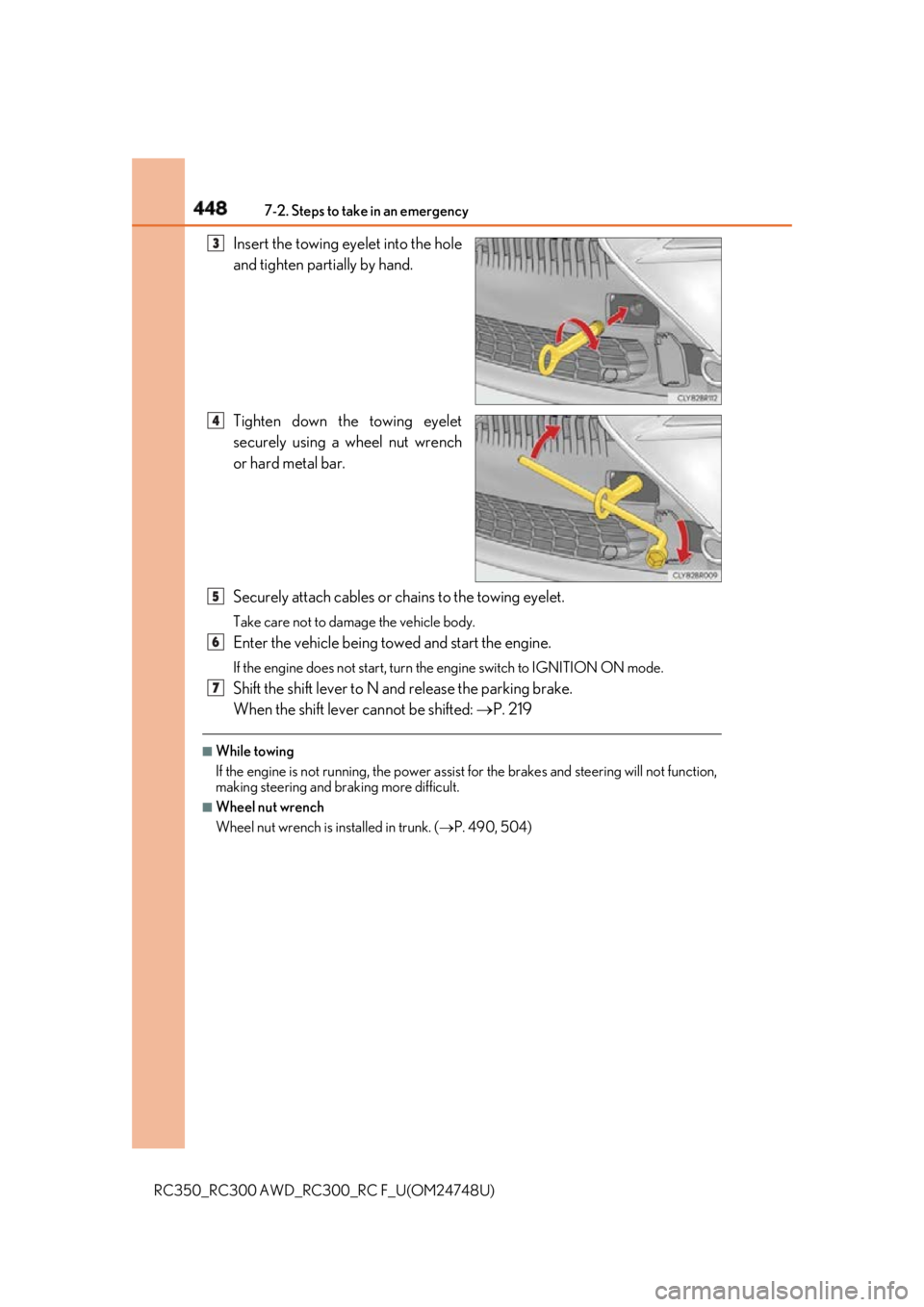
RC350_RC300 AWD_RC3 00_RC F_U(OM24748U)Insert the towing eyelet into the hole
and tighten partially by hand.
Tighten down the towing eyelet
securely using a wheel nut wrench
or hard metal bar.
Securely attach cables or chains to the towing eyelet. Take care not to damage the vehicle body.
Enter the vehicle being towed and start the engine. If the engine does not start, turn the engine switch to IGNITION ON mode.
Shift the shift lever to N and release the parking brake.
When the shift lever cannot be shifted: P. 219■
While towing
If the engine is not running, the power assist for the brakes and steering will not function,
making steering and br aking more difficult.■
Wheel nut wrench
Wheel nut wrench is installed in trunk. ( P. 490, 504)3
4
5
6
7
Page 454 of 636
454 7-2. Steps to take in an emergency
RC350_RC300 AWD_RC3 00_RC F_U(OM24748U) (U.S.A.)
(Canada)
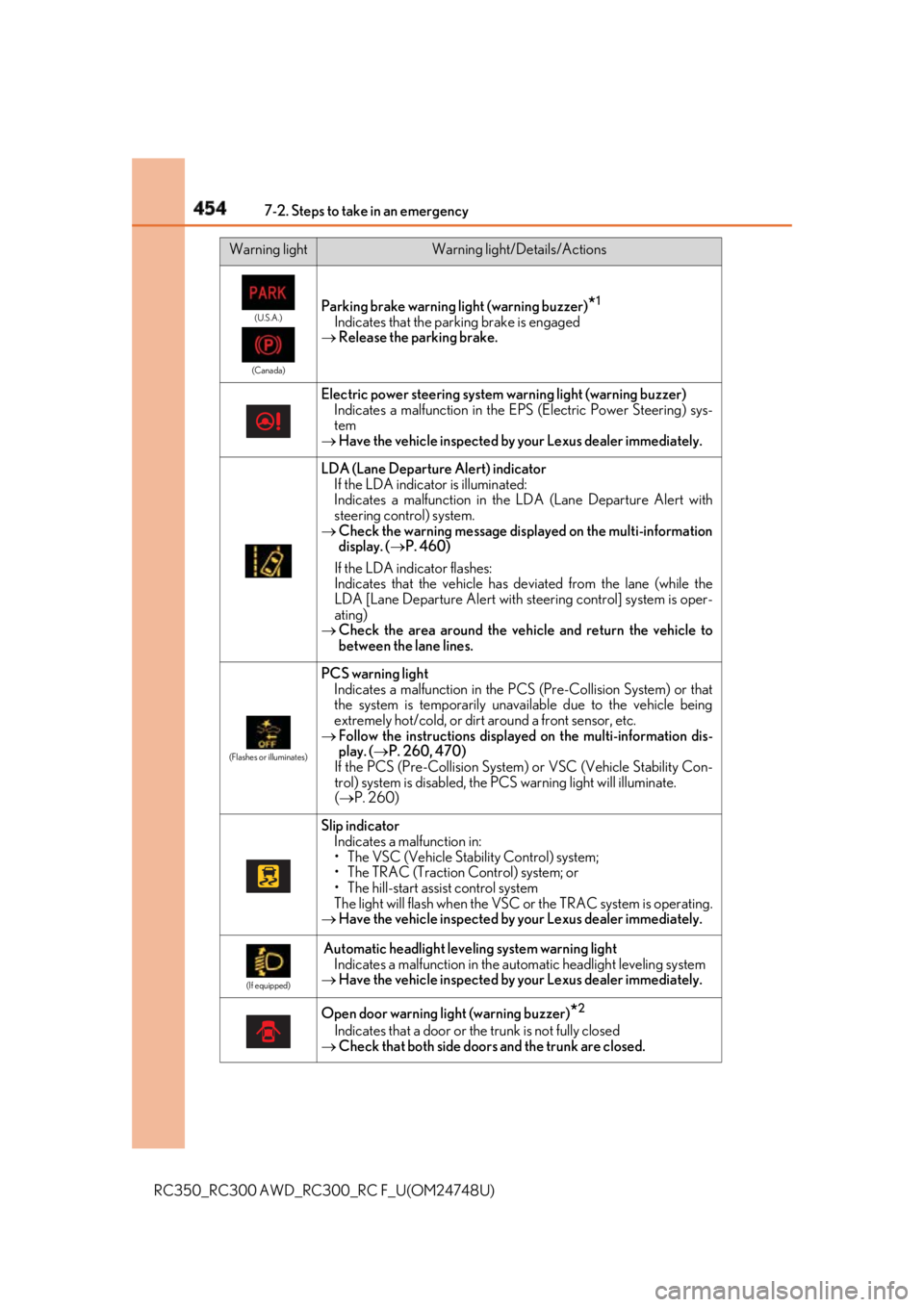
Parking brake warning light (warning buzzer)
* 1
Indicates that the parking brake is engaged
Release the parking brake.
Electric power steering system warning light (warning buzzer)
Indicates a malfunction in the EPS (Electric Power Steering) sys-
tem
Have the vehicle inspected by your Lexus dealer immediately.
LDA (Lane Departure Alert) indicator
If the LDA indicato r is illuminated:
Indicates a malfunction in the LDA (Lane Departure Alert with
steering control) system.
Check the warning message displa yed on the multi-information
display. ( P. 460)
If the LDA indicator flashes:
Indicates that the vehicle has deviated from the lane (while the
LDA [Lane Departure Alert with stee ring control] system is oper-
ating)
Check the area around the vehicle and return the vehicle to
between the lane lines. (Flashes or illuminates)
PCS warning light
Indicates a malfunction in the PCS (Pre-Collision System) or that
the system is temporarily unavailable due to the vehicle being
extremely hot/cold, or dirt around a front sensor, etc.
Follow the instructions displaye d on the multi-information dis-
play. ( P. 260, 470)
If the PCS (Pre-Collision System ) or VSC (Vehicle Stability Con-
trol) system is disabled, the PC S warning light will illuminate.
( P. 260)
Slip indicator
Indicates a malfunction in:
• The VSC (Vehicle Stability Control) system;
• The TRAC (Traction Control) system; or
• The hill-start assist control system
The light will flash when the VSC or the TRAC system is operating.
Have the vehicle inspected by your Lexus dealer immediately. (If equipped)
Automatic headlight leve ling system warning light
Indicates a malfunction in the automatic headlight leveling system
Have the vehicle inspected by your Lexus dealer immediately.
Open door warning light (warning buzzer)
* 2
Indicates that a door or the trunk is not fully closed
Check that both side doors and the trunk are closed.Warning light Warning light/Details/Actions
Page 463 of 636
4637-2. Steps to take in an emergency
RC350_RC300 AWD_RC3 00_RC F_U(OM24748U) 7
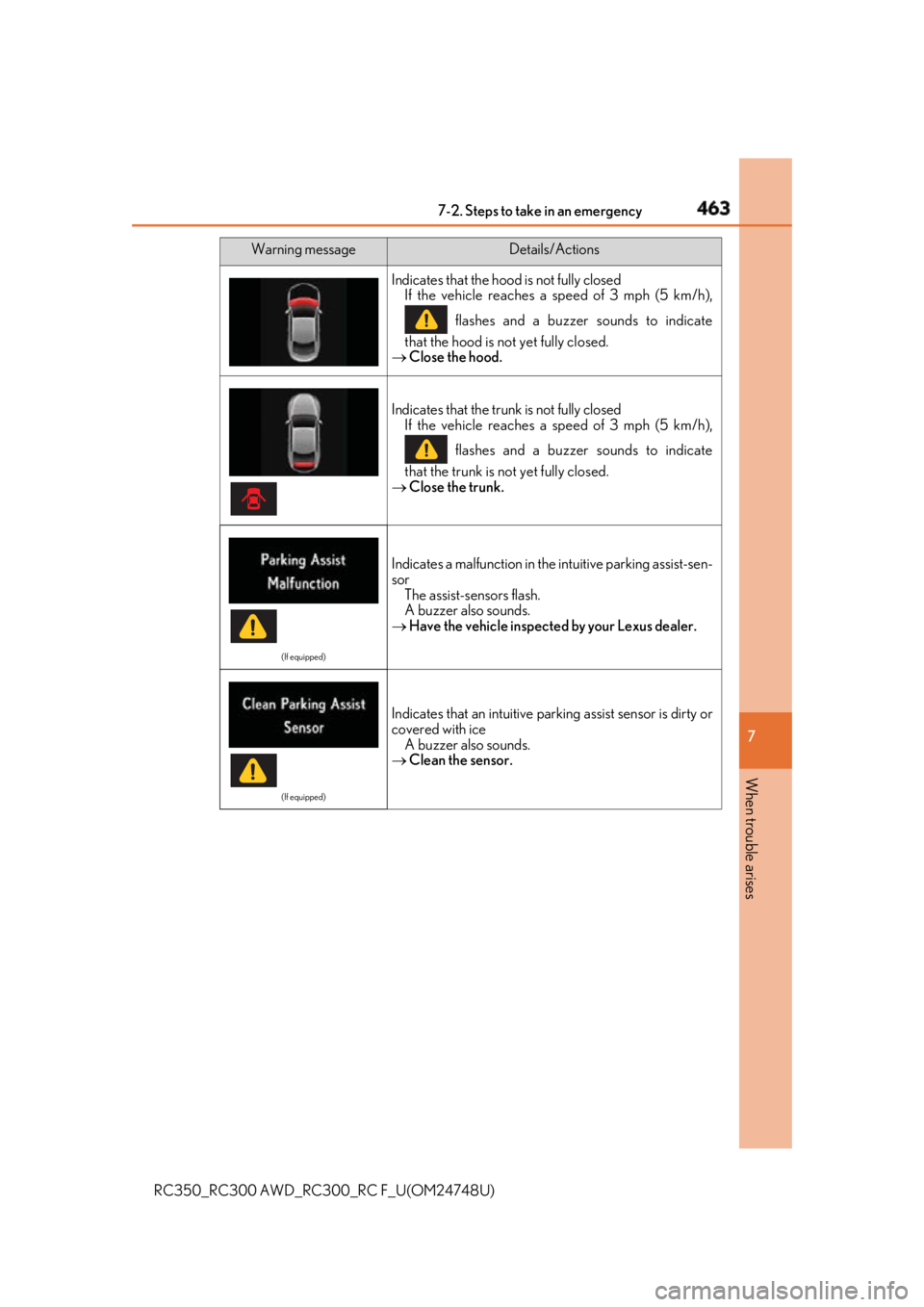
When trouble arises Indicates that the hood is not fully closed
If the vehicle reaches a speed of 3 mph (5 km/h),
flashes and a buzzer sounds to indicate
that the hood is not yet fully closed.
Close the hood.
Indicates that the trunk is not fully closed
If the vehicle reaches a speed of 3 mph (5 km/h),
flashes and a buzzer sounds to indicate
that the trunk is not yet fully closed.
Close the trunk. (If equipped)
Indicates a malfunction in the intuitive parking assist-sen-
sor
The assist-sensors flash.
A buzzer also sounds.
Have the vehicle inspected by your Lexus dealer. (If equipped)
Indicates that an intuitive par king assist sensor is dirty or
covered with ice
A buzzer also sounds.
Clean the sensor.Warning message Details/Actions
Page 501 of 636
5017-2. Steps to take in an emergency
RC350_RC300 AWD_RC3 00_RC F_U(OM24748U) 7
When trouble arises WARNING ■
When using the spare tire ●
Remember that the spare tire provided is specifically designed for use with your vehi-
cle. Do not use your spare tire on another vehicle. ●
Do not use more than one spare tires simultaneously. ●
Replace the spare tire with a stan dard tire as soon as possible.●
Avoid sudden acceleration, abrupt steering, sudden braking and shifting operations
that cause sudden engine braking. ■
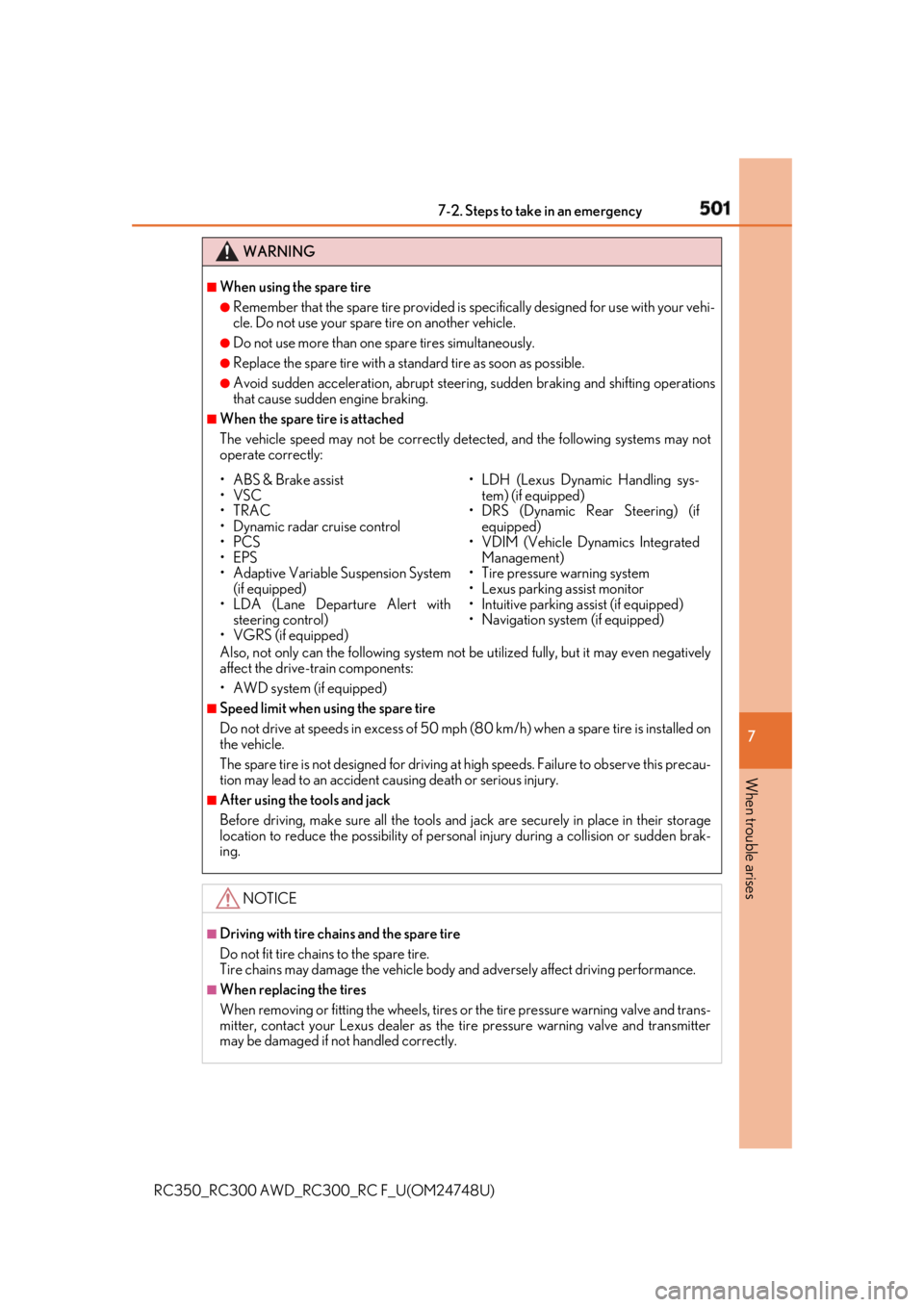
When the spare tire is attached
The vehicle speed may not be correctly detected, and the following systems may not
operate correctly:
Also, not only can the following system not be utilized fully, but it may even negatively
affect the drive-train components:
• AWD system (if equipped) ■
Speed limit when using the spare tire
Do not drive at speeds in excess of 50 mp h (80 km/h) when a spar e tire is installed on
the vehicle.
The spare tire is not designed for driving at high speeds. Fa ilure to observe this precau-
tion may lead to an accident causing death or serious injury. ■
After using the tools and jack
Before driving, make sure all the tools and jack are securely in place in their storage
location to reduce the possibilit y of personal injury during a collision or sudden brak-
ing.
NOTICE ■
Driving with tire chains and the spare tire
Do not fit tire chains to the spare tire.
Tire chains may damage the vehicle body and adversely affect driving performance.■
When replacing the tires
When removing or fitting the wheels, tires or the tire pressure warning valve and trans-
mitter, contact your Lexus dealer as the tire pressure warning valve and transmitter
may be damaged if not handled correctly.• ABS & Brake assist
•VSC
•TRAC
• Dynamic radar cruise control
•PCS
•EPS
• Adaptive Variable Suspension System
(if equipped)
• LDA (Lane Departure Alert with
steering control)
• VGRS (if equipped) • LDH (Lexus Dynamic Handling sys-
tem) (if equipped)
• DRS (Dynamic Rear Steering) (if
equipped)
• VDIM (Vehicle Dynamics Integrated
Management)
• Tire pressure warning system
• Lexus parking assist monitor
• Intuitive parking assist (if equipped)
• Navigation system (if equipped)
Page 569 of 636

569
RC350_RC300 AWD_RC3 00_RC F_U(OM24748U) 8
Vehicle specifications 8-2. Customization
■
Changing by using the Remote Touch
Press the “MENU” button on the Remote Touch.
Select “Setup” on the menu screen and select “Vehicle”.
Select “Vehicle Customization”, “L EXUS Park Assist” or “Drive Mode
Customization”.
Various setting can be changed. Refer to the list of settings that can be
changed for details.
For details on the Remote Touch, refer to the “NAVIGATION AND MULTI-
MEDIA SYSTEM OWNER’S MANUAL”. ■
Changing by using the meter control switches
P. 111, 129Customizable features Your vehicle includes a variety of elec tronic features that can be personalized
to your preferences. The settings of these features can be changed by using
the meter control switches, the Remote Touch or at your Lexus dealer.
Customizing vehicle features 1
2
3