remote control LEXUS RCF 2018 Owner's Manual
[x] Cancel search | Manufacturer: LEXUS, Model Year: 2018, Model line: RCF, Model: LEXUS RCF 2018Pages: 636, PDF Size: 6.88 MB
Page 335 of 636
3355-1. Using the air conditioning system
5
Interior features
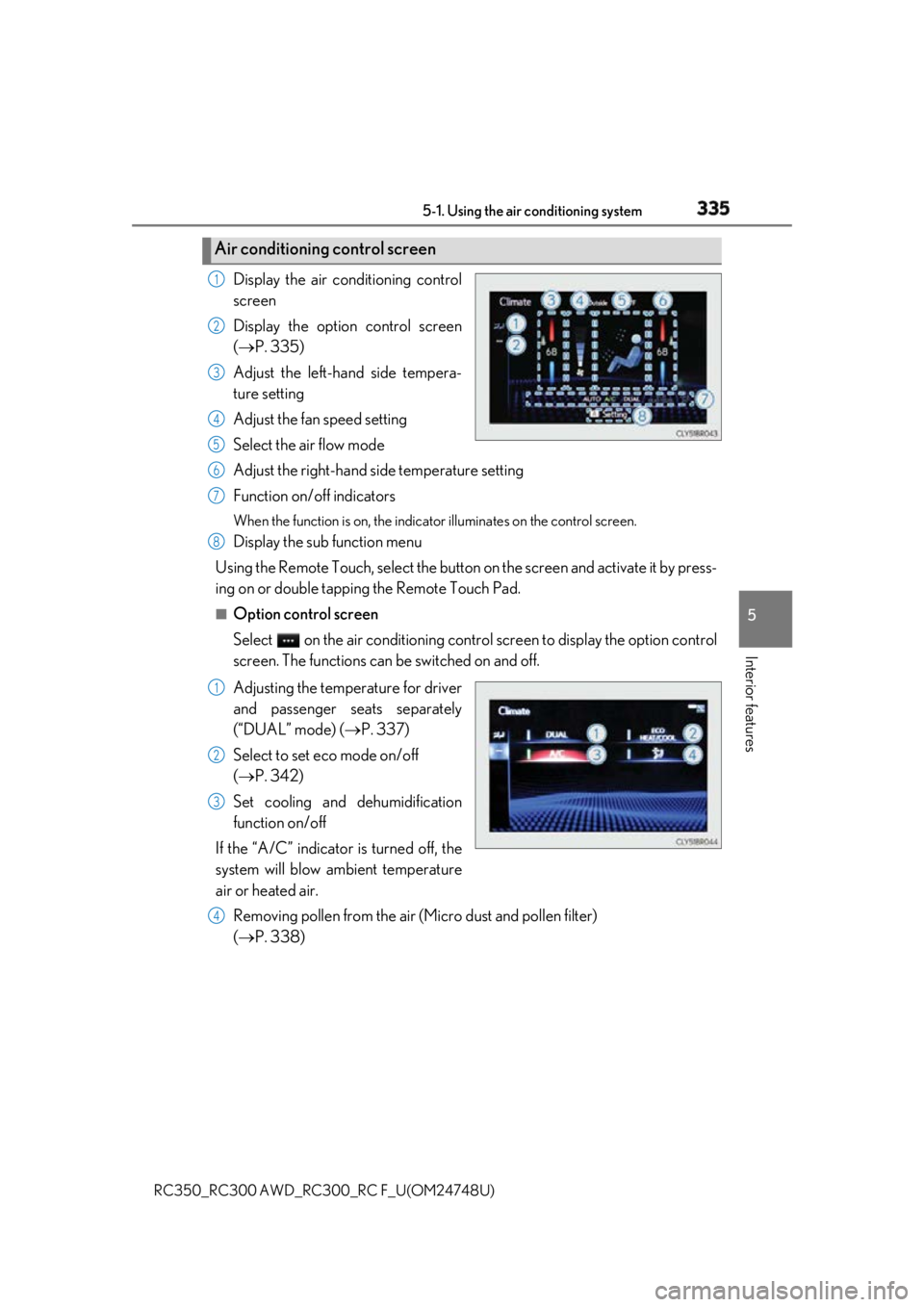
RC350_RC300 AWD_RC3 00_RC F_U(OM24748U)Display the air conditioning control
screen
Display the option control screen
( P. 335)
Adjust the left-hand side tempera-
ture setting
Adjust the fan speed setting
Select the air flow mode
Adjust the right-hand side temperature setting
Function on/off indicators When the function is on, the indica tor illuminates on th e control screen.
Display the sub function menu
Using the Remote Touch, select the button on the screen and activate it by press-
ing on or double tappin g the Remote Touch Pad.■
Option control screen
Select on the air conditioning contro l screen to display the option control
screen. The functions can be switched on and off.
Adjusting the temperature for driver
and passenger seats separately
(“DUAL” mode) ( P. 337)
Select to set eco mode on/off
( P. 342)
Set cooling and dehumidification
function on/off
If the “A/C” indicator is turned off, the
system will blow ambient temperature
air or heated air.
Removing pollen from the air (Micro dust and pollen filter)
( P. 338)Air conditioning control screen 1
2
3
4
5
6
7
8
1
2
3
4
Page 359 of 636
3595-4. Using the other interior features
RC350_RC300 AWD_RC3 00_RC F_U(OM24748U) 5
Interior features The HomeLink ®
wireless control system in your vehicle has 3 buttons which can
be programmed to operate 3 different de vices. Refer to the programming meth-
ods on the following pages to determine the method which is appropriate for the
device.
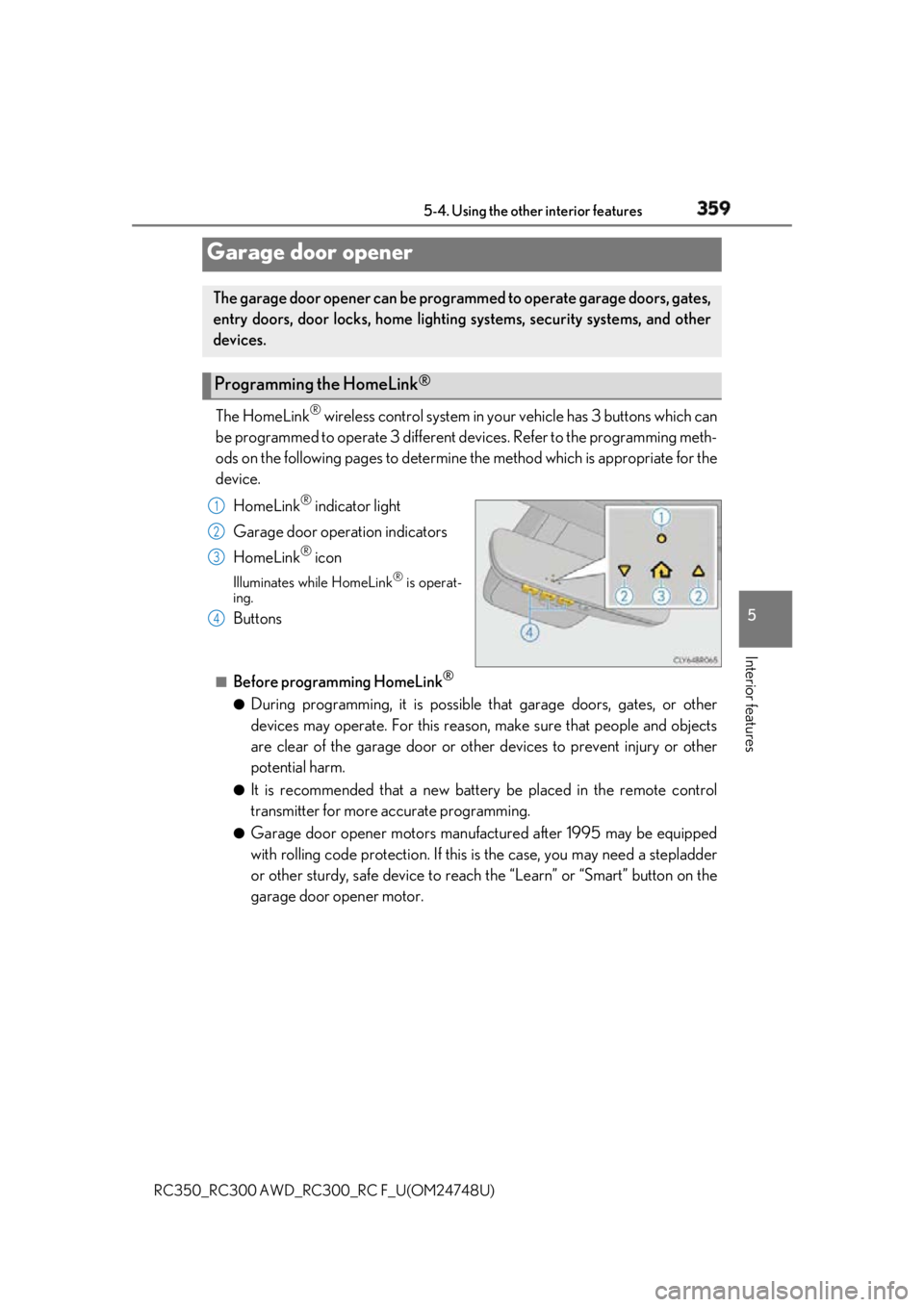
HomeLink ®
indicator light
Garage door operation indicators
HomeLink ®
iconIlluminates while HomeLink ®
is operat-
ing.
Buttons ■
Before programming HomeLink ®
●
During programming, it is possible that garage doors, gates, or other
devices may operate. For this reason, make sure that people and objects
are clear of the garage door or othe r devices to prevent injury or other
potential harm. ●
It is recommended that a new batter y be placed in the remote control
transmitter for more accurate programming. ●
Garage door opener motors manufa ctured after 1995 may be equipped
with rolling code protection. If this is the case, you may need a stepladder
or other sturdy, safe device to reach the “Learn” or “Smart” button on the
garage door opener motor.Garage door opener The garage door opener can be programmed to operate garage doors, gates,
entry doors, door locks, home lightin g systems, security systems, and other
devices.
Programming the HomeLink ®
1
2
3
4
Page 360 of 636
360 5-4. Using the other interior features
RC350_RC300 AWD_RC3 00_RC F_U(OM24748U)■
Programming HomeLink ®
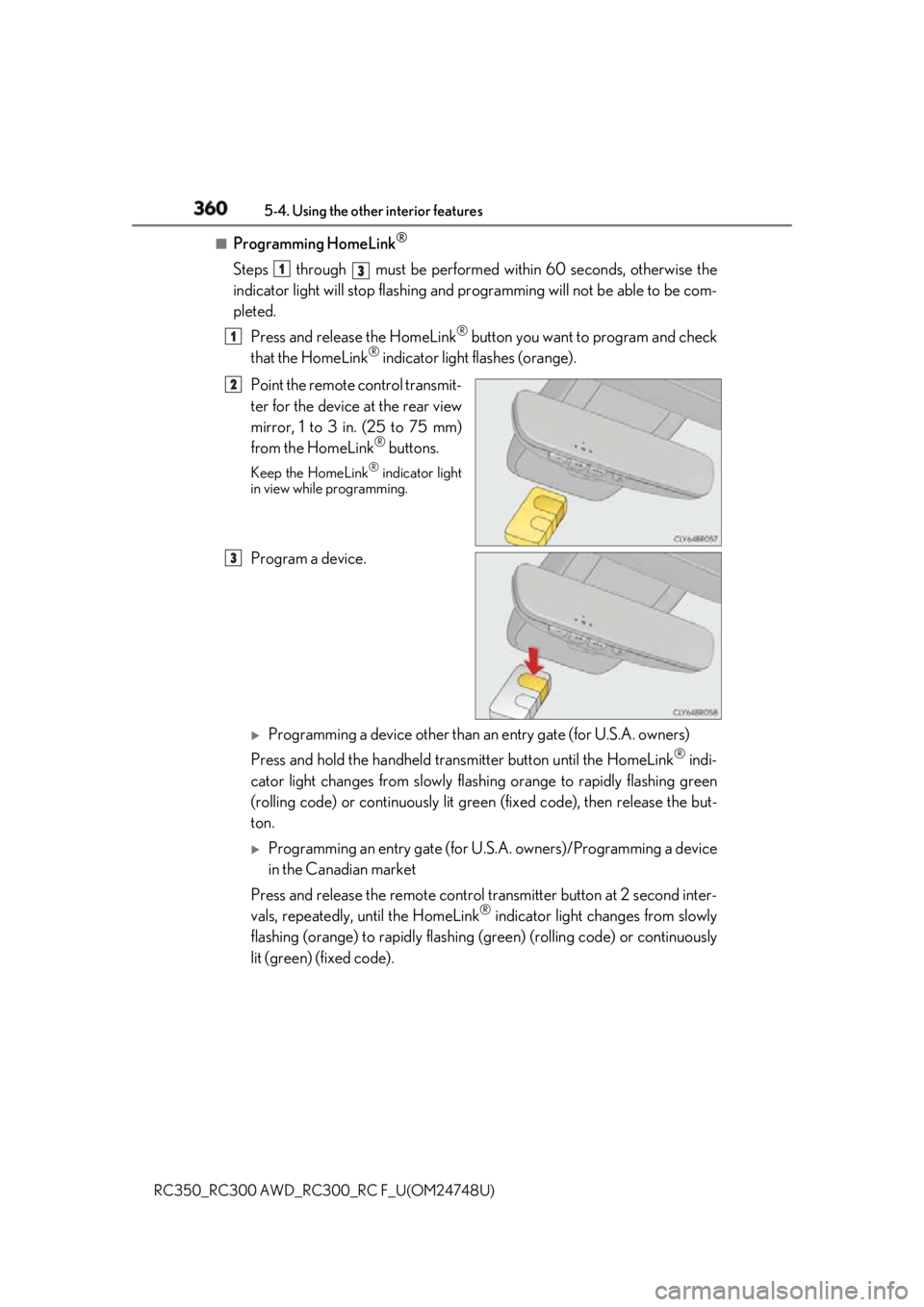
Steps through must be performed within 60 seconds, otherwise the
indicator light will stop flashing and pr ogramming will not be able to be com-
pleted.
Press and release the HomeLink ®
button you want to program and check
that the HomeLink ®
indicator light flashes (orange).
Point the remote control transmit-
ter for the device at the rear view
mirror, 1 to 3 in. (25 to 75 mm)
from the HomeLink ®
buttons.Keep the HomeLink ®
indicator light
in view while programming.
Program a device.
Programming a device other than an entry gate (for U.S.A. owners)
Press and hold the handheld tran smitter button until the HomeLink ®
indi-
cator light changes from slowly flashi ng orange to rapidly flashing green
(rolling code) or continuously lit green (fixed code), then release the but-
ton.
Programming an entry gate (for U. S.A. owners)/Programming a device
in the Canadian market
Press and release the remo te control transm itter button at 2 second inter-
vals, repeatedly, until the HomeLink ®
indicator light changes from slowly
flashing (orange) to rapidly flashing (green) (rolling code) or continuously
lit (green) (fixed code). 1
3
1
2
3
Page 365 of 636
3655-4. Using the other interior features
RC350_RC300 AWD_RC3 00_RC F_U(OM24748U) 5
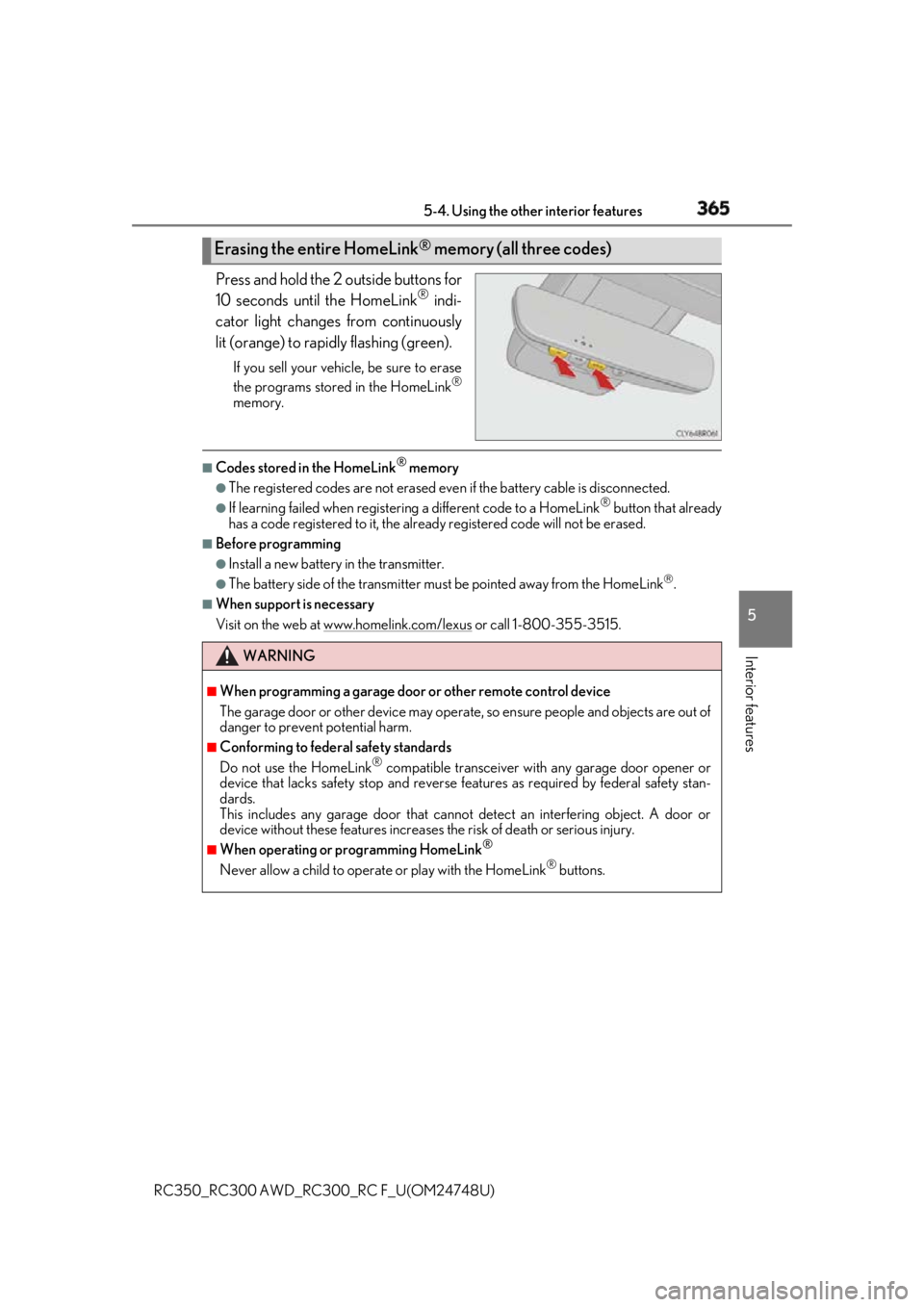
Interior features Press and hold the 2 outside buttons for
10 seconds until the HomeLink ®
indi-
cator light changes from continuously
lit (orange) to rapidly flashing (green). If you sell your vehicle, be sure to erase
the programs stored in the HomeLink ®
memory. ■
Codes stored in the HomeLink ®
memory●
The registered codes are not erased even if the battery cabl e is disconnected.●
If learning failed when registerin g a different code to a HomeLink ®
button that already
has a code registered to it, the alread y registered code will not be erased.■
Before programming ●
Install a new battery in the transmitter. ●
The battery side of the transmitter must be pointed away from the HomeLink
.■
When support is necessary
Visit on the web at www.homelink.com/lexus
or call 1-800-355-3515.Erasing the entire HomeLink ®
memory (all three codes)
WARNING ■
When programming a garage door or other remote control device
The garage door or other device may operat e, so ensure people and objects are out of
danger to prevent potential harm. ■
Conforming to federal safety standards
Do not use the HomeLink ®
compatible transceiver with any garage door opener or
device that lacks safety stop and reverse features as requ ired by federal safety stan-
dards.
This includes any garage door that canno t detect an interfering object. A door or
device without these features increases the risk of death or serious injury.■
When operating or programming HomeLink ®
Never allow a child to operat e or play with the HomeLink ®
buttons.
Page 409 of 636

4096-3. Do-it-yourself maintenance
RC350_RC300 AWD_RC3 00_RC F_U(OM24748U) 6
Maintenance and care ■
Before recharging
When recharging, the battery produces hydrogen gas which is flammable and explosive.
Therefore, observe the following before recharging: ●
If recharging with the battery installed on the vehicle, be sure to disconnect the ground
cable. ●
Make sure the power switch on the charge r is off when connecting and disconnecting
the charger cables to the battery. ■
After recharging/reconnecting the battery
The engine may not start. Follow the procedure below to initialize the system.
Shift the shift lever to P.
Open and close either door.
Restart the engine. ●
Unlocking the doors using the smart access system with push-button start may not be
possible immediately after reconnecting the battery. If this happens, use the wireless
remote control or the mechanical key to lock/unlock the doors.●
Start the engine with the engine switch in ACCESSORY mode. The engine may not
start with the engine switch turned off. However, the engine will operate normally from
the second attempt. ●
The engine switch mode is recorded by the vehicle. If the battery is disconnected and
reconnected, the vehicle will return the engi ne switch mode to the status it was in
before the battery was disconnected. Make su re to turn off the engine before discon-
necting the battery. Take extra care when connecting the battery if the engine switch
mode prior to the battery being disconnected is unknown.
If the system will not start even after mult iple attempts, contact your Lexus dealer.1
2
3
Page 428 of 636
428 6-3. Do-it-yourself maintenance
RC350_RC300 AWD_RC3 00_RC F_U(OM24748U)■
Use a CR2032 lithium battery ●
Batteries can be purc hased at your Lexus dealer, loca l electrical appliance shops or
camera stores. ●
Replace only with the same or equivalent type recommended by the manufacturer. ●
Dispose of used batteries according to local laws. ■
When the card key battery needs to be replaced (if equipped)
The battery for the card key is available only at Lexus dealers. Your Lexus dealer can
replace the battery for you. ■
If the electronic key battery is depleted
The following symptoms may occur: ●
The smart access system with push-button start and wireless remote control will not
function properly. ●
The operational rang e will be reduced.
WARNING ■
Removed battery and other parts
These parts are small and if swallowed by a child, they can cause choking. Keep away
from children. Failure to do so coul d result in death or serious injury.
NOTICE ■
For normal operation after replacing the battery
Observe the following precautions to prevent accidents: ●
Always work with dry hands.
Moisture may cause the battery to rust. ●
Do not touch or move any other co mponent inside the remote control.●
Do not bend either of the battery terminals.
Page 518 of 636
518 7-2. Steps to take in an emergency
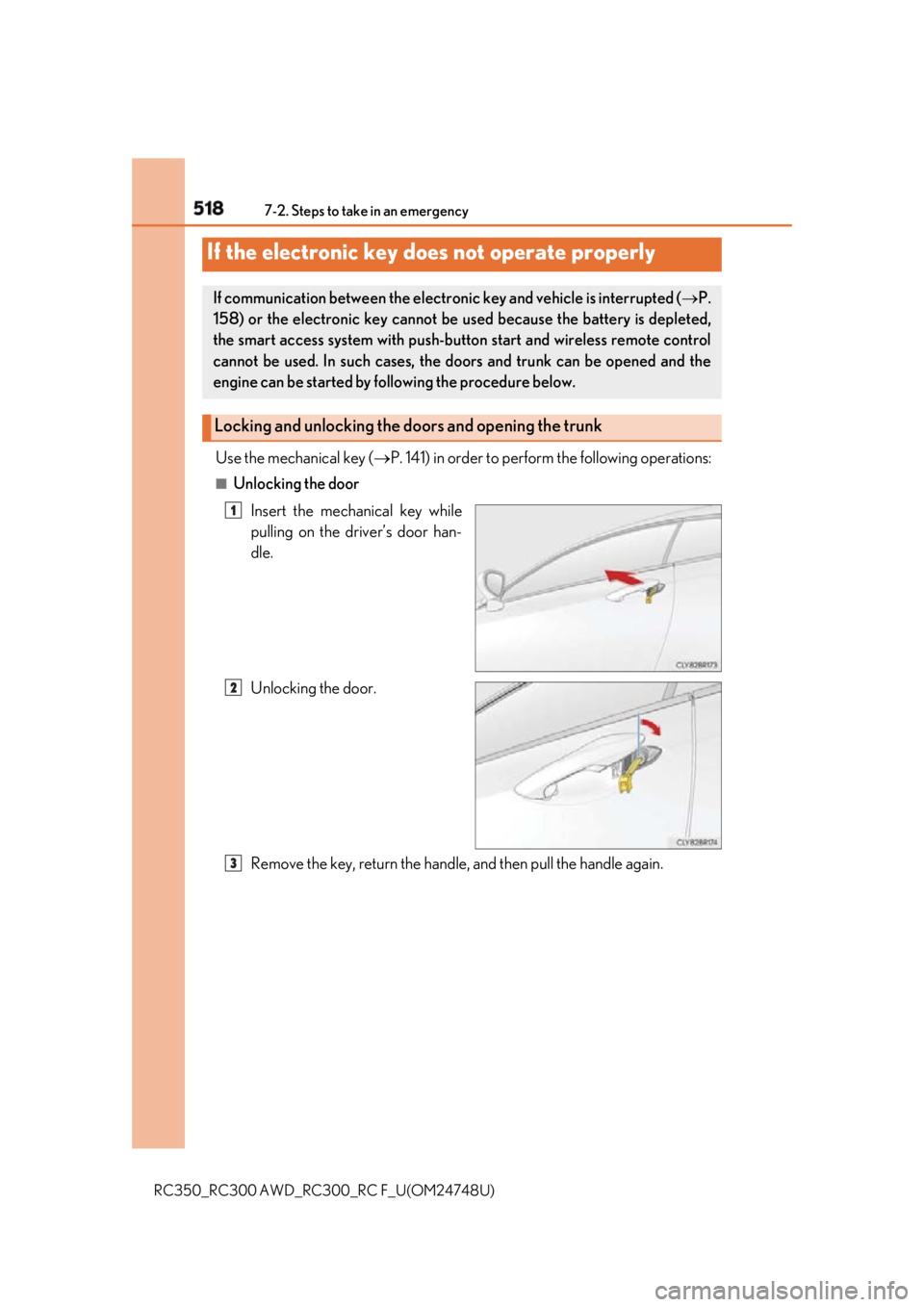
RC350_RC300 AWD_RC3 00_RC F_U(OM24748U)Use the mechanical key ( P. 141) in order to perfor m the following operations:■
Unlocking the door
Insert the mechanical key while
pulling on the driver’s door han-
dle.
Unlocking the door.
Remove the key, return the handle, and then pull the handle again.If the electronic key do es not operate properlyIf communication between the electron ic key and vehicle is interrupted ( P.
158) or the electronic key cannot be used because the battery is depleted,
the smart access system with push-butto n start and wireless remote control
cannot be used. In such cases, the doors and trunk can be opened and the
engine can be started by following the procedure below.
Locking and unlocking the doors and opening the trunk 1
2
3
Page 524 of 636
524 7-2. Steps to take in an emergency
RC350_RC300 AWD_RC3 00_RC F_U(OM24748U)Start the engine of the second vehicle. Increase the engine speed slightly and
maintain at that level for approximatel y 5 minutes to recharge the battery of
your vehicle.
Open and close any of the door of your vehicle with the engine switch off.
Maintain the engine speed of the second vehicle and start the engine of your
vehicle by turning the engine switch to IGNITION ON mode.
Once the vehicle’s engine has started, remove the jumper cables in the exact
reverse order from which they were connected.
Once the engine starts, have the vehicle inspected at your Lexus dealer as soon
as possible. ■
Starting the engine when the battery is discharged
The engine cannot be started by push-starting. ■
To prevent battery discharge ●
Turn off the headlights and the audio system while the engine is off. ●
Turn off any unnecessary electrical componen ts when the vehicle is running at a low
speed for an extended period , such as in heavy traffic.■
Charging the battery
The electricity stored in the battery will disc harge gradually even when the vehicle is not
in use, due to natural discharge and the draini ng effects of certain electrical appliances. If
the vehicle is left for a long time, the battery may discharge, and the engine may be
unable to start. (The battery recharges automatically during driving.) ■
When recharging or replacing the battery ●
In some cases, it may not be possible to un lock the doors using the smart access system
with push-button start when the battery is discharged. Use the wireless remote control
or the mechanical key to lock or unlock the doors. ●
The engine may not start on the first attempt after the battery has recharged but will
start normally after the second attempt. This is not a malfunction. ●
The engine switch mode is memorized by the vehicle. When the battery is recon-
nected, the system will return to the mode it was in before the battery was discharged.
Before disconnecting the battery, turn the engine switch off.
If you are unsure what mode the engine switch was in before the battery discharged, be
especially careful when reconnecting the battery. 5
6
7
8
Page 569 of 636
569
RC350_RC300 AWD_RC3 00_RC F_U(OM24748U) 8
Vehicle specifications 8-2. Customization
■
Changing by using the Remote Touch
Press the “MENU” button on the Remote Touch.
Select “Setup” on the menu screen and select “Vehicle”.
Select “Vehicle Customization”, “L EXUS Park Assist” or “Drive Mode
Customization”.
Various setting can be changed. Refer to the list of settings that can be
changed for details.
For details on the Remote Touch, refer to the “NAVIGATION AND MULTI-
MEDIA SYSTEM OWNER’S MANUAL”. ■
Changing by using the meter control switches
P. 111, 129Customizable features Your vehicle includes a variety of elec tronic features that can be personalized
to your preferences. The settings of these features can be changed by using
the meter control switches, the Remote Touch or at your Lexus dealer.
Customizing vehicle features 1
2
3
Page 571 of 636
5718-2. Customization
RC350_RC300 AWD_RC3 00_RC F_U(OM24748U) 8
Vehicle specifications ■
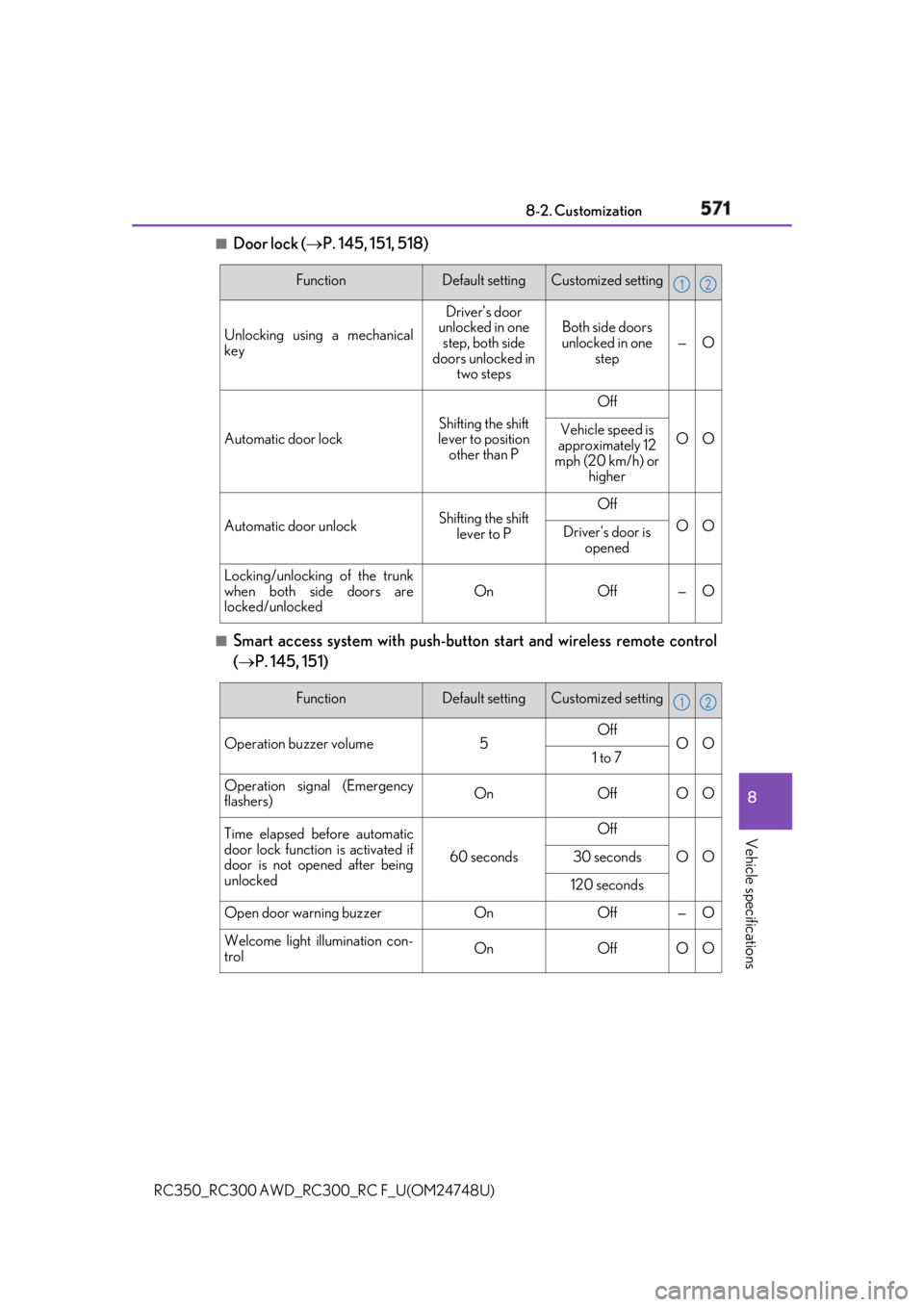
Door lock ( P. 145, 151, 518)
■
Smart access system with push-button start and wireless remote control
( P. 145, 151) Function Default setting Customized setting
Unlocking using a mechanical
key Driver’s door
unlocked in one
step, both side
doors unlocked in
two steps Both side doors
unlocked in one
step — O
Automatic door lock Shifting the shift
lever to position
other than P Off
O OVehicle speed is
approximately 12
mph (20 km/h) or
higher
Automatic door unlock Shifting the shift
lever to P Off
O O
Driver’s door is
opened
Locking/unlocking of the trunk
when both side doors are
locked/unlocked On Off — O 1 2
Function Default setting Customized setting
Operation buzzer volume 5 Off
O O
1 to 7
Operation signal (Emergency
flashers) On Off O O
Time elapsed before automatic
door lock function is activated if
door is not opened after being
unlocked 60 seconds Off
O O30 seconds
120 seconds
Open door warning buzzer On Off — O
Welcome light illumination con-
trol On Off O O 1 2