fuel LEXUS RCF 2019 User Guide
[x] Cancel search | Manufacturer: LEXUS, Model Year: 2019, Model line: RCF, Model: LEXUS RCF 2019Pages: 636, PDF Size: 12.48 MB
Page 106 of 636
106 2. Instrument cluster
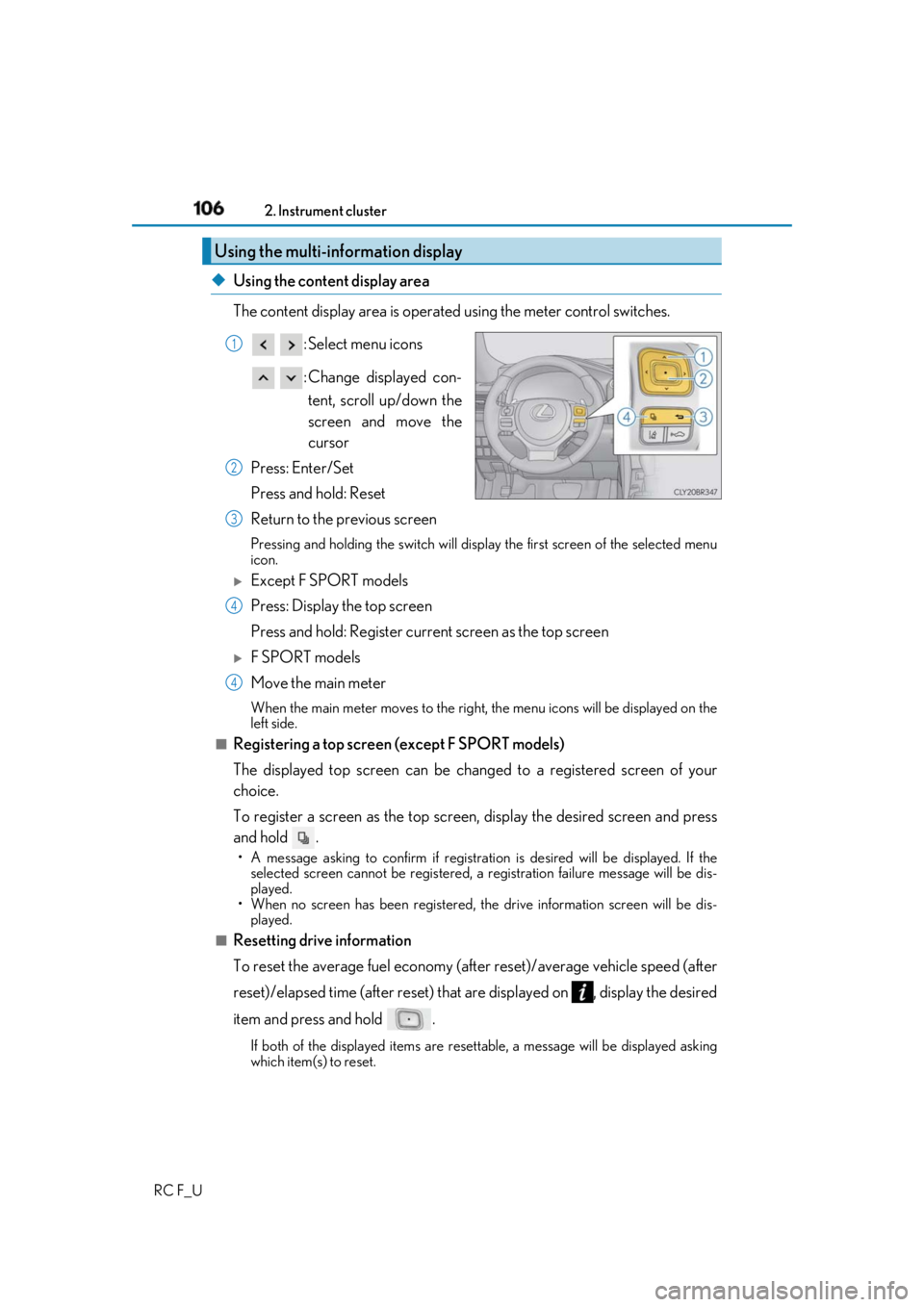
RC F_U ◆ Using the content display area
The content display area is operated using the meter control switches.
: Select menu icons
: Change displayed con-
tent, scroll up/down the
screen and move the
cursor
Press: Enter/Set
Press and hold: Reset
Return to the previous screen Pressing and holding the swit ch will display the first screen of the selected menu
icon.
Except F SPORT models
Press: Display the top screen
Press and hold: Register current screen as the top screen
F SPORT models
Move the main meter When the main meter moves to the right, the menu icons will be displayed on the
left side.■
Registering a top screen (except F SPORT models)
The displayed top screen can be chan ged to a registered screen of your
choice.
To register a screen as the top screen, display the desired screen and press
and hold . • A message asking to confirm if registrati on is desired will be displayed. If the
selected screen canno t be registered, a registration failure message will be dis-
played.
• When no screen has been registered, the drive information screen will be dis-
played.
■
Resetting drive information
To reset the average fuel economy (aft er reset)/average vehicle speed (after
reset)/elapsed time (after reset) that are displayed on , display the desired
item and press and hold .
If both of the displayed items are resettable, a messa ge will be displayed asking
which item(s) to reset.Using the multi-information display 1
2
3
4
4
Page 108 of 636
108 2. Instrument cluster
RC F_U F SPORT models: Some drive information items can only be displayed when the
main meter is in the center position or when it is moved to the right.■
Drive information 1/Drive information 2/Drive information 3
Displays drive informatio n such as the following.F SPORT models (when the main meter is in the center position): Each item is dis-
played separately.●
Drive information 1
• Current fuel consumption
• Average fuel economy (after reset) ●
Drive information 2
• Distance (driving range)
• Average vehicle speed (after reset) ●
Drive information 3
• Average fuel economy (after refuel)
• Elapsed time (after start)
Displayed items (listed below) can be changed on . ( P. 111)Drive information ( )
Item Content
Current fuel consumption Displays in stantaneous current fuel consumption
Average fuel
economy After reset Displays average fuel consumption since display
reset
* 1, 2
After start Displays average fuel consumption since engine
start
* 2
After refuel Displays average fuel consumption since refuel
* 2, 3
Average
vehicle
speed After reset Displays average vehicle speed since display
reset
* 1
After start Displays average vehicle speed since engine start
Elapsed time After reset Displays elapsed time since display reset
* 1
After start Displays elapsed time since engine start
Distance Driving range Displays driving rang e with remaining fuel
* 3, 4
After start Displays drive distance since vehicle start
Other Blank No item
Page 109 of 636
1092. Instrument cluster
2
Instrument cluster
RC F_U * 1
:Resetting: P. 106
* 2
: Use the displayed fuel consumption as a reference.
* 3
: When only a small amount of fuel is added to the tank, the display may not be
updated.
When refueling, turn the engine switch off. If the vehicle is refueled without turning the
engine switch off, the display may not be updated.
* 4
: This distance is computed based on your average fuel consumption. As a result, the
actual distance that can be driven may differ from that displayed.■
Eco Driving Indicator
P. 116■
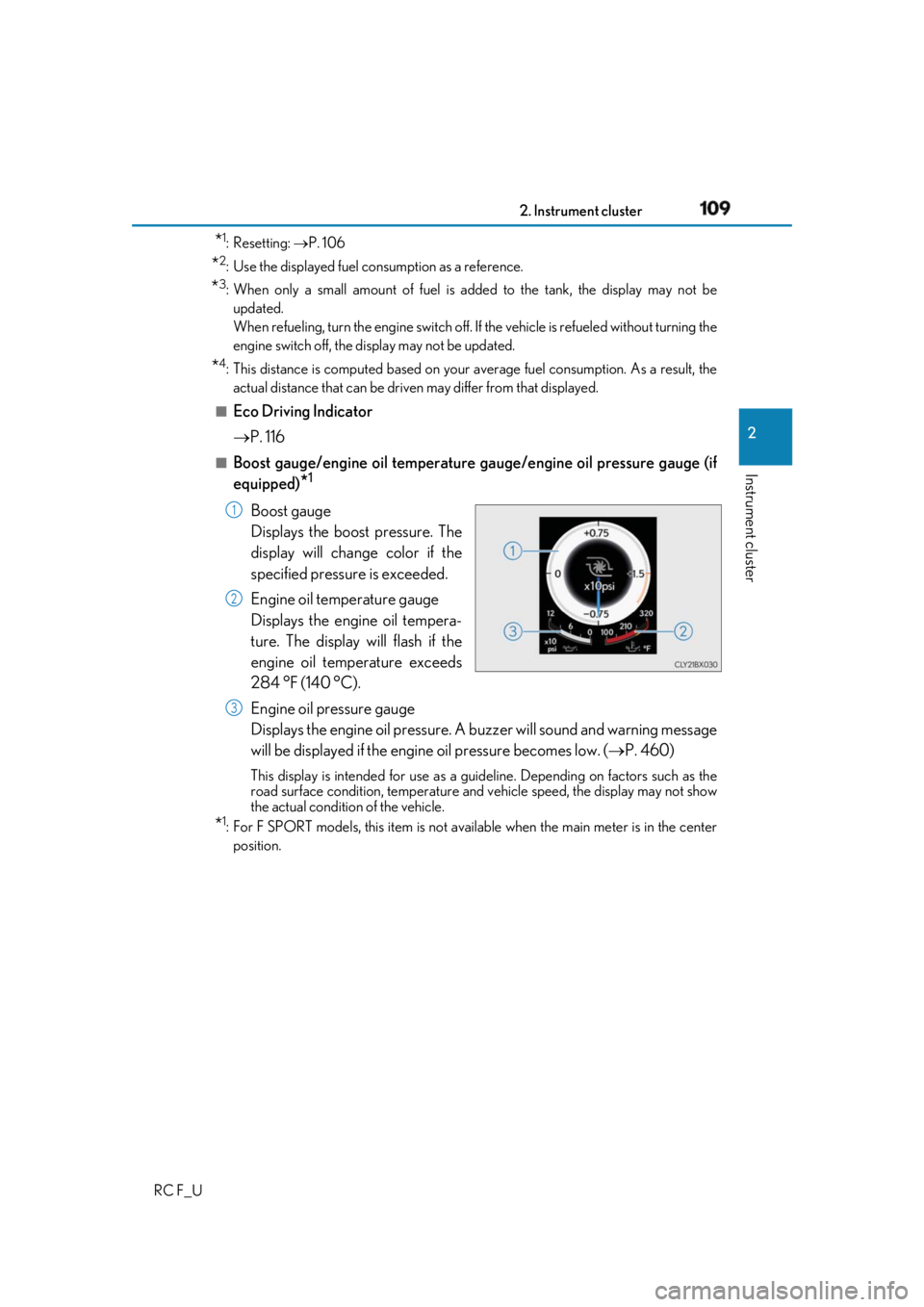
Boost gauge/engine oil temperature ga uge/engine oil pressure gauge (if
equipped)
* 1
Boost gauge
Displays the boost pressure. The
display will change color if the
specified pressure is exceeded.
Engine oil temperature gauge
Displays the engine oil tempera-
ture. The display will flash if the
engine oil temperature exceeds
284 °F (140 °C).
Engine oil pressure gauge
Displays the engine oil pressure. A buzzer will sound an d warning message
will be displayed if the engine oil pressure becomes low. ( P. 460)This display is intended for use as a guideline. Depending on factors such as the
road surface condition, temperature and vehicle speed, the display may not show
the actual condition of the vehicle.
* 1
: For F SPORT models, this item is not ava ilable when the main meter is in the center
position. 1
2
3
Page 119 of 636
1192. Instrument cluster
2
Instrument cluster
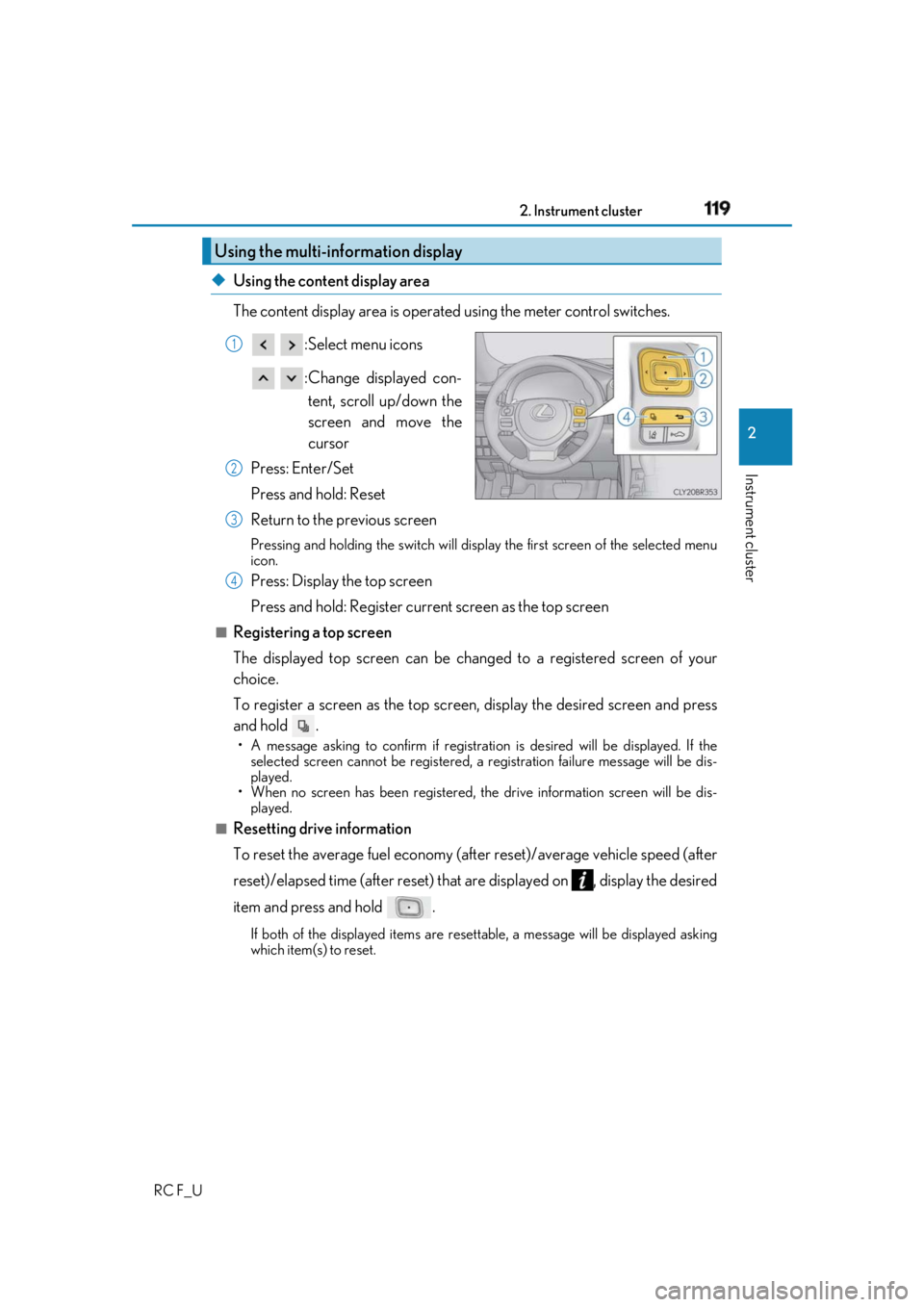
RC F_U ◆ Using the content display area
The content display area is operated using the meter control switches.
:Select menu icons
:Change displayed con-
tent, scroll up/down the
screen and move the
cursor
Press: Enter/Set
Press and hold: Reset
Return to the previous screen Pressing and holding the swit ch will display the first screen of the selected menu
icon.
Press: Display the top screen
Press and hold: Register current screen as the top screen■
Registering a top screen
The displayed top screen can be chan ged to a registered screen of your
choice.
To register a screen as the top screen, display the desired screen and press
and hold . • A message asking to confirm if registrati on is desired will be displayed. If the
selected screen canno t be registered, a registration failure message will be dis-
played.
• When no screen has been registered, the drive information screen will be dis-
played.■
Resetting drive information
To reset the average fuel economy (aft er reset)/average vehicle speed (after
reset)/elapsed time (after reset) that are displayed on , display the desired
item and press and hold . If both of the displayed items are resettable, a messa ge will be displayed asking
which item(s) to reset.Using the multi-information display 1
2
3
4
Page 122 of 636
122 2. Instrument cluster
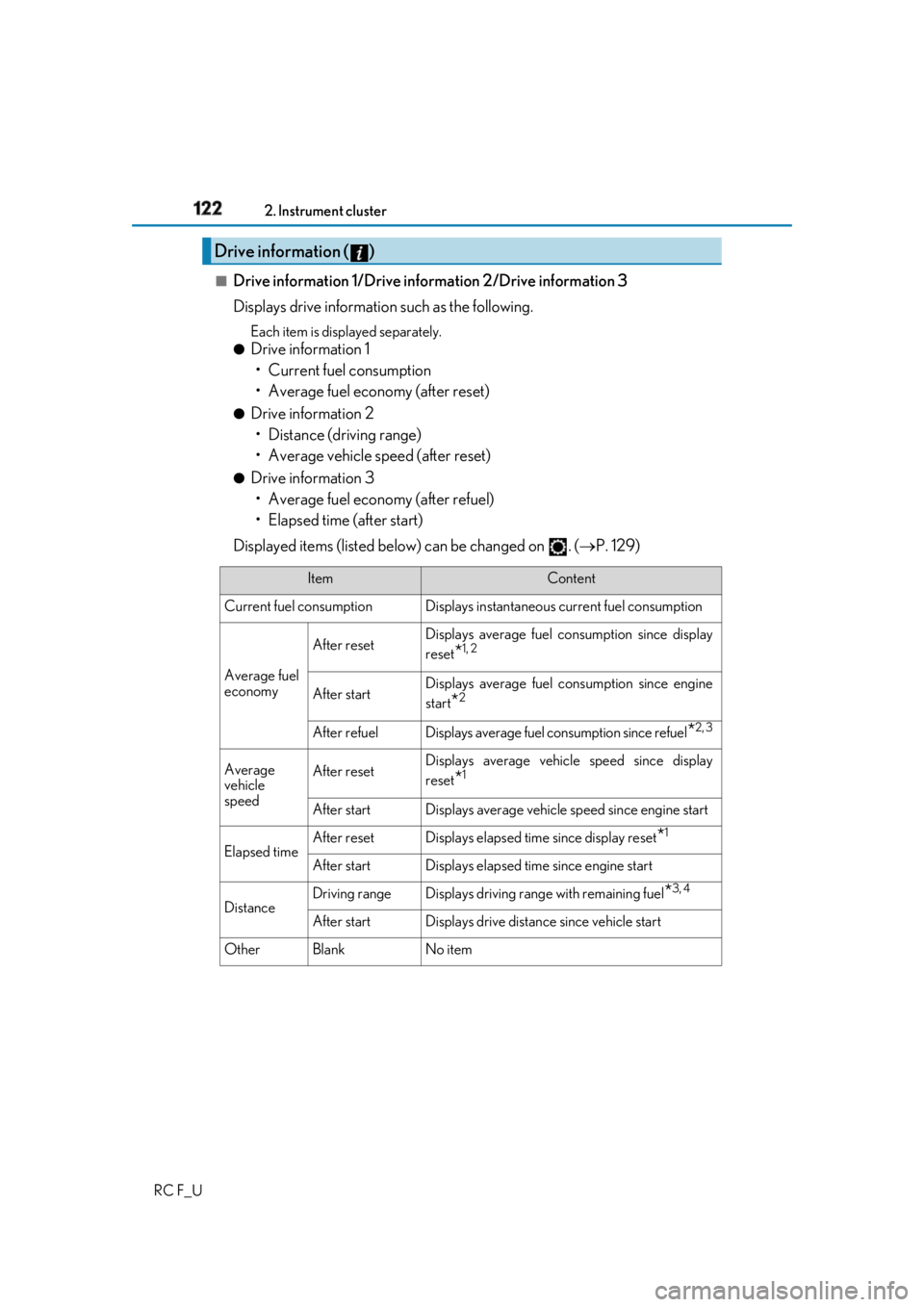
RC F_U ■
Drive information 1/Drive information 2/Drive information 3
Displays drive informatio n such as the following.Each item is displayed separately.●
Drive information 1
• Current fuel consumption
• Average fuel economy (after reset) ●
Drive information 2
• Distance (driving range)
• Average vehicle speed (after reset) ●
Drive information 3
• Average fuel economy (after refuel)
• Elapsed time (after start)
Displayed items (listed below) can be changed on . ( P. 129)Drive information ( )
Item Content
Current fuel consumption Displays in stantaneous current fuel consumption
Average fuel
economy After reset Displays average fuel consumption since display
reset
* 1, 2
After start Displays average fuel consumption since engine
start
* 2
After refuel Displays average fuel consumption since refuel
* 2, 3
Average
vehicle
speed After reset Displays average vehicle speed since display
reset
* 1
After start Displays average vehicle speed since engine start
Elapsed time After reset Displays elapsed time since display reset
* 1
After start Displays elapsed time since engine start
Distance Driving range Displays driving rang e with remaining fuel
* 3, 4
After start Displays drive distance since vehicle start
Other Blank No item
Page 123 of 636
1232. Instrument cluster
2
Instrument cluster
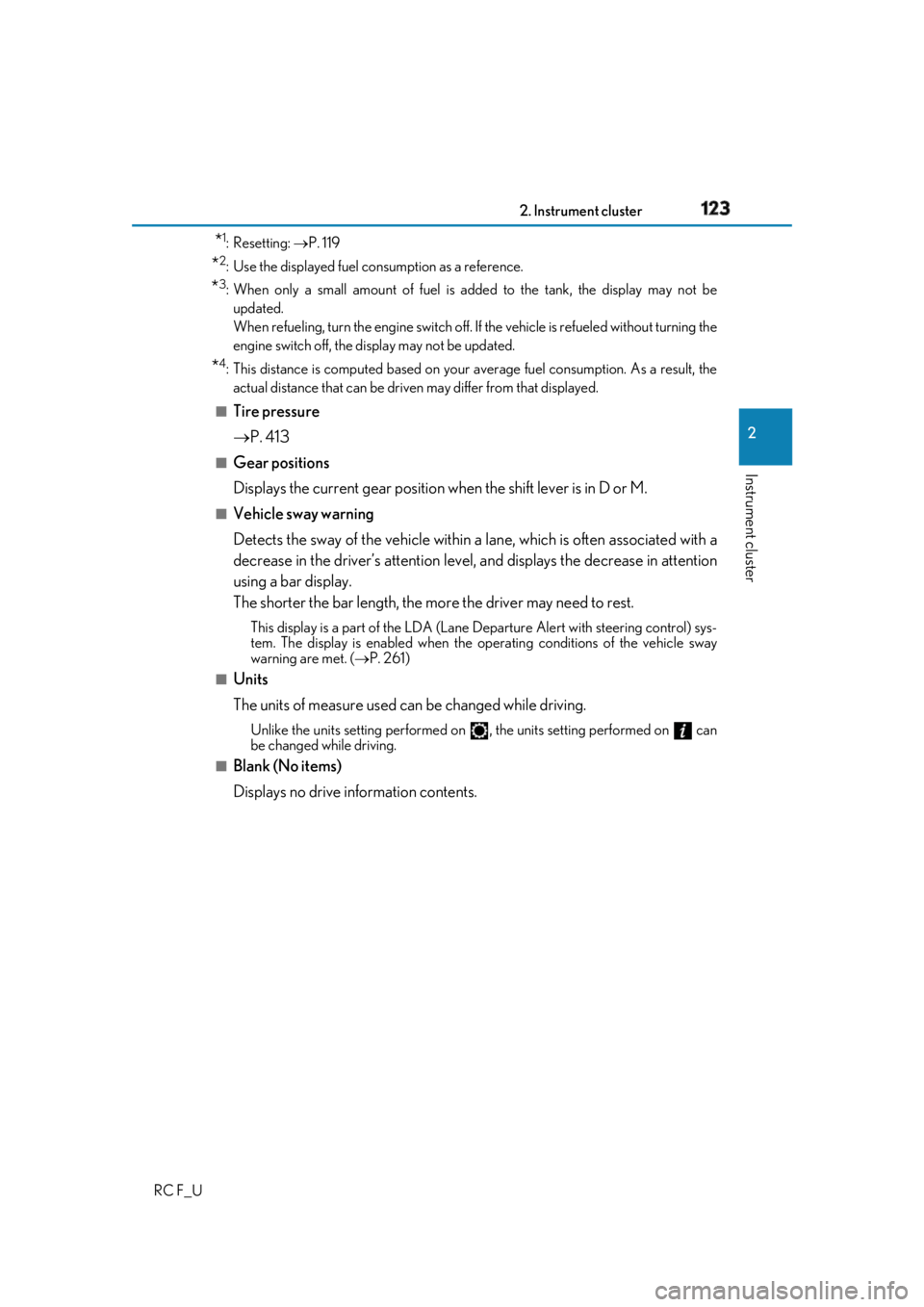
RC F_U * 1
:Resetting: P. 119
* 2
: Use the displayed fuel consumption as a reference.
* 3
: When only a small amount of fuel is added to the tank, the display may not be
updated.
When refueling, turn the engine switch off. If the vehicle is refueled without turning the
engine switch off, the display may not be updated.
* 4
: This distance is computed based on your average fuel consumption. As a result, the
actual distance that can be driven may differ from that displayed.■
Tire pressure
P. 413■
Gear positions
Displays the current gear position when the shift lever is in D or M.■
Vehicle sway warning
Detects the sway of the vehicle within a lane, which is often associated with a
decrease in the driver’s at tention level, and displays the decrease in attention
using a bar display.
The shorter the bar length, the more the driver may need to rest. This display is a part of the LDA (Lane Departure Alert with steering control) sys-
tem. The display is enabled when the op erating conditions of the vehicle sway
warning are met. ( P. 261)■
Units
The units of measure used can be changed while driving. Unlike the units setting performed on , the units setting performed on can
be changed while driving.■
Blank (No items)
Displays no drive information contents.
Page 135 of 636
1352. Instrument cluster
2
Instrument cluster
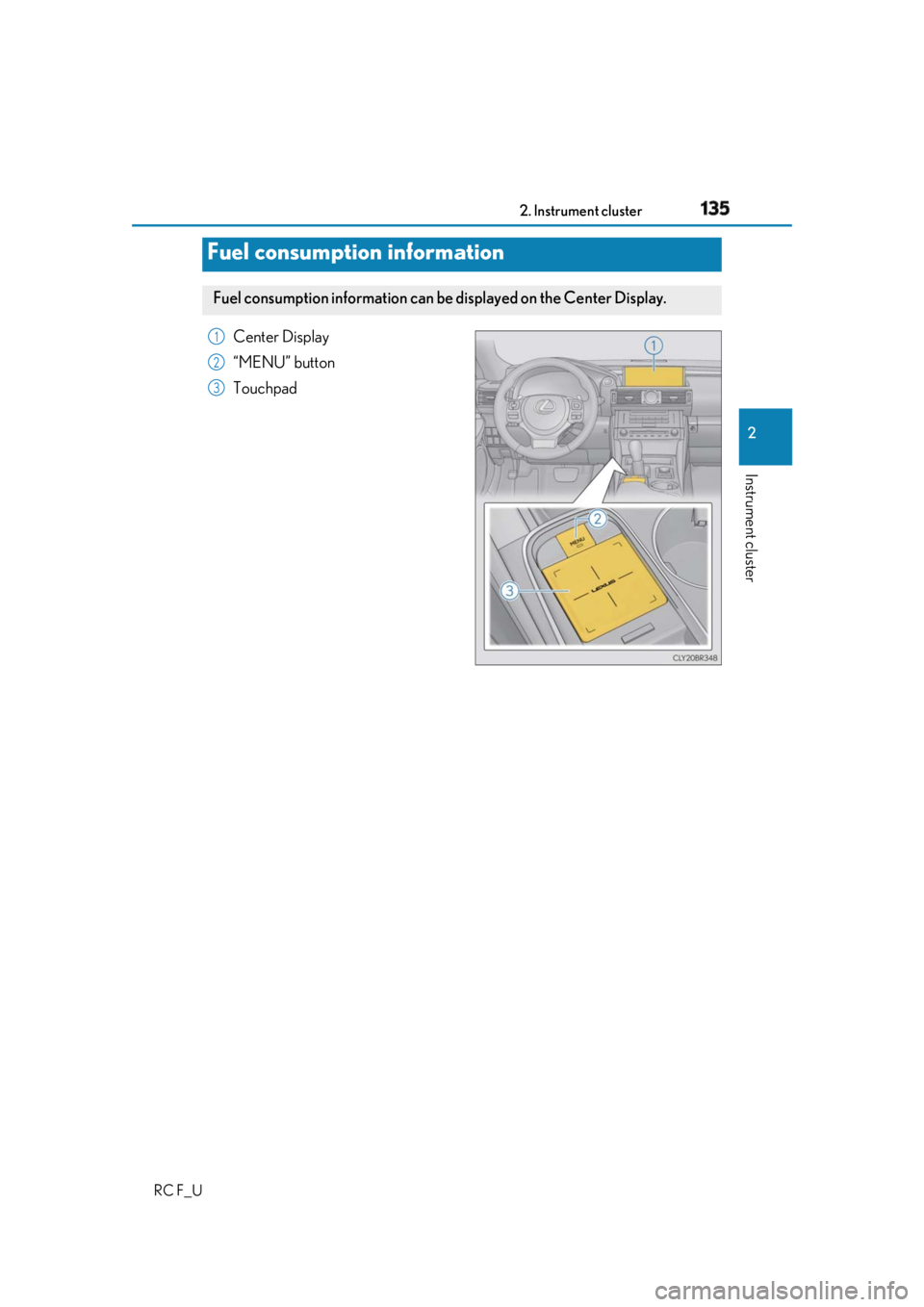
RC F_U Center Display
“MENU” button
Touchpad
Fuel consumption information Fuel consumption information can be displayed on the Center Display. 1
2
3
Page 136 of 636
136 2. Instrument cluster
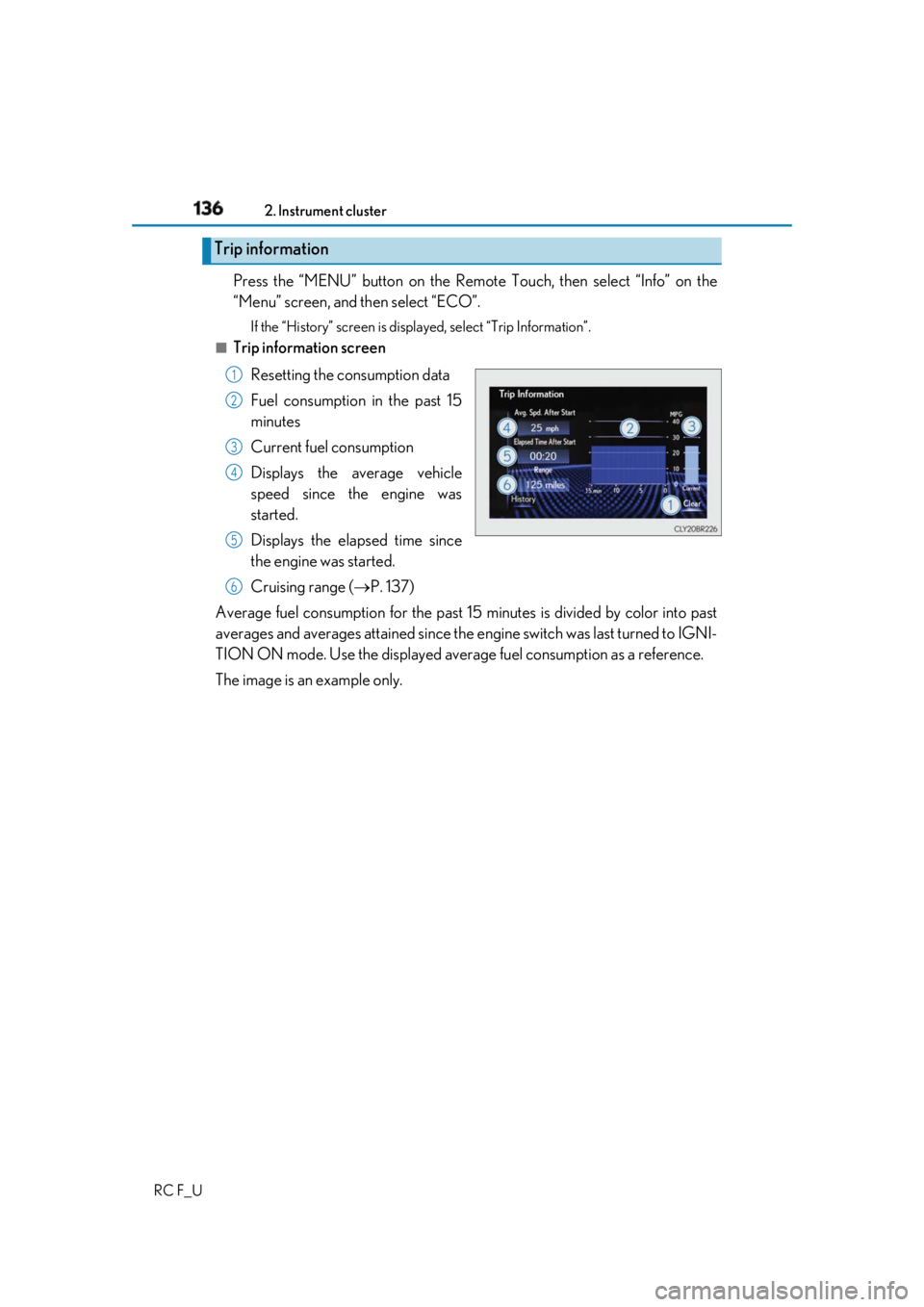
RC F_U Press the “MENU” button on the Remote Touch, then select “Info” on the
“Menu” screen, and then select “ECO”. If the “History” screen is displayed, select “Trip Information”.■
Trip information screen
Resetting the consumption data
Fuel consumption in the past 15
minutes
Current fuel consumption
Displays the average vehicle
speed since the engine was
started.
Displays the elapsed time since
the engine was started.
Cruising range ( P. 137)
Average fuel consumption for the past 15 minutes is divided by color into past
averages and averages attained since the engine switch was last turned to IGNI-
TION ON mode. Use the displayed average fuel consumption as a reference.
The image is an example only.Trip information 1
2
3
4
5
6
Page 137 of 636
1372. Instrument cluster
2
Instrument cluster
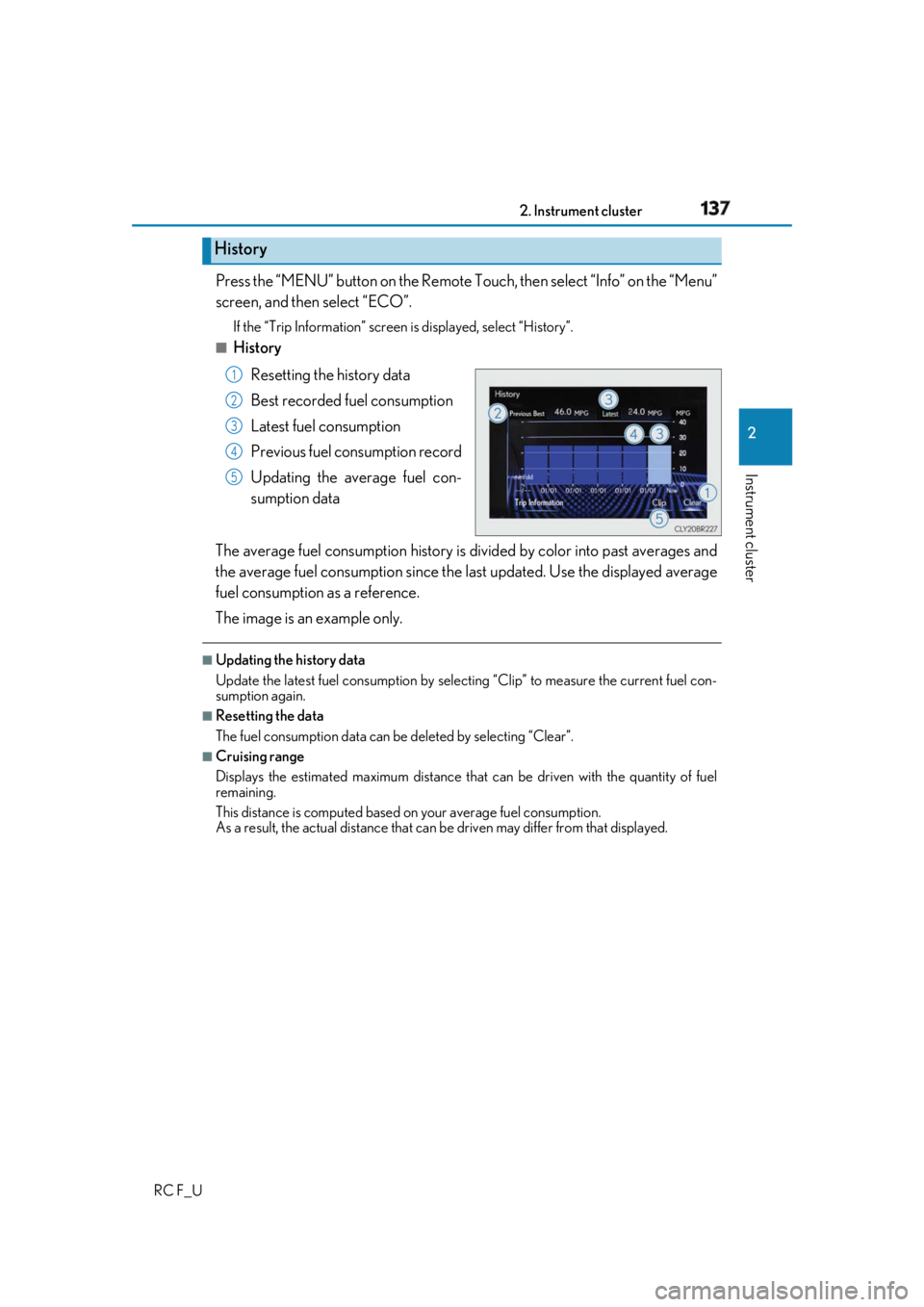
RC F_U Press the “MENU” button on the Remote To uch, then select “Info” on the “Menu”
screen, and then select “ECO”. If the “Trip Information” screen is displayed, select “History”.■
History
Resetting the history data
Best recorded fuel consumption
Latest fuel consumption
Previous fuel consumption record
Updating the average fuel con-
sumption data
The average fuel consumption history is di vided by color into past averages and
the average fuel consumption since the last updated. Use the displayed average
fuel consumption as a reference.
The image is an example only. ■
Updating the history data
Update the latest fuel consumption by sele cting “Clip” to measure the current fuel con-
sumption again. ■
Resetting the data
The fuel consumption data can be deleted by selecting “Clear”. ■
Cruising range
Displays the estimated maximum distance that can be driven with the quantity of fuel
remaining.
This distance is computed based on your average fuel consumption.
As a result, the actual distance that can be driven may differ from that displayed.History 1
2
3
4
5
Page 138 of 636
138 2. Instrument cluster
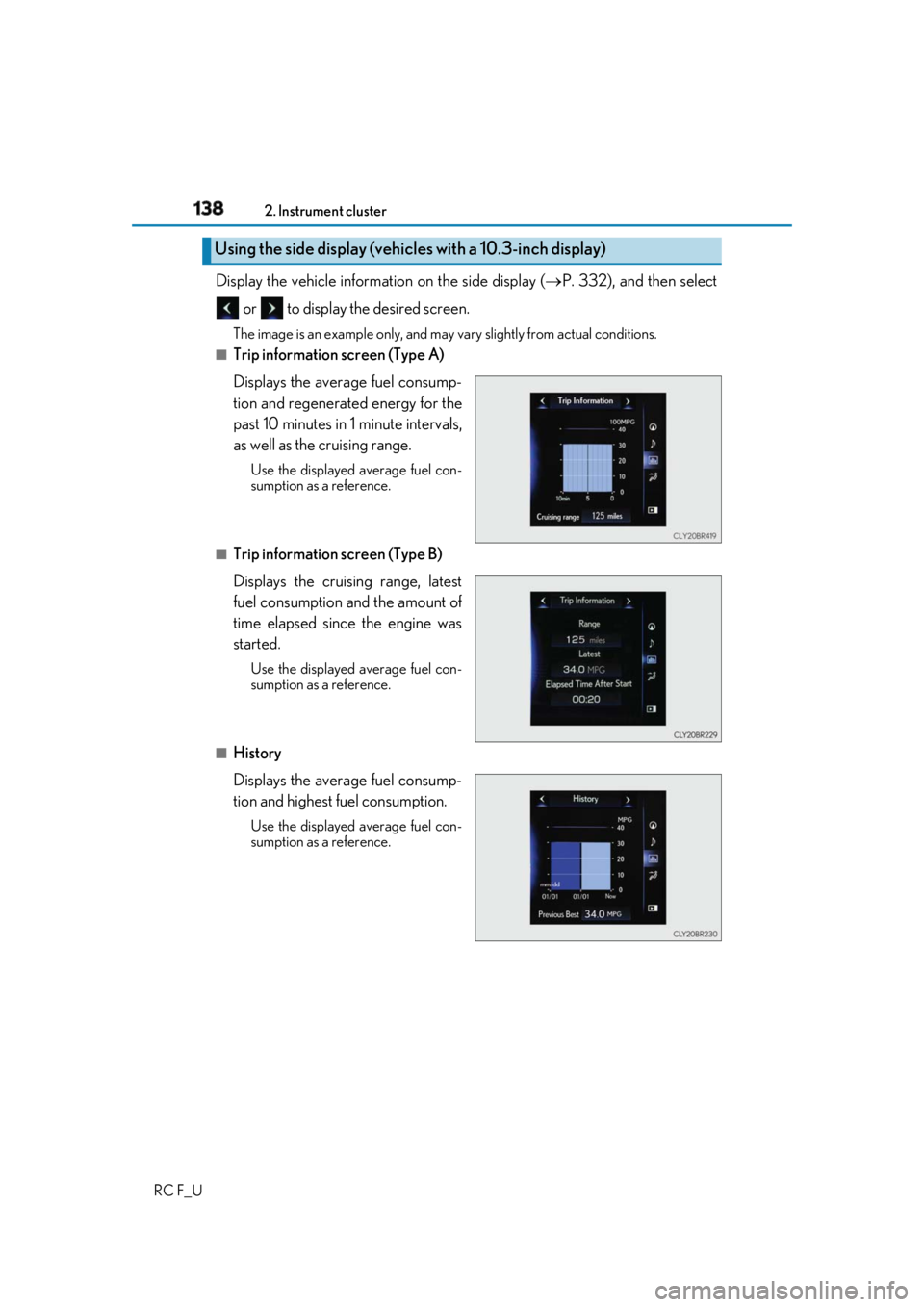
RC F_U Display the vehicle information on the side display ( P. 332), and then select
or to display the desired screen. The image is an example only, and may va ry slightly from actual conditions.■
Trip information screen (Type A)
Displays the average fuel consump-
tion and regenerated energy for the
past 10 minutes in 1 minute intervals,
as well as the cruising range. Use the displayed average fuel con-
sumption as a reference.
■
Trip information screen (Type B)
Displays the cruising range, latest
fuel consumption and the amount of
time elapsed since the engine was
started. Use the displayed average fuel con-
sumption as a reference.
■
History
Displays the average fuel consump-
tion and highest fuel consumption. Use the displayed average fuel con-
sumption as a reference.Using the side display (vehicles with a 10.3-inch display)