lights LEXUS RCF 2019 Owner's Manual
[x] Cancel search | Manufacturer: LEXUS, Model Year: 2019, Model line: RCF, Model: LEXUS RCF 2019Pages: 636, PDF Size: 12.48 MB
Page 95 of 636
952. Instrument cluster
2
Instrument cluster
RC F_U ■
The meters and display illuminate when
The engine switch is in IGNITION ON mode. ■
Instrument panel brightness adjustment
The instrument panel brightness levels when the tail lights are on and off can be adjusted
individually. However, when the surroundings are bright (dayti me, etc.), turning on the tail
lights will not change the inst rument panel brightness. At th is time, any adjustments made
to the instrument panel brightness levels will be applied to both settings at once. ■
Outside temperature display ●
In the following situations, the correct outside temperature may not be displayed, or the
display may take longer than normal to change.
• When stopped, or driving at low speeds (less than 12 mph [20 km/h])
• When the outside temperature has changed suddenly (at the entrance/exit of a
garage, tunnel, etc.) ●
When “_ _”or “E” is displayed, the system may be malfunctioning.
Take your vehicle to your Lexus dealer. ■
Pop-up display ●
In some situations, such as when a switch operation is performed, a pop-up display will
be temporarily displayed on the multi-info rmation display or the odometer/trip meter
screen (F SPORT models). ●
Some pop-up displays can be set on/off. ( P. 111)■
Customization
The meter display can be customized on the multi-information display. ( P. 111)
NOTICE ■
To prevent damage to the engine and its components●
Do not let the indicator needle of the tachometer enter the red zone, which indicates
the maximum engine speed. ●
The engine may be overheating if the engine coolant temperature gauge is in the red
zone (H). In this case, immediately stop the vehicle in a safe place, and check the
engine after it has cooled completely. ( P. 526)
Page 100 of 636
100 2. Instrument cluster
RC F_U ■
Rev peak (Normal mode/SPORT S mode)
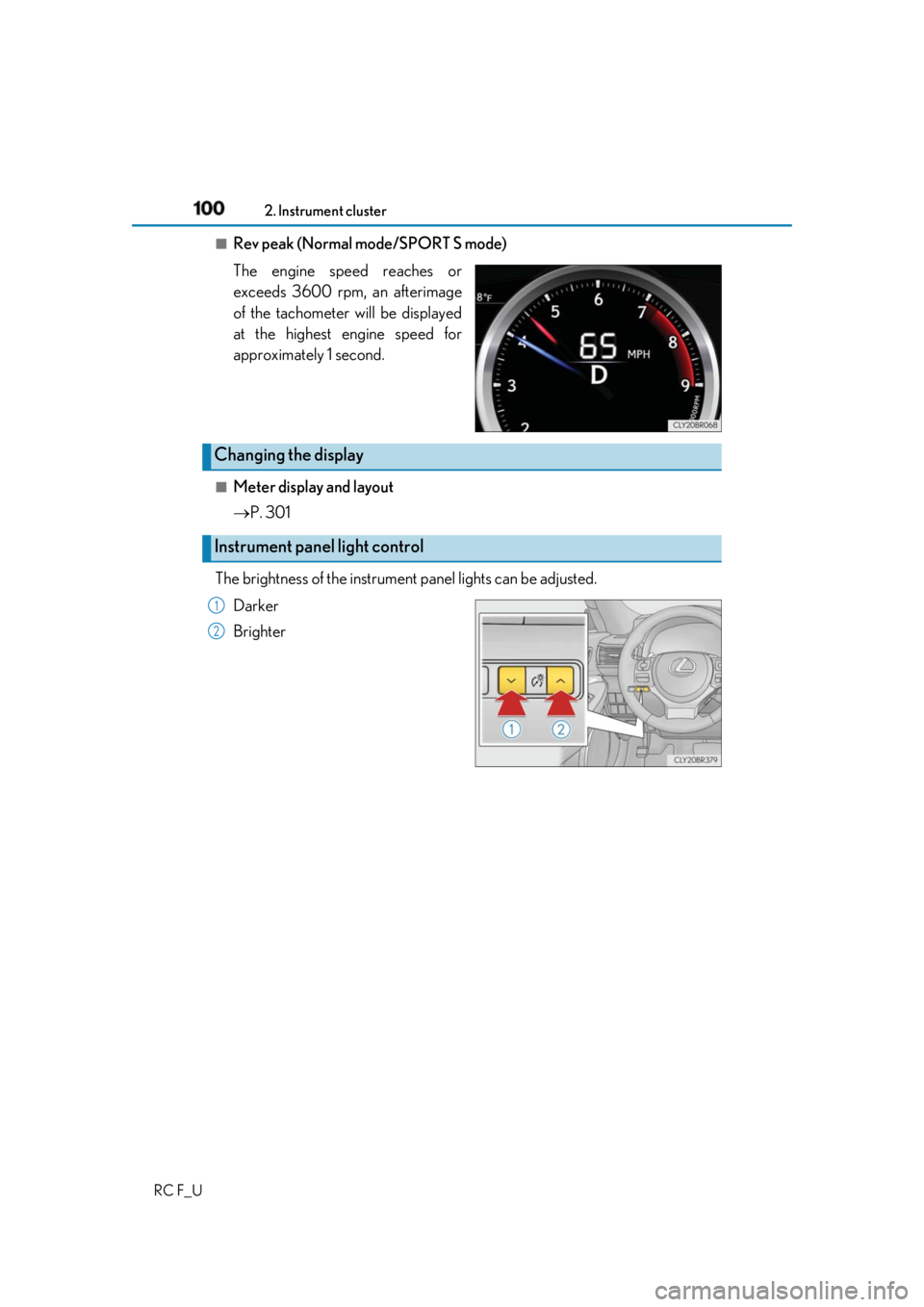
The engine speed reaches or
exceeds 3600 rpm, an afterimage
of the tachometer will be displayed
at the highest engine speed for
approximately 1 second.
■
Meter display and layout
P. 301
The brightness of the instrument panel lights can be adjusted.
Darker
BrighterChanging the display
Instrument panel light control 1
2
Page 102 of 636
102 2. Instrument cluster
RC F_U ■
Instrument panel brightness adjustment
The instrument panel brightness levels when the tail lights are on and off can be adjusted
individually. However, when the surroundings are bright (dayti me, etc.), turning on the tail
lights will not change the inst rument panel brightness. At th is time, any adjustments made
to the instrument panel brightness levels will be applied to both settings at once. ■
Dimming the analog speedometer lighting
The analog speedometer lighting will be dimm ed when the ambient light is bright, such
as during the daytime, and SPORT S or SPORT S+ mode is selected.■
Outside temperature display ●
In the following situations, the correct outside temperature may not be displayed, or the
display may take longer than normal to change.
• When stopped, or driving at low speeds (less than 12 mph [20 km/h])
• When the outside temperature has changed suddenly (at the entrance/exit of a
garage, tunnel, etc.) ●
When “ ” or “E” is displayed, the sy stem may be malfunctioning.
Take your vehicle to your Lexus dealer. ■
Pop-up display ●
In some situations, such as when a switch operation is performed, a pop-up display will
be temporarily displayed on the multi-information display.●
Some pop-up displays can be set on/off. ( P. 129)■
Liquid crystal display
Small spots or light spots may appear on the display. This phenomenon is characteristic
of liquid crystal displays, and there is no problem continuing to use the display.■
Customization
The meter display can be customized on the multi-information display. ( P. 129)
NOTICE ■
To prevent damage to the engine and its components●
Do not let the indicator of the tachometer enter the red zone, as it represents the
engine speed range which exceeds the maximum safe engine speed. ●
In the following situations, th e engine may be overheating. In this case, immediately
stop the vehicle in a safe place, and check the engine after it has cooled completely.
( P. 526)
• The engine coolant temperature gauge indicator ( ) is in the red zone and flash-
ing.
• The engine oil temperature gauge indicator ( ) is in the red zone and flashing.
Page 141 of 636
1413-1. Key information
3
Operation of each component
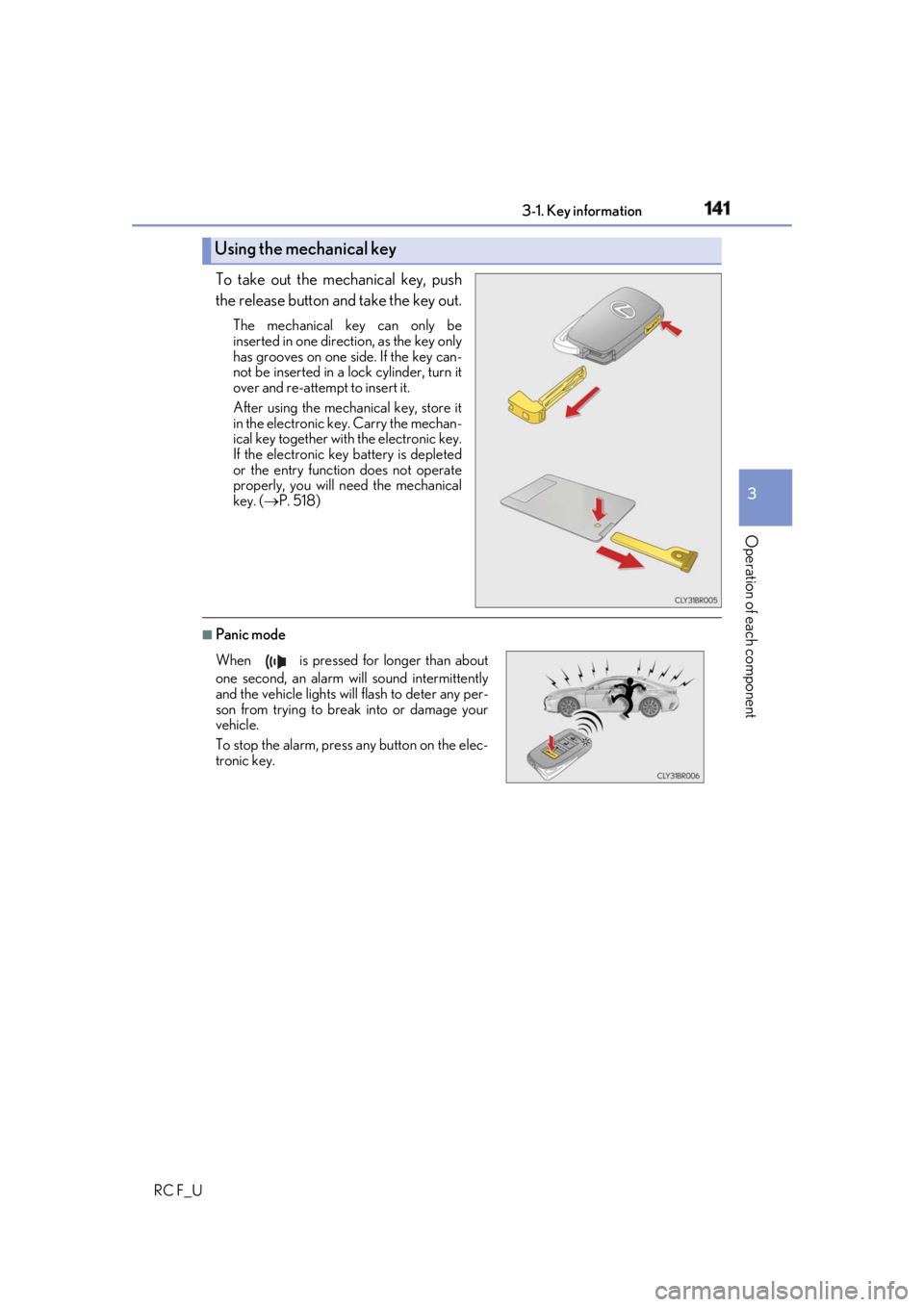
RC F_U To take out the mechanical key, push
the release button and take the key out. The mechanical key can only be
inserted in one direction, as the key only
has grooves on one side. If the key can-
not be inserted in a lock cylinder, turn it
over and re-attempt to insert it.
After using the mechanical key, store it
in the electronic ke y. Carry the mechan-
ical key together with the electronic key.
If the electronic key battery is depleted
or the entry function does not operate
properly, you will need the mechanical
key. ( P. 518)
■
Panic modeUsing the mechanical key
When is pressed for longer than about
one second, an alarm will sound intermittently
and the vehicle lights will flash to deter any per-
son from trying to break into or damage your
vehicle.
To stop the alarm, press any button on the elec-
tronic key.
Page 146 of 636
146 3-2. Opening, closing and locking the doors and trunk
RC F_U ■
Operation signals
A buzzer sounds and the emergency flashers flash to indicate that the doors have been
locked/unlocked. (Locked: once; Unlocked: twice)
A buzzer sounds to indicate that th e windows and moon roof are operating.■
Security feature
If a door is not opened within approximately 60 seconds after the vehicle is unlocked, the
security feature automatically locks the vehicle again. ■
Welcome light illumination control
The side marker, parking, tail and license plate lights automati cally turn on at night when
the doors are unlocked using the entry function or wireless remote control if the light
switch is in the “AUTO” position. ■
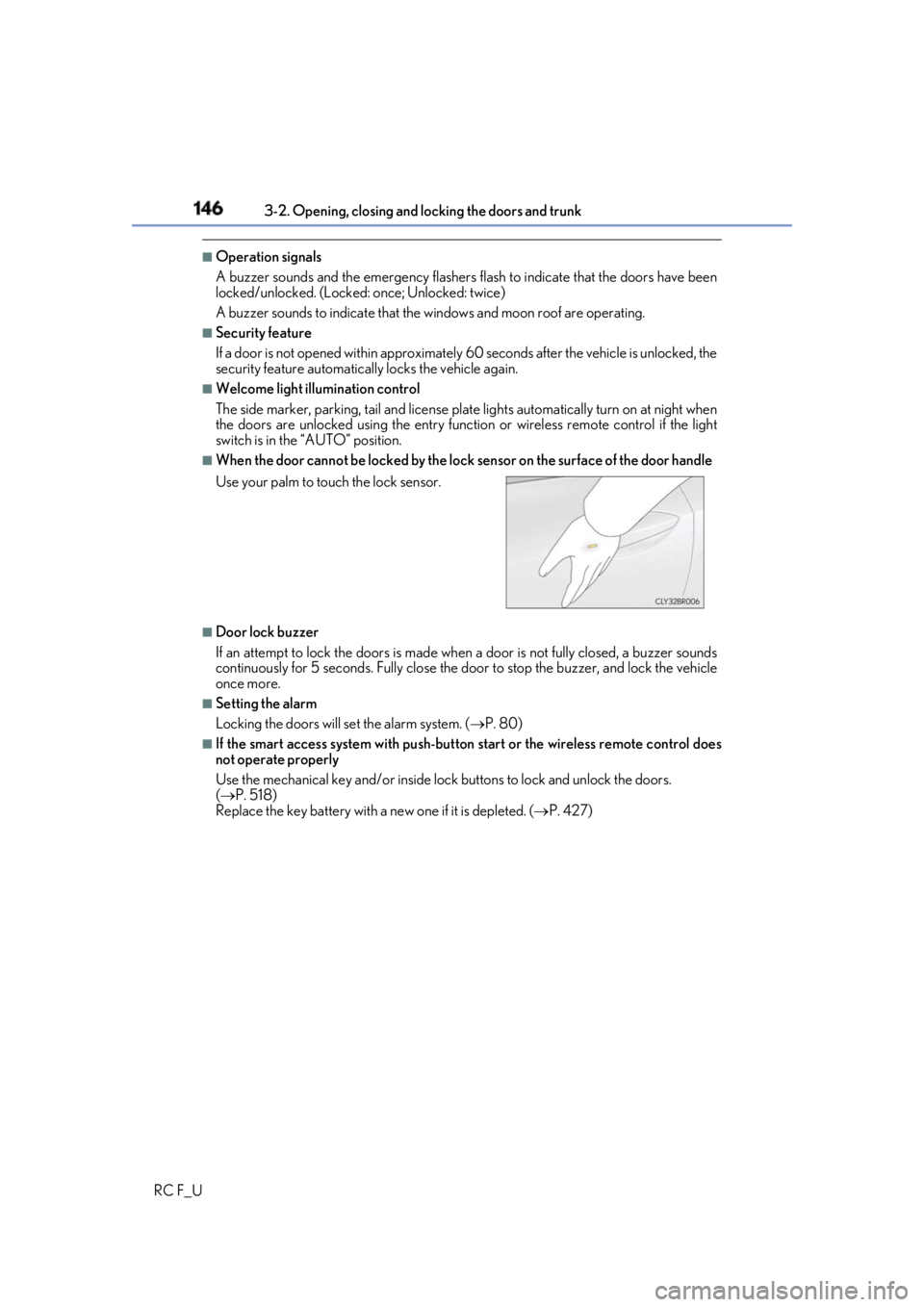
When the door cannot be locked by the lock sensor on the surface of the door handle
■
Door lock buzzer
If an attempt to lock the doors is made when a door is not fully closed, a buzzer sounds
continuously for 5 seconds. Fully close the d oor to stop the buzzer, and lock the vehicle
once more. ■
Setting the alarm
Locking the doors will set the alarm system. ( P. 80)■
If the smart access system with push-button start or the wireless remote control does
not operate properly
Use the mechanical key and/or inside lock buttons to lock and unlock the doors.
( P. 518)
Replace the key battery with a new one if it is depleted. ( P. 427)Use your palm to touch the lock sensor.
Page 176 of 636
176 3-4. Adjusting the steering wheel and mirrors
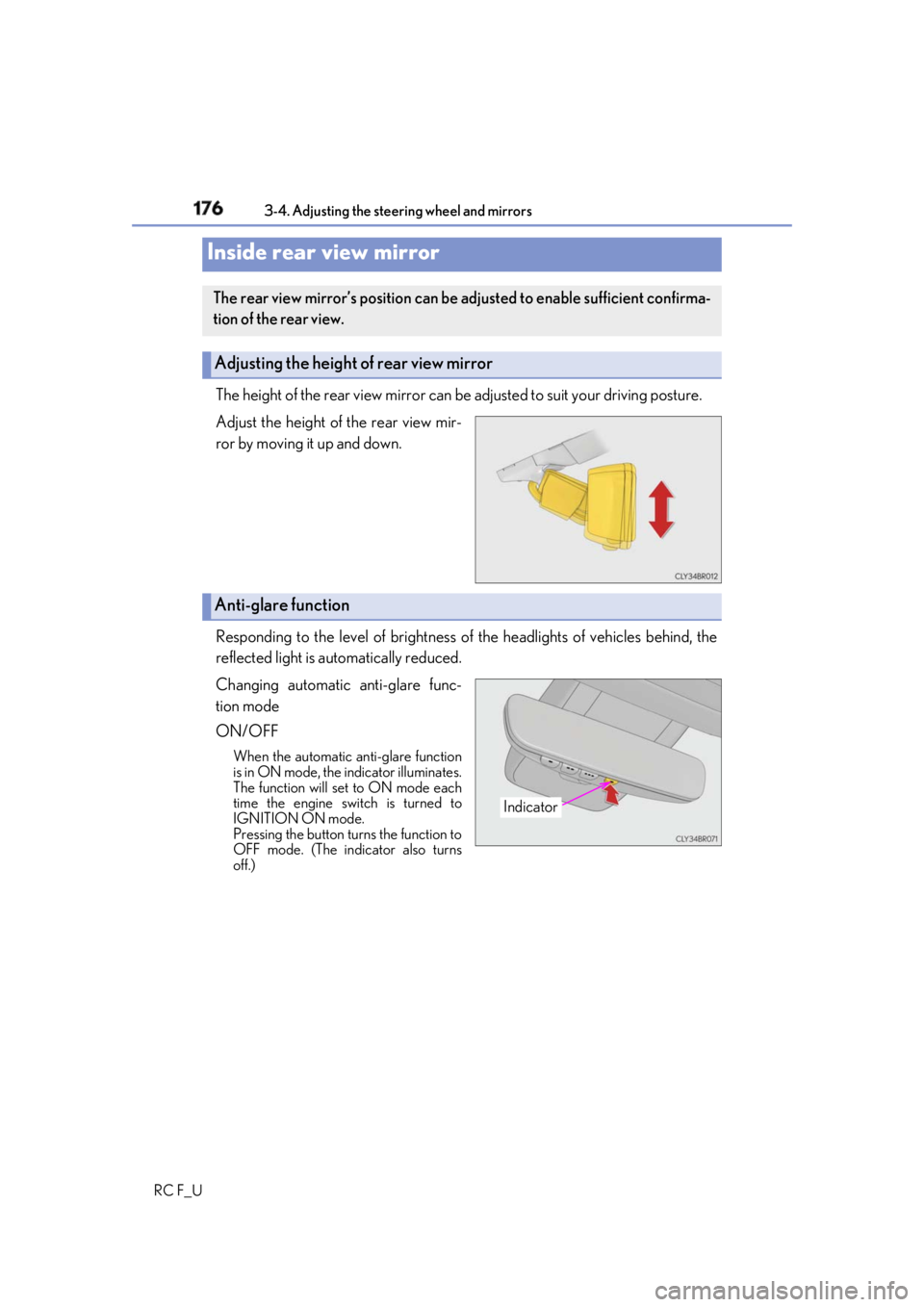
RC F_U The height of the rear view mirror can be adjusted to suit your driving posture.
Adjust the height of the rear view mir-
ror by moving it up and down.
Responding to the level of brightness of the headlights of vehicles behind, the
reflected light is automatically reduced.
Changing automatic anti-glare func-
tion mode
ON/OFF When the automatic anti-glare function
is in ON mode, the indicator illuminates.
The function will set to ON mode each
time the engine switch is turned to
IGNITION ON mode.
Pressing the button turns the function to
OFF mode. (The indicator also turns
off.)Inside rear view mirror The rear view mirror’s position can be adjusted to enable sufficient confirma-
tion of the rear view.
Adjusting the height of rear view mirror
Anti-glare function
Indicator
Page 191 of 636

191
Driving
4
RC F_U 4-1. Before driving
Driving the vehicle ...................... 192
Cargo and luggage .................... 201
Vehicle load limits ......................204
Trailer towing .............................. 205
Dinghy towing ............................ 206
4-2. Driving procedures
Engine (ignition) switch ...........207
Automatic transmission............ 213
Turn signal lever........................... 221
Parking brake .............................. 222
ASC
(Active Sound Control)
(RC350/RC300) .................223
ASC
(Active Sound Control)
(RC F)........................................... 224
4-3. Operating the lights and
wipers
Headlight switch .........................225
Automatic High Beam .............228
Fog light switch ...........................232
Windshield wipers and
washer..........................................233 4-4. Refueling
Opening the fuel tank cap .......241
4-5. Using the driving support
systems
Lexus Safety System+ .............. 245
PCS
(Pre-Collision System) .........250
LDA
(Lane Departure Alert
with steering control) ..............261
Dynamic radar cruise
control ......................................... 268
Intuitive parking assist ..............280
BSM
(Blind Spot Moni tor)..............290
• BSM function ......................... 293
• RCTA function...................... 297
Driving mode select
switch ............................................ 301
Active rear wing ......................... 307
TVD
(Torque Vectoring
Differential) ................................. 310
Driving assist systems ............... 312
4-6. Driving tips
Winter driving tips .....................320
Page 221 of 636
2214-2. Driving procedures
4
Driving
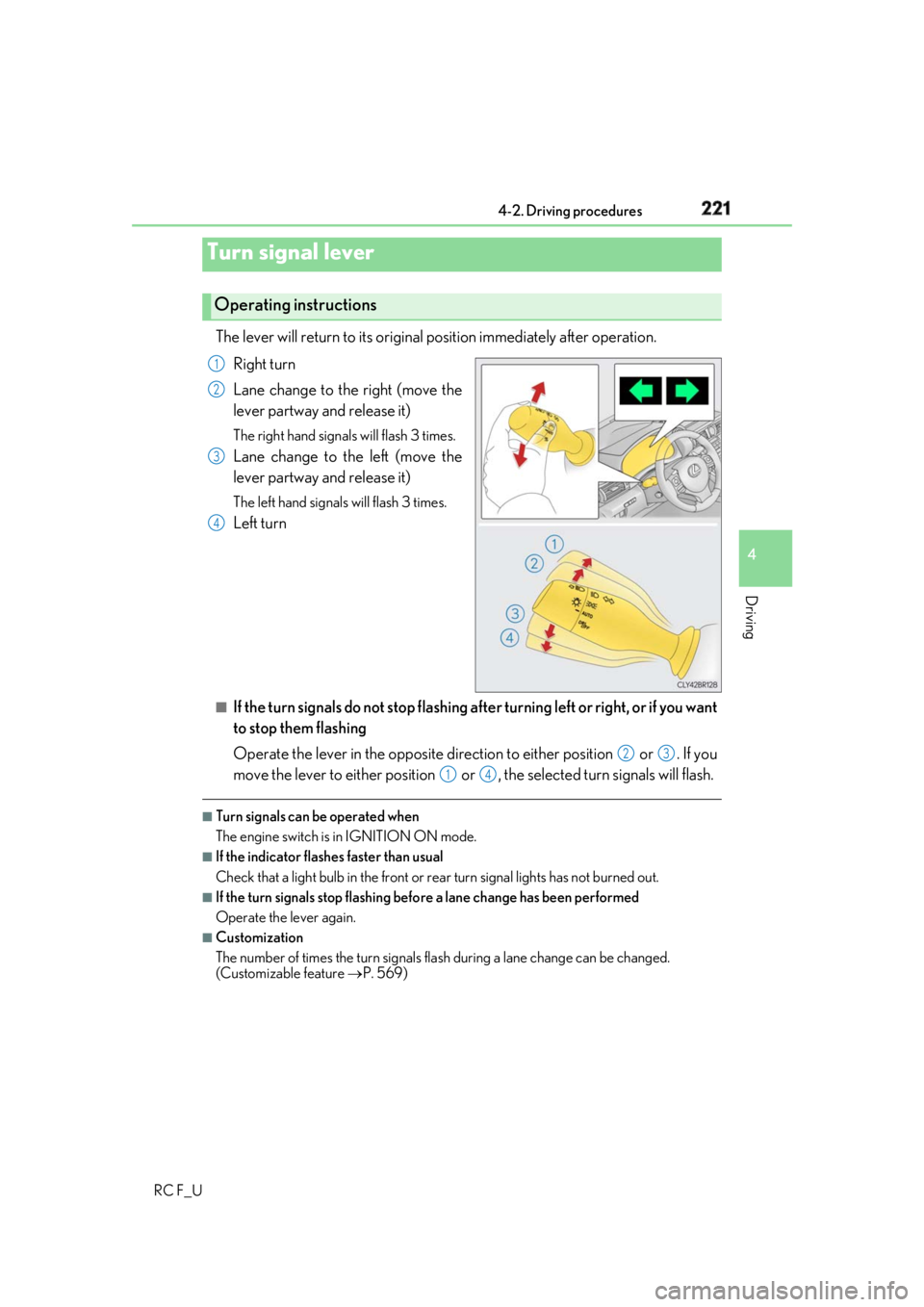
RC F_U The lever will return to its original position immediately after operation.
Right turn
Lane change to the right (move the
lever partway and release it) The right hand signals will flash 3 times.
Lane change to the left (move the
lever partway and release it) The left hand signals will flash 3 times.
Left turn
■
If the turn signals do not stop flashing af ter turning left or right, or if you want
to stop them flashing
Operate the lever in the opposite direct ion to either position or . If you
move the lever to either position or , the selected turn signals will flash. ■
Turn signals can be operated when
The engine switch is in IGNITION ON mode. ■
If the indicator flashes faster than usual
Check that a light bulb in the front or rear turn signal lights has not burned out.■
If the turn signals stop flashing befo re a lane change has been performed
Operate the lever again. ■
Customization
The number of times the turn signals flas h during a lane change can be changed.
(Customizable feature P. 569)Turn signal lever Operating instructions 1
2
3
4
2 3
1 4
Page 225 of 636
225
4
Driving
RC F_U 4-3. Operating the lights and wipers
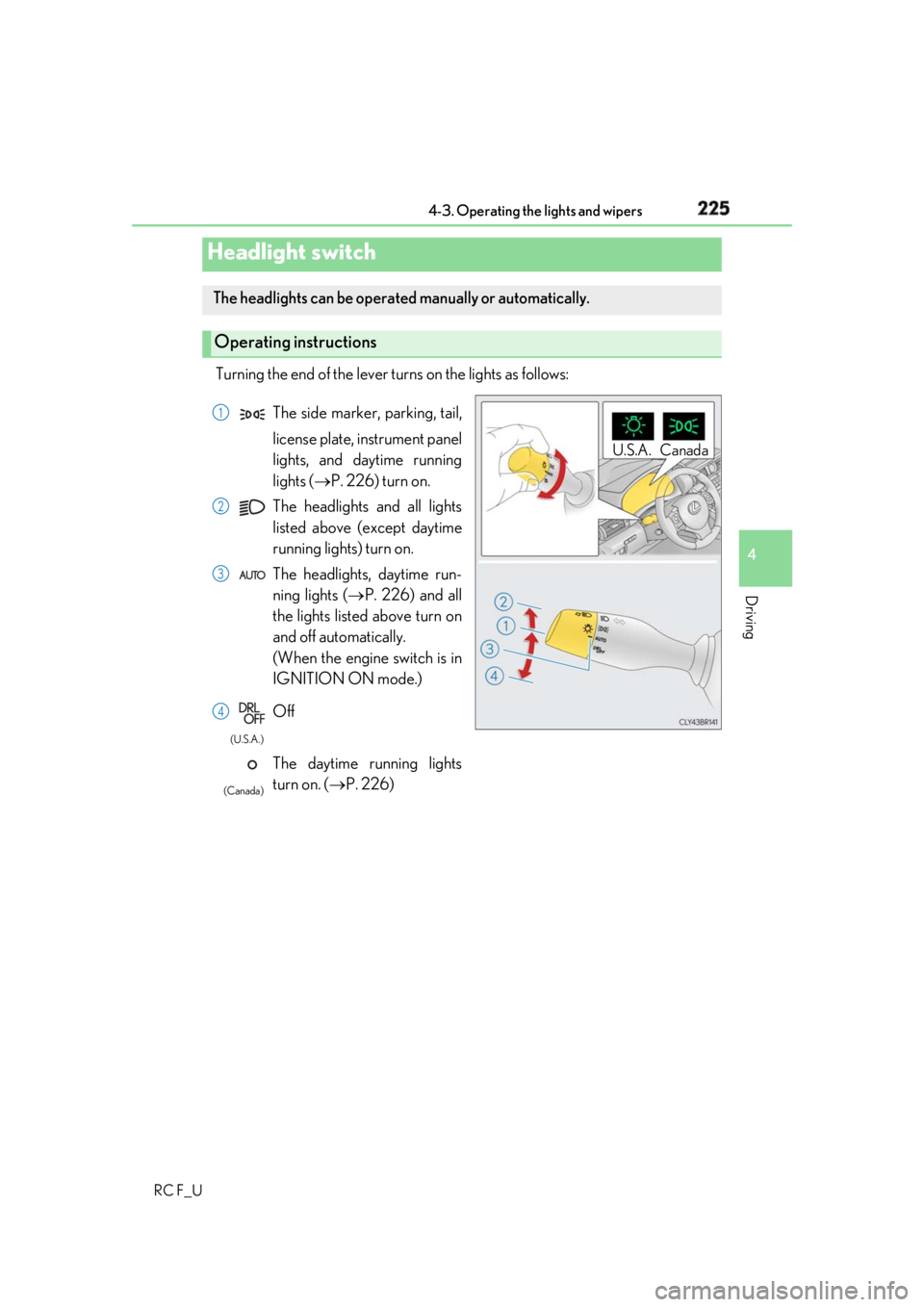
Turning the end of the lever turns on the lights as follows:
Headlight switch The headlights can be operated manually or automatically.
Operating instructions U.S.A. Canada
The side marker, parking, tail,
license plate, instrument panel
lights, and daytime running
lights ( P. 226) turn on.
The headlights and all lights
listed above (except daytime
running lights) turn on.
The headlights, daytime run-
ning lights ( P. 226) and all
the lights listed above turn on
and off automatically.
(When the engine switch is in
IGNITION ON mode.)
Off
The daytime running lights
turn on. ( P. 226) 1
2
3
4 (U.S.A.)
(Canada)
Page 226 of 636
226 4-3. Operating the lights and wipers
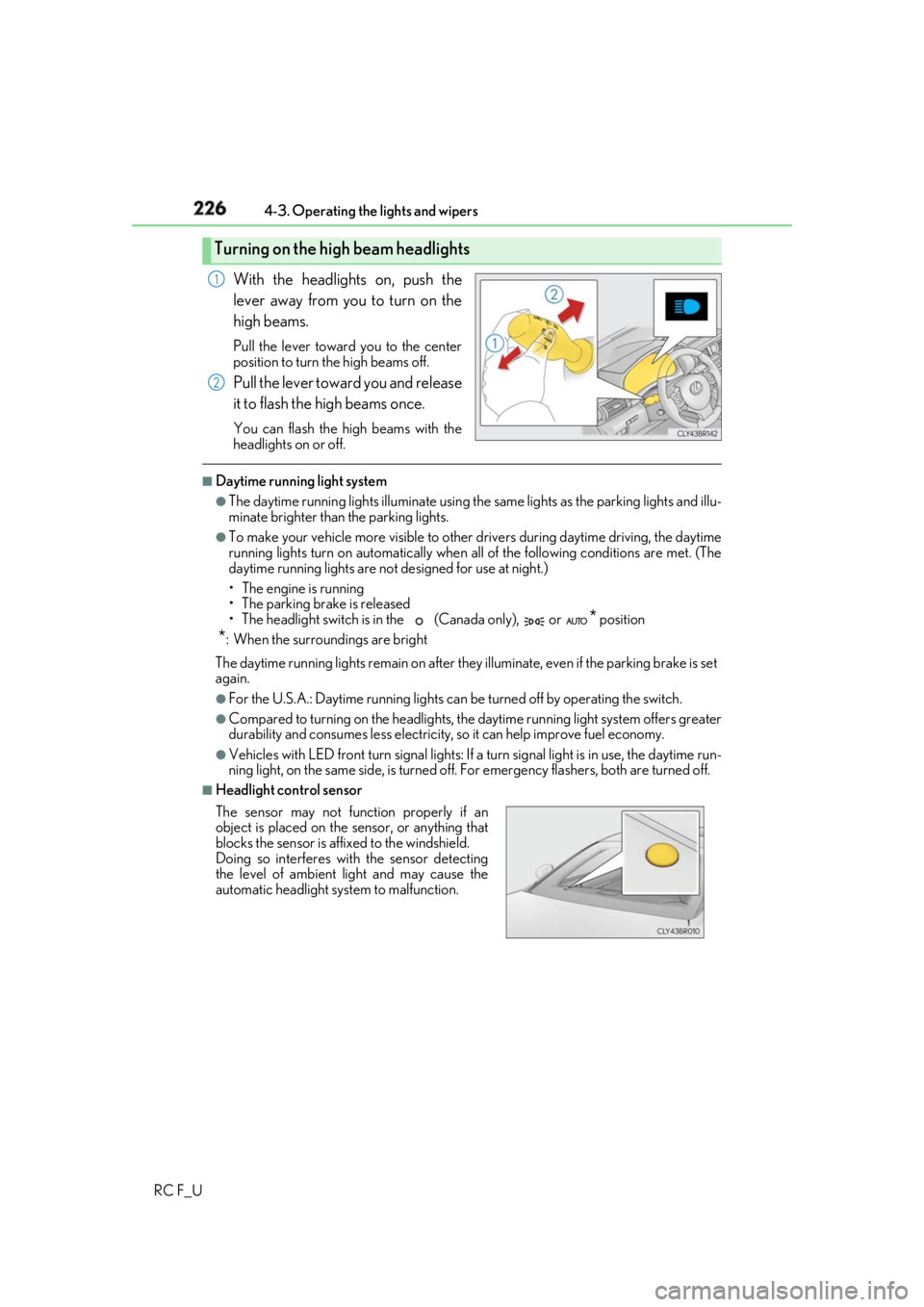
RC F_U With the headlights on, push the
lever away from you to turn on the
high beams. Pull the lever toward you to the center
position to turn the high beams off.
Pull the lever toward you and release
it to flash the high beams once. You can flash the high beams with the
headlights on or off. ■
Daytime running light system ●
The daytime running lights illuminate using th e same lights as the parking lights and illu-
minate brighter than the parking lights. ●
To make your vehicle more visible to other drivers during daytime driving, the daytime
running lights turn on automatically when a ll of the following conditions are met. (The
daytime running lights are not designed for use at night.)
• The engine is running
• The parking brake is released
• The headlight switch is in the (Canada only), or
* position
* : When the surroundings are bright
The daytime running lights remain on after they illuminate, even if the parking brake is set
again. ●
For the U.S.A.: Daytime running lights can be turned off by operating the switch.●
Compared to turning on the headlights, the daytime running light system offers greater
durability and consumes less electricity, so it can help improve fuel economy.●
Vehicles with LED front turn signal lights: If a turn signal light is in use, the daytime run-
ning light, on the same side, is turned off. For emergency flashers, both are turned off. ■
Headlight control sensorTurning on the high beam headlights 1
2
The sensor may not function properly if an
object is placed on the sensor, or anything that
blocks the sensor is affixed to the windshield.
Doing so interferes with the sensor detecting
the level of ambient li ght and may cause the
automatic headlight system to malfunction.