lock LEXUS RCF 2019 Owner's Manual
[x] Cancel search | Manufacturer: LEXUS, Model Year: 2019, Model line: RCF, Model: LEXUS RCF 2019Pages: 636, PDF Size: 12.48 MB
Page 105 of 636
1052. Instrument cluster
2
Instrument cluster
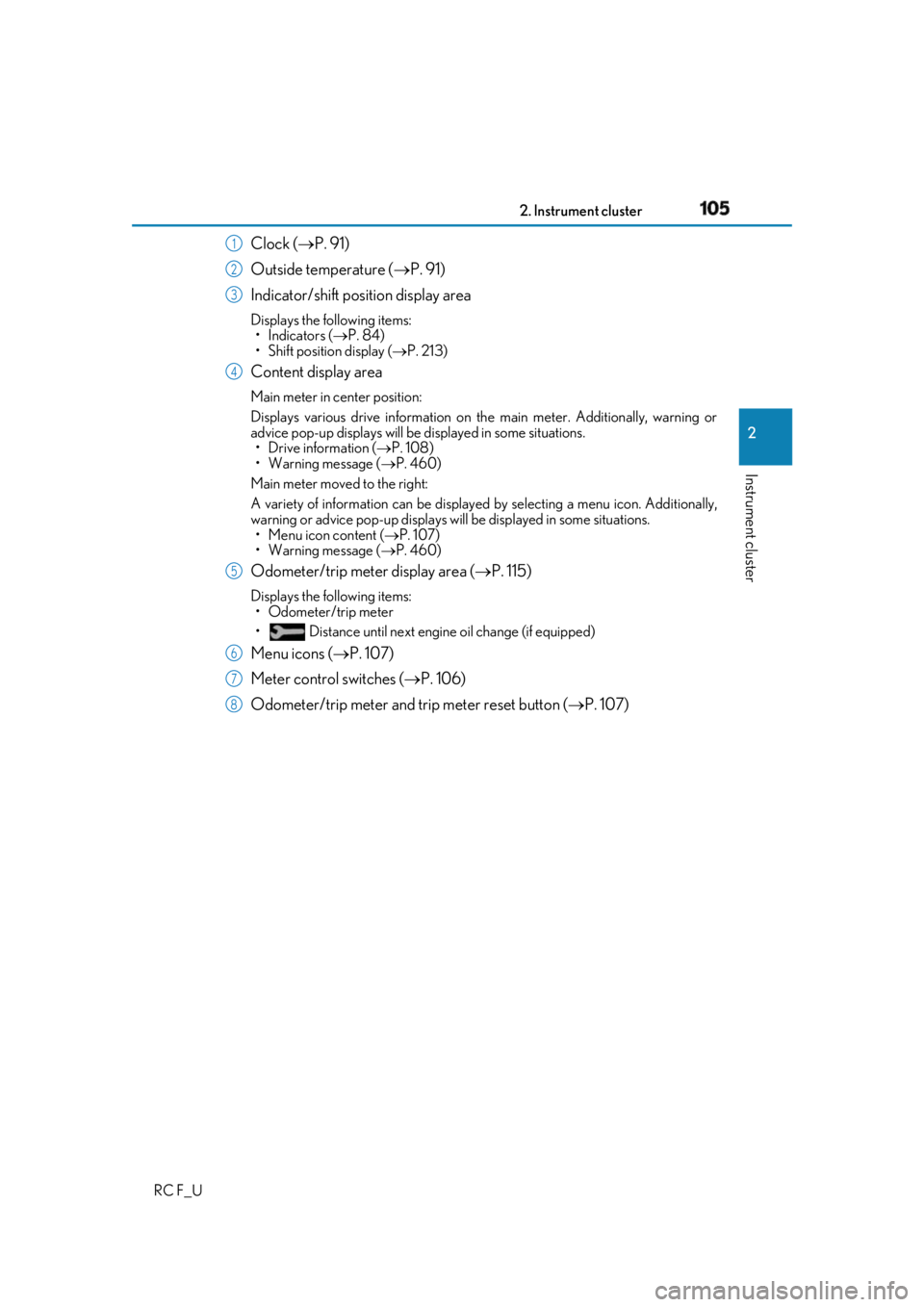
RC F_U Clock ( P. 91)
Outside temperature ( P. 91)
Indicator/shift position display area Displays the following items:
•Indicators ( P. 84)
• Shift position display ( P. 213)
Content display area Main meter in center position:
Displays various drive information on th e main meter. Additionally, warning or
advice pop-up displays will be displayed in some situations.
• Drive information ( P. 108)
• Warning message ( P. 460)
Main meter moved to the right:
A variety of information can be displayed by selecting a menu icon. Additionally,
warning or advice pop-up displays w ill be displayed in some situations.
• Menu icon content ( P. 107)
• Warning message ( P. 460)
Odometer/trip meter display area
( P. 115)Displays the following items:
• Odometer/trip meter
• Distance until next engine oil change (if equipped)
Menu icons ( P. 107)
Meter control switches ( P. 106)
Odometer/trip meter and trip meter reset button ( P. 107)1
2
3
4
5
6
7
8
Page 112 of 636
112 2. Instrument cluster
RC F_U ■
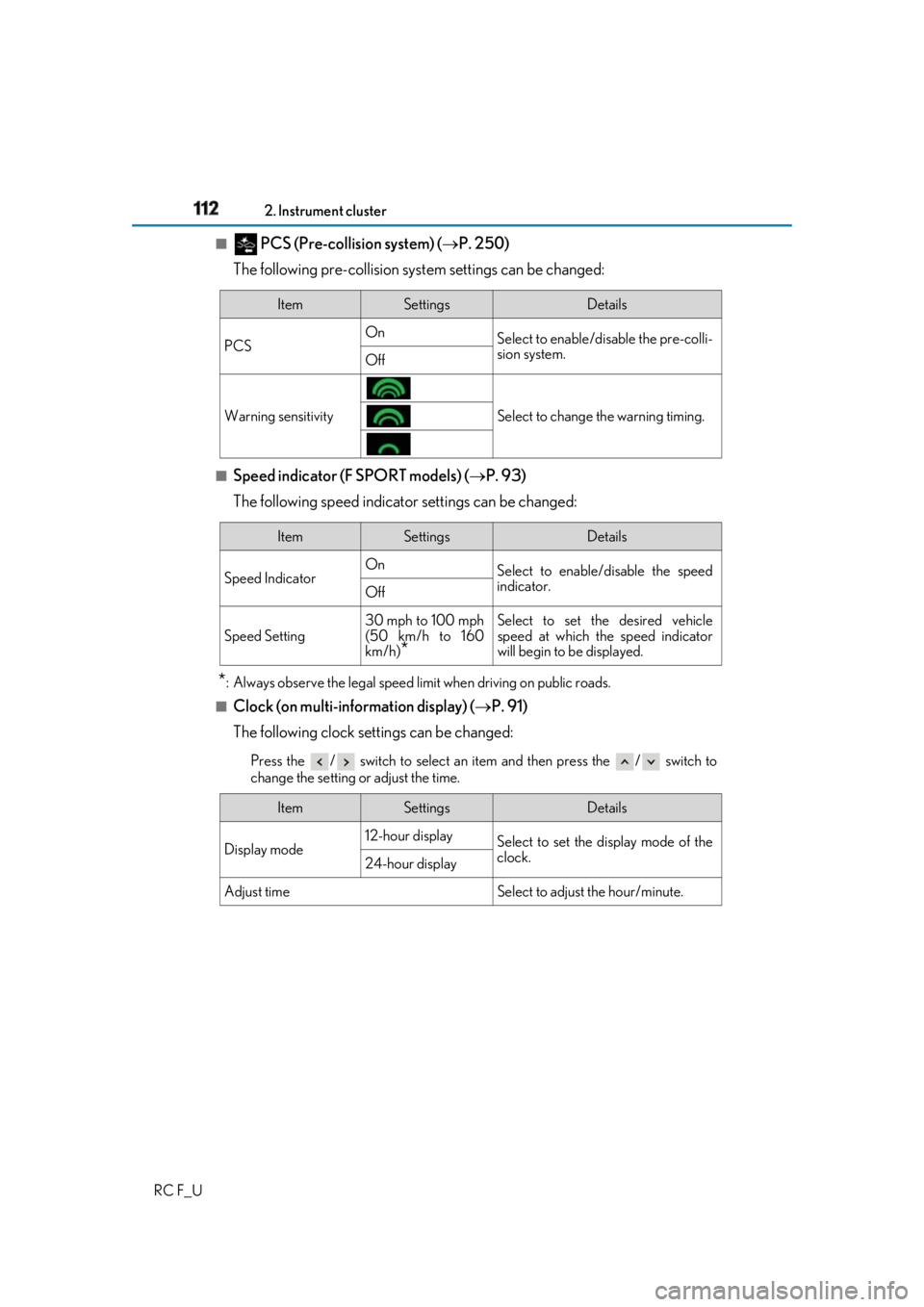
PCS (Pre-collision system) ( P. 250)
The following pre-collision syst em settings can be changed:
■
Speed indicator (F SPORT models) ( P. 93)
The following speed indicator settings can be changed:
* : Always observe the legal speed li mit when driving on public roads.■
Clock (on multi-information display) ( P. 91)
The following clock settings can be changed: Press the / switch to select an it em and then press the / switch to
change the setting or adjust the time. Item Settings Details
PCS On
Select to enable/disable the pre-colli-
sion system.
Off
Warning sensitivity Select to change the warning timing.
Item Settings Details
Speed Indicator On
Select to enable/disable the speed
indicator.
Off
Speed Setting 30 mph to 100 mph
(50 km/h to 160
km/h)
* Select to set the desired vehicle
speed at which the speed indicator
will begin to be displayed.
Item Settings Details
Display mode 12-hour display
Select to set the display mode of the
clock.
24-hour display
Adjust time Select to adjust the hour/minute.
Page 139 of 636

139
Operation of
each component
3
RC F_U 3-1. Key information
Keys .................................................. 140
3-2. Opening, closing and
locking the doors and
trunk
Doors ............................................... 145
Trunk .................................................. 151
Smart access system with
push-button start ...................... 156
3-3. Adjusting the seats
Front seats........................................ 161
Rear seats....................................... 164
Power easy access system/
driving position memory/
memory recall function ......... 166
Head restraints .............................. 171
3-4. Adjusting the steering
wheel and mirrors
Steering wheel ..............................174
Inside rear view mirror ..............176
Outside rear view mirrors....... 178
3-5. Opening, closing the
windows and moon roof
Power windows ........................... 182
Moon roof ...................................... 186
Page 140 of 636
140
RC F_U 3-1. Key information
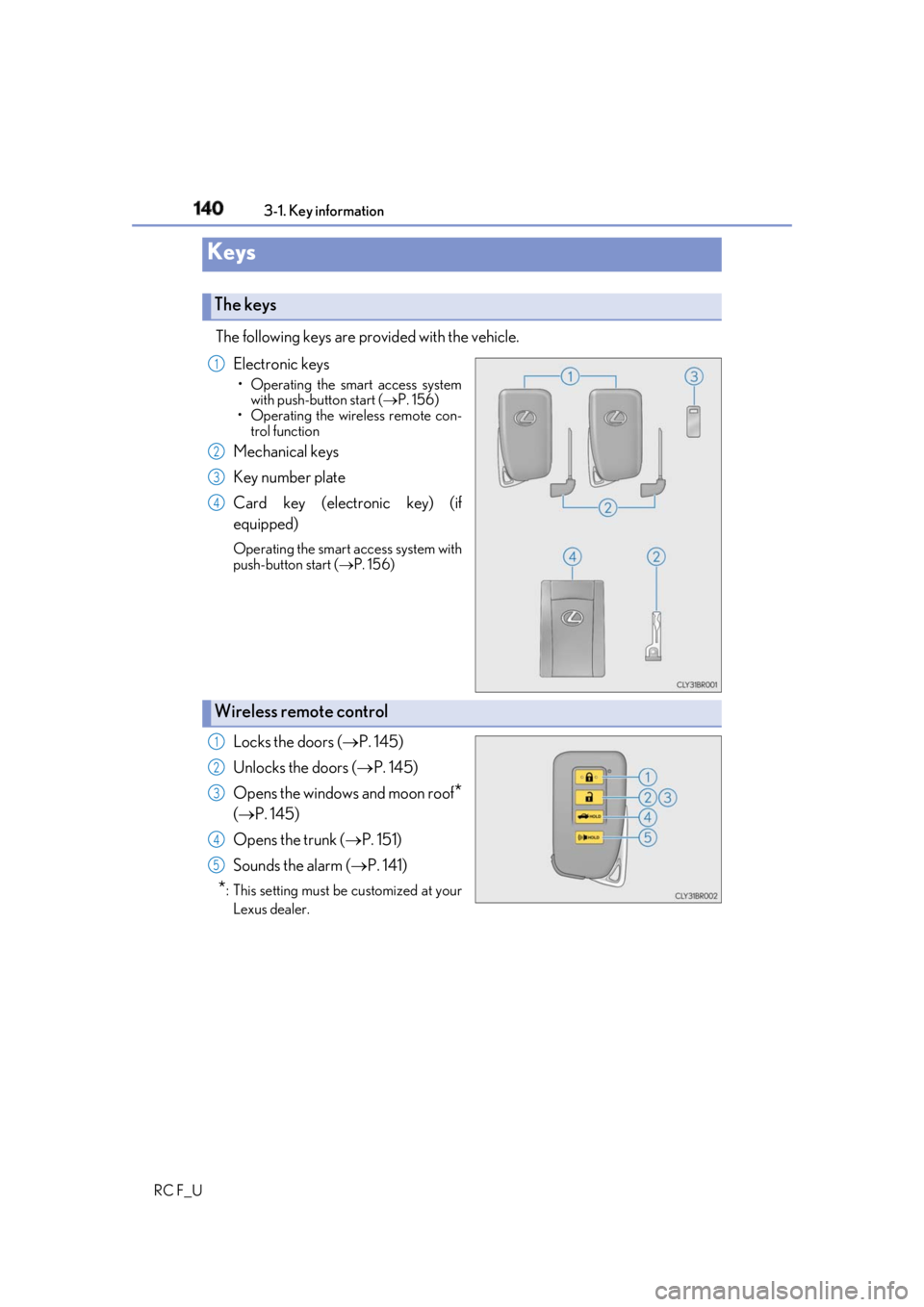
The following keys are provided with the vehicle.
Electronic keys • Operating the smart access system
with push-button start ( P. 156)
• Operating the wireless remote con-
trol function
Mechanical keys
Key number plate
Card key (electronic key) (if
equipped) Operating the smart access system with
push-button start ( P. 156)
Locks the doors ( P. 145)
Unlocks the doors ( P. 145)
Opens the windows and moon roof
*( P. 145)
Opens the trunk ( P. 151)
Sounds the alarm ( P. 141)
* : This setting must be customized at your
Lexus dealer.Keys The keys 1
2
3
4
Wireless remote control 1
2
3
4
5
Page 141 of 636
1413-1. Key information
3
Operation of each component
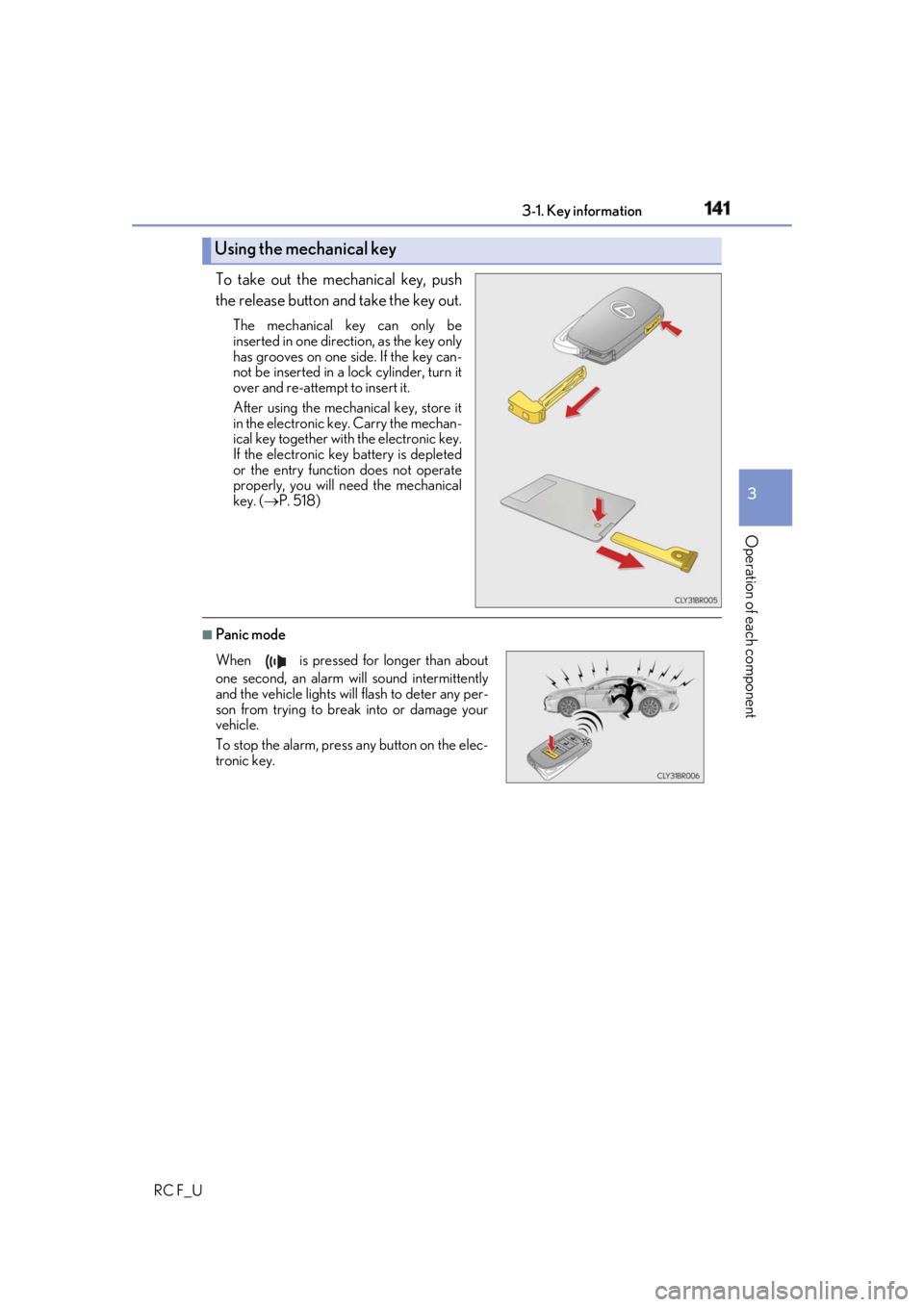
RC F_U To take out the mechanical key, push
the release button and take the key out. The mechanical key can only be
inserted in one direction, as the key only
has grooves on one side. If the key can-
not be inserted in a lock cylinder, turn it
over and re-attempt to insert it.
After using the mechanical key, store it
in the electronic ke y. Carry the mechan-
ical key together with the electronic key.
If the electronic key battery is depleted
or the entry function does not operate
properly, you will need the mechanical
key. ( P. 518)
■
Panic modeUsing the mechanical key
When is pressed for longer than about
one second, an alarm will sound intermittently
and the vehicle lights will flash to deter any per-
son from trying to break into or damage your
vehicle.
To stop the alarm, press any button on the elec-
tronic key.
Page 142 of 636
142 3-1. Key information
RC F_U ■
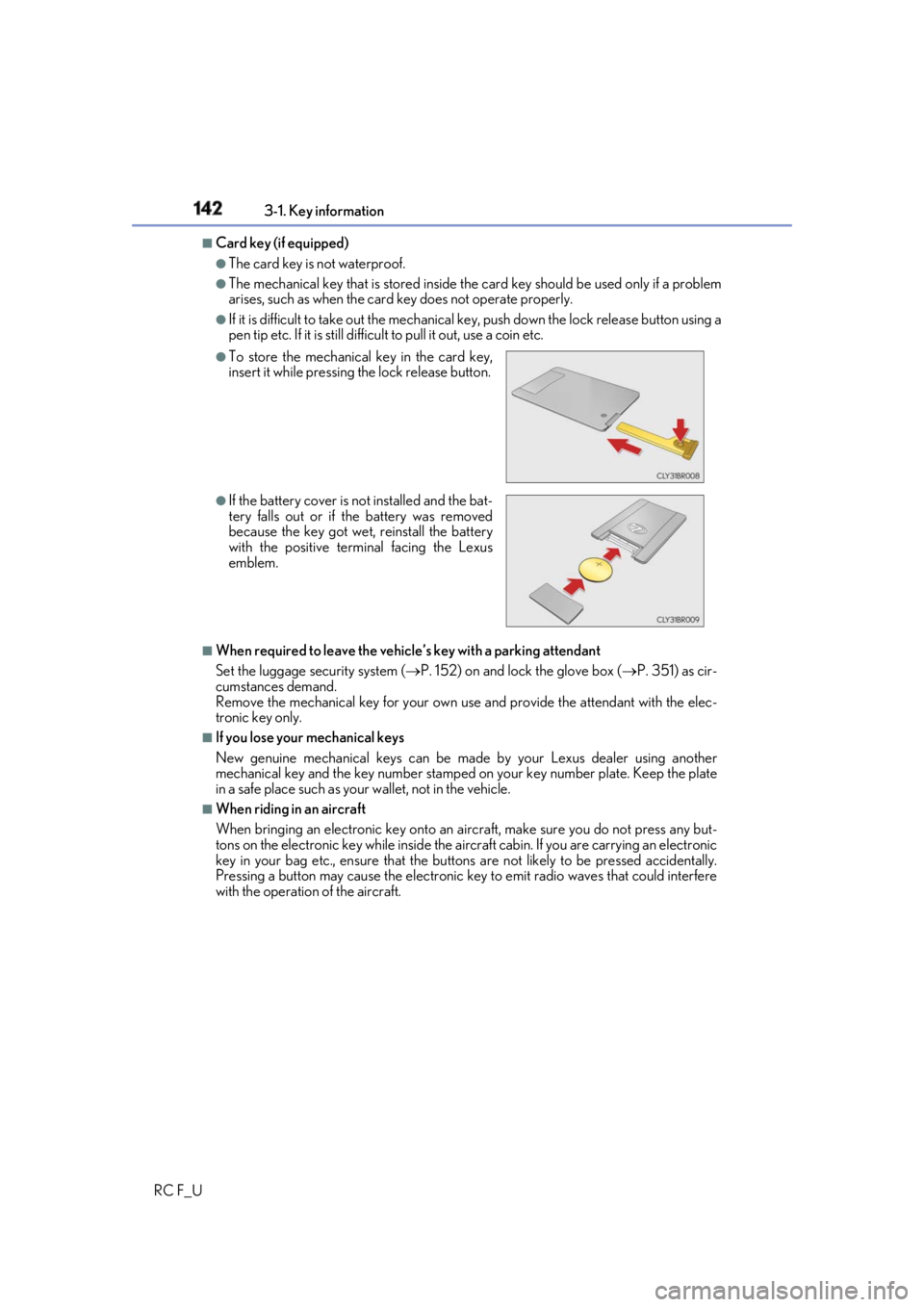
Card key (if equipped) ●
The card key is not waterproof. ●
The mechanical key that is stored inside the card key should be us ed only if a problem
arises, such as when the card key does not operate properly.●
If it is difficult to take out the mechanical key, push down the lock release button using a
pen tip etc. If it is still difficult to pull it out, use a coin etc.
■
When required to leave the vehicle’s key with a parking attendant
Set the luggage security system ( P. 152) on and lock the glove box ( P. 351) as cir-
cumstances demand.
Remove the mechanical key for your own use and provide the attendant with the elec-
tronic key only. ■
If you lose your mechanical keys
New genuine mechanical keys can be made by your Lexus dealer using another
mechanical key and the key number stamped on your key number plate. Keep the plate
in a safe place such as your wallet, not in the vehicle. ■
When riding in an aircraft
When bringing an electronic key onto an aircraft, make sure you do not press any but-
tons on the electronic key while inside the airc raft cabin. If you are carrying an electronic
key in your bag etc., ensure that the buttons are not likely to be pressed accidentally.
Pressing a button may cause the electronic key to emit radio waves that could interfere
with the operation of the aircraft. ●
To store the mechanical key in the card key,
insert it while pressing the lock release button. ●
If the battery cover is not installed and the bat-
tery falls out or if the battery was removed
because the key got wet, reinstall the battery
with the positive terminal facing the Lexus
emblem.
Page 145 of 636
145
3
Operation of each component
RC F_U 3-2. Opening, closing and locking the doors and trunk
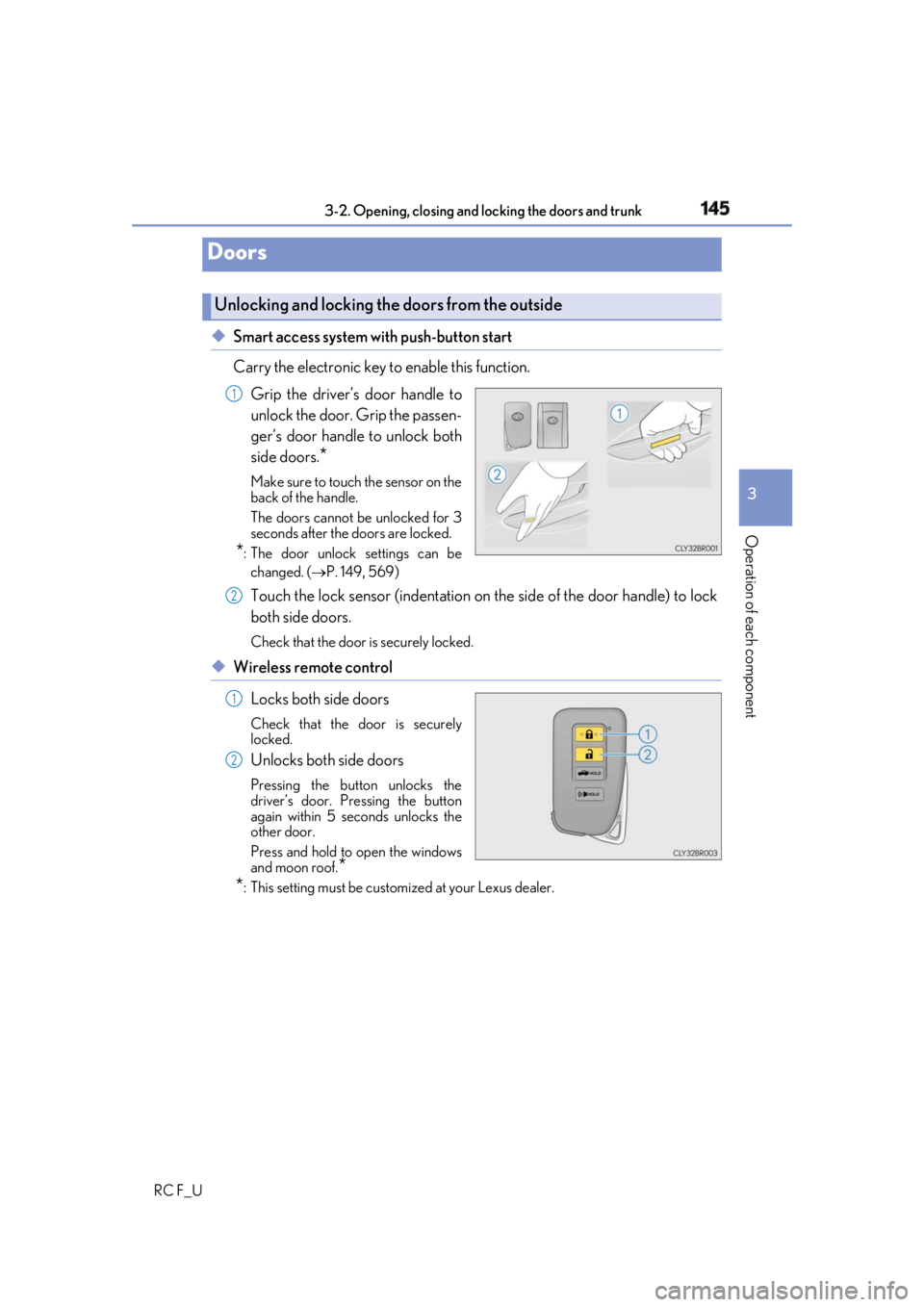
◆ Smart access system with push-button start
Carry the electronic key to enable this function.
Grip the driver’s door handle to
unlock the door. Grip the passen-
ger’s door handle to unlock both
side doors.
* Make sure to touch the sensor on the
back of the handle.
The doors cannot be unlocked for 3
seconds after the doors are locked.
* : The door unlock settings can be
changed. ( P. 149, 569)
Touch the lock sensor (indentation on the side of the door handle) to lock
both side doors. Check that the door is securely locked.
◆ Wireless remote control
Locks both side doors Check that the door is securely
locked.
Unlocks both side doors Pressing the button unlocks the
driver’s door. Pressing the button
again within 5 seconds unlocks the
other door.
Press and hold to open the windows
and moon roof.
*
* : This setting must be custom ized at your Lexus dealer.Doors Unlocking and locking the doors from the outside 1
2
1
2
Page 146 of 636
146 3-2. Opening, closing and locking the doors and trunk
RC F_U ■
Operation signals
A buzzer sounds and the emergency flashers flash to indicate that the doors have been
locked/unlocked. (Locked: once; Unlocked: twice)
A buzzer sounds to indicate that th e windows and moon roof are operating.■
Security feature
If a door is not opened within approximately 60 seconds after the vehicle is unlocked, the
security feature automatically locks the vehicle again. ■
Welcome light illumination control
The side marker, parking, tail and license plate lights automati cally turn on at night when
the doors are unlocked using the entry function or wireless remote control if the light
switch is in the “AUTO” position. ■
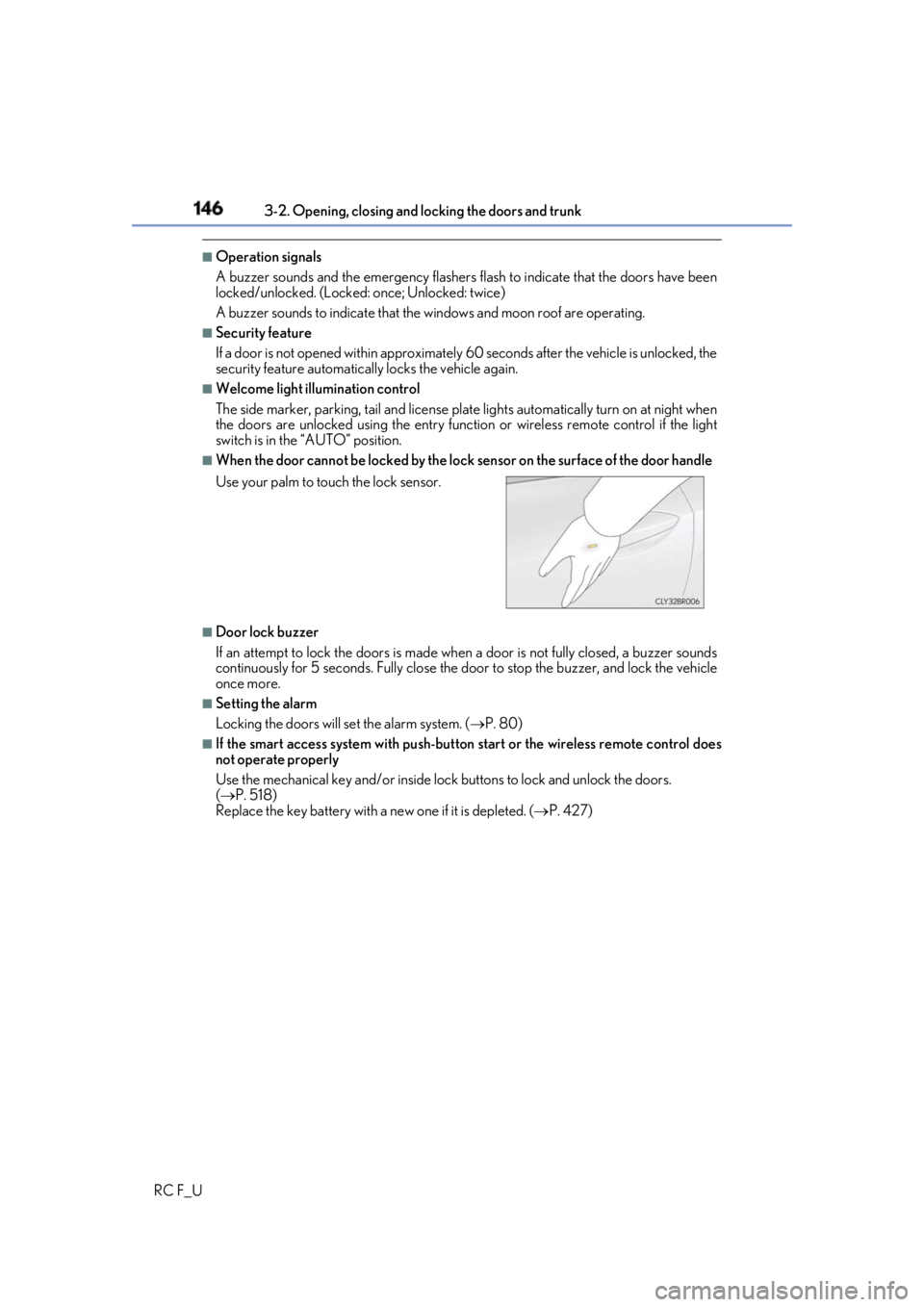
When the door cannot be locked by the lock sensor on the surface of the door handle
■
Door lock buzzer
If an attempt to lock the doors is made when a door is not fully closed, a buzzer sounds
continuously for 5 seconds. Fully close the d oor to stop the buzzer, and lock the vehicle
once more. ■
Setting the alarm
Locking the doors will set the alarm system. ( P. 80)■
If the smart access system with push-button start or the wireless remote control does
not operate properly
Use the mechanical key and/or inside lock buttons to lock and unlock the doors.
( P. 518)
Replace the key battery with a new one if it is depleted. ( P. 427)Use your palm to touch the lock sensor.
Page 147 of 636
1473-2. Opening, closing and locking the doors and trunk
3
Operation of each component
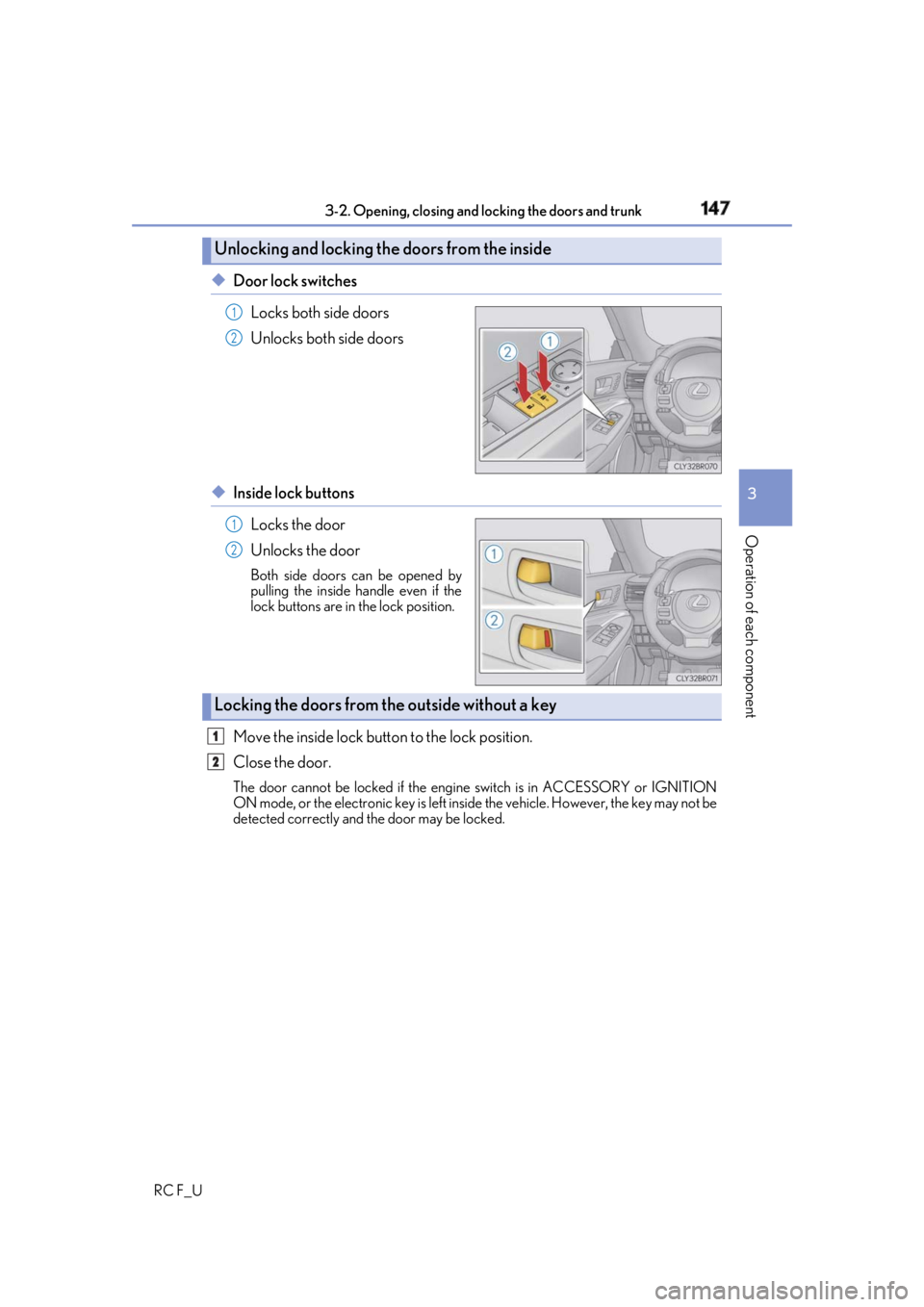
RC F_U ◆ Door lock switches
Locks both side doors
Unlocks both side doors
◆ Inside lock buttons
Locks the door
Unlocks the door Both side doors can be opened by
pulling the inside handle even if the
lock buttons are in the lock position.
Move the inside lock button to the lock position.
Close the door. The door cannot be locked if the engine switch is in ACCESSORY or IGNITION
ON mode, or the electronic key is left insi de the vehicle. However, the key may not be
detected correctly and the door may be locked.Unlocking and locking the doors from the inside 1
2
1
2
Locking the doors from the outside without a key 1
2
Page 148 of 636
148 3-2. Opening, closing and locking the doors and trunk
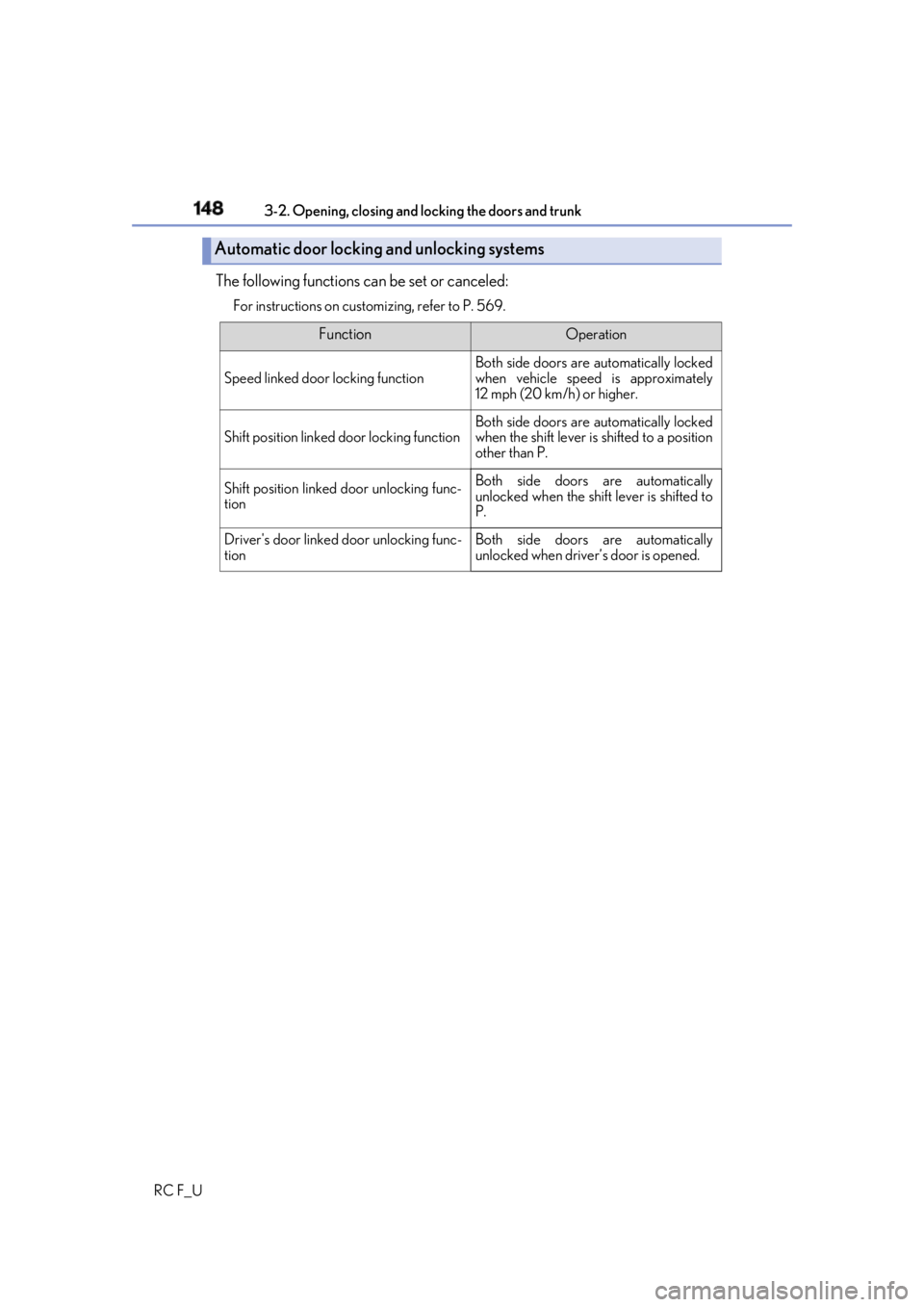
RC F_U The following functions can be set or canceled: For instructions on custom izing, refer to P. 569.
Automatic door locking and unlocking systems Function Operation
Speed linked door locking function Both side doors are automatically locked
when vehicle speed is approximately
12 mph (20 km/h) or higher.
Shift position linked door locking function Both side doors are automatically locked
when the shift lever is shifted to a position
other than P.
Shift position linked door unlocking func-
tion Both side doors are automatically
unlocked when the shift lever is shifted to
P.
Driver's door linked door unlocking func-
tion Both side doors are automatically
unlocked when driver’s door is opened.