reset LEXUS RCF 2019 Owner's Manual
[x] Cancel search | Manufacturer: LEXUS, Model Year: 2019, Model line: RCF, Model: LEXUS RCF 2019Pages: 636, PDF Size: 12.48 MB
Page 128 of 636
128 2. Instrument cluster
RC F_U ●
Switching the display
To switch to advanced display, press .
To return to normal display, press . ●
Resetting the record of maximum G-forces
With the record of maximum G-forces displayed, press and hold to
reset the display. ●
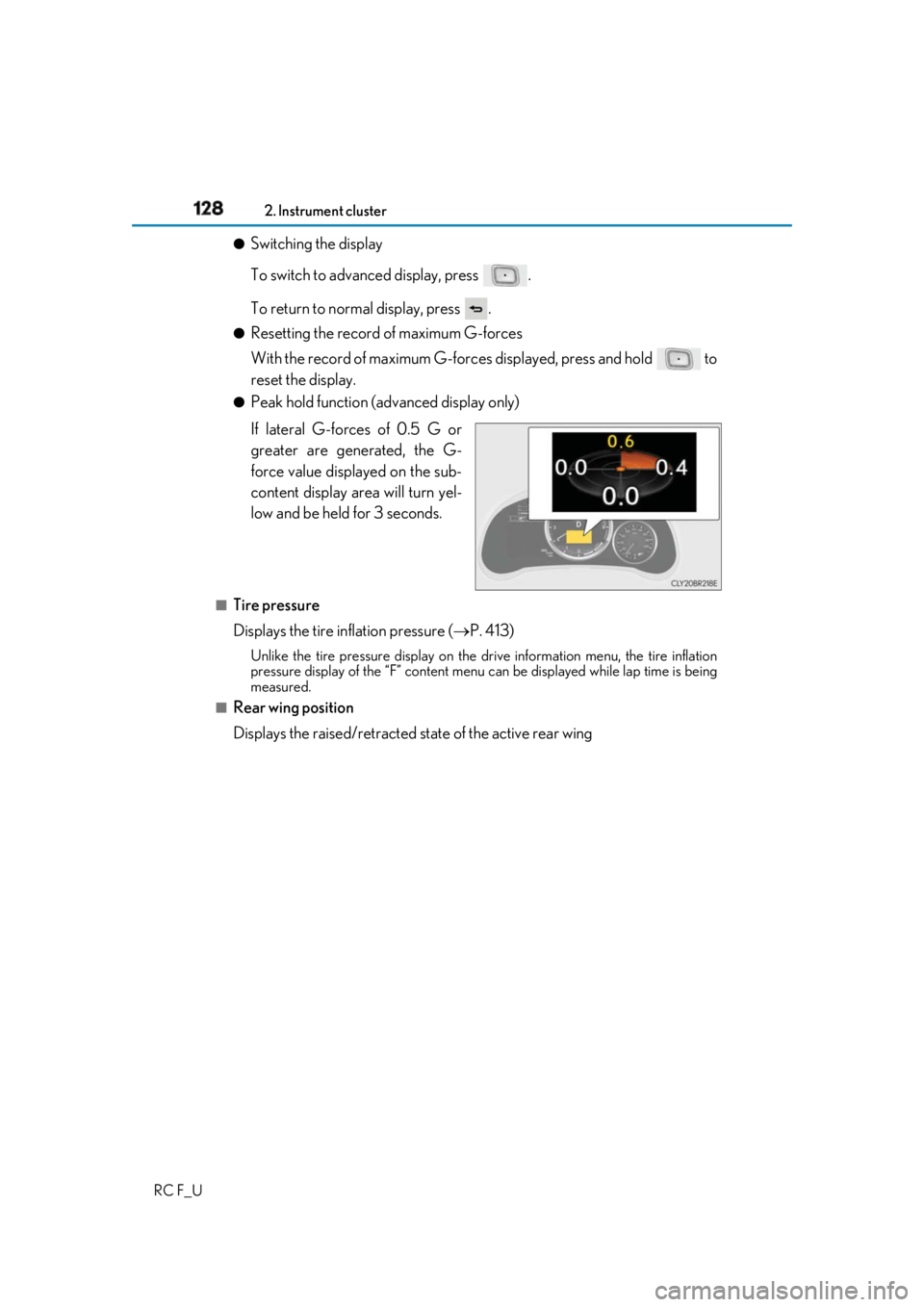
Peak hold function (advanced display only)
If lateral G-forces of 0.5 G or
greater are generated, the G-
force value displayed on the sub-
content display ar ea will turn yel-
low and be held for 3 seconds.■
Tire pressure
Displays the tire inflation pressure ( P. 413)Unlike the tire pressure display on the drive information menu, the tire inflation
pressure display of the “F” content menu can be displayed while lap time is being
measured.■
Rear wing position
Displays the raised/retracted state of the active rear wing
Page 130 of 636
130 2. Instrument cluster
RC F_U ■
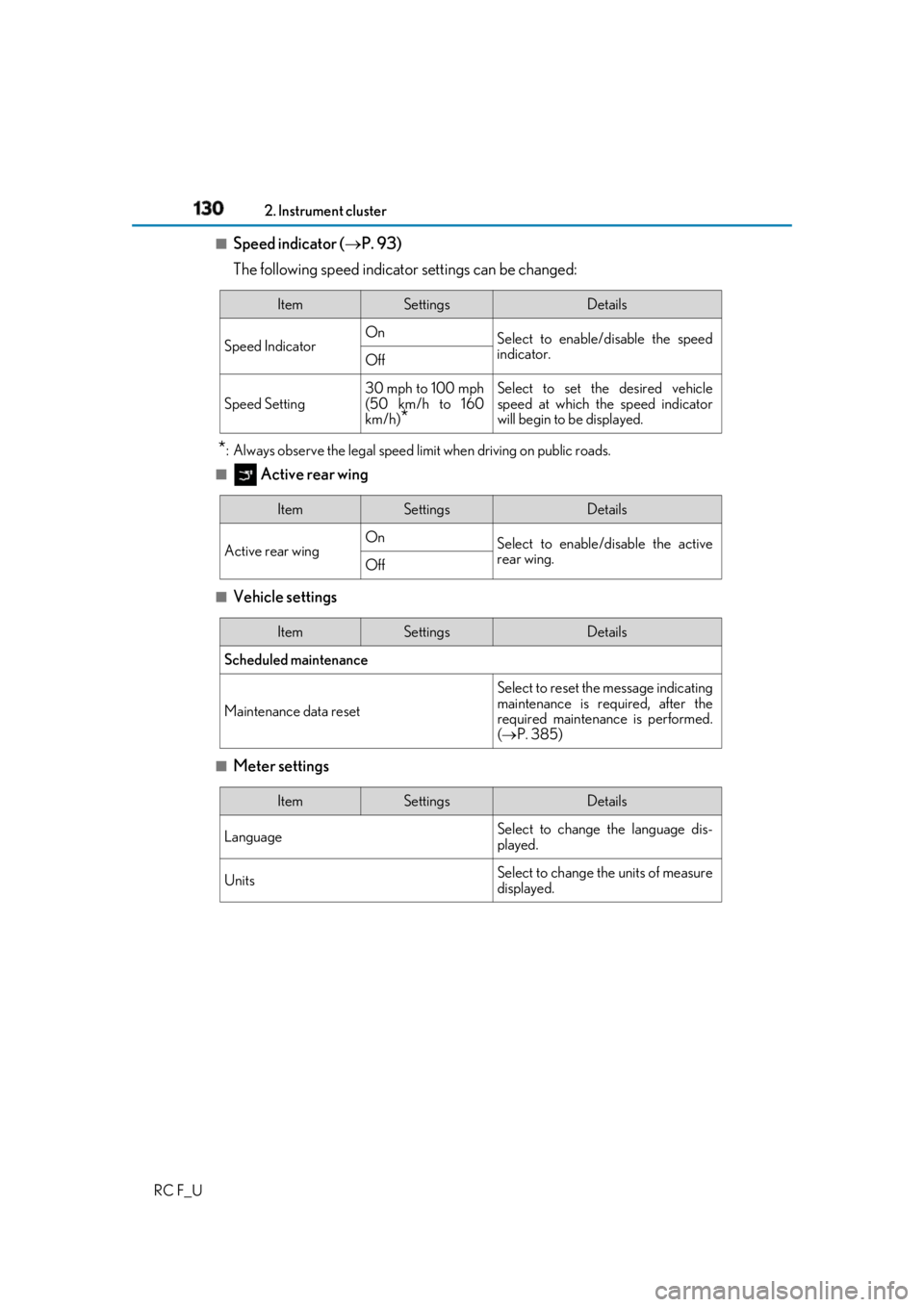
Speed indicator ( P. 93)
The following speed indicator settings can be changed:
* : Always observe the legal speed li mit when driving on public roads.■
Active rear wing
■
Vehicle settings
■
Meter settings Item Settings Details
Speed Indicator On
Select to enable/disable the speed
indicator.
Off
Speed Setting 30 mph to 100 mph
(50 km/h to 160
km/h)
* Select to set the desired vehicle
speed at which the speed indicator
will begin to be displayed.
Item Settings Details
Active rear wing On
Select to enable/disable the active
rear wing.
Off
Item Settings Details
Scheduled maintenance
Maintenance data reset Select to reset the message indicating
maintenance is re quired, after the
required maintenance is performed.
( P. 385)
Item Settings Details
Language Select to change the language dis-
played.
Units Select to change the units of measure
displayed.
Page 131 of 636
1312. Instrument cluster
2
Instrument cluster
RC F_U (Eco Driving
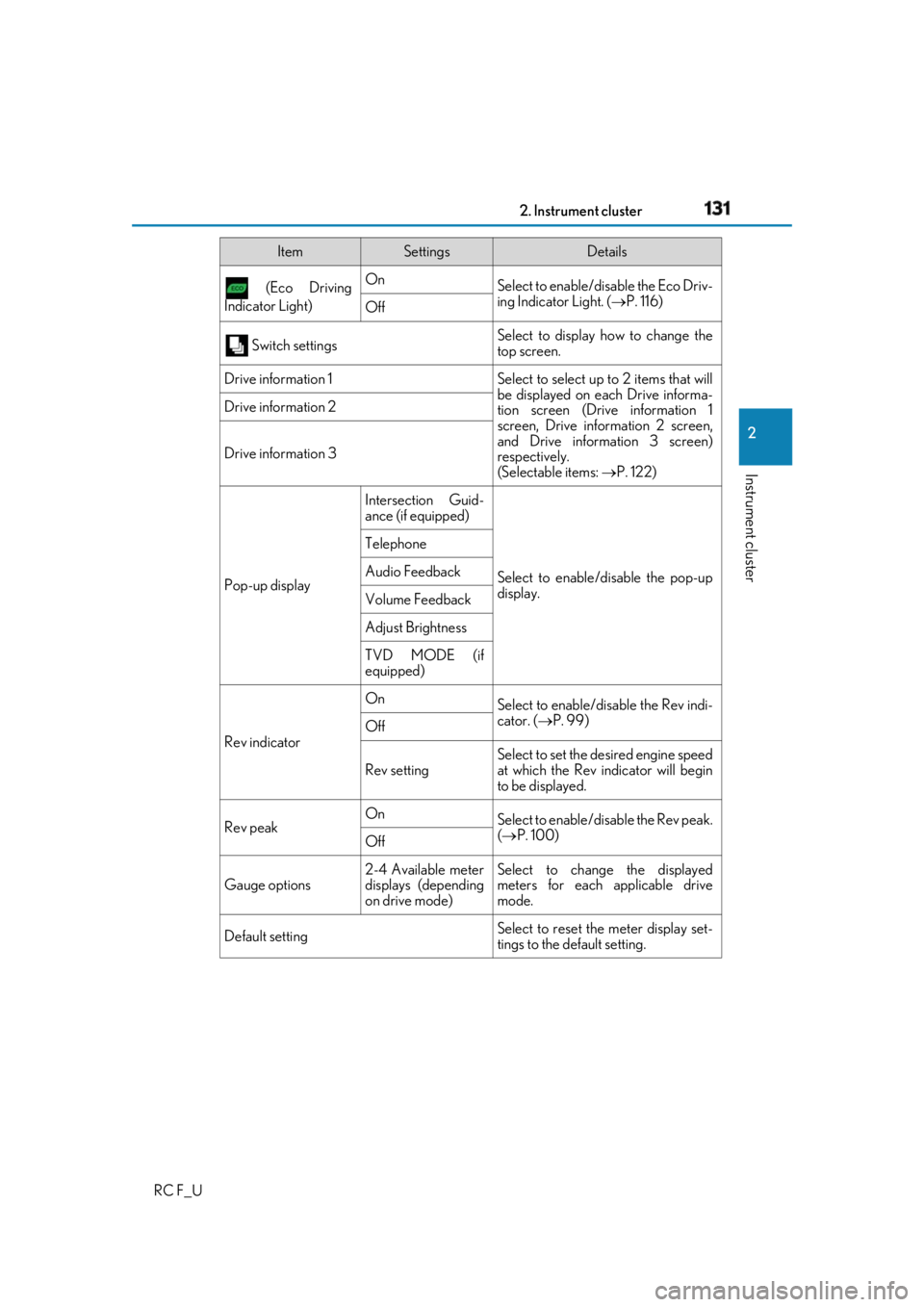
Indicator Light) On
Select to enable/dis able the Eco Driv-
ing Indicator Light. ( P. 116)
Off
Switch settings Select to display how to change the
top screen.
Drive information 1 Select to select up to 2 items that will
be displayed on ea ch Drive informa-
tion screen (Drive information 1
screen, Drive information 2 screen,
and Drive inform ation 3 screen)
respectively.
(Selectable items: P. 122)Drive information 2
Drive information 3
Pop-up display Intersection Guid-
ance (if equipped)
Select to enable/disable the pop-up
display.Telephone
Audio Feedback
Volume Feedback
Adjust Brightness
TVD MODE (if
equipped)
Rev indicator On
Select to enable/disable the Rev indi-
cator. ( P. 99)
Off
Rev setting Select to set the desired engine speed
at which the Rev indicator will begin
to be displayed.
Rev peak On
Select to enable/disable the Rev peak.
( P. 100)
Off
Gauge options 2-4 Available meter
displays (depending
on drive mode) Select to change the displayed
meters for each applicable drive
mode.
Default setting Select to reset the meter display set-
tings to the default setting.Item Settings Details
Page 132 of 636
132 2. Instrument cluster
RC F_U ■
Odometer
Displays the total distance the vehicle has been driven. ■
Trip meter A/trip meter B
Displays the distance the vehicle has been driven since the meter was last
reset. Trip meters A and B can be used to record and display different dis-
tances independently. To reset, display the desired trip meter and press and hold the odometer/trip meter
and trip meter reset button.■
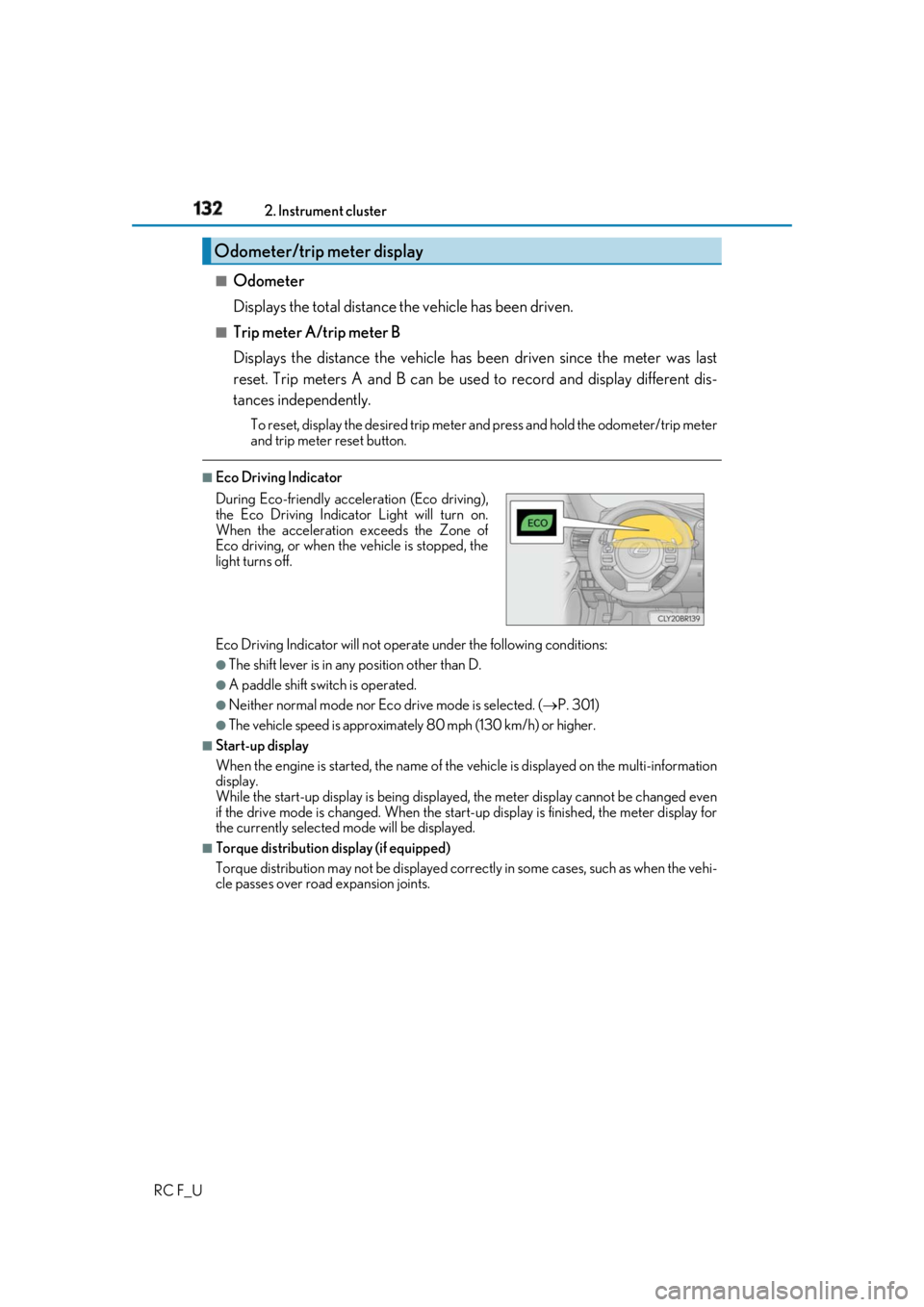
Eco Driving Indicator
Eco Driving Indicator will not operate under the following conditions: ●
The shift lever is in any position other than D. ●
A paddle shift swit ch is operated.●
Neither normal mode nor Eco drive mode is selected. ( P. 301)●
The vehicle speed is approximatel y 80 mph (130 km/h) or higher.■
Start-up display
When the engine is started, the name of the vehicle is displayed on the multi-information
display.
While the start-up display is being displaye d, the meter display cannot be changed even
if the drive mode is changed. When the start- up display is finished, the meter display for
the currently selected mode will be displayed.■
Torque distribution display (if equipped)
Torque distribution may not be displayed correctly in some ca ses, such as when the vehi-
cle passes over road expansion joints.Odometer/trip meter display
During Eco-friendly acceleration (Eco driving),
the Eco Driving Indicator Light will turn on.
When the acceleration exceeds the Zone of
Eco driving, or when the vehicle is stopped, the
light turns off.
Page 133 of 636
1332. Instrument cluster
2
Instrument cluster
RC F_U ■
G-force display ●
The G-force values may not be zero even when the vehicle is parked, such as when it is
parked on an incline. ●
The steering amount, accelerator pedal input, and brake fluid pressure displays are dis-
abled until the engine has warmed up (the variable red zone of the tachometer has
retracted to 7300 rpm).
After the engine has warmed up, these displays will be enabled. ●
Depending on the vehicle usage conditions, the brake fluid pressure display may not
reach its maximum reading even though the brake pedal is fully depressed. ●
If a battery terminal is disconnected and reconnected, the steering amount display may
be disabled temporarily. Afte r driving the vehicle for a while , the display will be enabled.■
Suspension of the settings display
In the following situations, op eration of the settings disp lay will be temporarily sus-
pended. ●
When a warning message appears on the multi-information display●
When the vehicle begins to move ■
Tire pressure ●
It may take a few minutes to display the tire inflation pressure after the engine switch is
turned to IGNITION ON mode. It may also take a few minutes to display the tire infla-
tion pressure after inflation pressure has been adjusted.●
“---” may be displayed if the tire position information cannot be determined due to
unfavorable radio wave conditions. ●
Tire inflation pressure changes with temperat ure. The displayed values may also be dif-
ferent from the values measured using a tire pressure gauge. ■
When disconnecting and reco nnecting battery terminals
The following information data will be reset: ●
Drive information ●
Lap timer: Measured lap times, history ●
G-force: Record of the maximum G-forces■
Using the lap timer
If the engine is stopped while a lap is being timed, the lap timer will stop and the lap time
up to that point will be recorded. ■
Liquid crystal display
Small spots or light spots may appear on the display. This phenomenon is characteristic
of liquid crystal displays, and there is no problem continuing to use the display.
Page 136 of 636
136 2. Instrument cluster
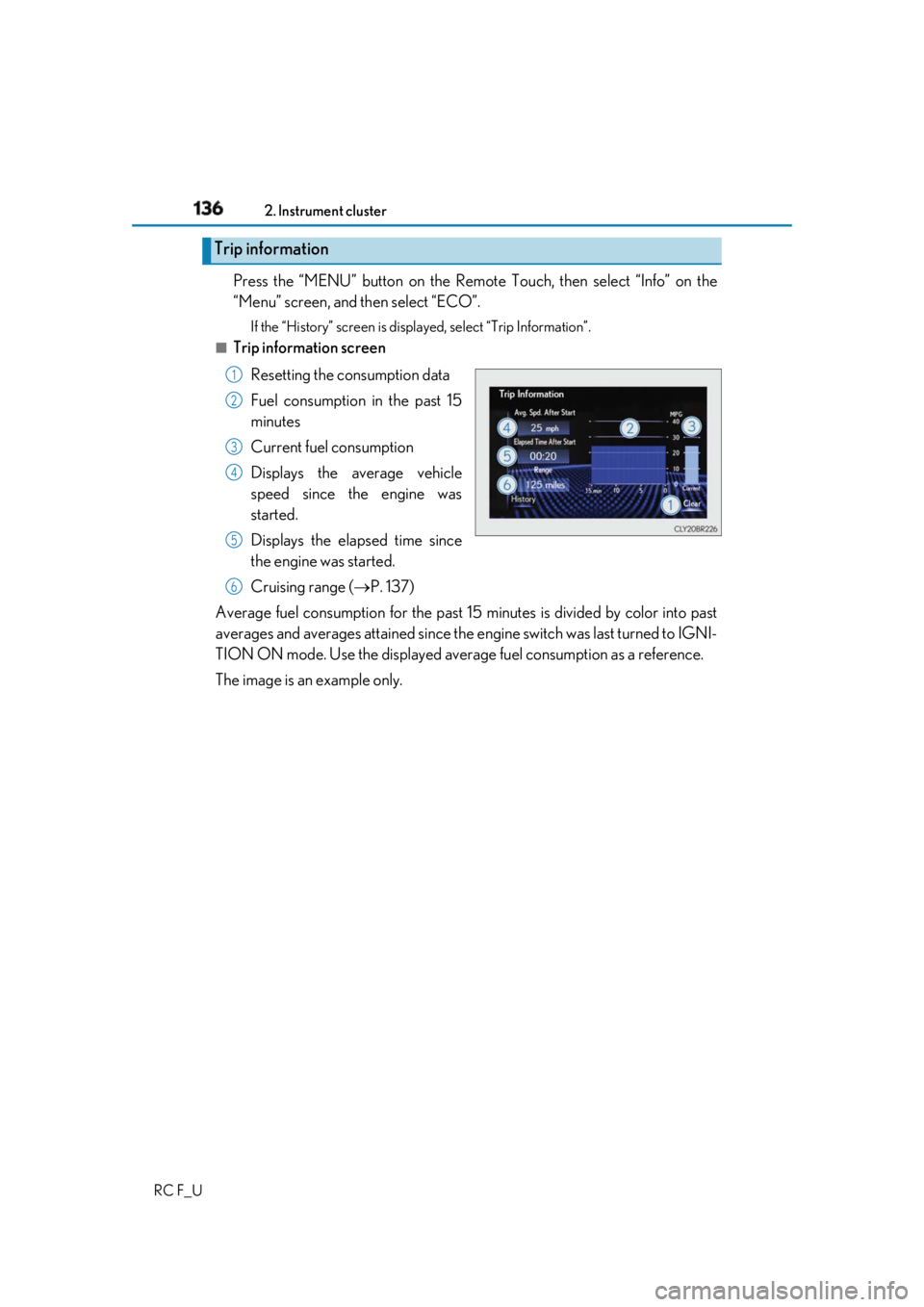
RC F_U Press the “MENU” button on the Remote Touch, then select “Info” on the
“Menu” screen, and then select “ECO”. If the “History” screen is displayed, select “Trip Information”.■
Trip information screen
Resetting the consumption data
Fuel consumption in the past 15
minutes
Current fuel consumption
Displays the average vehicle
speed since the engine was
started.
Displays the elapsed time since
the engine was started.
Cruising range ( P. 137)
Average fuel consumption for the past 15 minutes is divided by color into past
averages and averages attained since the engine switch was last turned to IGNI-
TION ON mode. Use the displayed average fuel consumption as a reference.
The image is an example only.Trip information 1
2
3
4
5
6
Page 137 of 636
1372. Instrument cluster
2
Instrument cluster
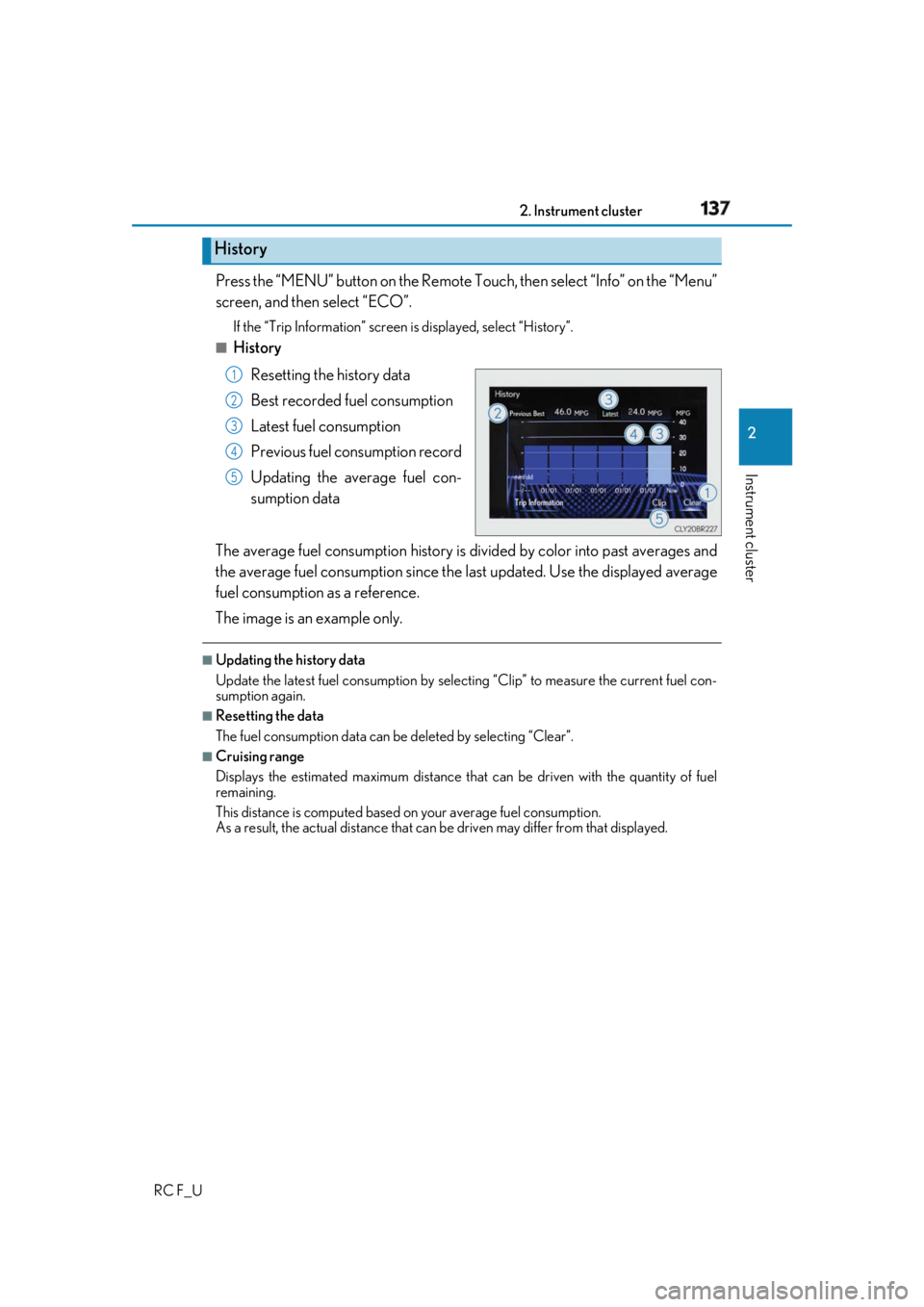
RC F_U Press the “MENU” button on the Remote To uch, then select “Info” on the “Menu”
screen, and then select “ECO”. If the “Trip Information” screen is displayed, select “History”.■
History
Resetting the history data
Best recorded fuel consumption
Latest fuel consumption
Previous fuel consumption record
Updating the average fuel con-
sumption data
The average fuel consumption history is di vided by color into past averages and
the average fuel consumption since the last updated. Use the displayed average
fuel consumption as a reference.
The image is an example only. ■
Updating the history data
Update the latest fuel consumption by sele cting “Clip” to measure the current fuel con-
sumption again. ■
Resetting the data
The fuel consumption data can be deleted by selecting “Clear”. ■
Cruising range
Displays the estimated maximum distance that can be driven with the quantity of fuel
remaining.
This distance is computed based on your average fuel consumption.
As a result, the actual distance that can be driven may differ from that displayed.History 1
2
3
4
5
Page 167 of 636
1673-3. Adjusting the seats
3
Operation of each component
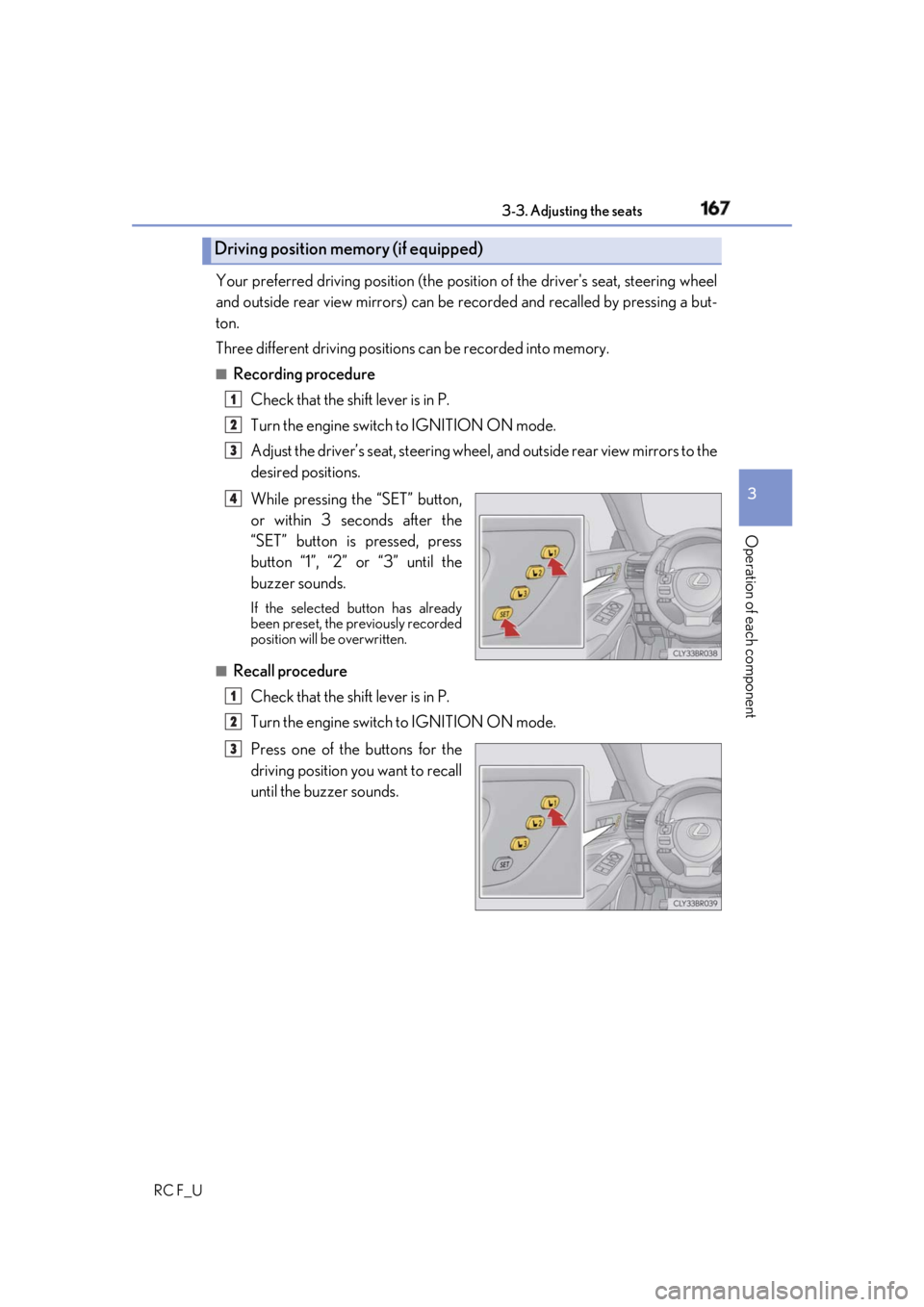
RC F_U Your preferred driving position (the posi tion of the driver's seat, steering wheel
and outside rear view mirrors) can be recorded and recalled by pressing a but-
ton.
Three different driving positions can be recorded into memory.■
Recording procedure
Check that the shift lever is in P.
Turn the engine switch to IGNITION ON mode.
Adjust the driver’s seat, steering wheel, and outside rear view mirrors to the
desired positions.
While pressing the “SET” button,
or within 3 seconds after the
“SET” button is pressed, press
button “1”, “2” or “3” until the
buzzer sounds. If the selected button has already
been preset, the previously recorded
position will be overwritten.
■
Recall procedure
Check that the shift lever is in P.
Turn the engine switch to IGNITION ON mode.
Press one of the buttons for the
driving position you want to recall
until the buzzer sounds.Driving position memory (if equipped) 1
2
3
4
1
2
3
Page 385 of 636

3856-2. Maintenance
RC F_U 6
Maintenance and care ■
Repair and replacement
It is recommended that genuine Lexus parts be used for repairs to ensure performance
of each system. If non-Lexus parts are used in replacement or if a repair shop other than
a Lexus dealer performs repairs, confirm the warranty coverage.■
Resetting the message indicati ng maintenance is required
After the required maintenanc e is preformed according to the maintenance schedule,
please reset the message.
To reset the message, follow the procedures described below:
Select on the multi-information display. ( P. 111, 129)
Press the or meter control switch on the steering wheel to select “Vehicle
Settings” then “Scheduled Maintenance”. (To confirm setting, press .)
Select “Yes” an d then press .
A message will be displayed on the multi- information display when the reset proce-
dure has been completed. ■
Allow inspection and repairs to be performed by a Lexus dealer●
Lexus technicians are well-trained specialists and are kept up to date with the latest ser-
vice information. They are well informed about the operations of all systems on your
vehicle. ●
Keep a copy of the repair order. It proves that the maintenance that has been per-
formed is under warranty co verage. If any problem should arise while your vehicle is
under warranty, your Lexus dealer will promptly take care of it. 1
2
3
4
Page 403 of 636
4036-3. Do-it-yourself maintenance
RC F_U 6
Maintenance and care ■
Engine oil consumption
A certain amount of engine oil will be consumed while driving. In th e following situations,
oil consumption may increase, and engine oil may need to be refilled in between oil
maintenance intervals. ●
When the engine is new, for example directly after purchasing the vehicle or after
replacing the engine ●
If low quality oil or oil of an inappropriate viscosity is used●
When driving at high engine speeds or with a heavy load, or when driving while accel-
erating or decelerating frequently ●
When leaving the engine idling for a long time, or when drivin g frequently through
heavy traffic ■
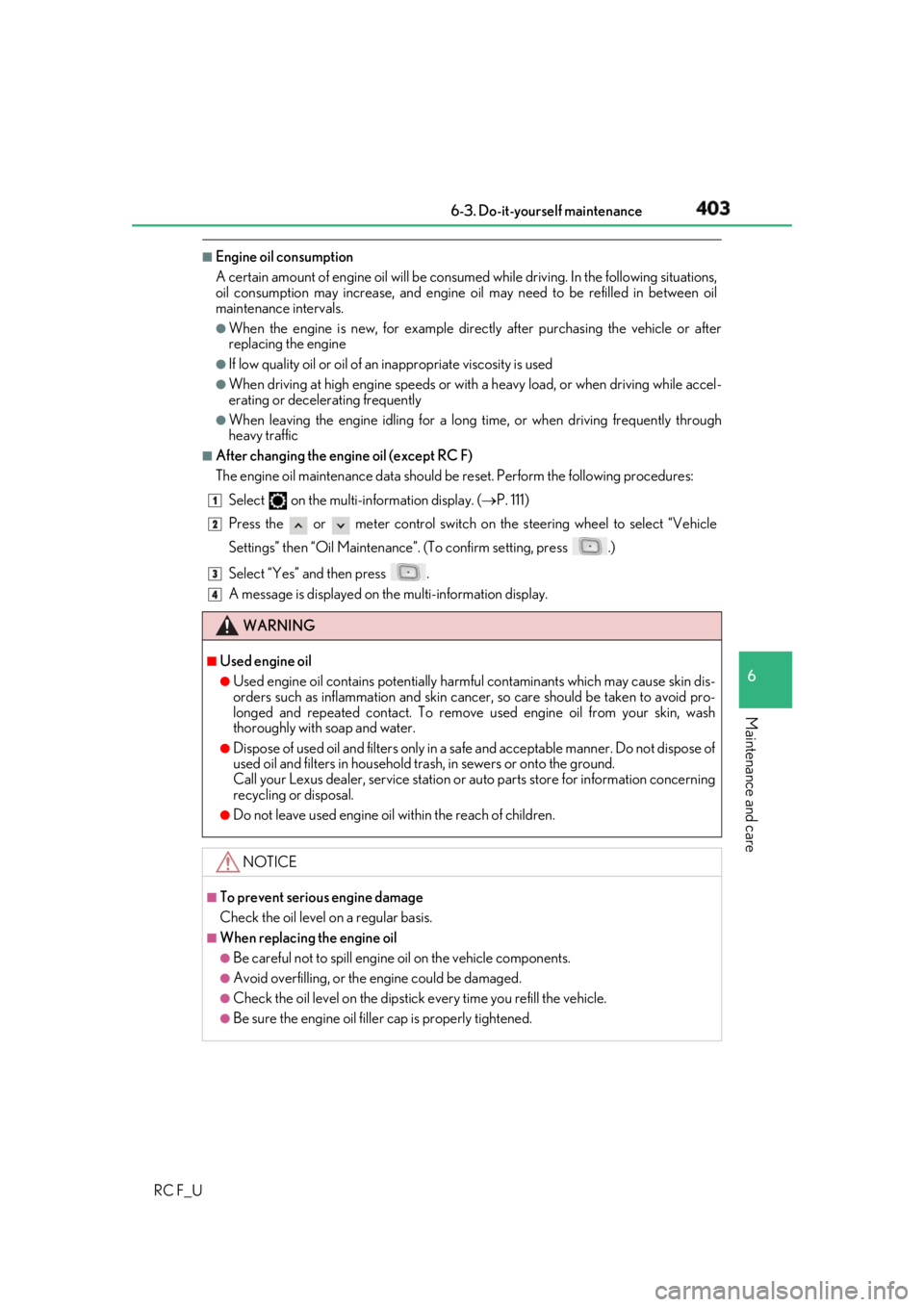
After changing the engine oil (except RC F)
The engine oil maintenance data should be reset. Perform the following procedures:
Select on the multi-information display. ( P. 111)
Press the or meter control switch on the steering wheel to select “Vehicle
Settings” then “Oil Maintenance” . (To confirm setting, press .)
Select “Yes” an d then press .
A message is displayed on th e multi-information display.
WARNING ■
Used engine oil ●
Used engine oil contains potentially harm ful contaminants which may cause skin dis-
orders such as inflammation and skin cance r, so care should be taken to avoid pro-
longed and repeated contact. To remove used engine oil from your skin, wash
thoroughly with soap and water. ●
Dispose of used oil and filters only in a sa fe and acceptable manner. Do not dispose of
used oil and filters in household tras h, in sewers or onto the ground.
Call your Lexus dealer, service station or auto parts store for information concerning
recycling or disposal. ●
Do not leave used engine oil within the reac h of children.
NOTICE ■
To prevent serious engine damage
Check the oil level on a regular basis. ■
When replacing the engine oil ●
Be careful not to spill engine oil on the vehicle components.●
Avoid overfilling, or the engine could be damaged. ●
Check the oil level on the dipstick every time you refill the vehicle.●
Be sure the engine oil fille r cap is properly tightened. 1
2
3
4