tow LEXUS RCF 2019 Owner's Manual
[x] Cancel search | Manufacturer: LEXUS, Model Year: 2019, Model line: RCF, Model: LEXUS RCF 2019Pages: 636, PDF Size: 12.48 MB
Page 263 of 636
2634-5. Using the driving support systems
4
Driving
RC F_U WARNING ■
Before using LDA system
Do not rely solely upon the LDA system. The LDA system does not automatically drive
the vehicle or reduce the amount of attention that must be paid to the area in front of
the vehicle. The driver must always assume full responsibility for driving safely by pay-
ing careful attention to the surrounding cond itions and operating the steering wheel to
correct the path of the vehicle. Also, the driver must take adequate breaks when
fatigued, such as from driving for a long period of time.
Failure to perform appropriate driving operat ions and pay careful attention may lead to
an accident, resulting in death or serious injury. ■
To avoid operating LDA system by mistake
When not using the LDA system, use the LDA switch to turn the system off.■
Situations unsuitable for LDA system
Do not use the LDA system in the following situations.
The system may not operate properly and lead to an accident, resulting in death or
serious injury. ●
A spare tire, tire chains, etc. are equipped. ●
When the tires have been excessively worn, or when the tire inflation pressure is low. ●
Tires which differ by structure, manufacturer, brand or tread pattern are used. ●
Objects or patterns that could be mistaken for white (yellow) lines are present on the
side of the road (guardrails, cu rbs, reflective poles, etc.).●
Vehicle is driven on a snow-covered road. ●
White (yellow) lines are difficult to see due to rain, snow, fog, dust, etc.●
Asphalt repair marks, white (y ellow) line marks, etc. are present due to road repair.●
Vehicle is driven in a temporary lane or restricted lane due to construction work.●
Vehicle is driven on a road surface which is slippery due to rainy weather, fallen snow,
freezing, etc. ●
Vehicle is driven in traffic lanes ot her than on highways and freeways.●
Vehicle is driven in a construction zone. ●
During emergency towing ■
Preventing LDA system malfunctions and operations performed by mistake ●
Do not modify the headlights or place stickers, etc. on the surface of the lights.●
Do not modify the suspension etc. If the suspension etc. needs to be replaced, con-
tact your Lexus dealer. ●
Do not install or place anything on the hood or grille. Also, do not install a grille guard
(bull bars, kangaroo bar, etc.). ●
If your windshield needs repair s, contact your Lexus dealer.
Page 270 of 636
270 4-5. Using the driving support systems
RC F_U WARNING ■
Situations unsuitable for dy namic radar cruise control
Do not use dynamic radar cruise contro l in any of the following situations.
Doing so may result in inappropriate speed control and could cause an accident result-
ing in death or serious injury. ●
Roads where there are pede strians, cyclists, etc.●
In heavy traffic ●
On roads with sharp bends ●
On winding roads ●
On slippery roads, such as thos e covered with rain, ice or snow●
On steep downhills, or where there are sudden changes between sharp up and down
gradients
Vehicle speed may exceed the set speed when driving down a steep hill.●
At entrances to freeways and highways ●
When weather conditions are bad enough that they may prevent the sensors from
detecting correctly (fog, snow, sandstorm, heavy rain, etc.)●
When there is rain, snow, etc. on the fron t surface of the radar sensor or camera sen-
sor ●
In traffic conditions that require frequent repeated a cceleration and deceleration●
During emergency towing ●
When an approach warning buzzer is heard often
Page 274 of 636
274 4-5. Using the driving support systems
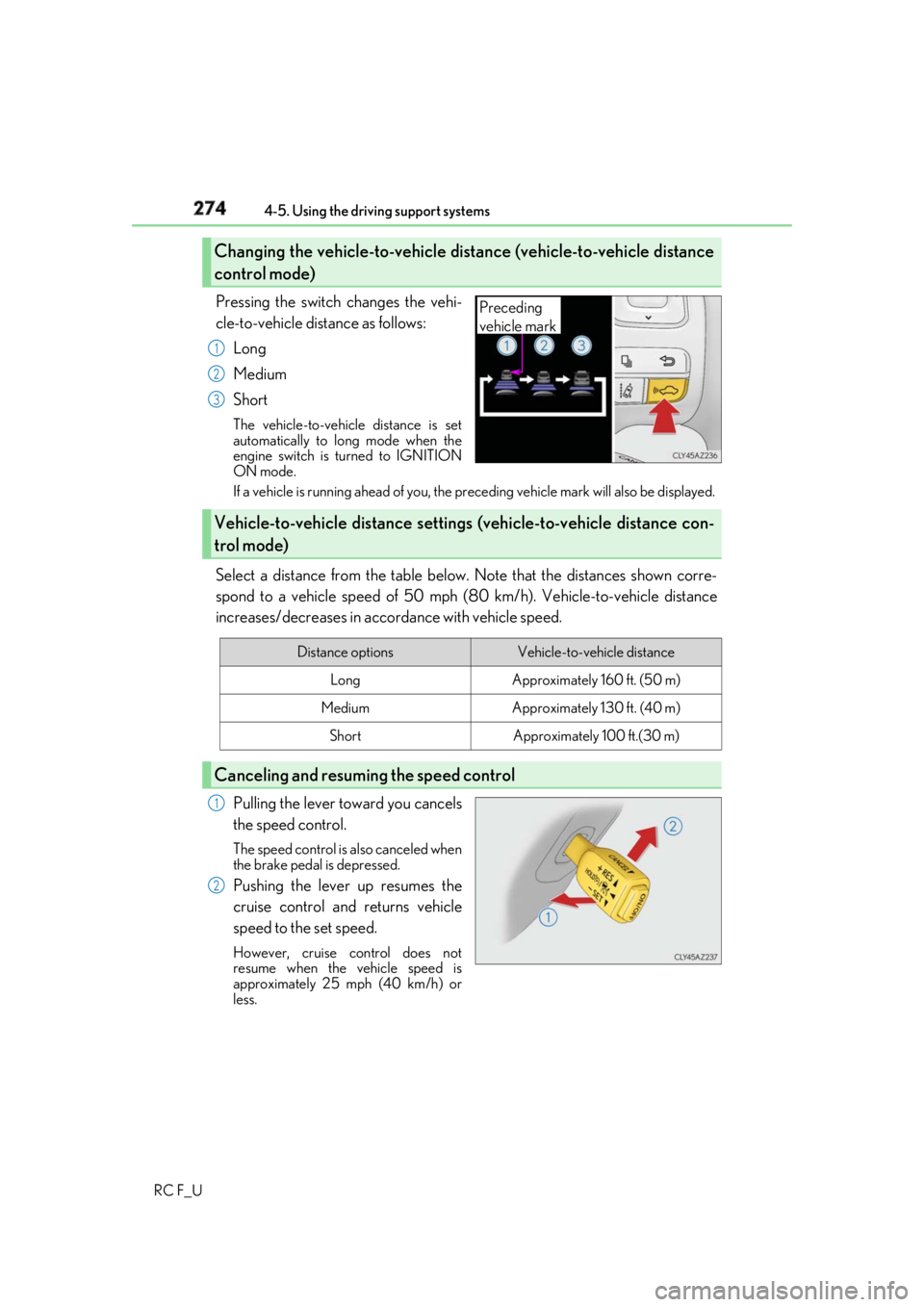
RC F_U Pressing the switch changes the vehi-
cle-to-vehicle distance as follows:
Long
Medium
Short The vehicle-to-vehicle distance is set
automatically to long mode when the
engine switch is turned to IGNITION
ON mode.
If a vehicle is running ahead of you, the pr eceding vehicle mark w ill also be displayed.
Select a distance from the table below. Note that the distances shown corre-
spond to a vehicle speed of 50 mph (8 0 km/h). Vehicle-to-vehicle distance
increases/decreases in accord ance with vehicle speed.
Pulling the lever toward you cancels
the speed control. The speed control is also canceled when
the brake pedal is depressed.
Pushing the lever up resumes the
cruise control and returns vehicle
speed to the set speed. However, cruise control does not
resume when the vehicle speed is
approximately 25 mph (40 km/h) or
less.Changing the vehicle-to-vehicle distance (vehicle-to-vehicle distance
control mode) Preceding
vehicle mark1
2
3
Vehicle-to-vehicle distance settings (vehicle-to-vehicle distance con-
trol mode) Distance options Vehicle-to-vehicle distance
Long Approximately 160 ft. (50 m)
Medium Approximately 130 ft. (40 m)
Short Approximately 100 ft.(30 m)
Canceling and resuming the speed control 1
2
Page 288 of 636
288 4-5. Using the driving support systems
RC F_U WARNING ■
When using the intuitive parking assist
Observe the following precautions.
Failing to do so may result in the vehicle be ing unable to be driv en safely and possibly
cause an accident. ●
Do not use the sensor at speeds in excess of 6 mph (10 km/h). ●
The sensors’ detection areas and reaction ti mes are limited. When moving forward or
reversing, check the areas surrounding the vehicle (especially th e sides of the vehi-
cle) for safety, and drive slowly, using the brake to control the vehicle’s speed. ●
Do not install accessories within the sensors’ detection areas.■
Limitations of the sensors ●
RC350/RC300: The detection areas of the sensors are limited to the areas around
the vehicle’s front and rear bumpers. ●
RC F: The detection areas of the sensors are limited to the areas around the vehicle’s
front corners and the rear bumpers. ●
Certain vehicle conditions and surrounding environments, such as the following, may
affect the ability of th e sensors to correctly detect obje cts. Pay particul ar attention in
the following situations. Failure to do so may result in the vehicle being driven
unsafely, possibly leading to an accident.
• When there is dirt, snow or ice on a se nsor (Cleaning the sensor will resolve this
problem.)
• When the sensor is frozen (Thawing the area will resolve this problem.)
In especially cold weather, if a sensor is frozen the screen may show an abnormal
display, or objects may not be detected
• When a sensor is covered in any way
• When the vehicle is leaning considerably to one side
• When driving on an extremely bump y road, incline, gravel, or grass
• When the vicinity of the vehicle is noisy due to vehicle horns, motorcycle engines,
air brakes of large vehicles, or other loud noises producing ultrasonic waves
• When there is another vehicle equipped with parking assist sensor in the vicinity
• When the sensor is coated with a sheet of spray or heavy rain
• When the vehicle is equipped with a fender pole or wireless antenna
• When a towing eyelet is installed
• When a bumper or sensor receives a strong impact
• When the vehicle is approaching a tall or curved curb
• When driving in harsh sunlig ht or intense cold weather
• When an object is directly under a bumper
• When objects become too close to the sensors
• When a non-genuine Lexus suspension (lowered suspension, etc.) is installed
In addition to the situations above, there are instances in which, because of their
shape, signs and other objects may be judged by the sensor to be closer than they
are.
Page 291 of 636
2914-5. Using the driving support systems
4
Driving
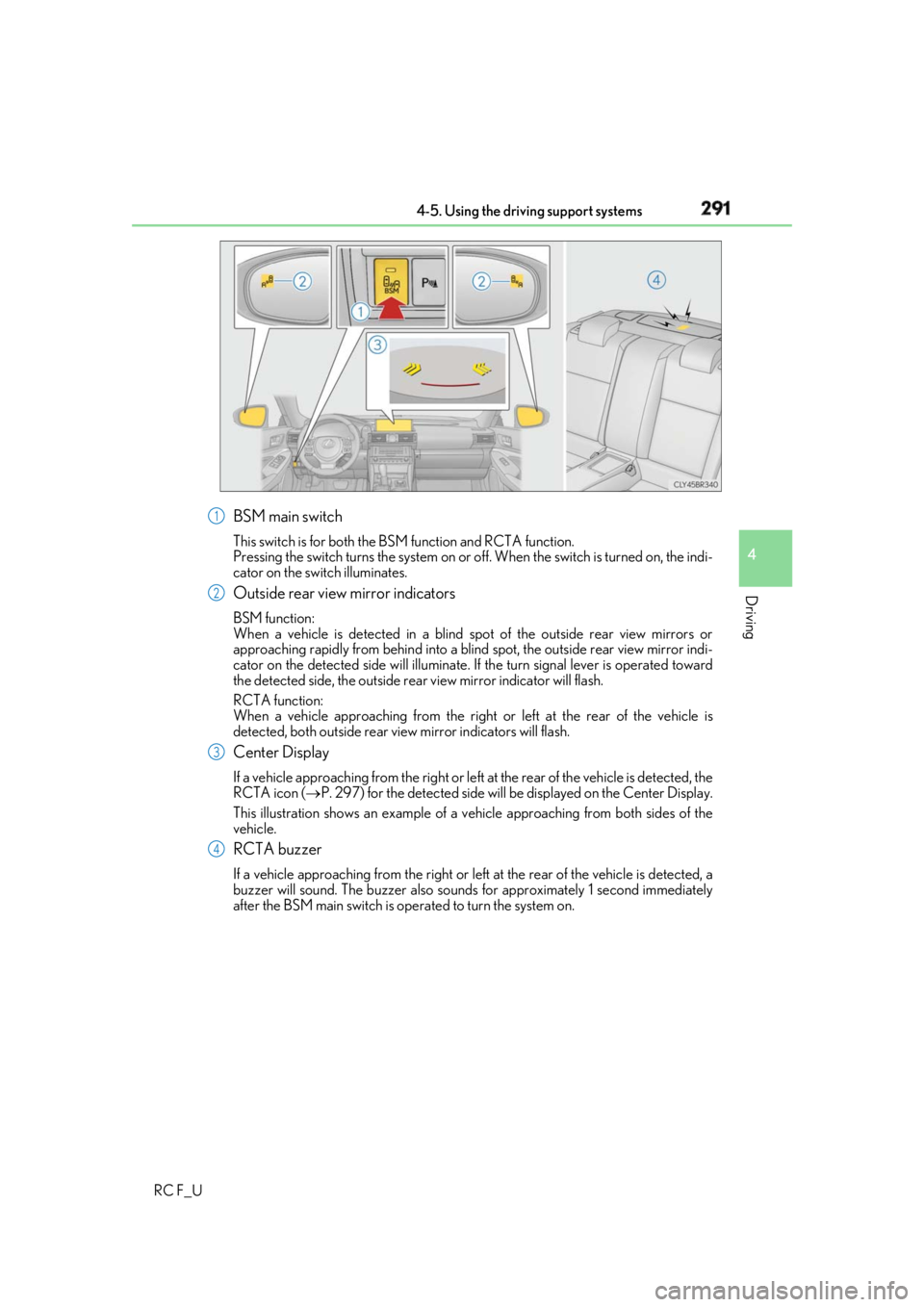
RC F_U BSM main switch This switch is for both the BS M function and RCTA function.
Pressing the switch turns the system on or of f. When the switch is turned on, the indi-
cator on the switch illuminates.
Outside rear view mirror indicators BSM function:
When a vehicle is detected in a blind spot of the outside rear view mirrors or
approaching rapidly from behind into a blin d spot, the outside rear view mirror indi-
cator on the detected side will illuminate. If the turn signal lever is operated toward
the detected side, the outside rear view mirror indicator will flash.
RCTA function:
When a vehicle approaching from the right or left at the rear of the vehicle is
detected, both outsid e rear view mirror indicators will flash.
Center Display If a vehicle approaching from the right or left at the rear of the vehicle is detected, the
RCTA icon ( P. 297) for the detected side will be displayed on the Center Display.
This illustration shows an example of a ve hicle approaching from both sides of the
vehicle.
RCTA buzzer If a vehicle approaching from the right or left at the rear of the vehicle is detected, a
buzzer will sound. The buzzer also sounds for approximately 1 second immediately
after the BSM main switch is operated to turn the system on. 1
2
3
4
Page 300 of 636
300 4-5. Using the driving support systems
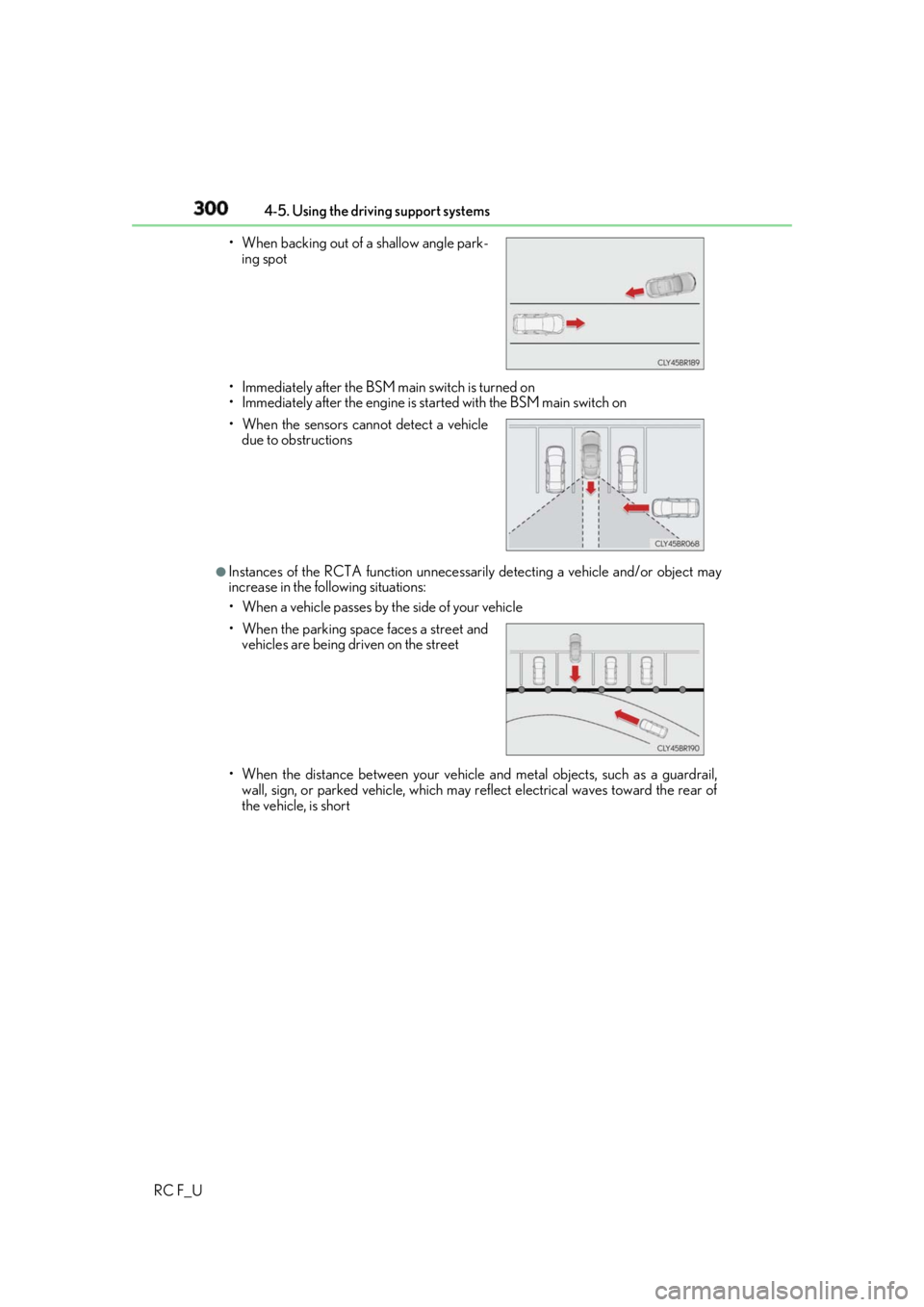
RC F_U • Immediately after the BSM main switch is turned on
• Immediately after the engine is st arted with the BSM main switch on
●
Instances of the RCTA function unnecessari ly detecting a vehicle and/or object may
increase in the following situations:
• When a vehicle passes by th e side of your vehicle
• When the distance between your vehicle and metal objects, such as a guardrail,
wall, sign, or parked vehicle, which may re flect electrical waves toward the rear of
the vehicle, is short• When backing out of a shallow angle park-
ing spot
• When the sensors cannot detect a vehicle
due to obstructions
• When the parking space faces a street and
vehicles are being driven on the street
Page 329 of 636
3295-1. Using the air conditioning system
5
Interior features
RC F_U ●
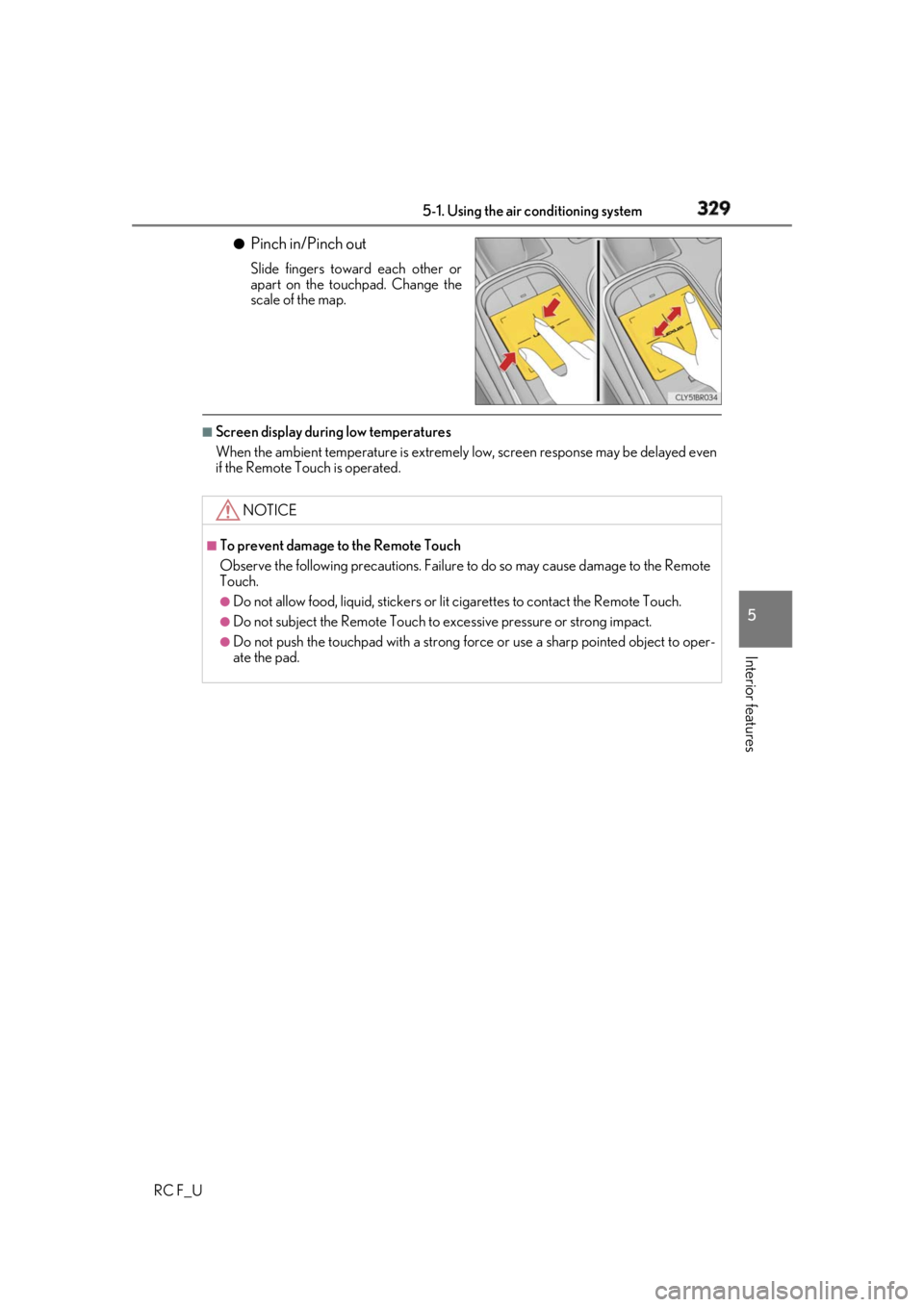
Pinch in/Pinch out Slide fingers toward each other or
apart on the touchpad. Change the
scale of the map.■
Screen display during low temperatures
When the ambient temperature is extremely low, screen response may be delayed even
if the Remote Touch is operated.
NOTICE ■
To prevent damage to the Remote Touch
Observe the following precautions. Failure to do so may cause damage to the Remote
Touch. ●
Do not allow food, liquid, stickers or lit cigarettes to contact the Remote Touch.●
Do not subject the Remote Touch to ex cessive pressure or strong impact.●
Do not push the touchpad with a strong force or use a sharp pointed object to oper-
ate the pad.
Page 353 of 636
3535-3. Using the storage features
RC F_U 5
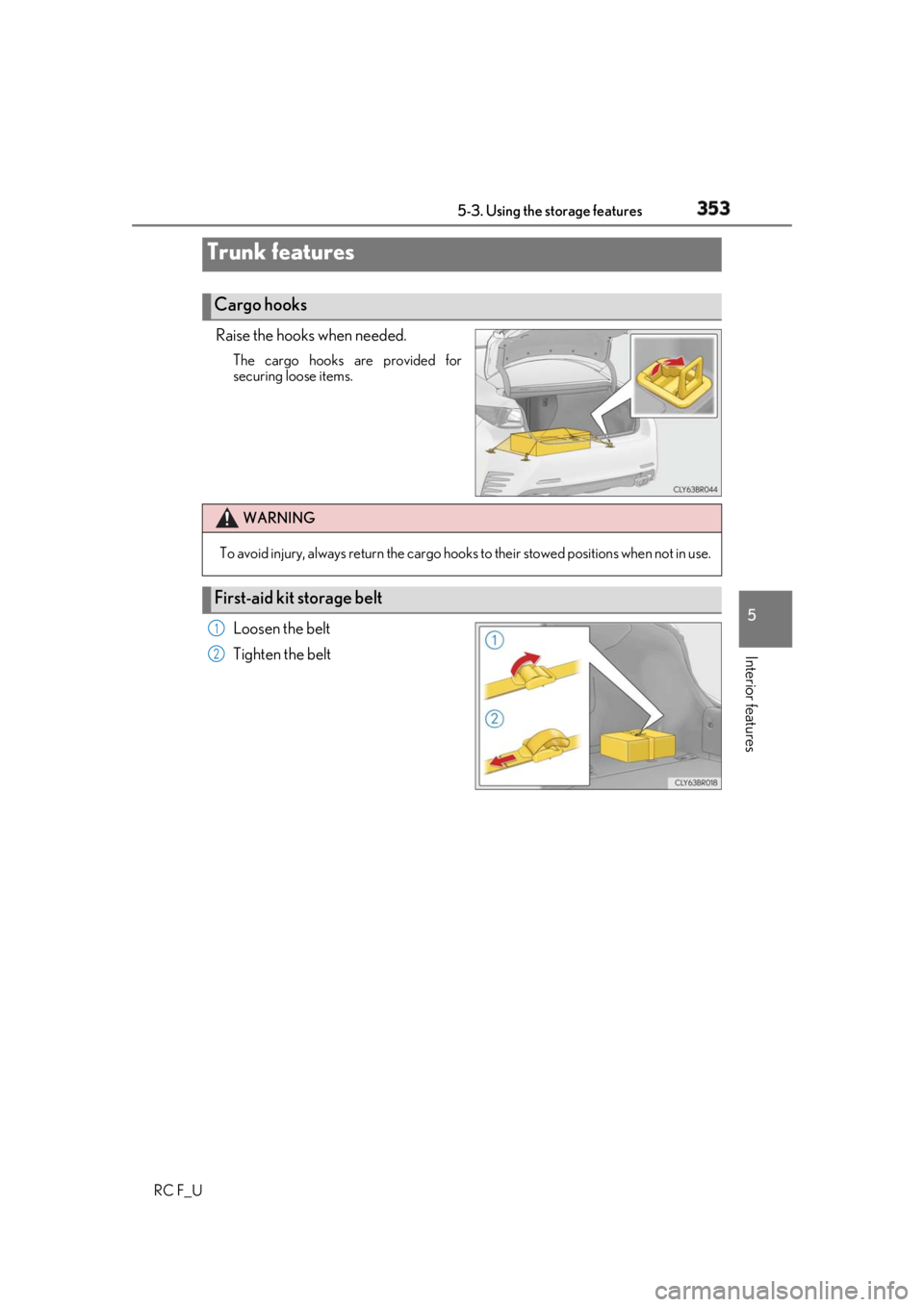
Interior features Raise the hooks when needed. The cargo hooks are provided for
securing loose items.
Loosen the belt
Tighten the beltTrunk features Cargo hooks
WARNING
To avoid injury, always return the cargo hooks to their stow ed positions when not in use.
First-aid kit storage belt 1
2
Page 368 of 636
368 5-4. Using the other interior features
RC F_U ■
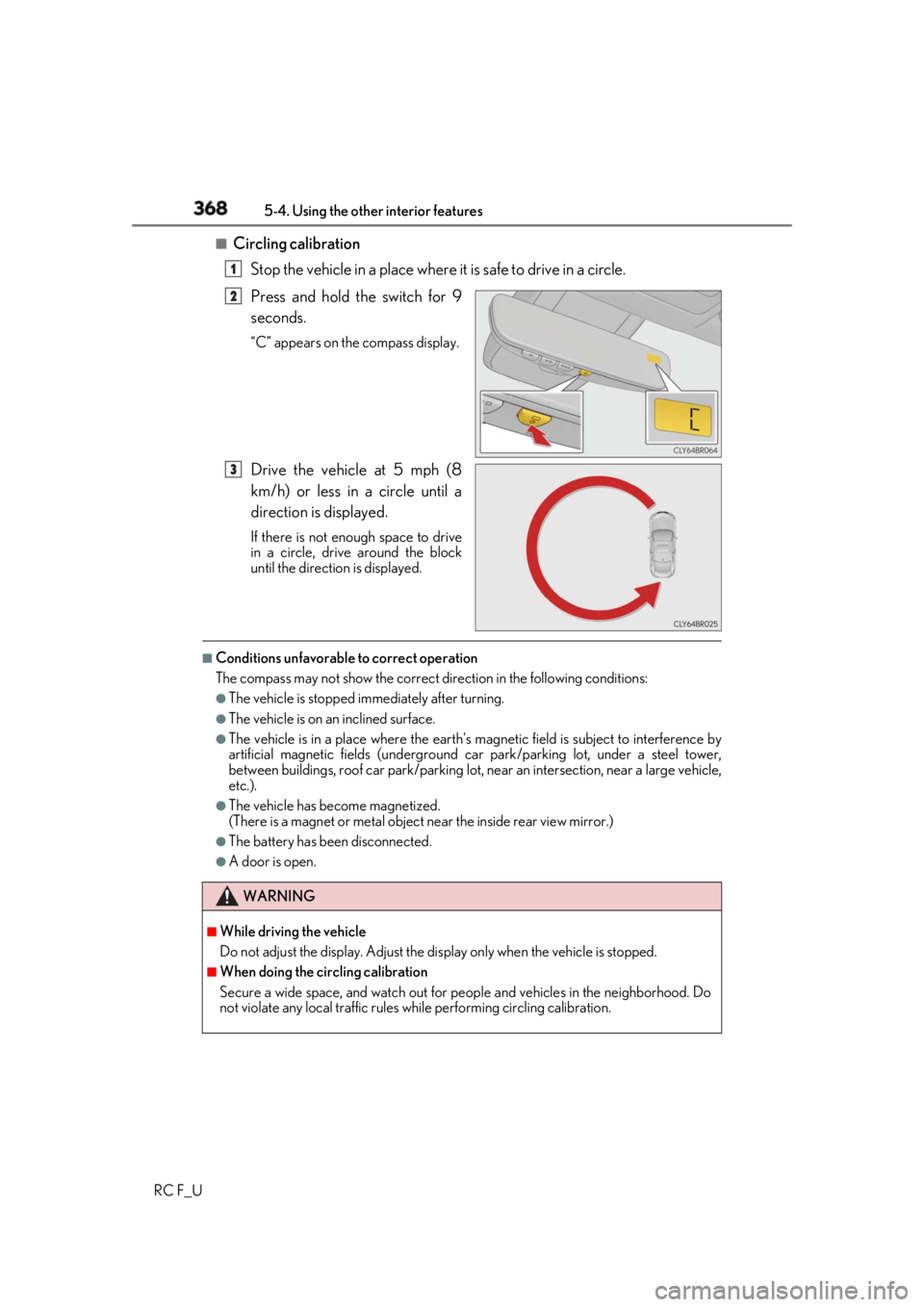
Circling calibration
Stop the vehicle in a place where it is safe to drive in a circle.
Press and hold the switch for 9
seconds. “C” appears on the compass display.
Drive the vehicle at 5 mph (8
km/h) or less in a circle until a
direction is displayed. If there is not enough space to drive
in a circle, drive around the block
until the direction is displayed.■
Conditions unfavorable to correct operation
The compass may not show the correct di rection in the follo wing conditions:●
The vehicle is stopped immediately after turning. ●
The vehicle is on an inclined surface. ●
The vehicle is in a place where the earth's ma gnetic field is subject to interference by
artificial magnetic fields (underground car park/parking lot, under a steel tower,
between buildings, roof car park/parking lot, near an intersection, near a large vehicle,
etc.). ●
The vehicle has become magnetized.
(There is a magnet or metal object near the inside rear view mirror.)●
The battery has been disconnected. ●
A door is open. 1
2
3
WARNING ■
While driving the vehicle
Do not adjust the display. Adjust the di splay only when the vehicle is stopped.■
When doing the circling calibration
Secure a wide space, and watch out for pe ople and vehicles in the neighborhood. Do
not violate any local traffic rules wh ile performing ci rcling calibration.
Page 373 of 636
3735-4. Using the other interior features
RC F_U 5
Interior features ■
Automatic Collision Notification
In case of either airbag deployment or severe rear-end collision, the system is
designed to automatically call the re sponse center. The responding agent
receives the vehicle’s location and attempts to speak with the vehicle occu-
pants to assess the level of emergency. If the occupants are unable to commu-
nicate, the agent automatically treats the call as an emergency, contacts the
nearest emergency services provider to describe the situation, and requests
that assistance be sent to the location. ■
Stolen Vehicle Location
If your vehicle is stolen, Safety Conn ect can work with local authorities to
assist them in locating and recovering the vehicle. After filing a police report,
call the Safety Connect response ce nter at 1-800-25-LEXUS (1-800-255-
3987) in the United Stat es, 1-877-539-8777 in Pu erto Rico or 1-800-265-
3987 in Canada, and follow the prompts for Safety Connect to initiate this
service.
In addition to assisting law enforcemen t with recovery of a stolen vehicle,
Safety-Connect-equipped vehicle locatio n data may, under certain circum-
stances, be shared with third parties to locate your vehicle. Further informa-
tion is available at Lexus.com. ■
Emergency Assistance Button (“SOS”)
In the event of an emergency on the ro ad, push the “SOS” button to reach the
Safety Connect response center. Th e answering agent will determine your
vehicle’s location, assess the emergency, and dispatch the necessary assis-
tance required. If you accidentally press the “SOS” button, tell the response-center agent that you
are not experiencing an emergency.■
Enhanced Roadside Assistance
Enhanced Roadside Assistance adds GP S data to the already included war-
ranty-based Lexus roadside service.
Subscribers can press the “SOS” button to reach a Safety Connect response-
center agent, who can help with a wide range of needs, such as: towing, flat
tire, fuel delivery, etc. For a descript ion of the Roadside Assistance services
and their limitations, please see the Safety Connect Terms and Conditions,
which are available at Lexus.com.Safety Connect services