trunk LEXUS RCF 2019 Owner's Guide
[x] Cancel search | Manufacturer: LEXUS, Model Year: 2019, Model line: RCF, Model: LEXUS RCF 2019Pages: 636, PDF Size: 12.48 MB
Page 227 of 636
2274-3. Operating the lights and wipers
4
Driving
RC F_U ■
Automatic light off system
When the light switch is in , or : The headlights and tail lights turn off 30
seconds after the engine switch is turned to ACCESSORY mode or turned off and a
door is opened and all of the doors and trun k are closed. (The lights turn off immediately
if on the key is pr essed twice after both side doors are closed.)
To turn the lights on again, turn the engine switch to IGNITION ON mode, or turn the
light switch off once and then back to or .
If any of the doors or trunk lid is left open , the lights automatically turn off after 20 min-
utes. ■
Automatic headlight leveling system
The level of the headlights is automatically adjusted accordi ng to the number of passen-
gers and the loading condition of the vehicle to ensure that the headlights do not inter-
fere with other road users. ■
Light reminder buzzer
A buzzer sounds when the engine switch is turned off or turned to ACCESSORY mode
and the driver’s door is opened while the lights are turned on. ■
Customization
Settings (e.g. light sensor se nsitivity) can be changed.
(Customizable features: P. 569)
NOTICE ■
To prevent battery discharge
Do not leave the lights on longer than ne cessary when the engine is not running.
Page 243 of 636
2434-4. Refueling
4
Driving
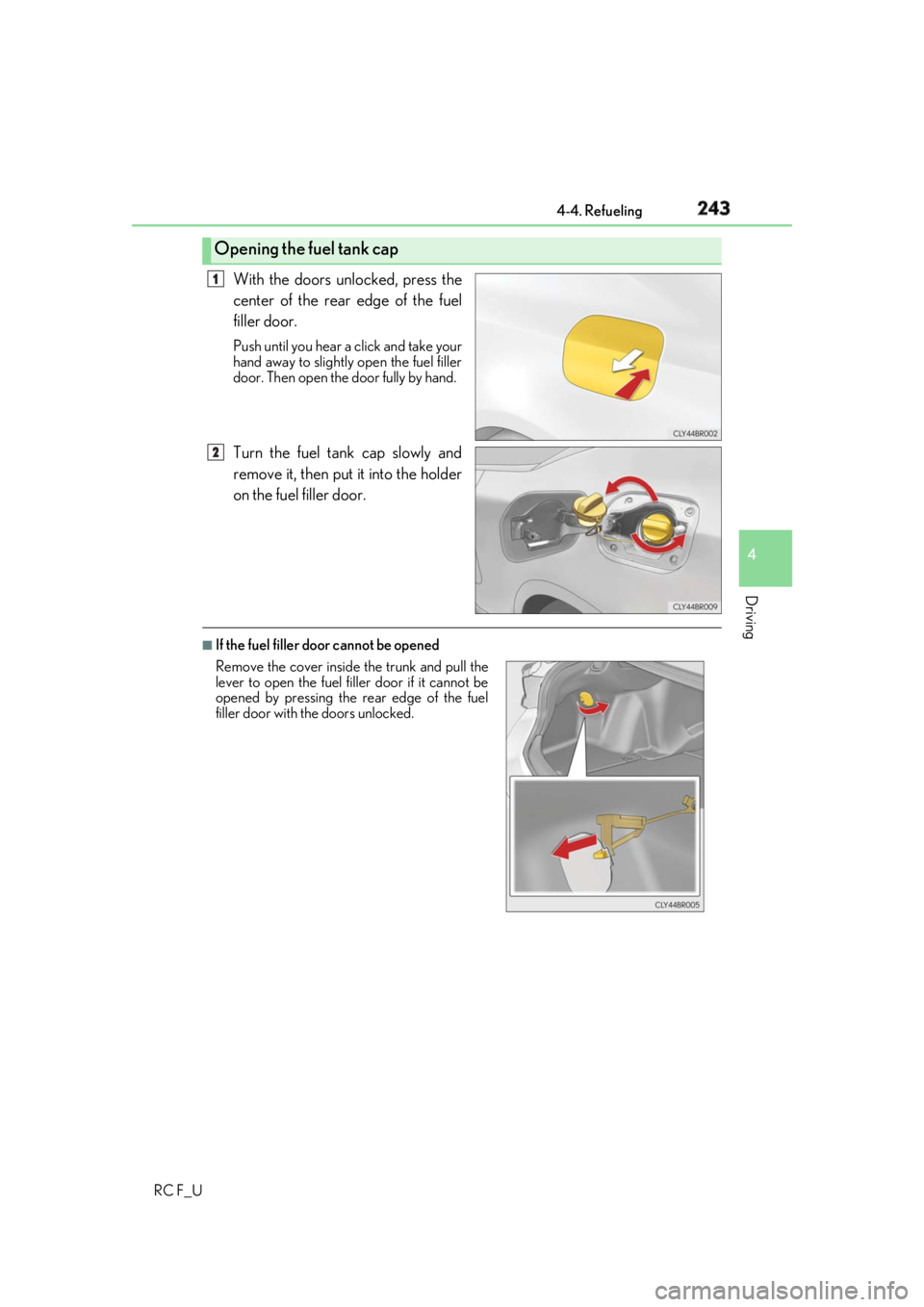
RC F_U With the doors unlocked, press the
center of the rear edge of the fuel
filler door. Push until you hear a click and take your
hand away to slightly open the fuel filler
door. Then open the door fully by hand.
Turn the fuel tank cap slowly and
remove it, then put it into the holder
on the fuel filler door. ■
If the fuel filler door cannot be openedOpening the fuel tank cap 1
2
Remove the cover inside the trunk and pull the
lever to open the fuel fi ller door if it cannot be
opened by pressing the rear edge of the fuel
filler door with the doors unlocked.
Page 308 of 636
308 4-5. Using the driving support systems
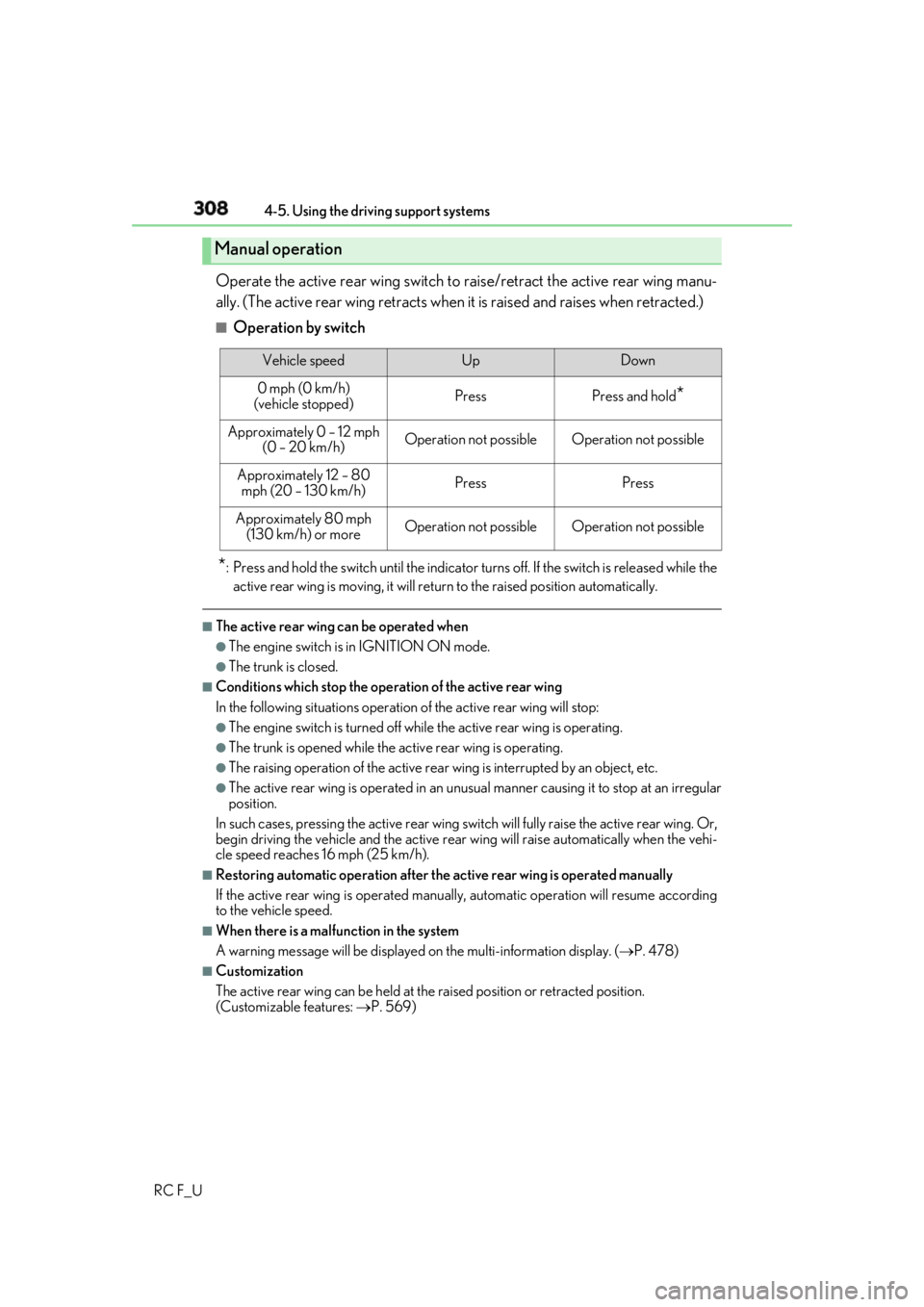
RC F_U Operate the active rear wing switch to raise/retract the active rear wing manu-
ally. (The active rear wing retracts when it is raised and raises when retracted.) ■
Operation by switch
* : Press and hold the switch until the indicator tu rns off. If the switch is released while the
active rear wing is moving, it will retu rn to the raised position automatically.■
The active rear wing can be operated when ●
The engine switch is in IGNITION ON mode. ●
The trunk is closed. ■
Conditions which stop the operation of the active rear wing
In the following situatio ns operation of the acti ve rear wing will stop:●
The engine switch is turned off whil e the active rear wing is operating.●
The trunk is opened while the active rear wing is operating. ●
The raising operation of the active rear wing is interrupted by an object, etc.●
The active rear wing is operated in an unusua l manner causing it to stop at an irregular
position.
In such cases, pressing the acti ve rear wing switch will fully raise the active rear wing. Or,
begin driving the vehicle and the active rear wing will raise automatically when the vehi-
cle speed reaches 16 mph (25 km/h). ■
Restoring automatic operatio n after the active rear wing is operated manually
If the active rear wing is operated manua lly, automatic operation will resume according
to the vehicle speed. ■
When there is a malfunction in the system
A warning message will be displayed on the multi-information display. ( P. 478)■
Customization
The active rear wing can be held at the raised position or retracted position.
(Customizable features: P. 569)Manual operation Vehicle speed Up Down
0 mph (0 km/h)
(vehicle stopped) Press Press and hold
*Approximately 0 – 12 mph
(0 – 20 km/h) Operation not possible Operation not possible
Approximately 12 – 80
mph (20 – 130 km/h) Press Press
Approximately 80 mph
(130 km/h) or more Operation not possible Operation not possible
Page 325 of 636
325
Interior features
5
RC F_U 5-1. Using the air conditioning
system
Remote Touch .............................326
10.3-inch display ......................... 331
Automatic air conditioning
system ......................................... 333
Heated steering wheel/
seat heaters/
seat ventilators .........................344
5-2. Using the interior lights
Interior lights list.......................... 347
• Interior lights ......................... 348
• Personal lights .......................349
5-3. Using the storage features
List of storage features............ 350
• Glove box ................................ 351
• Console box ............................ 351
• Cup holders............................352
Trunk features............................. 353 5-4. Using the other interior
features
Other interior features ............ 354
• Sun visors ................................ 354
• Vanity mirrors ....................... 354
• Clock ........................................355
• Power outlet...........................355
• Armrest .................................... 356
•Trunk storage
extension ................................. 357
• Assist grips..............................358
• Coat hooks .............................358
Garage door op ener ...............359
Compass ....................................... 366
LEXUS Enform Safety
Connect ...................................... 370
Page 351 of 636
3515-3. Using the storage features
RC F_U 5
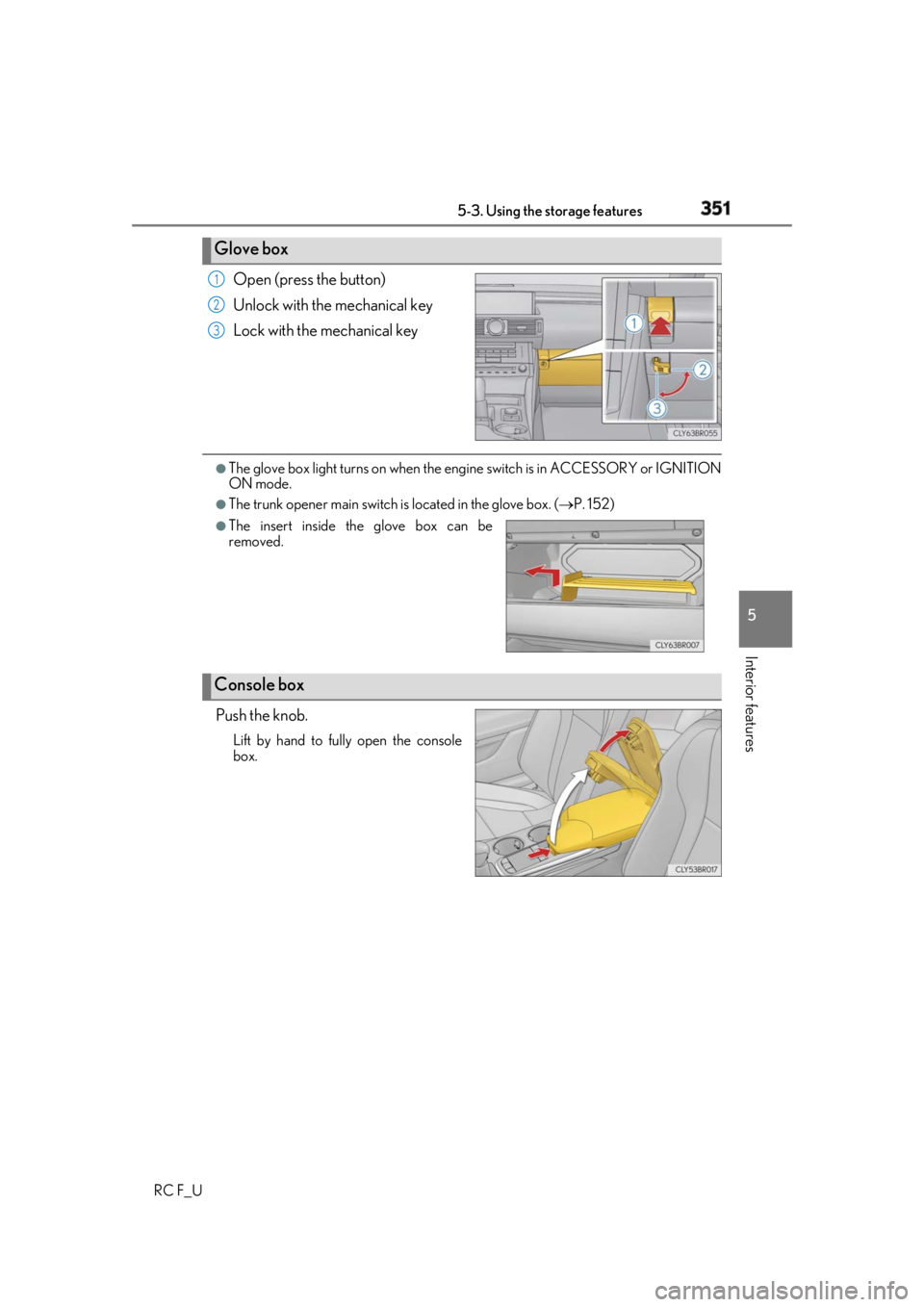
Interior features Open (press the button)
Unlock with the mechanical key
Lock with the mechanical key ●
The glove box light turns on when the engine switch is in ACCESSORY or IGNITION
ON mode. ●
The trunk opener main switch is located in the glove box. ( P. 152)
Push the knob. Lift by hand to fully open the console
box.Glove box 1
2
3
●
The insert inside the glove box can be
removed.
Console box
Page 353 of 636
3535-3. Using the storage features
RC F_U 5
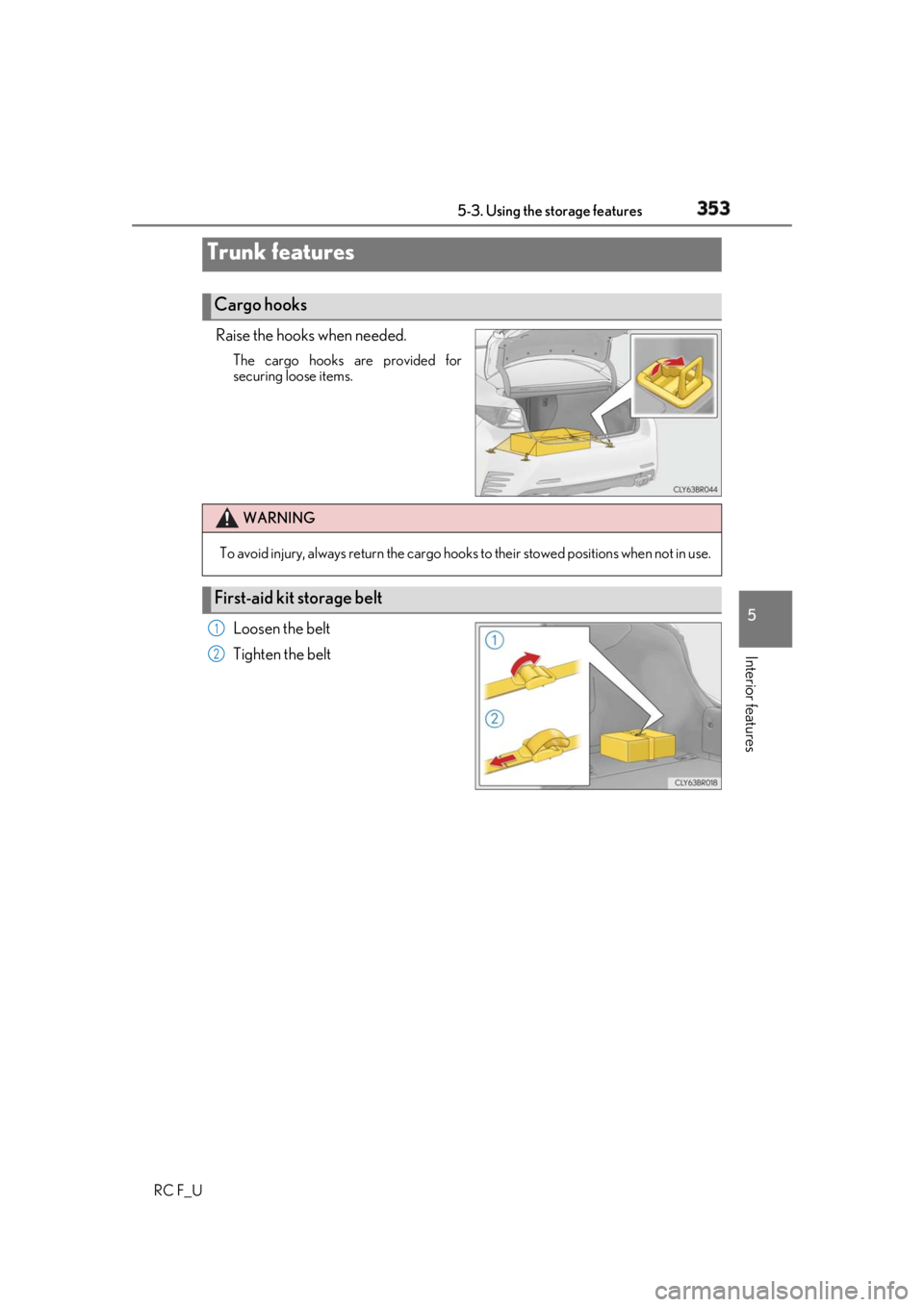
Interior features Raise the hooks when needed. The cargo hooks are provided for
securing loose items.
Loosen the belt
Tighten the beltTrunk features Cargo hooks
WARNING
To avoid injury, always return the cargo hooks to their stow ed positions when not in use.
First-aid kit storage belt 1
2
Page 357 of 636
3575-4. Using the other interior features
RC F_U 5
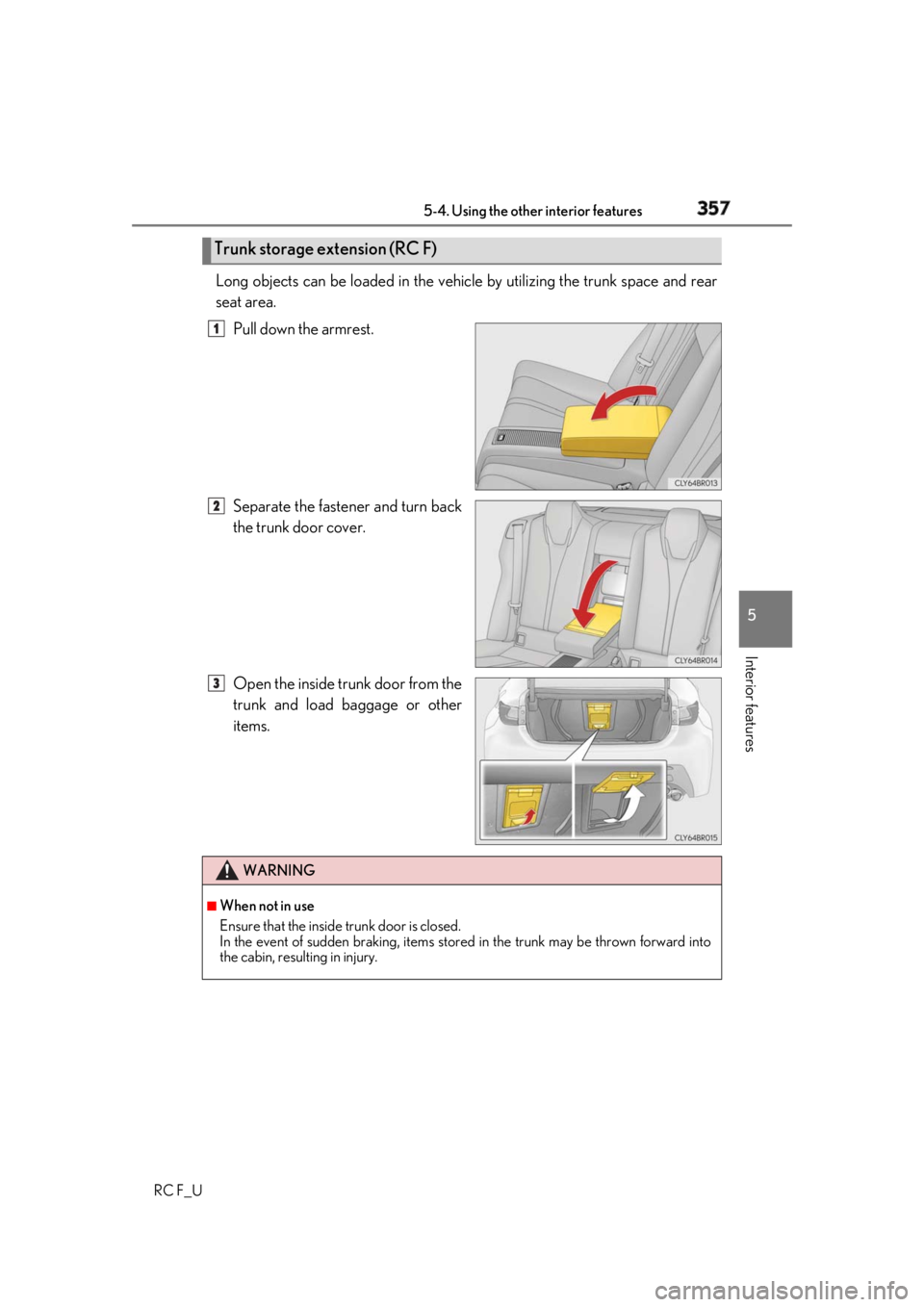
Interior features Long objects can be loaded in the vehicle by utilizing the trunk space and rear
seat area.
Pull down the armrest.
Separate the fastener and turn back
the trunk door cover.
Open the inside trunk door from the
trunk and load ba ggage or other
items.Trunk storage extension (RC F) 1
2
3
WARNING ■
When not in use
Ensure that the inside trunk door is closed.
In the event of sudden braking, items stor ed in the trunk may be thrown forward into
the cabin, resulting in injury.
Page 389 of 636
3896-2. Maintenance
RC F_U 6
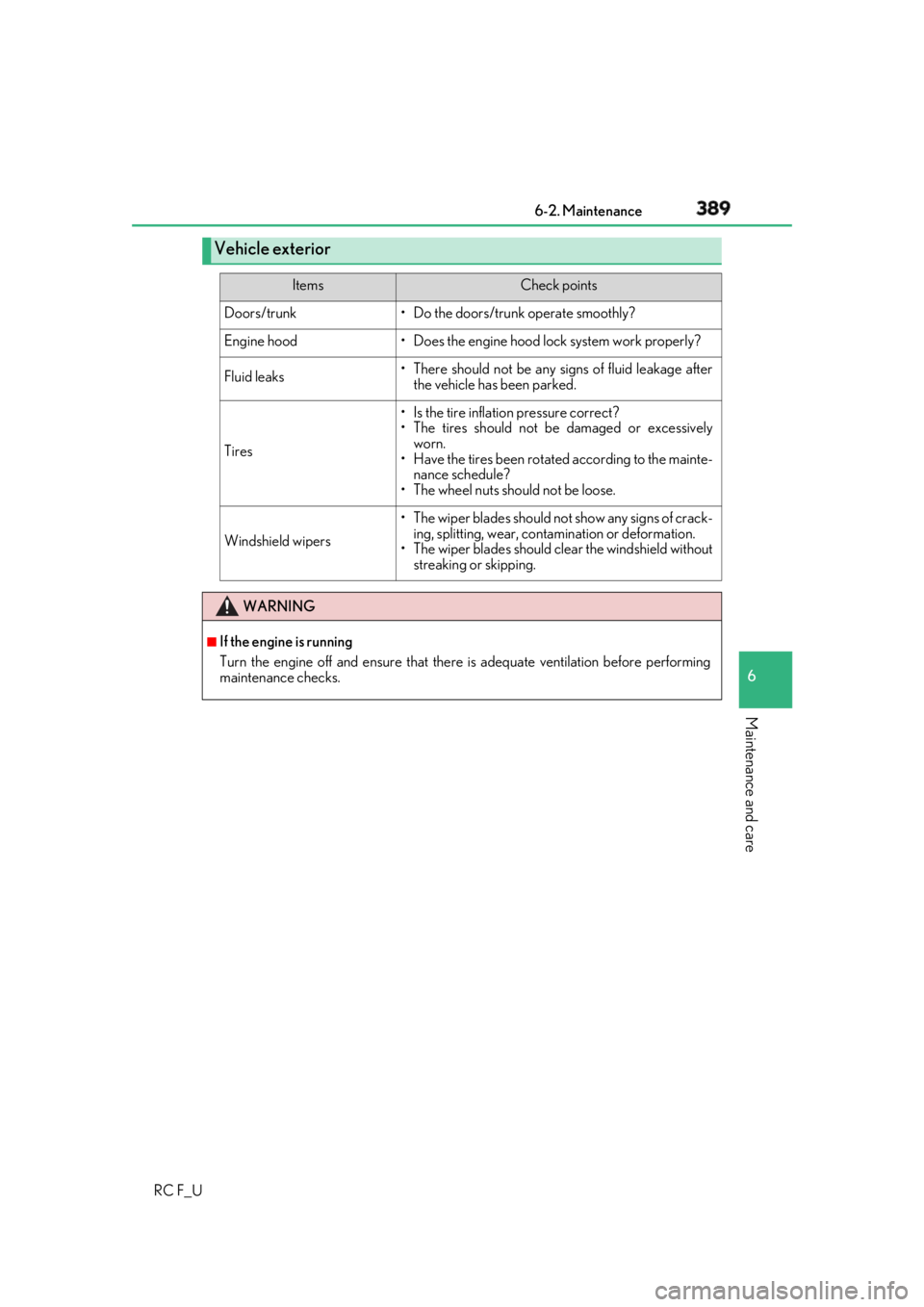
Maintenance and care Vehicle exterior Items Check points
Doors/trunk • Do the doors/trunk operate smoothly?
Engine hood • Does the engine hood lock system work properly?
Fluid leaks • There should not be any si gns of fluid leakage after
the vehicle has been parked.
Tires • Is the tire inflation pressure correct?
• The tires should not be damaged or excessively
worn.
• Have the tires been rotated according to the mainte-
nance schedule?
• The wheel nuts should not be loose.
Windshield wipers •The wiper blades should no t show any signs of crack-
ing, splitting, wear, contamination or deformation.
• The wiper blades should clear the windshield without
streaking or skipping.
WARNING ■
If the engine is running
Turn the engine off and ensure that there is adequate ventilation before performing
maintenance checks.
Page 436 of 636
436 6-3. Do-it-yourself maintenance
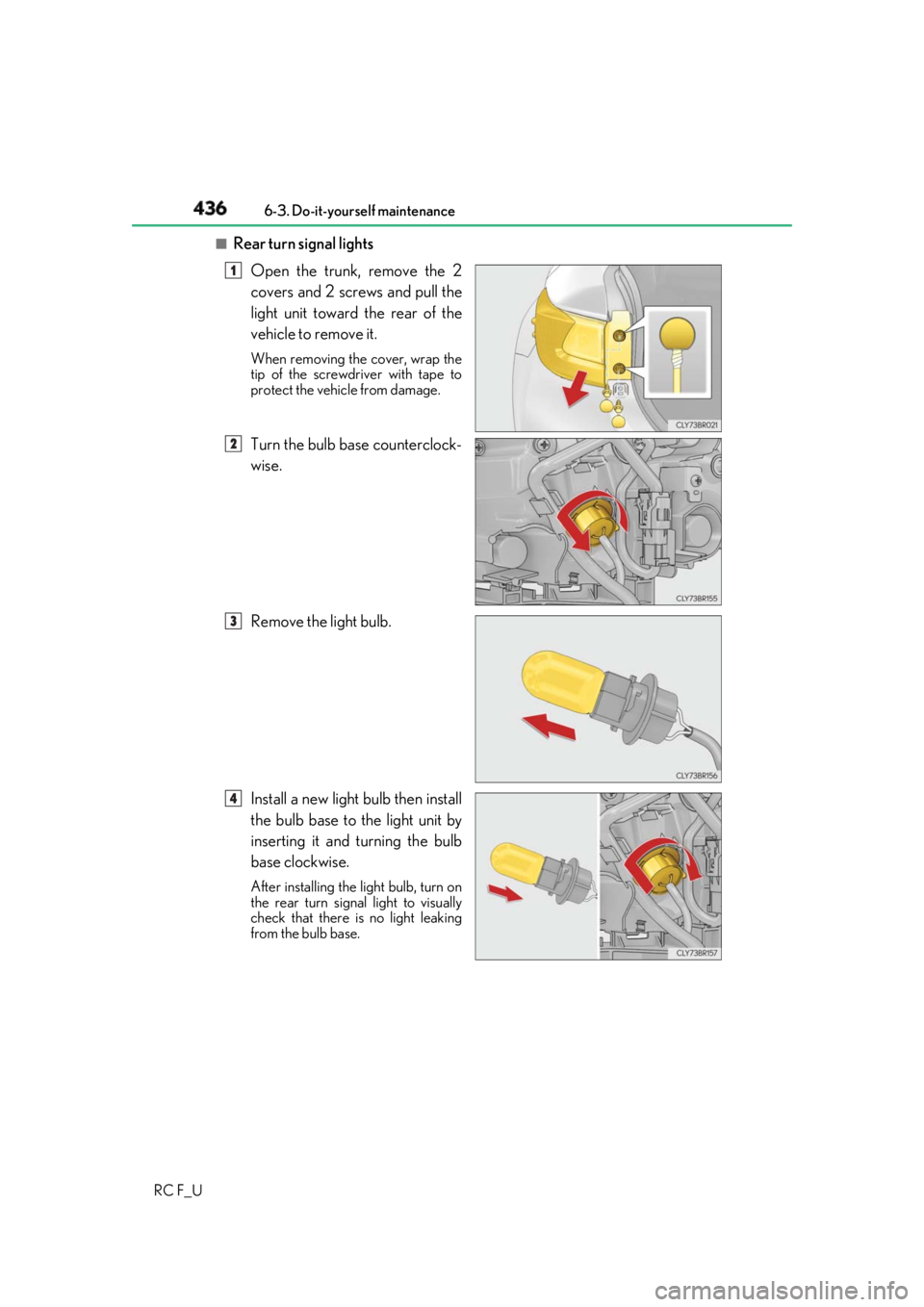
RC F_U ■
Rear turn signal lights
Open the trunk, remove the 2
covers and 2 screws and pull the
light unit toward the rear of the
vehicle to remove it. When removing the cover, wrap the
tip of the screwdriver with tape to
protect the vehicle from damage.
Turn the bulb base counterclock-
wise.
Remove the light bulb.
Install a new light bulb then install
the bulb base to the light unit by
inserting it and turning the bulb
base clockwise. After installing the light bulb, turn on
the rear turn signal light to visually
check that there is no light leaking
from the bulb base. 1
2
3
4
Page 438 of 636
438 6-3. Do-it-yourself maintenance
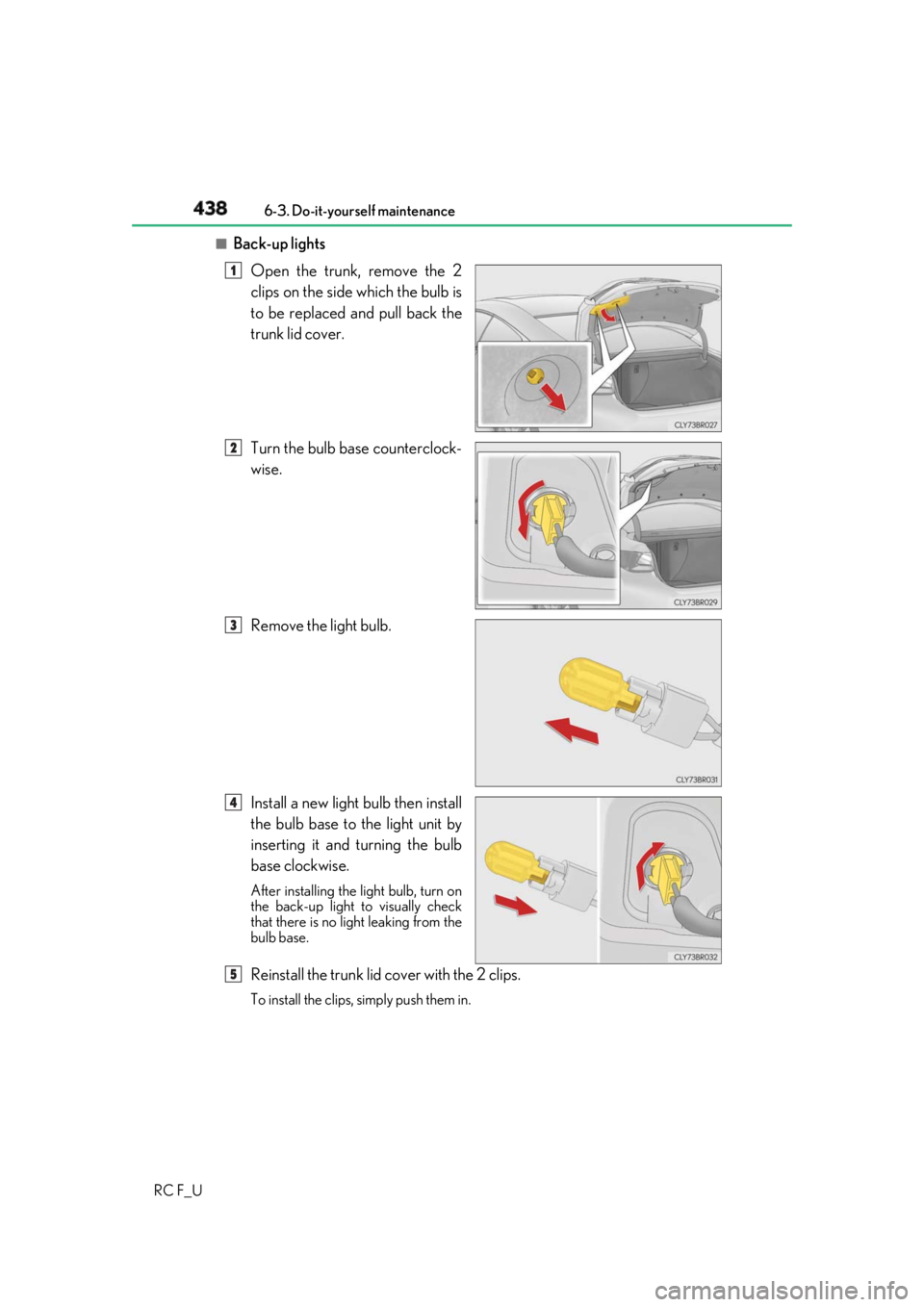
RC F_U ■
Back-up lights
Open the trunk, remove the 2
clips on the side which the bulb is
to be replaced and pull back the
trunk lid cover.
Turn the bulb base counterclock-
wise.
Remove the light bulb.
Install a new light bulb then install
the bulb base to the light unit by
inserting it and turning the bulb
base clockwise. After installing the light bulb, turn on
the back-up light to visually check
that there is no li ght leaking from the
bulb base.
Reinstall the trunk lid cover with the 2 clips. To install the clips, simply push them in.1
2
3
4
5