lock LEXUS RCF 2019 Manual PDF
[x] Cancel search | Manufacturer: LEXUS, Model Year: 2019, Model line: RCF, Model: LEXUS RCF 2019Pages: 636, PDF Size: 12.48 MB
Page 312 of 636

312 4-5. Using the driving support systems
RC F_U ◆ ABS (Anti-lock Brake System)
Helps to prevent wheel lock when the br akes are applied suddenly, or if the
brakes are applied while drivin g on a slippery road surface
◆ Brake assist
Generates an increased level of br aking force after the brake pedal is
depressed when the system detects a panic stop situation
◆ VSC (Vehicle Stability Control)
Helps the driver to contro l skidding when swerving suddenly or turning on
slippery road surfaces
◆ Enhanced VSC (Enhanced Vehicle Stability Control)
Provides cooperative control of the ABS, TRAC, VSC and EPS.
Helps to maintain directional stability when swerving on slippery road sur-
faces by controlling steering performance.
◆ TRAC (Traction Control)
Helps to maintain drive power and pr event the drive wheels from spinning
when starting the vehicle or accelerating on slippery roads
◆ Hill-start assist control
Helps to prevent the vehicle from rolling backward when starti ng on an incline
◆ VGRS (Variable Gear Ratio Steering) (if equipped)
Adjusts the front wheel turning angle in accordance with the vehicle speed
and steering wheel movement
◆ DRS (Dynamic Rear Steering) (if equipped)
Contributes to the turning characteristi cs and responsiveness of the vehicle
by adjusting the rear wheel angle of the vehicle in accordance with steering
wheel movement.Driving assist systems To help enhance driving safety and perf ormance, the following systems oper-
ate automatically in response to variou s driving situations. Be aware, however,
that these systems are supplementary and should not be relied upon too heav-
ily when operating the vehicle.
Page 321 of 636

3214-6. Driving tips
4
Driving
RC F_U Perform the following according to the driving conditions: ●
Do not try to forcibly open a window or move a wiper that is frozen. Pour
warm water over the frozen area to me lt the ice. Wipe away the water imme-
diately to prevent it from freezing. ●
To ensure proper operation of the c limate control system fan, remove any
snow that has accumulated on the air inlet vents in front of the windshield. ●
Check for and remove any excess ice or snow that may have accumulated on
the exterior lights, vehicle’s roof, chassi s, around the tires or on the brakes.●
Remove any snow or mud from the bottom of your shoes before getting in the
vehicle.
Accelerate the vehicle slowly, keep a sa fe distance between you and the vehicle
ahead, and drive at a reduced spee d suitable to road conditions.●
Park the vehicle and move the shift lever to P without setting the parking
brake. The parking brake may freeze up, preventing it from being released. If
the vehicle is parked without setting the parking brake, make sure to block the
wheels.
Failure to do so may be dangerous because it may cause the vehicle to move
unexpectedly, possibly leading to an accident. ●
If the vehicle is parked without setting the parking brake, confirm that the shift
lever cannot be moved out of P
* .
* : The shift lever will be locked if it is atte mpted to be shifted from P to any other posi-
tion without depressing the brake pedal. If the shift lever can be shifted from P, there
may be a problem with the shift lock sy stem. Have the vehicle inspected by your
Lexus dealer immediately.Before driving the vehicle
When driving the vehicle
When parking the vehicle
Page 325 of 636

325
Interior features
5
RC F_U 5-1. Using the air conditioning
system
Remote Touch .............................326
10.3-inch display ......................... 331
Automatic air conditioning
system ......................................... 333
Heated steering wheel/
seat heaters/
seat ventilators .........................344
5-2. Using the interior lights
Interior lights list.......................... 347
• Interior lights ......................... 348
• Personal lights .......................349
5-3. Using the storage features
List of storage features............ 350
• Glove box ................................ 351
• Console box ............................ 351
• Cup holders............................352
Trunk features............................. 353 5-4. Using the other interior
features
Other interior features ............ 354
• Sun visors ................................ 354
• Vanity mirrors ....................... 354
• Clock ........................................355
• Power outlet...........................355
• Armrest .................................... 356
•Trunk storage
extension ................................. 357
• Assist grips..............................358
• Coat hooks .............................358
Garage door op ener ...............359
Compass ....................................... 366
LEXUS Enform Safety
Connect ...................................... 370
Page 341 of 636

3415-1. Using the air conditioning system
5
Interior features
RC F_U ■
Registering air conditioning settings to elec tronic keys (vehicles with driving position
memory) ●
Unlocking the vehicle using an electronic ke y and turning the engine switch to IGNI-
TION ON mode will recall that key's re gistered air conditioning settings. ●
When the engine switch is tu rned off, the current air cond itioning settings will automat-
ically be registered to the electronic key that was used to unlock the vehicle. ●
The system may not operate correctly if more th an one electronic key is in the vicinity or
if the smart access system with push-button start is used to unlock a passenger door. ●
The doors that can recall the air conditioning setting* when unlocked using the smart
access system with push-button start can be changed. For details, contact your Lexus
dealer.
*: The doors that can recall the driving posi tion memory are change d at the same time.■
Using automatic mode
Fan speed is adjusted automatically according to the temperature setting and the ambi-
ent conditions.
Therefore, the fan may stop for a while until wa rm or cool air is ready to flow immediately
after is pressed or “AUTO” is selected. ■
Using the voice command system
Air conditioning system can be operated using voic e commands. For details, refer to the
“NAVIGATION AND MULTIMEDIA SYSTEM OWNER’S MANUAL”. ■
Fogging up of the windows
The windows will easily fog up when the hu midity in the vehicle is high. Turning
(“A/C”) on will dehumidify the air from the outlets and defog the wi ndshield effectively.●
If you turn (“A/C”) off, the windows may fog up more easily.●
The windows may fog up if the recirculated air mode is used. ■
Outside/recirculated air mode ●
When driving on dusty roads such as tunnels or in heavy traffic, set the outside/recircu-
lated air mode button to the recirculated air mode. This is effective in preventing out-
side air from enteri ng the vehicle interior. During cooling operation, setting the
recirculated air mode will also cool the vehicle interior effectively. ●
Outside/recirculated air mode may automa tically switch depending on the tempera-
ture setting or the inside temperature. ■
When the outside temperature exceeds 75 F (24 C) and the air conditioning system
is on ●
In order to reduce the air co nditioning power consumption, the air conditioning system
may switch to recirculated air mode automa tically. This may also reduce fuel consump-
tion. ●
Recirculated air mode is selected as a defaul t mode when the engine switch is turned to
IGNITION ON mode. ●
It is possible to switch to outside air mode at any time by pressing .
Page 343 of 636
3435-1. Using the air conditioning system
5
Interior features
RC F_U WARNING ■
To prevent the windshield from fogging up ●
Do not use during cool air operation in extremely humid weather. The differ-
ence between the temperature of the outside air and that of the windshield can cause
the outer surface of the windshield to fog up, blocking your vision.
■
To prevent burns ●
Do not touch the rear view mirror surfaces when the outside rear view mirror defog-
gers are on. ●
Do not touch the glass at lower part of the windshield or to the side of the front pillars
when the windshield wiper de-icer is on.
NOTICE ■
To prevent battery discharge
Do not leave the air conditioni ng system on longer than necessary when the engine is
stopped. ●
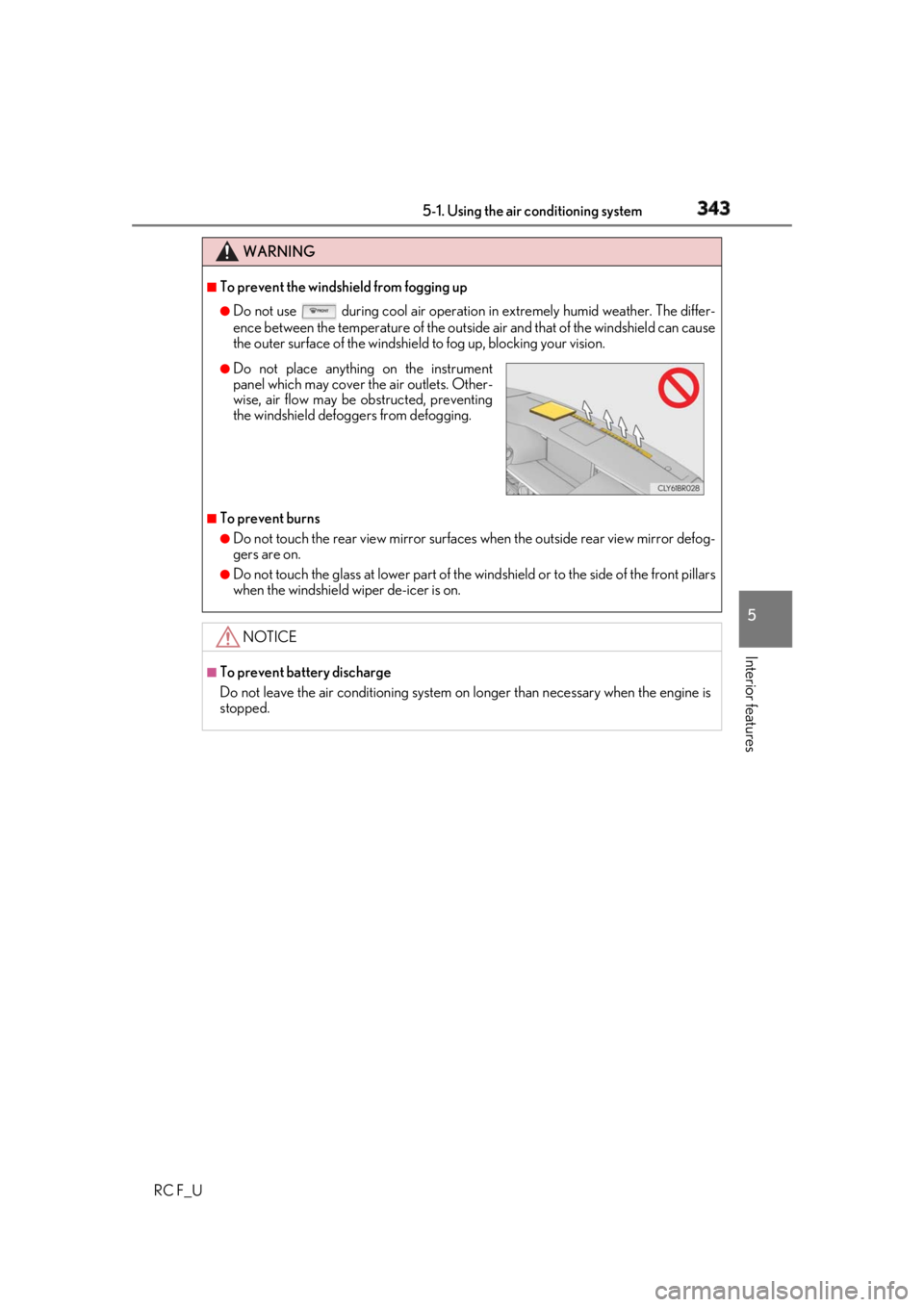
Do not place anything on the instrument
panel which may cover th e air outlets. Other-
wise, air flow may be obstructed, preventing
the windshield defoggers from defogging.
Page 349 of 636
3495-2. Using the interior lights
RC F_U 5
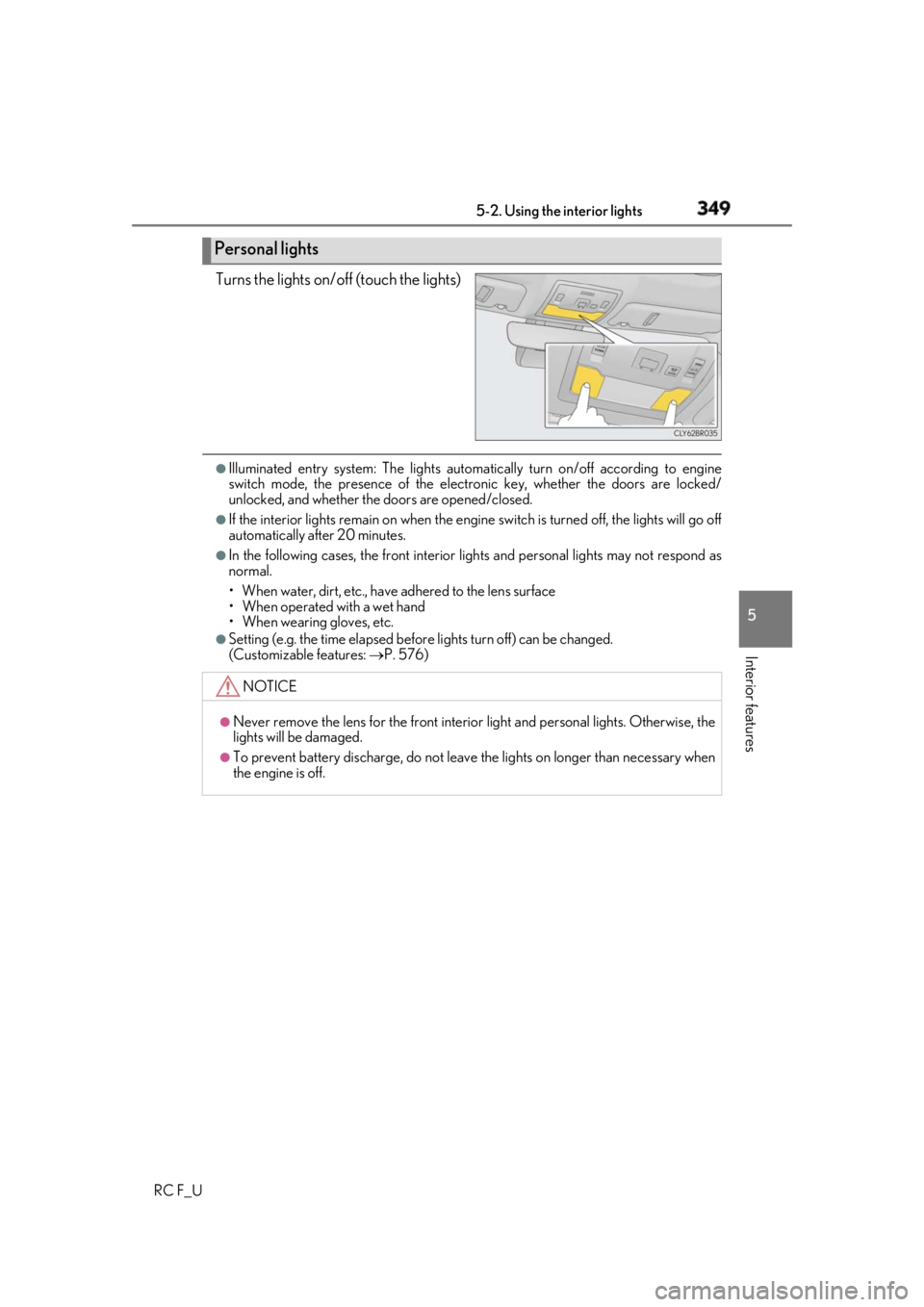
Interior features Turns the lights on/off (touch the lights) ●
Illuminated entry system: Th e lights automatically turn on/off according to engine
switch mode, the presence of the electronic key, whether the doors are locked/
unlocked, and whether the doors are opened/closed. ●
If the interior lights remain on when the engine switch is turned off, the lights will go off
automatically after 20 minutes. ●
In the following cases, the front interior lights and personal lights may not respond as
normal.
• When water, dirt, etc., have adhered to the lens surface
• When operated with a wet hand
• When wearing gloves, etc. ●
Setting (e.g. the time elapsed before lights turn off) can be changed.
(Customizable features: P. 576)Personal lights
NOTICE ●
Never remove the lens for the front interior light and personal lig hts. Otherwise, the
lights will be damaged. ●
To prevent battery discharge, do not leave the lights on longer than necessary when
the engine is off.
Page 351 of 636
3515-3. Using the storage features
RC F_U 5
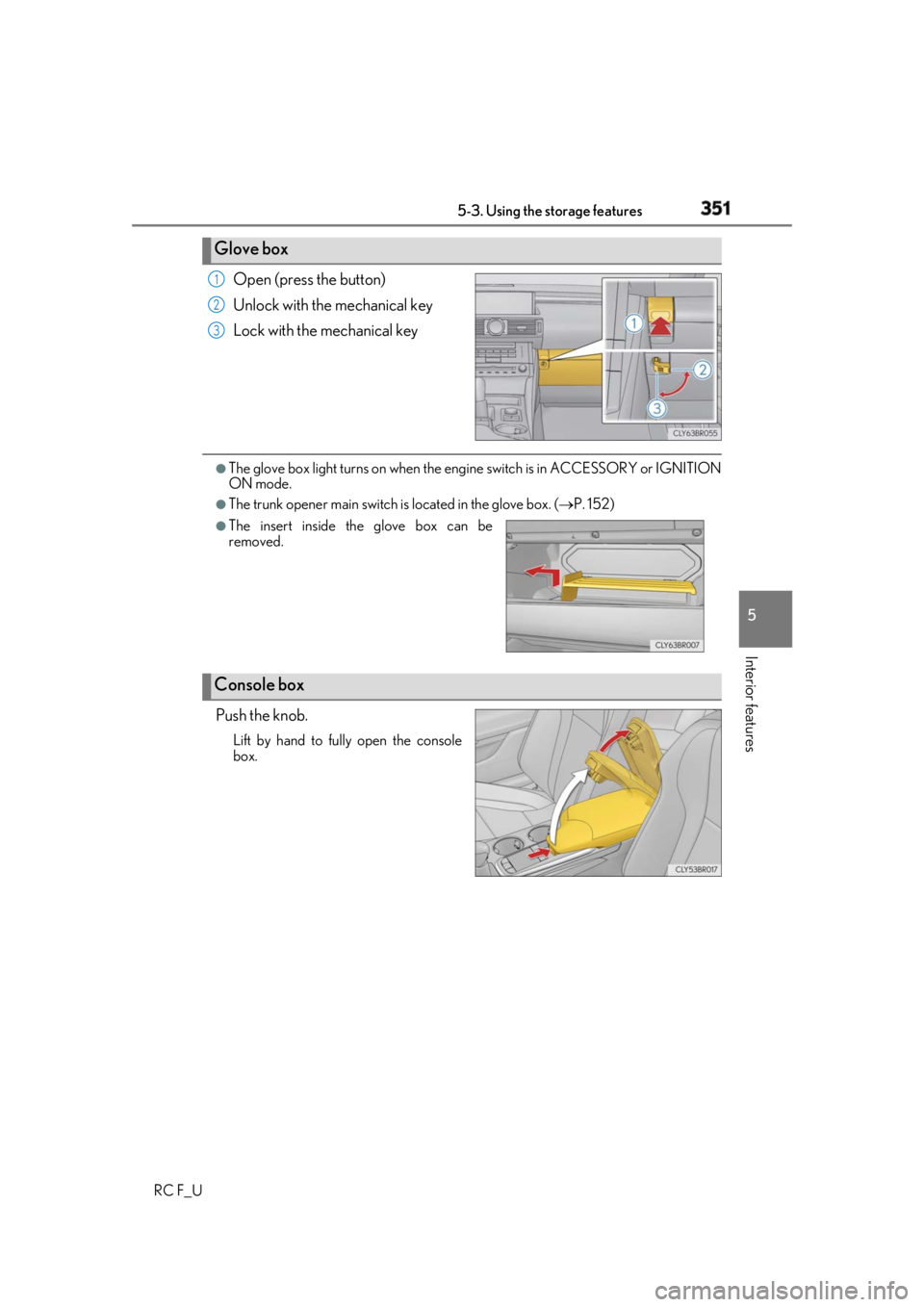
Interior features Open (press the button)
Unlock with the mechanical key
Lock with the mechanical key ●
The glove box light turns on when the engine switch is in ACCESSORY or IGNITION
ON mode. ●
The trunk opener main switch is located in the glove box. ( P. 152)
Push the knob. Lift by hand to fully open the console
box.Glove box 1
2
3
●
The insert inside the glove box can be
removed.
Console box
Page 355 of 636
3555-4. Using the other interior features
RC F_U 5
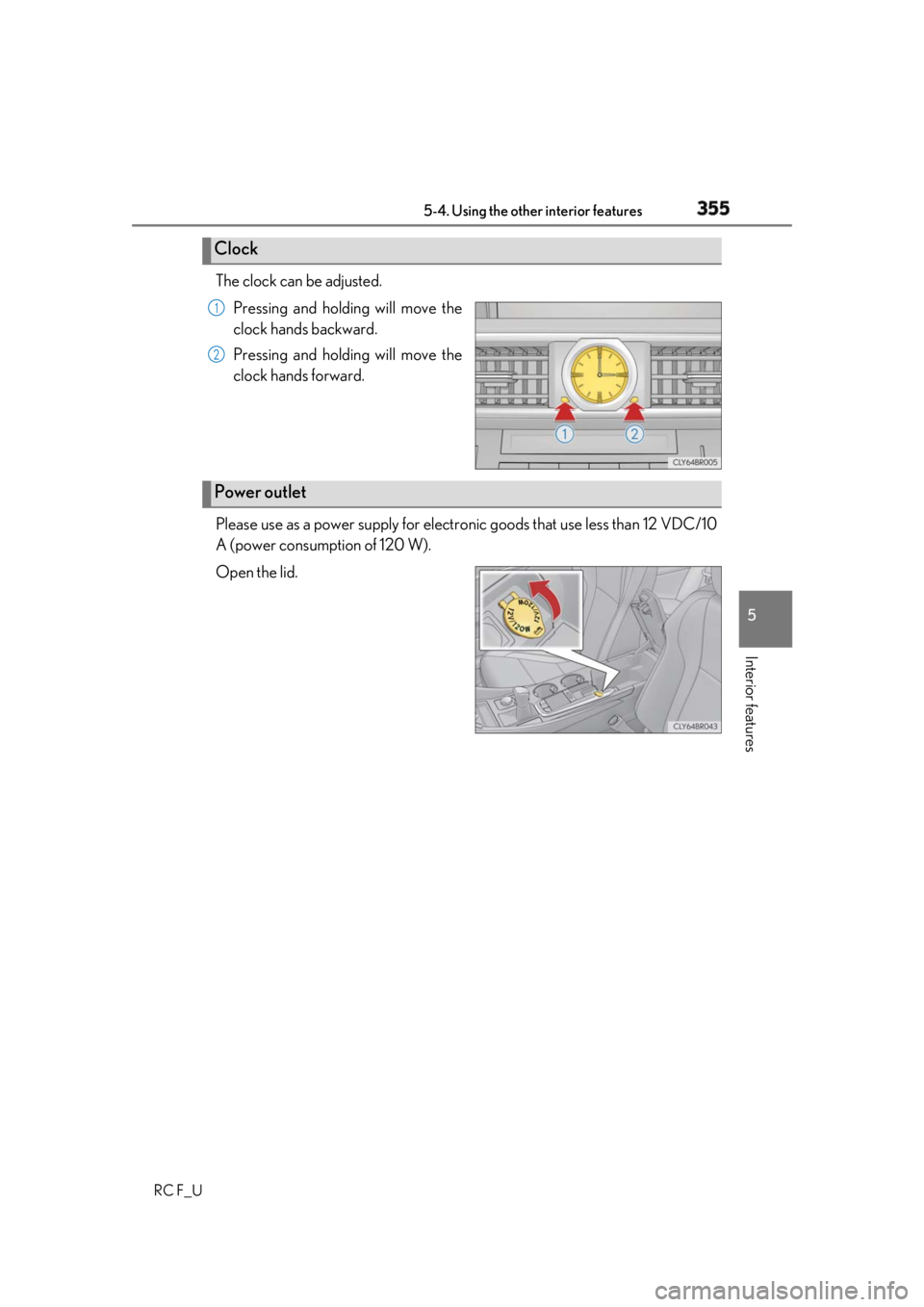
Interior features The clock can be adjusted.
Pressing and holding will move the
clock hands backward.
Pressing and holding will move the
clock hands forward.
Please use as a power supply for electronic goods that use less than 12 VDC/10
A (power consumption of 120 W).
Open the lid.Clock 1
2
Power outlet
Page 359 of 636
3595-4. Using the other interior features
RC F_U 5
Interior features The HomeLink ®
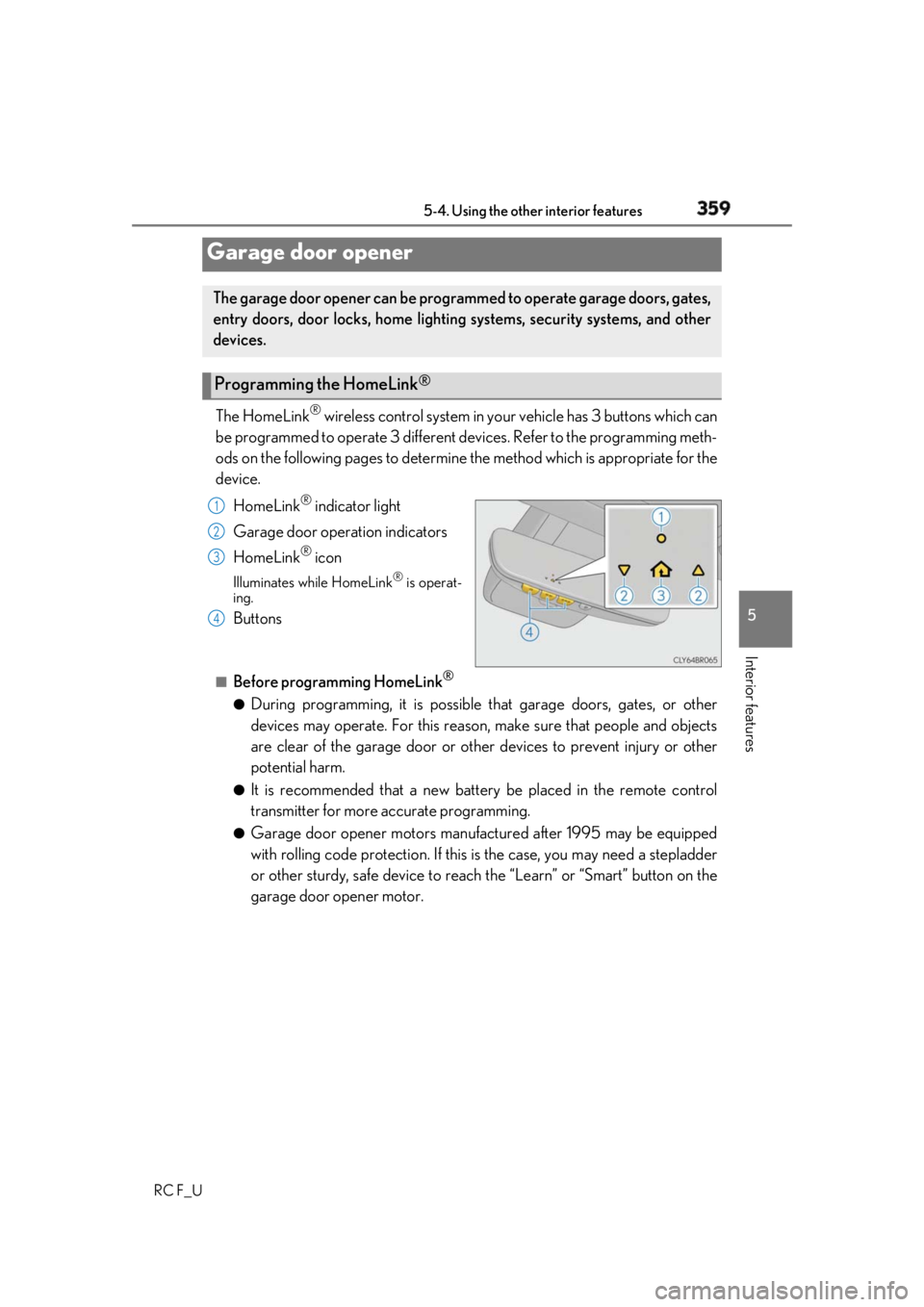
wireless control system in your vehicle has 3 buttons which can
be programmed to operate 3 different de vices. Refer to the programming meth-
ods on the following pages to determine the method which is appropriate for the
device.
HomeLink ®
indicator light
Garage door operation indicators
HomeLink ®
iconIlluminates while HomeLink ®
is operat-
ing.
Buttons ■
Before programming HomeLink ®
●
During programming, it is possible that garage doors, gates, or other
devices may operate. For this reason, make sure that people and objects
are clear of the garage door or othe r devices to prevent injury or other
potential harm. ●
It is recommended that a new batter y be placed in the remote control
transmitter for more accurate programming. ●
Garage door opener motors manufa ctured after 1995 may be equipped
with rolling code protection. If this is the case, you may need a stepladder
or other sturdy, safe device to reach the “Learn” or “Smart” button on the
garage door opener motor.Garage door opener The garage door opener can be programmed to operate garage doors, gates,
entry doors, door locks, home lightin g systems, security systems, and other
devices.
Programming the HomeLink ®
1
2
3
4
Page 368 of 636
368 5-4. Using the other interior features
RC F_U ■
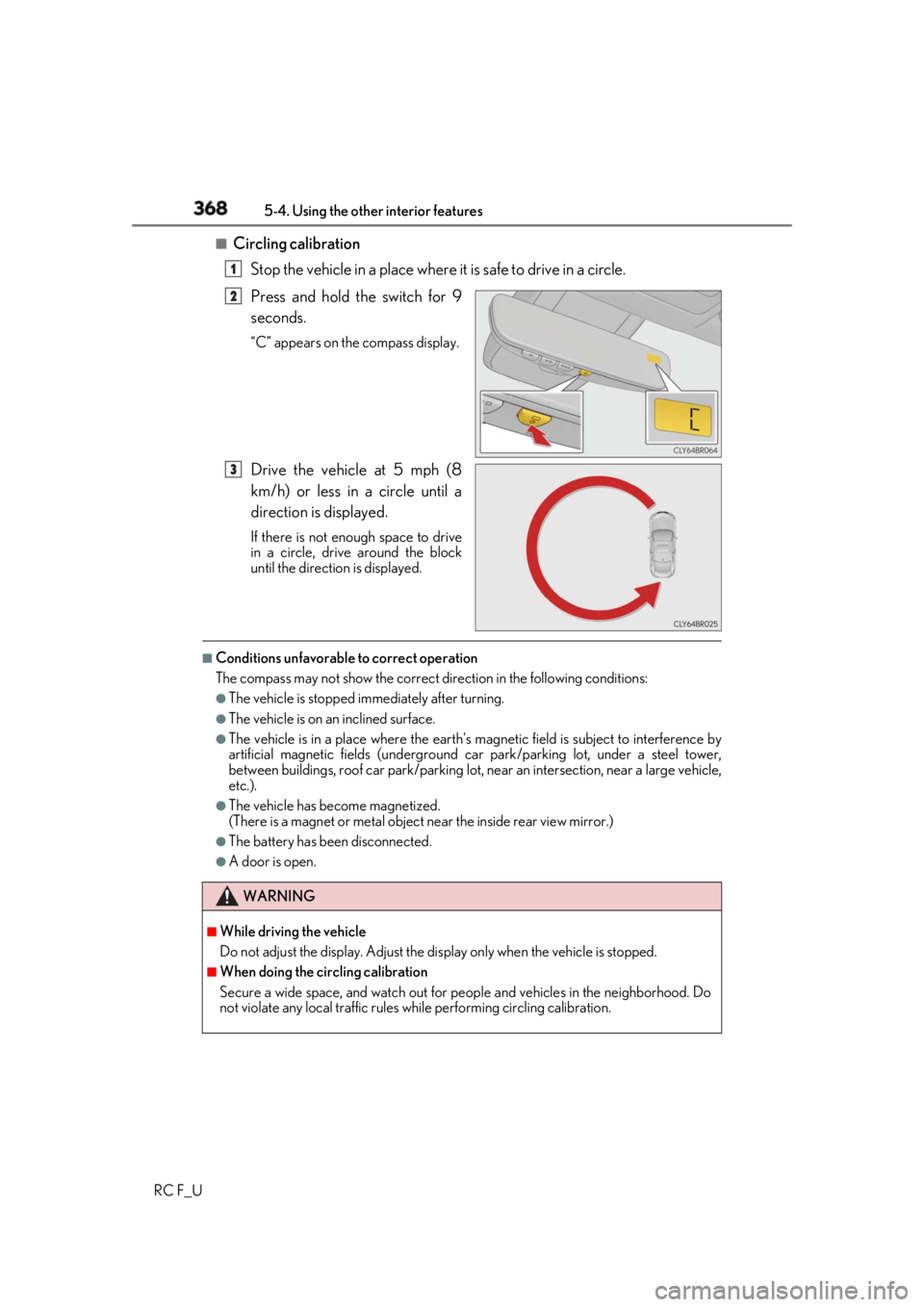
Circling calibration
Stop the vehicle in a place where it is safe to drive in a circle.
Press and hold the switch for 9
seconds. “C” appears on the compass display.
Drive the vehicle at 5 mph (8
km/h) or less in a circle until a
direction is displayed. If there is not enough space to drive
in a circle, drive around the block
until the direction is displayed.■
Conditions unfavorable to correct operation
The compass may not show the correct di rection in the follo wing conditions:●
The vehicle is stopped immediately after turning. ●
The vehicle is on an inclined surface. ●
The vehicle is in a place where the earth's ma gnetic field is subject to interference by
artificial magnetic fields (underground car park/parking lot, under a steel tower,
between buildings, roof car park/parking lot, near an intersection, near a large vehicle,
etc.). ●
The vehicle has become magnetized.
(There is a magnet or metal object near the inside rear view mirror.)●
The battery has been disconnected. ●
A door is open. 1
2
3
WARNING ■
While driving the vehicle
Do not adjust the display. Adjust the di splay only when the vehicle is stopped.■
When doing the circling calibration
Secure a wide space, and watch out for pe ople and vehicles in the neighborhood. Do
not violate any local traffic rules wh ile performing ci rcling calibration.