warning LEXUS RCF 2021 Owners Manual
[x] Cancel search | Manufacturer: LEXUS, Model Year: 2021, Model line: RCF, Model: LEXUS RCF 2021Pages: 408, PDF Size: 8.25 MB
Page 181 of 408
1814-5. Using the driving support systems
4
Driving
The BSM function uses radar sensors to detect the following vehicles traveling in
adjacent lanes and advises the driver of th e presence of such vehicles via the indi-
cators on the outside rear view mirrors.
WARNING
●Do not attach stickers to the sensor or
surrounding area on the rear bumper.
●Do not modify the sensor or surround-
ing area on the rear bumper.
●Do not paint the rear bumper any
color other than an official Lexus color.
■Cautions regarding the use of the
function
The driver is solely responsible for safe
driving. Always driv e safely, taking care
to observe your surroundings.
The BSM function is a supplementary
function which alerts the driver that a
vehicle is in a blind spot of the outside
rear view mirrors or is approaching rap-
idly from behind into a blind spot. Do not
overly rely on the BSM function. As the
function cannot judge if it is safe to
change lanes, over reliance could lead to
an accident resulting in death or serious
injury.
As the system may not function correctly
under certain conditions, the driver’s own
visual confirmation of safety is necessary.
The RCTA function is only a supplemen-
tary function which alerts the driver that a
vehicle is approaching from the right or
left at the rear of the vehicle. As the
RCTA function may not function cor-
rectly under certain conditions, the
driver’s own visual confirmation of safety
is necessary. Over reli ance on this func-
tion may lead to an accident resulting
death or serious injury.
BSM function
Page 188 of 408
1884-5. Using the driving support systems
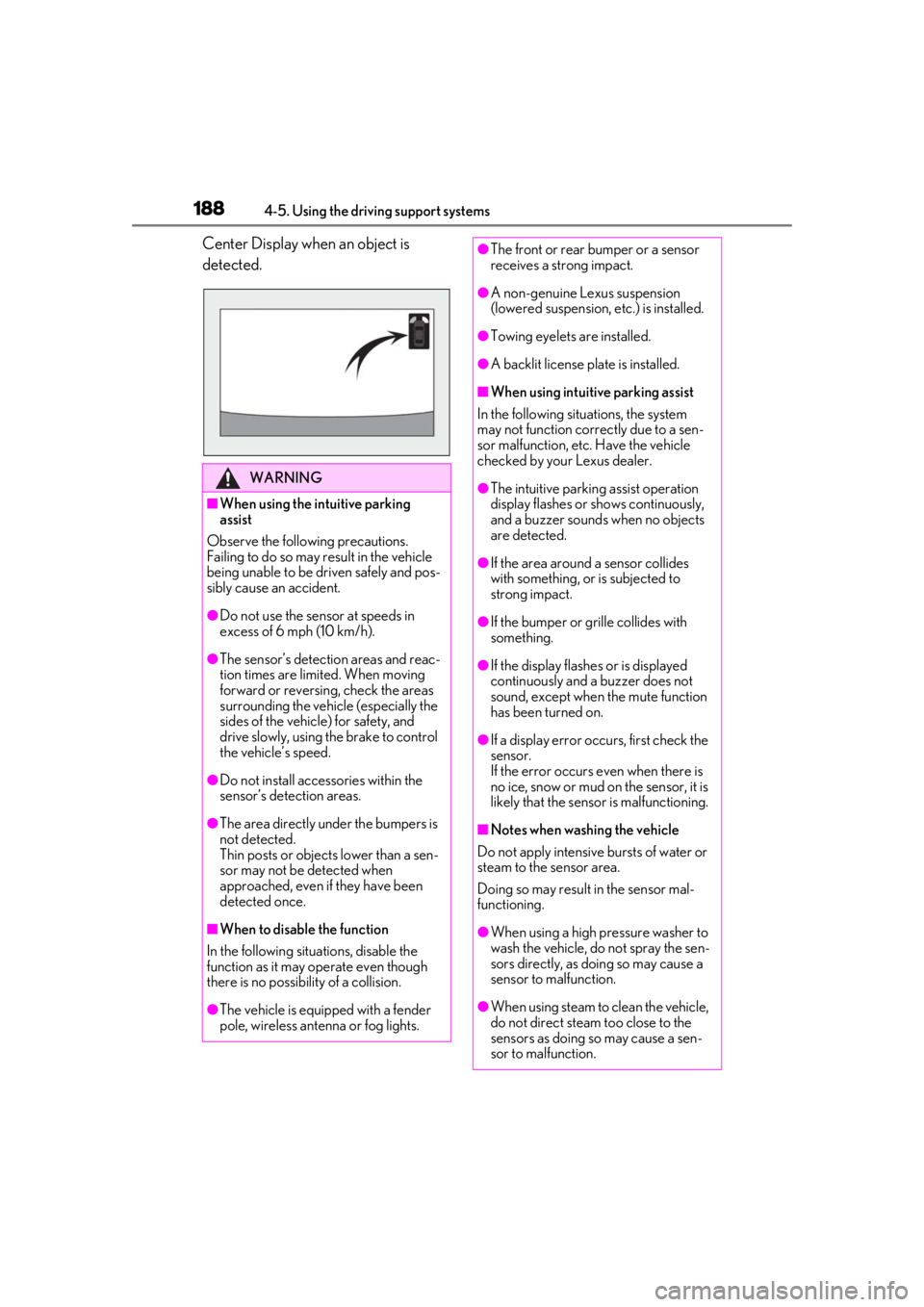
Center Display when an object is
detected.
WARNING
■When using the intuitive parking
assist
Observe the following precautions.
Failing to do so may result in the vehicle
being unable to be driven safely and pos-
sibly cause an accident.
●Do not use the sensor at speeds in
excess of 6 mph (10 km/h).
●The sensor’s detection areas and reac-
tion times are limited. When moving
forward or reversing, check the areas
surrounding the vehicle (especially the
sides of the vehicle) for safety, and
drive slowly, using the brake to control
the vehicle’s speed.
●Do not install accessories within the
sensor’s detection areas.
●The area directly under the bumpers is
not detected.
Thin posts or objects lower than a sen-
sor may not be detected when
approached, even if they have been
detected once.
■When to disable the function
In the following situations, disable the
function as it may operate even though
there is no possibility of a collision.
●The vehicle is equipped with a fender
pole, wireless antenna or fog lights.
●The front or rear bumper or a sensor
receives a strong impact.
●A non-genuine Lexus suspension
(lowered suspension, etc.) is installed.
●Towing eyelets are installed.
●A backlit license plate is installed.
■When using intuitive parking assist
In the following situations, the system
may not function correctly due to a sen-
sor malfunction, etc. Have the vehicle
checked by your Lexus dealer.
●The intuitive parking assist operation
display flashes or shows continuously,
and a buzzer sounds when no objects
are detected.
●If the area around a sensor collides
with something, or is subjected to
strong impact.
●If the bumper or grille collides with
something.
●If the display flashes or is displayed
continuously and a buzzer does not
sound, except when the mute function
has been turned on.
●If a display error oc curs, first check the
sensor.
If the error occurs even when there is
no ice, snow or mud on the sensor, it is
likely that the sensor is malfunctioning.
■Notes when washing the vehicle
Do not apply intensive bursts of water or
steam to the sensor area.
Doing so may result in the sensor mal-
functioning.
●When using a high pressure washer to
wash the vehicle, do not spray the sen-
sors directly, as doing so may cause a
sensor to malfunction.
●When using steam to clean the vehicle,
do not direct steam too close to the
sensors as doing so may cause a sen-
sor to malfunction.
Page 189 of 408

1894-5. Using the driving support systems
4
Driving
■The intuitive parking assist can be oper-
ated when
●Front corner sensors:
• The engine switch is in IGNITION ON
mode.
• The shift lever is in a position other than P.
• The vehicle speed is less than about 6
mph (10 km/h).
(At any speed when the shift lever is in R)
●Rear corner and rear center sensors:
• The engine switch is in IGNITION ON mode.
• The shift lever is in R.
■Muting the buzzer sound
●To mute the buzzer sound:
The buzzer can be temporarily muted by
pressing “OK” of the meter control
switches while an obstacle detection dis-
play is shown on the multi-information dis-
play.
●To cancel the mute:
Mute will be automatically canceled in the
following situations.
•When the shift lever is changed (except shifting from D to N, or N to D).
• When the vehicle speed has reached or exceeded 6 mph (10 km/h) with the shift
lever in D.
• When the intuitive par king assist is turned
off once and turned on again.
• When the engine switch is turned off once and turned to IGNITION ON
mode again.
■If “Clean Parking Assist Sensor” is dis-
played on the multi-information display
A sensor may be covered with ice, snow,
dirt, etc. Remove the ice, snow, dirt, etc.,
from the sensor to return the system to nor-
mal.
Also, due to ice forming on a sensor at low
temperatures, a warning message may be
displayed or the sensor may not be able to
detect an object. Once the ice melts, the
system will return to normal.
■Sensor detectio n information
●The following situations may occur
during use.
• The sensors may be able to only detect objects near the fron
t and rear bumpers.
• Depending on the shape of the object and other factors, the detection distance
may shorten, or detection may be impos-
sible.
• There will be a short delay between
object detection and di splay. Even at low
speeds, there is a possibility that the
object will come within the sensor’s
detection areas befo re the display is
shown and the warning beep sounds.
• It might be difficult to hear the buzzer due
to the volume of the audio system or air
flow noise of the air conditioning system.
• It may be difficult to hear the buzzer if
buzzers for other systems are sounding.
■Conditions under wh ich the function
may not function correctly
Certain vehicle conditions and the sur-
rounding environment may affect the ability
of a sensor to correctly detect objects. Par-
ticular instances where this may occur are
listed below.
●There is dirt, snow or ice on a sensor.
(Cleaning the sensors will resolve this
problem.)
●A sensor is frozen. (Thawing the area will
resolve this problem.)
In especially cold weather, if a sensor is
frozen the sensor display may be dis-
played abnormally, or objects, such as a
wall, may not be detected.
●A sensor is covered in any way.
●When a sensor or the area around a sen-
sor is extremely hot or cold.
●On an extremely bumpy road, on an
incline, on gravel, or on grass.
●The vicinity of the vehicle is noisy due to
vehicle horns, motorcycle engines, air
brakes of large vehicles, or other loud
noises producing ultrasonic waves.
●There is another vehicle equipped with
parking assist sensors in the vicinity.
●A sensor is coated with a sheet of spray
or heavy rain.
●If a sensor is hit by a large amount of
water, such as when driving on a flooded
road.
●If the vehicle is significantly tilted.
Page 192 of 408
1924-5. Using the driving support systems
depending on the shape of the object, etc.
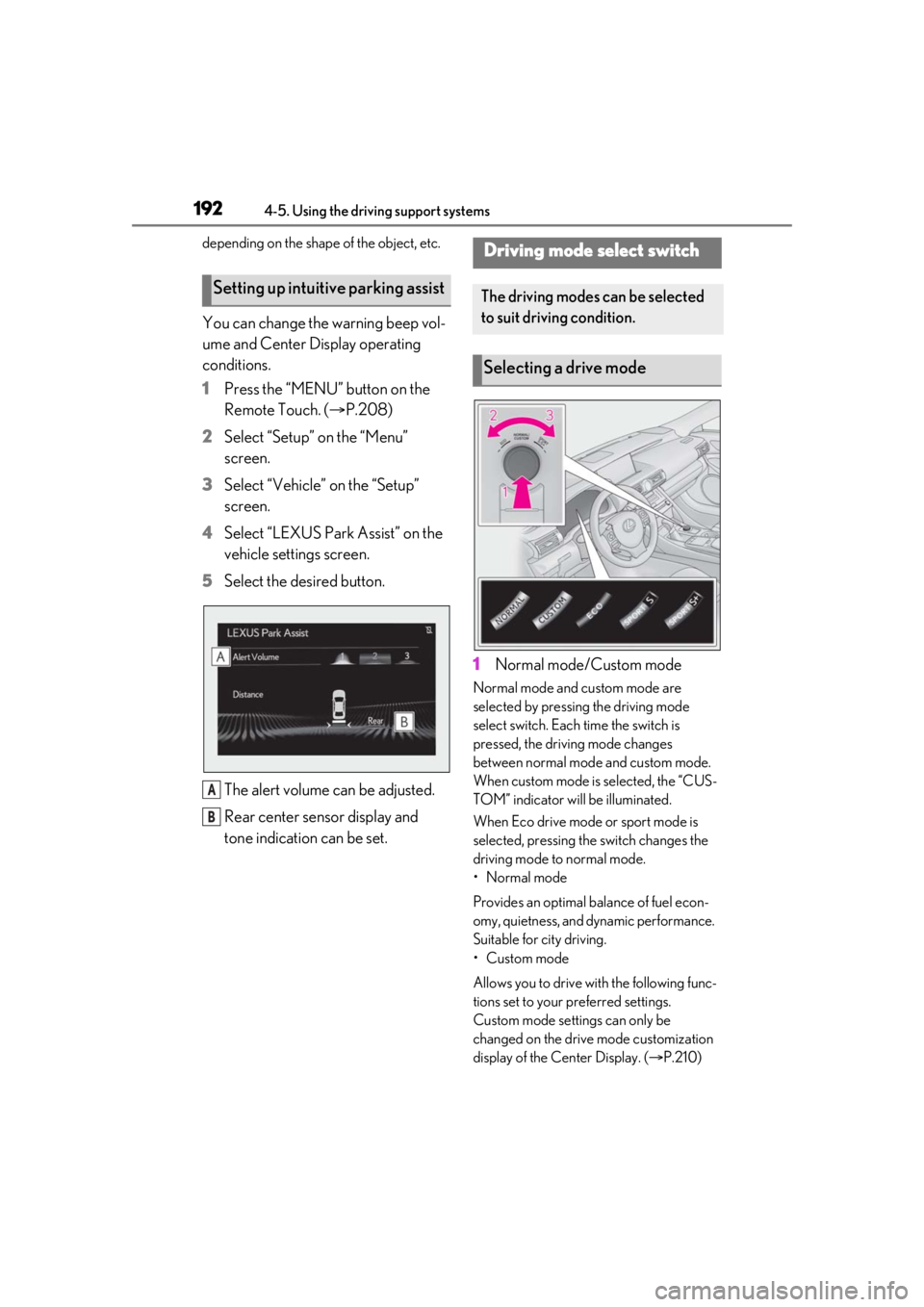
You can change the warning beep vol-
ume and Center Display operating
conditions.
1Press the “MENU” button on the
Remote Touch. ( P.208)
2 Select “Setup” on the “Menu”
screen.
3 Select “Vehicle” on the “Setup”
screen.
4 Select “LEXUS Park Assist” on the
vehicle settings screen.
5 Select the desired button.
The alert volume can be adjusted.
Rear center sensor display and
tone indication can be set. 1
Normal mode/Custom mode
Normal mode and custom mode are
selected by pressing the driving mode
select switch. Each time the switch is
pressed, the driving mode changes
between normal mode and custom mode.
When custom mode is selected, the “CUS-
TOM” indicator will be illuminated.
When Eco drive mode or sport mode is
selected, pressing th e switch changes the
driving mode to normal mode.
• Normal mode
Provides an optimal ba lance of fuel econ-
omy, quietness, and dynamic performance.
Suitable for city driving.
• Custom mode
Allows you to drive with the following func-
tions set to your preferred settings.
Custom mode settings can only be
changed on the drive mode customization
display of the Center Display. ( P.210)
Setting up intuitive parking assist
A
B
Driving mode select switch
The driving modes can be selected
to suit driving condition.
Selecting a drive mode
Page 195 of 408
1954-5. Using the driving support systems
4
Driving
●When starting off on a road surface that
is wet with rain, standing water, etc.
●When starting off on a slick road surface.
●When the vehicle has not been properly
maintained (tires are worn out, tire pres-
sure is low, etc.).
*: If equipped
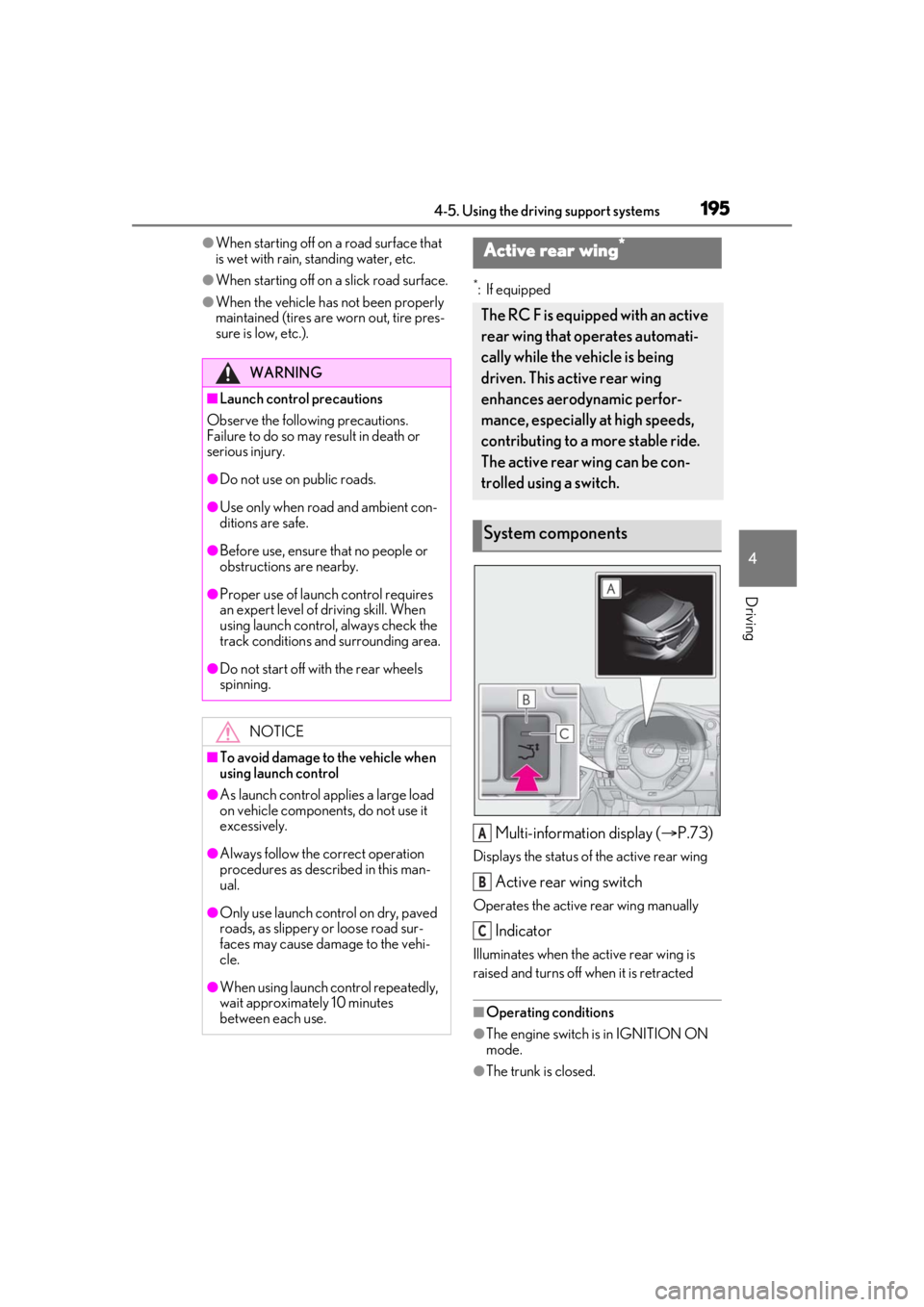
Multi-information display ( P.73)
Displays the status of the active rear wing
Active rear wing switch
Operates the active rear wing manually
Indicator
Illuminates when the active rear wing is
raised and turns off when it is retracted
■Operating conditions
●The engine switch is in IGNITION ON
mode.
●The trunk is closed.
WARNING
■Launch control precautions
Observe the following precautions.
Failure to do so may result in death or
serious injury.
●Do not use on public roads.
●Use only when road and ambient con-
ditions are safe.
●Before use, ensure that no people or
obstructions are nearby.
●Proper use of launch control requires
an expert level of driving skill. When
using launch control, always check the
track conditions and surrounding area.
●Do not start off with the rear wheels
spinning.
NOTICE
■To avoid damage to the vehicle when
using launch control
●As launch control applies a large load
on vehicle components, do not use it
excessively.
●Always follow the correct operation
procedures as described in this man-
ual.
●Only use launch control on dry, paved
roads, as slippery or loose road sur-
faces may cause damage to the vehi-
cle.
●When using launch control repeatedly,
wait approximately 10 minutes
between each use.
Active rear wing*
The RC F is equipped with an active
rear wing that operates automati-
cally while the ve hicle is being
driven. This active rear wing
enhances aerodynamic perfor-
mance, especially at high speeds,
contributing to a more stable ride.
The active rear wing can be con-
trolled using a switch.
System components
A
B
C
Page 196 of 408
1964-5. Using the driving support systems
●The active rear wing has been activated
in a customized setting.
■Conditions which stop the operation
In the following situations operation of the
active rear wing will stop:
●The engine switch is turned off while the
active rear wing is operating.
●The trunk is opened while the active rear
wing is operating.
●The raising operation of the active rear
wing is interrupted by an object, etc.
●The active rear wing is operated in an
unusual manner causing it to stop at an
irregular position.
In such cases, pressing the active rear wing
switch will fully raise the active rear wing.
Or, begin driving the vehicle and the active
rear wing will raise automatically when the
vehicle speed reaches 16 mph (25 km/h).
■When there is a malfunction in the sys-
tem
A warning message will be displayed on the
multi-information display. ( P.311)
■Customization
Some functions can be customized.
( P.360)
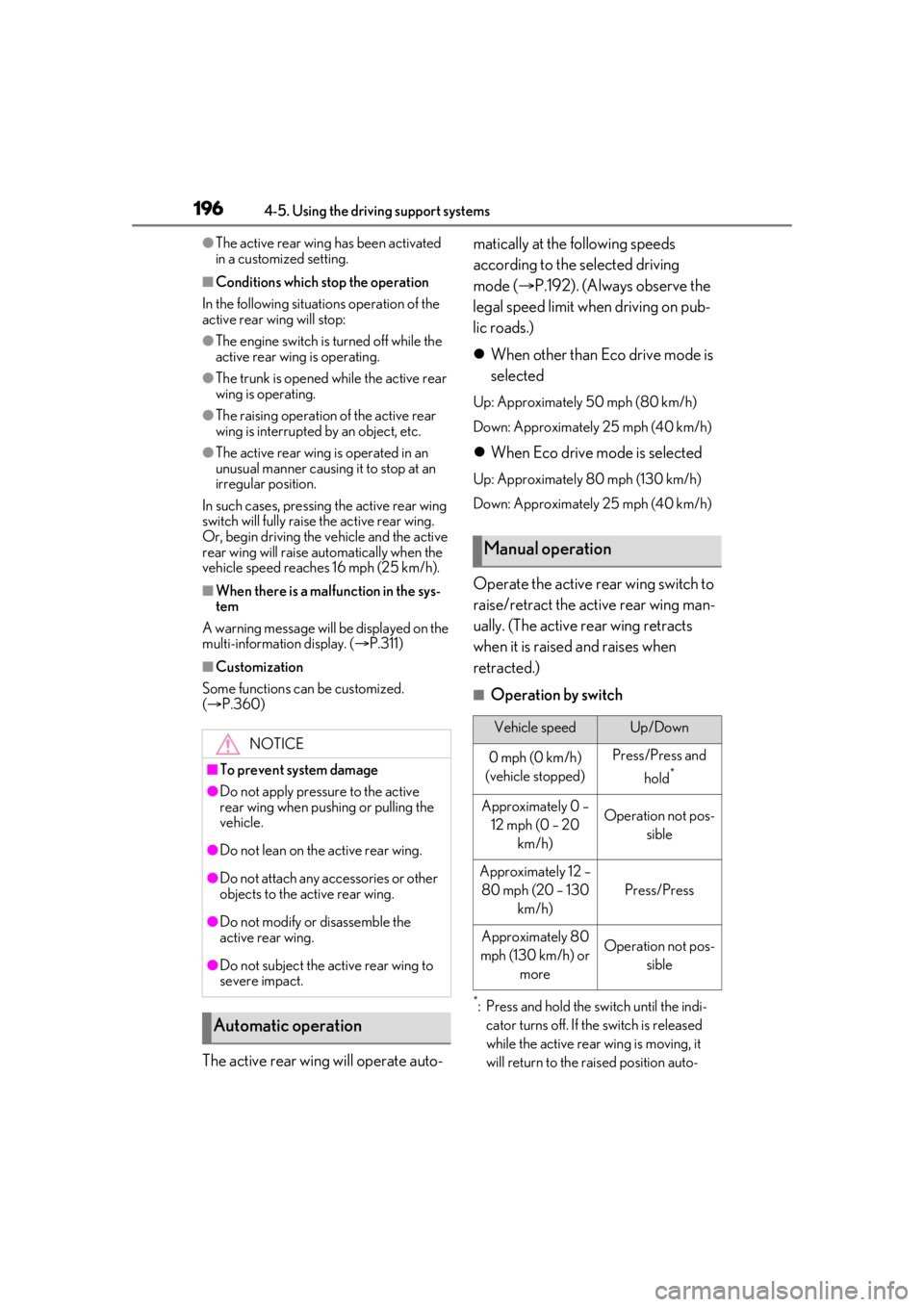
The active rear wing will operate auto- matically at the following speeds
according to the selected driving
mode (
P.192). (Always observe the
legal speed limit when driving on pub-
lic roads.)
When other than Eco drive mode is
selected
Up: Approximately 50 mph (80 km/h)
Down: Approximately 25 mph (40 km/h)
When Eco drive mode is selected
Up: Approximately 80 mph (130 km/h)
Down: Approximately 25 mph (40 km/h)
Operate the active rear wing switch to
raise/retract the active rear wing man-
ually. (The active rear wing retracts
when it is raised and raises when
retracted.)
■Operation by switch
*: Press and hold the sw itch until the indi-
cator turns off. If the switch is released
while the active rear wing is moving, it
will return to the raised position auto-
NOTICE
■To prevent system damage
●Do not apply pressure to the active
rear wing when pushing or pulling the
vehicle.
●Do not lean on the active rear wing.
●Do not attach any accessories or other
objects to the active rear wing.
●Do not modify or disassemble the
active rear wing.
●Do not subject the active rear wing to
severe impact.
Automatic operation
Manual operation
Vehicle speedUp/Down
0 mph (0 km/h)
(vehicle stopped)Press/Press and
hold
*
Approximately 0 – 12 mph (0 – 20 km/h)Operation not pos- sible
Approximately 12 – 80 mph (20 – 130 km/h)
Press/Press
Approximately 80
mph (130 km/h) or moreOperation not pos- sible
Page 197 of 408
1974-5. Using the driving support systems
4
Driving
matically.
■Manual operation
Even if the active rear wing is changed to
manual operation using the active rear wing
switch, the setting will not be maintained.
Automatic operation will resume if the
engine switch is turn ed off or at certain
vehicle speeds.
*: If equipped
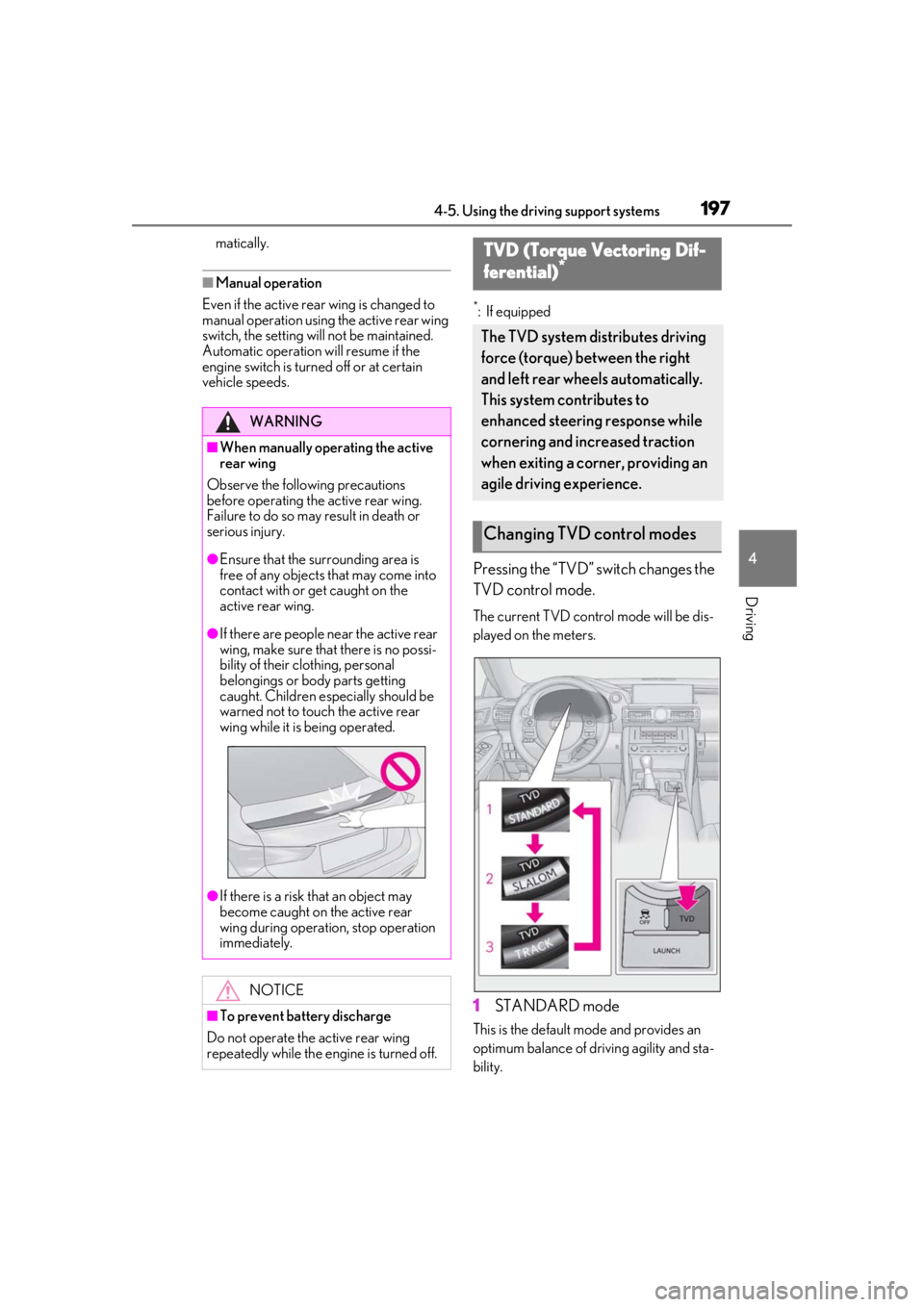
Pressing the “TVD” switch changes the
TVD control mode.
The current TVD control mode will be dis-
played on the meters.
1 STANDARD mode
This is the default mo de and provides an
optimum balance of driving agility and sta-
bility.
WARNING
■When manually operating the active
rear wing
Observe the following precautions
before operating the active rear wing.
Failure to do so may result in death or
serious injury.
●Ensure that the surrounding area is
free of any objects that may come into
contact with or get caught on the
active rear wing.
●If there are people near the active rear
wing, make sure that there is no possi-
bility of their clothing, personal
belongings or body parts getting
caught. Children especially should be
warned not to touch the active rear
wing while it is being operated.
●If there is a risk that an object may
become caught on the active rear
wing during operation, stop operation
immediately.
NOTICE
■To prevent battery discharge
Do not operate the active rear wing
repeatedly while the engine is turned off.
TVD (Torque Vectoring Dif-
ferential)*
The TVD system distributes driving
force (torque) between the right
and left rear wheels automatically.
This system contributes to
enhanced steering response while
cornering and increased traction
when exiting a corner, providing an
agile driving experience.
Changing TVD control modes
Page 198 of 408

1984-5. Using the driving support systems
2SLALOM mode
This mode emphasizes enhanced steering
response.
3TRACK mode
This mode emphasizes stability for high
speed sporty driving.
■Operating conditions
The engine switch is in IGNITION ON
mode.
■Automatic cancelation of the selected
TVD control mode
SLALOM and TRACK mode are canceled
when the engine switch is turned off. When
the engine switch is turned to IGNITION
ON mode, the TVD system will be in
STANDARD mode.
■Automatic disabling of the TVD system
If a malfunction is detected in the TVD sys-
tem, a warning message will be displayed
on the multi-information display ( P.311)
and the TVD system will be disabled auto-
matically. If the system is disabled, driving
force will not be distributed by the TVD but
through normal differential operation.
■To protect the system
The TVD fluid temperature may become
excessively high when driving for a long
time under extremely high load conditions.
In this case, a warnin g message will be dis-
played on the multi-information display.
( P.311)
The multi-information display shows the distribution of driving force
between the right and left rear wheels.
(
P.73)
WARNING
■Cautions regarding the use of the sys-
tem
The driver is solely responsible for safe
driving. Do not overly rely on the TVD
system. Always drive safely, taking care
to observe your surroundings.
TVD control status on the
multi-information display
Page 200 of 408
2004-5. Using the driving support systems
■Disabling the TRAC system
If the vehicle gets stuck in mud, dirt or snow,
the TRAC system may reduce power from
the engine to the wheels. Pressing the
switch to turn the system off may make it
easier for you to rock the vehicle in order to
free it.
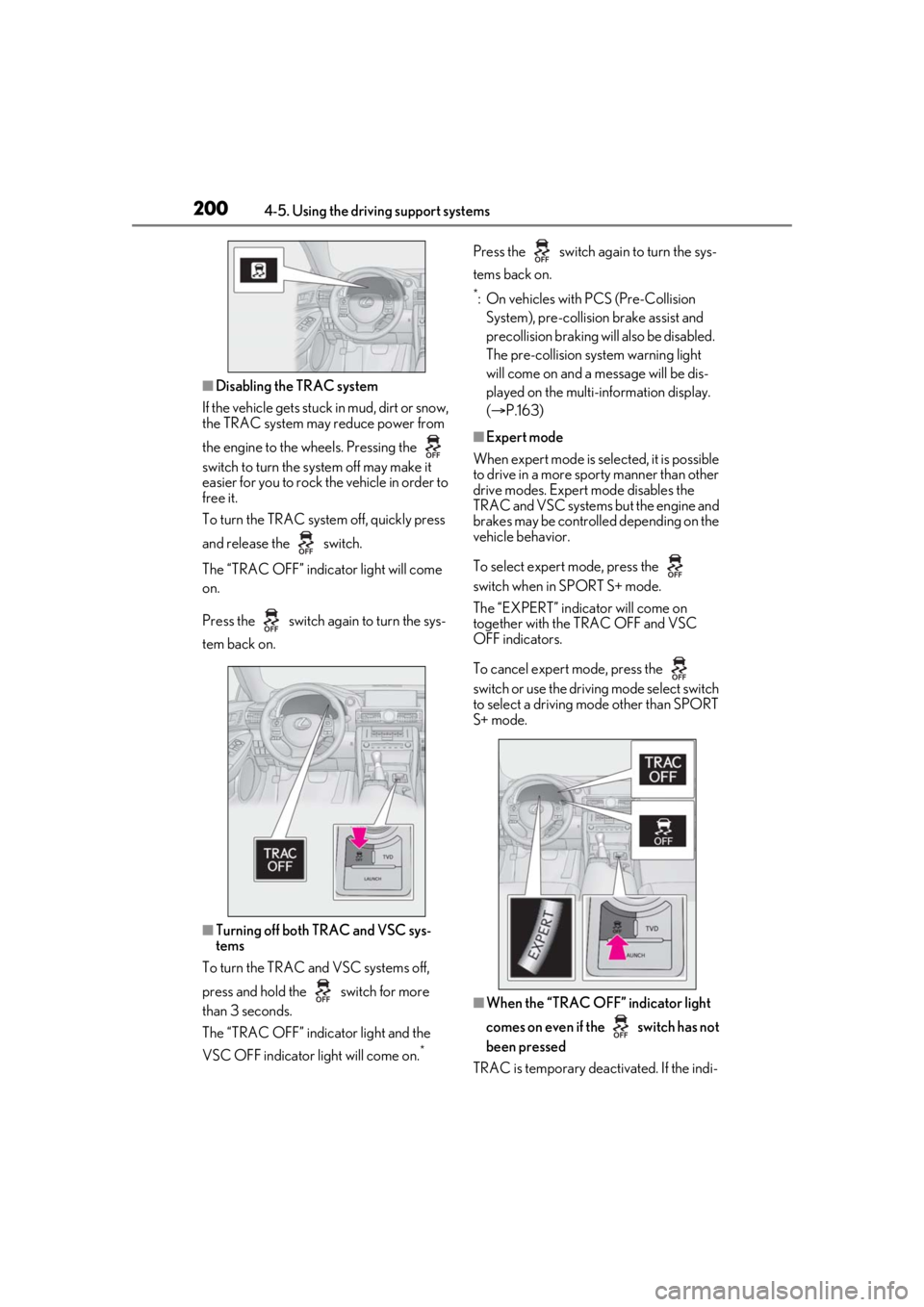
To turn the TRAC system off, quickly press
and release the switch.
The “TRAC OFF” indicator light will come
on.
Press the switch again to turn the sys-
tem back on.
■Turning off both TRAC and VSC sys-
tems
To turn the TRAC and VSC systems off,
press and hold the switch for more
than 3 seconds.
The “TRAC OFF” indicator light and the
VSC OFF indicator light will come on.
*
Press the switch ag ain to turn the sys-
tems back on.
*: On vehicles with PCS (Pre-Collision System), pre-collision brake assist and
precollision braking will also be disabled.
The pre-collision system warning light
will come on and a message will be dis-
played on the multi- information display.
( P.163)
■Expert mode
When expert mode is selected, it is possible
to drive in a more sporty manner than other
drive modes. Expert mode disables the
TRAC and VSC systems but the engine and
brakes may be controlled depending on the
vehicle behavior.
To select expert mode, press the
switch when in SPORT S+ mode.
The “EXPERT” indicator will come on
together with the TRAC OFF and VSC
OFF indicators.
To cancel expert mode, press the
switch or use the driving mode select switch
to select a driving mode other than SPORT
S+ mode.
■When the “TRAC OFF” indicator light
comes on even if the switch has not
been pressed
TRAC is temporary deactivated. If the indi-
Page 201 of 408
2014-5. Using the driving support systems
4
Driving
cator light continues to remain on, contact
your Lexus dealer.
■Operating conditions of hill-start assist
control
When the following four conditions are met,
the hill-start assist control will operate:
●The shift lever is in a position other than P
or N (when starting off forward/back-
ward on an upward incline).
●The vehicle is stopped.
●The accelerator pedal is not depressed.
●The parking brake is not engaged.
■Automatic system cancelation of
hill-start assist control
The hill-start assist control will turn off in any
of the following situations:
●The shift lever is moved to P or N.
●The accelerator pedal is depressed.
●The parking brake is engaged.
●Approximately 2 seconds elapse after
the brake pedal is released.
■Sounds and vibrations caused by the
ABS, brake assist, VSC, TRAC and
hill-start assist control systems
●A sound may be heard from the engine
compartment when the brake pedal is
depressed repeatedly, when the engine is
started or just after the vehicle begins to
move. This sound does not indicate that a
malfunction has occurred in any of these
systems.
●Any of the following conditions may
occur when the above systems are oper-
ating. None of these indicates that a mal-
function has occurred.
• Vibrations may be felt through the vehicle
body and steering.
• A motor sound may be heard after the vehicle comes to a stop.
• The brake pedal may pulsate slightly after the ABS is activated.
• The brake pedal may move down slightly after the ABS is activated.
■EPS operation sound
When the steering wheel is operated, a
motor sound (whirring sound) may be
heard. This does not indicate a malfunction.
■Reactivation of the TRAC/VSC systems
Even after the TRAC /VSC systems have
been turned off, turning the engine off and
then on again will automatically reactivate
the TRAC/VSC systems.
■Reactivation of the TRAC system linked
to vehicle speed
When only the TRAC system is turned off,
the TRAC system will turn on when vehicle
speed increases. Ho wever, when both
TRAC/VSC systems are turned off, the sys-
tems will not turn on even when vehicle
speed increases.
■Reduced effectiveness of the EPS sys-
tem
The effectiveness of the EPS system is
reduced to prevent the system from over-
heating when there is frequent steering
input over an extended period of time. The
steering wheel may feel heavy as a result.
Should this occur, re frain from excessive
steering input or stop the vehicle and turn
the engine off. The EPS system should
return to normal within 10 minutes.
WARNING
■The ABS does not operate effectively
when
●The limits of tire gripping performance
have been exceeded (such as exces-
sively worn tires on a snow covered
road).
●The vehicle hydroplanes while driving
at high speed on wet or slick roads.
■Stopping distance when the ABS is
operating may exceed that of normal
conditions
The ABS is not designed to shorten the
vehicle’s stopping di stance. Always main-
tain a safe distance from the vehicle in
front of you, especially in the following
situations:
●When driving on dirt, gravel or
snow-covered roads
●When driving over bumps in the road