warning LEXUS RCF 2021 Owners Manual
[x] Cancel search | Manufacturer: LEXUS, Model Year: 2021, Model line: RCF, Model: LEXUS RCF 2021Pages: 408, PDF Size: 8.25 MB
Page 329 of 408
3297-2. Steps to take in an emergency
7
When trouble arises
One of the following may be the cause
of the problem:
There may not be sufficient fuel in
the vehicle’s tank.
Refuel the vehicle.
The engine may be flooded.
Try to restart the engine again fol-
lowing correct starting procedures.
( P.128)
There may be a malfunction in the
engine immobilizer system.
( P.57)
One of the following may be the cause
of the problem:
The battery may be discharged.
( P.334)
The battery terminal connections
may be loose or corroded.
( P.271)
NOTICE
●Store the emergency tire puncture
repair kit in the trunk. The kit may be
thrown around during sudden braking
and so forth, damaging the kit.
●Store the kit in its assigned place out of
reach of children.
●Do not disassemble or modify the kit.
Do not subject parts such as the air
pressure indicator to impacts. This may
cause a malfunction.
■To avoid damage to the tire pressure
warning valves and transmitters
When a tire is repaired with liquid seal-
ants, the tire pressu re warning valve and
transmitter may not operate properly. If a
liquid sealant is used , contact your Lexus
dealer as soon as possible. After use of
liquid sealant, make sure to replace the
tire pressure warnin g valve and transmit-
ter when repairing or replacing the tire.
(
P.277)
If the engine will not start
If the engine will not start even
though correct starting procedures
are being followed ( P.128), con-
sider each of the following points:
The engine will not start even
though the starter motor oper-
ates normally.
The starter motor turns over
slowly, the interior lights and
headlights are dim, or the horn
does not sound or sounds at a low
volume.
Page 333 of 408
3337-2. Steps to take in an emergency
7
When trouble arises
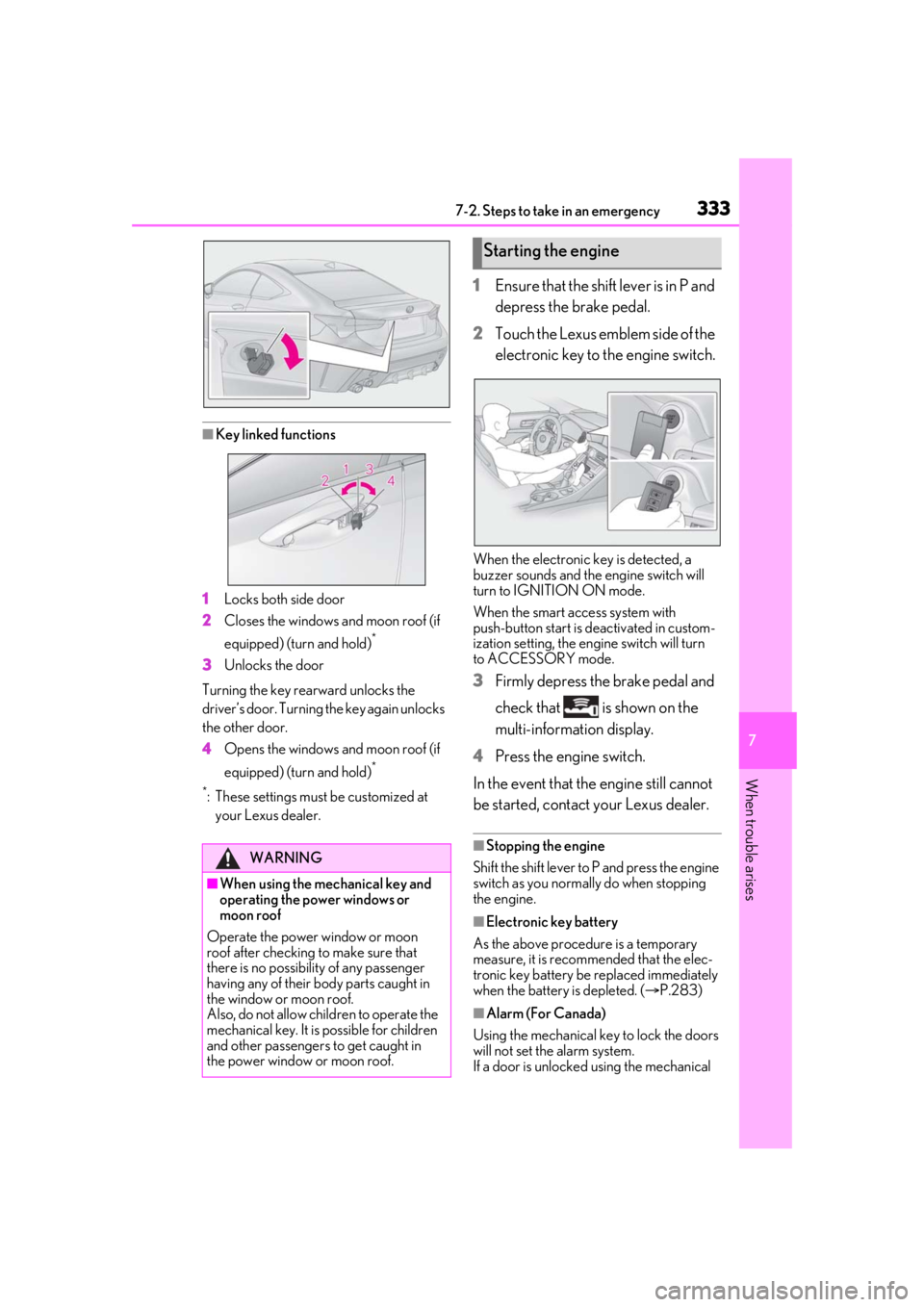
■Key linked functions
1 Locks both side door
2 Closes the windows and moon roof (if
equipped) (turn and hold)
*
3Unlocks the door
Turning the key rearward unlocks the
driver’s door. Turning the key again unlocks
the other door.
4 Opens the windows and moon roof (if
equipped) (turn and hold)
*
*
: These settings must be customized at
your Lexus dealer.
1 Ensure that the shift lever is in P and
depress the brake pedal.
2 Touch the Lexus emblem side of the
electronic key to the engine switch.
When the electronic key is detected, a
buzzer sounds and the engine switch will
turn to IGNITION ON mode.
When the smart access system with
push-button start is deactivated in custom-
ization setting, the engine switch will turn
to ACCESSORY mode.
3 Firmly depress the brake pedal and
check that is shown on the
multi-information display.
4 Press the engine switch.
In the event that the engine still cannot
be started, contact your Lexus dealer.
■Stopping the engine
Shift the shift lever to P and press the engine
switch as you normally do when stopping
the engine.
■Electronic key battery
As the above procedure is a temporary
measure, it is recommended that the elec-
tronic key battery be replaced immediately
when the battery is depleted. ( P.283)
■Alarm (For Canada)
Using the mechanical ke y to lock the doors
will not set the alarm system.
If a door is unlocked using the mechanical
WARNING
■When using the mechanical key and
operating the power windows or
moon roof
Operate the power window or moon
roof after checking to make sure that
there is no possibilit y of any passenger
having any of their body parts caught in
the window or moon roof.
Also, do not allow ch ildren to operate the
mechanical key. It is possible for children
and other passengers to get caught in
the power window or moon roof.
Starting the engine
Page 336 of 408

3367-2. Steps to take in an emergency
Once the engine starts, have the vehi-
cle inspected at your Lexus dealer as
soon as possible.
■Starting the engine when the battery is
discharged
The engine cannot be started by push-start-
ing.
■To prevent battery discharge
●Turn off the headlights and the audio sys-
tem while the engine is off.
●Turn off any unnecessary electrical com-
ponents when the vehicle is running at a
low speed for an extended period, such
as in heavy traffic.
■Charging the battery
The electricity stored in the battery will dis-
charge gradually even when the vehicle is
not in use, due to natural discharge and the
draining effects of certain electrical appli-
ances. If the vehicle is left for a long time,
the battery may discharge, and the engine
may be unable to start. (The battery
recharges automatically during driving.)
■When recharging or replacing the bat-
tery
●In some cases, it may not be possible to
unlock the doors using the smart access
system with push-button start when the
battery is discharged. Use the wireless
remote control or the mechanical key to
lock or unlock the doors.
●The engine may not start on the first
attempt after the battery has recharged
but will start normally after the second
attempt. This is not a malfunction.
●The engine switch mode is memorized by
the vehicle. When the battery is recon-
nected, the system will return to the
mode it was in before the battery was dis-
charged. Before di sconnecting the bat-
tery, turn the engine switch off.
If you are unsure what mode the engine
switch was in befo re the battery dis-
charged, be especially careful when
reconnecting the battery.
■When replacing the battery
●Use a battery that conforms to European
regulations.
●Use a battery that tha case size is same as
the previous one (LN3), 20 hour rate
capacity (20HR) is equivalent (70Ah) or
greater, and performance rating (CCA)
is equivalent (592A) or greater.
• If the sizes differ, the battery cannot be properly secured.
• If the 20 hour rate capacity is low, even if the time period where the vehicle is not
used is a short time, battery may dis-
charge and the engine may not be able to
start.
●For details, consult your Lexus dealer.
WARNING
■Avoiding battery fires or explosions
Observe the following precautions to
prevent accidentally igniting the flamma-
ble gas that may be emitted from the bat-
tery:
●Make sure each jumper cable is con-
nected to the correct terminal and that
it is not unintentionally in contact with
any other than the intended terminal.
●Do not allow the other end of the
jumper cable connected to the “+” ter-
minal to come into contact with any
other parts or meta l surfaces in the
area, such as brackets or unpainted
metal.
●Do not allow the + and - clamps of the
jumper cables to come into contact
with each other.
●Do not smoke, use matches, cigarette
lighters or allow open flame near the
battery.
■Battery precautions
The battery contains poisonous and cor-
rosive acidic electrol yte, while related
parts contain lead and lead compounds.
Observe the following precautions when
handling the battery:
Page 337 of 408
3377-2. Steps to take in an emergency
7
When trouble arises
1Stop the vehicle in a safe place and
turn off the air conditioning system,
and then stop the engine.
2 If you see steam:
Carefully lift the hood after the
steam subsides.
If you do not see steam:
Carefully lift the hood.
3 After the engine has cooled down
sufficiently, inspect the hoses and
WARNING
●When working with the battery, always
wear safety glasses and take care not
to allow any battery fluids (acid) to
come into contact with skin, clothing
or the vehicle body.
●Do not lean over the battery.
●In the event that battery fluid comes
into contact with the skin or eyes,
immediately wash the affected area
with water and seek medical attention.
Place a wet sponge or cloth over the
affected area until medical attention
can be received.
●Always wash your hands after handling
the battery support, terminals, and
other battery-related parts.
●Do not allow children near the battery.
NOTICE
■When handling jumper cables
When connecting the jumper cables,
ensure that they do not become entan-
gled in the cooling fans or engine drive
belt.
If your vehicle overheats
The following may indicate that
your vehicle is overheating.
The engine coolant temperature
gauge ( P.66) is in the red zone
or a loss of engine power is expe-
rienced. (For example, the vehicle
speed does not increase.)
“Engine Coolant Temp High Stop
in a Safe Place See Owner’s
Manual” is shown on the
multi-information display.
Steam comes out from under the
hood.
Correction procedures
Page 338 of 408
3387-2. Steps to take in an emergency
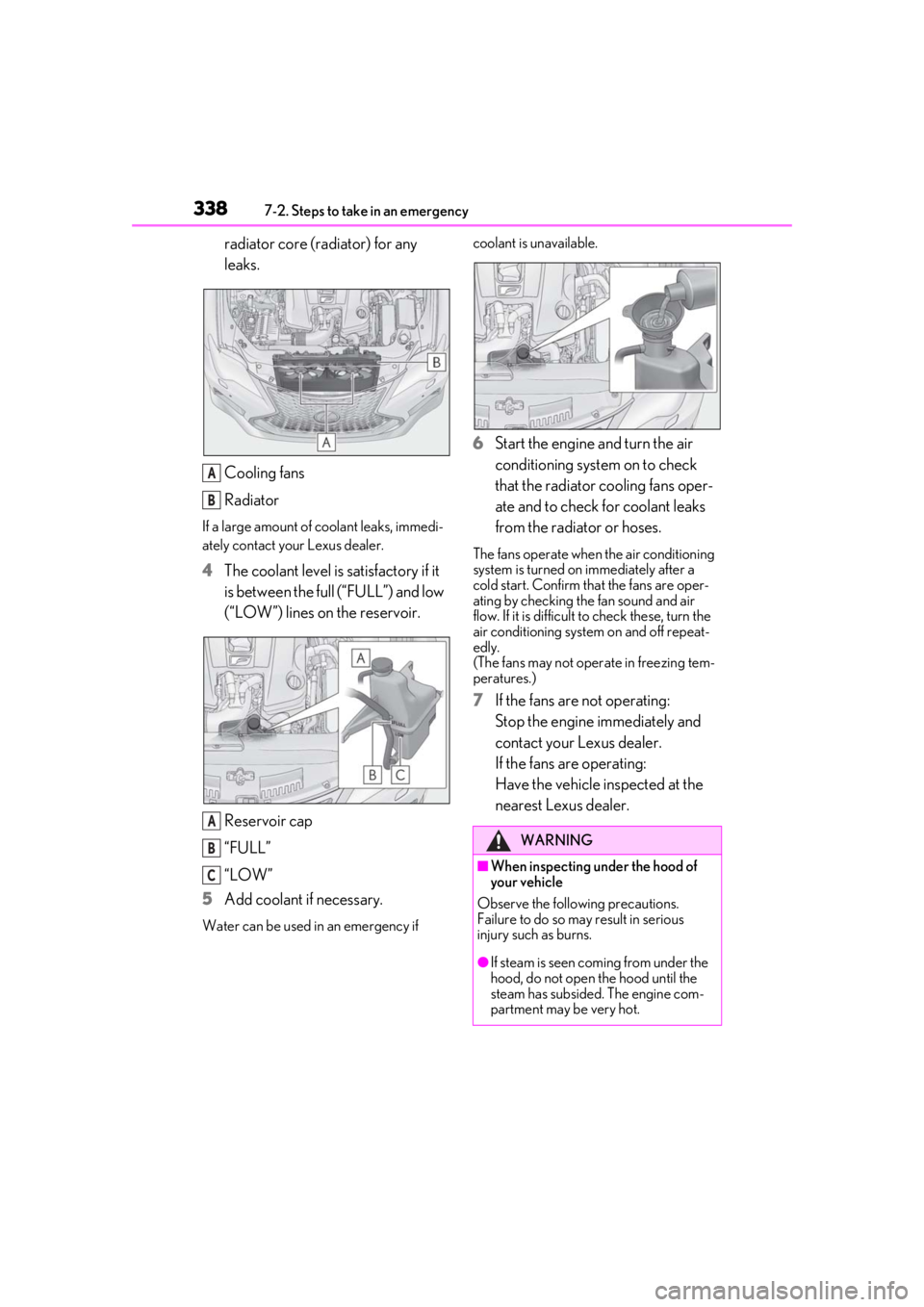
radiator core (radiator) for any
leaks.
Cooling fans
Radiator
If a large amount of coolant leaks, immedi-
ately contact your Lexus dealer.
4The coolant level is satisfactory if it
is between the full (“FULL”) and low
(“LOW”) lines on the reservoir.
Reservoir cap
“FULL”
“LOW”
5 Add coolant if necessary.
Water can be used in an emergency if coolant is unavailable.
6
Start the engine and turn the air
conditioning system on to check
that the radiator cooling fans oper-
ate and to check for coolant leaks
from the radiator or hoses.
The fans operate when the air conditioning
system is turned on immediately after a
cold start. Confirm that the fans are oper-
ating by checking the fan sound and air
flow. If it is difficult to check these, turn the
air conditioning system on and off repeat-
edly.
(The fans may not oper ate in freezing tem-
peratures.)
7 If the fans are not operating:
Stop the engine immediately and
contact your Lexus dealer.
If the fans are operating:
Have the vehicle inspected at the
nearest Lexus dealer.
A
B
A
B
C
WARNING
■When inspecting under the hood of
your vehicle
Observe the following precautions.
Failure to do so may result in serious
injury such as burns.
●If steam is seen coming from under the
hood, do not open the hood until the
steam has subsided. The engine com-
partment may be very hot.
Page 339 of 408
3397-2. Steps to take in an emergency
7
When trouble arises
1Stop the engine. Set the parking
brake and shift the shift lever to P.
2 Remove the mud, snow or sand
from around the rear wheels.
3 Place wood, stones or some other
material under the rear wheels to
help provide traction.
4 Restart the engine.
5 Shift the shift lever to D or R and
release the parking brake. Then,
while exercising caution, depress
the accelerator pedal.
■When it is difficult to free the vehicle
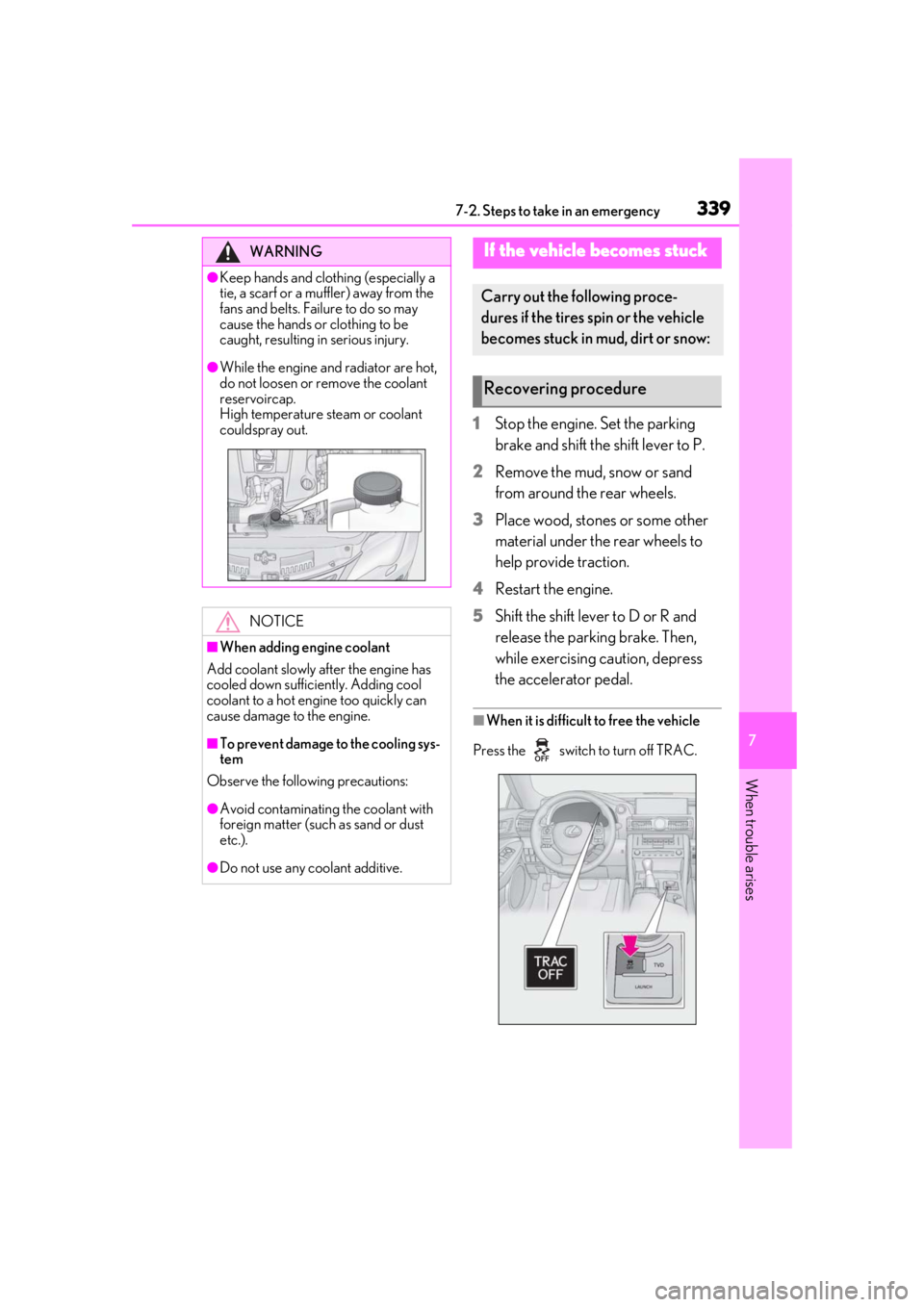
Press the switch to turn off TRAC.
WARNING
●Keep hands and clothing (especially a
tie, a scarf or a muffler) away from the
fans and belts. Failure to do so may
cause the hands or clothing to be
caught, resulting in serious injury.
●While the engine and radiator are hot,
do not loosen or remove the coolant
reservoircap.
High temperature steam or coolant
couldspray out.
NOTICE
■When adding engine coolant
Add coolant slowly after the engine has
cooled down sufficiently. Adding cool
coolant to a hot engine too quickly can
cause damage to the engine.
■To prevent damage to the cooling sys-
tem
Observe the following precautions:
●Avoid contaminating the coolant with
foreign matter (such as sand or dust
etc.).
●Do not use any coolant additive.
If the vehicle becomes stuck
Carry out the following proce-
dures if the tires spin or the vehicle
becomes stuck in mud, dirt or snow:
Recovering procedure
Page 340 of 408
3407-2. Steps to take in an emergency
WARNING
■When attempting to free a stuck vehi-
cle
If you choose to push the vehicle back
and forth to free it, make sure the sur-
rounding area is clear to avoid striking
other vehicles, objects or people. The
vehicle may also lunge forward or lunge
back suddenly as it becomes free. Use
extreme caution.
■When shifting the shift lever
Be careful not to shif t the shift lever with
the accelerator pedal depressed.
This may lead to unexpected rapid accel-
eration of the vehicle that may cause an
accident resulting in death or serious
injury.
NOTICE
■To avoid damaging the transmission
and other components
●Avoid spinning the rear wheels and
depressing the accelerator pedal
more than necessary.
●If the vehicle remains stuck even after
these procedures are performed, the
vehicle may require towing to be freed.
Page 354 of 408
3548-1. Specifications
■Traction AA, A, B, C
The traction grades, from highest to
lowest, are AA, A, B and C, and they
represent the tire’s ability to stop on
wet pavement as measured under con-
trolled conditions on specified govern-
ment test surfaces of asphalt and
concrete.
A tire marked C may have poor traction
performance.
Warning: The traction grade assigned to
this tire is based on braking (straight
ahead) traction tests and does not include
cornering (turning) traction.
■Temperature A, B, C
The temperature grades are A (the
highest), B, and C, representing the
tire’s resistance to the generation of
heat and its ability to dissipate heat when tested under controlled condi-
tions on a specified indoor laboratory
test wheel.
Sustained high temperature can cause the
material of the tire to degenerate and
reduce tire life, and excessive temperature
can lead to sudd
en tire failure.
Grade C corresponds to a level of perfor-
mance which all passenger car tires must
meet under the Fede ral Motor Vehicle
Safety Standard No. 109.
Grades B and A represent higher levels of
performance on the laboratory test wheel
than the minimum required by law.
Warning: The temperature grades of a tire
assume that it is properly inflated and not
overloaded.
Excessive speed, unde rinflation, or exces-
sive loading, either separately or in combi-
nation, can cause heat buildup and
possible tire failure.
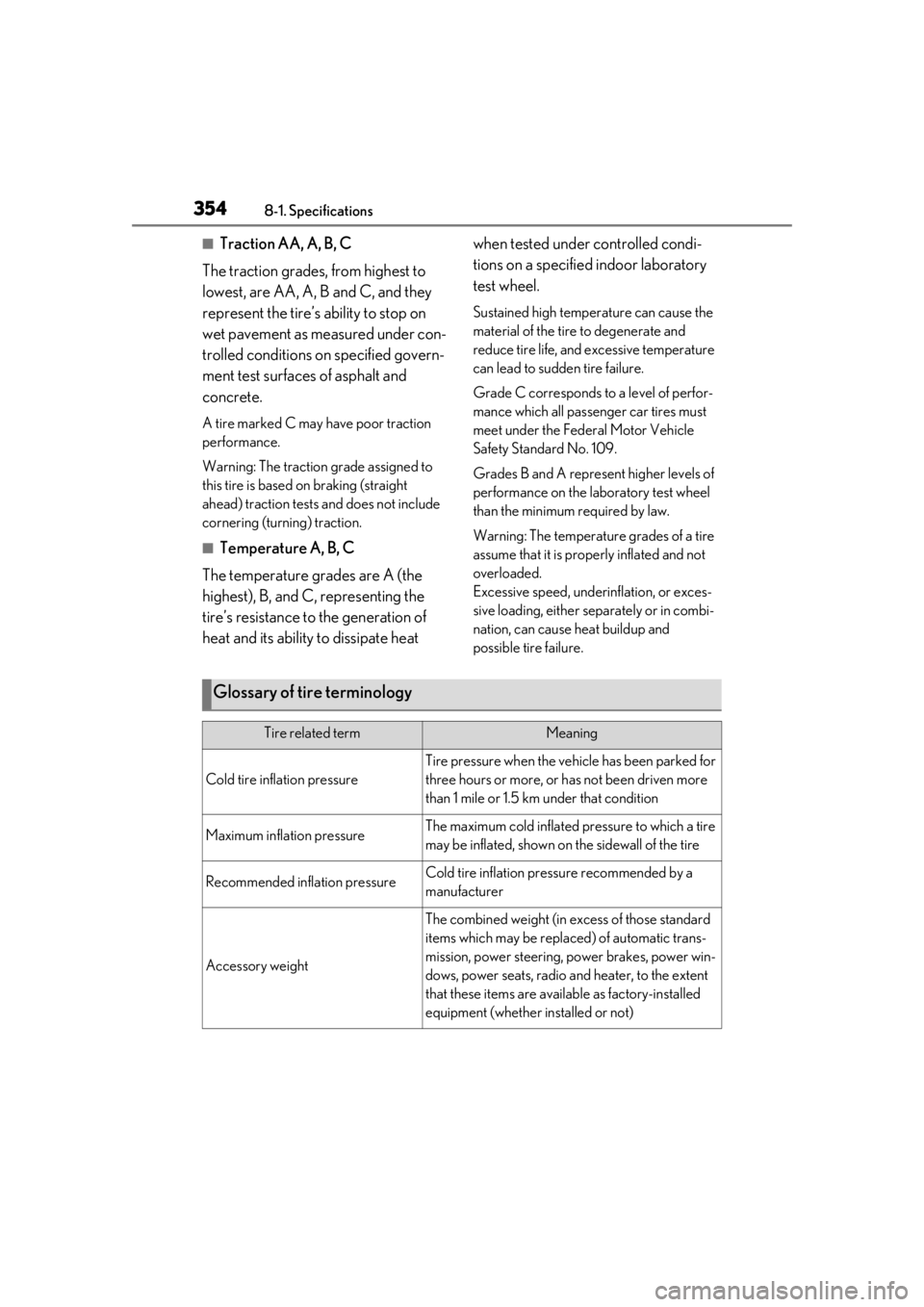
Glossary of tire terminology
Tire related termMeaning
Cold tire inflation pressure
Tire pressure when the vehicle has been parked for
three hours or more, or has not been driven more
than 1 mile or 1.5 km under that condition
Maximum inflation pressureThe maximum cold inflated pressure to which a tire
may be inflated, shown on the sidewall of the tire
Recommended inflation pressureCold tire inflation pressure recommended by a
manufacturer
Accessory weight
The combined weight (in excess of those standard
items which may be replaced) of automatic trans-
mission, power steering, power brakes, power win-
dows, power seats, radio and heater, to the extent
that these items are available as factory-installed
equipment (whether installed or not)
Page 360 of 408
3608-2. Customization
8-2.Customization
■Changing by using the meter con-
trol switches
1 Press or to select .
2 Operate the switches to select a
desired item.
3 Change the setting by referring to
the message displayed on the
screen.
■Changing by using the Remote
Touch
1 Press the “MENU” button on the
Remote Touch.
2 Select “Setup” on the menu screen
and select “Vehicle”.
3 Select “Vehicle Customization”,
“LEXUS Park Assist” or “Drive
Mode Customization”. Various setting can be changed. Refer
to the list of settings that can be
changed for details.
For details on the Remote Touch, refer
to the “NAVIGATION AND MULTI-
MEDIA SYSTEM OWNER’S MAN-
UAL”.
■When customizing using the Remote
Touch
Stop the vehicle in a safe place, apply the
parking brake, and shift the shift lever to P.
Also, to prevent battery discharge, leave
the engine running while customizing the
features.
Some function settings are changed simultaneously with other functions being cus-
tomized. Contact your Lexus dealer for further details.
Settings that can be changed using the Remote Touch
Settings that can be changed using the meter control switches
Settings that can be changed by your Lexus dealer
Customizable features
Your vehicle includes a variety of
electronic features that can be per-
sonalized to your preferences. The
settings of these features can be
changed by using the meter control
switches, the Remote Touch or at
your Lexus dealer.
Customizing vehicle features
WARNING
■During customization
As the engine needs to be running
during customization, ensure that the
vehicle is parked in a place with ade-
quate ventilation. In a closed area such as
a garage, exhaust gases including harm-
ful carbon monoxide (CO) may collect
and enter the vehicle. This may lead to
death or a serious health hazard.
NOTICE
■During customization
To prevent battery discharge, ensure that
the engine is running while customizing
features.
Customizable features
A
B
C
Page 363 of 408
3638-2. Customization
8
Vehicle specifications
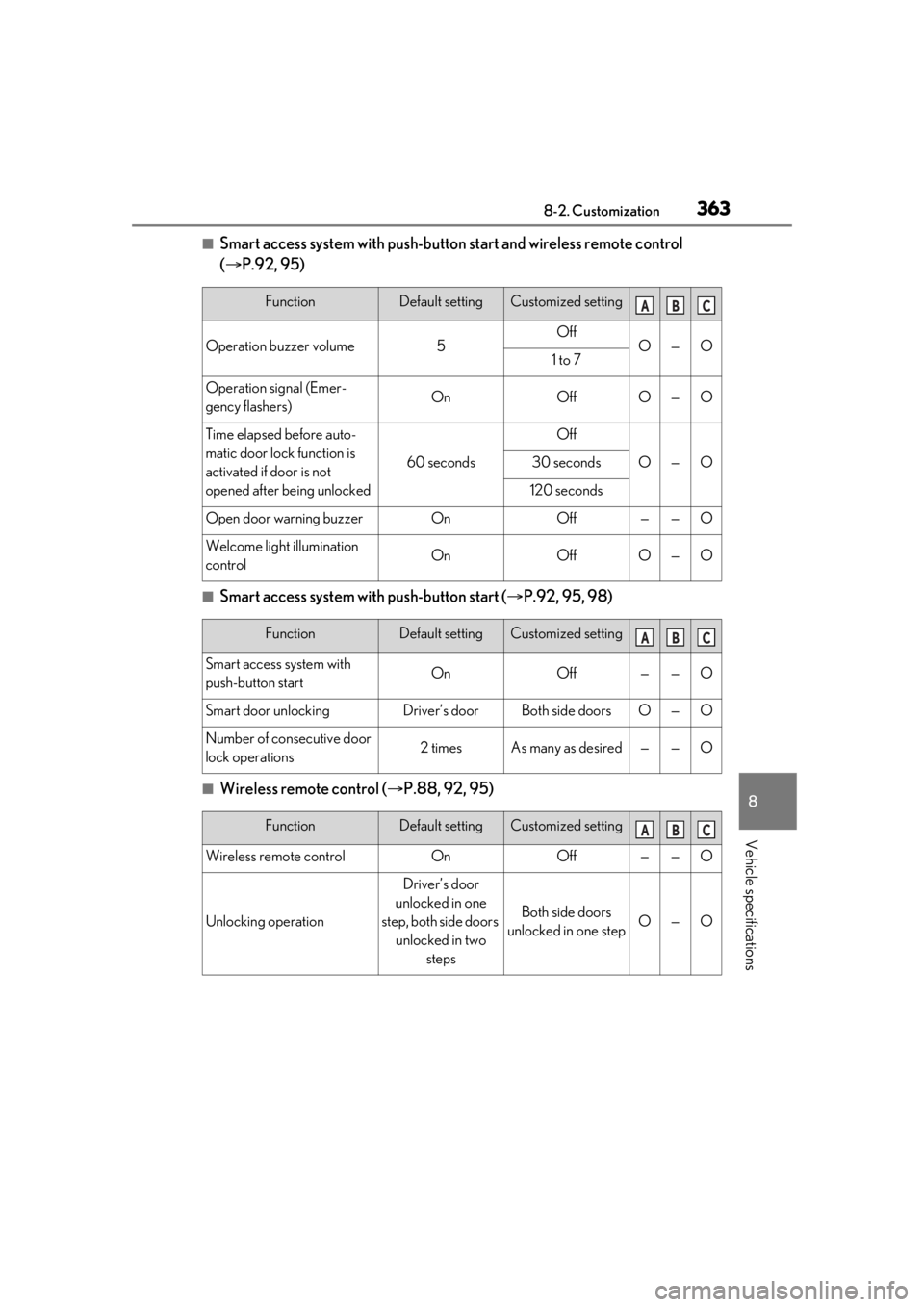
■Smart access system with push-button start and wireless remote control
( P.92, 95)
■Smart access system with push-button start ( P.92, 95, 98)
■Wireless remote control ( P.88, 92, 95)
FunctionDefault settingCustomized setting
Operation buzzer volume5OffO—O1 to 7
Operation signal (Emer-
gency flashers)OnOffO—O
Time elapsed before auto-
matic door lock function is
activated if door is not
opened after being unlocked
60 seconds
Off
O—O30 seconds
120 seconds
Open door warning buzzerOnOff——O
Welcome light illumination
controlOnOffO—O
ABC
FunctionDefault settingCustomized setting
Smart access system with
push-button startOnOff——O
Smart door unlockingDriver’s doorBoth side doorsO—O
Number of consecutive door
lock operations2 timesAs many as desired——O
ABC
FunctionDefault settingCustomized setting
Wireless remote controlOnOff——O
Unlocking operation
Driver’s door
unlocked in one
step, both side doors unlocked in two steps
Both side doors
unlocked in one stepO—O
ABC