fuel LEXUS RCF 2021 User Guide
[x] Cancel search | Manufacturer: LEXUS, Model Year: 2021, Model line: RCF, Model: LEXUS RCF 2021Pages: 408, PDF Size: 8.25 MB
Page 67 of 408

672-1. Instrument cluster
2
Vehicle status information and indicators
Tachometer
Displays the engine speed in revolutions per minute
Digital speedometer
Analog speedometer
Shift position/shift range/gear position (P.132)
Odometer and trip meter display ( P.72)
Eco drive mode
Multi-information display
Presents the driver with a variety of vehicle data ( P.73)
Displays warning messages in case of a malfunction (P.310)
Fuel gauge
Engine coolant temperature gauge
Displays the engine coolant temperature. If the engine coolant temperature gauge indica-
tor ( ) enters the red zone, a buzzer will so und and the indicator will turn red and start
flashing. Also, a warning message will be displayed.
Engine oil temperature gauge
Displays the engine oil temperature. If the engine oil temperature gauge indicator ( )
enters the red zone, the indicator will turn red and start flashing.
Outside temperature
Displays the outside temperature within the range of -40°F (-40°C) to 122°F (50°C). Low
outside temperature indicator comes on when the ambient temperature is 37°F (3°C) or
lower.
Eco driving meter
F
G
H
I
J
A
B
C
D
E
F
Page 68 of 408
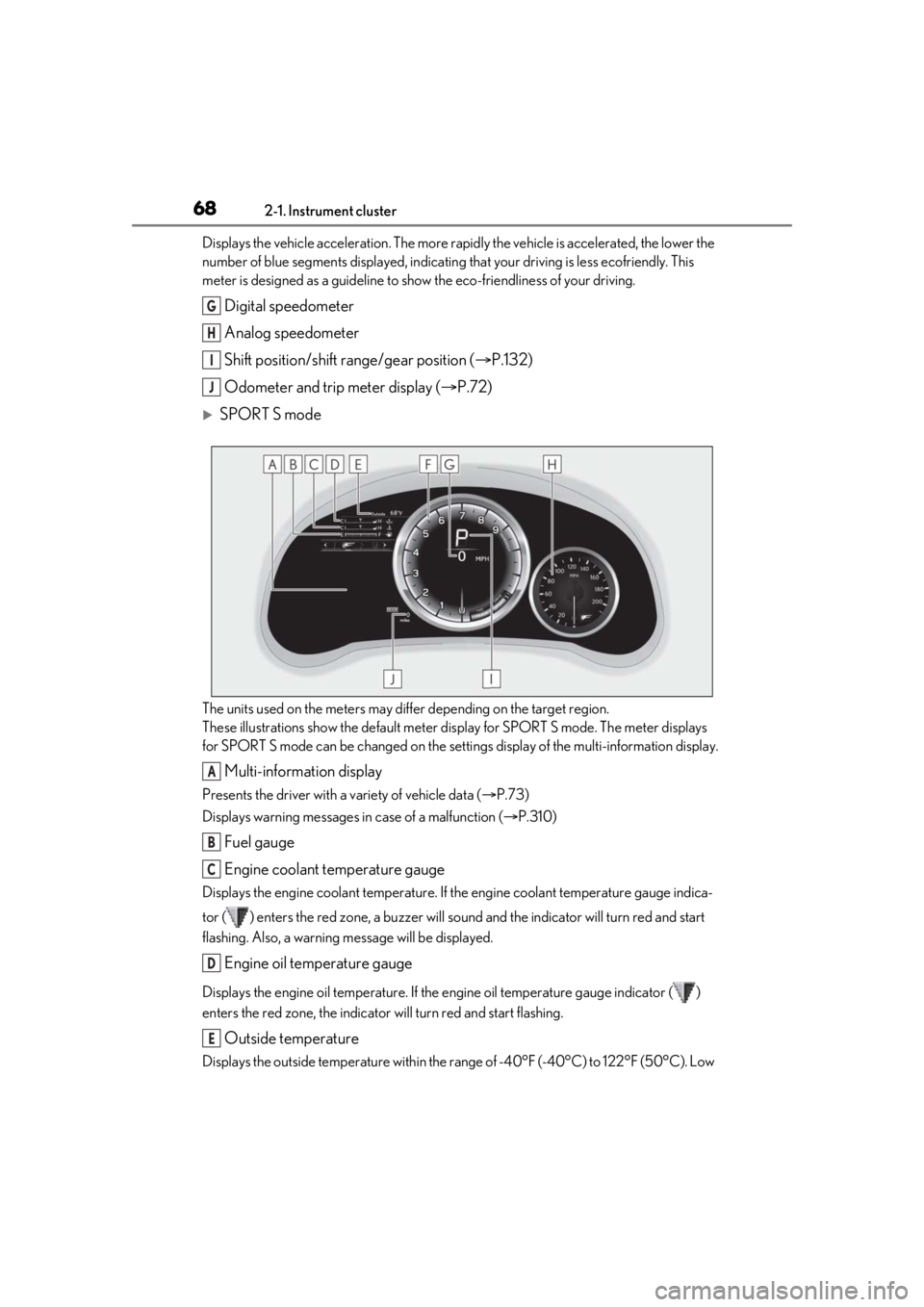
682-1. Instrument cluster
Displays the vehicle acceleration. The more rapidly the vehicle is accelerated, the lower the
number of blue segments displayed, indicating that your driving is less ecofriendly. This
meter is designed as a guid eline to show the eco-friendliness of your driving.
Digital speedometer
Analog speedometer
Shift position/shift range/gear position ( P.132)
Odometer and trip meter display ( P.72)
SPORT S mode
The units used on the meters may differ depending on the target region.
These illustrations show the default meter display for SPORT S mode. The meter displays
for SPORT S mode can be changed on the setti ngs display of the multi-information display.
Multi-information display
Presents the driver with a variety of vehicle data ( P.73)
Displays warning messages in case of a malfunction (P.310)
Fuel gauge
Engine coolant temperature gauge
Displays the engine coolant temperature. If the engine coolant temperature gauge indica-
tor ( ) enters the red zone, a buzzer will so und and the indicator will turn red and start
flashing. Also, a warning message will be displayed.
Engine oil temperature gauge
Displays the engine oil temperature. If the engine oil temperature gauge indicator ( )
enters the red zone, the indicator will turn red and start flashing.
Outside temperature
Displays the outside temperature within the range of -40°F (-40°C) to 122°F (50°C). Low
G
H
I
J
A
B
C
D
E
Page 69 of 408
692-1. Instrument cluster
2
Vehicle status information and indicators
outside temperature indicator comes on when the ambient temperature is 37°F (3°C) or
lower.
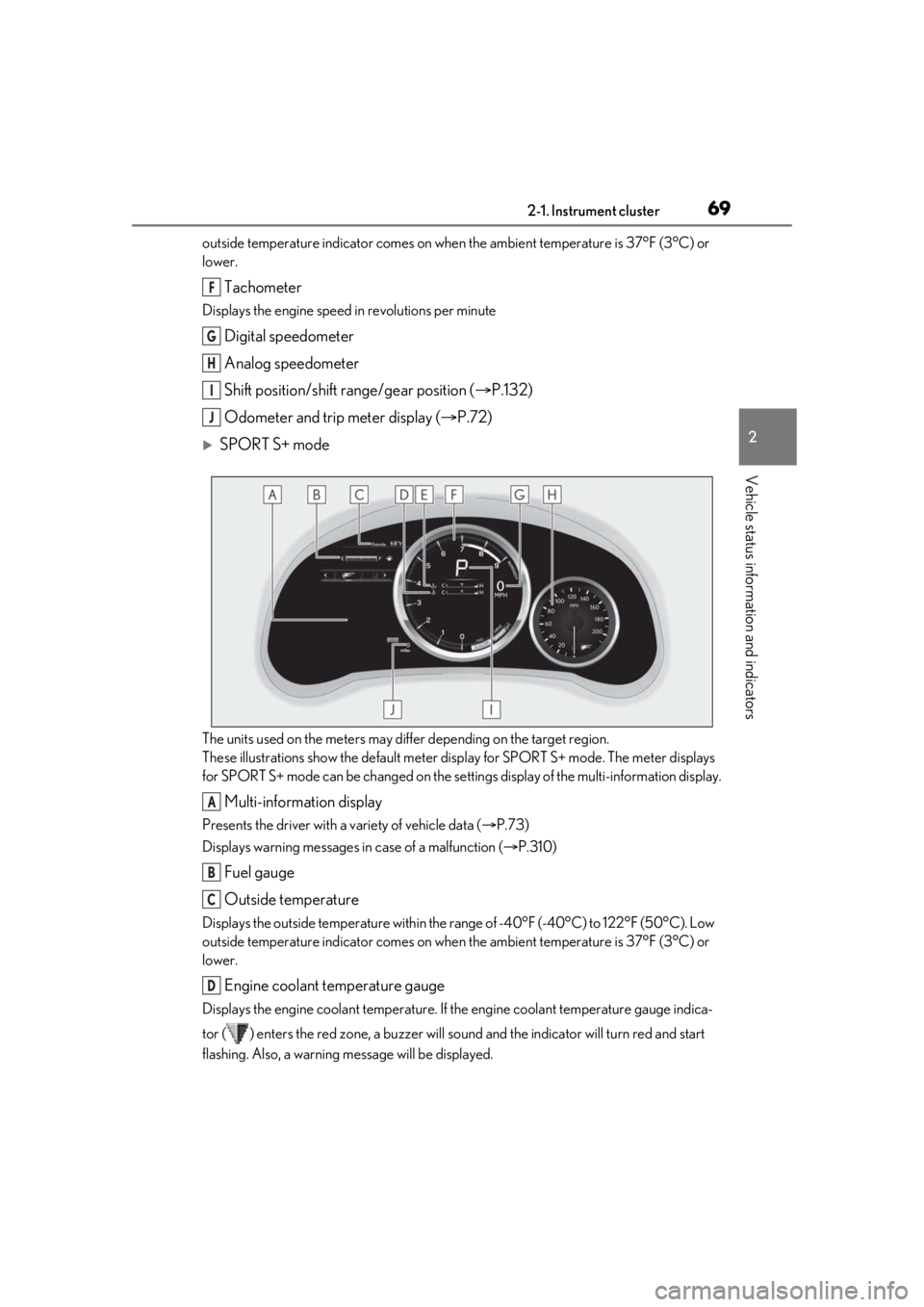
Tachometer
Displays the engine speed in revolutions per minute
Digital speedometer
Analog speedometer
Shift position/shift range/gear position (P.132)
Odometer and trip meter display ( P.72)
SPORT S+ mode
The units used on the meters may differ depending on the target region.
These illustrations show the default meter display for SPORT S+ mode. The meter displays
for SPORT S+ mode can be changed on the sett ings display of the multi-information display.
Multi-information display
Presents the driver with a variety of vehicle data ( P.73)
Displays warning messages in case of a malfunction (P.310)
Fuel gauge
Outside temperature
Displays the outside temperature within the range of -40°F (-40°C) to 122°F (50°C). Low
outside temperature indicator comes on when the ambient temperature is 37°F (3°C) or
lower.
Engine coolant temperature gauge
Displays the engine coolant temperature. If the engine coolant temperature gauge indica-
tor ( ) enters the red zone, a buzzer will so und and the indicator will turn red and start
flashing. Also, a warning message will be displayed.
F
G
H
I
J
A
B
C
D
Page 71 of 408
712-1. Instrument cluster
2
Vehicle status information and indicators
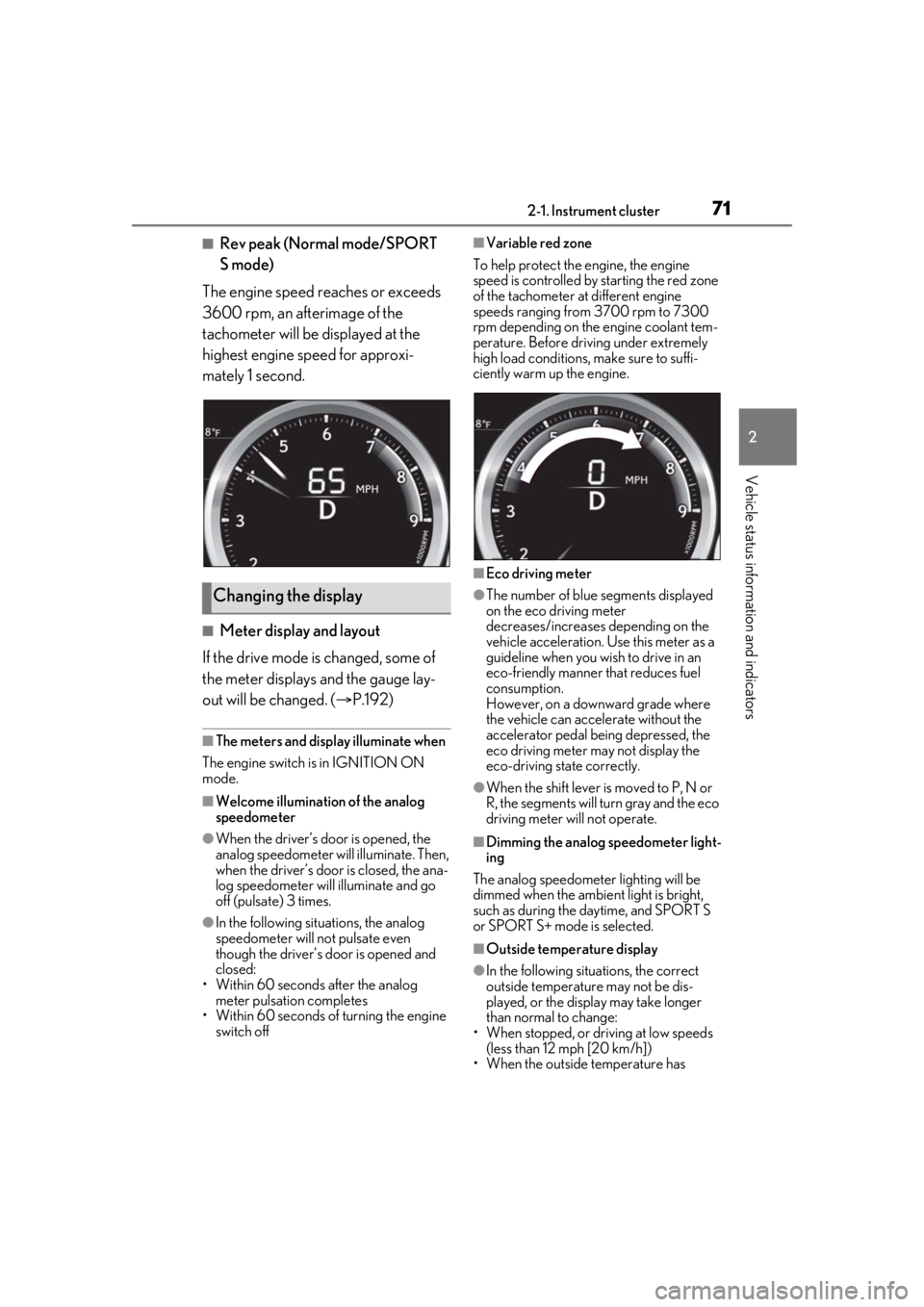
■Rev peak (Normal mode/SPORT
S mode)
The engine speed reaches or exceeds
3600 rpm, an afterimage of the
tachometer will be displayed at the
highest engine speed for approxi-
mately 1 second.
■Meter display and layout
If the drive mode is changed, some of
the meter displays and the gauge lay-
out will be changed. ( P.192)
■The meters and display illuminate when
The engine switch is in IGNITION ON
mode.
■Welcome illumination of the analog
speedometer
●When the driver’s door is opened, the
analog speedometer will illuminate. Then,
when the driver’s door is closed, the ana-
log speedometer will illuminate and go
off (pulsate) 3 times.
●In the following situations, the analog
speedometer will not pulsate even
though the driver’s door is opened and
closed:
• Within 60 seconds after the analog
meter pulsation completes
• Within 60 seconds of turning the engine switch off
■Variable red zone
To help protect the engine, the engine
speed is controlled by starting the red zone
of the tachometer at different engine
speeds ranging from 3700 rpm to 7300
rpm depending on the engine coolant tem-
perature. Before driv ing under extremely
high load conditions, make sure to suffi-
ciently warm up the engine.
■Eco driving meter
●The number of blue segments displayed
on the eco driving meter
decreases/increases depending on the
vehicle acceleration. Use this meter as a
guideline when you wish to drive in an
eco-friendly manner that reduces fuel
consumption.
However, on a downward grade where
the vehicle can accelerate without the
accelerator pedal being depressed, the
eco driving meter may not display the
eco-driving state correctly.
●When the shift lever is moved to P, N or
R, the segments will turn gray and the eco
driving meter will not operate.
■Dimming the analog speedometer light-
ing
The analog speedometer lighting will be
dimmed when the ambient light is bright,
such as during the daytime, and SPORT S
or SPORT S+ mode is selected.
■Outside temperature display
●In the following situations, the correct
outside temperature may not be dis-
played, or the display may take longer
than normal to change:
• When stopped, or driving at low speeds (less than 12 mph [20 km/h])
• When the outside temperature has
Changing the display
Page 75 of 408
752-1. Instrument cluster
2
Vehicle status information and indicators
SYSTEM OWNER’S MANUAL”.
■Registering a top screen
The displayed top screen can be
changed to a registered screen of your
choice.
To register a screen as the top screen,
display the desired screen and press
and hold .
A message asking to confirm if reg-
istration is desired will be displayed.
If the selected screen cannot be
registered, a registration failure
message will be displayed.
When no screen has been regis-
tered, the drive information screen
will be displayed.
■Resetting drive information
To reset the average fuel economy
(after reset)/average vehicle speed
(after reset)/elapsed time (after reset)
that are displayed on , display the
desired item and press and hold .
If both of the displa yed items are resetta-
ble, a message will be displayed asking
which item(s) to reset.
■Drive information 1/Drive infor-
mation 2/Drive information 3
Select to display various drive data.
Up to 2 of the following items can be
selected for each drive information
screen:
Items displayed can be switched by pressing or of the meter con-
trol switches to select and pressing
or .
Use the displayed values as a reference
only.
Drive information 1
• Current fuel consumption
• Average fuel economy (after reset)
Drive information 2
• Distance (driving range)
• Average vehicle speed (after reset)
Drive information 3
• Average fuel economy (after refuel)
• Elapsed time (after start)
Displayed items (listed below) can be
changed on . ( P.81)
Current fuel consumption
Displays instantaneous current fuel con-
sumption
Average fuel economy
• After reset: Displays average fuel con-
sumption since display reset
*1, 2
• After start: Displays average fuel con-sumption since engine start
*2
• After refuel: Displays average fuel con-
sumption since refuel
*2, 3
Average vehicle speed
• After reset: Displays average vehicle
speed since display reset
*1
• After start: Displays average vehicle speed since engine start
Elapsed time
• After reset: Displays elapsed time since
the display was reset
*1
Content displayed as drive infor-
mation
Page 76 of 408
762-1. Instrument cluster
• After start: Displays elapsed time since engine start
Distance
• Driving range: Displays driving range
with remaining fuel
*3, 4
•After start: Displays drive distance since
vehicle start
Other
Blank: No item
*1:Resetting: P.75
*2: Use the displayed fuel consumption as a
reference.
*3: When only a small amount of fuel is added to the tank, the display may not
be updated.
When refueling, turn the engine switch
off. If the vehicle is refueled without
turning the engine switch off, the display
may not be updated.
*4: This distance is computed based on
your average fuel consumption. As a
result, the actual distance that can be
driven may differ from that displayed.
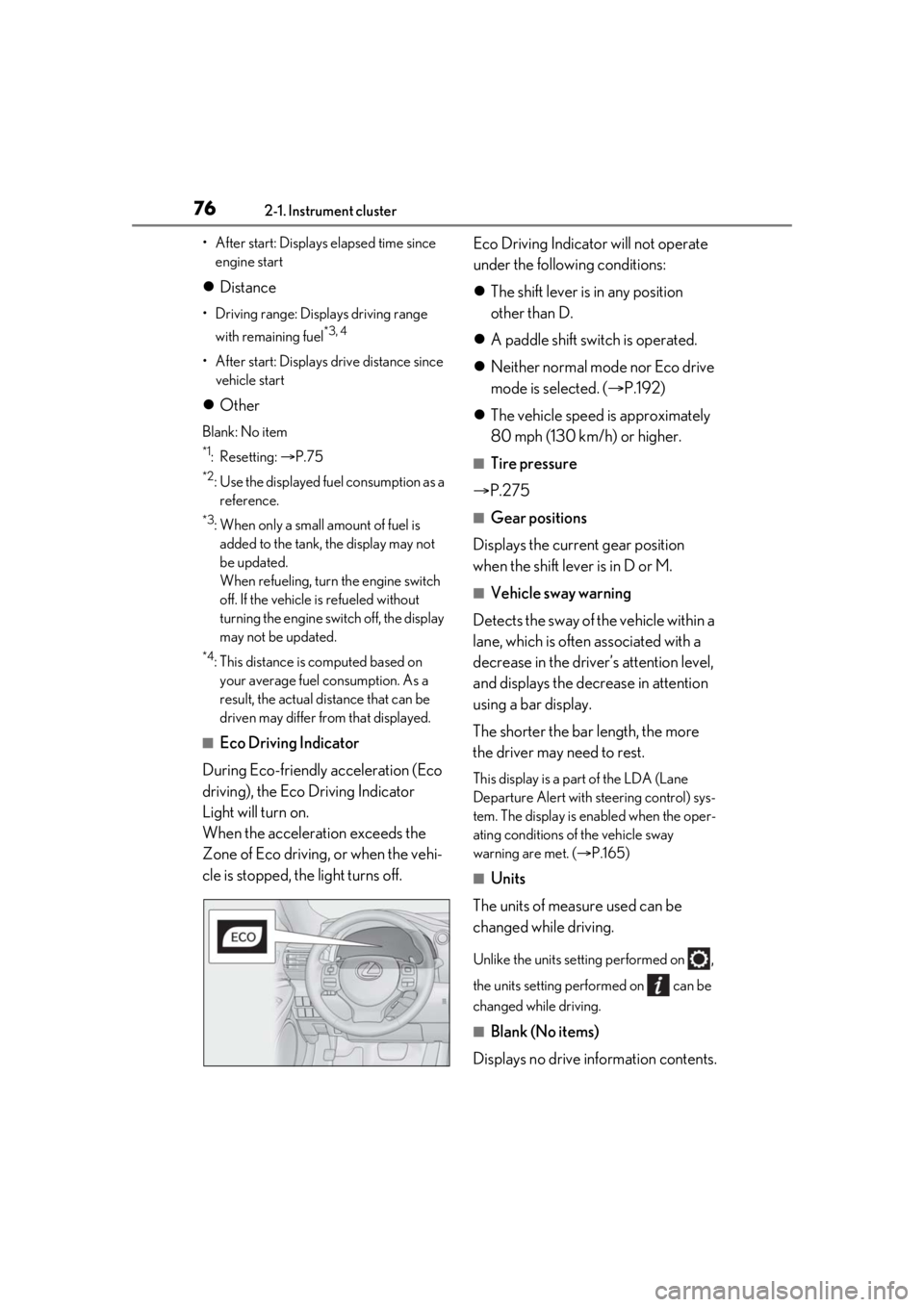
■Eco Driving Indicator
During Eco-friendly acceleration (Eco
driving), the Eco Driving Indicator
Light will turn on.
When the acceleration exceeds the
Zone of Eco driving, or when the vehi-
cle is stopped, the light turns off. Eco Driving Indicator will not operate
under the following conditions:
The shift lever is in any position
other than D.
A paddle shift switch is operated.
Neither normal mode nor Eco drive
mode is selected. ( P.192)
The vehicle speed is approximately
80 mph (130 km/h) or higher.
■Tire pressure
P.275
■Gear positions
Displays the current gear position
when the shift lever is in D or M.
■Vehicle sway warning
Detects the sway of the vehicle within a
lane, which is often associated with a
decrease in the driver’s attention level,
and displays the decrease in attention
using a bar display.
The shorter the bar length, the more
the driver may need to rest.
This display is a pa rt of the LDA (Lane
Departure Alert with steering control) sys-
tem. The display is en abled when the oper-
ating conditions of the vehicle sway
warning are met. ( P.165)
■Units
The units of measure used can be
changed while driving.
Unlike the units sett ing performed on ,
the units setting performed on can be
changed while driving.
■Blank (No items)
Displays no drive information contents.
Page 83 of 408
832-1. Instrument cluster
2
Vehicle status information and indicators
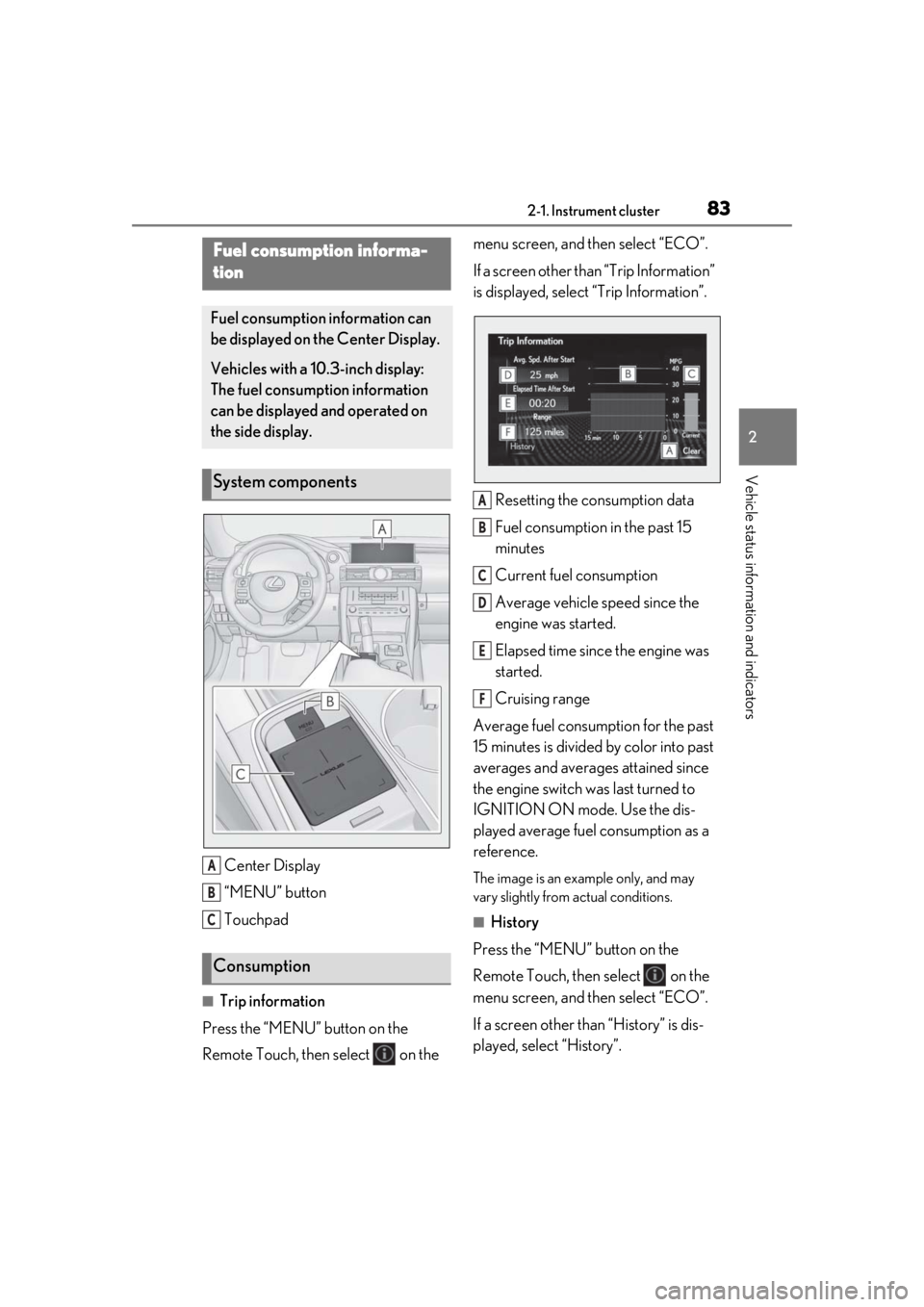
Center Display
“MENU” button
Touchpad
■Trip information
Press the “MENU” button on the
Remote Touch, then select on the menu screen, and then select “ECO”.
If a screen other than “Trip Information”
is displayed, select
“Trip Information”.
Resetting the consumption data
Fuel consumption in the past 15
minutes
Current fuel consumption
Average vehicle speed since the
engine was started.
Elapsed time since the engine was
started.
Cruising range
Average fuel consumption for the past
15 minutes is divided by color into past
averages and averages attained since
the engine switch was last turned to
IGNITION ON mode. Use the dis-
played average fuel consumption as a
reference.
The image is an example only, and may
vary slightly from actual conditions.
■History
Press the “MENU” button on the
Remote Touch, then select on the
menu screen, and then select “ECO”.
If a screen other than “History” is dis-
played, select “History”.
Fuel consumption informa-
tion
Fuel consumption information can
be displayed on the Center Display.
Vehicles with a 10.3-inch display:
The fuel consumption information
can be displayed and operated on
the side display.
System components
Consumption
A
B
C
A
B
C
D
E
F
Page 84 of 408
842-1. Instrument cluster
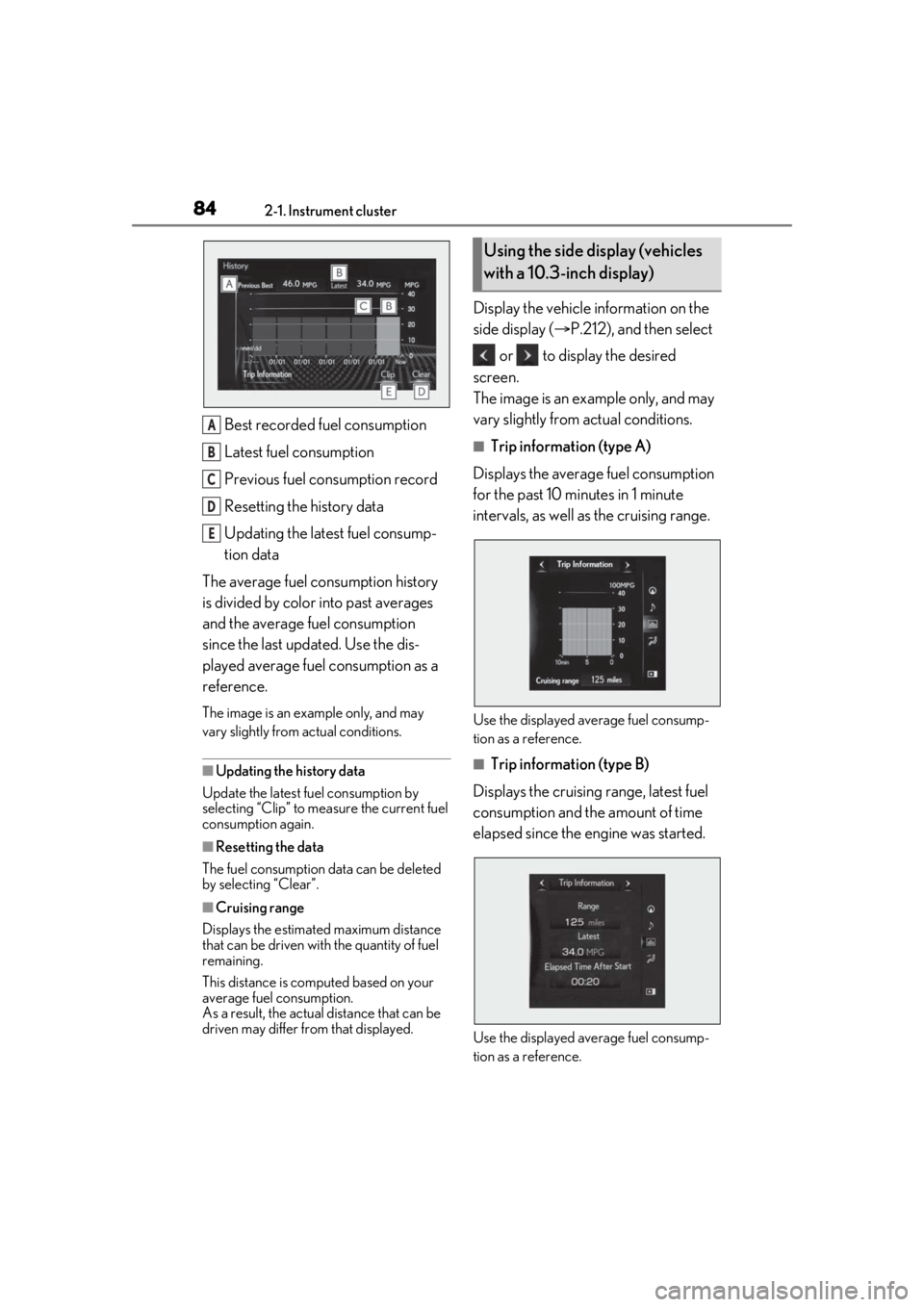
Best recorded fuel consumption
Latest fuel consumption
Previous fuel consumption record
Resetting the history data
Updating the latest fuel consump-
tion data
The average fuel consumption history
is divided by color into past averages
and the average fuel consumption
since the last updated. Use the dis-
played average fuel consumption as a
reference.
The image is an example only, and may
vary slightly from actual conditions.
■Updating the history data
Update the latest fuel consumption by
selecting “Clip” to measure the current fuel
consumption again.
■Resetting the data
The fuel consumption data can be deleted
by selecting “Clear”.
■Cruising range
Displays the estimated maximum distance
that can be driven with the quantity of fuel
remaining.
This distance is comp uted based on your
average fuel consumption.
As a result, the actual distance that can be
driven may differ from that displayed.
Display the vehicle information on the
side display ( P.212), and then select
or to display the desired
screen.
The image is an example only, and may
vary slightly from actual conditions.
■Trip information (type A)
Displays the average fuel consumption
for the past 10 minutes in 1 minute
intervals, as well as the cruising range.
Use the displayed average fuel consump-
tion as a reference.
■Trip information (type B)
Displays the cruising range, latest fuel
consumption and the amount of time
elapsed since the engine was started.
Use the displayed average fuel consump-
tion as a reference.
A
B
C
D
E
Using the side display (vehicles
with a 10.3-inch display)
Page 85 of 408
852-1. Instrument cluster
2
Vehicle status information and indicators
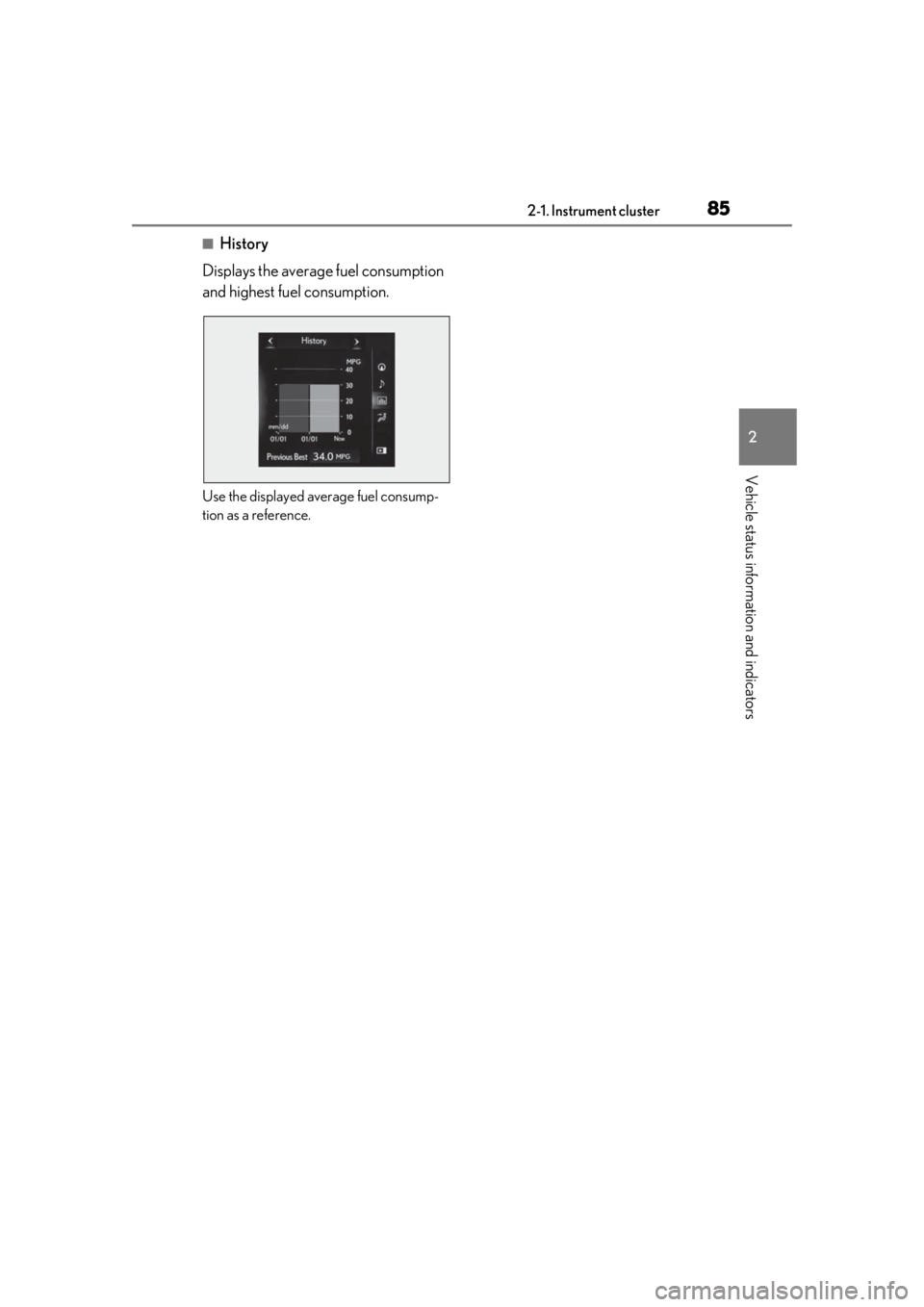
■History
Displays the average fuel consumption
and highest fuel consumption.
Use the displayed average fuel consump-
tion as a reference.
Page 117 of 408
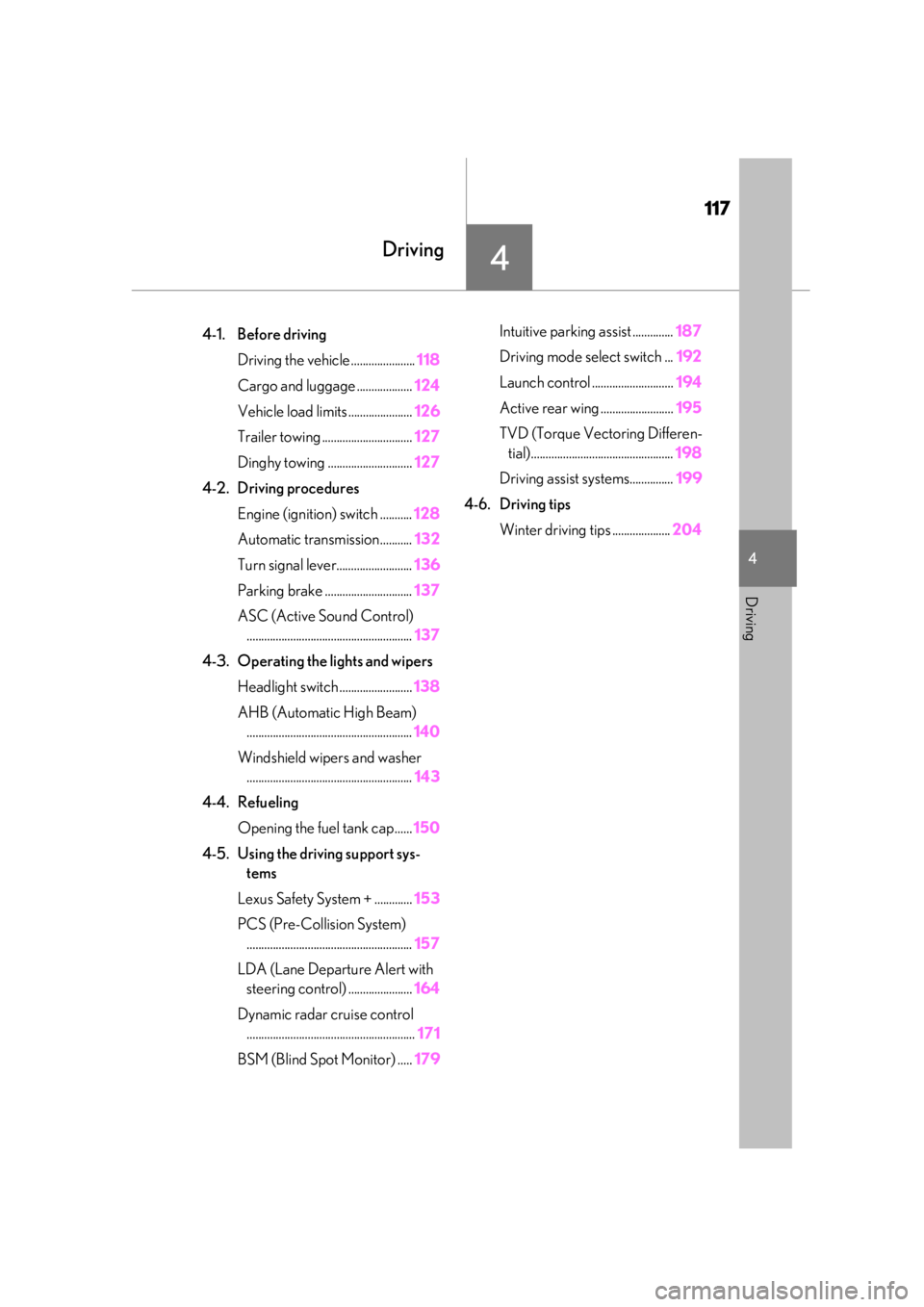
117
4
4
Driving
Driving
.4-1. Before drivingDriving the vehicle ...................... 118
Cargo and luggage ................... 124
Vehicle load limits ...................... 126
Trailer towing ............................... 127
Dinghy towing ............................. 127
4-2. Driving procedures Engine (ignition) switch ........... 128
Automatic transmission........... 132
Turn signal lever.......................... 136
Parking brake .............................. 137
ASC (Active Sound Control) ......................................................... 137
4-3. Operating the lights and wipers Headlight switch ......................... 138
AHB (Automatic High Beam) ......................................................... 140
Windshield wipers and washer ......................................................... 143
4-4. Refueling Opening the fuel tank cap...... 150
4-5. Using the driving support sys- tems
Lexus Safety System + ............. 153
PCS (Pre-Collision System) ......................................................... 157
LDA (Lane Departure Alert with steering control) ...................... 164
Dynamic radar cruise control .......................................................... 171
BSM (Blind Spot Monitor) ..... 179Intuitive parking assist ..............
187
Driving mode select switch ... 192
Launch control ............................ 194
Active rear wing ......................... 195
TVD (Torque Vectoring Differen- tial)................................................. 198
Driving assist systems............... 199
4-6. Driving tips Winter driving tips .................... 204