remote start LEXUS RCF 2021 User Guide
[x] Cancel search | Manufacturer: LEXUS, Model Year: 2021, Model line: RCF, Model: LEXUS RCF 2021Pages: 408, PDF Size: 8.25 MB
Page 102 of 408

1023-2. Opening, closing and locking the doors and trunk
■If the smart access system with
push-button start has been deactivated
in a customized setting
●Locking and unlocking the doors and
opening the trunk:
Use the wireless remote control or
mechanical key. (P.92, 96, 332)
●Starting the engine and changing engine
switch modes: P.333
●Stopping the engine: P.129
WARNING
■Caution regarding interference with
electronic devices
●People with implantable cardiac pace-
makers, cardiac resynchronization
therapy-pacemakers or implantable
cardioverter defibrillators should keep
away from the smart access system
with push-button start antennas.
( P.99)
The radio waves may affect the opera-
tion of such devices. If necessary, the
entry function can be disabled. Ask
your Lexus dealer for details, such as
the frequency of radio waves and tim-
ing of the emitted radio waves. Then,
consult your doctor to see if you
should disable the entry function.
●Users of any electrical medical device
other than implantable cardiac pace-
makers, cardiac resynchronization
therapy-pacemakers or implantable
cardioverter defibrillators should con-
sult the manufacturer of the device for
information about its operation under
the influence of radio waves.
Radio waves could have unexpected
effects on the operation of such medi-
cal devices.
Ask your Lexus dealer for details on dis-
abling the entry function.
Page 107 of 408

1073-3. Adjusting the seats
3
Before driving
2Turn the engine switch to IGNI-
TION ON mode.
3 Recall the driving position that you
want to record.
4 While pressing the recalled button,
press and hold the door lock switch
(either lock or unlock) until the
buzzer sounds.
If the button could not be registered, the
buzzer sounds continuously for approxi-
mately 3 seconds.
■Cancelation procedure
Carry only the key you want to cancel
and then close the driver’s door.
If 2 or more keys are in the vehicle, the
driving position cannot be canceled
properly.
1 Turn the engine switch to IGNI-
TION ON mode.
2 While pressing the “SET” button,
press and hold the door lock switch
(either lock or unlock) until the
buzzer sounds twice.
If the button could not be canceled, the
buzzer sounds continuously for approxi-
mately 3 seconds.
■Recall procedure
1 Make sure that the doors are
locked before recalling the driving
position. Carry the electronic key that has been registered to the driv-
ing position, and then unlock and
open the driver’s door using the
smart access system with push-but-
ton start or wireless remote control.
The driving position will move to the
recorded position (not including the steer-
ing wheel). However, th
e seat will move to
a position slightly behind the recorded
position in order to make entering the vehi-
cle easier.
If the driving position is in a position that
has already been recorded, the seat and
outside rear view mirrors will not move.
2 Turn the engine switch to ACCES-
SORY mode or IGNITION ON
mode, or fasten a seat belt.
The seat and steering wheel will move to
the recorded position.
■Recalling the driving position using the
memory recall function
●Different driving positions can be regis-
tered for each electronic key. Therefore,
the driving position that is recalled may
be different depending on the key being
carried.
●If a door other than the driver’s door is
unlocked with the smart access system
with push-button start, the driving posi-
tion cannot be recalled. In this case, press
the driving position button which has
been set.
■Customization
Some functions can be customized.
( P.360)
Page 113 of 408

1133-5. Opening, closing the windows and moon roof
3
Before driving
If you release the switch while the window is
moving, start again from the beginning.
If the window reverses and cannot be fully
closed or opened, have the vehicle
inspected by your Lexus dealer.
■Door lock linked window operation
●The power windows can be opened and
closed using the mechanical key.*
( P.333)
●The power windows can be opened using
the wireless remote control.* ( P.92)
*: These settings must be customized at
your Lexus dealer.
■Power windows open warning buzzer
A buzzer sounds and a message is shown
on the multi-information display in the
instrument cluster when the engine switch
is turned off and the driver’s door is opened
with the power windows open.
■Customization
Some functions can be customized.
( P.360)
This function can be used to prevent
children from accidentally opening or
closing a passenger window.
Press the switch.
The indicator will come on and the pas-
WARNING
Observe the following precautions.
Failure to do so may result in death or
serious injury.
■Closing the windows
●The driver is responsible for all the
power window operations, including
the operation for the passengers. In
order to prevent accidental operation,
especially by a child, do not let a child
operate the power windows. It is possi-
ble for children an d other passengers
to have body parts caught in the power
window. Also, when riding with a child,
it is recommended to use the window
lock switch. ( P.113)
●Check to make sure that all passen-
gers do not have any part of their body
in a position where it could be caught
when a window is being operated.
●When using the wireless remote con-
trol or mechanical key and operating
the power windows, operate the
power window after checking to make
sure that there is no possibility of any
passenger having any of their body
parts caught in the window. Also do
not let a child operate window by the
wireless remote control or mechanical
key. It is possible for children and other
passengers to get caught in the power
window.
●When exiting the vehicle, turn the
engine switch off, carry the key and
exit the vehicle along with the child.
There may be accidental operation,
due to mischief, etc., that may possibly
lead to an accident.
■Jam protection function
●Never use any part of your body to
intentionally activa te the jam protec-
tion function.
●The jam protection function may not
work if something gets jammed just
before the window is fully closed. Be
careful not to get any part of your body
jammed in the window.
■Catch protection function
●Never use any part of your body or
clothing to intentionally activate the
catch protection function.
●The catch protection function may not
work if something gets caught just
before the window is fully opened. Be
careful not to get any part of your body
or clothing caught in the window.
Preventing accidental operation
(window lock switch)
A
Page 272 of 408
2726-4. Do-it-yourself maintenance
necting the battery. If this happens, use
the wireless remote control or the
mechanical key to lock/unlock the doors.
●Start the engine with the engine switch in
ACCESSORY mode. The engine may
not start with the engine switch turned off.
However, the engine will operate nor-
mally from the second attempt.
●The engine switch mode is recorded by
the vehicle. If the battery is disconnected
and reconnected, the vehicle will return
the engine switch mode to the status it
was in before the battery was discon-
nected. Make sure to turn off the engine
before disconnecting the battery. Take
extra care when connecting the battery if
the engine switch mode prior to the bat-
tery being disconnected is unknown.
If the system will not start even after multi-
ple attempts, contact your Lexus dealer.
If any washer does not work or the
warning message appears on the
multi-information display, the washer
tank may be empty. Add washer fluid.
WARNING
■Chemicals in the battery
Batteries contain poisonous and corro-
sive sulfuric acid and may produce
hydrogen gas which is flammable and
explosive. To reduce the risk of death or
serious injury, take the following precau-
tions while working on or near the bat-
tery:
●Do not cause sparks by touching the
battery terminals with tools.
●Do not smoke or light a match near the
battery.
●Avoid contact with eyes, skin and
clothes.
●Never inhale or swallow electrolyte.
●Wear protective safety glasses when
working near the battery.
●Keep children away from the battery.
■Where to safely charge the battery
Always charge the battery in an open
area. Do not charge the battery in a
garage or closed room where there is
insufficient ventilation.
■How to recharge the battery
Only perform a slow charge (5 A or
less). The battery may explode if charged
at a quicker rate.
■Emergency measures regarding
electrolyte
●If electrolyte gets in your eyes
Flush your eyes with clean water for at
least 15 minutes and get immediate med-
ical attention. If possible, continue to
apply water with a sponge or cloth while
traveling to the nearest medical facility.
●If electrolyte gets on your skin
Wash the affected area thoroughly. If you
feel pain or burning, get medical atten-
tion immediately.
●If electrolyte gets on your clothes
It can soak through clothing on to your
skin. Immediately take off the clothing
and follow the procedure above if neces-
sary.
●If you accidentally swallow electrolyte
Drink a large quantity of water or milk.
Get emergency medical attention imme-
diately.
NOTICE
■When recharging the battery
Never recharge the battery while the
engine is running. Also, be sure all acces-
sories are turned off.
Adding the washer fluid
Page 283 of 408
2836-4. Do-it-yourself maintenance
6
Maintenance and care
When an air conditioning odor comes out
continuously, replace the air conditioning
filter.
■If the electronic key battery is depleted
The following symptoms may occur:
●The smart access system with push-but-
ton start and wireless remote control will
not function properly.
●The operationa l range will be reduced.
■When the card key battery needs to be
replaced (if equipped)
The battery for the card key is available only
at Lexus dealers. Your Lexus dealer can
replace the battery for you.
Flathead screwdriver
Small flathead screwdriver
Lithium battery CR2032
■Use a CR2032 lithium battery
●Batteries can be purchased at your Lexus
dealer, local electrical appliance shops or
camera stores.
●Replace only with the same or equivalent
type recommended by the manufacturer.
●Dispose of used batteries according to
local laws.
NOTICE
■When using the air conditioning sys-
tem
Make sure that a filter is always installed.
Using the air conditioning system without
a filter may cause damage to the system.
Electronic key battery
Replace the battery with a new one
if it is depleted.
As the key may be damaged if the
following procedure is not per-
formed properly, it is recom-
mended that key battery
replacement be performed by your
Lexus dealer.
Items to prepare
Page 332 of 408

3327-2. Steps to take in an emergency
■When the electronic key does not work
properly
●Make sure that the smart access system
with push-button start has not been deac-
tivated in the customization setting. If it is
off, turn the function on.
●Check if battery-saving mode is set. If it is
set, cancel the function. ( P.100)
■Unlocking the door
Use the mechanical key ( P.88) in
order to perform the following opera-
tions: 1
Insert the mechanical key while
pulling on the driver’s door handle.
2 Unlocking the door.
3 Remove the key, return the handle,
and then pull the handle again.
■Locking the door
1 Move the inside lock button to the
lock position.
2 Close the door.
■Opening the trunk
Turn the mechanical key clockwise to
open. ( P.58)
If the electronic key does not
operate properly
If communication between the
electronic key and vehicle is inter-
rupted ( P.100) or the electronic
key cannot be used because the
battery is depleted, the smart
access system with push-button
start and wireless remote control
cannot be used. In such cases, the
doors and trunk can be opened and
the engine can be started by follow-
ing the procedure below.
NOTICE
■In case of a smart access system with
push-button start malfunction or
other key-related problems
Take your vehicle with all the electronic
keys provided with your vehicle, includ-
ing the card key, to your Lexus dealer.
Locking and unlocking the doors
and opening the trunk
Page 336 of 408
3367-2. Steps to take in an emergency
Once the engine starts, have the vehi-
cle inspected at your Lexus dealer as
soon as possible.
■Starting the engine when the battery is
discharged
The engine cannot be started by push-start-
ing.
■To prevent battery discharge
●Turn off the headlights and the audio sys-
tem while the engine is off.
●Turn off any unnecessary electrical com-
ponents when the vehicle is running at a
low speed for an extended period, such
as in heavy traffic.
■Charging the battery
The electricity stored in the battery will dis-
charge gradually even when the vehicle is
not in use, due to natural discharge and the
draining effects of certain electrical appli-
ances. If the vehicle is left for a long time,
the battery may discharge, and the engine
may be unable to start. (The battery
recharges automatically during driving.)
■When recharging or replacing the bat-
tery
●In some cases, it may not be possible to
unlock the doors using the smart access
system with push-button start when the
battery is discharged. Use the wireless
remote control or the mechanical key to
lock or unlock the doors.
●The engine may not start on the first
attempt after the battery has recharged
but will start normally after the second
attempt. This is not a malfunction.
●The engine switch mode is memorized by
the vehicle. When the battery is recon-
nected, the system will return to the
mode it was in before the battery was dis-
charged. Before di sconnecting the bat-
tery, turn the engine switch off.
If you are unsure what mode the engine
switch was in befo re the battery dis-
charged, be especially careful when
reconnecting the battery.
■When replacing the battery
●Use a battery that conforms to European
regulations.
●Use a battery that tha case size is same as
the previous one (LN3), 20 hour rate
capacity (20HR) is equivalent (70Ah) or
greater, and performance rating (CCA)
is equivalent (592A) or greater.
• If the sizes differ, the battery cannot be properly secured.
• If the 20 hour rate capacity is low, even if the time period where the vehicle is not
used is a short time, battery may dis-
charge and the engine may not be able to
start.
●For details, consult your Lexus dealer.
WARNING
■Avoiding battery fires or explosions
Observe the following precautions to
prevent accidentally igniting the flamma-
ble gas that may be emitted from the bat-
tery:
●Make sure each jumper cable is con-
nected to the correct terminal and that
it is not unintentionally in contact with
any other than the intended terminal.
●Do not allow the other end of the
jumper cable connected to the “+” ter-
minal to come into contact with any
other parts or meta l surfaces in the
area, such as brackets or unpainted
metal.
●Do not allow the + and - clamps of the
jumper cables to come into contact
with each other.
●Do not smoke, use matches, cigarette
lighters or allow open flame near the
battery.
■Battery precautions
The battery contains poisonous and cor-
rosive acidic electrol yte, while related
parts contain lead and lead compounds.
Observe the following precautions when
handling the battery:
Page 363 of 408
3638-2. Customization
8
Vehicle specifications
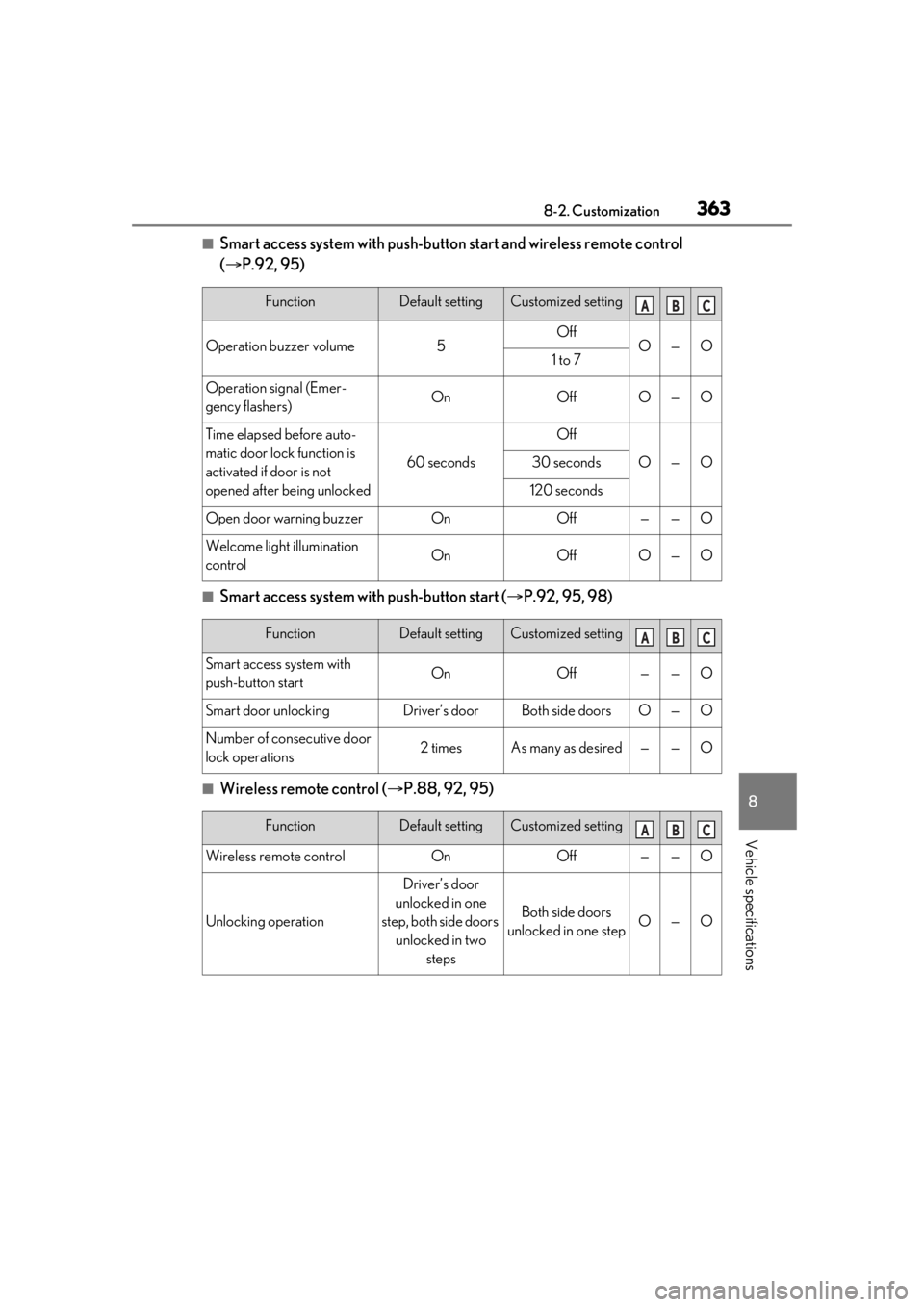
■Smart access system with push-button start and wireless remote control
( P.92, 95)
■Smart access system with push-button start ( P.92, 95, 98)
■Wireless remote control ( P.88, 92, 95)
FunctionDefault settingCustomized setting
Operation buzzer volume5OffO—O1 to 7
Operation signal (Emer-
gency flashers)OnOffO—O
Time elapsed before auto-
matic door lock function is
activated if door is not
opened after being unlocked
60 seconds
Off
O—O30 seconds
120 seconds
Open door warning buzzerOnOff——O
Welcome light illumination
controlOnOffO—O
ABC
FunctionDefault settingCustomized setting
Smart access system with
push-button startOnOff——O
Smart door unlockingDriver’s doorBoth side doorsO—O
Number of consecutive door
lock operations2 timesAs many as desired——O
ABC
FunctionDefault settingCustomized setting
Wireless remote controlOnOff——O
Unlocking operation
Driver’s door
unlocked in one
step, both side doors unlocked in two steps
Both side doors
unlocked in one stepO—O
ABC
Page 368 of 408
3688-2. Customization
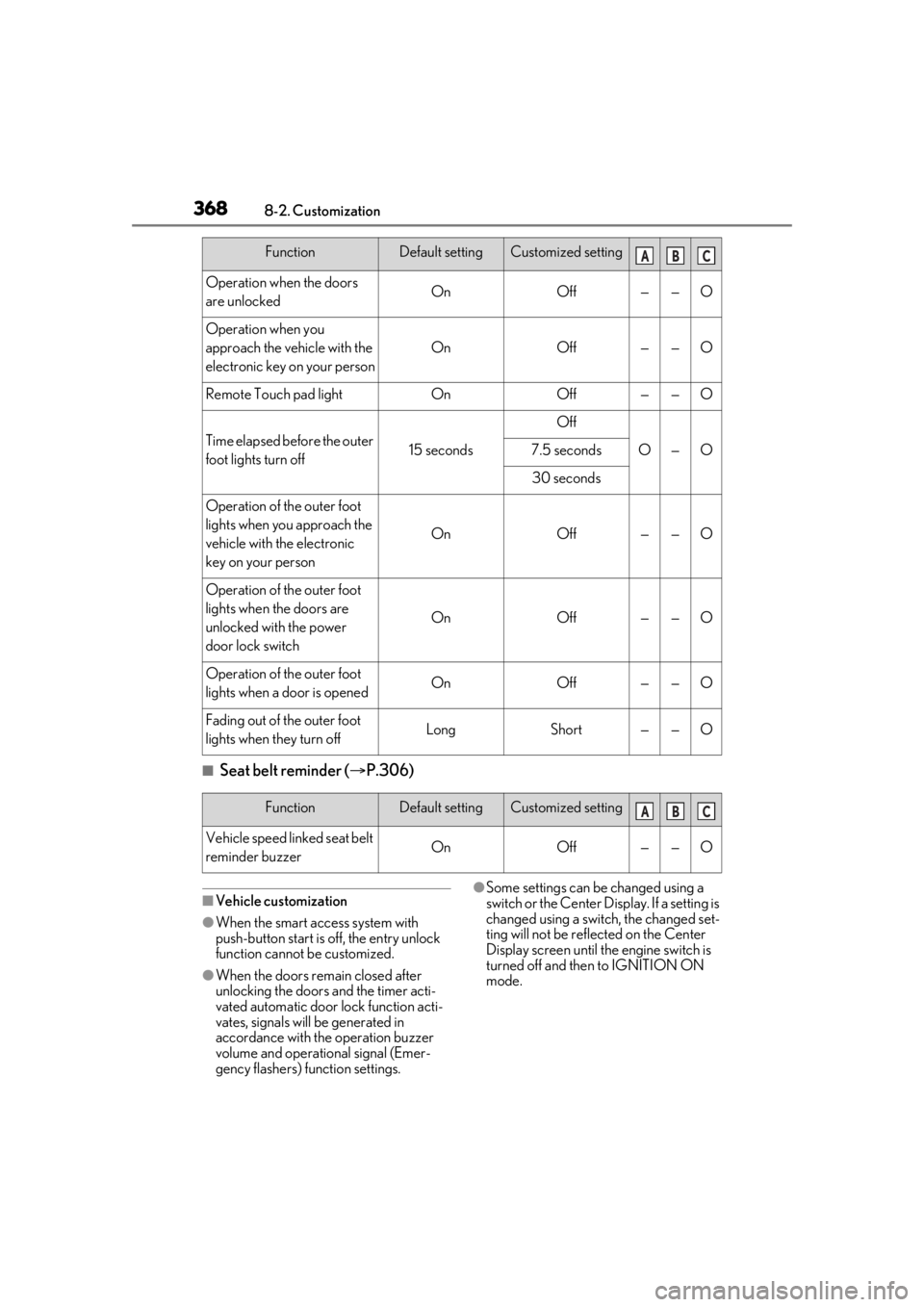
■Seat belt reminder (P.306)
■Vehicle customization
●When the smart access system with
push-button start is off, the entry unlock
function cannot be customized.
●When the doors remain closed after
unlocking the doors and the timer acti-
vated automatic door lock function acti-
vates, signals will be generated in
accordance with the operation buzzer
volume and operational signal (Emer-
gency flashers) function settings.
●Some settings can be changed using a
switch or the Center Di splay. If a setting is
changed using a switch, the changed set-
ting will not be reflected on the Center
Display screen until the engine switch is
turned off and then to IGNITION ON
mode.
Operation when the doors
are unlockedOnOff——O
Operation when you
approach the vehicle with the
electronic key on your person
OnOff——O
Remote Touch pad lightOnOff——O
Time elapsed before the outer
foot lights turn off15 seconds
Off
O—O7.5 seconds
30 seconds
Operation of the outer foot
lights when you approach the
vehicle with the electronic
key on your person
OnOff——O
Operation of the outer foot
lights when the doors are
unlocked with the power
door lock switch
OnOff——O
Operation of the outer foot
lights when a door is openedOnOff——O
Fading out of the outer foot
lights when they turn offLongShort——O
FunctionDefault settingCustomized settingABC
FunctionDefault settingCustomized setting
Vehicle speed linked seat belt
reminder buzzerOnOff——O
ABC
Page 391 of 408
391What to do if... (Troubleshooting)
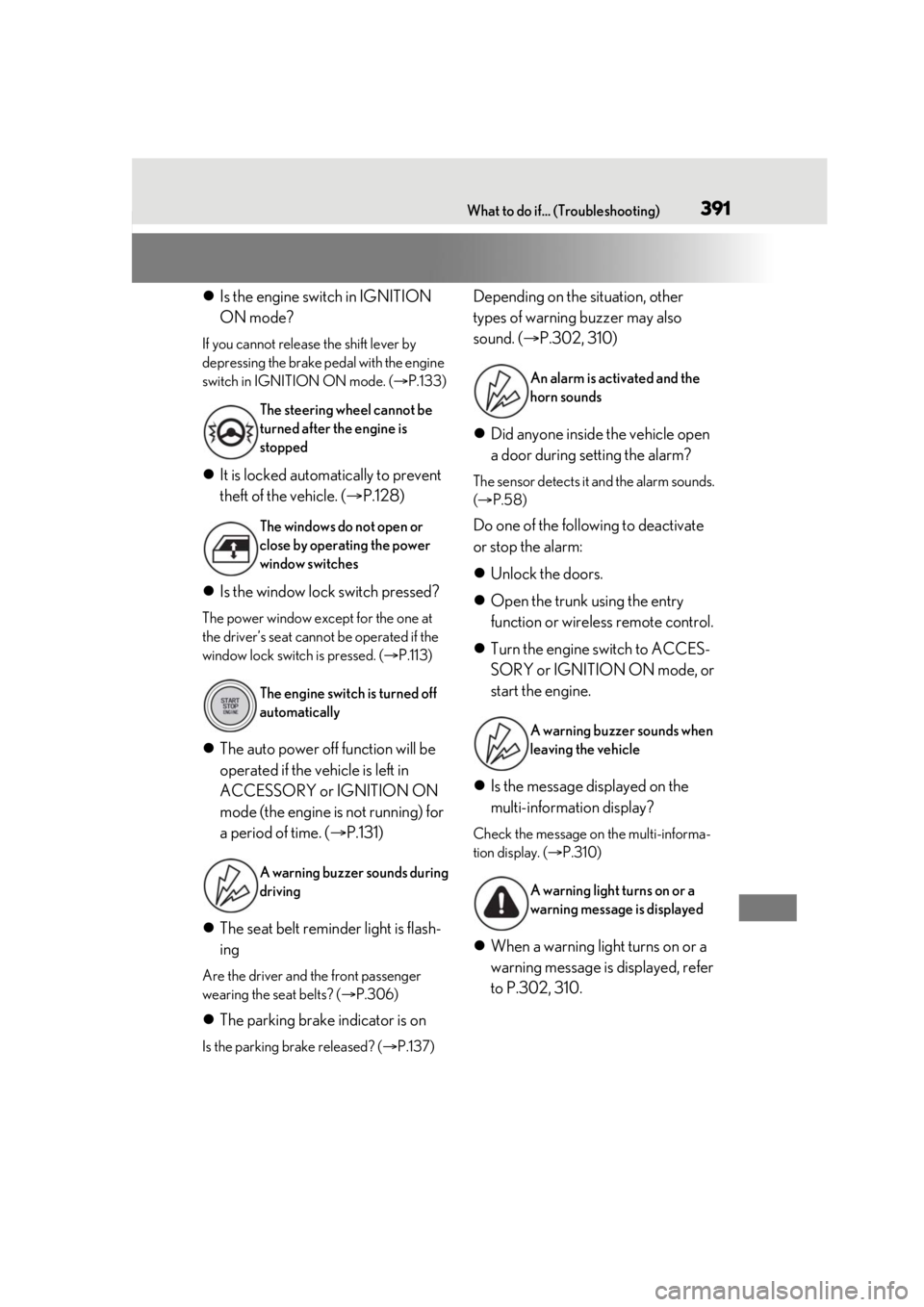
Is the engine switch in IGNITION
ON mode?
If you cannot release the shift lever by
depressing the brake pedal with the engine
switch in IGNITION ON mode. ( P.133)
It is locked automatically to prevent
theft of the vehicle. ( P.128)
Is the window lock switch pressed?
The power window except for the one at
the driver’s seat cannot be operated if the
window lock switch is pressed. ( P.113)
The auto power off function will be
operated if the vehicle is left in
ACCESSORY or IGNITION ON
mode (the engine is not running) for
a period of time. ( P.131)
The seat belt reminder light is flash-
ing
Are the driver and the front passenger
wearing the seat belts? ( P.306)
The parking brake indicator is on
Is the parking brake released? ( P.137)
Depending on the situation, other
types of warning buzzer may also
sound. ( P.302, 310)
Did anyone inside the vehicle open
a door during setting the alarm?
The sensor detects it and the alarm sounds.
( P.58)
Do one of the following to deactivate
or stop the alarm:
Unlock the doors.
Open the trunk using the entry
function or wireless remote control.
Turn the engine switch to ACCES-
SORY or IGNITION ON mode, or
start the engine.
Is the message displayed on the
multi-information display?
Check the message on the multi-informa-
tion display. ( P.310)
When a warning light turns on or a
warning message is displayed, refer
to P.302, 310.
The steering wheel cannot be
turned after the engine is
stopped
The windows do not open or
close by operating the power
window switches
The engine switch is turned off
automatically
A warning buzzer sounds during
driving
An alarm is activated and the
horn sounds
A warning buzzer sounds when
leaving the vehicle
A warning light turns on or a
warning message is displayed