lane LEXUS RCF 2021 Owner's Manual
[x] Cancel search | Manufacturer: LEXUS, Model Year: 2021, Model line: RCF, Model: LEXUS RCF 2021Pages: 408, PDF Size: 8.25 MB
Page 179 of 408
1794-5. Using the driving support systems
4
Driving
*:If equipped
The Blind Spot Monitor is a system that
has 2 functions:
The BSM (Blind Spot Monitor) func-
tion
Assists the driver in making a deci-
sion when changing lanes
The RCTA (Rear Cross Traffic Alert)
function
Assists the driver when backing up
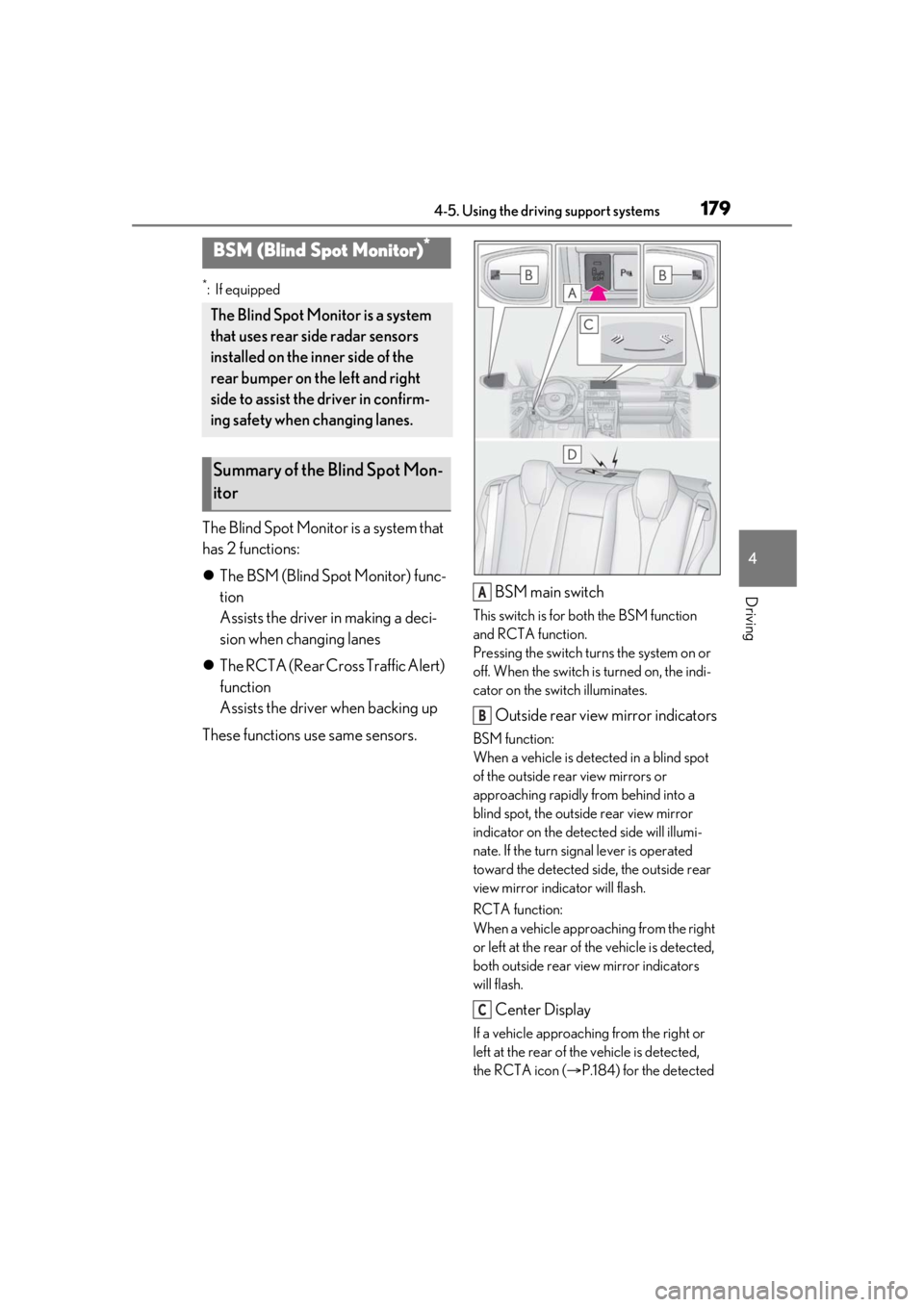
These functions use same sensors. BSM main switch
This switch is for both the BSM function
and RCTA function.
Pressing the switch turns the system on or
off. When the switch is turned on, the indi-
cator on the switch illuminates.
Outside rear view mirror indicators
BSM function:
When a vehicle is dete
cted in a blind spot
of the outside rear view mirrors or
approaching rapidly from behind into a
blind spot, the outside rear view mirror
indicator on the detected side will illumi-
nate. If the turn signal lever is operated
toward the detected side, the outside rear
view mirror indicator will flash.
RCTA function:
When a vehicle approaching from the right
or left at the rear of the vehicle is detected,
both outside rear view mirror indicators
will flash.
Center Display
If a vehicle approaching from the right or
left at the rear of th e vehicle is detected,
the RCTA icon ( P.184) for the detected
BSM (Blind Spot Monitor)*
The Blind Spot Monitor is a system
that uses rear side radar sensors
installed on the inner side of the
rear bumper on the left and right
side to assist the driver in confirm-
ing safety when changing lanes.
Summary of the Blind Spot Mon-
itor
A
B
C
Page 181 of 408
1814-5. Using the driving support systems
4
Driving
The BSM function uses radar sensors to detect the following vehicles traveling in
adjacent lanes and advises the driver of th e presence of such vehicles via the indi-
cators on the outside rear view mirrors.
WARNING
●Do not attach stickers to the sensor or
surrounding area on the rear bumper.
●Do not modify the sensor or surround-
ing area on the rear bumper.
●Do not paint the rear bumper any
color other than an official Lexus color.
■Cautions regarding the use of the
function
The driver is solely responsible for safe
driving. Always driv e safely, taking care
to observe your surroundings.
The BSM function is a supplementary
function which alerts the driver that a
vehicle is in a blind spot of the outside
rear view mirrors or is approaching rap-
idly from behind into a blind spot. Do not
overly rely on the BSM function. As the
function cannot judge if it is safe to
change lanes, over reliance could lead to
an accident resulting in death or serious
injury.
As the system may not function correctly
under certain conditions, the driver’s own
visual confirmation of safety is necessary.
The RCTA function is only a supplemen-
tary function which alerts the driver that a
vehicle is approaching from the right or
left at the rear of the vehicle. As the
RCTA function may not function cor-
rectly under certain conditions, the
driver’s own visual confirmation of safety
is necessary. Over reli ance on this func-
tion may lead to an accident resulting
death or serious injury.
BSM function
Page 183 of 408
1834-5. Using the driving support systems
4
Driving
●The vehicle speed is greater than approx-
imately 10 mph (16 km/h).
■The BSM function will detect a vehicle
when
The BSM function will detect a vehicle pres-
ent in the detection area in the following sit-
uations:
●A vehicle in an adj acent lane overtakes
your vehicle.
●You overtake a vehicle in an adjacent lane
slowly.
●Another vehicle enters the detection
area when it changes lanes.
■Conditions under which the BSM func-
tion will not detect a vehicle
The BSM function is not designed to detect
the following types of vehicles and/or
objects:
●Small motorcycles, bicycles, pedestrians,
etc.*
●Vehicles traveling in the opposite direc-
tion
●Guardrails, walls, signs, parked vehicles
and similar stationary objects*
●Following vehicles th at are in the same
lane*
●Vehicles traveling 2 lanes away from your
vehicle*
●Vehicles which are being overtaken rap-
idly by your vehicle*
*
: Depending on the conditions, detection of a vehicle and/or object may occur.
■Conditions under which the BSM func-
tion may not function correctly
●The BSM function may not detect vehi-
cles correctly in the following situations:
• When the sensor is misaligned due to a strong impact to the sensor or its sur-
rounding area
• When mud, snow, ice, a sticker, etc. is covering the sensor or surrounding area
on the rear bumper
• When driving on a road surface that is wet with standing water during bad
weather, such as heavy rain, snow, or fog • When multiple vehicles are approaching
with only a small gap between each vehi-
cle
• When the distance between your vehicle and a following vehicle is short
• When there is a significant difference in
speed between your vehicle and the vehi-
cle that enters the detection area
• When the difference in speed between
your vehicle and another vehicle is
changing
• When a vehicle enters a detection area
traveling at about the same speed as your
vehicle
• As your vehicle starts from a stop, a vehi-
cle remains in the detection area
• When driving up and down consecutive steep inclines, such as hills, dips in the
road, etc.
• When driving on roads with sharp bends, consecutive curves, or uneven surfaces
• When vehicle lanes are wide, or when driving on the edge of a lane, and the
vehicle in an adjacent lane is far away
from your vehicle
• When a bicycle carrier or other acces- sory is installed to the rear of the vehicle
• When there is a significant difference in height between your vehicle and the
vehicle that enters the detection area
• Immediately after the BSM main switch is turned on
●Instances of the BSM function unneces-
sarily detecting a vehicle and/or object
may increase in the following situations:
• When the sensor is misaligned due to a strong impact to the sensor or its sur-
rounding area
• When the distance between your vehicle and a guardrail, wall, etc. that enters the
detection area is short
• When driving up and down consecutive steep inclines, such as hills, dips in the
road, etc.
• When vehicle lanes are narrow, or when driving on the edge of a lane, and a vehi-
cle traveling in a lane other than the adja-
cent lanes enters the detection area
• When driving on roads with sharp bends, consecutive curves, or uneven surfaces
• When the tires are slipping or spinning
• When the distance between your vehicle
and a following vehicle is short
• When a bicycle carrier or other acces-
Page 201 of 408
2014-5. Using the driving support systems
4
Driving
cator light continues to remain on, contact
your Lexus dealer.
■Operating conditions of hill-start assist
control
When the following four conditions are met,
the hill-start assist control will operate:
●The shift lever is in a position other than P
or N (when starting off forward/back-
ward on an upward incline).
●The vehicle is stopped.
●The accelerator pedal is not depressed.
●The parking brake is not engaged.
■Automatic system cancelation of
hill-start assist control
The hill-start assist control will turn off in any
of the following situations:
●The shift lever is moved to P or N.
●The accelerator pedal is depressed.
●The parking brake is engaged.
●Approximately 2 seconds elapse after
the brake pedal is released.
■Sounds and vibrations caused by the
ABS, brake assist, VSC, TRAC and
hill-start assist control systems
●A sound may be heard from the engine
compartment when the brake pedal is
depressed repeatedly, when the engine is
started or just after the vehicle begins to
move. This sound does not indicate that a
malfunction has occurred in any of these
systems.
●Any of the following conditions may
occur when the above systems are oper-
ating. None of these indicates that a mal-
function has occurred.
• Vibrations may be felt through the vehicle
body and steering.
• A motor sound may be heard after the vehicle comes to a stop.
• The brake pedal may pulsate slightly after the ABS is activated.
• The brake pedal may move down slightly after the ABS is activated.
■EPS operation sound
When the steering wheel is operated, a
motor sound (whirring sound) may be
heard. This does not indicate a malfunction.
■Reactivation of the TRAC/VSC systems
Even after the TRAC /VSC systems have
been turned off, turning the engine off and
then on again will automatically reactivate
the TRAC/VSC systems.
■Reactivation of the TRAC system linked
to vehicle speed
When only the TRAC system is turned off,
the TRAC system will turn on when vehicle
speed increases. Ho wever, when both
TRAC/VSC systems are turned off, the sys-
tems will not turn on even when vehicle
speed increases.
■Reduced effectiveness of the EPS sys-
tem
The effectiveness of the EPS system is
reduced to prevent the system from over-
heating when there is frequent steering
input over an extended period of time. The
steering wheel may feel heavy as a result.
Should this occur, re frain from excessive
steering input or stop the vehicle and turn
the engine off. The EPS system should
return to normal within 10 minutes.
WARNING
■The ABS does not operate effectively
when
●The limits of tire gripping performance
have been exceeded (such as exces-
sively worn tires on a snow covered
road).
●The vehicle hydroplanes while driving
at high speed on wet or slick roads.
■Stopping distance when the ABS is
operating may exceed that of normal
conditions
The ABS is not designed to shorten the
vehicle’s stopping di stance. Always main-
tain a safe distance from the vehicle in
front of you, especially in the following
situations:
●When driving on dirt, gravel or
snow-covered roads
●When driving over bumps in the road
Page 305 of 408
3057-2. Steps to take in an emergency
7
When trouble arises
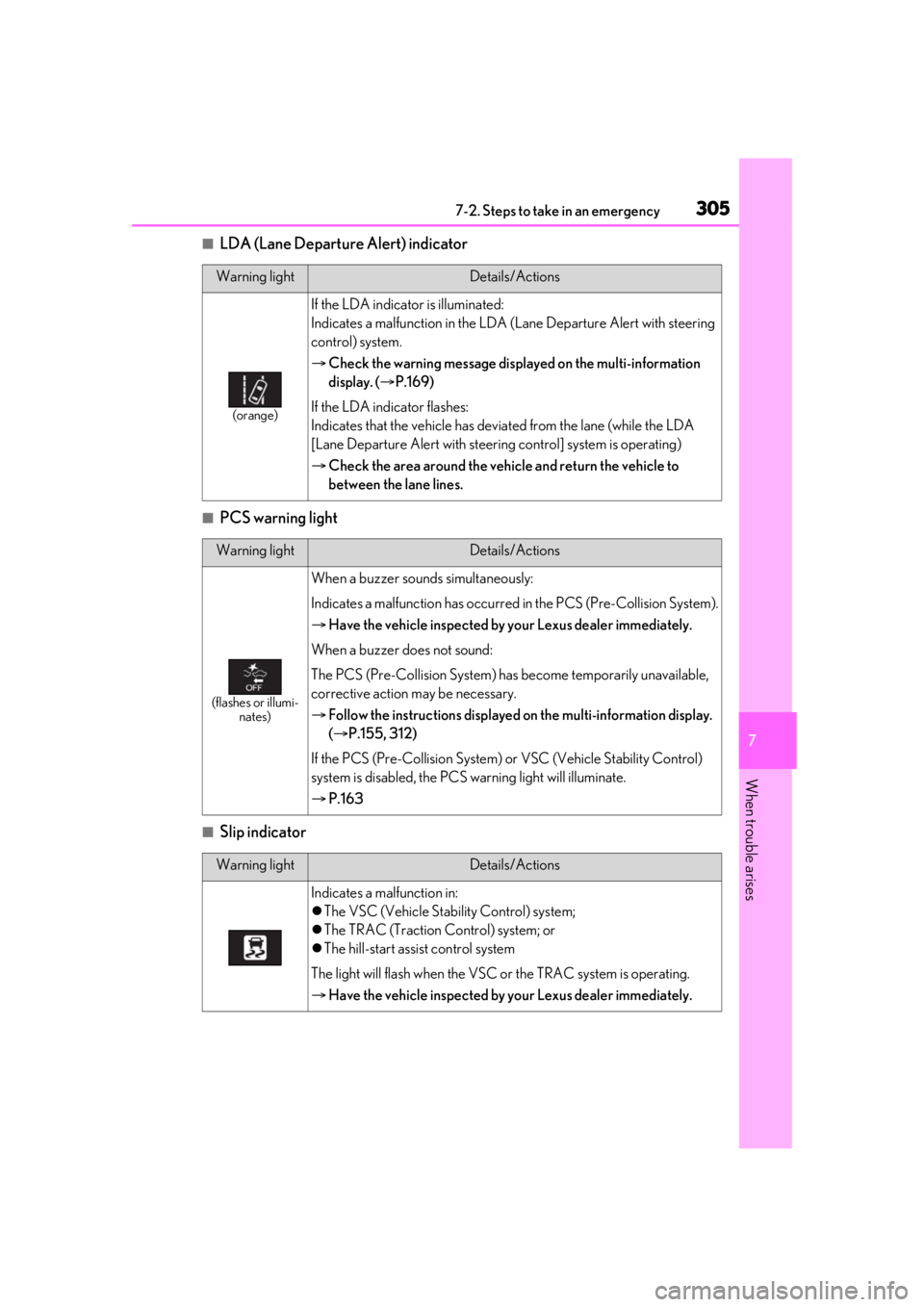
■LDA (Lane Departure Alert) indicator
■PCS warning light
■Slip indicator
Warning lightDetails/Actions
(orange)
If the LDA indicator is illuminated:
Indicates a malfunction in the LDA (Lane Departure Alert with steering
control) system.
Check the warning message displayed on the multi-information
display. ( P.169)
If the LDA indicator flashes:
Indicates that the vehicle has deviated from the lane (while the LDA
[Lane Departure Alert with steering control] system is operating)
Check the area around the vehicle and return the vehicle to
between the lane lines.
Warning lightDetails/Actions
(flashes or illumi-
nates)
When a buzzer sounds simultaneously:
Indicates a malfunction has occurred in the PCS (Pre-Collision System).
Have the vehicle inspected by your Lexus dealer immediately.
When a buzzer does not sound:
The PCS (Pre-Collision System) has become temporarily unavailable,
corrective action may be necessary.
Follow the instructions displayed on the multi-information display.
( P.155, 312)
If the PCS (Pre-Collision System) or VSC (Vehicle Stability Control)
system is disabled, the PCS warning light will illuminate.
P.163
Warning lightDetails/Actions
Indicates a malfunction in:
The VSC (Vehicle Stability Control) system;
The TRAC (Traction Control) system; or
The hill-start assist control system
The light will flash when the VSC or the TRAC system is operating.
Have the vehicle inspected by your Lexus dealer immediately.
Page 312 of 408
3127-2. Steps to take in an emergency
power off function. Next time when starting
the engine, increase the engine speed
slightly and maintain that level for approxi-
mately 5 minutes to recharge the battery.
■If “Headlight System Malfunction Visit
Your Dealer” is displayed
The following systems may be malfunction-
ing. Have the vehicle inspected by your
Lexus dealer immediately.
●The LED headlight system
●The automatic headlight leveling system
●Automatic High Beam
■If “Radar Cruise Control Unavailable” is
displayed
The dynamic radar cruise control system
cannot be used temporar ily. Use the system
when it becomes available again.
■If a message that indicates the malfunc-
tion of front camera is displayed
The following systems may be suspended
until the problem shown in the message is
resolved. ( P.155, 305)
●PCS (Pre-Collision System)
●LDA (Lane Departure Alert with steering
control)
●Dynamic radar cruise control
●Automatic High Beam
■If “Maintenance Required Soon” is dis-
played
Indicates that all maintenance according to
the driven distance on the maintenance
schedule
* should be performed soon.
Comes on approximately 4500 miles
(7200 km) after the message has been
reset. If necessary, perform maintenance.
Please reset the message after the mainte-
nance is performed. ( P.257)
*: Refer to the separa te “Scheduled Main-
tenance” or “Owner’s Manual Supple-
ment” for the maintenance interval
applicable to your vehicle.
■If “Maintenance Required Visit Your
Dealer” is displayed
Indicates that all maintenance is required to
correspond to the driven distance on the maintenance schedule
*.
Comes on approximately 5000 miles
(8000 km) after the message has been
reset. (The indicator will not work properly
unless the message ha s been reset.) Per-
form the necessary maintenance. Please
reset the message after the maintenance is
performed. ( P.257)
*: Refer to the separate “Scheduled Main-
tenance” or “Owner’s Manual Supple-
ment” for the main tenance interval
applicable to your vehicle.
■If “Active Rear Wing Off Go to Settings
to turn On” is displayed
The active rear wing switch was pressed
when the active rear wing
* was disabled.
Enable the active rear wing before pressing
the active rear wing switch. ( P.195)
*: If equipped
■If “TVD System Overheated Reduce
Engine Speed and Load” is displayed
The TVD system
* has overheated, this mes-
sage may be displayed when driving under
high load conditions, such as the following:
●When driving at high speeds or through
sharp turns continuously
●When either rear tire has lost traction
and spun continuously
Drive the vehicle for a while, while avoiding
high load conditions.
*: If equipped
■If a message that indicates the need for
visiting your Lexus dealer is displayed
The system or part shown on the
multi-information display is malfunctioning.
Have the vehicle inspected by your Lexus
dealer immediately.
■If “See Owner’s Manual” is displayed
●If the following messages are shown, fol-
lowing the instruct ions, accordingly.
• “Engine Coolant Temp High” ( P.337)
• “Transmission Fluid Temp High” ( P.132)
●If any of the following messages are
shown on the multi-information display, it
may indicate a malfunction. Have the
Page 318 of 408
3187-2. Steps to take in an emergency
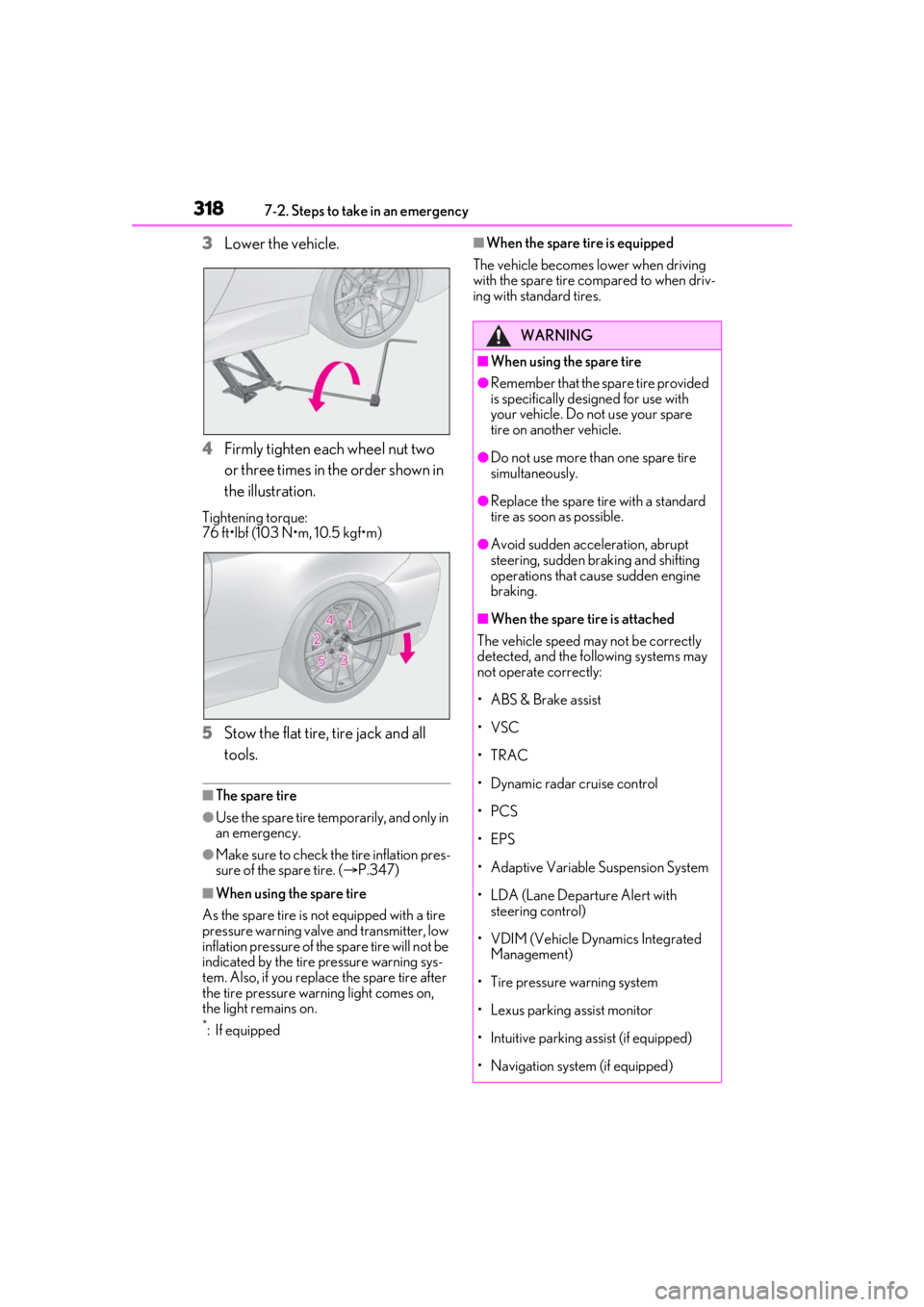
3Lower the vehicle.
4 Firmly tighten each wheel nut two
or three times in the order shown in
the illustration.
Tightening torque:
76 ft•lbf (103 N•m, 10.5 kgf•m)
5Stow the flat tire, tire jack and all
tools.
■The spare tire
●Use the spare tire temporarily, and only in
an emergency.
●Make sure to check the tire inflation pres-
sure of the spare tire. ( P.347)
■When using the spare tire
As the spare tire is not equipped with a tire
pressure warning valve and transmitter, low
inflation pressure of the spare tire will not be
indicated by the tire pressure warning sys-
tem. Also, if you replace the spare tire after
the tire pressure warning light comes on,
the light remains on.
*:If equipped
■When the spare tire is equipped
The vehicle becomes lower when driving
with the spare tire compared to when driv-
ing with standard tires.
WARNING
■When using the spare tire
●Remember that the sp are tire provided
is specifically designed for use with
your vehicle. Do not use your spare
tire on another vehicle.
●Do not use more than one spare tire
simultaneously.
●Replace the spare tire with a standard
tire as soon as possible.
●Avoid sudden acceleration, abrupt
steering, sudden br aking and shifting
operations that cause sudden engine
braking.
■When the spare tire is attached
The vehicle speed may not be correctly
detected, and the following systems may
not operate correctly:
• ABS & Brake assist
•VSC
•TRAC
• Dynamic radar cruise control
•PCS
•EPS
• Adaptive Variable Suspension System
• LDA (Lane Departure Alert with steering control)
• VDIM (Vehicle Dynamics Integrated Management)
• Tire pressure warning system
• Lexus parking assist monitor
• Intuitive parking assist (if equipped)
• Navigation system (if equipped)
Page 365 of 408
3658-2. Customization
8
Vehicle specifications
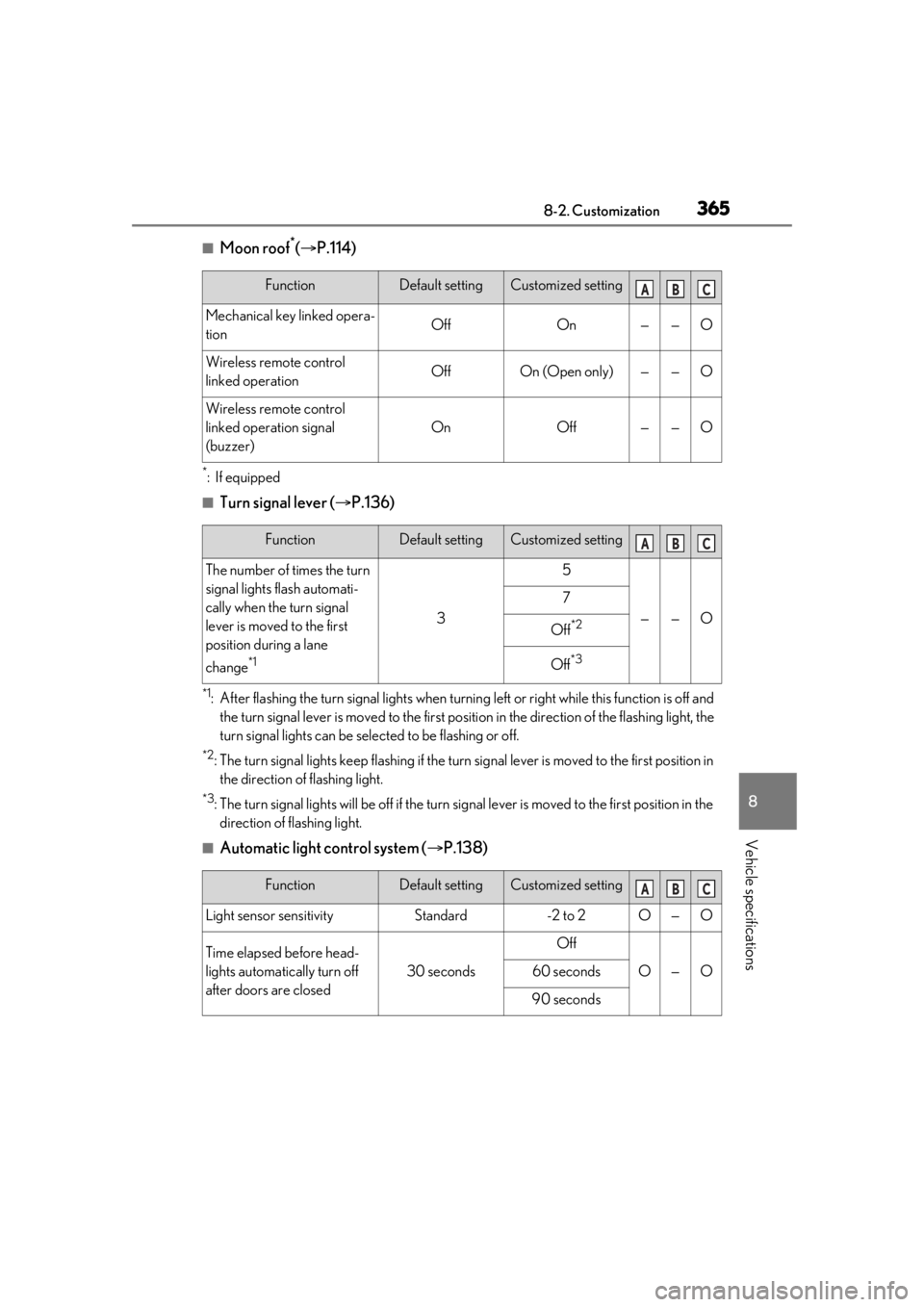
■Moon roof*( P.114)
*:If equipped
■Turn signal lever ( P.136)
*1: After flashing the turn signal lights when turnin g left or right while this function is off and
the turn signal lever is moved to the first positi on in the direction of the flashing light, the
turn signal lights can be sele cted to be flashing or off.
*2: The turn signal lights keep flashing if the turn signal lever is moved to the first position in
the direction of flashing light.
*3: The turn signal lights will be off if the turn si gnal lever is moved to the first position in the
direction of flashing light.
■Automatic light control system ( P.138)
FunctionDefault settingCustomized setting
Mechanical key linked opera-
tionOffOn——O
Wireless remote control
linked operationOffOn (Open only)——O
Wireless remote control
linked operation signal
(buzzer)
OnOff——O
ABC
FunctionDefault settingCustomized setting
The number of times the turn
signal lights flash automati-
cally when the turn signal
lever is moved to the first
position during a lane
change
*1
3
5
——O
7
Off*2
Off*3
ABC
FunctionDefault settingCustomized setting
Light sensor sensitivityStandard-2 to 2O—O
Time elapsed before head-
lights automatically turn off
after doors are closed
30 seconds
Off
O—O60 seconds
90 seconds
ABC
Page 366 of 408
3668-2. Customization
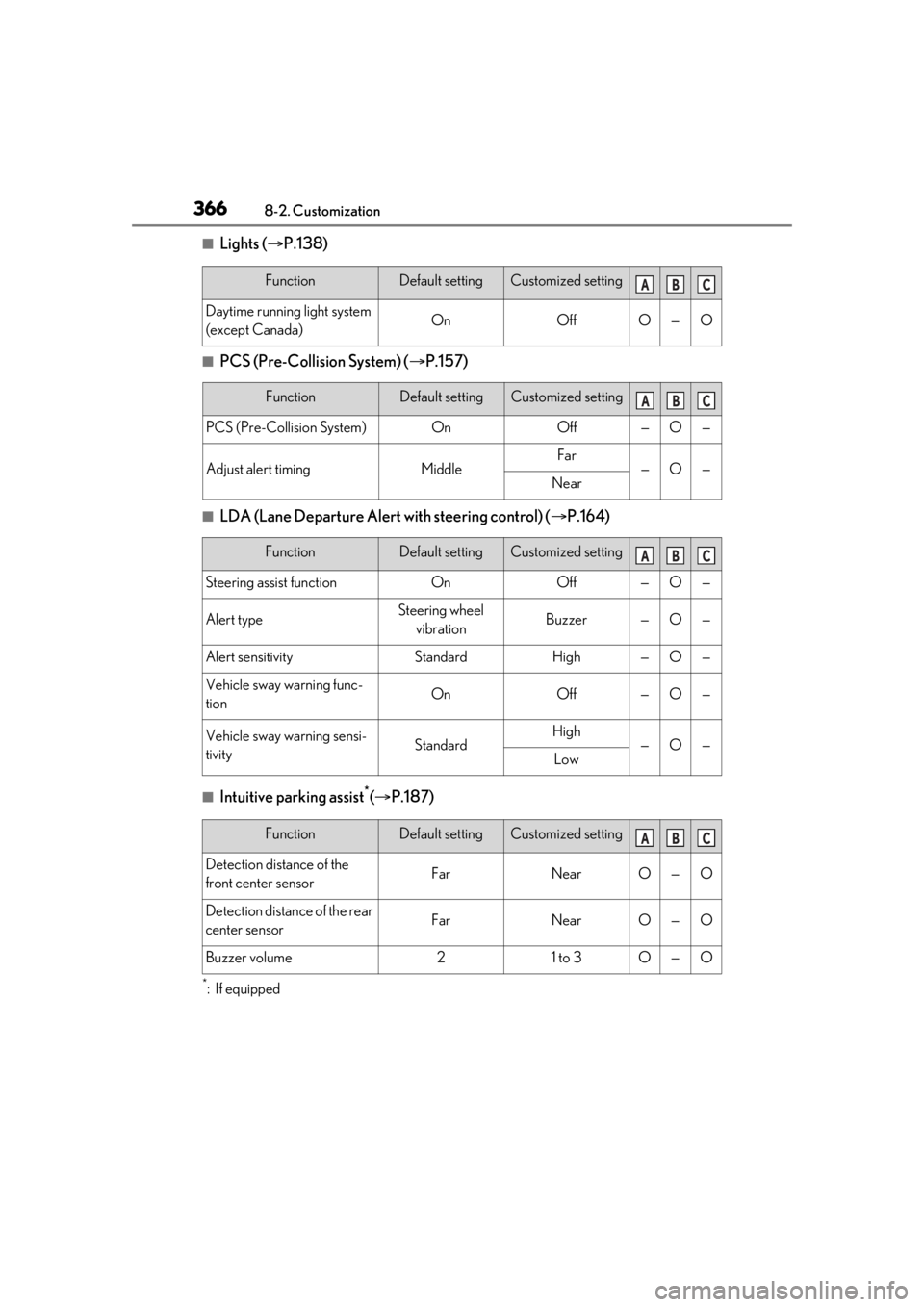
■Lights (P.138)
■PCS (Pre-Collision System) ( P.157)
■LDA (Lane Departure Alert with steering control) ( P.164)
■Intuitive parking assist*( P.187)
*:If equipped
FunctionDefault settingCustomized setting
Daytime running light system
(except Canada)OnOffO—O
FunctionDefault settingCustomized setting
PCS (Pre-Collision System)OnOff—O—
Adjust alert timingMiddleFar—O—Near
FunctionDefault settingCustomized setting
Steering assist functionOnOff—O—
Alert typeSteering wheel
vibrationBuzzer—O—
Alert sensitivityStandardHigh—O—
Vehicle sway warning func-
tionOnOff—O—
Vehicle sway warning sensi-
tivityStandardHigh—O—Low
ABC
ABC
ABC
FunctionDefault settingCustomized setting
Detection distance of the
front center sensorFarNearO—O
Detection distance of the rear
center sensorFarNearO—O
Buzzer volume21 to 3O—O
ABC
Page 388 of 408
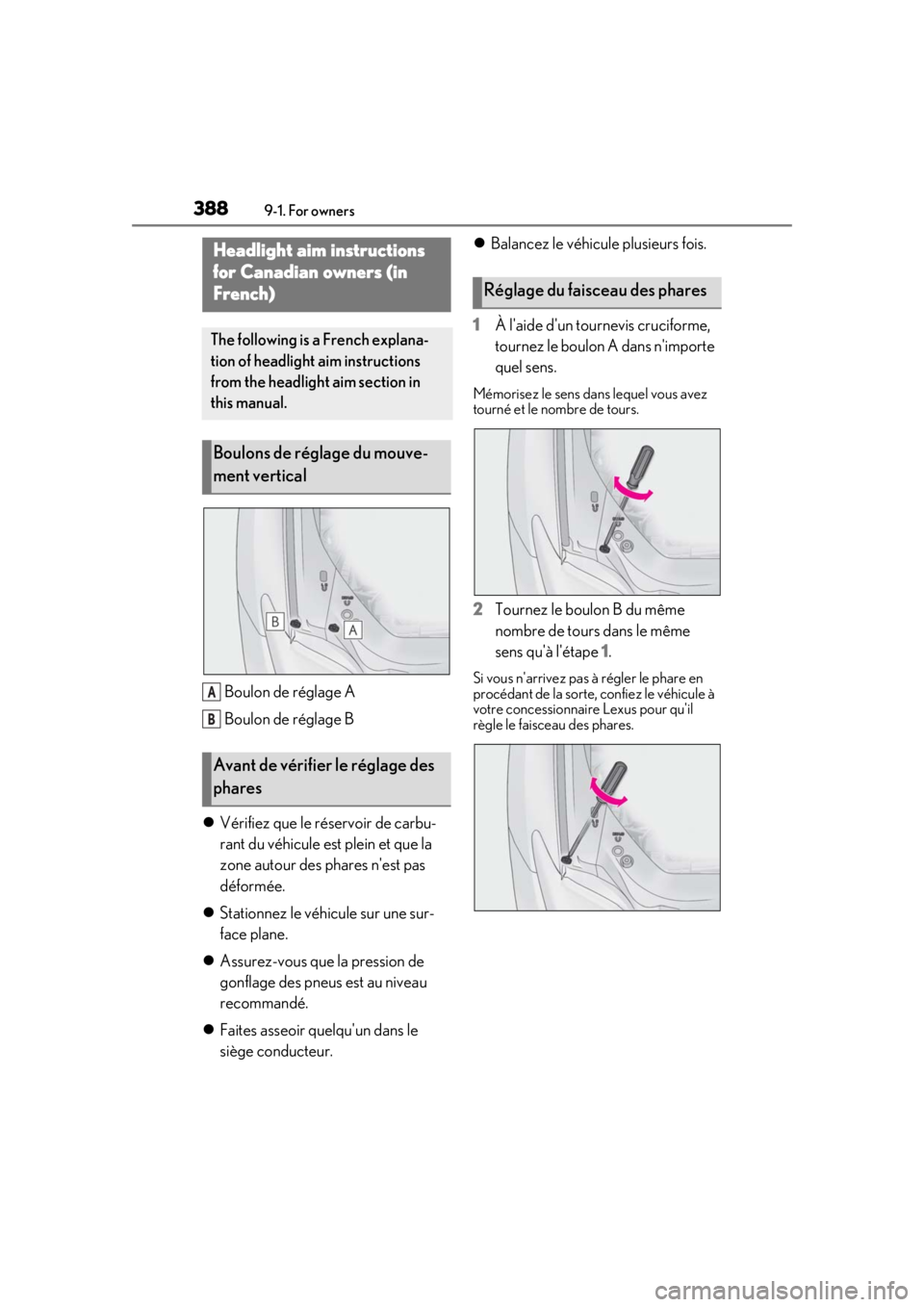
3889-1. For owners
Boulon de réglage A
Boulon de réglage B
Vérifiez que le réservoir de carbu-
rant du véhicule est plein et que la
zone autour des phares n'est pas
déformée.
Stationnez le véhicule sur une sur-
face plane.
Assurez-vous que la pression de
gonflage des pneus est au niveau
recommandé.
Faites asseoir quelqu'un dans le
siège conducteur.
Balancez le véhicule plusieurs fois.
1 À l'aide d'un tournevis cruciforme,
tournez le boulon A dans n'importe
quel sens.
Mémorisez le sens dans lequel vous avez
tourné et le nombre de tours.
2Tournez le boulon B du même
nombre de tours dans le même
sens qu'à l'étape 1 .
Si vous n'arrivez pas à régler le phare en
procédant de la sorte, confiez le véhicule à
votre concessionnair e Lexus pour qu'il
règle le faisceau des phares.
Headlight aim instructions
for Canadian owners (in
French)
The following is a French explana-
tion of headlight aim instructions
from the headlight aim section in
this manual.
Boulons de réglage du mouve-
ment vertical
Avant de vérifier le réglage des
phares
A
B
Réglage du faisceau des phares