key battery LEXUS RCF 2022 User Guide
[x] Cancel search | Manufacturer: LEXUS, Model Year: 2022, Model line: RCF, Model: LEXUS RCF 2022Pages: 412, PDF Size: 26.28 MB
Page 103 of 412

1013-2. Opening, closing and locking the doors and trunk
RC F Owner's Manual
3
Before driving
the doors detecting the electronic key
can be used to unlock the vehicle.
●Even if the electronic key is not inside the
vehicle, it may be possible to start the
engine if the electronic key is near the
window.
●The doors may unlock or lock if a large
amount of water splashes on the door
handle, such as in the rain or in a car
wash, when the electronic key is within
the effective range. (The doors will auto-
matically be locked after approximately
60 seconds if the d oors are not opened
and closed.)
●If the wireless remote control is used to
lock the doors when the electronic key is
near the vehicle, there is a possibility that
the door may not be unlocked by the
entry function. (Use the wireless remote
control to unlock the doors.)
●Touching the door lock or unlock sensor
while wearing gloves may prevent lock or
unlock operation.
●When the lock operation is performed
using the lock sensor, recognition signals
will be shown up to two consecutive
times. After this, no recognition signals
will be given.
●If the door handle becomes wet while the
electronic key is within the effective
range, the door may lock and unlock
repeatedly. In this case, follow the follow-
ing correction procedures to wash the
vehicle:
• Place the electronic key in a location 6 ft. (2 m) or more away from the vehicle.
(Take care to ensure that the key is not
stolen.)
• Set the electronic key to battery-saving
mode to disable the smart access system
with push-button start. ( P.100)
●If the electronic key is inside the vehicle
and a door handle becomes wet during a
car wash, a message may be shown on
the multi-information display and a
buzzer will sound outside the vehicle. To
turn off the alarm, lock both side doors.
●The lock sensor may not work properly if
it comes into contact with ice, snow, mud,
etc. Clean the lock sensor and attempt to
operate it again.
●A sudden handle operation or a handle
operation immediately after entering the
effective range may prevent the doors
from being unlocked. Touch the door
unlock sensor and check that the doors
are unlocked before pulling the door
handle again.
●Unlocking the vehicle may take more
time if another electronic key is within the
effective range.
■When the vehicle is not driven for
extended periods
●To prevent theft of the vehicle, do not
leave the electronic key within 6 ft. (2 m)
of the vehicle.
●The smart access system with push-but-
ton start can be deactivated in advance.
■To operate the system properly
●Make sure to carry the electronic key
when operating the system. Do not get
the electronic key too close to the vehicle
when operating the system from the out-
side of the vehicle.
Depending on the position and holding
condition of the electronic key, the key may
not be detected correctly and the system
may not operate properly. (The alarm may
go off accident ally, or the door lock pre-
vention function may not operate.)
●Do not leave the electronic key inside the
trunk.
The key confinement prevention function
may not operate, de pending on the loca-
tion of the key (close to a spare tire [if
equipped], the inside edge of the trunk),
conditions (inside a metal bag, close to
metallic objects) and the radio waves in
the surrounding area. ( P.98)
■If the smart access system with
push-button start does not operate
properly
●Locking and unlocking the doors and
opening the trunk: P.330
●Starting the engine: P.331
■Customization
Some functions can be customized.
( P.358)
Page 130 of 412

1284-2. Driving procedures
RC F Owner's Manual
4-2.Driving procedures
1Check that the parking brake is set.
2 Check that the shift lever is in P.
3 Firmly depress the brake pedal.
and a message will be displayed on
the multi-information display.
If it is not displayed, the engine cannot be
started.
4 Press the engine switch shortly and
firmly.
When operating the engine switch, one
short, firm press is enough.
It is not necessary to press and hold the
switch.
The engine will crank until it starts or for up
to 30 seconds, whichever is less.
Continue depressing the brake pedal until
the engine is completely started.
The engine can be started from any engine
switch mode.
■If the engine does not start
●The engine immobilizer system may not have been deactivated. (
P.57)
Contact your Lexus dealer.
●Check that the shift lever is securely set in
P. The engine may no t start if the shift
lever is displaced out of P.
■Electronic key battery depletion
P.88
■Conditions affecting operation
P.100
■Notes for the entry function
P.100
■Steering lock function
●After turning the engine switch off and
opening and closing th e doors, the steer-
ing wheel will be lock ed due to the steer-
ing lock function. Operating the engine
switch again automatically cancels the
steering lock.
●When the steering lock cannot be
released, “Steering Wheel Lock Press
Engine Switch while Turning Wheel” will
be displayed on the multi-information dis-
play.
Check that the shift lever is in P. Press the
engine switch while turning the steering
wheel left and right.
●To prevent the steering lock motor from
overheating, operation of the motor may
be suspended if the en gine is turned on
and off repeatedly in a short period of
time. In this case, re frain from operating
the engine switch. After about 10 sec-
onds, the steering lock motor will resume
functioning.
■Electronic key battery
P.281
■Operation of the engine switch
●If the switch is no t pressed shortly and
Engine (ignition) switch
Performing the following opera-
tions when carryin g the electronic
key on your person starts the
engine or changes engine switch
modes.
Starting the engine
Page 141 of 412

1394-3. Operating the lights and wipers
RC F Owner's Manual
4
Driving
ing the level of ambient light and may cause
the automatic headlight system to malfunc-
tion.
■Automatic light off system
When the light switch is in , or : The headlights and tail lights turn off
30 seconds after the engine switch is
turned to ACCESSORY mode or turned
off and a door is opened and all of the doors
and trunk are closed. (The lights turn off
immediately if on the key is pressed
twice after both side doors are closed.)
To turn the lights on again, turn the engine
switch to IGNITION ON mode, or turn the
light switch off once and then back to
or .
If any of the doors or trunk lid is left open,
the lights automatically turn off after 20
minutes.
■Light reminder buzzer
A buzzer sounds when the engine switch is
turned off or turned to ACCESSORY
mode and the driver’s door is opened while
the lights are turned on.
■Automatic headlight leveling system
The level of the headlights is automatically
adjusted according to the number of pas-
sengers and the loading condition of the
vehicle to ensure that the headlights do not
interfere with other road users.
■Customization
Some functions can be customized.
( P.358)
1 With the headlights on, push the
lever away from you to turn on the
high beams.
Pull the lever toward you to the center
position to turn the high beams off.
2Pull the lever toward you and
release it to flash the high beams
once.
You can flash the high beams with the
headlights on or off.
NOTICE
■To prevent battery discharge
Do not leave the lights on longer than
necessary when the engine is not run-
ning.
Turning on the high beam head-
lights
Page 224 of 412

2225-3. Using the interior lights
RC F Owner's Manual
1On
2 Off
■Rear
Turns the light on/off
If the front interior light is off, the rear light
can be turned on/off separately.
Turns the lights on/off (touch the lights)
■Illuminated entry system
The lights automatically turn on/off accord-
ing to engine switch mode, the presence of
the electronic key, whether the doors are locked/unlocked, and whether the doors
are opened/closed.
■To prevent the battery from being dis-
charged
If the interior lights remain on when the
engine switch is turned off, the lights will go
off automatically after 20 minutes.
■When front interior light or personal
lights do not respond as normal
●When water, dirt, etc., have adhered to
the lens surface
●When operated with a wet hand
●When wearing gloves, etc.
■Customization
Some functions can be customized.
( P.358)
Operating the personal lights
NOTICE
■Removing light lenses
Never remove the lens for the front inte-
rior light and personal lights. Otherwise,
the lights will be damaged.
■To prevent battery discharge
Do not leave the lights on longer than
necessary when the engine is off.
Page 239 of 412

237
RC F Owner's Manual
6
6
Maintenance and care
Maintenance and care
.6-1. Maintenance and careCleaning and protecting the vehi-cle exterior ................................ 238
Cleaning and protecting the vehi- cle interior ................................. 243
6-2. Matte paint care guide (if equipped)
Basic knowledge about matte clear coat ................................... 247
Washing your vehicle .............. 251
Frequently Asked Questions ........................................................ 252
6-3. Maintenance Maintenance requirements .. 255
General maintenance ............. 256
Emission inspection and mainte- nance (I/M) programs ......... 259
6-4. Do-it-yourself maintenance Do-it-yourself service precautions........................................................ 260
Hood............................................... 262
Positioning a floor jack............ 263
Engine compartment............... 265
Tires ................................................. 271
Tire inflation pressure.............. 277
Wheels........................................... 279
Air conditioning filter...............280
Electronic key battery .............. 281
Checking and replacing fuses ........................................................ 283
Headlight aim.............................. 285Light bulbs....................................
286
Page 241 of 412

2396-1. Maintenance and care
RC F Owner's Manual
6
Maintenance and care
this case, the active rear wing may not be
washed very well or may even be
scratched or damaged.
●Brushes used in automatic car washes
may scratch the vehi cle surface, parts
(wheel, etc.) and harm your vehicle’s
paint.
■Automatic car washes(vehicles with
CFRP parts)
Do not use an automatic car wash as they
may scratch the CFRP parts and damage
their finish or damage the fixed rear wing.
■High pressure car washes
As water may enter the cabin, do not bring
the nozzle tip near the gaps around the
doors or perimeter of the windows, or spray
these areas continuously.
■When using a car wash
If the door handle becomes wet while the
electronic key is within the effective range,
the door may lock and unlock repeatedly. In
that case, follow the following correction
procedures to wash the vehicle:
●Place the key in a position 6 ft. (2 m) or
more separate from the vehicle while the
vehicle is being washed. (Take care to
ensure that the key is not stolen.)
●Set the electronic key to battery-saving
mode to disable the smart access system
with push-button start. ( P.98)
■Wheels and wheel ornaments (vehicles
without matte black painted wheels)
●Remove any dirt immediately by using a
neutral detergent.
●Wash detergent off with water immedi-
ately after use.
●To protect the paint from damage, make
sure to observe the following precau-
tions.
• Do not use acidic, al kaline or abrasive
detergent
• Do not use hard brushes
• Do not use detergent on the wheels when they are hot, such as after driving or park-
ing in hot weather
■Wheels and wheel ornaments (vehicles
with matte black painted wheels)
As matte black painted wheels require dif-
ferent cleaning method s than conventional
aluminum wheels, be sure to observer the
following. For details, consult your Lexus
dealer.
●Remove dirt using water. If the wheels are
excessively dirty, use a sponge or soft
cloth dampened with a diluted neutral
detergent to remove the dirt.
●When using detergent, make sure to
rinse it off with water immediately. Then
use a soft cloth to wipe off the water.
●To prevent the matte black paint from
being damaged, make sure to observe
the following precautions:
• Do not scrub or polish the wheels using a brush or dry cloth.
• Do not use any wheel coatings or abra-
sive detergents.
• When using an automatic car wash, dis- able/do not select t he wheel brush func-
tion(if such an option is available).
• Do not use a high pressure pressure washer or steam cleaner.
• Do not use detergent on the wheels when they are hot, such as after driving or park-
ing in hot weather.
■Diffuser (Vehicles with titanium muf-
flers)
The cleaning method for the diffuser on
vehicles with titanium mufflers differs from
that for normal diffusers.
●When using detergent, make sure to
rinse it off with water immediately. Then
use a soft cloth to wipe off the water.
●To prevent the diffuser from being dam-
aged, make sure to observe the following
precautions:
• Do not scrub or polish the diffuser using a brush or dry cloth.
• Do not apply any ceramic coatings or use abrasive detergents.
Page 272 of 412

2706-4. Do-it-yourself maintenance
RC F Owner's Manual
necting the battery. If this happens, use
the wireless remote control or the
mechanical key to lock/unlock the doors.
●Start the engine with the engine switch in
ACCESSORY mode. The engine may
not start with the engine switch turned off.
However, the engine will operate nor-
mally from the second attempt.
●The engine switch mode is recorded by
the vehicle. If the battery is disconnected
and reconnected, the vehicle will return
the engine switch mode to the status it
was in before the battery was discon-
nected. Make sure to turn off the engine
before disconnecting the battery. Take
extra care when connecting the battery if
the engine switch mode prior to the bat-
tery being disconnected is unknown.
If the system will not start even after multi-
ple attempts, contact your Lexus dealer.
If any washer does not work or the
warning message appears on the
multi-information display, the washer
tank may be empty. Add washer fluid.
WARNING
■Chemicals in the battery
Batteries contain poisonous and corro-
sive sulfuric acid and may produce
hydrogen gas which is flammable and
explosive. To reduce the risk of death or
serious injury, take the following precau-
tions while working on or near the bat-
tery:
●Do not cause sparks by touching the
battery terminals with tools.
●Do not smoke or light a match near the
battery.
●Avoid contact with eyes, skin and
clothes.
●Never inhale or swallow electrolyte.
●Wear protective sa fety glasses when
working near the battery.
●Keep children away from the battery.
■Where to safely charge the battery
Always charge the battery in an open
area. Do not charge the battery in a
garage or closed room where there is
insufficient ventilation.
■How to recharge the battery
Only perform a slow charge (5 A or
less). The battery may explode if charged
at a quicker rate.
■Emergency measures regarding
electrolyte
●If electrolyte gets in your eyes
Flush your eyes with clean water for at
least 15 minutes and get immediate med-
ical attention. If possible, continue to
apply water with a sponge or cloth while
traveling to the nearest medical facility.
●If electrolyte gets on your skin
Wash the affected area thoroughly. If you
feel pain or burning, get medical atten-
tion immediately.
●If electrolyte gets on your clothes
It can soak through clothing on to your
skin. Immediately take off the clothing
and follow the procedure above if neces-
sary.
●If you accidentally swallow electrolyte
Drink a large quantity of water or milk.
Get emergency medical attention imme-
diately.
NOTICE
■When recharging the battery
Never recharge the battery while the
engine is running. Also, be sure all acces-
sories are turned off.
Adding the washer fluid
Page 283 of 412

2816-4. Do-it-yourself maintenance
RC F Owner's Manual
6
Maintenance and care
When an air conditioning odor comes out
continuously, replace the air conditioning
filter.
■If the electronic key battery is depleted
The following symptoms may occur:
●The smart access system with push-but-
ton start and wireless remote control will
not function properly.
●The operational rang e will be reduced.
■When the card key battery needs to be
replaced (if equipped)
The battery for the card key is available only
at Lexus dealers. Your Lexus dealer can
replace the battery for you.
Flathead screwdriver
Small flathead screwdriver
Lithium battery CR2032
■Use a CR2032 lithium battery
●Batteries can be purc hased at your Lexus
dealer, local electrical appliance shops or
camera stores.
●Replace only with the same or equivalent
type recommended by the manufacturer.
●Dispose of used batteries according to
local laws.
NOTICE
■When using the air conditioning sys-
tem
Make sure that a filter is always installed.
Using the air conditioning system without
a filter may cause damage to the system.
Electronic key battery
Replace the battery with a new one
if it is depleted.
As the key may be damaged if the
following procedure is not per-
formed properly, it is recom-
mended that key battery
replacement be performed by your
Lexus dealer.
Items to prepare
Page 284 of 412
2826-4. Do-it-yourself maintenance
RC F Owner's Manual
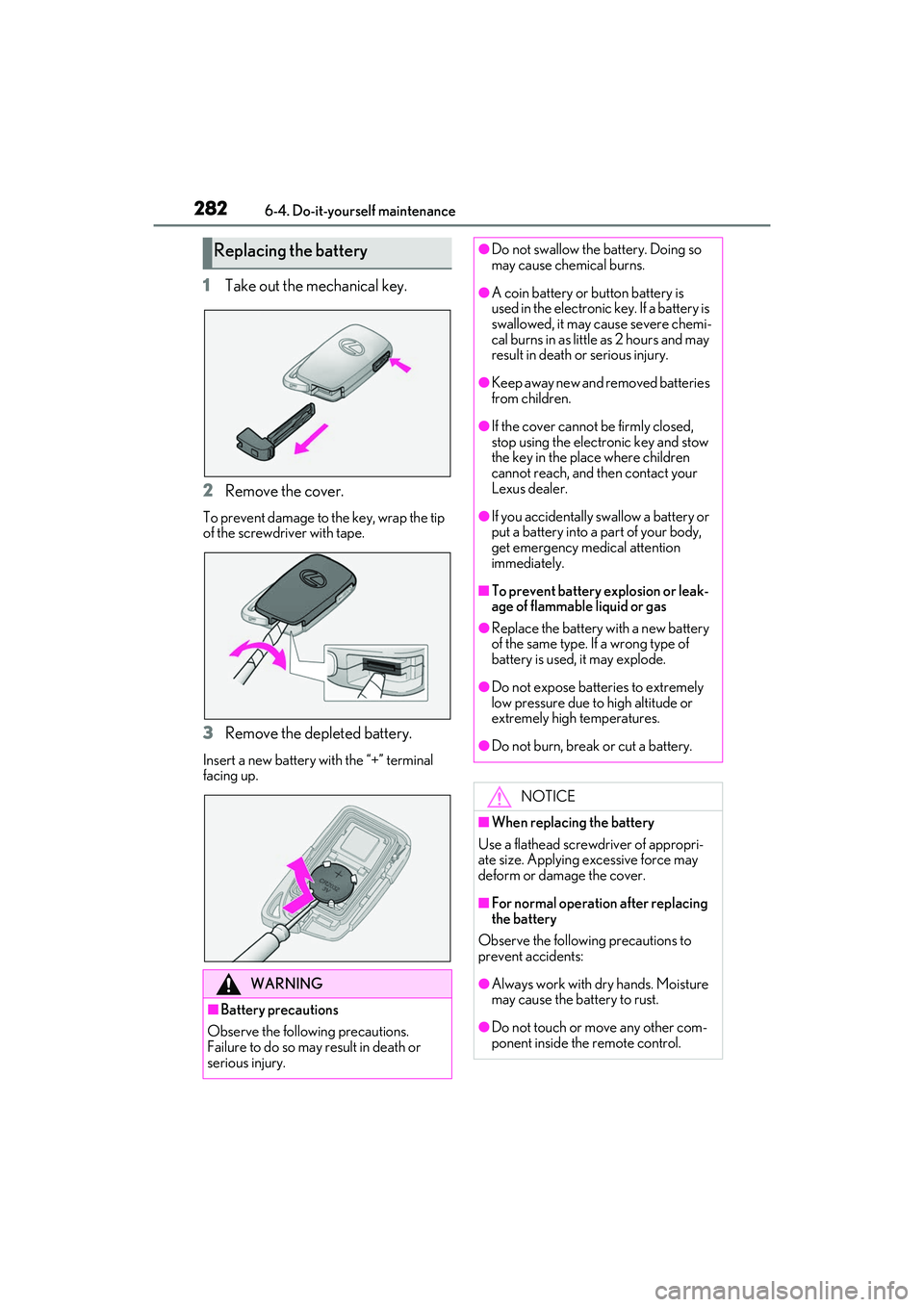
1Take out the mechanical key.
2 Remove the cover.
To prevent damage to the key, wrap the tip
of the screwdriver with tape.
3Remove the depleted battery.
Insert a new battery with the “+” terminal
facing up.
Replacing the battery
WARNING
■Battery precautions
Observe the following precautions.
Failure to do so may result in death or
serious injury.
●Do not swallow the battery. Doing so
may cause chemical burns.
●A coin battery or button battery is
used in the electronic key. If a battery is
swallowed, it may cause severe chemi-
cal burns in as little as 2 hours and may
result in death or serious injury.
●Keep away new and removed batteries
from children.
●If the cover cannot be firmly closed,
stop using the electronic key and stow
the key in the place where children
cannot reach, and then contact your
Lexus dealer.
●If you accidentally swallow a battery or
put a battery into a part of your body,
get emergency medical attention
immediately.
■To prevent battery explosion or leak-
age of flammable liquid or gas
●Replace the battery with a new battery
of the same type. If a wrong type of
battery is used, it may explode.
●Do not expose batteries to extremely
low pressure due to high altitude or
extremely high temperatures.
●Do not burn, break or cut a battery.
NOTICE
■When replacing the battery
Use a flathead screwdriver of appropri-
ate size. Applying excessive force may
deform or damage the cover.
■For normal operation after replacing
the battery
Observe the following precautions to
prevent accidents:
●Always work with dry hands. Moisture
may cause the battery to rust.
●Do not touch or move any other com-
ponent inside the remote control.
Page 293 of 412

291
RC F Owner's Manual
7
7
When trouble arises
When trouble arises
.7-1. Essential informationEmergency flashers.................. 292
If your vehicle has to be stopped in an emergency .......................... 292
If the vehicle is submerged or water on the road is rising .. 293
7-2. Steps to take in an emergency If your vehicle needs to be towed........................................................ 295
If you think something is wrong ........................................................ 298
Fuel pump shut off system ..... 299
If a warning light turns on or a warning buzzer sounds ....... 300
If a warning message is displayed ........................................................ 308
If you have a flat tire (vehicles with an emergency tire puncture
repair kit) ..................................... 311
If you have a flat tire (vehicles with a spare tire) ................................ 321
If the engine wi ll not start .......327
If you lose your keys ................. 329
If the fuel filler door cannot be opened........................................ 329
If the electronic key does not operate properly .................... 330
If the vehicle battery is discharged ........................................................ 332
If your vehicle overheats ........ 336
If the vehicle becomes stuck ........................................................ 338