belt LEXUS RCF 2022 Owner's Guide
[x] Cancel search | Manufacturer: LEXUS, Model Year: 2022, Model line: RCF, Model: LEXUS RCF 2022Pages: 412, PDF Size: 26.28 MB
Page 51 of 412

491-2. Child safety
RC F Owner's Manual
1
For safety and security
■Child restraint LATCH anchors
LATCH anchors are provided for the
each rear seats. (Mark displaying the
location of the anchors are attached to
the seats.)
■When installing in the each rear
seats
Install the child restraint system in
accordance to the operation manual
enclosed with the child restraint sys-
tem.
With flexible lowerattachments
1 Latch the hooks of the lower
attachments onto the LATCH
anchors.
For owners in Canada:
The symbol on a child restraint sys-
WARNING
●Do not allow children to play with the
seat belt. If the seat belt becomes
twisted around a child’s neck, it may
lead to choking or other serious inju-
ries that could result in death.
If this occurs and the buckle cannot be
unfastened, scissors should be used to
cut the belt.
●Ensure that the belt and plate are
securely locked and the seat belt is not
twisted.
●Shake the child restraint system left
and right, and forward and backward
to ensure that it has been securely
installed.
●After securing a child restraint system,
never adjust the seat.
●When a booster seat is installed,
always ensure that th e shoulder belt is
positioned across the center of the
child’s shoulder. T he belt should be
kept away from the child’s neck, but
not so that it could fall off the child’s
shoulder.
When a junior seat (booster seat) is
installed, always ensu re that the shoulder
belt is positioned across the center of the
child’s shoulder. The be lt should be kept
away from the child’s neck, but not so that
it could fall off the child’s shoulder.
●Follow all installation instructions pro-
vided by the child restraint system
manufacturer.
■When installing a booster seat
To prevent the belt from going into ALR
lock mode, do not fu lly extend the shoul-
der belt. ALR mode causes the belt to
tighten only. This could cause injury or
discomfort to the child. (
P.26)
■Do not use a seat belt extender
If a seat belt extender is used when
installing a child restra int system, the seat
belt will not securely hold the child
restraint system, which could cause
death or serious injury to the child or
other passengers in the event of sudden
braking, sudden swerving or an accident.
Child restraint system fixed with
a child restraint LATCH anchor
Page 53 of 412

511-2. Child safety
RC F Owner's Manual
1
For safety and security
■Anchor brackets (for top tether
strap)
Anchor brackets are provided for the
each rear seat.
Use anchor brackets when fixing the
top tether strap.
Anchor brackets
Top tether strap
■Fixing the top tether strap to the
anchor bracket
Install the child restraint system in accordance to the operation manual
enclosed with the child restraint sys-
tem.
Open the anchor bracket cover, latch
the hook onto the anchor bracket and
tighten the top tether strap.
Make sure the top tether strap is securely
latched. (
P.49)
Top tether strap
Hook
■Laws and regulations pertaining to
anchorages
The LATCH system conforms to
FMVSS225 or CMVSS210.2.
Child restraint systems conforming to
FMVSS213 or CMVSS213 specifications
can be used.
This vehicle is designed to conform to the
SAE J1819.
WARNING
■When installing a child restraint sys-
tem
Observe the following precautions.
Failure to do so may result in death or
serious injury.
●When using the LATCH anchors, be
sure that there are no foreign objects
around the anchors and that the seat
belt is not caught behind the child
restraint system.
●Follow all installation instructions pro-
vided by the child restraint system
manufacturer.
●If the seat is adju sted, reconfirm the
security of the child restraint system.
Using an anchor bracket (for top
tether strap)
A
B
WARNING
■When installing a child restraint sys-
tem
Observe the following precautions.
Failure to do so may result in death or
serious injury.
●Firmly attach the top tether strap and
make sure that the belt is not twisted.
●Do not attach the top tether strap to
anything other than the anchor
bracket.
A
B
Page 65 of 412
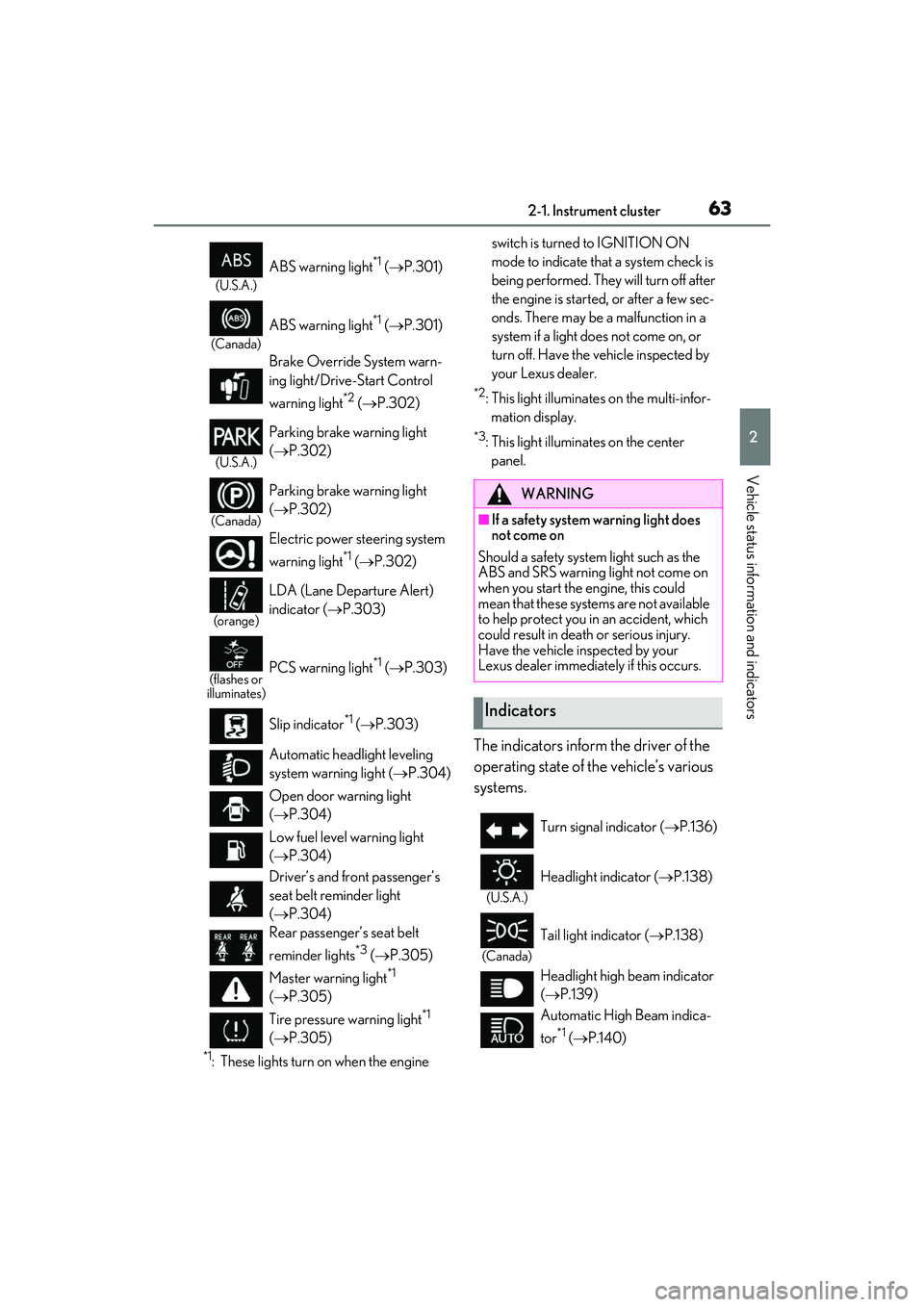
632-1. Instrument cluster
RC F Owner's Manual
2
Vehicle status information and indicators
*1: These lights turn on when the engine switch is turned to IGNITION ON
mode to indicate that a system check is
being performed. They will turn off after
the engine is started,
or after a few sec-
onds. There may be a malfunction in a
system if a light does not come on, or
turn off. Have the vehicle inspected by
your Lexus dealer.
*2: This light illuminates on the multi-infor- mation display.
*3: This light illuminates on the center panel.
The indicators inform the driver of the
operating state of the vehicle’s various
systems.
(U.S.A.)
ABS warning light*1 ( P.301)
(Canada)
ABS warning light*1 ( P.301)
Brake Override System warn-
ing light/Drive-Start Control
warning light
*2 ( P.302)
(U.S.A.)
Parking brake warning light
(P.302)
(Canada)
Parking brake warning light
(P.302)
Electric power st eering system
warning light
*1 ( P.302)
(orange)
LDA (Lane Departure Alert)
indicator ( P.303)
(flashes or
illuminates)PCS warning light*1 ( P.303)
Slip indicator
*1 ( P.303)
Automatic headlight leveling
system warning light ( P.304)
Open door warning light
( P.304)
Low fuel level warning light
( P.304)
Driver’s and front passenger’s
seat belt reminder light
( P.304)
Rear passenger’s seat belt
reminder lights
*3 ( P.305)
Master warning light
*1
( P.305)
Tire pressure warning light
*1
( P.305)
WARNING
■If a safety system warning light does
not come on
Should a safety system light such as the
ABS and SRS warning light not come on
when you start the engine, this could
mean that these systems are not available
to help protect you in an accident, which
could result in death or serious injury.
Have the vehicle inspected by your
Lexus dealer immediat ely if this occurs.
Indicators
Turn signal indicator (P.136)
(U.S.A.)
Headlight indicator (P.138)
(Canada)
Tail light indicator ( P.138)
Headlight high beam indicator
( P.139)
Automatic High Beam indica-
tor
*1 ( P.140)
Page 105 of 412

1033-3. Adjusting the seats
RC F Owner's Manual
3
Before driving
3-3.Adjusting the seats
Seat position adjustment
Seatback angle adjustment
Seat cushion (front) angle adjust-
ment
Vertical height adjustment
Lumbar support adjustment
(driver’s seat only)
■Power easy access system
The driver’s seat and steering wheel move
in accordance with engine switch mode and
the driver’s seat belt condition. ( P.105)
■When adjusting the seat
Take care when adjust ing the seat so that
the head restraint does not touch the ceil-
ing.
■Before entering/exiting the rear
seats
Remove the seat belt from the seat belt
guide. ( P.26)
Front seats
WARNING
■When adjusting the seat position
●Take care when adjusting the seat
position to ensure that other passen-
gers are not injured by the moving
seat.
●Do not put your hands under the seat
or near the moving parts to avoid
injury.
Fingers or hands may become jammed in
the seat mechanism.
●Make sure to leave enough space
around the feet so they do not get
stuck.
■Seat adjustment
To reduce the risk of sliding under the lap
belt during a collision, do not recline the
seat more than necessary.
If the seat is too reclined, the lap belt may
slide past the hips and apply restraint
forces directly to the abdomen, or your
neck may contact the shoulder belt,
increasing the risk of death or serious
injury in the event of an accident.
Adjustments should not be made while
driving as the seat may unexpectedly
move and cause the driver to lose control
of the vehicle.
Adjustment procedure
Entering/exiting the rear seats
(lever-operated “Front, Fold &
Return” seat)
A
B
C
D
E
Page 106 of 412

1043-3. Adjusting the seats
RC F Owner's Manual
■Entering/exiting the rear seat
1 Pull the lever.
The front seat will lower automatically.
2Fold the seatback completely for-
ward.
The front seat will move forward automati-
cally.
■Returning the front seat to its origi-
nal position
Move the seatback backward until it
locks. The front seat will return to its
original position automatically.
■Lever-operated “Front, Fold & Return”
seat
●After the front seat is moved forward by
operating the “Front, Fold & Return” seat
lever, if a power seat adjusting switch or a
driving position memory switch is
pressed, the front seat will not return to its
original position even if the front seatback
is moved backward until it locks.
●The lever-operated “Front, Fold &
Return” seat will not operate in the follow- ing situations:
• The front seat belt of the seat to be oper-
ated is fastened.
• The engine switch is in IGNITION ON mode and the shift lever is in a position
other than P (driver’s seat only).
●Operation of the lever-operated “Front,
Fold & Return” seat will stop in the follow-
ing situations:
• A power seat adjusting switch or a driv- ing position memory switch is pressed.
• The front seat belt of the seat which is operating is fastened.
• The engine switch is in IGNITION ON
mode and the shift lever is moved to a
position other than P (driver’s seat only).
■Jam protection function
While the lever-operat ed “Front, Fold &
Return” seat is operatin g, if an object is
stuck either in front of or behind the front
seat, the front seat will stop and then move
in the opposite direction slightly.
WARNING
■Lever-operated “Front, Fold &
Return” seat
●Before operating the lever-operated
“Front, Fold & Return” seat, ensure that
any surrounding passengers or objects
will not contact the seat.
●Make sure the seatback is locked
securely before driving.
●Never operate the lever-operated
“Front, Fold & Return” seat while the
vehicle is moving.
■Jam protection function
Do not use a hand, foot, or any other part
of your body to intentionally activate the
jam protection function.
Page 107 of 412

1053-3. Adjusting the seats
RC F Owner's Manual
3
Before driving
*:If equipped
The seat and steering wheel* are auto-
matically adjusted to allow the driver to
enter and exit the vehicle easily.
When all of the following have been
performed, the driver’s seat and steer-
ing wheel
* are automatically adjusted
to a position that allows driver to enter
and exit the vehicle easily.
The shift lever has been shifted to P.
The engine switch has been turned
off.
The driver’s seat belt has been
unfastened.
When any of the following has been
performed, the driver’s seat and steer- ing wheel
* automatically return to their
original positions.
The engine switch has been turned
to ACCESSORY mode or IGNI-
TION ON mode.
The driver’s seat belt has been fas-
tened.
*: Power type
■Operation of the power easy access sys-
tem
When exiting the vehicle, the power easy
access system may not op erate if the seat is
already close to the rear position, etc.
■Customization
Some functions can be customized.
( P.358)
1 Check that the shift lever is in P.
2 Turn the engine switch to IGNI-
TION ON mode.
3 Adjust the driver’s seat, steering
wheel, and outside rear view mir-
rors to the desired positions.
4 While pressing the “SET” button, or
within 3 seconds after the “SET”
button is pressed, press button “1”,
“2” or “3” until the buzzer sounds.
If the selected button has already been
preset, the previously recorded position
Power easy access sys-
tem/driving position mem-
ory
*/memory recall function*
This feature automatically adjusts
the driver’s seat, steering wheel
and outside rear view mirrors to
make entering and exiting the vehi-
cle easier or to suit your prefer-
ences.
Power easy access system
Recording a driving position into
memory (vehicles with driving
position memory)
Page 109 of 412

1073-3. Adjusting the seats
RC F Owner's Manual
3
Before driving
2Turn the engine switch to IGNI-
TION ON mode.
3 Recall the driving position that you
want to record.
4 While pressing the recalled button,
press and hold the door lock switch
(either lock or unlock) until the
buzzer sounds.
If the button could not be registered, the
buzzer sounds continuously for approxi-
mately 3 seconds.
■Cancelation procedure
Carry only the key you want to cancel
and then close the driver’s door.
If 2 or more keys are in the vehicle, the
driving position cannot be canceled
properly.
1 Turn the engine switch to IGNI-
TION ON mode.
2 While pressing the “SET” button,
press and hold the door lock switch
(either lock or unlock) until the
buzzer sounds twice.
If the button could not be canceled, the
buzzer sounds continuously for approxi-
mately 3 seconds.
■Recall procedure
1 Make sure that the doors are
locked before recalling the driving
position. Carry the electronic key that has been registered to the driv-
ing position, and then unlock and
open the driver’s door using the
smart access system with push-but-
ton start or wireless remote control.
The driving position will move to the
recorded position (not
including the steer-
ing wheel). However, th e seat will move to
a position slightly behind the recorded
position in order to make entering the vehi-
cle easier.
If the driving position is in a position that
has already been reco rded, the seat and
outside rear view mirrors will not move.
2 Turn the engine switch to ACCES-
SORY mode or IGNITION ON
mode, or fasten a seat belt.
The seat and steering wheel will move to
the recorded position.
■Recalling the driving position using the
memory recall function
●Different driving positions can be regis-
tered for each electronic key. Therefore,
the driving position that is recalled may
be different depending on the key being
carried.
●If a door other than the driver’s door is
unlocked with the smart access system
with push-button start, the driving posi-
tion cannot be recalled. In this case, press
the driving position button which has
been set.
■Customization
Some functions can be customized.
( P.358)
Page 110 of 412

1083-4. Adjusting the steering wheel and mirrors
RC F Owner's Manual
3-4.Adjusting the steering wheel and mirrors
Manual type
1 Hold the steering wheel and push
the lever down.
2 Adjust to the ideal position by mov-
ing the steering wheel horizontally
and vertically.
After adjustment, pull the lever up to
secure the steering wheel.
Power type
Operating the switch moves the steer-
ing wheel in the following directions: 1
Up
2 Down
3 Toward the driver
4 Away from the driver
■The steering wheel can be adjusted
when (power type)
The engine switch is in ACCESSORY or
IGNITION ON mode
*.
*: If the driver’s seat belt is fastened, the
steering wheel can be adjusted regard-
less of engine switch mode.
■Automatic adjustment of the steering
position (if equipped)
A desired steering posi tion can be entered
to memory and recalled automatically by
the driving position memory system.
( P.105)
■Power easy access system (power type)
The steering wheel and driver’s seat move
in accordance with engine switch mode and
the driver’s seat belt condition. ( P.105)
Steering wheel
Adjustment procedure
WARNING
■Caution while driving
Do not adjust the steering wheel while
driving.
Doing so may cause the driver to mis-
handle the vehicle and cause an acci-
dent, resulting in death or serious injury.
Page 227 of 412

2255-4. Using the storage features
RC F Owner's Manual
5
Interior features
Push the knob.
Lift by hand to fully open the console box.
Raise the hooks when needed.
The cargo hooks are provided for securing
loose items.
1Loosen the belt
2 Tighten the belt
WARNING
■Items unsuitable for the cup holder
Do not place anything other than cups or
beverage cans in the cup holders.
Inappropriate items must not be stored in
the cup holders even if the lid is closed.
Other items may be thrown out of the
holders in the event of an accident or
sudden braking and cause injury. If possi-
ble, cover hot drinks to prevent burns.
■When not in use
Keep the cup holders closed.
In the event of sudd en braking, an acci-
dent may occur due to an occupant
being struck by the items stored inside.
Console box
WARNING
■Caution while driving
Keep the console box closed.
Injuries may result in the event of an acci-
dent or sudden braking.
Trunk features
Cargo hooks
WARNING
■When the cargo net is not in use
To avoid injury, always return the cargo
hooks on the floor to their stowed posi-
tions.
First-aid kit storage belt
Page 245 of 412

2436-1. Maintenance and care
RC F Owner's Manual
6
Maintenance and care
Remove dirt and dust using a vac-
uum cleaner. Wipe dirty surfaces
with a cloth dampened with luke-
warm water.
If dirt cannot be removed, wipe it off
with a soft cloth dampened with
neutral detergent diluted to approx-
imately 1%.
Wring out any excess water from the cloth
and thoroughly wipe off remaining traces
of detergent and water.
■Shampooing the carpets
There are several commercial foaming-type
cleaners available. Use a sponge or brush
to apply the foam. Ru b in overlapping cir-
cles. Do not use water. Wipe dirty surfaces
and let them dry. Excellent results are
obtained by keeping the carpet as dry as
possible.
■Handling the seat belts
Clean with mild soap and lukewarm water
using a cloth or sponge. Also check the
belts periodically for excessive wear, fraying
or cuts.
■When cleaning the carpeted portions of
the glove box, console box, etc.
If a strong adhesive tape is used, there is a
possibility that the surface of the carpet
could be damaged.
■CFRP (Carbon Fiber Reinforced Plas-
tic) parts (if equipped)
When cleaning, remove dirt using a soft moist cloth or synthetic chamois, and then
wipe the surface with a soft dry cloth to
remove any remaining moisture.
Cleaning and protecting the
vehicle interior
Perform cleaning in a manner
appropriate to each component
and its material.
Protecting the vehicle interior
WARNING
■Water in the vehicle
●Do not splash or spill liquid in the vehi-
cle.
Doing so may cause electrical compo-
nents, etc. to malfun ction or catch fire.
●Do not get any of the SRS components
or wiring in the vehicle interior wet.
(P.28)
An electrical malfun ction may cause the
airbags to deploy or not function prop-
erly, resulting in death or serious injury.
■Cleaning the interior (especially
instrument panel)
Do not use polish wax or polish cleaner.
The instrument panel may reflect off the
windshield, obstructin g the driver’s view
and leading to an accident, resulting in
death or serious injury.
NOTICE
■Cleaning detergents
●Do not use the following liquids, as
they may discolor th e vehicle interior
or cause streaks or damage to painted
surfaces:
• Center Display: Organic substances such as benzine or gasoline, alkaline
solutions, and alcohol
• Seats: Alkaline solutions, organic sub- stances such as thinner or benzine,
and alcohol
• Other parts: Organic substances such as benzine or gasoline, alkaline or
acidic solutions, dye, and bleach
●Do not use polish wax or polish
cleaner. The instrument panel’s or
other interior part’s painted surface
may be damaged.