display LEXUS RCF 2022 Repair Manual
[x] Cancel search | Manufacturer: LEXUS, Model Year: 2022, Model line: RCF, Model: LEXUS RCF 2022Pages: 412, PDF Size: 26.28 MB
Page 170 of 412

1684-5. Using the driving support systems
RC F Owner's Manual
canceled. However, when the operation
conditions are met again, operation of the
function is automatically restored. ( P.167)
■Steering control function
Depending on the vehicle speed, lane
departure situation, ro ad conditions, etc.,
the driver may not feel the function is oper-
ating or the function may not operate at all.
■Lane departure alert function
The warning buzzer may be difficult to hear
due to external noise, audio playback, etc.
Also, it may be difficult to feel steering
wheel vibrations due to the road conditions
etc.
■Hands off steering wheel warning
In the following situations, a warning mes-
sage urging the driver to hold the steering
wheel and the symbol shown in the illustra-
tion are displayed on the multi-information
display to warn the driver.The warning stops
when the system determines that the driver
holds the steering wheel. Always keep your
hands on the steering wheel when using this
system, regardless of warnings.
●When the system determines that the
driver is driving without holding the steer-
ing wheel while the system is operating
If the driver continues to keep their hands
off of the steering wheel, the buzzer
sounds, the driver is warned and the func-
tion is temporarily ca nceled. This warning
also operates in the same way when the
driver continuously operates the steering
wheel only a small amount.
The buzzer also sounds even if the alert
type is set to .
Depending on the vehicle condition and
road conditions, the warning may not operate. Also, if the sy
stem determines that
the vehicle is driving around a curve, warn-
ings will occur earlier than during
straight-lane driving.
●When the system determines that the
driver is driving with out holding the steer-
ing wheel while the st eering wheel assist
of the steering assist function is operat-
ing.
If the driver continues to keep their hands
off of the steering wheel and the steering
wheel assist is operating, the buzzer
sounds and the driver is warned. Each time
the buzzer sounds, the continuing time of
the buzzer becomes longer.
The buzzer also sounds even if the alert
type is set to .
■Vehicle sway warning function
When the system determines that the vehi-
cle is swaying while the vehicle sway warn-
ing function is operating, a buzzer sounds
and a warning message urging the driver to
rest and the symbol sh own in the illustration
are simultaneously displayed on the
multi-information display.
Depending on the vehicle and road condi-
tions, the warning may not operate.
■White (yellow) lines are only on one side
of road
The LDA system will not operate for the
side on which white (yellow) lines could not
be recognized.
■Conditions in which functions may not
operate properly
In the following situations, the camera sen-
sor may not detect white (yellow) lines and
various functions may not operate normally.
Page 171 of 412

1694-5. Using the driving support systems
RC F Owner's Manual
4
Driving
●There are shadows on the road that run
parallel with, or cover, the white (yellow)
lines.
●The vehicle is driven in an area without
white (yellow) lines, such as in front of a
tollgate or checkpoint, or at an intersec-
tion, etc.
●The white (yellow) lines are cracked,
“Botts’ dots”, “Raise d pavement marker”
or stones are present.
●The white (yellow) lines cannot be seen
or are difficult to see due to sand, etc.
●The vehicle is driven on a road surface
that is wet due to rain, puddles, etc.
●The traffic lines are yellow (which may be
more difficult to recognize than lines that
are white).
●The white (yellow) lines cross over a curb,
etc.
●The vehicle is driven on a bright surface,
such as concrete.
●The vehicle is driven on a surface that is
bright due to reflected light, etc.
●The vehicle is driven in an area where the
brightness changes suddenly, such as at
the entrances and exits of tunnels, etc.
●Light from the headlights of an oncoming
vehicle, the sun, etc. enters the camera.
●The vehicle is driven where the road
diverges, merges, etc.
●The vehicle is driven on a slope.
●The vehicle is driven on a road which tilts
left or right, or a winding road.
●The vehicle is driven on an unpaved or
rough road.
●The vehicle is driven around a sharp
curve.
●The traffic lane is excessively narrow or
wide.
●The vehicle is extremely tilted due to car-
rying heavy luggage or having improper
tire pressure.
●The distance to the preceding vehicle is
extremely short.
●The vehicle is moving up and down a
large amount due to road conditions during driving (poor roads or road
seams).
●The headlight lenses are dirty and emit a
faint amount of light at night, or the beam
axis has deviated.
●The vehicle is struck by a crosswind.
●The vehicle has just changed lanes or
crossed an intersection.
●Snow tires, etc. are equipped.
■Warning message
If the following warning message is dis-
played on the multi-information display and
the LDA indicator illuminates in orange, fol-
low the appropriate troubleshooting proce-
dure.
Warning mes-
sageDetails/Actions
“Lane Depar-
ture Alert
Malfunction
Visit Your
Dealer”The system may not be
operating properly.
Have the vehicle
inspected at your Lexus
dealer.
“Front Cam-
era Unavail-
able Remove
Debris On
Windshield”
Dirt, rain, condensation,
ice, snow, etc. are present
on the windshield in front
of the camera sensor.
Turn the LDA system off,
remove any dirt, rain, con-
densation, ice, snow, etc.
from the windshield, and
then turn the LDA system
back on.
Page 172 of 412

1704-5. Using the driving support systems
RC F Owner's Manual
If a different warning message is displayed,
follow the instructions displayed on the
screen.
■Customization
The following settings can be changed.
For how to change settings, refer to P.358
“Front Cam-
era Unavail-
able”
The operation conditions
of the camera sensor (tem-
perature, etc.) are not met.
When the operation
conditions of the camera
sensor (temperature, etc.)
are met, the LDA system
will become available. Turn
the LDA system off, wait
for a little while, and then
turn the LDA system back
on.
“Lane Depar-
ture Alert
Unavailable”
The LDA system is tempo-
rarily canceled due to a
malfunction in a sensor
other than the camera sen-
sor.
Turn the LDA system off
and follow the appropriate
troubleshooting proce-
dures for the warning mes-
sage. Afterward, drive the
vehicle for a short time,
and then turn the LDA sys-
tem back on.
“Lane Depar-
ture Alert
Unavailable
Below
Approx
32MPH”The LDA system cannot be
used as the vehicle speed
is less than approximately
32 mph (50 km/h).
Drive the vehicle at
approximately 32 mph
(50 km/h) or more.
“Lane Depar-
ture Alert
Unavailable at
Current
Speed”The LDA system cannot be
used as the vehicle speed
is too high.
Slow down.
Warning mes-
sageDetails/Actions
FunctionSetting details
Lane departure
alert functionAdjust alert sensitivity
Adjust alert type
Steering control
functionTurn steering wheel
assistance on and off
Vehicle sway
warning functionTurn function on and
off
Adjust alert sensitivity
Page 173 of 412

1714-5. Using the driving support systems
RC F Owner's Manual
4
Driving
Vehicle-to-vehicle distance switch
Display
Set speed
IndicatorsCruise control switch
Dynamic radar cruise con-
trol
In vehicle-to-vehicle distance con-
trol mode, the vehicle automati-
cally accelerates
and decelerates
to match the speed changes of the
preceding vehicle even if the accel-
erator pedal is not depressed. In
constant speed control mode, the
vehicle runs at a fixed speed.
Use the dynamic radar cruise con-
trol on freeways and highways.
Vehicle-to-vehicle distance con-
trol mode ( P.173)
Constant speed control mode
( P.176)
System Components
A
B
C
D
WARNING
■Before using dynamic radar cruise
control
●Driving safely is th e sole responsibility
of the driver. Do not rely solely on the
system, and drive safely by always pay-
ing careful attention to your
surroundings.
●The dynamic radar cruise control pro-
vides driving assistance to reduce the
driver’s burden. However, there are
limitations to the assistance provided.
Read the following conditions care-
fully. Do not overly rely on this system
and always drive carefully.
• When the sensor ma y not be correctly
detecting the vehicle ahead:
P.178
• Conditions under which the vehi- cle-to-vehicle distance control mode
may not function correctly:
P.178
●Set the speed appropriately depend-
ing on the speed limit, traffic flow, road
conditions, weather conditions, etc.
The driver is responsible for checking
the set speed.
●Even when the system is functioning
normally, the condition of the preced-
ing vehicle as detected by the system
may differ from the condition
observed by the driver. Therefore, the
driver must always remain alert, assess
the danger of each situation and drive
safely. Relying on this system or assum-
ing the system ensu res safety while
driving can lead to an accident, result-
ing in death or serious injury.
●Switch the dynamic radar cruise con-
trol off using the “ON/OFF” button
when not in use.
E
Page 176 of 412
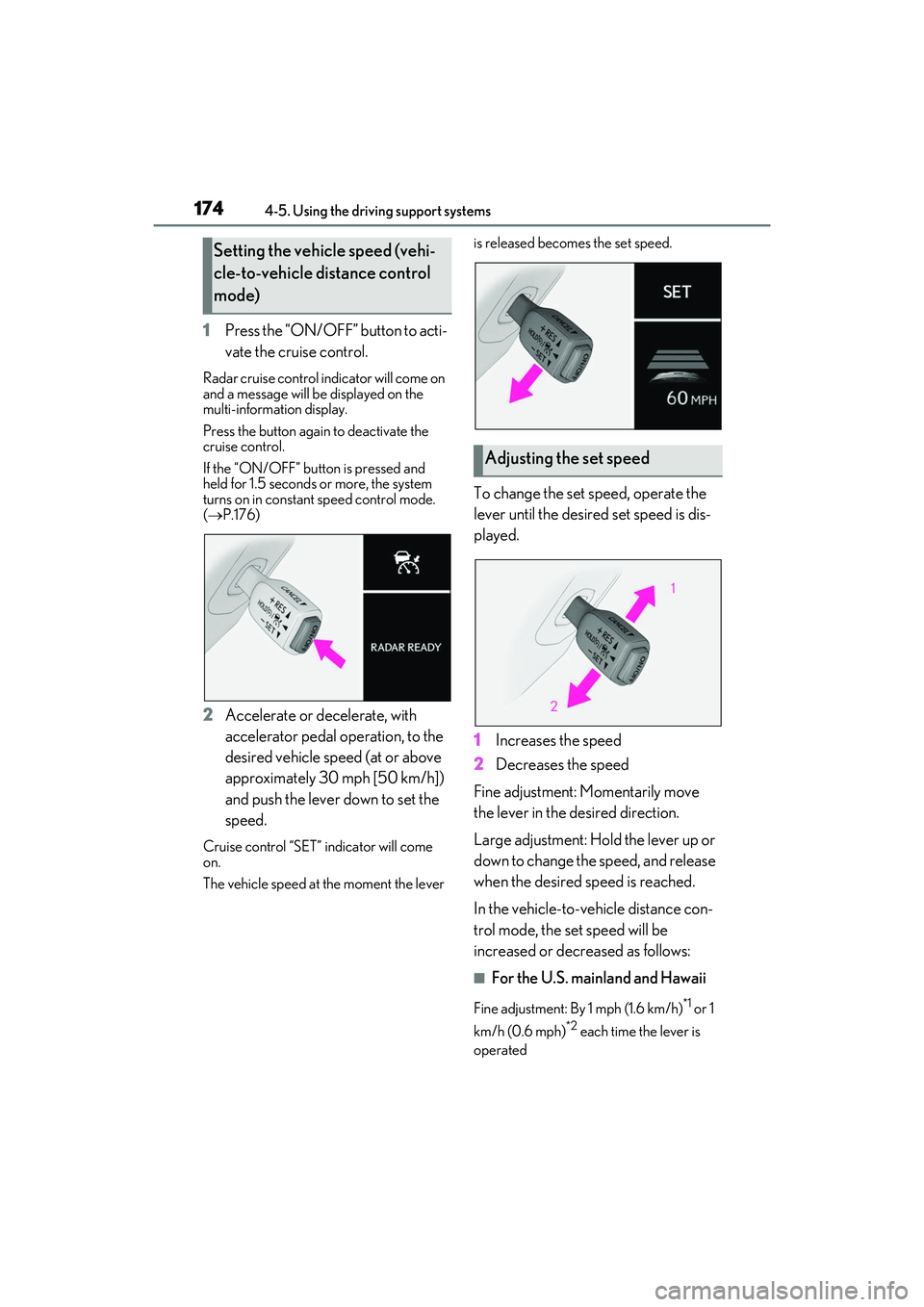
1744-5. Using the driving support systems
RC F Owner's Manual
1Press the “ON/OFF” button to acti-
vate the cruise control.
Radar cruise control indicator will come on
and a message will be displayed on the
multi-information display.
Press the button again to deactivate the
cruise control.
If the “ON/OFF” button is pressed and
held for 1.5 seconds or more, the system
turns on in constant speed control mode.
( P.176)
2 Accelerate or decelerate, with
accelerator pedal operation, to the
desired vehicle speed (at or above
approximately 30 mph [50 km/h])
and push the lever down to set the
speed.
Cruise control “SET” indicator will come
on.
The vehicle speed at the moment the lever is released becomes the set speed.
To change the set speed, operate the
lever until the desired set speed is dis-
played.
1
Increases the speed
2 Decreases the speed
Fine adjustment: Momentarily move
the lever in the desired direction.
Large adjustment: Hold the lever up or
down to change the speed, and release
when the desired speed is reached.
In the vehicle-to-vehicle distance con-
trol mode, the set speed will be
increased or decreased as follows:
■For the U.S. mainland and Hawaii
Fine adjustment: By 1 mph (1.6 km/h)*1 or 1
km/h (0.6 mph)
*2 each time the lever is
operated
Setting the vehicle speed (vehi-
cle-to-vehicle distance control
mode)
Adjusting the set speed
Page 178 of 412

1764-5. Using the driving support systems
RC F Owner's Manual
1Pulling the lever toward you can-
cels the speed control.
The speed control is also canceled when
the brake pedal is depressed.
2Pushing the lever up resumes the
cruise control and returns vehicle
speed to the set speed.
However, cruise control does not resume
when the vehicle speed is approximately
25 mph (40 km/h) or less.
When your vehicle is too close to a
vehicle ahead, and sufficient automatic
deceleration via the cruise control is
not possible, the display will flash and
the buzzer will sound to alert the driver.
An example of this would be if another
driver cuts in front of you while you are
following a vehicle. Depress the brake
pedal to ensure an appropriate vehi-
cle-to-vehicle distance.
■Warnings may not occur when
In the following instances, warnings
may not occur even when the vehi-
cle-to-vehicle distance is small.
When the speed of the preceding
vehicle matches or exceeds your
vehicle speed
When the preceding vehicle is
traveling at an extremely slow speed
Immediately after the cruise control
speed was set
When depressing the accelerator
pedal
When constant speed control mode is
selected, your vehicle will maintain a
set speed without controlling the vehi-
cle-to-vehicle distance. Select this
mode only when vehicle-to-vehicle dis-
tance control mode does not function
correctly due to a dirty radar sensor,
etc.
1 With the cruise control off, press
and hold the “ON/OFF” button for
1.5 seconds or more.
Immediately after the “ON/OFF” button is
pressed, the radar crui se control indicator
Canceling and resuming the
speed control
Approach warning (vehi-
cle-to-vehicle distance control
mode)
Selecting constant speed con-
trol mode
Page 180 of 412

1784-5. Using the driving support systems
RC F Owner's Manual
■Brake system operation sound
If the brakes are app lied automatically while
the vehicle is in vehicle-to-vehicle distance
control mode, a brake system operation
sound may be heard. This does not indicate
a malfunction.
■Warning messages and buzzers for
dynamic radar cruise control
Warning messages and buzzers are used to
indicate a system malfunction or to inform
the driver of the need for caution while driv-
ing. If a warning message is shown on the
multi-information display, read the message
and follow the instructions.
■When the sensor may not be correctly
detecting the vehicle ahead
In the case of the fo llowing and depending
on the conditions, operate the brake pedal
when deceleration of the system is insuffi-
cient or operate the accelerator pedal
when acceleration is required.
As the sensor may not be able to correctly
detect these types of vehicles, the approach
warning (P.176) may not be activated.
●Vehicles that cut in suddenly
●Vehicles traveling at low speeds
●Vehicles that are not moving in the same
lane
●Vehicles with small rear ends (trailers
with no load on board, etc.)
●Motorcycles travelin g in the same lane
●When water or snow thrown up by the
surrounding vehicles hinders the detect-
ing of the sensor
●When your vehicle is pointing upwards
(caused by a heavy load in the luggage
compartment, etc.)
●Preceding vehicle has an extremely high
ground clearance
■Conditions under which the vehi-
cle-to-vehicle distance control mode
may not function correctly
In the case of the following conditions,
operate the brake pedal (or accelerator
pedal, depending on the situation) as nec-
essary.
As the sensor may not be able to correctly
detect vehicles ahead, the system may not
operate properly.
●When the road curves or when the lanes
are narrow
●When steering wheel operation or your
position in the lane is unstable
●When the vehicle ahead of you deceler-
ates suddenly
●When driving on a road surrounded by a
structure, such as in a tunnel or on a
bridge
●While the vehicle speed is decreasing to
the set speed after the vehicle acceler-
ates by depressing the accelerator pedal
Page 181 of 412

1794-5. Using the driving support systems
RC F Owner's Manual
4
Driving
The Blind Spot Monitor is a system that
has 2 functions:
The BSM (Blind Spot Monitor) func-
tion
Assists the driver in making a deci-
sion when changing lanes
The RCTA (Rear Cross Traffic Alert)
function
Assists the driver when backing up
These functions use same sensors. BSM main switch
This switch is for both the BSM function
and RCTA function.
Pressing the switch turns the system on or
off. When the switch is
turned on, the indi-
cator on the switch illuminates.
Outside rear view mirror indicators
BSM function:
When a vehicle is detected in a blind spot
of the outside rear view mirrors or
approaching rapidly from behind into a
blind spot, the outside rear view mirror
indicator on the detected side will illumi-
nate. If the turn signal lever is operated
toward the detected side, the outside rear
view mirror indicator will flash.
RCTA function:
When a vehicle approaching from the right
or left at the rear of the vehicle is detected,
both outside rear view mirror indicators
will flash.
Center Display
If a vehicle approaching from the right or
left at the rear of the vehicle is detected,
the RCTA icon (P.184) for the detected
side will be displaye d on the Center Dis-
play.
This illustration shows an example of a
vehicle approaching from both sides of the
vehicle.
R C T A b u z z e r ( R C T A f u n c t i o n o n l y )
If a vehicle approaching from the right or
left at the rear of the vehicle is detected, a
buzzer will sound. The buzzer also sounds
for approximately 1 second immediately
after the BSM main swit ch is operated to
turn the system on.
■Outside rear view mirror indicator visi-
bility
In strong sunlight, the outside rear view mir-
ror indicator may be difficult to see.
BSM (Blind Spot Monitor)
The Blind Spot Monitor is a system
that uses rear side radar sensors
installed on the in ner side of the
rear bumper on the left and right
side to assist the driver in confirm-
ing safety when changing lanes.
Summary of the Blind Spot Mon-
itor
A
B
C
D
Page 182 of 412

1804-5. Using the driving support systems
RC F Owner's Manual
■Hearing the RCTA buzzer
The RCTA buzzer may be difficult to hear
over loud noises, such as if the audio system
volume is high.
■When “Blind Spot Monitor Unavailable”
is shown on the multi-information dis-
play
Ice, snow, mud, etc., may be attached to the
rear bumper around the sensors. ( P.180)
The system should return to normal opera-
tion after removing the ice, snow, mud, etc.
from the rear bumper. Additionally, the sen-
sors may not operate no rmally when driving
in extremely hot or cold environments.
■When there is a malfunction in the Blind
Spot Monitor
If a system malfunction is detected due to
any of the following, a warning message will
be displayed: ( P.308)
●A sensor is malfunctioning
●A sensor is dirty or covered with snow or
a sticker
●The outside temperature is extremely
high or low
●Sensor voltage is abnormal
●A sensor is misaligned
WARNING
■Handling the radar sensor
Blind Spot Monitor se nsors are installed
behind the left and right sides of the rear
bumper respectively. Observe the fol-
lowing to ensure the Blind Spot Monitor
can function correctly.
●Keep the sensors and the surrounding
areas on the rear bumper clean at all
times.
If a sensor or its surrounding area on
the rear bumper is dirty or covered
with snow, the Blind Spot Monitor may
not operate and a warning message
(
P.308) will be displa yed. In this sit-
uation, clear off the dirt or snow and
drive the vehicle with the operation
conditions of the BSM function
(
P.182) satisfied for approximately
10 minutes. If the warning message
does not disappear, have the vehicle
inspected by your Lexus dealer.
●Do not subject a sensor or its sur-
rounding area on the rear bumper to a
strong impact.
If a sensor is moved even slightly off
position, the system may malfunction
and vehicles may not be detected cor-
rectly.
In the following situations, have your
vehicle inspected by your Lexus
dealer.
• A sensor or its surrounding area is subject to a strong impact.
• If the surrounding area of a sensor is scratched or dented, or part of them
has become disconnected.
●Do not disassemble the sensor.
●Do not attach stickers to the sensor or
surrounding area on the rear bumper.
●Do not modify the sensor or surround-
ing area on the rear bumper.
●Do not paint the rear bumper any
color other than an official Lexus color.
Page 186 of 412

1844-5. Using the driving support systems
RC F Owner's Manual
Approaching vehicles
Detection areas of approaching vehicles
■RCTA icon display
When a vehicle approaching from the
right or left at the rear of the vehicle is
detected, the following will be dis-
played on the Center Display.This illustration shows an example of a
vehicle approaching from both sides of the
vehicle.
: The RCTA function is malfunc-
tioning ( P.180)
The areas that vehicles can be detected in are outlined below.
The buzzer can alert the driver of faster vehicles approaching from farther away.
Example:
A
B
RCTA function detection areas