door lock LEXUS RCF 2022 Owners Manual
[x] Cancel search | Manufacturer: LEXUS, Model Year: 2022, Model line: RCF, Model: LEXUS RCF 2022Pages: 412, PDF Size: 26.28 MB
Page 4 of 412

2
RC F Owner's Manual
TABLE OF CONTENTS
For your information ......................................6
Reading this manual .................................... 10
How to search ................................................. 11
Pictorial index ................................................. 12
1-1. For safe use Before driving .................................... 22
For safe driving.................................. 23
Seat belts ............................................. 24
SRS airbags ....................................... 28
Front passenger occupant classifi- cation system ................................. 36
Exhaust gas precautions ................ 41
1-2. Child safety Riding with children......................... 42
Child restraint systems .................. 42
1-3. LEXUS Enform Lexus Enform Safety Connect .. 53
1-4. Theft deterrent system Engine immobili zer system .........57
Alarm.................................................... 58
Theft prevention labels ................. 60
2-1. Instrument cluster Warning lights and indicators ..... 62
Gauges and meters ....................... 66
Multi-information display............. 73
Fuel consumption information ... 833-1. Key information
Keys ...................................................... 88
3-2. Opening, closing and locking the doors and trunk
Doors .................................................... 92
Trunk ..................................................... 95
Smart access system with push-but- ton start ............................................ 98
3-3. Adjusting the seats Front seats........................................ 103
Power easy access system/driving position memory/memory recall
function........................................... 105
3-4. Adjusting the steering wheel and mirrors
Steering wheel ............................... 108
Inside rear view mirror ............... 109
Outside rear view mirrors.......... 110
3-5. Opening, closing the windows and moon roof
Power windows ............................... 112
Moon roof .......................................... 114
4-1. Before driving Driving the vehicle......................... 118
Cargo and luggage....................... 124
Vehicle load limits.......................... 126
Trailer towing................................... 127
Dinghy towing ................................. 127
4-2. Driving procedures Engine (ignition) switch .............. 128
1For safety and security
2Vehicle status information and
indicators
3Before driving
4Driving
Page 14 of 412

12Pictorial index
RC F Owner's Manual
Pictorial index
■Exterior
The shape of the headlights may differ depending on the grade, etc.
Doors .......................................................................................................................... ..P.92
Locking/unlocking .............................................................................................................. P.92
Opening/closing the side windows ............................................................................. P.112
Locking/unlocking by using the mechanical key ................................................P.330
Warning lights/warning messages .............................................................. P.300, 308
Trunk .......................................................................................................................... ...P.95
Opening from inside the cabin ...................................................................................... P.96
Opening from outside ....................................................................................................... P.96
Opening by using the mechanical key ....................................................................P.330
Warning lights/warning messages .............................................................. P.300, 308
Outside rear view mirrors..................................................................................... P.110
Adjusting the mirror angle ...............................................................................................P.110
Folding the mirrors ............................................................................................................ ... P.111
Driving position memory
*.............................................................................................. P.105
Defogging the mirrors ..................................................................................................... P.215
A
B
C
Page 19 of 412

17Pictorial index
RC F Owner's Manual
Outside rear view mirror switches ..................................................................... P.110
Door lock switches ...................................................................................................P.94
Power window switches ......................................................................................... P.112
Window lock switch ................................................................................................ P.113
Tire pressure warning reset switch................................................................... P.275
*:If equippedAudio remote control switches
*
Paddle shift switches ....................................... ............................................. P.134, 135
Meter control switches ........................................................................................... P.74
Vehicle-to-vehicle distance switch ................................................................... P.175
Cruise control switch.............................................................................................. P.171
LDA (Lane Departure Alert with steering control) switch ........................ P.164
Talk switch
*
Telephone switches*
*
: Refer to “NAVIGATION AND MULTIMEDIA SYSTEM OWNER’S MANUAL”.
B
C
D
E
F
A
B
C
D
E
F
G
H
Page 60 of 412

581-4. Theft deterrent system
RC F Owner's Manual
■Items to check before locking the
vehicle
To prevent unexpected triggering of
the alarm and vehicle theft, make sure
of the following:
Nobody is in the vehicle.
The windows and moon roof (if
equipped) are closed before the
alarm is set.
No valuables or other personal items are left in the vehicle.
■Setting
Close the doors, trunk and hood, and
lock both side doors. The system will
be set automatically after 30 seconds.
The indicator light changes from being on
to flashing when the system is set.
■Deactivating or stopping
Do one of the following to deactivate
or stop the alarms:
Unlock the doors.
Open the trunk using the entry
function or wireless remote control.
Turn the engine switch to ACCES-
SORY or IGNITION ON mode, or
start the engine. (The alarm will be
deactivated or stopped after a few
seconds.)
■System maintenance
The vehicle has a maintenance-free type
alarm system.
■Triggering of the alarm
The alarm may be triggered in the following
situations:
(Stopping the alarm deactivates the alarm
system.)
●For Canada: The doors are unlocked
using the mechanical key.
Alarm
The alarm uses light and sound to
give an alert when an intrusion is
detected.
The alarm is triggered in the follow-
ing situations when the alarm is set:
Except for Canada: A locked
door is unlocked or opened in any
way other than using the entry
function, wireless remote control
or mechanical key. (The doors will
lock again automatically.)
For Canada: A locked door is
unlocked or opened in any way
other than using the entry func-
tion or wireless remote control.
(The doors will lock again auto-
matically.)
The trunk is opened in any way
other than using the entry func-
tion or wireless remote control.
The hood is opened.
Setting/deactivating/stopping
the alarm system
Page 61 of 412

591-4. Theft deterrent system
RC F Owner's Manual
1
For safety and security
●The trunk is opened using the mechanical
key.
●A person inside the vehicle opens a door,
the trunk or hood, or unlocks the vehicle
using an inside lock button.
●The battery is rech arged or replaced
when the vehicle is locked. ( P.334)
■Alarm-operated door lock
In the following cases, depending on the sit-
uation, the door may automatically lock to
prevent improper entry into the vehicle:
●When a person remaining in the vehicle
unlocks the door and the alarm is acti-
vated.
●While the alarm is activated, a person remaining in the vehicle unlocks the door.
●When recharging or replacing the bat-
tery
NOTICE
■To ensure the system operates cor-
rectly
Do not modify or remove the system. If
modified or removed, the proper opera-
tion of the system cannot be guaranteed.
Page 89 of 412

87
RC F Owner's Manual
3
3
Before driving
Before driving
.3-1. Key informationKeys ................................................... 88
3-2. Opening, closing and locking the doors and trunk
Doors................................................. 92
Trunk.................................................. 95
Smart access system with push-button start ....................... 98
3-3. Adjusting the seats Front seats ..................................... 103
Power easy access system/driving
position memory/memory recall
function ........................................ 105
3-4. Adjusting the steering wheel and mirrors
Steering wheel............................. 108
Inside rear view mirror............. 109
Outside rear view mirrors ....... 110
3-5. Opening, closing the windows and moon roof
Power windows............................ 112
Moon roof ...................................... 114
Page 92 of 412

903-1. Key information
RC F Owner's Manual
The electronic keys are equipped with
the following wireless remote control:Locks the doors ( P.92)
Unlocks the doors ( P.92)
Opens the windows and moon roof
(if equipped)
* ( P.92)
Opens the trunk ( P.97)
Sounds the alarm
*: This setting must be customized at your
Lexus dealer.
■Panic mode
When is pressed for longer than
about one second, an alarm will sound
intermittently and the vehicle lights will flash
to deter any person from trying to break
into or damage your vehicle.
To stop the alarm, pr ess any button on the
electronic key.
To take out the mechanical key, push
the release button and take the key out.
The mechanical key can only be inserted in
one direction, as the key only has grooves
on one side. If the key cannot be inserted in
a lock cylinder, turn it over and re-attempt
to insert it.
After using the mechanical key, store it in
the electronic key. Carry the mechanical
key together with the electronic key. If the
electronic key battery is depleted or the
entry function does not operate properly,
you will need the mechanical key.
( P.330)
NOTICE
●When installing the battery, make sure
to check the direction of the battery.
Installing the battery in the wrong
direction may cause the battery to
deplete rapidly.
●The surface of the card key may be
damaged, or its coating may peel off in
the following situations:
• The card key is carried together with hard objects, such as coins and keys.
• The card key is scraped with a sharp object, such as the tip of a mechanical
pencil.
• The surface of the card key is wiped with thinner or benzene.
Wireless remote control
A
B
C
D
E
Using the mechanical key
Page 94 of 412

923-2. Opening, closing and locking the doors and trunk
RC F Owner's Manual
3-2.Opening, closing and locking the doors and trunk
■Smart access system with
push-button start
Carry the electronic key to enable this
function.
1 Grip the driver’s door handle to
unlock the door. Grip the passen-
ger’s door handle to unlock both
side doors.
*
Make sure to touch the sensor on the back
of the handle.
The doors cannot be unlocked for 3 sec-
onds after the doors are locked.
*: The door unlock settings can be
changed.
2 Touch the lock sensor (indentation
on the side of the door handle) to
lock the doors.
Check that the door is securely locked.
■Wireless remote control
1 Locks both side doors
Check that the door is securely locked.
2Unlocks both side doors
Pressing the button unlocks the driver’s
door. Pressing the button again within 5
seconds unlocks the other door.
Press and hold to open the windows and
moon roof (if equipped).
*
*
: This setting must be customized at your Lexus dealer.
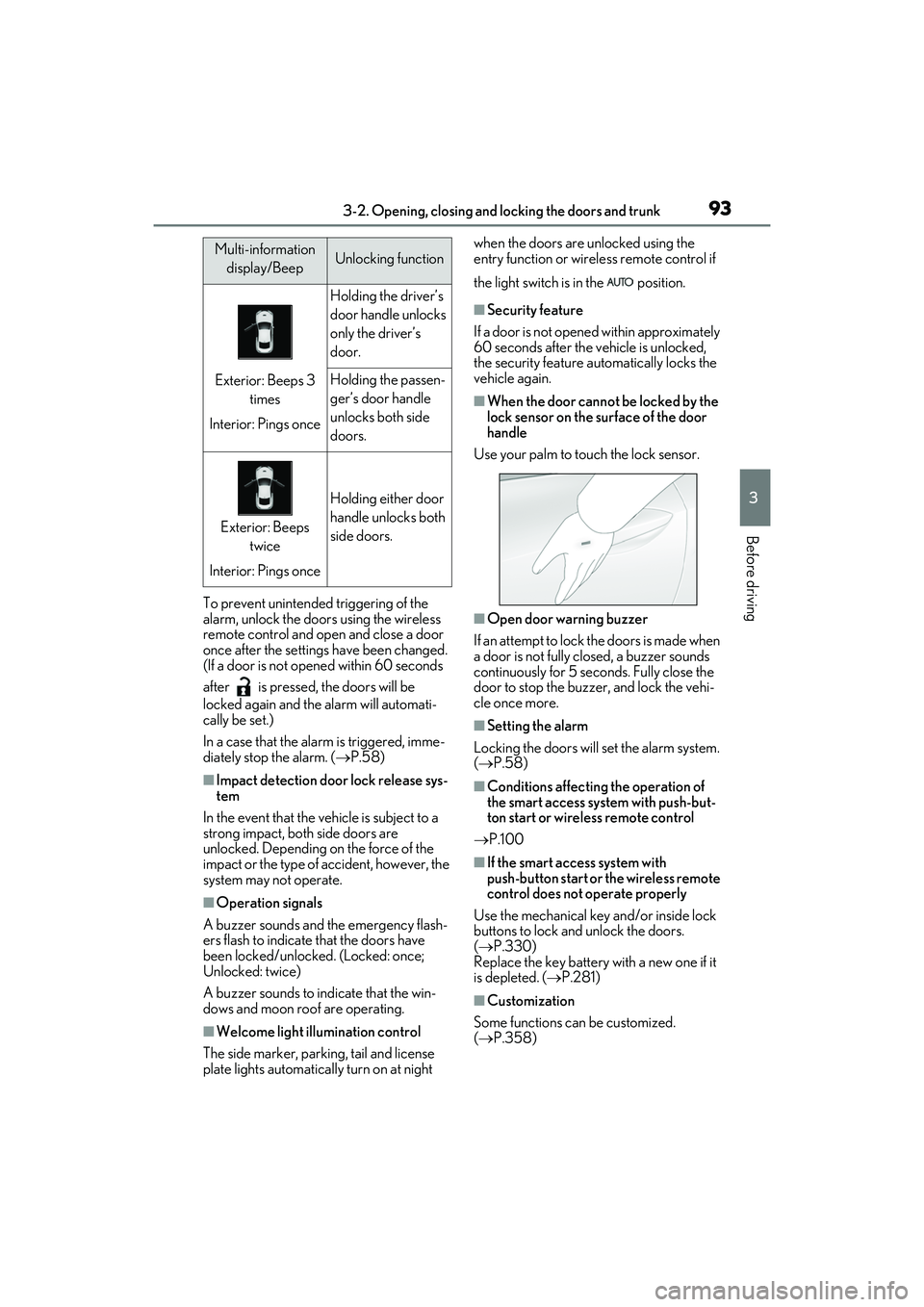
■Side window open/close function linked
to door operation
When a door is opened, its window opens
slightly. When a door is closed, its window
closes completely.
■Switching the door unlock function
It is possible to set which doors the entry
function unlocks using the wireless remote
control.
1 Turn the engine switch off.
2 When the indicator light on the key sur-
face is not on, press and hold ,
or for approximately 5
seconds while pre ssing and holding
.
The setting changes each time an operation
is performed, as shown below. (When
changing the setting continuously, release
the buttons, wait for at least 5 seconds, and
repeat step 2 .)
Doors
Unlocking and locking the doors
from the outside
Page 95 of 412
933-2. Opening, closing and locking the doors and trunk
RC F Owner's Manual
3
Before driving
To prevent unintended triggering of the
alarm, unlock the doors using the wireless
remote control and open and close a door
once after the settings have been changed.
(If a door is not opened within 60 seconds
after is pressed, the doors will be
locked again and the alarm will automati-
cally be set.)
In a case that the alarm is triggered, imme-
diately stop the alarm. ( P.58)
■Impact detection door lock release sys-
tem
In the event that the vehicle is subject to a
strong impact, both side doors are
unlocked. Depending on the force of the
impact or the type of accident, however, the
system may not operate.
■Operation signals
A buzzer sounds and the emergency flash-
ers flash to indicate that the doors have
been locked/unlocke d. (Locked: once;
Unlocked: twice)
A buzzer sounds to indicate that the win-
dows and moon roof are operating.
■Welcome light illumination control
The side marker, parking, tail and license
plate lights automatically turn on at night when the doors are unlocked using the
entry function or wireless remote control if
the light switch is in the position.
■Security feature
If a door is not opened within approximately
60 seconds after the vehicle is unlocked,
the security feature automatically locks the
vehicle again.
■When the door cannot be locked by the
lock sensor on the surface of the door
handle
Use your palm to touch the lock sensor.
■Open door warning buzzer
If an attempt to lock the doors is made when
a door is not fully closed, a buzzer sounds
continuously for 5 seconds. Fully close the
door to stop the buzz er, and lock the vehi-
cle once more.
■Setting the alarm
Locking the doors will set the alarm system.
( P.58)
■Conditions affecting the operation of
the smart access system with push-but-
ton start or wireless remote control
P.100
■If the smart access system with
push-button start or the wireless remote
control does not operate properly
Use the mechanical key and/or inside lock
buttons to lock and unlock the doors.
( P.330)
Replace the key battery with a new one if it
is depleted. ( P.281)
■Customization
Some functions can be customized.
( P.358)
Multi-information
display/BeepUnlocking function
Exterior: Beeps 3 times
Interior: Pings once
Holding the driver’s
door handle unlocks
only the driver’s
door.
Holding the passen-
ger’s door handle
unlocks both side
doors.
Exterior: Beeps twice
Interior: Pings once
Holding either door
handle unlocks both
side doors.
Page 96 of 412

943-2. Opening, closing and locking the doors and trunk
RC F Owner's Manual
■Door lock switches (to
lock/unlock)
1 Locks both side doors
2 Unlocks both side doors
■Inside lock buttons (to lock/unlock)
1 Locks the door
2 Unlocks the door
Both side doors can be opened by pulling
the inside handle even if the lock buttons
are in the lock position.
■Locking the doors from the outside with-
out a key
1 Move the inside lock button to the lock
position.
2 Close the door.
The door cannot be lo cked if the engine
switch is in ACCESSORY or IGNITION
ON mode, or the electronic key is left
inside the vehicle. However, the key may not
be detected correctly and the door may be
locked.
■If a symbol indicating one or more of the
doors open is shown on the multi-infor-
mation display
The hood, one or more of the doors, or
trunk is not fully closed. If the vehicle
reaches a speed of 3 mph (5 km/h), the
master warning light flashes and a buzzer
sounds to indicate that the door(s) are not
fully closed. Make sure to close hood, all
doors and trunk.
The following functions can be set or
canceled:
For instructions on customizing, refer to
WARNING
■To prevent an accident
Observe the following precautions while
driving the vehicle.
Failure to do so may result in a door
opening and an occupant being thrown
out of the vehicle, resulting in death or
serious injury.
●Ensure that both side doors are prop-
erly closed and locked.
●Do not pull the inside handle of the
doors while driving.
The doors may be opened even if the
inside lock buttons are in locked position.
■Side window open/close function
linked to door operation
Do not hold the upper edge of the side
window when you close the door. Other-
wise, your fingers or hand may be caught
in the window.
Unlocking and locking the doors
from the inside
Automatic door locking and
unlocking systems