tires LEXUS RCF 2022 Owners Manual
[x] Cancel search | Manufacturer: LEXUS, Model Year: 2022, Model line: RCF, Model: LEXUS RCF 2022Pages: 412, PDF Size: 26.28 MB
Page 6 of 412
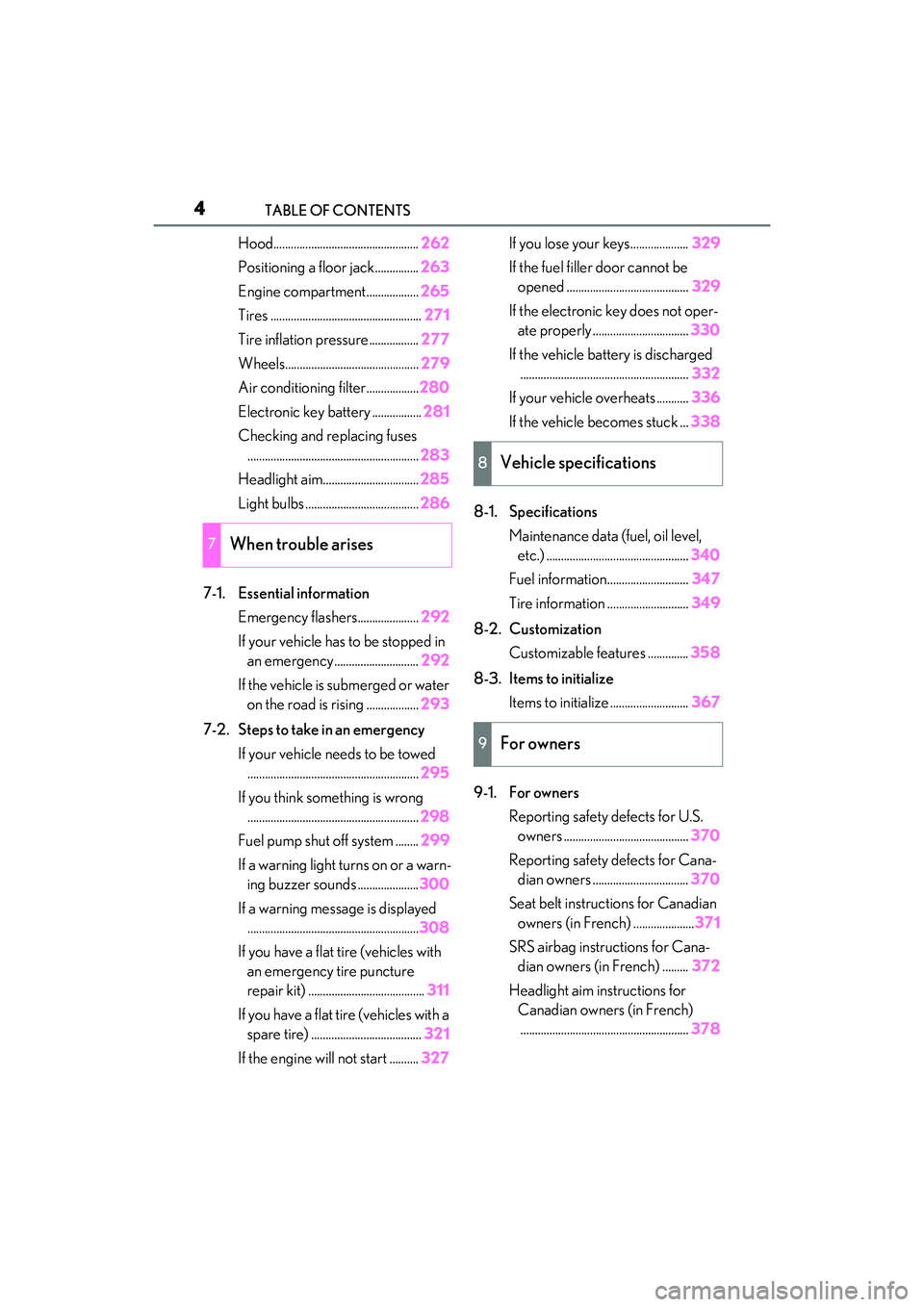
4TABLE OF CONTENTS
RC F Owner's Manual
Hood..................................................262
Positioning a floor jack............... 263
Engine compartment.................. 265
Tires .................................................... 271
Tire inflation pressure................. 277
Wheels.............................................. 279
Air conditioning filter..................280
Electronic key battery ................. 281
Checking and replacing fuses ........................................................... 283
Headlight aim................................. 285
Light bulbs ....................................... 286
7-1. Essential information Emergency flashers..................... 292
If your vehicle has to be stopped in an emergency ............................. 292
If the vehicle is submerged or water on the road is rising .................. 293
7-2. Steps to take in an emergency If your vehicle needs to be towed........................................................... 295
If you think something is wrong ........................................................... 298
Fuel pump shut off system ........ 299
If a warning light turns on or a warn- ing buzzer sounds ..................... 300
If a warning message is displayed ........................................................... 308
If you have a flat tire (vehicles with an emergency tire puncture
repair kit) ........................................ 311
If you have a flat tire (vehicles with a spare tire) ...................................... 321
If the engine wi ll not start .......... 327If you lose your keys....................
329
If the fuel filler door cannot be opened .......................................... 329
If the electronic key does not oper- ate properly ................................. 330
If the vehicle battery is discharged .......................................................... 332
If your vehicle overheats ........... 336
If the vehicle becomes stuck ... 338
8-1. Specifications Maintenance data (fuel, oil level, etc.) ................................................. 340
Fuel information............................ 347
Tire information ............................ 349
8-2. Customization Customizable features .............. 358
8-3. Items to initialize Items to initialize ........................... 367
9-1. For owners Reporting safety defects for U.S. owners ........................................... 370
Reporting safety defects for Cana- dian owners ................................. 370
Seat belt instructions for Canadian owners (in French) ..................... 371
SRS airbag instructions for Cana- dian owners (in French) ......... 372
Headlight aim instructions for Canadian owners (in French).......................................................... 378
7When trouble arises
8Vehicle specifications
9For owners
Page 15 of 412

13Pictorial index
RC F Owner's Manual
Windshield wipers .................................................................................................. P.143
Precautions for winter season .....................................................................................P.203
To prevent freezing (windshield wiper de-icer)
*.................................................. P.215
Precautions against car wash ...................................................................................... P.240
Fuel filler door ..........................................................................................................P.150
Refueling method .............................................................................................................. P .150
Fuel type/fuel tank capacity .......................................................................................... P.341
Tires.......................................................................................................................... ... P.271
Tire size/inflation pressure ............................ ............................................................... P.345
Winter tires................................................................................................................... .......P.203
Checking/rotation/tire pressure warning system................................................ P.271
Coping with flat tires................................................................................................. P.311, 3 21
Hood ..........................................................................................................................P .262
Opening ........................................................................................................................ ....... P.262
Engine oil ..................................................................................................................... .......... P.341
Coping with overheating ............................................................................................... P.336
Warning messages ......................................................................................................... P.308
Active rear wing
*.................................................................................................... P.195
Headlights .................................................................................................................P.13 8
Parking lights/daytime running lights................ ...............................................P.138
Turn signal lights ...................................................................................................... P.136
Side marker lights ...................................................................................................P.138
Tail lights .................................................................................................................... P.138
Stop lights
License plate lights .................................................................................................P.138
Back up lights
Shifting the shift lever to R .............................................................................................. P.13 3
*:If equipped
Light bulbs of the exterior lights for driving(Replacing method: P.286, Watts: P.346)
D
E
F
G
H
I
J
K
L
M
N
O
Page 120 of 412

1184-1. Before driving
RC F Owner's Manual
4-1.Before driving
■Starting the engine
P.128
■Driving
1 With the brake pedal depressed,
shift the shift lever to D. ( P.132)
2 Release the parking brake.
( P.137)
3 Gradually release the brake pedal
and gently depress the accelerator
pedal to accelerate the vehicle.
■Stopping
1 With the shift lever in D, depress the
brake pedal.
2 If necessary, set the parking brake.
If the vehicle is to be stopped for an
extended period of time, shift the shift lever
to P or N. ( P.132)
■Parking the vehicle
1 With the shift lever in D, depress the
brake pedal.
2 Set the parking brake ( P.137),
and shift the shift lever to P
( P.132).
3 Press the engine switch to stop the
engine.
4 Lock the door, making sure that you
have the electronic key on your
person.
If parking on a hill, block the wheels as
needed.
■Starting off on a steep uphill
1 Make sure that the parking brake is
set and shift the shift lever to D.
2 Gently depress the accelerator
pedal.
3 Release the parking brake.
■When starting off on an uphill
The hill-start assist control will activate.
( P.199)
■Driving in the rain
●Drive carefully when it is raining, because
visibility will be re duced, the windows
may become fogged-u p, and the road
will be slippery.
●Drive carefully when it starts to rain,
because the road surface will be espe-
cially slippery.
●Refrain from high speeds when driving on
an expressway in the rain, because there
may be a layer of water between the tires
and the road surface, preventing the
steering and brakes from operating prop-
erly.
■Engine speed while driving
In the following conditions, the engine
speed may become high while driving. This
is due to automatic up-shifting control or
down-shifting implementation to meet driv-
ing conditions. It does not indicate sudden
acceleration.
●The vehicle is judged to be driving uphill
or downhill
●When the accelerato r pedal is released
●When the brake pedal is depressed while
sport mode is selected
■Restraining the engine output (Brake
Override System)
●When the accelerator and brake pedals
are depressed at the same time, the
engine output may be restrained.
●A warning message is displayed on the
multi-information display while the sys-
tem is operating.
Driving the vehicle
The following procedures should be
observed to ensure safe driving:
Driving procedure
Page 122 of 412

1204-1. Before driving
RC F Owner's Manual
WARNING
●During normal driving, do not turn off
the engine. Turning the engine off
while driving will not cause loss of
steering or braking control, but the
power assist to these systems will be
lost. This will make it more difficult to
steer and brake, so you should pull
over and stop the vehicle as soon as it
is safe to do so.
However, in the event of an emer-
gency, such as if it becomes impossible
to stop the vehicle in the normal way:
P.292
●Use engine braking (downshift) to
maintain a safe speed when driving
down a steep hill.
Using the brakes continuously may
cause the brakes to overheat and lose
effectiveness. (
P.132)
●Do not adjust the positions of the
steering wheel, the seat, or the inside
or outside rear view mirrors while driv-
ing.
Doing so may result in a loss of vehicle
control.
●Always check that all passengers’
arms, heads or other parts of their
body are not outside the vehicle.
●Do not drive in excess of the speed
limit. Even if the legal speed limit per-
mits it, do not drive over 85 mph (140
km/h) unless your vehicle has
high-speed capability tires. Driving
over 85 mph (140 km/h) may result in
tire failure, loss of control and possible
injury. Be sure to consult a tire dealer
to determine whether the tires on your
vehicle are high-speed capability tires
or not before driving at such speeds.
■When driving on slippery road sur-
faces
●Sudden braking, acceleration and
steering may cause tire slippage and
reduce your ability to control the vehi-
cle.
●Sudden acceleration, engine braking
due to shifting, or changes in engine
speed could cause the vehicle to skid.
●After driving through a puddle, lightly
depress the brake pedal to make sure
that the brakes are functioning prop-
erly. Wet brake pads may prevent the
brakes from functioning properly. If the
brakes on only one side are wet and
not functioning properly, steering con-
trol may be affected.
■When shifting the shift lever
●Do not let the vehicle roll backward
while the shift lever is in a driving posi-
tion, or roll forward while the shift lever
is in R.
Doing so may cause the engine to stall
or lead to poor brake and steering
performance, resulting in an accident
or damage to the vehicle.
●Do not shift the shift lever to P while
the vehicle is moving.
Doing so can damage the transmission
and may result in a loss of vehicle con-
trol.
●Do not shift the shift lever to a driving
position while the vehicle is moving
backward.
Doing so can damage the transmission
and may result in a loss of vehicle con-
trol.
●Do not shift the shift lever to R while
the vehicle is moving forward.
Doing so can damage the transmission
and may result in a loss of vehicle con-
trol.
●Moving the shift lever to N while the
vehicle is moving will disengage the
engine from the transmission. Engine
braking is not available when N is
selected.
Page 128 of 412

1264-1. Before driving
RC F Owner's Manual
■Total load capacity and seating capacity
These details are also described on the tire
and loading information label. ( P.277)
WARNING
●Do not place cargo or luggage in or on
the following locations.
• At the feet of the driver
• On the front passenger or rear seats (when stacking items)
• On the package tray
• On the instrument panel
•On the dashboard
• In front of the Center Display
●Secure all items in the occupant com-
partment.
■Capacity and distribution
●Do not exceed the maximum axle
weight rating or the total vehicle
weight rating.
●Even if the total load of occupant’s
weight and the cargo load is less than
the total load capacity, do not apply the
load unevenly. Improper loading may
cause deterioration of steering or
braking control which may cause
death or serious injury.
Vehicle load limits
Vehicle load limits include total
load capacity, seating capacity,
towing capacity and cargo capac-
ity.
Total load capacity (vehicle
capacity weight): P.340
Total load capacity means the com-
bined weight of occupants, cargo
and luggage.
Seating capacity: P.340
Seating capacity means the maxi-
mum number of occupants whose
estimated average weight is 150 lb.
(68 kg) per person.
Towing capacity
Lexus does not recommend towing
a trailer with your vehicle.
Cargo capacity
Cargo capacity may increase or
decrease depending on the weight
and the number of occupants.
WARNING
■Overloading the vehicle
Do not overload the vehicle.
It may not only cause damage to the tires,
but also degrade steering and braking
ability, resulting in an accident.
Page 160 of 412

1584-5. Using the driving support systems
RC F Owner's Manual
WARNING
■Limitations of the pre-collision system
●The driver is solely responsible for safe
driving. Always drive safely, taking
care to observe your surroundings.
Do not use the pre-collision system
instead of normal braking operations
under any circumstances. This system
will not prevent collisions or lessen col-
lision damage or injury in every situa-
tion. Do not overly rely on this system.
Failure to do so may lead to an acci-
dent, resulting in death or serious
injury.
●Although this system is designed to
help avoid a collision or help reduce
the impact of the collision, its effective-
ness may change according to various
conditions, therefore the system may
not always be able to achieve the same
level of performance.
Read the following conditions care-
fully. Do not overly rely on this system
and always drive carefully.
• Conditions under which the system may operate even if there is no possi-
bility of a collision:
P.160
• Conditions under which the system may not operate properly:
P.162
●Do not attempt to test the operation of
the pre-collision system yourself.
Depending on the objects used for
testing (dummies, cardboard objects
imitating detectable objects, etc.), the
system may not operate properly, pos-
sibly leading to an accident.
■Pre-collision braking
●When the pre-collision braking func-
tion is operating, a large amount of
braking force will be applied.
●If the vehicle is stopped by the opera-
tion of the pre-collision braking func-
tion, the pre-collision braking function
operation will be canceled after
approximately 2 seco nds. Depress the
brake pedal as necessary.
●The pre-collision braking function may
not operate if certain operations are
performed by the driver. If the acceler-
ator pedal is being depressed strongly
or the steering wheel is being turned,
the system may determine that the
driver is taking evasive action and pos-
sibly prevent the pre-collision braking
function from operating.
●In some situations, while the pre-colli-
sion braking function is operating,
operation of the function may be
canceled if the ac celerator pedal is
depressed strongly or the steering
wheel is turned and the system deter-
mines that the driver is taking evasive
action.
●If the brake pedal is being depressed,
the system may determine that the
driver is taking evasive action and pos-
sibly delay the operat ion timing of the
pre-collision braking function.
■When to disable the pre-collision sys-
tem
In the following situations, disable the
system, as it may not operate properly,
possibly leading to an accident resulting
in death or serious injury:
●When the vehicle is being towed
●When your vehicle is towing another
vehicle
●When transporting the vehicle via
truck, boat, train or similar means of
transportation
●When the vehicle is raised on a lift with
the engine running and the tires are
allowed to rotate freely
●When inspecting the vehicle using a
drum tester such as a chassis dyna-
mometer or speedometer tester, or
when using an on vehicle wheel bal-
ancer
●When a strong impact is applied to the
front bumper or front grille, due to an
accident or other reasons
Page 161 of 412

1594-5. Using the driving support systems
RC F Owner's Manual
4
Driving
■Enabling/disabling the pre-colli-
sion system
The pre-collision system can be
enabled/disabled on ( P.73) of
the multi-information display.
The system is automatically enabled each
time the engine switch is turned to IGNI-
TION ON mode.
If the system is disabled, the PCS warn-
ing light will turn on and a message will
be displayed on the multi-information
display.
■Changing the pre-collision warn-
ing timing
The pre-collision warning timing can
be changed on ( P.73) of the
multi-information display.
The operation timing setting is retained
when the engine switch is turned off.
1 Far
The warning will begin to operate earlier
than with the default timing.
2Middle
This is the default setting.
3Near
The warning will begin to operate later
than with the default timing.
■Operational conditions
The pre-collision system is enabled and the
WARNING
●If the vehicle cannot be driven in a sta-
ble manner, such as when the vehicle
has been in an accident or is malfunc-
tioning
●When the vehicle is driven in a sporty
manner or off-road
●When the tires are not properly
inflated
●When the tires are very worn
●When tires of a size other than speci-
fied are installed
●When tire chains are installed
●When a compact spare tire or an
emergency tire puncture repair kit is
used
●If equipment (snow plow, etc.) that may
obstruct the radar sensor or front cam-
era is temporarily installed to the vehi-
cle
Changing settings of the pre-col-
lision system
Page 165 of 412

1634-5. Using the driving support systems
RC F Owner's Manual
4
Driving
• The vehicle is wobbling.
• The vehicle is being driven at extremely high speeds.
• When driving on a hill
• If the radar sensor or front camera is mis- aligned
●In some situations such as the following,
sufficient braking force may not be
obtained, preventing the system from
performing properly:
• If the braking functions cannot operate to
their full extent, such as when the brake
parts are extremely cold, extremely hot,
or wet
• If the vehicle is not properly maintained (brakes or tires are excessively worn,
improper tire inflation pressure, etc.)
• When the vehicle is being driven on a gravel road or other slippery surface
●Some pedestrians such as the following
may not be detected by the radar sensor
and front camera, preventing the system
from operating properly:
• Pedestrians shorter than approximately 3.2 ft. (1 m) or tall er than approximately
6.5 ft. (2 m)
• Pedestrians wearing oversized clothing (a rain coat, long skir t, etc.), making their
silhouette obscure
• Pedestrians who are carrying large bag- gage, holding an umbrella, etc., hiding
part of their body
• Pedestrians who are bending forward or squatting
• Pedestrians who are pushing a stroller, wheelchair, bicycle or other vehicle
• Groups of pedestrians which are close
together
• Pedestrians who are wearing white and look extremely bright
• Pedestrians in the dark, such as at night or while in a tunnel
• Pedestrians whose clothing appears to
be nearly the same co lor or brightness as
their surroundings
• Pedestrians near walls , fences, guardrails,
or large objects
• Pedestrians who are on a metal object (manhole cover, steel plate, etc.) on the
road
• Pedestrians who are walking fast
• Pedestrians who are changing speed abruptly • Pedestrians running out from behind a
vehicle or a large object
• Pedestrians who are extremely close to
the side of the vehicle (outside rear view
mirror, etc.)
■If VSC is disabled
●If VSC is disabled ( P.199), the pre-col-
lision brake assist and pre-collision brak-
ing functions are also disabled.
●The PCS warning light will turn on and
“VSC Turned Off Pre-Collision Brake
System Unavailable” will be displayed on
the multi-information display.
Page 167 of 412

1654-5. Using the driving support systems
RC F Owner's Manual
4
Driving■Vehicle sway warning function
When the vehicle is swaying or
appears as if it may depart from its lane
multiple times, the warning buzzer
sounds and a message is displayed on
the multi-information display to alert
the driver.
WARNING
■Before using LDA system
Do not rely solely upon the LDA system.
The LDA system does not automatically
drive the vehicle or reduce the amount of
attention that must be paid to the area in
front of the vehicle. The driver must
always assume full responsibility for driv-
ing safely by paying careful attention to
the surrounding conditions and operat-
ing the steering wheel to correct the path
of the vehicle. Also, the driver must take
adequate breaks when fatigued, such as
from driving for a long period of time.
Failure to perform appropriate driving
operations and pay careful attention may
lead to an accident, resulting in death or
serious injury.
■To avoid operating LDA system by
mistake
When not using the LDA system, use the
LDA switch to turn the system off.
■Situations unsuitable for LDA system
Do not use the LDA system in the follow-
ing situations.
The system may not operate properly
and lead to an accident, resulting in
death or serious injury.
●A spare tire, tire chains, etc. are
equipped.
●When the tires have been excessively
worn, or when the tire inflation pres-
sure is low.
●Tires which differ by structure, manu-
facturer, brand or tread pattern are
used.
●Objects or patterns that could be mis-
taken for white (yellow) lines are pres-
ent on the side of the road (guardrails,
curbs, reflective poles, etc.).
●Vehicle is driven on a snow-covered
road.
●White (yellow) lines are difficult to see
due to rain, snow, fog, dust, etc.
Page 171 of 412

1694-5. Using the driving support systems
RC F Owner's Manual
4
Driving
●There are shadows on the road that run
parallel with, or cover, the white (yellow)
lines.
●The vehicle is driven in an area without
white (yellow) lines, such as in front of a
tollgate or checkpoint, or at an intersec-
tion, etc.
●The white (yellow) lines are cracked,
“Botts’ dots”, “Raise d pavement marker”
or stones are present.
●The white (yellow) lines cannot be seen
or are difficult to see due to sand, etc.
●The vehicle is driven on a road surface
that is wet due to rain, puddles, etc.
●The traffic lines are yellow (which may be
more difficult to recognize than lines that
are white).
●The white (yellow) lines cross over a curb,
etc.
●The vehicle is driven on a bright surface,
such as concrete.
●The vehicle is driven on a surface that is
bright due to reflected light, etc.
●The vehicle is driven in an area where the
brightness changes suddenly, such as at
the entrances and exits of tunnels, etc.
●Light from the headlights of an oncoming
vehicle, the sun, etc. enters the camera.
●The vehicle is driven where the road
diverges, merges, etc.
●The vehicle is driven on a slope.
●The vehicle is driven on a road which tilts
left or right, or a winding road.
●The vehicle is driven on an unpaved or
rough road.
●The vehicle is driven around a sharp
curve.
●The traffic lane is excessively narrow or
wide.
●The vehicle is extremely tilted due to car-
rying heavy luggage or having improper
tire pressure.
●The distance to the preceding vehicle is
extremely short.
●The vehicle is moving up and down a
large amount due to road conditions during driving (poor roads or road
seams).
●The headlight lenses are dirty and emit a
faint amount of light at night, or the beam
axis has deviated.
●The vehicle is struck by a crosswind.
●The vehicle has just changed lanes or
crossed an intersection.
●Snow tires, etc. are equipped.
■Warning message
If the following warning message is dis-
played on the multi-information display and
the LDA indicator illuminates in orange, fol-
low the appropriate troubleshooting proce-
dure.
Warning mes-
sageDetails/Actions
“Lane Depar-
ture Alert
Malfunction
Visit Your
Dealer”The system may not be
operating properly.
Have the vehicle
inspected at your Lexus
dealer.
“Front Cam-
era Unavail-
able Remove
Debris On
Windshield”
Dirt, rain, condensation,
ice, snow, etc. are present
on the windshield in front
of the camera sensor.
Turn the LDA system off,
remove any dirt, rain, con-
densation, ice, snow, etc.
from the windshield, and
then turn the LDA system
back on.