light LEXUS RX 2023 User Guide
[x] Cancel search | Manufacturer: LEXUS, Model Year: 2023, Model line: RX, Model: LEXUS RX 2023Pages: 112, PDF Size: 5.24 MB
Page 39 of 112
38
RX500h/RX350h_QG_U
■EV driving ratio since starting (If equipped)
Displays the percentage of EV driving since starting.
It is reset each time the hybrid system stops.
Fuel consumption information can be displayed on the center display.
■Displaying fuel consumption/history screen on the center display
1
Select on the main menu.
2Select “Trip information”.
3Select “Current” or “History”.
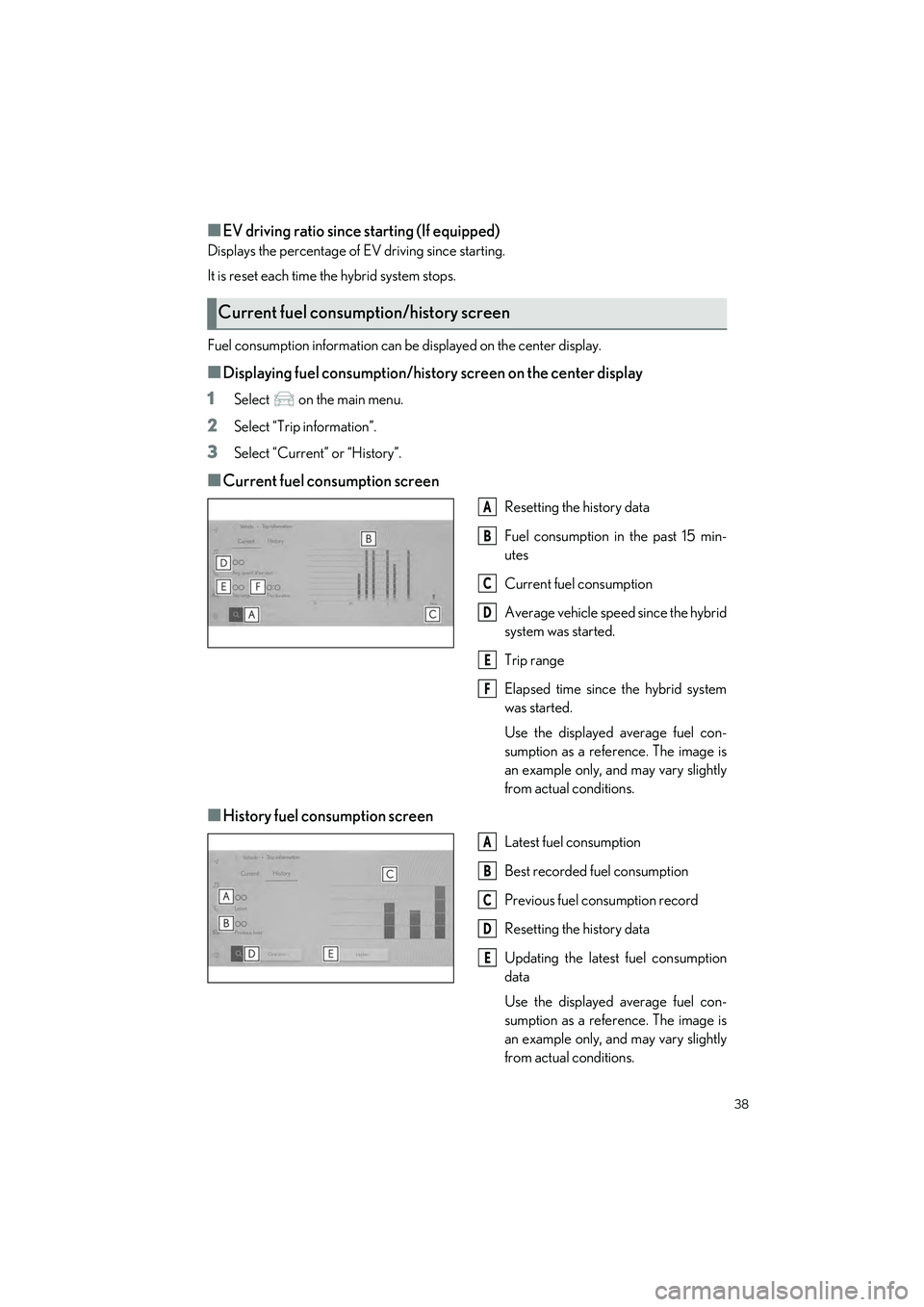
■Current fuel consumption screen
Resetting the history data
Fuel consumption in the past 15 min-
utes
Current fuel consumption
Average vehicle speed since the hybrid
system was started.
Trip range
Elapsed time since the hybrid system
was started.
Use the displayed average fuel con-
sumption as a refe rence. The image is
an example only, and may vary slightly
from actual conditions.
■History fuel consumption screen
Latest fuel consumption
Best recorded fuel consumption
Previous fuel consumption record
Resetting the history data
Updating the latest fuel consumption
data
Use the displayed average fuel con-
sumption as a refe rence. The image is
an example only, and may vary slightly
from actual conditions.
Current fuel consumption/history screen
A
B
C
D
E
F
A
B
C
D
E
Page 40 of 112
39
RX500h/RX350h_QG_U
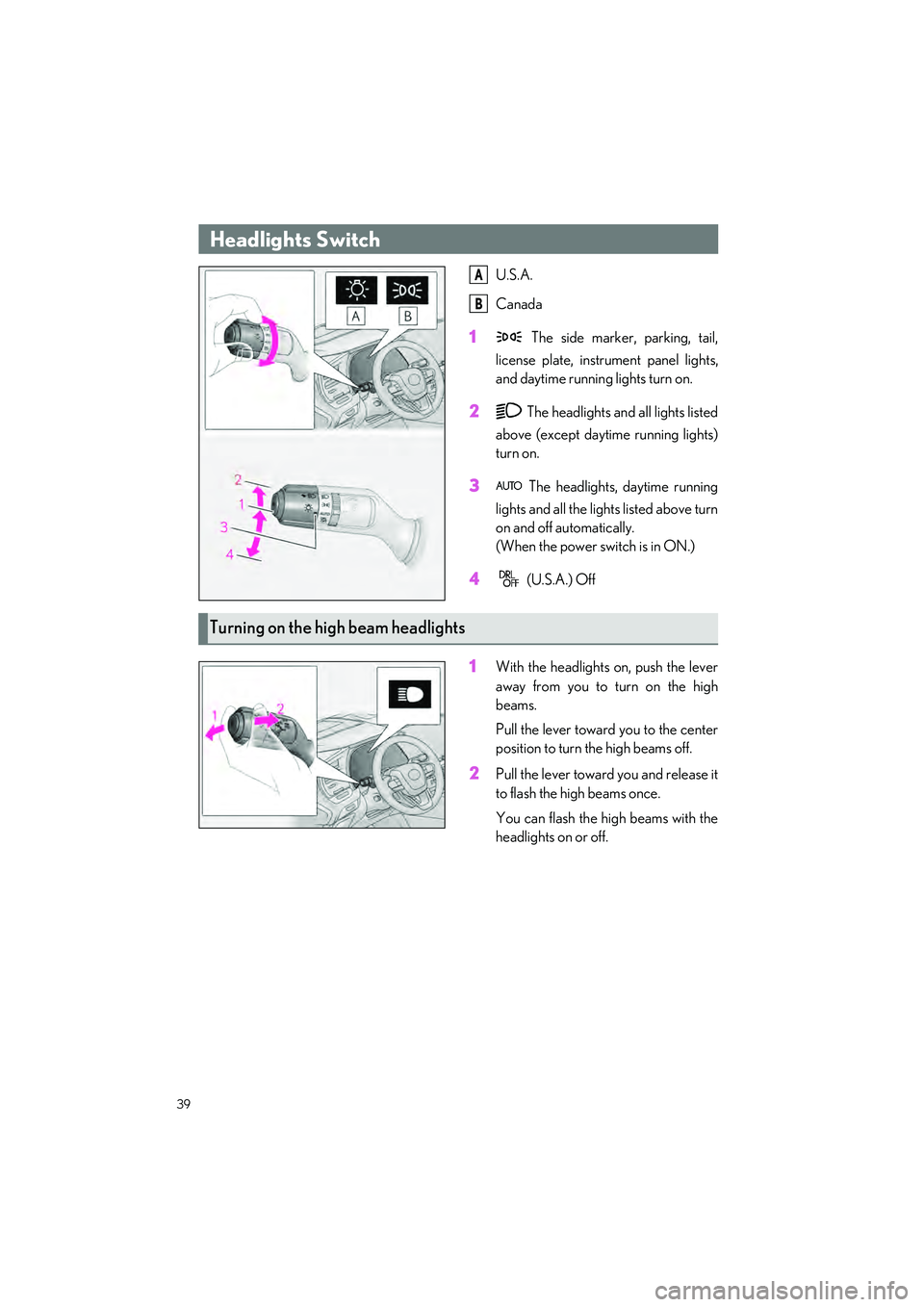
U.S.A.
Canada
1 The side marker, parking, tail,
license plate, inst rument panel lights,
and daytime running lights turn on.
2 The headlights and all lights listed
above (except daytime running lights)
turn on.
3 The headlights, daytime running
lights and all the lights listed above turn
on and off automatically.
(When the power switch is in ON.)
4 (U.S.A.) Off
1With the headlights on, push the lever
away from you to turn on the high
beams.
Pull the lever toward you to the center
position to turn the high beams off.
2Pull the lever toward you and release it
to flash the high beams once.
You can flash the high beams with the
headlights on or off.
Headlights Switch
A
B
Turning on the high beam headlights
Page 41 of 112

40
RX500h/RX350h_QG_U
1Press the Adaptive High-beam System
switch.
2Turn the headlight switch to the or position.
When the headlight switch lever is in
the low beam positi on, the AHS will be
enabled and the AHS indicator will illu-
minate.
AHS (Adaptive High-bea m System) (if equipped)
The Adaptive High-beam System uses a front camera located on the upper portion of the
windshield to detect the brightness of the lights of vehicles ahead, streetlights, etc., and
automatically controls the light distribution of the headlights.
Using the Adaptive High-beam System
Page 43 of 112

42
RX500h/RX350h_QG_U
1Press the Automatic High Beam
switch.
2Turn the headlight switch to the or position.
When the headlight switch lever is in
the low beam position, the AHB system
will be enabled and the AHB indicator
will illuminate.
AHB (Automatic High Beam) (if equipped)
The Automatic High Beam uses a front camera located on the upper portion of the wind-
shield to detect the brightness of the lights of vehicles ahead, streetlights, etc., and auto-
matically changes the head lights between the high beams and low beams.
Using the Automatic High Beam system
Page 45 of 112

44
RX500h/RX350h_QG_U
1 (U.S.A.) or (Canada)
Turns the fog lights off
2 Turns the fog lights on
Fog Light Switch
The fog lights secure excellent vi sibility in difficult driving conditions, such as in rain and
fog.
Page 47 of 112

46
RX500h/RX350h_QG_U
8 Washer/wiper dual operation
Pulling the lever operates the wipers
and washer.
(After operating seve ral times, the wip-
ers operate once more time after a
short delay to prevent dripping. How-
ever, the dripping prevention does not
operate while the vehicle is moving.)
Vehicles with headlight cleaners:
When the power switch is in ON and
the headlights are on, if the lever is
pulled, the headlight cleaners will
operate once. After this, the headlight
cleaners will operate every 5th time
the lever is pulled.
Page 77 of 112

76
RX500h/RX350h_QG_U
Lexus Enform
Microphone
LED light indicators
“SOS” button
Subscribers have the following Safety Connect services available:
● Automatic Collision Notification
*
Helps drivers receive necessary response from emergency service providers.
*: U.S. Patent No. 7,508,298 B2
● Stolen Vehicle Location
Helps drivers in the event of vehicle theft.
● Emergency Assistance Button (“SOS”)
Connects drivers to resp onse-center support.
● Enhanced Roadside Assistance
Provides drivers various on-road assistance.
Safety Connect
Safety Connect is a subscription-based telematics service that uses Global Positioning
System (GPS) data and embedded cellular technology to provide safety and security fea-
tures to subscribers. Safety Connect is supp orted by Lexus’ designated response center,
which operates 24 hours per day, 7 days per week.
Safety Connect service is available by subscription on select, telematics hardware-
equipped vehicles.
By using the Safety Connect service, you are agreeing to be bound by the Telematics
Subscription Service Agreement and its Terms and Conditions, as in effect and amended
from time to time, a current copy of which is available at Lexus.com. All use of the Safety
Connect service is subject to such then-applicable Terms and Conditions.
System components
A
B
C
Services
Page 84 of 112

83
RX500h/RX350h_QG_U
■Opening and closing1
Opens the moon roof*
The moon roof stops slightly before the
fully open position to reduce wind
noise.
Press the switch again to fully open the
moon roof.
2Closes the moon roof*
*
: Lightly press either side of the moon roof switch to stop the moon roof partway.
■Tilting up and down
1
Tilts the moon roof up*
2Tilts the moon roof down*
*
: Lightly press either side of the moon roof switch to stop the moon roof partway.
Moon Roof (if equipped)
Operating the moon roof
Page 85 of 112

84
RX500h/RX350h_QG_U
■Opening and closing the electronic sunshade1
Opens the electronic sunshade
If the switch is pressed and held,
the electronic sunshade will fully open
automatically.
*1
2Closes the electronic sunshade
If the switch is pressed and held,
the electronic sunshade will fully close
automatically.
*2
*1: Lightly press either end of the switch to stop the electronic sunshade
while it is operating.
*2:Lightly press either end of the switch to stop the electronic sunshade
while it is operating.
■Tilting the panoramic moon roof up and down
Tilts the panoramic moon roof up (press)*
When the panoramic moon roof is tilted up,
the electronic sunshade will open to the
half-open position of the roof.
*: Lightly press the switch again to stop the panoramic moon roof partway.
Tilts the panoramic moon roof down (press
and hold)
The panoramic moon roof can be tilted
down only when it is in the tilt-up position.
Panoramic Moon Roof (if equipped)
Operating the panoramic moon roof
Page 86 of 112

85
RX500h/RX350h_QG_U
■Opening and closing the panoramic moon roof1
Opens the panoramic moon roof*1
Lightly press either end of the pan-
oramic moon roof switch to stop
the panoramic moon roof while it is
operating.
The panoramic moon roof can be
opened from the tilt-up position.
2Closes the panoramic moon roof*2
The panoramic moon roof can be
opened from the tilt-up position.
Press the switch. The panoramic
moon roof will fully close automatically.
*1: Lightly press either end of the switch to stop the electronic sunshade
while it is operating.
*2:Lightly press either end of the
switch to stop the electronic sunshade
while it is operating.