lock LEXUS RX 2023 User Guide
[x] Cancel search | Manufacturer: LEXUS, Model Year: 2023, Model line: RX, Model: LEXUS RX 2023Pages: 112, PDF Size: 5.24 MB
Page 89 of 112

88
RX500h/RX350h_QG_U
●Close
Press the switch.
A buzzer will sound and the power back
door will automatically close.
Pressing the switch while the power
back door is closing will stop the operation.
Pressing the switch again will open the
power back door automatically.
● Close the back door and lock all doors after moving away from the back door (close &
lock [Walk-Away] function)
1Close all of the doors except the back
door, carrying an electronic key and
press the switch on the lower part
of the back door.
A different buzzer than the normal one
will sound and the close & lock (Walk-
Away) function will go into standby.
2While the buzzer is sounding, move away from the back door.
When the sensor detects that you are away from the back door, the emergency flashers
will flash, and the buzzer will sound. Depending on the direction of moving away from
the back door, the location and how to hold the electronic key or circumstances, it may
not be detected properly.
All the doors other than the back door will be locked, an d after the back door is closed,
the back door will also be locked. When all the doors have been closed and locked, the
buzzer (if equipped) will sound and the emergency flashers will flash.
The standby state is canceled if you do not move away from the back door for 30 sec-
onds. To operate the function again, perf orm the procedure again from the beginning.
If you approach the back door carrying the el ectronic key, the back door operation will
stop, all the doors will be unlocked, and the buzzer (if equipped) will sound and the
emergency flashers will flash.
If the switch is pressed after the back door operation has stopped, the close & lock
(Walk-Away) function will go into standby again.
Page 90 of 112

89
RX500h/RX350h_QG_U
●Close the back door and lock all doors (close & lock function)*
*
: This setting can be customiz ed by your Lexus dealer.
Press the switch.
The power back door will close and all of
the doors will be locked at the same time.
A different buzzer than the normal one will
sound and the power back door will begin
closing automatically. When the power
back door is closed, all of the doors will lock
simultaneously and operation signals will
indicate that all of the doors have been
locked.
If the switch is pressed while the power
back door is closing, the operation will stop.
Pressing the switch again will open the
power back door automatically.
■Hands Free Power Back Door (if equipped)
1
While carrying an electronic key, stand with in the smart access system with push-but-
ton start operation range, approximately 19.7 to 23.6 in. (50 to 60 cm) from the rear
bumper.
Type A
Kick sensor
Hands Free Power Back Door opera-
tion detection area
Smart access system with push-button
start operation detection area
A
B
C
Page 91 of 112

90
RX500h/RX350h_QG_U
Type B
Kick sensor
Hands Free Power Back Door opera-
tion detection area
Smart access system with push-button
start operation detection area
2Perform a kick operation by moving
your foot to within approximately 3.9
in. (10 cm) of the rear bumper and then
pulling your foot back after the buzzer
sounds.
• Perform the entire kick operationwithin 1 second.
• The Hands Free Power Back Door will not start operating while a foot is
detected under the rear bumper.
• Operate the Hands Free Power Back Door without contacting the rear
bumper with your foot.
• If another electronic key is in the cabin or luggage compartment, it
may take slightly longer than normal
for the operation to occur.
• If the buzzer sounds twice, perform a kick operation again.
Kick sensor
Hands Free Power Back Door opera-
tion detection area
3When the kick sensor detects that your foot is pulled back, a buzzer will sound and the
power back door will automatically fully open/close.
If kick operation is performed again in the middle of back door op erating, the operation
will stop.
■Closing and locking the back door after moving away from the back door using
the kick sensor (Hands Free clos e & lock [Walk-Away] function)
*1, 2
*1:If equipped
*2: This setting can be customized by your Lexus dealer.
A
B
C
A
B
Page 93 of 112

92
RX500h/RX350h_QG_U
3When the kick sensor detects that your foot is pulled back, a different buzzer than the
normal one will sound and the Hands Free close & lock (Walk-Away) function will go
into standby.
4While the buzzer is sounding, move away from the back door.
When the sensor detects that you are away from the back door, the emergency flashers
will flash, and the buzzer will sound. Depending on the direction of moving away from
the back door, the location and how to hold the electronic key or circumstances, it may
not be detected properly.
All the doors other than the back door will be locked, an d after the back door is closed,
the back door will also be locked. When all the doors have been closed and locked, the
buzzer (if equipped) will sound and the emergency flashers will flash.
The standby state is canceled if you do not move away from the back door for 30 sec-
onds. To operate the function again, perf orm the procedure again from the beginning.
If you approach the back door carrying the el ectronic key, the back door operation will
stop, all the doors will be unlocked, and the buzzer (if equipped) will sound and the
emergency flashers will flash.
If the power back door is operated after the back door operation has stopped, the
Hands Free close & lock (Walk-Away) fu nction will go into standby again.
Page 94 of 112

93
RX500h/RX350h_QG_U
■HomeLink® programming procedure
The programming procedures can also be found at the following URL.
Website: www.homelink.com/lexus
For support, contact customer support at the following.
Help Line: 1-800-355-3515
The HomeLink
® wireless control system in your vehicle has 3 buttons which can be pro-
grammed to operate 3 different devices. Refe r to the programming methods on the follow-
ing pages to determine the method wh ich is appropriate for the device.
Vehicles with auto anti-glare inside rear view mirror
HomeLink
® indicator light
Garage door operation indicators
HomeLink
® icon
Illuminates while HomeLink
® is oper-
ating.
Buttons
Garage Door Opener
The garage door opener can be programmed using the HomeLink® to operate garage
doors, gates, entry doors, door locks, home lighting systems, security systems, and other
devices.
System components
A
B
C
D
Page 105 of 112
104
What to do if...
RX500h/RX350h_QG_U
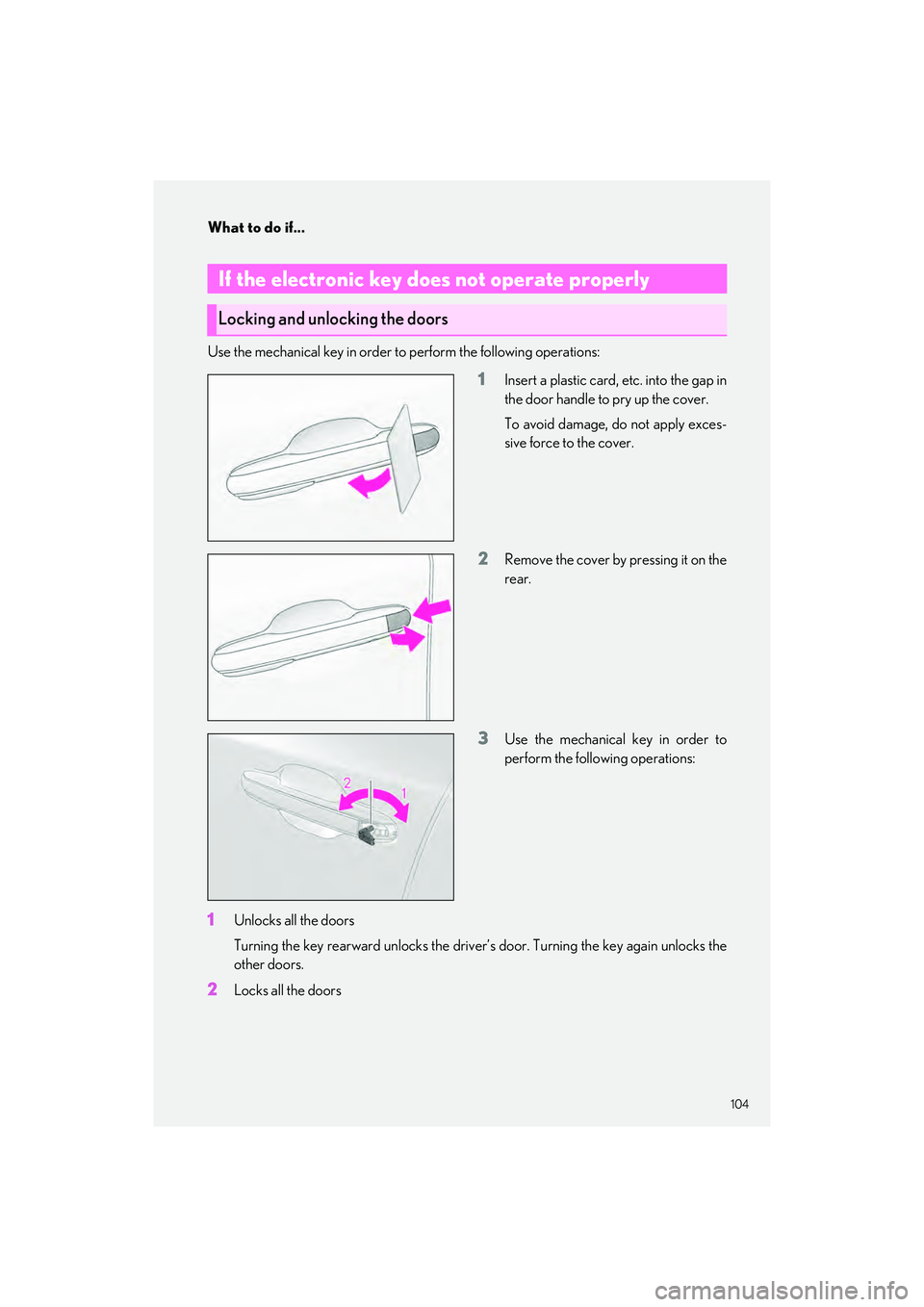
Use the mechanical key in order to perform the following operations:
1Insert a plastic card, etc. into the gap in
the door handle to pry up the cover.
To avoid damage, do not apply exces-
sive force to the cover.
2Remove the cover by pressing it on the
rear.
3Use the mechanical key in order to
perform the following operations:
1Unlocks all the doors
Turning the key rearward unlo cks the driver’s door. Turning the key again unlocks the
other doors.
2Locks all the doors
If the electronic key does not operate properly
Locking and unlocking the doors
Page 109 of 112
108
What to do if...
RX500h/RX350h_QG_U
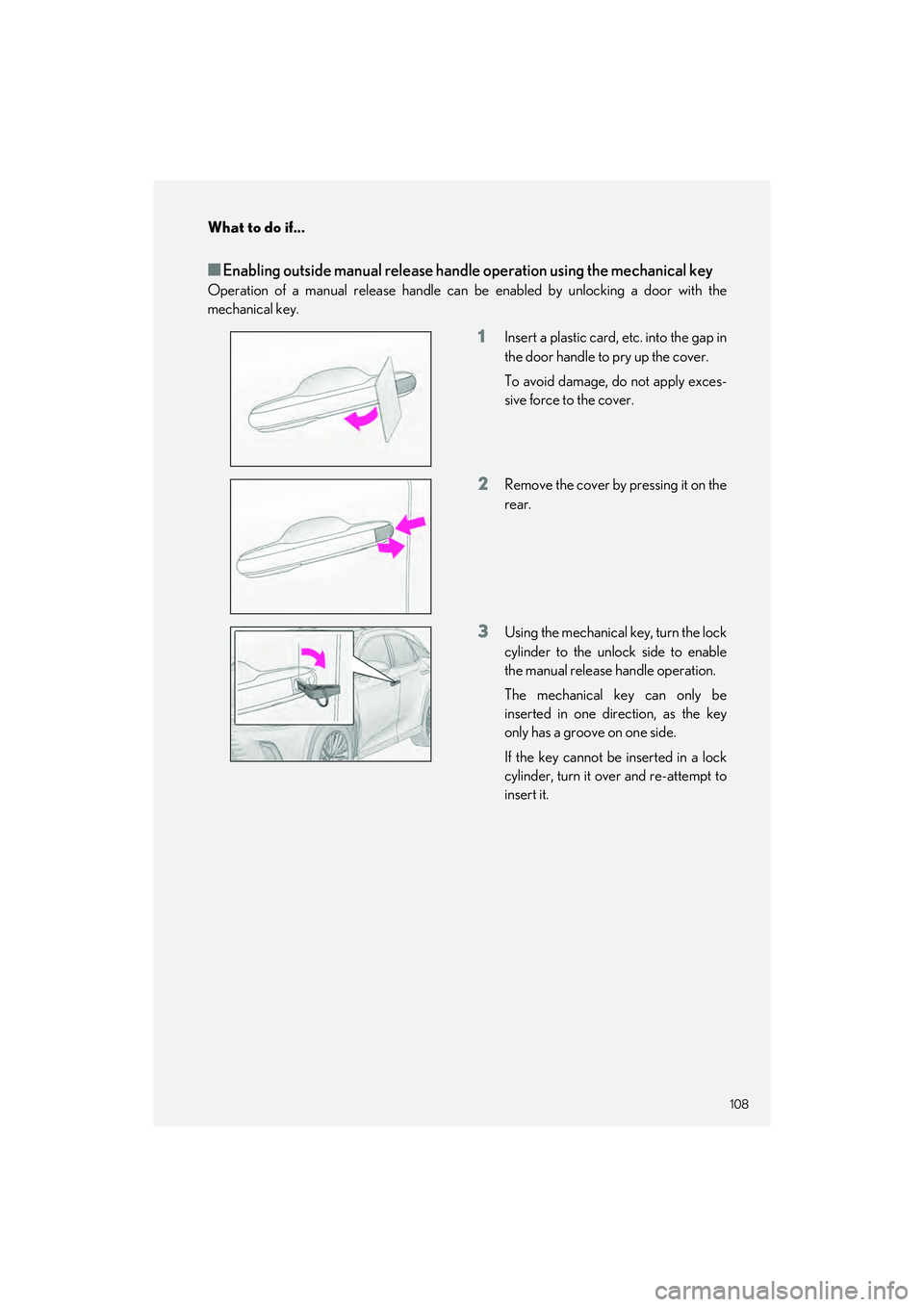
■Enabling outside manual release handle operation using the mechanical key
Operation of a manual release handle can be enabled by unlocking a door with the
mechanical key.
1Insert a plastic card, etc. into the gap in
the door handle to pry up the cover.
To avoid damage, do not apply exces-
sive force to the cover.
2Remove the cover by pressing it on the
rear.
3Using the mechanical key, turn the lock
cylinder to the unlock side to enable
the manual release handle operation.
The mechanical key can only be
inserted in one direction, as the key
only has a groove on one side.
If the key cannot be inserted in a lock
cylinder, turn it over and re-attempt to
insert it.