change wheel LEXUS RX200T 2017 User Guide
[x] Cancel search | Manufacturer: LEXUS, Model Year: 2017, Model line: RX200T, Model: LEXUS RX200T 2017Pages: 776, PDF Size: 44.51 MB
Page 415 of 776
4154-5. Using the driving support systems
4
Driving
RX350/RX200t_EE_OM48F32E
WARNING
■When using the Lexus parking assist monitor system
The parking assist monitor is a supplemental device intended to assist the driver when backing up. When backing up, be sure to check visually behind and all around the vehi-
cle before proceeding.
Observe the following precautions to avoid an accident that could result in death or serious injuries.
●Never depend on the parking assist monitor entirely when backing up. The imageand the position of the guide lines displayed on the screen may differ from the actualstate.
Use caution, just as you would when backing up any vehicle.
●Be sure to back up slowly, depressing the brake pedal to control vehicle speed.
●If you seem likely to hit nearby vehicles , obstacles, people or mount the shoulder,
depress the brake pedal to stop the vehicle.
●The instructions given are only guidelines. When and how much to turn the steering wheel will vary according to traffic condi-
tions, road surface conditions, vehicle condition, etc. when parking. It is necessary to be fully aware of this before using the parking assist system.
●When parking, be sure to check that th e parking space will accommodate your vehi-
cle before maneuvering into it.
●Do not use the parking assist monitor in the following cases:
• On icy or slick road surfaces, or in snow
• When using tire chains or emergency tires • When the back door is not closed completely• On roads that are not flat or straight, such as curves or slopes.
●In low temperatures, the screen may darken or the image may become faint. Theimage could distort when the vehicle is moving, or you may become unable to see the
image on the screen. Be sure to check direct visually and with the mirrors all around the vehicle before proceeding.
●If the tire sizes are changed, the position of the guide lines displayed on the screen
may change.
●The camera uses a special lens. The distances between objects and pedestrians that appear in the image displayed on the screen will differ from the actual distances.
( P. 409)
●Estimated course line display mode: If the steering wheel is straight and the vehicle width guide lines and the estimated course lin es are not in alignment, have the vehicle
inspected by any authorized Lexus dealer or repairer, or another duly qualified and equipped professional.
Page 431 of 776
4314-6. Driving tips
4
Driving
RX350/RX200t_EE_OM48F32E
To enable the windshield wipers to be lifted when heavy snow or icy conditions
are expected, change the rest position of the windshield wipers from the
retracted position below the hood to the service position using the wiper lever.
( P. 283)
■Tire chain installation
Observe the following precautions wh en installing and removing chains:
●Install and remove tire chains in a safe location.
●Install tire chains on the front tires only. Do not install tire chains on the rear tires.
●Install tire chains on front tires as tightly as possible. Retighten chains after driving
0.5 - 1.0 km (1/4 - 1/2 mile).
●Install tire chains following the instru ctions provided with the tire chains.
Windshield wipers
WARNING
■Driving with snow tires
Observe the following precautions to reduce the risk of accidents. Failure to do so may result in a loss of vehicle control and cause death or serious injury.
●Use tires of the specified size.
●Maintain the recommended level of air pressure.
●Do not drive at speeds in excess of the speed limit or the speed limit specified for the
snow tires being used.
●Use snow tires on all, not just some wheels.
■Driving with tire chains
Observe the following precautions to reduce the risk of accidents. Failure to do so may result in the vehicle being unable to be driven safely, and may cause death or serious injury.
●Do not drive in excess of the speed limit sp ecified for the tire chains being used, or 50 km/h (30 mph), whichever is lower.
●Avoid driving on bumpy road surfaces or over potholes.
●Avoid sudden acceleration, abrupt steering, sudden braking and shifting operations that cause sudden engine braking.
●Slow down sufficiently before entering a curve to ensure that vehicle control is main-
tained.
●Do not use the LKA (Lane-Keeping Assist) system. (if equipped)
Page 434 of 776
4344-6. Driving tips
RX350/RX200t_EE_OM48F32E
Your vehicle is not designed to be driven off-road. However, in the event that off-
road driving cannot be avoided, please observe the following precautions to help
avoid the areas prohibited to vehicles.
●Drive your vehicle only in areas where off-road vehicles are permitted to
travel.
●Respect private property. Get owner’s permission before entering private
property.
●Do not enter areas that are closed. Honor gates, barriers and signs that
restrict travel.
●Stay on established roads. When co nditions are wet, driving techniques
should be changed or travel delayed to prevent damage to roads.
Off-road driving
WARNING
■Off-road driving precautions
Always observe the following precautions to minimize the risk of death, serious injury
or damage to your vehicle:
●Drive carefully when off the road. Do not ta ke unnecessary risks by driving in danger- ous places.
●Do not grip the steering wheel spokes when driving off-road. A bad bump could jerkthe wheel and injure your hands. Keep both hands and especially your thumbs on the outside of the rim.
●Always check your brakes for effectivene ss immediately after driving in sand, mud, water or snow.
●After driving through tall grass, mud, rock, sand, rivers, etc., check that there is no
grass, bush, paper, rags, stone, sand, etc. adhering or trapped on the underbody. Clear off any such matter from the underbody. If the vehicle is used with these materi- als trapped or adhering to the underb ody, a breakdown or fire could occur.
●When driving off-road or in rugged terrain, do not drive at excessive speeds, jump, make sharp turns, strike objects, etc. This may cause loss of control or vehicle rollover causing death or serious injury. You are also risking expensive damage to your vehi-
cle’s suspension and chassis.
Page 455 of 776
455
5
Lexus Display Audio system
RX350/RX200t_EE_OM48F32E
5-3. Using the audio system
Press the “AUDIO” button to display the “Source” screen.
If the “Source” screen is not displayed, press the button again.
Select the desired audio source.
The audio source can be selected by pressing the “RADIO” or “MEDIA” button.
Press the “MODE” switch when the audio system is turned on. The audio source
changes each time the “MODE” switch is pressed.
■Rearranging the list
The listing order of the source list can be rearranged.
Move the controller to the left while on the “Source” screen.
Select “Audio source select”.
Select an item you wish to move and then select where to move the item to.
Selecting the audio source
Switching between audio sources, such as the radio and CD, is explained in
this section.
Changing audio source
Using the steering wheel switches to change audio sources
1
2
1
2
3
Page 499 of 776
4995-9. Bluetooth® Phone
5
Lexus Display Audio system
RX350/RX200t_EE_OM48F32E
Select “Handset mode” to change from a hands-free call to a cellular phone call
or vice versa.
Press the on-hook switch on the steering wheel or select .
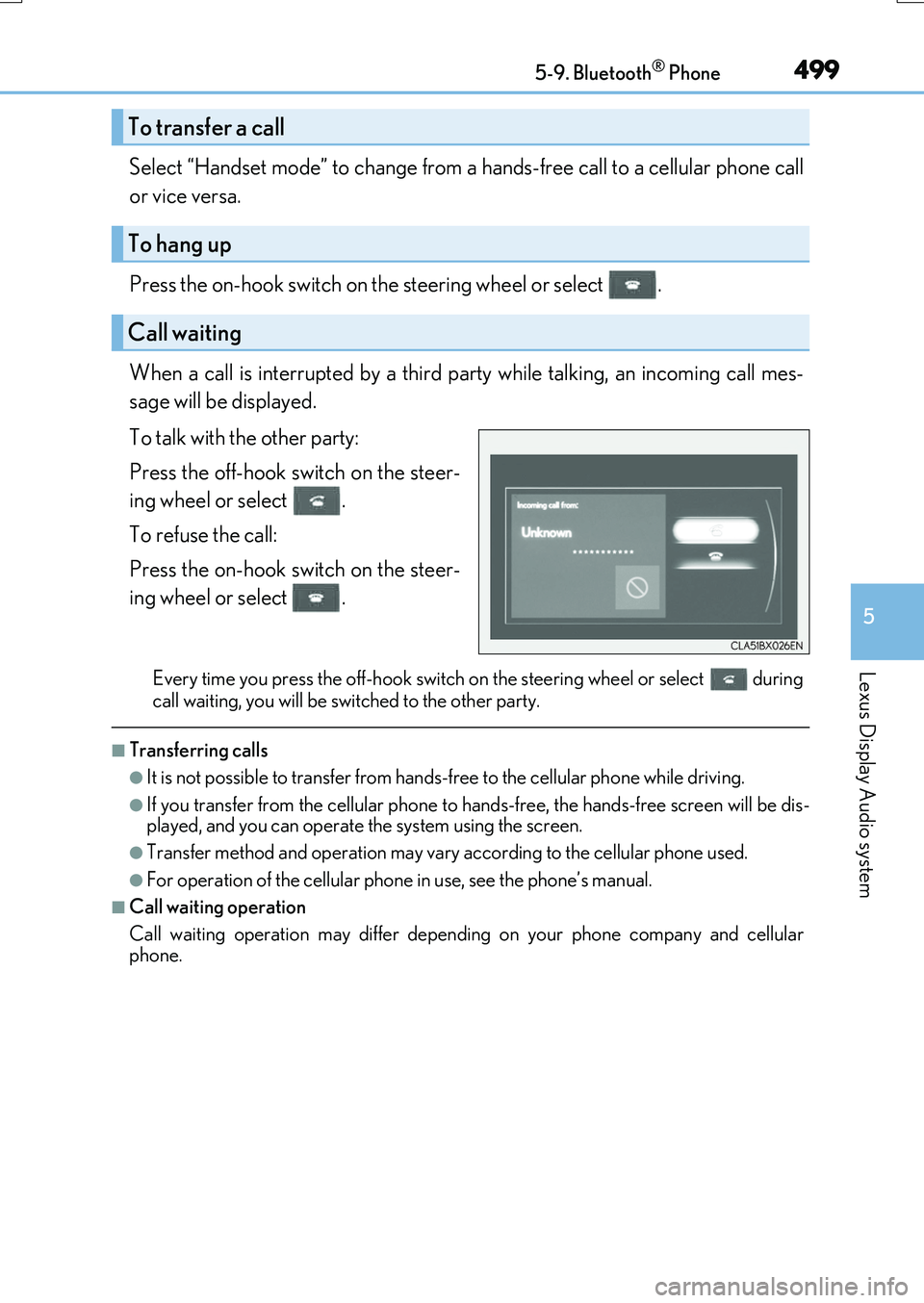
When a call is interrupted by a third party while talking, an incoming call mes-
sage will be displayed.
To talk with the other party:
Press the off-hook switch on the steer-
ing wheel or select .
To refuse the call:
Press the on-hook switch on the steer-
ing wheel or select .
Every time you press the off-hook switch on the steering wheel or select during
call waiting, you will be sw itched to the other party.
■Transferring calls
●It is not possible to transfer from hands-free to the cellular phone while driving.
●If you transfer from the cellul ar phone to hands-free, the hands-free screen will be dis-
played, and you can operate the system using the screen.
●Transfer method and operation may vary according to the cellular phone used.
●For operation of the cellular phone in use, see the phone’s manual.
■Call waiting operation
Call waiting operation may differ dependin g on your phone company and cellular
phone.
To transfer a call
To hang up
Call waiting
Page 550 of 776
5506-2. Using the air conditioning system and defogger
RX350/RX200t_EE_OM48F32E
■Operation condition
The heated steering wheel can be used when the engine switch is in IGNITION ON mode.
■Timer
The heated steering wheel will automatically turn off after about 30 minutes.
■When the heated steering wheel is operating
If the Heated Windshield Defroster is operated, operation of the heated steering wheel
will be suspended. Turn off the Heated Windsh ield Defroster to enable the heated steer- ing wheel. ( P. 543)
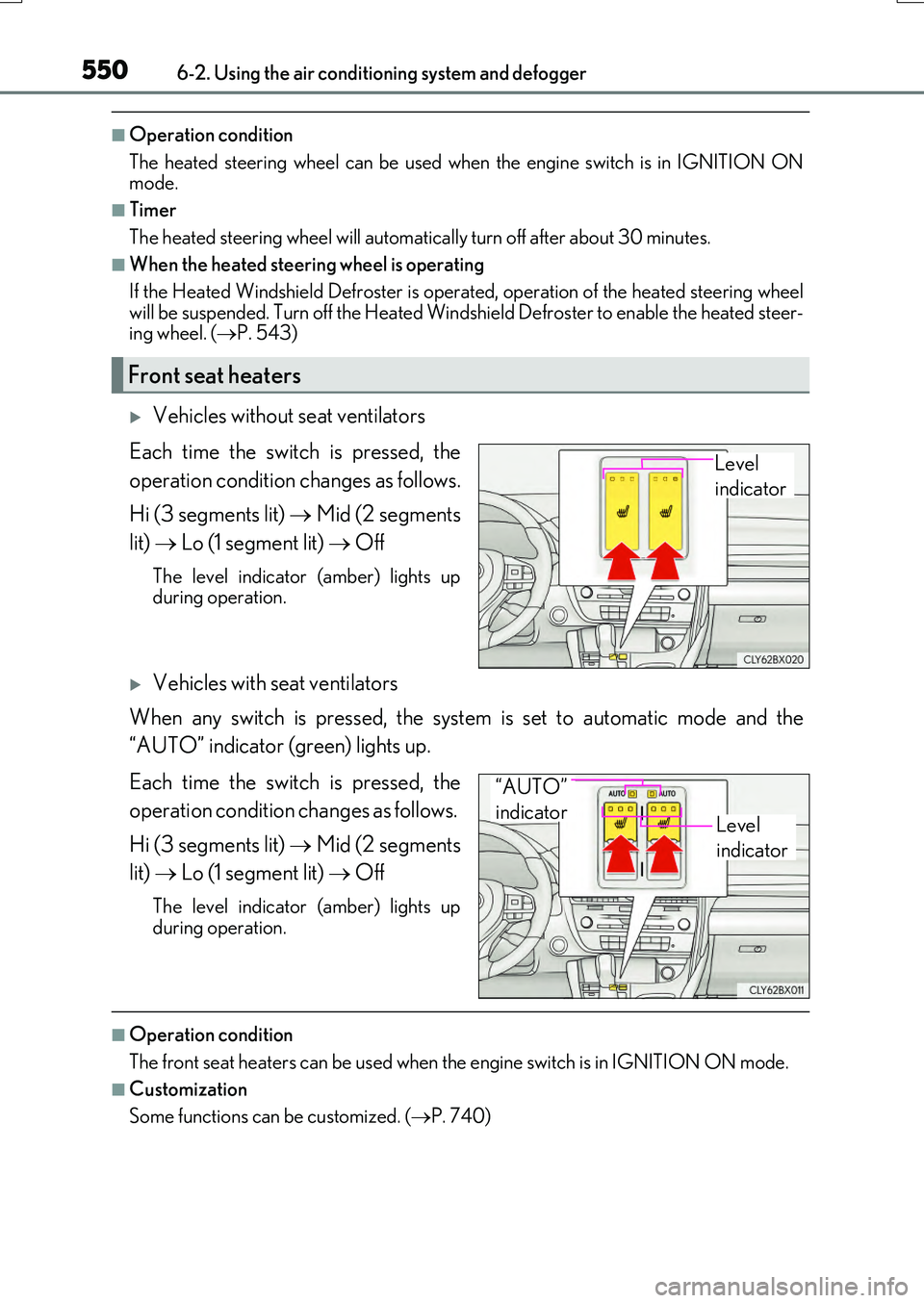
Vehicles without seat ventilators
Each time the switch is pressed, the
operation condition changes as follows.
Hi (3 segments lit) Mid (2 segments
lit) Lo (1 segment lit) Off
The level indicator (amber) lights up during operation.
Vehicles with seat ventilators
When any switch is pressed, the system is set to automatic mode and the
“AUTO” indicator (green) lights up.
Each time the switch is pressed, the
operation condition changes as follows.
Hi (3 segments lit) Mid (2 segments
lit) Lo (1 segment lit) Off
The level indicator (amber) lights up
during operation.
■Operation condition
The front seat heaters can be used when th e engine switch is in IGNITION ON mode.
■Customization
Some functions can be customized. ( P. 740)
Front seat heaters
Level
indicator
Level
indicator
“AUTO”
indicator
Page 615 of 776
6157-3. Do-it-yourself maintenance
7
Maintenance and care
RX350/RX200t_EE_OM48F32E
◆Installing tire pressure warning valves and transmitters
When replacing tires or wheels, tire pressure warning valves and transmitters
must also be installed.
When new tire pressure warning valves and transmitters are installed, new ID
codes must be registered in the tire pressure warning computer and the tire
pressure warning system must be initialized. Have tire pressure warning valve
and transmitter ID codes registered by any authorized Lexus dealer or
repairer, or another duly qualified and equipped professional. ( P. 617)
◆Initializing the tire pressure warning system
■The tire pressure warning system must be initialized in the following circum-
stances:
●When the tire inflation pressure is changed such as when changing
traveling speed.
●When the tire inflation pressure is changed such as when the tire size is
changed.
●When rotating the tires
When the tire pressure warning system is initialized, the current tire inflation
pressure is set as the benchmark pressure.
Page 672 of 776
6728-2. Steps to take in an emergency
RX350/RX200t_EE_OM48F32E
WARNING
■If the tire pressure warning light comes on
Be sure to observe the following precautions. Failure to do so could cause a loss of vehicle control and result in death or serious injury.
●Stop your vehicle in a safe place as soon as possible. Adjust the tire inflation pressureimmediately.
●Vehicles with a spare tire: If the tire pressure warning light comes on even after tire
inflation pressure adjustment, it is probable that you have a flat tire. Check the tires. If a tire is flat, change it with the spare tire and have the flat tire repaired by the nearest any authorized Lexus dealer or repairer, or another duly qualified and equipped pro-
fessional.
●Vehicles with an emergency tire puncture repair kit: If the tire pressure warning light comes on even after tire inflation pressure adjustment, it is probable that you have a
flat tire. Check the tires. If a tire is flat, re pair the flat tire by using emergency tire punc- ture repair kit.
●Avoid abrupt maneuvering and braking. If th e vehicle tires deteriorate, you could lose
control of the steering wheel or the brakes.
■If a blowout or sudden air leakage should occur
The tire pressure warning system may not activate immediately.
NOTICE
■To ensure the tire pressure warning system operates properly
Do not install tires with different specifications or makers, as the tire pressure warning system may not operate properly.