cruise control LEXUS RX200T 2017 User Guide
[x] Cancel search | Manufacturer: LEXUS, Model Year: 2017, Model line: RX200T, Model: LEXUS RX200T 2017Pages: 776, PDF Size: 44.51 MB
Page 313 of 776
3134-5. Using the driving support systems
4
Driving
RX350/RX200t_EE_OM48F32E
When driving on highways and freeways with white or yellow lines, this function
alerts the driver when the vehicle might depart from its lane and provides assis-
tance by operating the steering wheel to keep the vehicle in its lane. Further-
more, the system also provides steering assistance when dynamic radar cruise
control with full-speed range is operating to keep the vehicle in its lane.
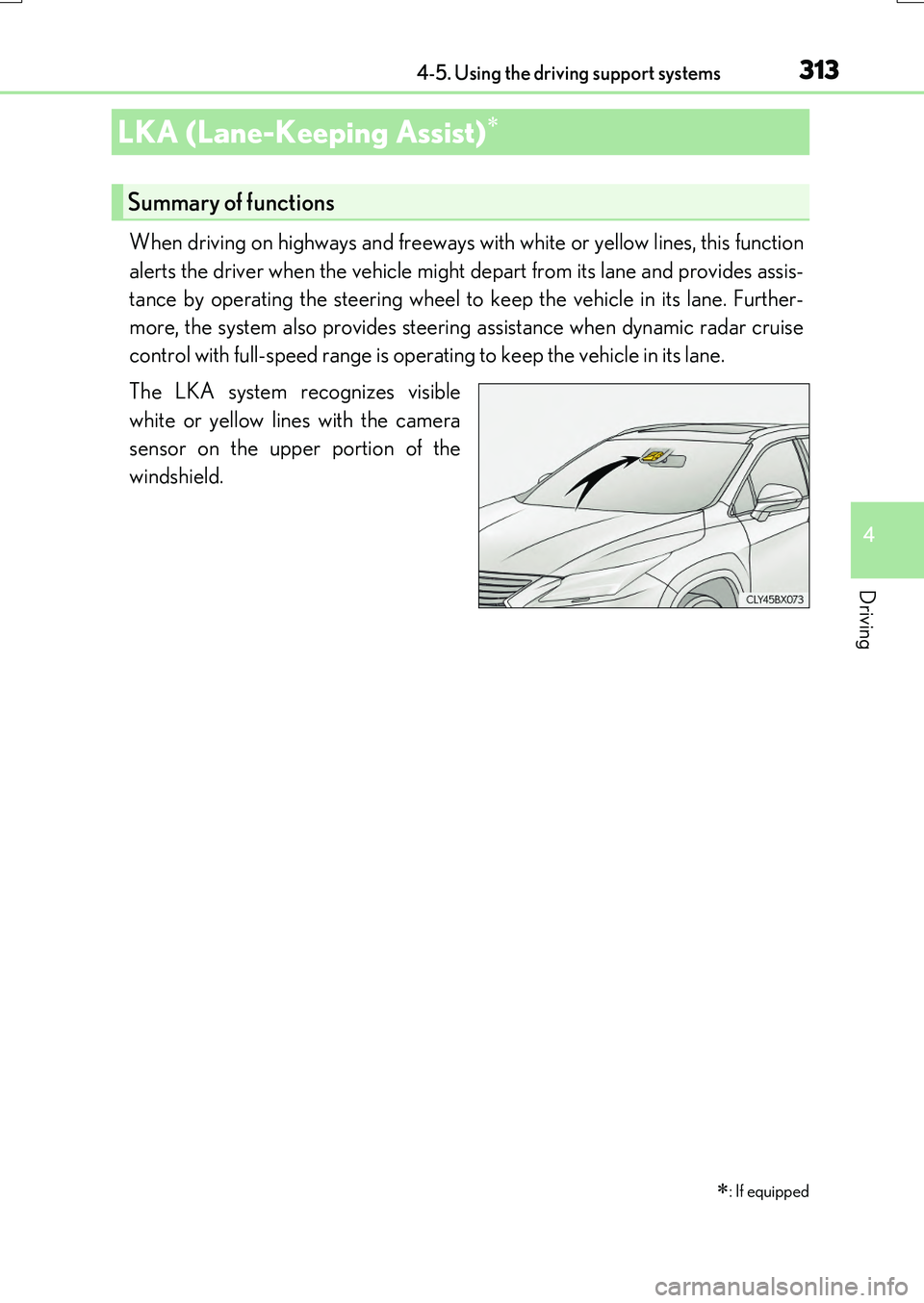
The LKA system recognizes visible
white or yellow lines with the camera
sensor on the upper portion of the
windshield.
LKA (Lane-Keeping Assist)
: If equipped
Summary of functions
Page 316 of 776
3164-5. Using the driving support systems
RX350/RX200t_EE_OM48F32E
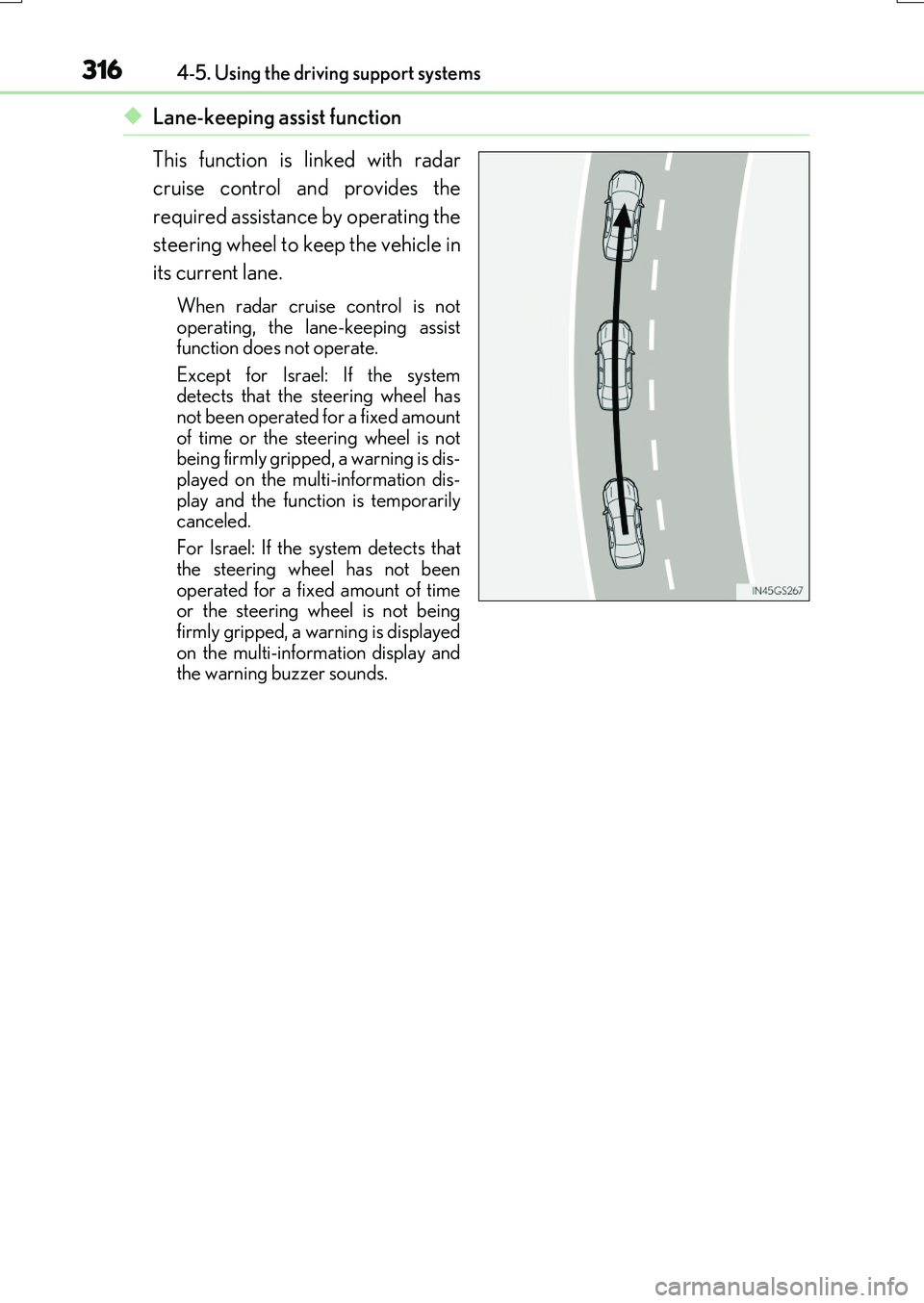
◆Lane-keeping assist function
This function is linked with radar
cruise control and provides the
required assistance by operating the
steering wheel to keep the vehicle in
its current lane.
When radar cruise control is not operating, the lane-keeping assistfunction does not operate.
Except for Israel: If the system detects that the steering wheel hasnot been operated for a fixed amount
of time or the steering wheel is not being firmly gripped, a warning is dis-played on the multi-information dis-
play and the function is temporarily canceled.
For Israel: If the system detects that
the steering wheel has not been operated for a fixed amount of timeor the steering wheel is not being
firmly gripped, a warning is displayed on the multi-information display andthe warning buzzer sounds.
Page 320 of 776
3204-5. Using the driving support systems
RX350/RX200t_EE_OM48F32E
■Operation conditions of each function
●Lane departure alert function
This function operates when all of the following conditions are met.
• LKA is turned on.
• Vehicle speed is approximately 50 km/h (32 mph) or more.
• System recognizes white (yellow) lines.
• Width of traffic lane is approximately 3 m (9.8 ft.) or more.
• Turn signal lever is not operated.
• Vehicle is driven on a straight road or around a gentle curve with a radius of more than approximately 150 m (492 ft.).
• No system malfunctions are detected. ( P. 666)
●Lane departure control function
This function operates when all of the follo wing conditions are met in addition to the
operation conditions for the la ne departure alert function.
• Setting for “Steering Assist” in of the multi-information display is set to “On”.
( P. 110)
• Vehicle is not accelerated or decelerated by a fixed amount or more.
• Steering wheel is not operated with a steering force level suitable for changing
lanes.
• ABS, VSC, TRC and PCS are not operating.
• TRC or VSC is not turned off.
• Except for Israel: Hands off steerin g wheel alert is not displayed. (P. 321)
●Vehicle sway warning
This function operates when all of the following conditions are met.
• Setting for “Sway Warning” in of the multi-information display is set to “On”.
( P. 110)
• Vehicle speed is approximately 50 km/h (32 mph) or more.
• Width of traffic lane is approximately 3 m (9.8 ft.) or more.
• No system malfunctions are detected. ( P. 666)
●Lane-keeping assist function
This function operates when all of the following conditions are met.
• LKA is turned on.
• Setting for “Lane Center” in of the mu lti-information display are set to “On”.
( P. 110)
• System recognizes white (yellow) lines.
• Dynamic radar cruise control with full-speed range is operating.
• Width of traffic lane is approximately 2.5 to 4.1 m (8.2 to 13.5 ft.).
• Turn signal lever is not operated.
• Vehicle is driven on a straight road or around a gentle curve with a radius of more
than approximately 200 m (656 ft.).
• No system malfunctions are detected. ( P. 666)
• Vehicle does not accelerate or de celerate by a fixed amount or more.
• Steering wheel is not operated with a steering force level suitable for changing
lanes.
• ABS, VSC, TRC and PCS are not operating.
• TRC or VSC is not turned off.
• Except for Israel: Hands off steering wheel alert ( P. 321) is not displayed.
• Lane departure control function is not operating.
Page 329 of 776
3294-5. Using the driving support systems
4
Driving
RX350/RX200t_EE_OM48F32E
In vehicle-to-vehicle distance control mode, the vehicle automatically acceler-
ates, decelerates and stops to match the speed changes of the preceding vehicle
even if the accelerator pedal is not depr essed. In constant speed control mode,
the vehicle runs at a fixed speed.
Use the dynamic radar cruise control with full-speed range on freeways and
highways.
●Vehicle-to-vehicle distance control mode ( P. 332)
●Constant speed control mode (P. 337)
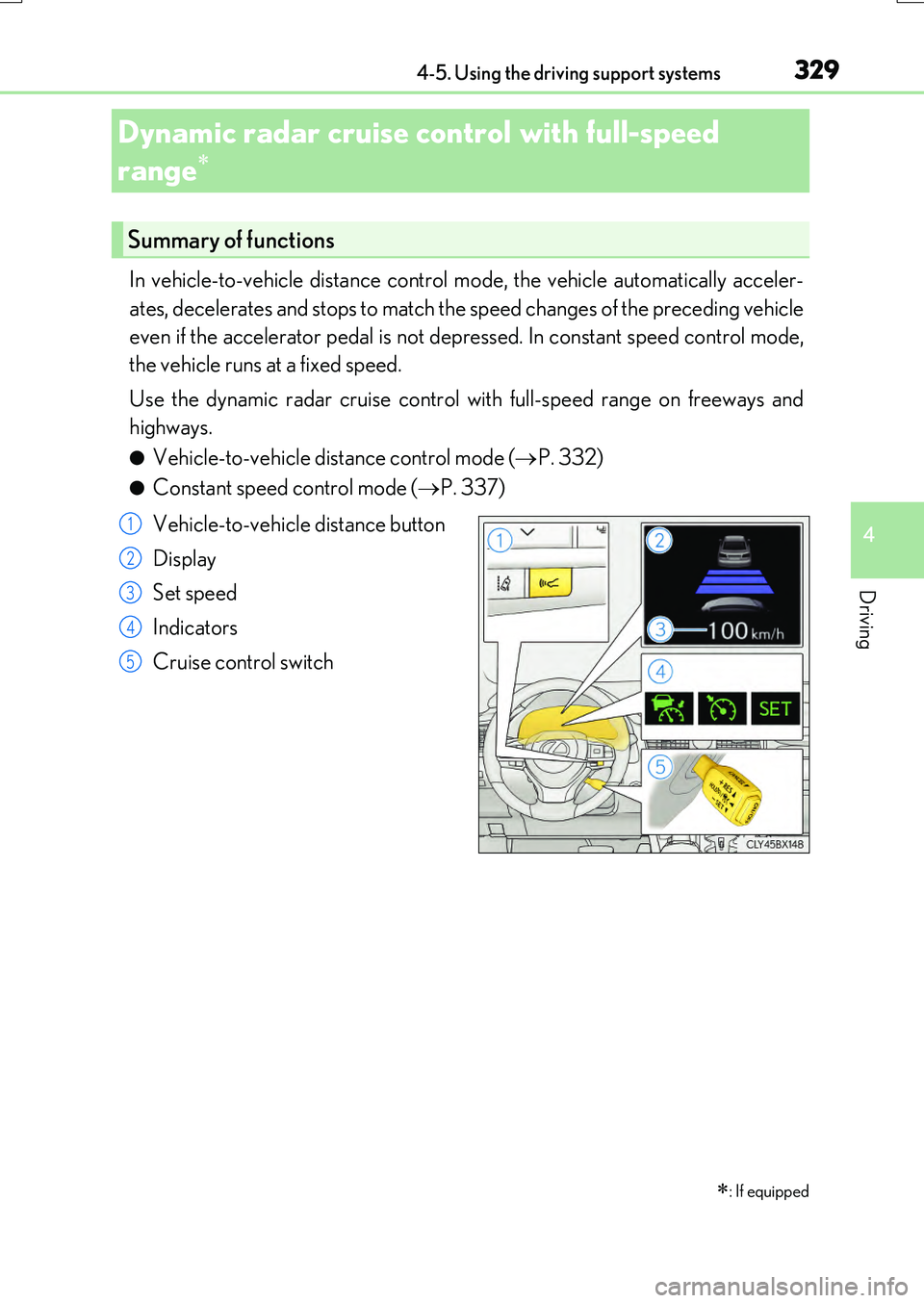
Vehicle-to-vehicle distance button
Display
Set speed
Indicators
Cruise control switch
Dynamic radar cruise control with full-speed
range
: If equipped
Summary of functions
1
2
3
4
5
Page 330 of 776
3304-5. Using the driving support systems
RX350/RX200t_EE_OM48F32E
WARNING
■Before using dynamic radar cruise control with full-speed range
Driving safely is the sole resp onsibility of the driver. Do not rely solely on the system, and drive safely by always paying careful attention to your surroundings.
The dynamic radar cruise control with full- speed range provides driving assistance to reduce the driver's burden. However, there are limitations to the assistance provided.
Even when the system is functioning norma lly, the condition of the preceding vehicle as
detected by the system may differ from the condition observed by the driver. There- fore, the driver must always remain alert, as sess the danger of each situation and drive safely. Relying on this system or assuming the system ensures safety while driving can
lead to an accident, resulting in death or serious injury.
■Cautions regarding the driving assist systems
Observe the following precautions, as there are limitations to the assistance provided
by the system. Failure to do so may cause an accident resulting in death or serious injury.
●Assisting the driver to measure following distance
The dynamic radar cruise control with full-sp eed range is only intended to help the driver in determining the fo llowing distance between the driver’s own vehicle and a designated vehicle traveling ahead. It is no t a mechanism that allows careless or inat-
tentive driving, and it is not a system that can assist the driver in low-visibility condi- tions. It is still necessary for driver to pay close attention to the vehicle’s surroundings.
●Assisting the driver to judge proper following distance
The dynamic radar cruise control with full-speed range determines whether the fol- lowing distance between the driver’s own vehicle and a designated vehicle traveling ahead is within a set range. It is not capable of making any other type of judgement.
Therefore, it is absolutely necessary for the driver to remain vigilant and to determine whether or not there is a possibility of danger in any given situation.
●Assisting the driver to operate the vehicle
The dynamic radar cruise control with full-speed range has limited capability to pre- vent or avoid a collision with a vehicle trave ling ahead. Therefore, if there is ever any danger, the driver must take immediate and direct control of the vehicle and act
appropriately in order to ensure the safety of all involved.
■To avoid inadvertent dynamic radar cruise control with full-speed range activation
Switch the dynamic radar cruise control wi th full-speed range off using the “ON/OFF”
button when not in use.
Page 331 of 776
3314-5. Using the driving support systems
4
Driving
RX350/RX200t_EE_OM48F32E
WARNING
■Situations unsuitable for dynamic radar cruise control with full-speed range
Do not use dynamic radar cruise control with full-speed range in any of the following situations.
Doing so may result in inappropriate speed control and could cause an accident result- ing in death or serious injury.
●Roads where there are pedestrians, cyclers, etc.
●In heavy traffic
●On roads with sharp bends
●On winding roads
●On slippery roads, such as those covered with rain, ice or snow
●On steep downhills, or where there are sudden changes between sharp up and downgradients
Vehicle speed may exceed the set sp eed when driving down a steep hill.
●At entrances to freeways and highways
●When weather conditions are bad enough that they may prevent the sensors from
detecting correctly (fog, snow, sandstorm, heavy rain, etc.)
●When there is rain, snow, etc. on the fron t surface of the radar sensor or camera sen- sor
●In traffic conditions that require frequent repeated acceleration and deceleration
●When your vehicle is towing a trailer or during emergency towing
●When an approach warning buzzer is heard often
Page 332 of 776
3324-5. Using the driving support systems
RX350/RX200t_EE_OM48F32E
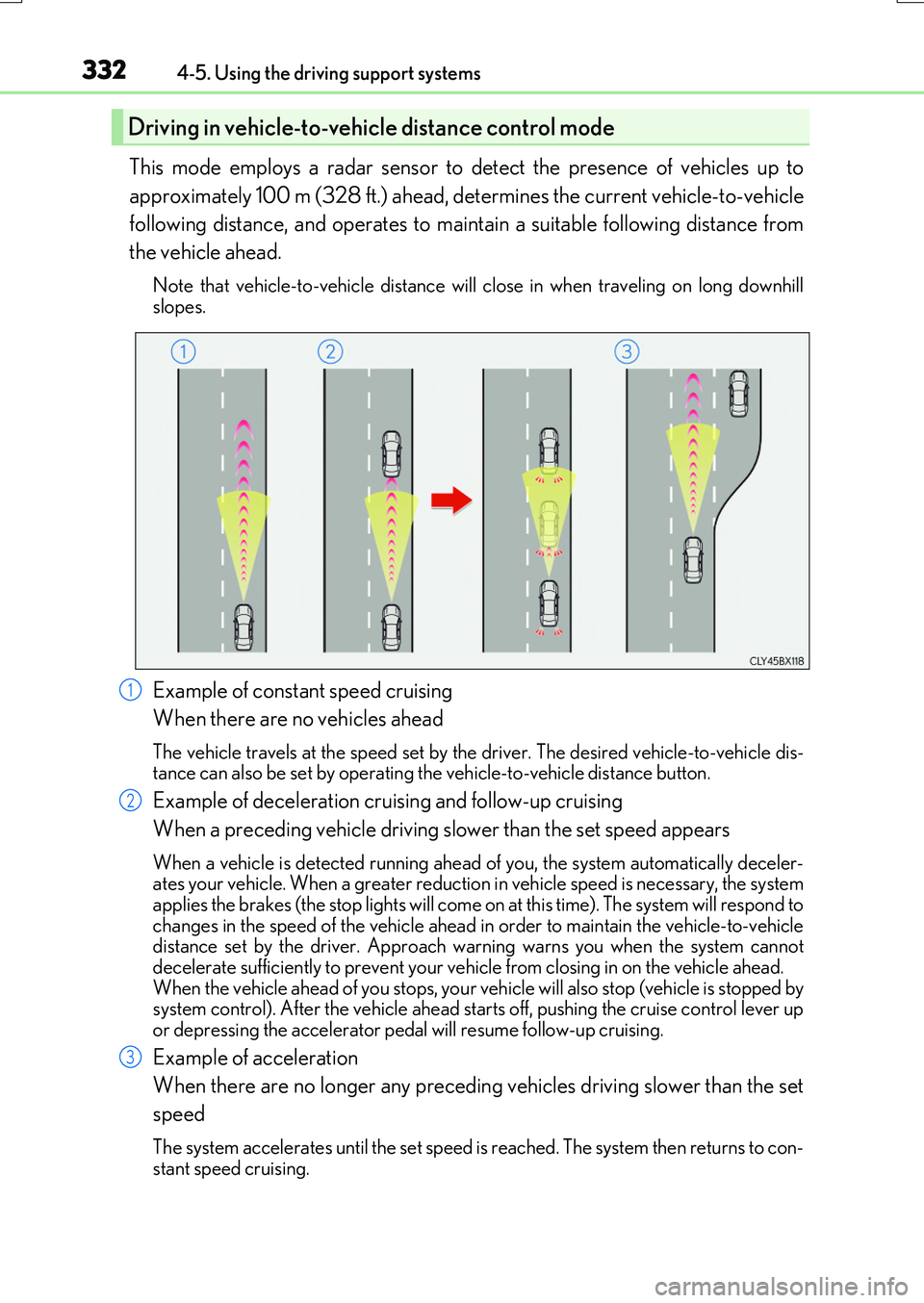
This mode employs a radar sensor to detect the presence of vehicles up to
approximately 100 m (328 ft.) ahead, determines the current vehicle-to-vehicle
following distance, and operates to maintain a suitable following distance from
the vehicle ahead.
Note that vehicle-to-vehicle distance will close in when traveling on long downhill slopes.
Example of constant speed cruising
When there are no vehicles ahead
The vehicle travels at the speed set by the driver. The desired vehicle-to-vehicle dis- tance can also be set by operating the vehicle-to-vehicle distance button.
Example of deceleration cruising and follow-up cruising
When a preceding vehicle driving slower than the set speed appears
When a vehicle is detected running ahead of you, the system automatically deceler- ates your vehicle. When a greater reductio n in vehicle speed is necessary, the system applies the brakes (the stop lights will come on at this time). The system will respond to
changes in the speed of the vehicle ahead in order to maintain the vehicle-to-vehicle distance set by the driver. Approach wa rning warns you when the system cannot decelerate sufficiently to prevent your vehicle from closing in on the vehicle ahead.
When the vehicle ahead of you stops, your ve hicle will also stop (vehicle is stopped by system control). After the vehicle ahead starts off, pushing the cruise control lever upor depressing the accelerator peda l will resume follow-up cruising.
Example of acceleration
When there are no longer any preceding vehicles driving slower than the set
speed
The system accelerates until the set speed is reached. The system then returns to con-
stant speed cruising.
Driving in vehicle-to-veh icle distance control mode
1
2
3
Page 333 of 776
3334-5. Using the driving support systems
4
Driving
RX350/RX200t_EE_OM48F32E
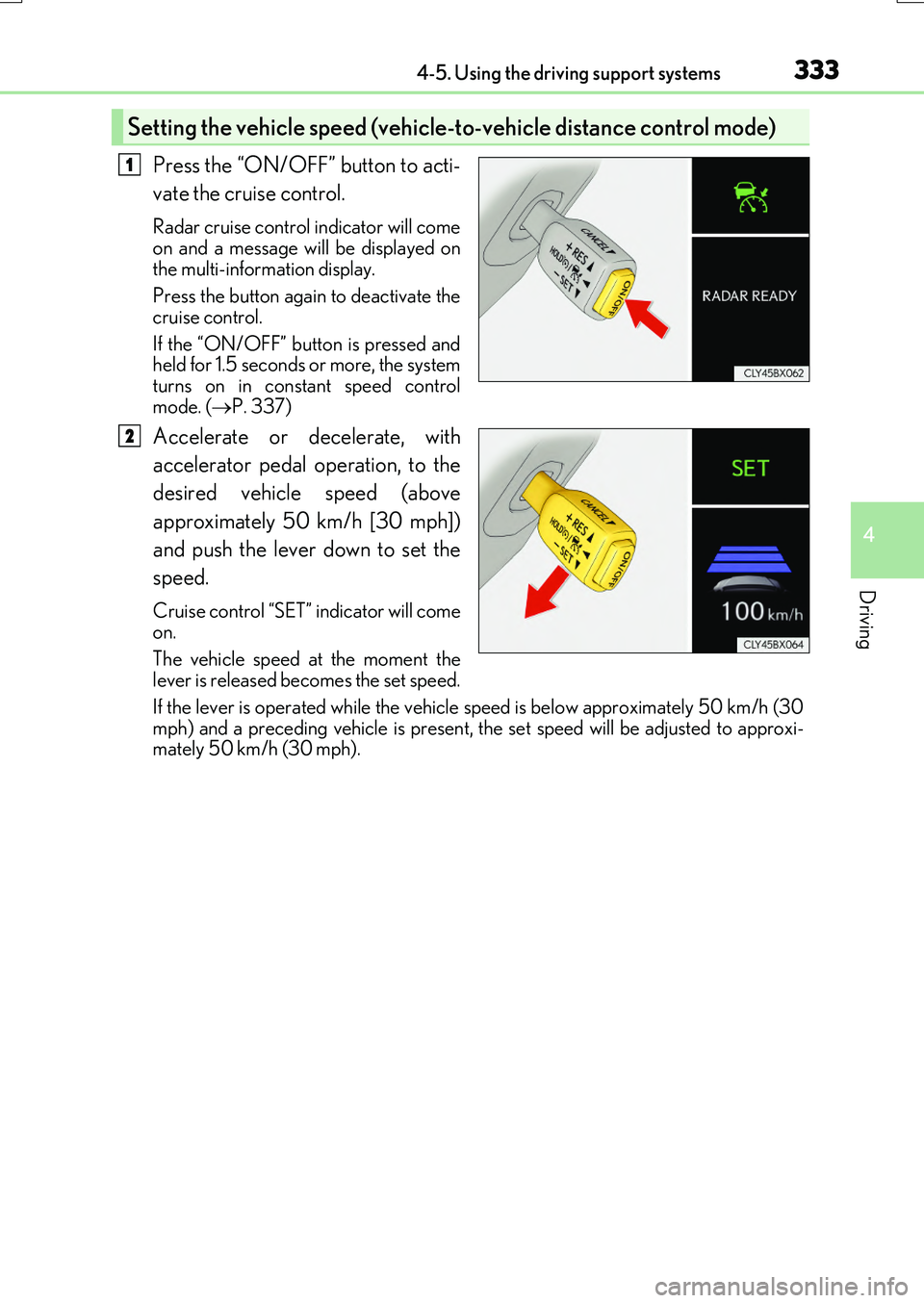
Press the “ON/OFF” button to acti-
vate the cruise control.
Radar cruise control indicator will come
on and a message will be displayed on the multi-information display.
Press the button again to deactivate the
cruise control.
If the “ON/OFF” button is pressed and held for 1.5 seconds or more, the system
turns on in constant speed control mode. ( P. 337)
Accelerate or decelerate, with
accelerator pedal operation, to the
desired vehicle speed (above
approximately 50 km/h [30 mph])
and push the lever down to set the
speed.
Cruise control “SET” indicator will come on.
The vehicle speed at the moment the
lever is released be comes the set speed.
If the lever is operated while the vehicle speed is below approximately 50 km/h (30
mph) and a preceding vehicle is present, the set speed will be adjusted to approxi- mately 50 km/h (30 mph).
Setting the vehicle speed (vehicle -to-vehicle distance control mode)
1
2
Page 336 of 776
3364-5. Using the driving support systems
RX350/RX200t_EE_OM48F32E
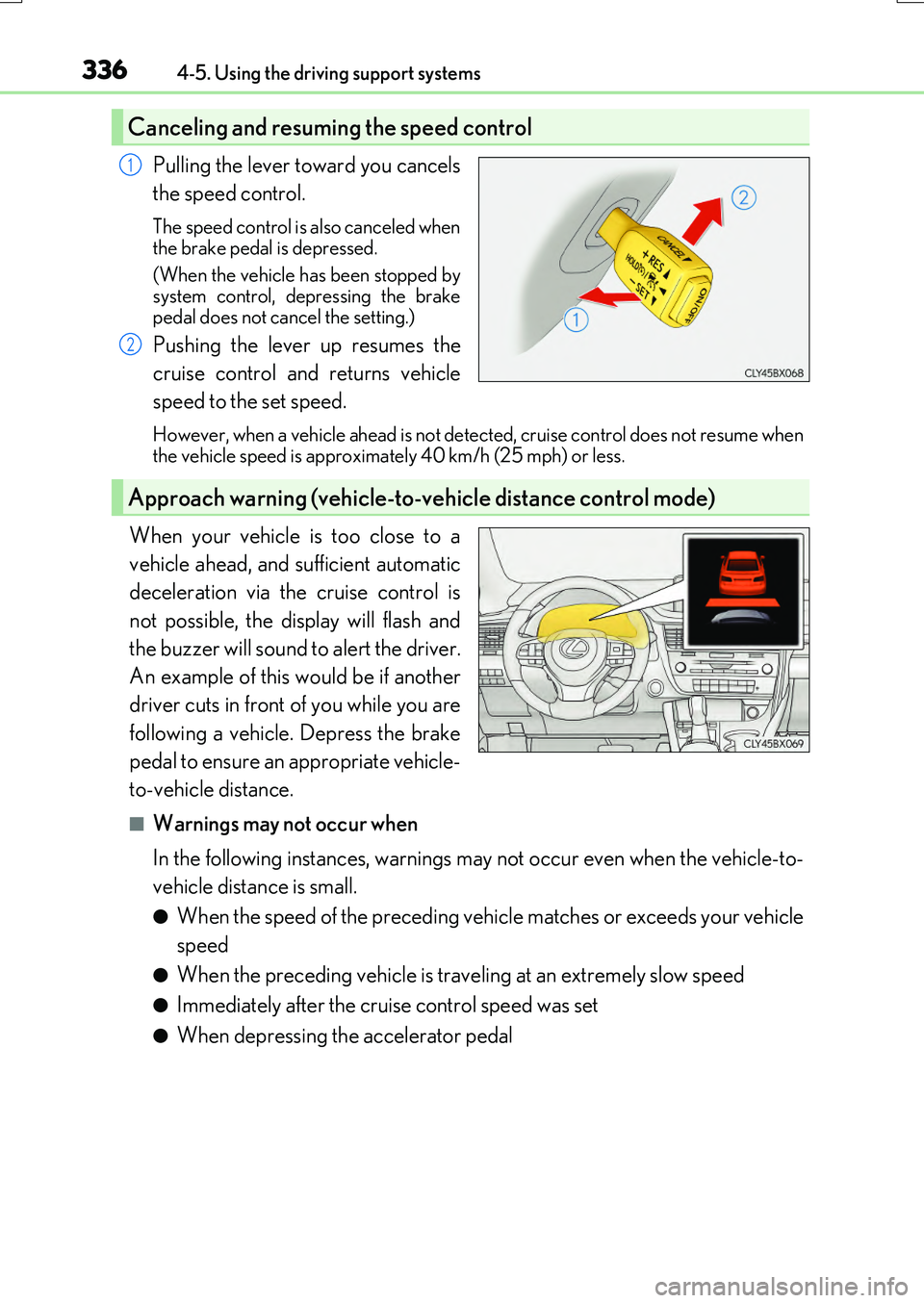
Pulling the lever toward you cancels
the speed control.
The speed control is also canceled when
the brake pedal is depressed.
(When the vehicle has been stopped by system control, depressing the brake
pedal does not cancel the setting.)
Pushing the lever up resumes the
cruise control and returns vehicle
speed to the set speed.
However, when a vehicle ahead is not detected, cruise control does not resume when the vehicle speed is approximately 40 km/h (25 mph) or less.
When your vehicle is too close to a
vehicle ahead, and sufficient automatic
deceleration via the cruise control is
not possible, the display will flash and
the buzzer will sound to alert the driver.
An example of this would be if another
driver cuts in front of you while you are
following a vehicle. Depress the brake
pedal to ensure an appropriate vehicle-
to-vehicle distance.
■Warnings may not occur when
In the following instances, warnings may not occur even when the vehicle-to-
vehicle distance is small.
●When the speed of the preceding vehicle matches or exceeds your vehicle
speed
●When the preceding vehicle is traveling at an extremely slow speed
●Immediately after the cruise control speed was set
●When depressing the accelerator pedal
Canceling and resuming the speed control
1
2
Approach warning (vehicle-to-vehicle distance control mode)
Page 337 of 776
3374-5. Using the driving support systems
4
Driving
RX350/RX200t_EE_OM48F32E
When constant speed control mode is selected, your vehicle will maintain a set
speed without controlling the vehicle-to-vehicle distance. Select this mode only
when vehicle-to-vehicle distance control mode does not function correctly due
to a dirty radar sensor, etc.
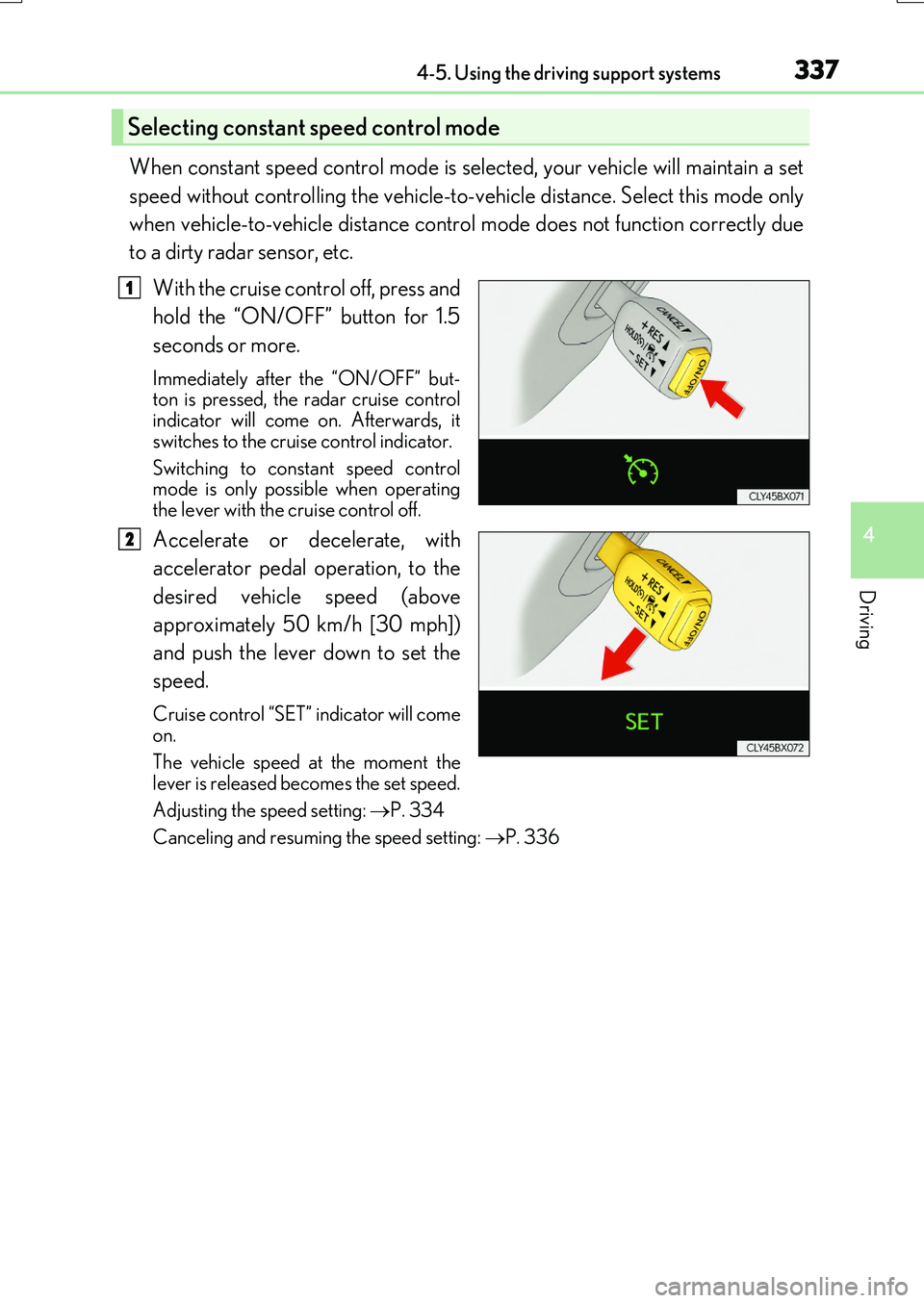
With the cruise control off, press and
hold the “ON/OFF” button for 1.5
seconds or more.
Immediately after the “ON/OFF” but- ton is pressed, the radar cruise controlindicator will come on. Afterwards, it
switches to the cruise control indicator.
Switching to constant speed control mode is only possible when operating
the lever with the cruise control off.
Accelerate or decelerate, with
accelerator pedal operation, to the
desired vehicle speed (above
approximately 50 km/h [30 mph])
and push the lever down to set the
speed.
Cruise control “SET” indicator will come
on.
The vehicle speed at the moment the lever is released be comes the set speed.
Adjusting the speed setting: P. 334
Canceling and resuming the speed setting: P. 336
Selecting constant speed control mode
1
2