door lock LEXUS RX200T 2017 User Guide
[x] Cancel search | Manufacturer: LEXUS, Model Year: 2017, Model line: RX200T, Model: LEXUS RX200T 2017Pages: 776, PDF Size: 44.51 MB
Page 83 of 776

831-3. Theft deterrent system
1
For safety and security
RX350/RX200t_EE_OM48F32E
The alarm uses light and sound to give an alert when an intrusion is detected.
The alarm is triggered in the following situations when the alarm is set:
●A locked door is unlocked or opened in any way other than using the entry
function or wireless remote control. (The doors will lock again automatically.)
●The hood is opened.
●The intrusion sensor detects something moving inside the vehicle. (An
intruder gets in the vehicle.)
●The tilt sensor detects a change of vehicle inclination. (if equipped)
●Any of the windows are broken.
Close the doors and hood, and lock all
the doors using the entry function or
wireless remote control. The system will
be set automatically after 30 seconds.
The indicator light changes from being
on to flashing when the system is set.
Do one of the following to deactivate or stop the alarm.
●Unlock the doors using the entry function or wireless remote control.
●Start the engine. (The alarm will be deactivated or stopped after a few sec-
onds.)
Alarm
: If equipped
The alarm
Setting the alarm system
Deactivating or stopping the alarm
Page 84 of 776
841-3. Theft deterrent system
RX350/RX200t_EE_OM48F32E
■System maintenance
The vehicle has a maintenance-free type alarm system.
■Items to check before locking the vehicle
To prevent unexpected triggering of the alarm and vehicle theft, make sure of the follow-
ing.
●Nobody is in the vehicle.
●The windows and moon roof or panoramic m oon roof are closed before the alarm is
set.
●No valuables or other personal items are left in the vehicle.
■Triggering of the alarm
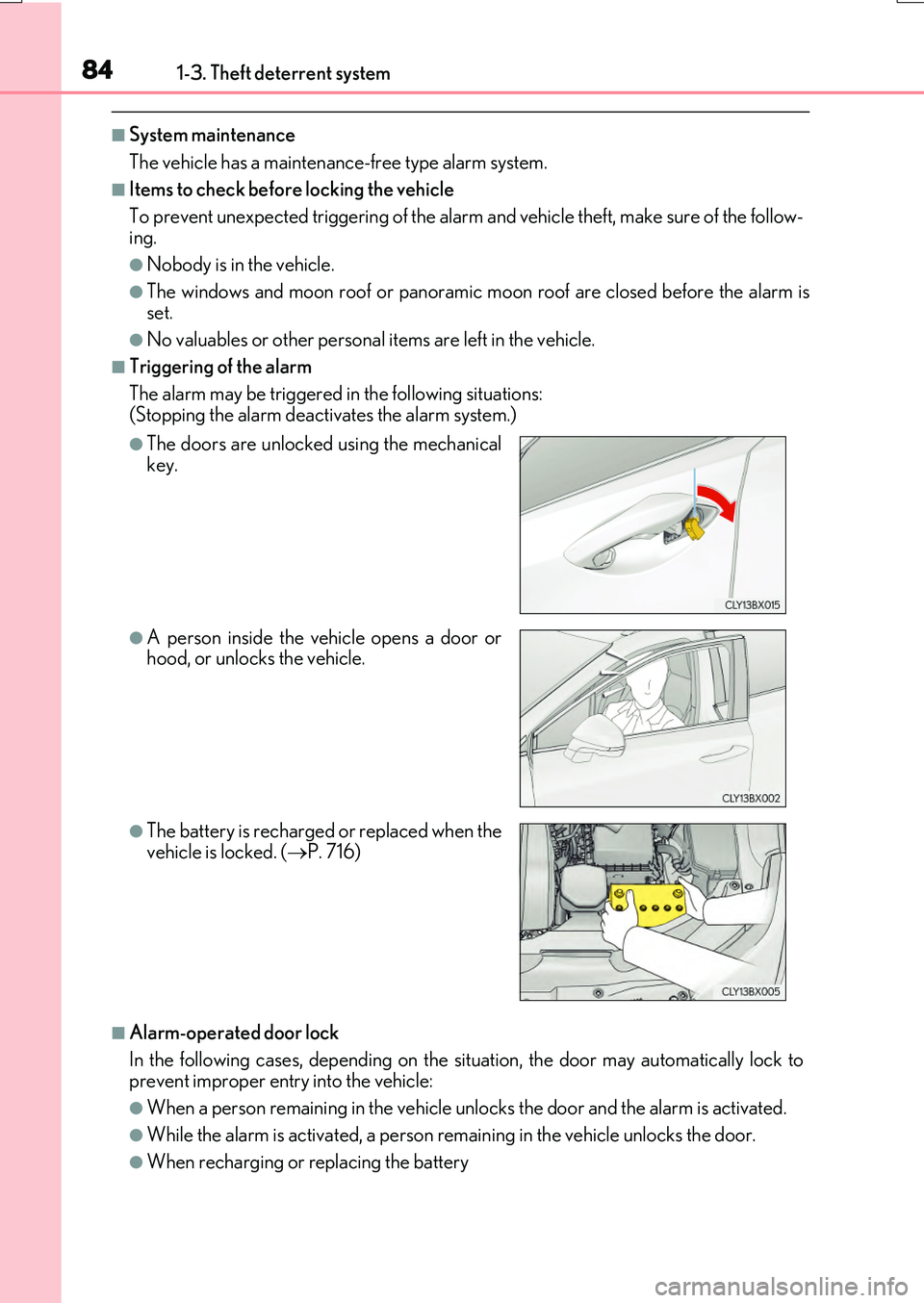
The alarm may be triggered in the following situations: (Stopping the alarm deactivates the alarm system.)
■Alarm-operated door lock
In the following cases, depending on the situation, the door may automatically lock to prevent improper entry into the vehicle:
●When a person remain ing in the vehicle unlocks the door and the alarm is activated.
●While the alarm is activated, a person remaining in the vehicle unlocks the door.
●When recharging or replacing the battery
●The doors are unlocked using the mechanical key.
●A person inside the vehicle opens a door orhood, or unlocks the vehicle.
●The battery is recharged or replaced when the
vehicle is locked. ( P. 716)
Page 86 of 776

861-3. Theft deterrent system
RX350/RX200t_EE_OM48F32E
■Canceling and automatic re-enabling of the intrusion sensor and tilt sensor
●The alarm will still be set even when the intrusion sensor and tilt sensor are canceled.
●After the intrusion sensor and tilt sensor are canceled, pressing the engine switch or unlocking the doors using the entry function or wireless remote control will re-enable
the intrusion sensor and tilt sensor.
●The intrusion sensor and tilt sensor will automatically be re-enabled when the alarm system is reactivated.
■Intrusion sensor dete ction considerations
The sensor may trigger the alarm in the following situations:
●People or pets are in the vehicle.
●A window or moon roof, panoramic moon roof is open.
In this case, the sensor may detect the follow-
ing:
• Wind or the movement of objects such as leaves and insects inside the vehicle
• Ultrasonic waves emitted from devices such as the intrusion sensors of other vehi-cles
• The movement of people outside the vehi- cle
●Unstable items, such as dangling accessories
or clothes hanging on the coat hooks, are in the vehicle.
Page 133 of 776
133
3
Operation of
each component
RX350/RX200t_EE_OM48F32E
3-1. Key information
Keys .................................................. 134
3-2. Opening, closing and
locking the doors
Side doors ...................................... 140
Back door........................................146
Power back door .......................... 151
Smart entry & start system ...... 168
3-3. Adjusting the seats
Front seats...................................... 185
Rear seats....................................... 186
Driving position memory ......... 195
Head restraints ...........................200
3-4. Adjusting the steering
wheel and mirrors
Steering wheel ............................ 202
Inside rear view mirror ............ 204
Outside rear view mirrors...... 206
3-5. Opening, closing the
windows and moon roof
Power windows ........................... 210
Moon roof .......................................214
Panoramic moon roof............... 218
Page 134 of 776
134
RX350/RX200t_EE_OM48F32E
3-1. Key information
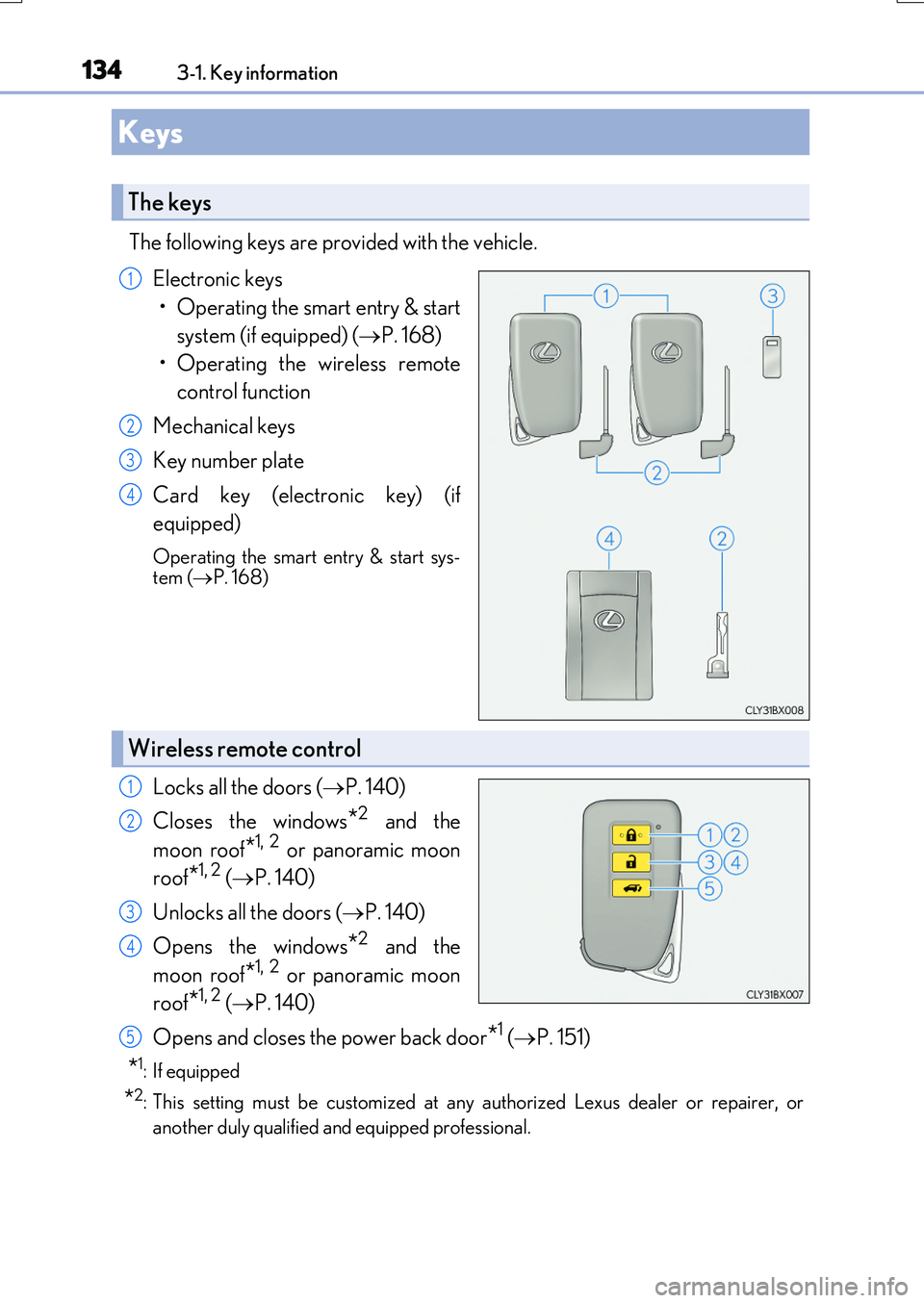
The following keys are provided with the vehicle.
Electronic keys
• Operating the smart entry & start
system (if equipped) ( P. 168)
• Operating the wireless remote
control function
Mechanical keys
Key number plate
Card key (electronic key) (if
equipped)
Operating the smart entry & start sys- tem ( P. 168)
Locks all the doors (P. 140)
Closes the windows*2 and the
moon roof*1, 2 or panoramic moon
roof*1, 2 ( P. 140)
Unlocks all the doors ( P. 140)
Opens the windows*2 and the
moon roof*1, 2 or panoramic moon
roof*1, 2 ( P. 140)
Opens and closes the power back door*1 ( P. 151)
*1: If equipped
*2: This setting must be customized at any authorized Lexus dealer or repairer, or
another duly qualified an d equipped professional.
Keys
The keys
1
2
3
4
Wireless remote control
1
2
3
4
5
Page 140 of 776
140
RX350/RX200t_EE_OM48F32E
3-2. Opening, closing and locking the doors
◆Smart entry & start system
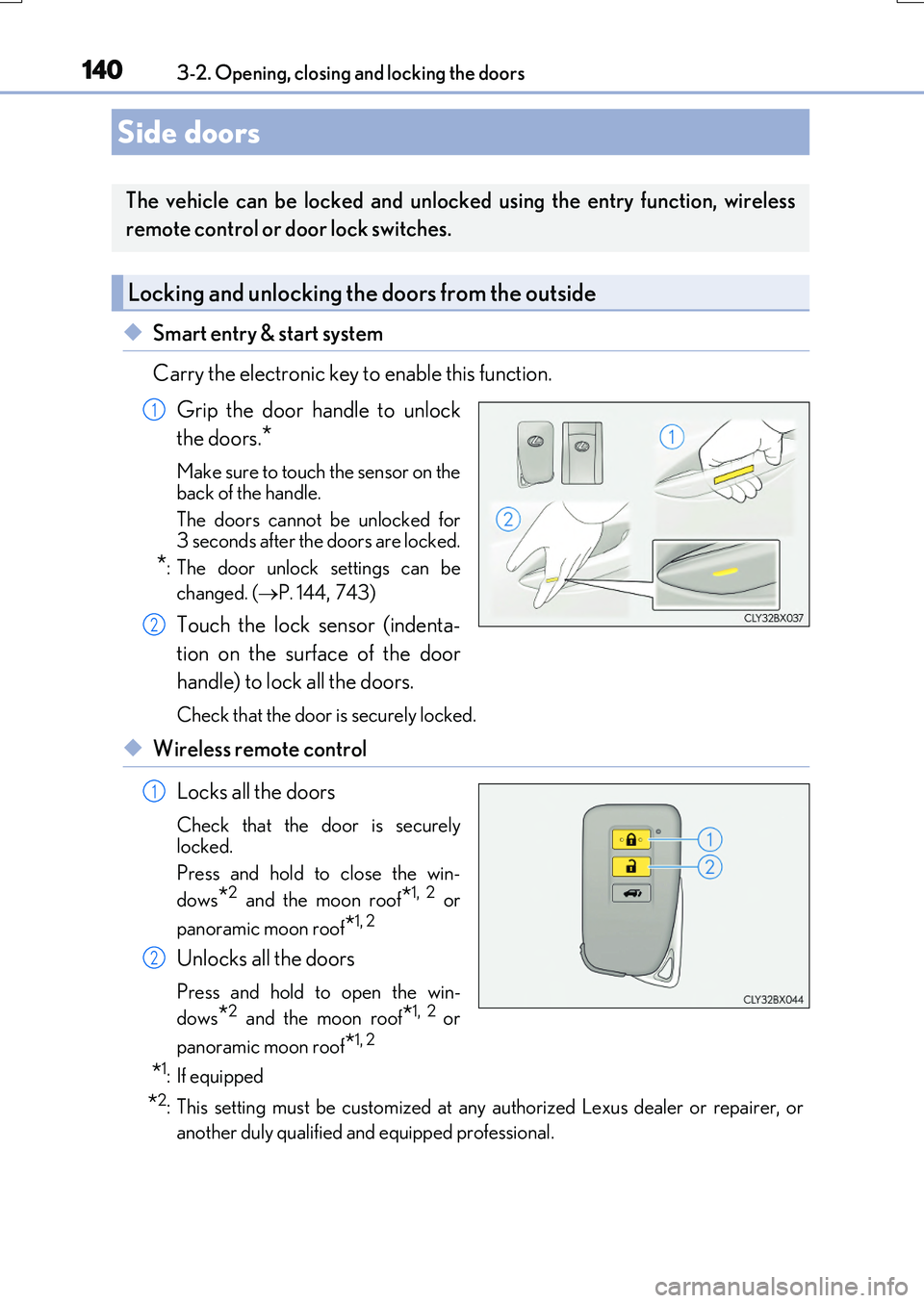
Carry the electronic key to enable this function.
Grip the door handle to unlock
the doors.*
Make sure to touch the sensor on the
back of the handle.
The doors cannot be unlocked for 3 seconds after the doors are locked.
*: The door unlock settings can be
changed. ( P. 144,743)
Touch the lock sensor (indenta-
tion on the surface of the door
handle) to lock all the doors.
Check that the door is securely locked.
◆Wireless remote control
Locks all the doors
Check that the door is securely
locked.
Press and hold to close the win-
dows*2 and the moon roof*1, 2 or
panoramic moon roof*1, 2
Unlocks all the doors
Press and hold to open the win-
dows*2 and the moon roof*1, 2 or
panoramic moon roof*1, 2
*1: If equipped
*2: This setting must be customized at any authorized Lexus dealer or repairer, or
another duly qualified and equipped professional.
Side doors
The vehicle can be locked and unlocked using the entry function, wireless
remote control or door lock switches.
Locking and unlocking the doors from the outside
1
2
1
2
Page 141 of 776
1413-2. Opening, closing and locking the doors
3
Operation of each component
RX350/RX200t_EE_OM48F32E
■Operation signals
Doors: The emergency flashers flash to indicate th at the doors have been locked/unlocked. (Locked: Once; Unlocked: Twice)
Windows and moon roof or panoramic moon roof: A buzzer sounds.
■Security feature
If a door is not opened within approximately 30 seconds after the vehicle is unlocked, the security feature automatically locks the vehicle again.
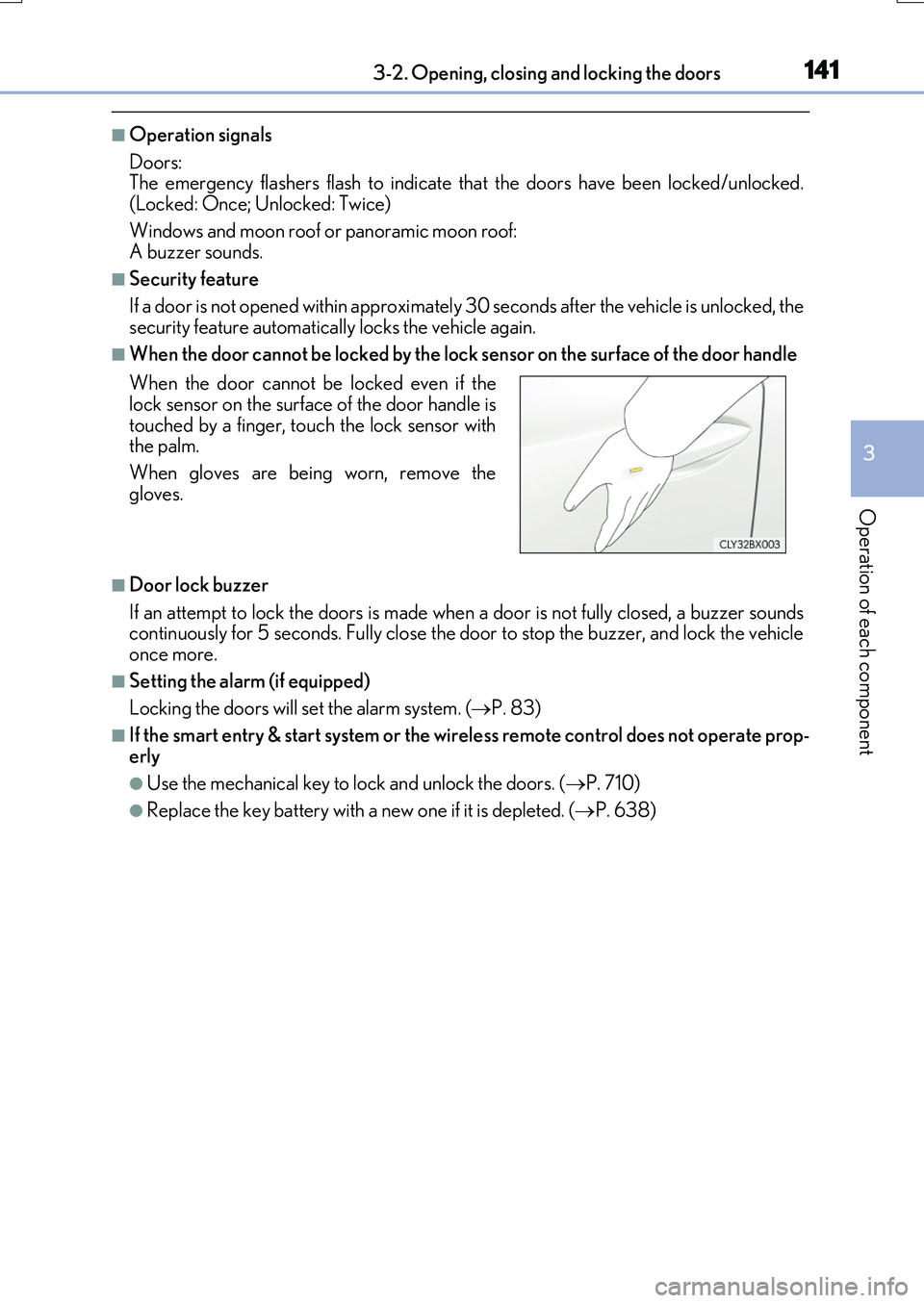
■When the door cannot be locked by the lock sensor on the surface of the door handle
■Door lock buzzer
If an attempt to lock the doors is made when a door is not fully closed, a buzzer sounds continuously for 5 seconds. Fully close the door to stop the buzzer, and lock the vehicleonce more.
■Setting the alarm (if equipped)
Locking the doors will set the alarm system. ( P. 83)
■If the smart entry & start system or the wireless remote control does not operate prop-
erly
●Use the mechanical key to lock and unlock the doors. ( P. 710)
●Replace the key battery with a new one if it is depleted. (P. 638)
When the door cannot be locked even if the lock sensor on the surface of the door handle is
touched by a finger, touch the lock sensor with the palm.
When gloves are being worn, remove the
gloves.
Page 142 of 776
1423-2. Opening, closing and locking the doors
RX350/RX200t_EE_OM48F32E
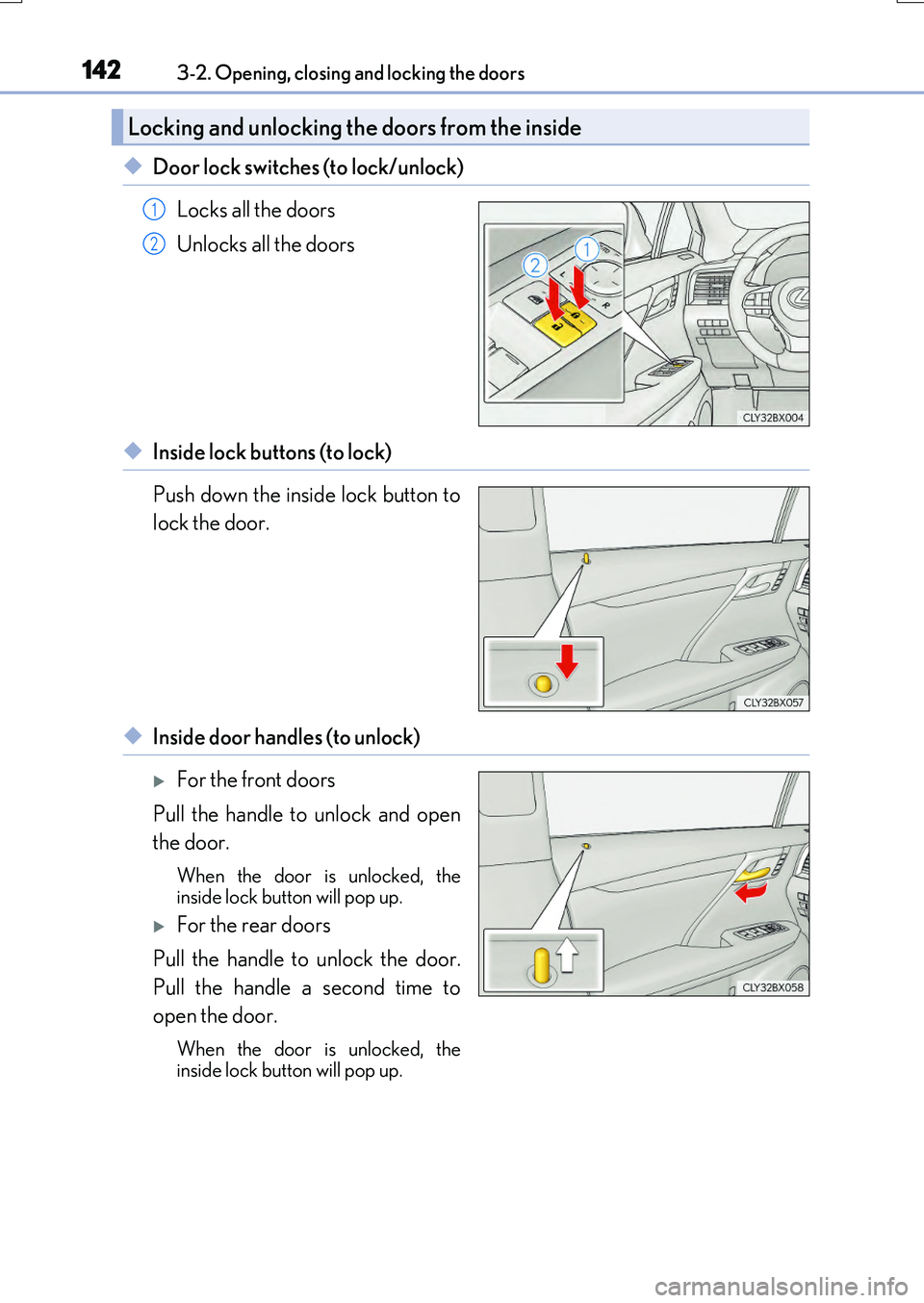
◆Door lock switches (to lock/unlock)
Locks all the doors
Unlocks all the doors
◆Inside lock buttons (to lock)
Push down the inside lock button to
lock the door.
◆Inside door handles (to unlock)
For the front doors
Pull the handle to unlock and open
the door.
When the door is unlocked, the inside lock button will pop up.
For the rear doors
Pull the handle to unlock the door.
Pull the handle a second time to
open the door.
When the door is unlocked, the
inside lock button will pop up.
Locking and unlocking the doors from the inside
1
2
Page 143 of 776
1433-2. Opening, closing and locking the doors
3
Operation of each component
RX350/RX200t_EE_OM48F32E
For the front doors
Push down the inside lock button.
Close the door while pulling the door handle.
The door cannot be locked if the engine switch is in ACCESSORY or IGNITION
ON mode, or the electronic key is left insi de the vehicle. However, the key may not be detected correctly and the door may be locked.
For the rear doors
Push down the inside lock button.
Close the door.
The door cannot be locked if the engine switch is in ACCESSORY or IGNITION ON mode, or the electronic key is left insi de the vehicle. However, the key may not be detected correctly and the door may be locked.
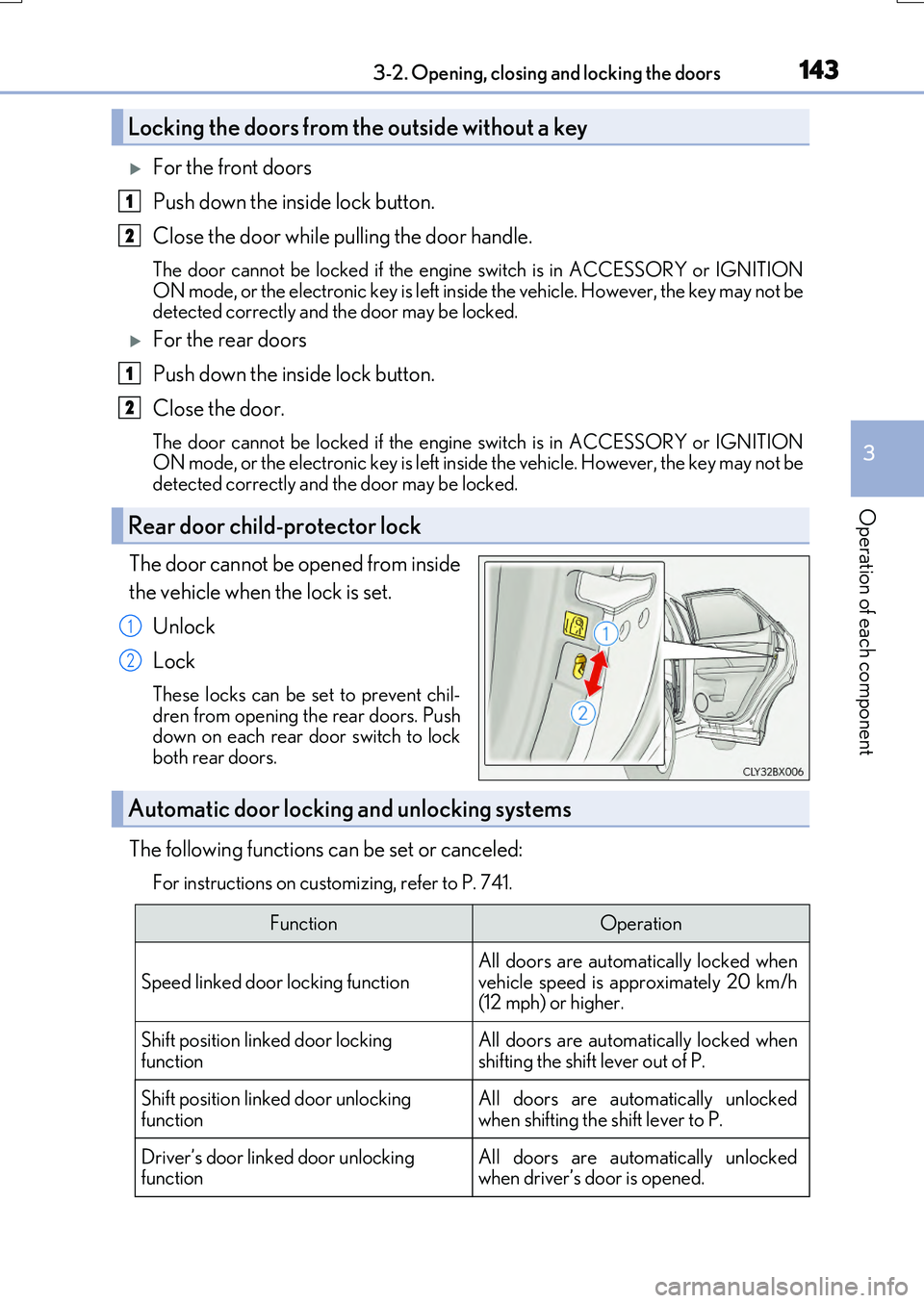
The door cannot be opened from inside
the vehicle when the lock is set.
Unlock
Lock
These locks can be set to prevent chil-
dren from opening the rear doors. Push down on each rear door switch to lockboth rear doors.
The following functions can be set or canceled:
For instructions on customizing, refer to P. 741.
Locking the doors from the outside without a key
Rear door child-protector lock
1
2
1
2
1
2
Automatic door locking and unlocking systems
FunctionOperation
Speed linked door locking functionAll doors are automatically locked whenvehicle speed is approximately 20 km/h(12 mph) or higher.
Shift position linked door locking
function
All doors are automatically locked when
shifting the shift lever out of P.
Shift position linked door unlocking functionAll doors are automatically unlockedwhen shifting the shift lever to P.
Driver’s door linked door unlocking functionAll doors are automatically unlockedwhen driver’s door is opened.
Page 144 of 776
1443-2. Opening, closing and locking the doors
RX350/RX200t_EE_OM48F32E
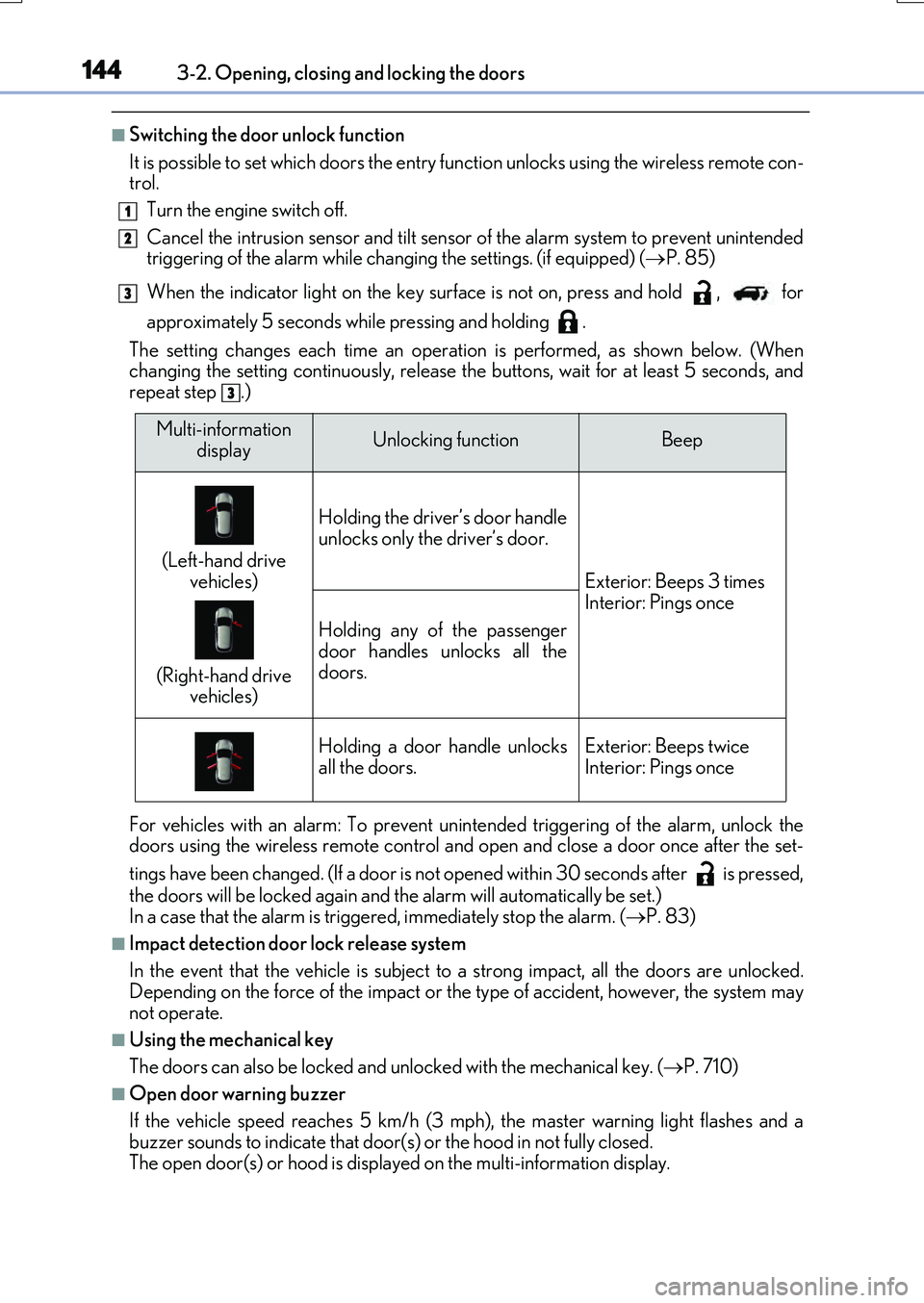
■Switching the door unlock function
It is possible to set which doors the entry function unlocks using the wireless remote con- trol.
Turn the engine switch off.
Cancel the intrusion sensor and tilt sensor of the alarm system to prevent unintended triggering of the alarm while changing the settings. (if equipped) ( P. 85)
When the indicator light on the key surface is not on, press and hold , for
approximately 5 seconds while pressing and holding .
The setting changes each time an operatio n is performed, as shown below. (When changing the setting continuously, release the buttons, wait for at least 5 seconds, andrepeat step .)
For vehicles with an alarm: To prevent unin tended triggering of the alarm, unlock the doors using the wireless remote control and op en and close a door once after the set-
tings have been changed. (If a door is not opened within 30 seconds after is pressed,
the doors will be locked again and the alarm will automatically be set.) In a case that the alarm is triggered, immediately stop the alarm. ( P. 83)
■Impact detection door lock release system
In the event that the vehicle is subject to a strong impact, all the doors are unlocked. Depending on the force of the impact or the type of accident, however, the system may
not operate.
■Using the mechanical key
The doors can also be locked and unlocked with the mechanical key. ( P. 710)
■Open door warning buzzer
If the vehicle speed reaches 5 km/h (3 mph), the master warning light flashes and a buzzer sounds to indicate that door (s) or the hood in not fully closed.
The open door(s) or hood is displa yed on the multi-information display.
1
2
3
3
Multi-information
displayUnlocking functionBeep
(Left-hand drive
vehicles)
(Right-hand drive vehicles)
Holding the driver’s door handle
unlocks only the driver’s door.
Exterior: Beeps 3 times Interior: Pings once
Holding any of the passenger
door handles unlocks all the doors.
Holding a door handle unlocksall the doors.Exterior: Beeps twiceInterior: Pings once