roof LEXUS RX200T 2017 User Guide
[x] Cancel search | Manufacturer: LEXUS, Model Year: 2017, Model line: RX200T, Model: LEXUS RX200T 2017Pages: 776, PDF Size: 44.51 MB
Page 84 of 776
841-3. Theft deterrent system
RX350/RX200t_EE_OM48F32E
■System maintenance
The vehicle has a maintenance-free type alarm system.
■Items to check before locking the vehicle
To prevent unexpected triggering of the alarm and vehicle theft, make sure of the follow-
ing.
●Nobody is in the vehicle.
●The windows and moon roof or panoramic m oon roof are closed before the alarm is
set.
●No valuables or other personal items are left in the vehicle.
■Triggering of the alarm
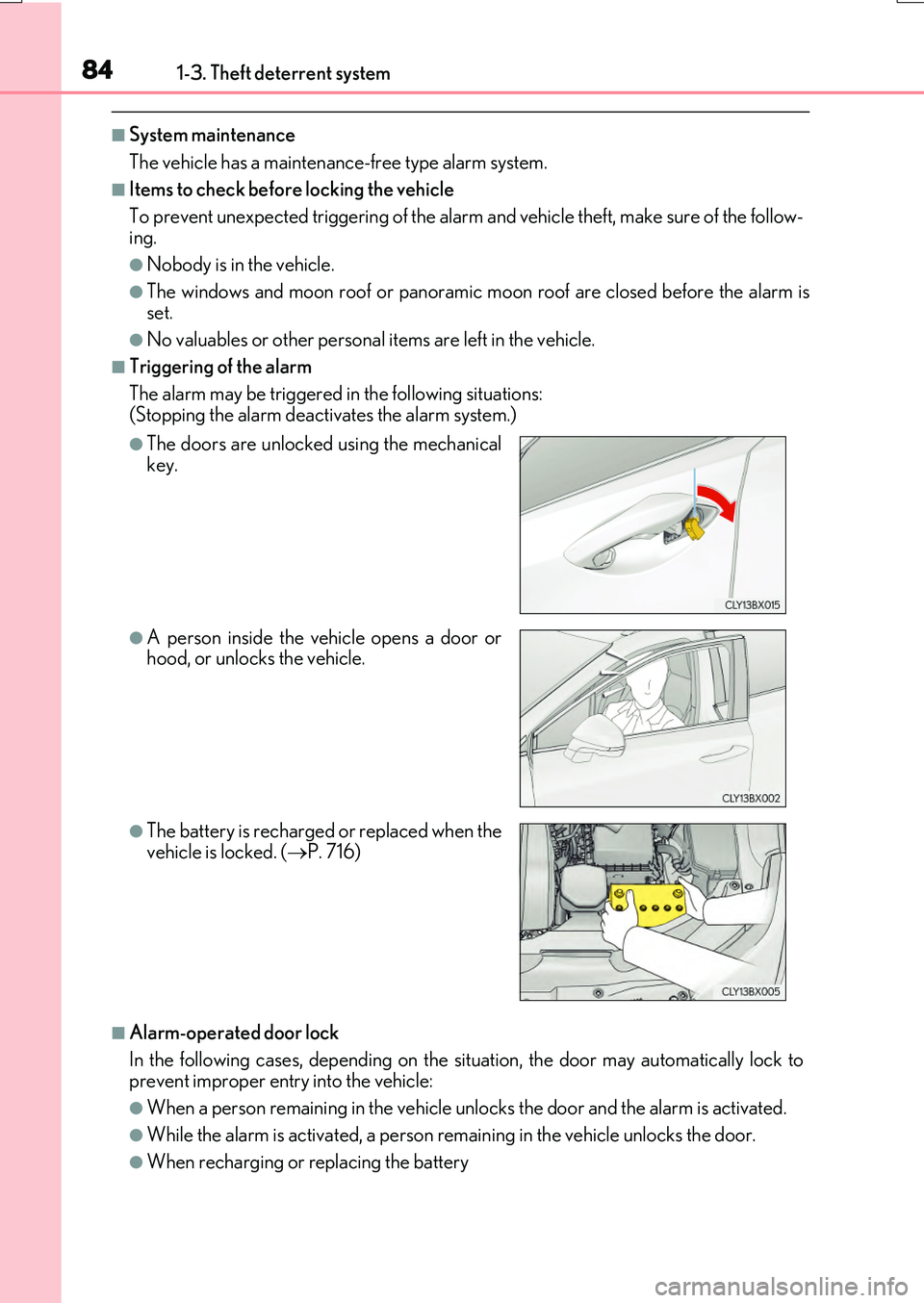
The alarm may be triggered in the following situations: (Stopping the alarm deactivates the alarm system.)
■Alarm-operated door lock
In the following cases, depending on the situation, the door may automatically lock to prevent improper entry into the vehicle:
●When a person remain ing in the vehicle unlocks the door and the alarm is activated.
●While the alarm is activated, a person remaining in the vehicle unlocks the door.
●When recharging or replacing the battery
●The doors are unlocked using the mechanical key.
●A person inside the vehicle opens a door orhood, or unlocks the vehicle.
●The battery is recharged or replaced when the
vehicle is locked. ( P. 716)
Page 86 of 776

861-3. Theft deterrent system
RX350/RX200t_EE_OM48F32E
■Canceling and automatic re-enabling of the intrusion sensor and tilt sensor
●The alarm will still be set even when the intrusion sensor and tilt sensor are canceled.
●After the intrusion sensor and tilt sensor are canceled, pressing the engine switch or unlocking the doors using the entry function or wireless remote control will re-enable
the intrusion sensor and tilt sensor.
●The intrusion sensor and tilt sensor will automatically be re-enabled when the alarm system is reactivated.
■Intrusion sensor dete ction considerations
The sensor may trigger the alarm in the following situations:
●People or pets are in the vehicle.
●A window or moon roof, panoramic moon roof is open.
In this case, the sensor may detect the follow-
ing:
• Wind or the movement of objects such as leaves and insects inside the vehicle
• Ultrasonic waves emitted from devices such as the intrusion sensors of other vehi-cles
• The movement of people outside the vehi- cle
●Unstable items, such as dangling accessories
or clothes hanging on the coat hooks, are in the vehicle.
Page 87 of 776

871-3. Theft deterrent system
1
For safety and security
RX350/RX200t_EE_OM48F32E
●The vehicle is inside an automatic or high-pressure car wash.
●The vehicle experiences impacts, such as hail, lightning strikes, and other kinds of repeated impacts or vibrations.
■Tilt sensor detection cons iderations (if equipped)
The sensor may trigger the alarm in the following situations:
●The vehicle is transported by a ferry, trailer, train, etc.
●The vehicle is parked in a parking garage.
●The vehicle is inside a car wash that moves the vehicle.
●Any of the tires loses air pressure.
●The vehicle is jacked up.
●An earthquake occurs or the road caves in.
●Cargo is loaded onto or unloaded from the roof luggage carrier.
●The vehicle is parked in a place where extreme vibrations or noises occur, such as in a parkinggarage.
●Ice or snow is removed from the vehicle, caus-ing the vehicle to receive repeated impacts orvibrations.
Page 133 of 776
133
3
Operation of
each component
RX350/RX200t_EE_OM48F32E
3-1. Key information
Keys .................................................. 134
3-2. Opening, closing and
locking the doors
Side doors ...................................... 140
Back door........................................146
Power back door .......................... 151
Smart entry & start system ...... 168
3-3. Adjusting the seats
Front seats...................................... 185
Rear seats....................................... 186
Driving position memory ......... 195
Head restraints ...........................200
3-4. Adjusting the steering
wheel and mirrors
Steering wheel ............................ 202
Inside rear view mirror ............ 204
Outside rear view mirrors...... 206
3-5. Opening, closing the
windows and moon roof
Power windows ........................... 210
Moon roof .......................................214
Panoramic moon roof............... 218
Page 134 of 776
134
RX350/RX200t_EE_OM48F32E
3-1. Key information
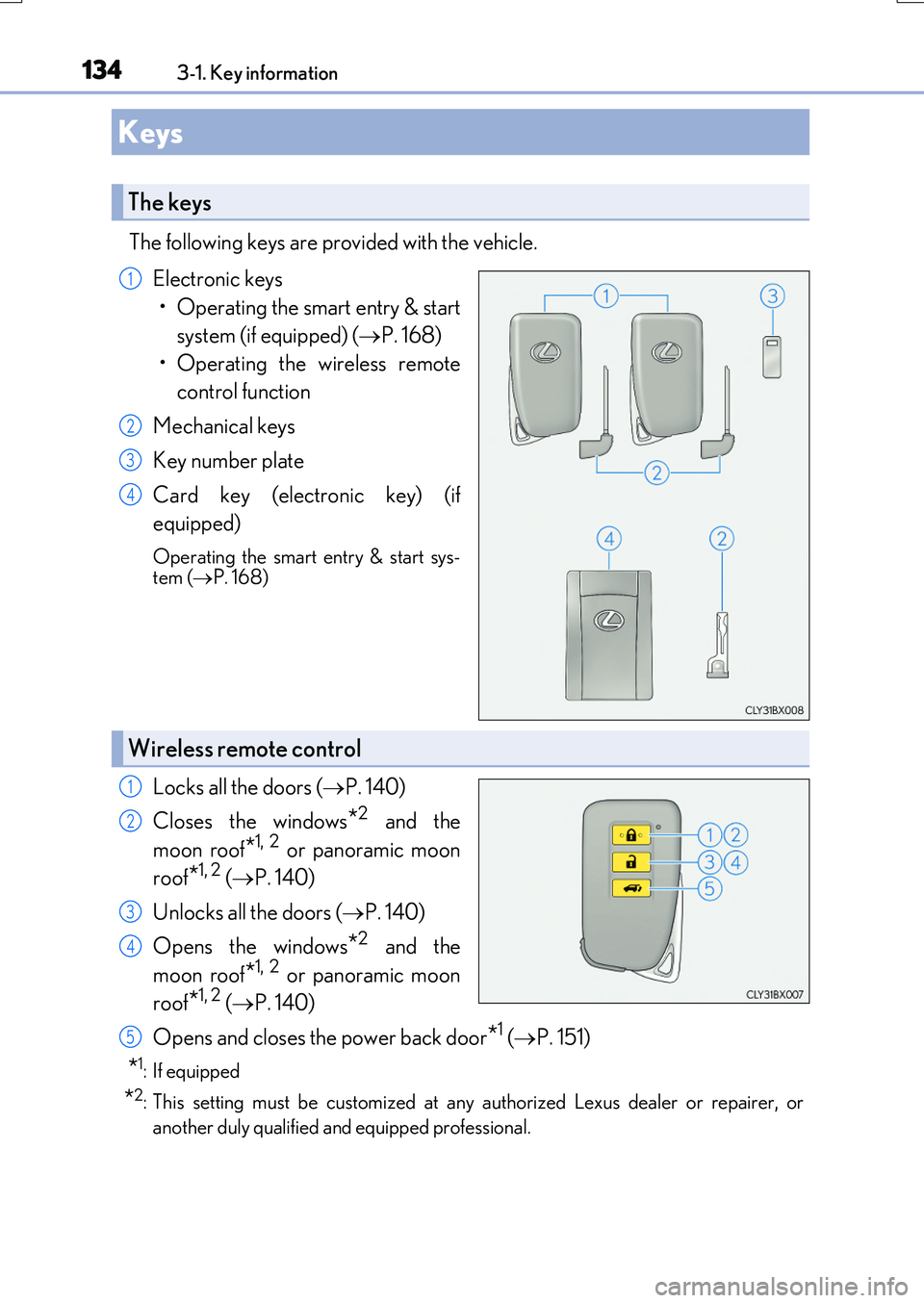
The following keys are provided with the vehicle.
Electronic keys
• Operating the smart entry & start
system (if equipped) ( P. 168)
• Operating the wireless remote
control function
Mechanical keys
Key number plate
Card key (electronic key) (if
equipped)
Operating the smart entry & start sys- tem ( P. 168)
Locks all the doors (P. 140)
Closes the windows*2 and the
moon roof*1, 2 or panoramic moon
roof*1, 2 ( P. 140)
Unlocks all the doors ( P. 140)
Opens the windows*2 and the
moon roof*1, 2 or panoramic moon
roof*1, 2 ( P. 140)
Opens and closes the power back door*1 ( P. 151)
*1: If equipped
*2: This setting must be customized at any authorized Lexus dealer or repairer, or
another duly qualified an d equipped professional.
Keys
The keys
1
2
3
4
Wireless remote control
1
2
3
4
5
Page 136 of 776
1363-1. Key information
RX350/RX200t_EE_OM48F32E
■Card key (if equipped)
●The card key is not waterproof.
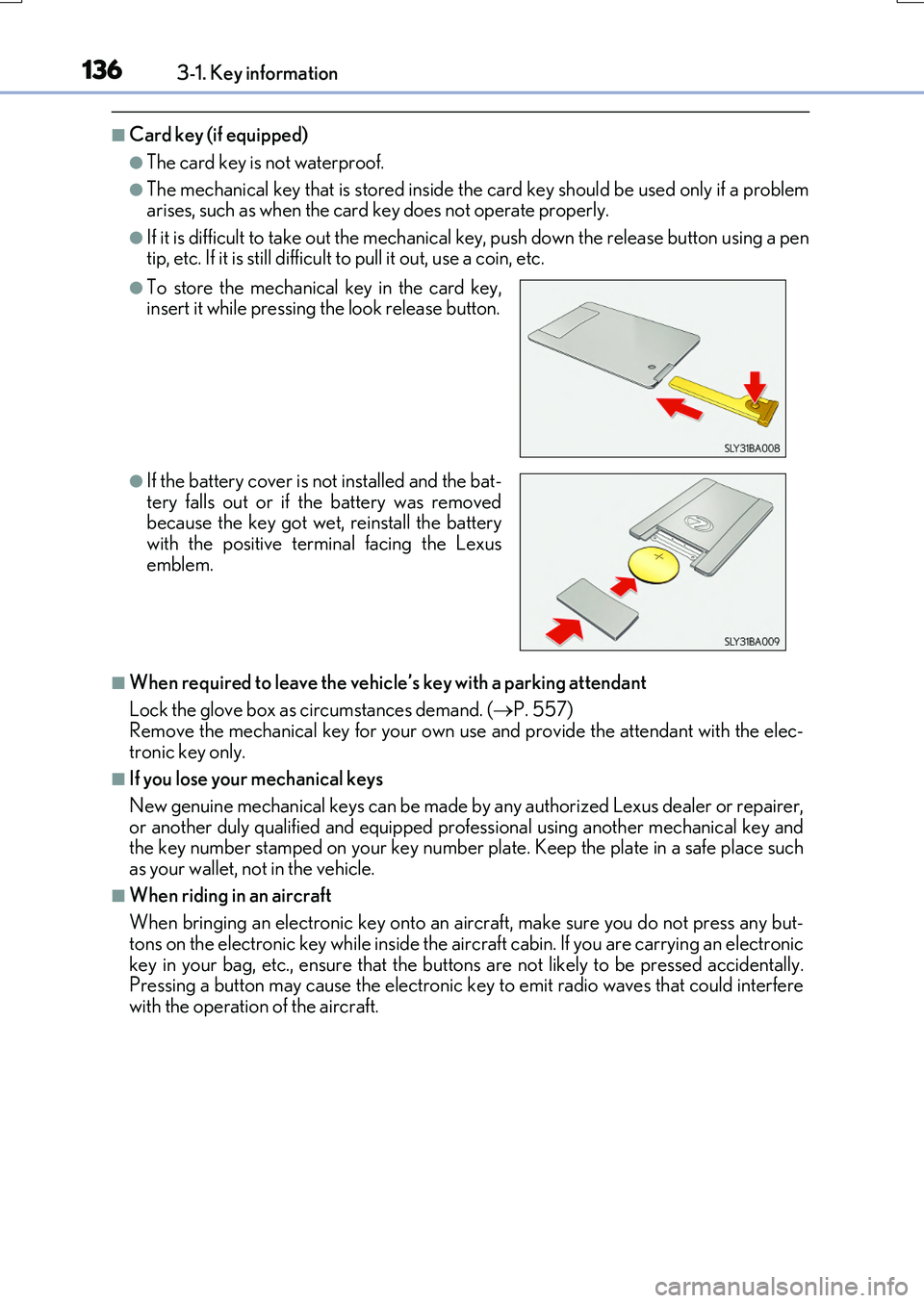
●The mechanical key that is stored inside the card key should be used only if a problem arises, such as when the card key does not operate properly.
●If it is difficult to take out the mechanical key, push down the release button using a pentip, etc. If it is still difficult to pull it out, use a coin, etc.
■When required to leave the vehicle’s key with a parking attendant
Lock the glove box as circumstances demand. ( P. 557) Remove the mechanical key for your own use and provide the attendant with the elec-
tronic key only.
■If you lose your mechanical keys
New genuine mechanical keys can be made by any authorized Lexus dealer or repairer,
or another duly qualified and equipped prof essional using another mechanical key and the key number stamped on your key number plate. Keep the plate in a safe place suchas your wallet, not in the vehicle.
■When riding in an aircraft
When bringing an electronic key onto an aircraft, make sure you do not press any but- tons on the electronic key while inside the ai rcraft cabin. If you are carrying an electronic
key in your bag, etc., ensure that the buttons are not likely to be pressed accidentally. Pressing a button may cause the electronic key to emit radio waves that could interferewith the operation of the aircraft.
●To store the mechanical key in the card key,insert it while pressing the look release button.
●If the battery cover is not installed and the bat- tery falls out or if the battery was removedbecause the key got wet, reinstall the battery
with the positive terminal facing the Lexus emblem.
Page 140 of 776
140
RX350/RX200t_EE_OM48F32E
3-2. Opening, closing and locking the doors
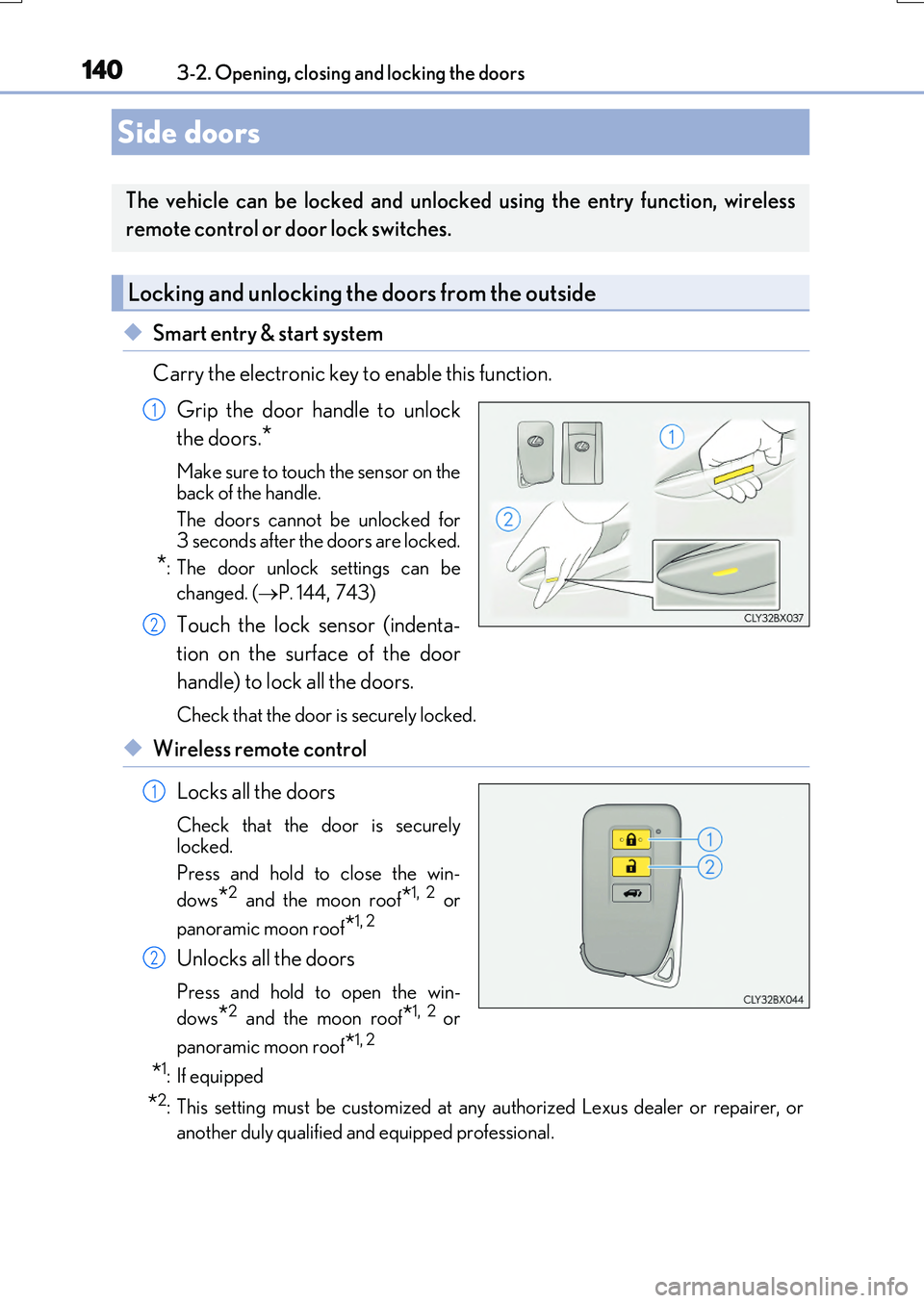
◆Smart entry & start system
Carry the electronic key to enable this function.
Grip the door handle to unlock
the doors.*
Make sure to touch the sensor on the
back of the handle.
The doors cannot be unlocked for 3 seconds after the doors are locked.
*: The door unlock settings can be
changed. ( P. 144,743)
Touch the lock sensor (indenta-
tion on the surface of the door
handle) to lock all the doors.
Check that the door is securely locked.
◆Wireless remote control
Locks all the doors
Check that the door is securely
locked.
Press and hold to close the win-
dows*2 and the moon roof*1, 2 or
panoramic moon roof*1, 2
Unlocks all the doors
Press and hold to open the win-
dows*2 and the moon roof*1, 2 or
panoramic moon roof*1, 2
*1: If equipped
*2: This setting must be customized at any authorized Lexus dealer or repairer, or
another duly qualified and equipped professional.
Side doors
The vehicle can be locked and unlocked using the entry function, wireless
remote control or door lock switches.
Locking and unlocking the doors from the outside
1
2
1
2
Page 141 of 776
1413-2. Opening, closing and locking the doors
3
Operation of each component
RX350/RX200t_EE_OM48F32E
■Operation signals
Doors: The emergency flashers flash to indicate th at the doors have been locked/unlocked. (Locked: Once; Unlocked: Twice)
Windows and moon roof or panoramic moon roof: A buzzer sounds.
■Security feature
If a door is not opened within approximately 30 seconds after the vehicle is unlocked, the security feature automatically locks the vehicle again.
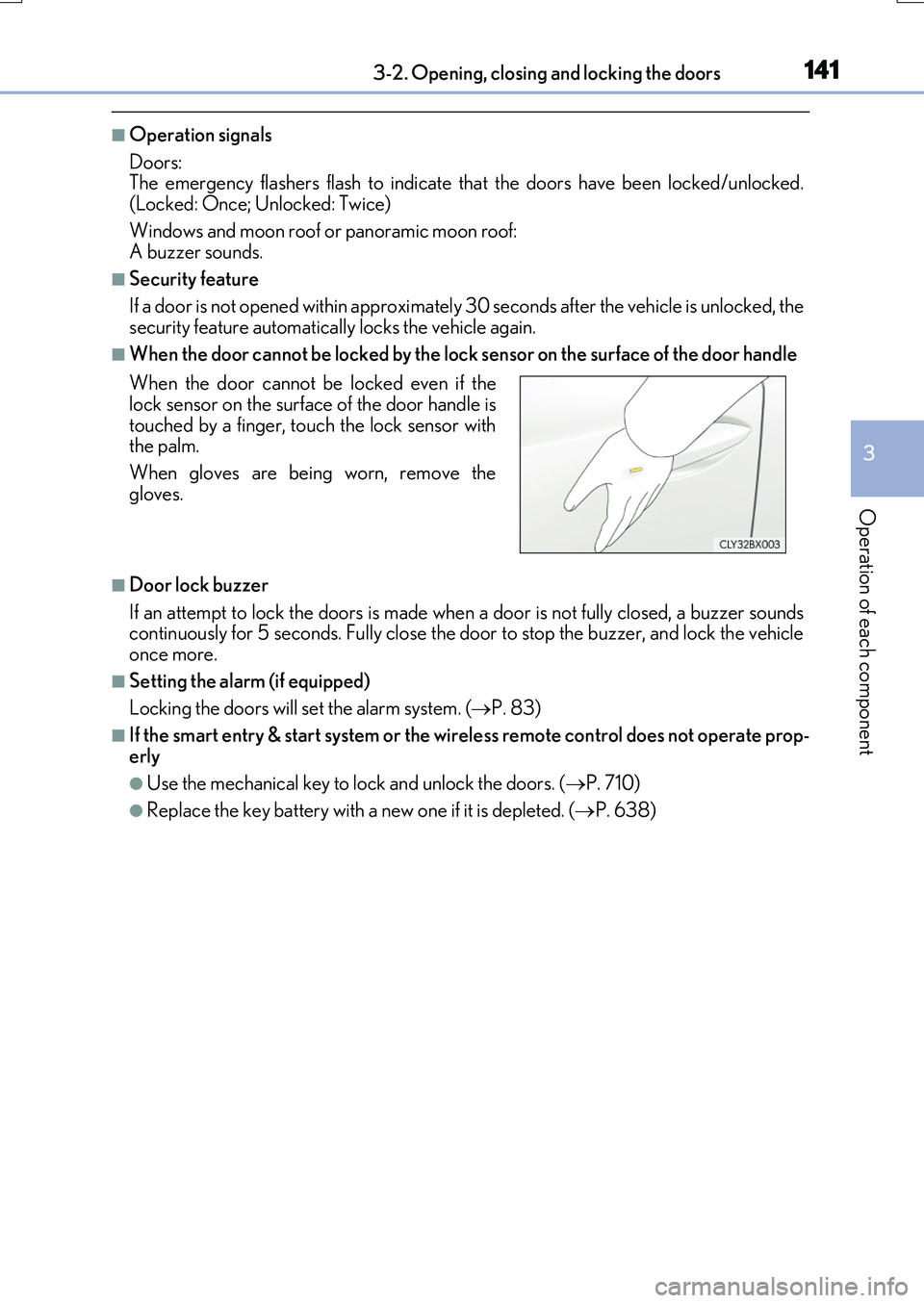
■When the door cannot be locked by the lock sensor on the surface of the door handle
■Door lock buzzer
If an attempt to lock the doors is made when a door is not fully closed, a buzzer sounds continuously for 5 seconds. Fully close the door to stop the buzzer, and lock the vehicleonce more.
■Setting the alarm (if equipped)
Locking the doors will set the alarm system. ( P. 83)
■If the smart entry & start system or the wireless remote control does not operate prop-
erly
●Use the mechanical key to lock and unlock the doors. ( P. 710)
●Replace the key battery with a new one if it is depleted. (P. 638)
When the door cannot be locked even if the lock sensor on the surface of the door handle is
touched by a finger, touch the lock sensor with the palm.
When gloves are being worn, remove the
gloves.
Page 145 of 776
1453-2. Opening, closing and locking the doors
3
Operation of each component
RX350/RX200t_EE_OM48F32E
■Conditions affecting the operation of the smart entry & start system or wireless remote control
P. 170
■Customization
Some functions can be customized. ( P. 740)
WARNING
■To prevent an accident
Observe the following precautions while driving the vehicle.
Failure to do so may result in a door open ing and an occupant falling out, resulting in death or serious injury.
●Ensure that all doors are properly closed and locked.
●Do not pull the inside handle of the doors while driving.
Be especially careful for the front doors, as the doors may be opened even if the inside lock buttons are in locked position.
●Set the rear door child-protector locks wh en children are seated in the rear seats.
■When opening or closing a door
Check the surroundings of the vehicle such as whether the vehicle is on an incline,
whether there is enough space for a door to open and whether a strong wind is blow- ing. When opening or closing the door, hold the door handle tightly to prepare for any unpredictable movement.
■When using the wireless remote control and operating the power windows or themoon roof or panoramic moon roof
Operate the power windows or the moon roof or panoramic moon roof after checking
to make sure that there is no possibility of any passenger having any of their body parts caught in the windows or the moon roof or panoramic moon roof. Also, do not allow children to operate the wireless remote contro l. It is possible for children and other
passengers to get caught in the power windows or the moon roof or panoramic moon roof.
Page 210 of 776
210
RX350/RX200t_EE_OM48F32E
3-5. Opening, closing the windows and moon roof
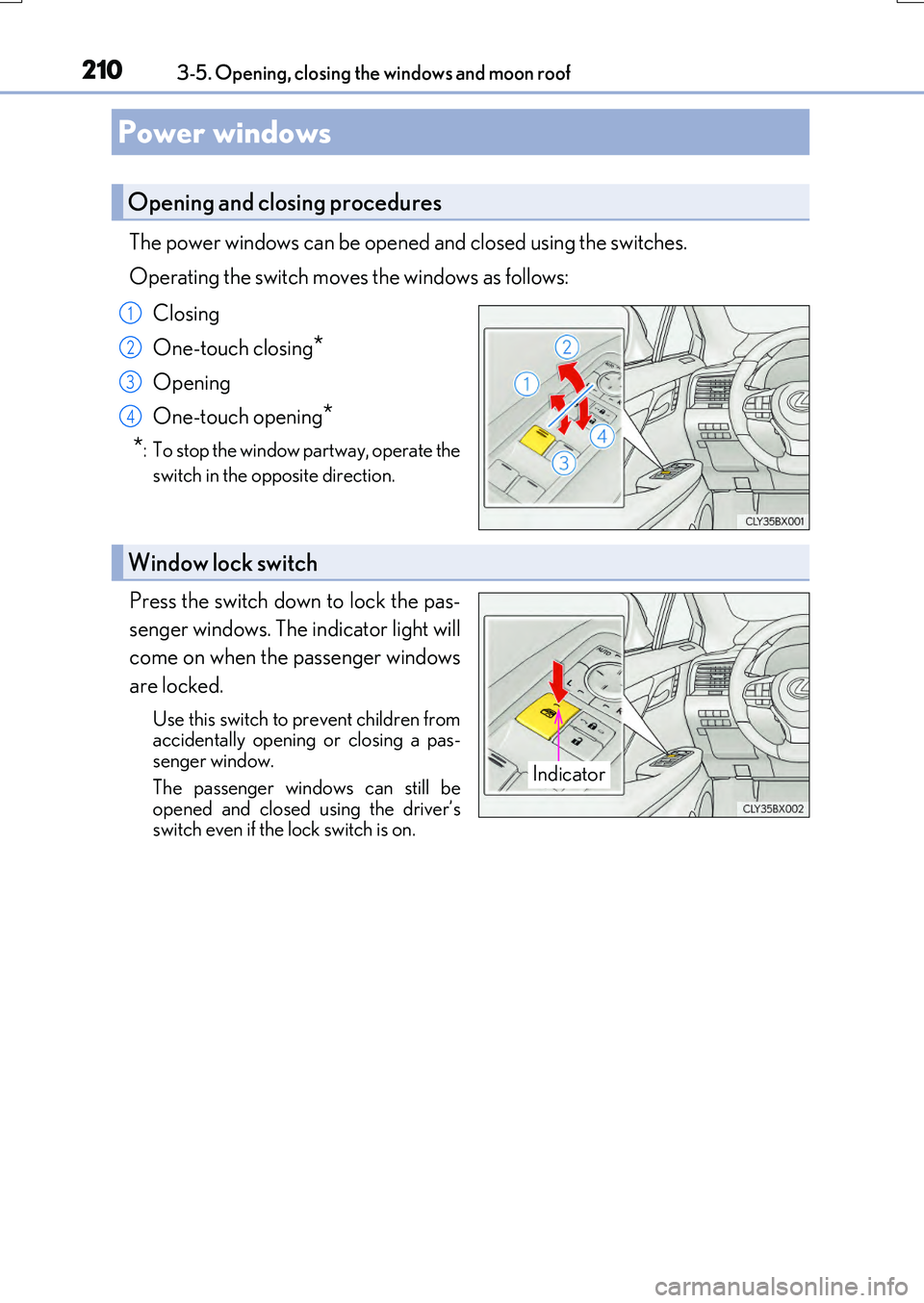
The power windows can be opened and closed using the switches.
Operating the switch moves the windows as follows:
Closing
One-touch closing*
Opening
One-touch opening*
*: To stop the window partway, operate the
switch in the opposite direction.
Press the switch down to lock the pas-
senger windows. The indicator light will
come on when the passenger windows
are locked.
Use this switch to prevent children from accidentally opening or closing a pas-senger window.
The passenger windows can still be opened and closed using the driver’sswitch even if the lock switch is on.
Power windows
Opening and closing procedures
1
2
3
4
Window lock switch
Indicator