mirror LEXUS RX200T 2017 Owner's Guide
[x] Cancel search | Manufacturer: LEXUS, Model Year: 2017, Model line: RX200T, Model: LEXUS RX200T 2017Pages: 776, PDF Size: 44.51 MB
Page 312 of 776
3124-5. Using the driving support systems
RX350/RX200t_EE_OM48F32E
●Some pedestrians such as the following may not be detected by the radar sensor and
camera sensor, preventing the system from operating properly*4:
• Pedestrians shorter than approximately 1 m (3 .2 ft.) or taller than approximately 2 m (6.5 ft.)
• Pedestrians wearing oversized clothing (a rain coat, long skirt, etc.), making their sil- houette obscure• Pedestrians who are carrying large baggage, holding an umbrella, etc., hiding part
of their body • Pedestrians who are bending forward or squatting• Pedestrians who are pushing a stroller , wheelchair, bicycle or other vehicle
• Groups of pedestrians which are close together • Pedestrians who are wearing white and look extremely bright• Pedestrians in the dark, such as at night or while in a tunnel
• Pedestrians whose clothing appears to be nearly the same color or brightness as their surroundings• Pedestrians near walls, fences, guardrails, or large objects
• Pedestrians who are on a metal object (manhole cover, steel plate, etc.) on the road • Pedestrians who are walking fast• Pedestrians who are changing speed abruptly
• Pedestrians running out from behi nd a vehicle or a large object • Pedestrians who are extremely close to the side of the vehicle (outside rear viewmirror, etc.)
*4: Depending on the region in which the vehicle was sold, the pedestrian detection
function may not be available.
■If the PCS warning light flashes and a warning message is displayed on the multi-infor- mation display
The pre-crash safety system may be temporar ily unavailable or there may be a malfunc-
tion in the system.
●In the following situations, the warning light will turn off, the message will disappear and the system will become operational when normal operating conditions return:
• When the radar sensor or camera sensor or the area around either sensor is hot, such as in the sun• When the radar sensor or camera sensor or the area around either sensor is cold,
such as in an extremely cold environment • When the radar sensor or front grille embl em is dirty or covered with snow, etc. • When the part of the windshield in front of the camera sensor is fogged up or cov-
ered with condensation or ice (Defogging the windshield: P. 542) • If the camera sensor is obstructed, such as when the hood is open or a sticker isattached to the windshield near the camera sensor
●If the PCS warning light continues to flash or the warning message does not disappear,the system may be malfunctioning. Have the vehicle inspected by any authorized Lexus
dealer or repairer, or another duly qua lified and equipped professional immediately.
■If VSC is disabled
●If VSC is disabled (P. 425), the pre-crash brake assist and pre-crash braking func-
tions are also disabled.
●The PCS warning light will tu rn on and “VSC Turned Off Pre-Crash Brake System Unavailable” will be displayed on the multi-information display.
Page 356 of 776
3564-5. Using the driving support systems
RX350/RX200t_EE_OM48F32E
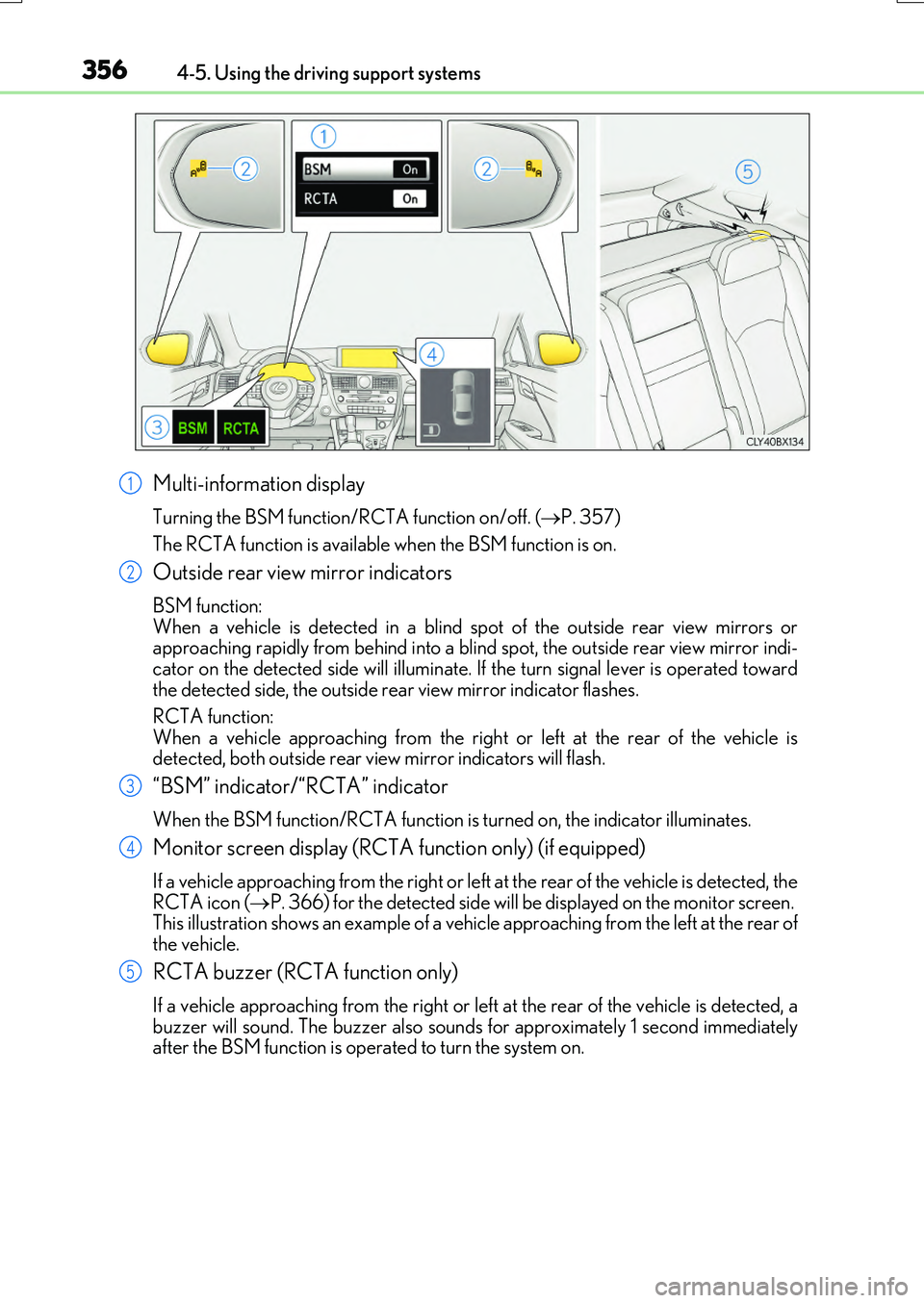
Multi-information display
Turning the BSM function/RCTA function on/off. (P. 357)
The RCTA function is available when the BSM function is on.
Outside rear view mirror indicators
BSM function: When a vehicle is detected in a blind sp ot of the outside rear view mirrors or approaching rapidly from behind into a blin d spot, the outside rear view mirror indi-
cator on the detected side will illuminate. If the turn signal lever is operated toward the detected side, the outside rear view mirror indicator flashes.
RCTA function:
When a vehicle approaching from the right or left at the rear of the vehicle is detected, both outside rear vi ew mirror indicators will flash.
“BSM” indicator/“RCTA” indicator
When the BSM function/RCTA function is turned on, the indicator illuminates.
Monitor screen display (RCTA function only) (if equipped)
If a vehicle approaching from the right or left at the rear of the vehicle is detected, the RCTA icon ( P. 366) for the detected side will be displayed on the monitor screen. This illustration shows an example of a vehicl e approaching from the left at the rear of
the vehicle.
RCTA buzzer (RCTA function only)
If a vehicle approaching from the right or left at the rear of the vehicle is detected, a buzzer will sound. The buzzer also sounds for approximately 1 second immediatelyafter the BSM function is operated to turn the system on.
1
2
3
4
5
Page 357 of 776
3574-5. Using the driving support systems
4
Driving
RX350/RX200t_EE_OM48F32E
Press “” or “” of the meter control switches, select .
Press “ ” or “” of the meter control switches, select “BSM”.
Press “ ” or “” of the meter control switches, select “BSM” or “RCTA”.
■Outside rear view mirror indicator visibility
In strong sunlight, the outside rear view mirror indicator may be difficult to see.
■Hearing the RCTA buzzer
The RCTA buzzer may be difficult to hear ov er loud noises, such as if the audio system volume is high.
■When there is a malfunction in the Blind Spot Monitor
If a system malfunction is de tected due to any of the following, a warning message will be displayed: ( P. 673)
●A sensor is malfunctioning
●A sensor is dirty or covered with snow or a sticker
●The outside temperature is extremely high or low
●Sensor voltage is abnormal
●A sensor is misaligned
■Certification for the Blind Spot Monitor
For vehicles sold in Ukraine
Turning the BSM function/RCTA function on/off
1
2
3
Page 361 of 776
3614-5. Using the driving support systems
4
Driving
RX350/RX200t_EE_OM48F32E
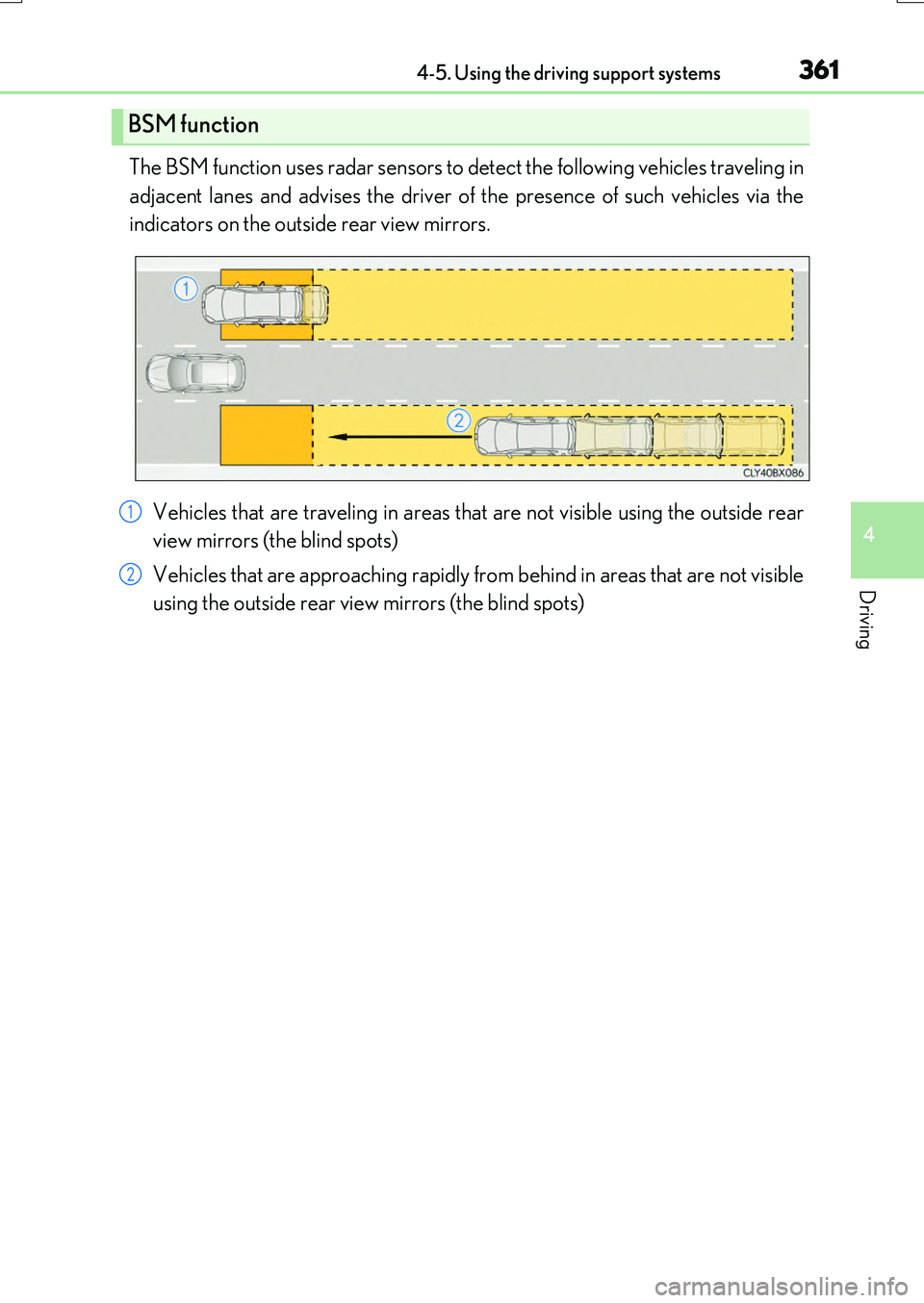
The BSM function uses radar sensors to detect the following vehicles traveling in
adjacent lanes and advises the driver of the presence of such vehicles via the
indicators on the outside rear view mirrors.
Vehicles that are traveling in areas that are not visible using the outside rear
view mirrors (the blind spots)
Vehicles that are approaching rapidly from behind in areas that are not visible
using the outside rear view mirrors (the blind spots)
BSM function
1
2
Page 362 of 776
3624-5. Using the driving support systems
RX350/RX200t_EE_OM48F32E
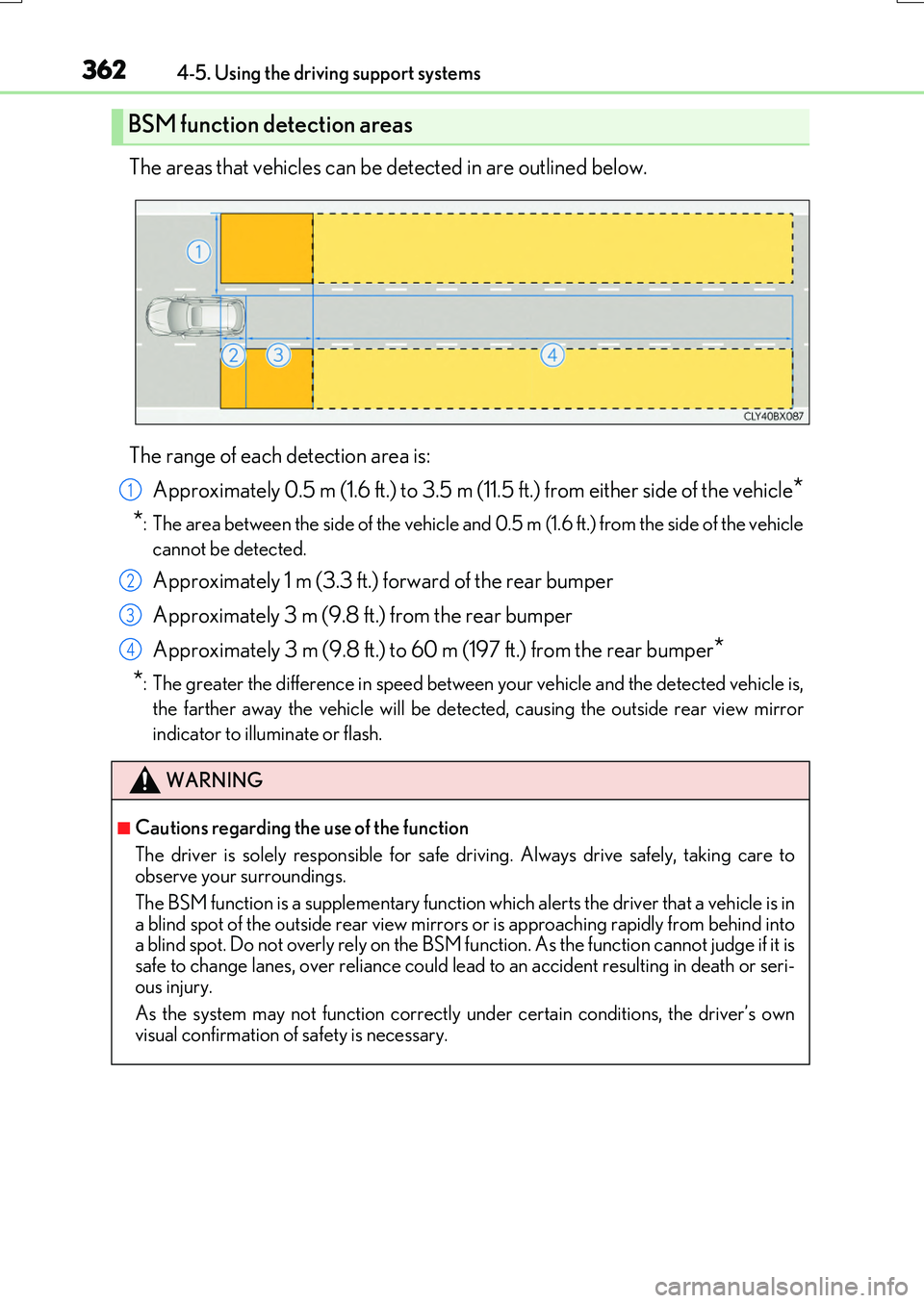
The areas that vehicles can be detected in are outlined below.
The range of each detection area is:
Approximately 0.5 m (1.6 ft.) to 3.5 m (11.5 ft.) from either side of the vehicle*
*: The area between the side of the vehicle and 0.5 m (1.6 ft.) from the side of the vehicle
cannot be detected.
Approximately 1 m (3.3 ft.) forward of the rear bumper
Approximately 3 m (9.8 ft.) from the rear bumper
Approximately 3 m (9.8 ft.) to 60 m (197 ft.) from the rear bumper*
*: The greater the difference in speed between your vehicle and the detected vehicle is,
the farther away the vehicle will be detect ed, causing the outside rear view mirror
indicator to illuminate or flash.
BSM function detection areas
WARNING
■Cautions regarding the use of the function
The driver is solely responsible for safe driving. Always drive safely, taking care to observe your surroundings.
The BSM function is a supplementary function which alerts the driver that a vehicle is in a blind spot of the outside rear view mirrors or is approaching rapidly from behind intoa blind spot. Do not overly rely on the BSM function. As the function cannot judge if it is
safe to change lanes, over reliance could lead to an accident resulting in death or seri- ous injury.
As the system may not function correctly under certain conditions, the driver’s own
visual confirmation of safety is necessary.
1
2
3
4
Page 365 of 776
3654-5. Using the driving support systems
4
Driving
RX350/RX200t_EE_OM48F32E
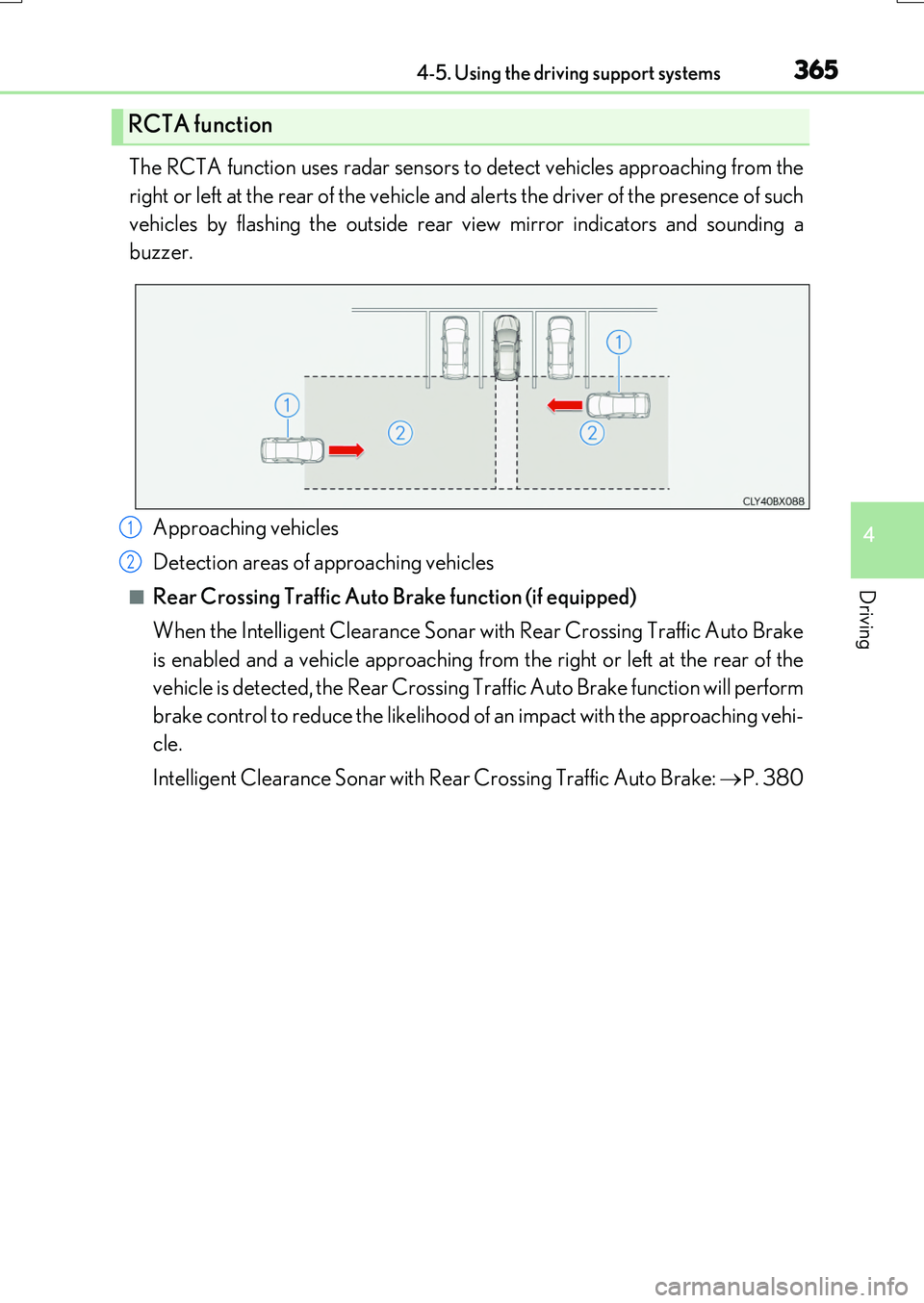
The RCTA function uses radar sensors to detect vehicles approaching from the
right or left at the rear of the vehicle and alerts the driver of the presence of such
vehicles by flashing the outside rear view mirror indicators and sounding a
buzzer.
Approaching vehicles
Detection areas of approaching vehicles
■Rear Crossing Traffic Auto Brake function (if equipped)
When the Intelligent Clearance Sonar with Rear Crossing Traffic Auto Brake
is enabled and a vehicle approaching from the right or left at the rear of the
vehicle is detected, the Rear Crossing Tr affic Auto Brake function will perform
brake control to reduce the likelihood of an impact with the approaching vehi-
cle.
Intelligent Clearance Sonar with Rear Crossing Traffic Auto Brake: P. 380
RCTA function
1
2
Page 415 of 776
4154-5. Using the driving support systems
4
Driving
RX350/RX200t_EE_OM48F32E
WARNING
■When using the Lexus parking assist monitor system
The parking assist monitor is a supplemental device intended to assist the driver when backing up. When backing up, be sure to check visually behind and all around the vehi-
cle before proceeding.
Observe the following precautions to avoid an accident that could result in death or serious injuries.
●Never depend on the parking assist monitor entirely when backing up. The imageand the position of the guide lines displayed on the screen may differ from the actualstate.
Use caution, just as you would when backing up any vehicle.
●Be sure to back up slowly, depressing the brake pedal to control vehicle speed.
●If you seem likely to hit nearby vehicles , obstacles, people or mount the shoulder,
depress the brake pedal to stop the vehicle.
●The instructions given are only guidelines. When and how much to turn the steering wheel will vary according to traffic condi-
tions, road surface conditions, vehicle condition, etc. when parking. It is necessary to be fully aware of this before using the parking assist system.
●When parking, be sure to check that th e parking space will accommodate your vehi-
cle before maneuvering into it.
●Do not use the parking assist monitor in the following cases:
• On icy or slick road surfaces, or in snow
• When using tire chains or emergency tires • When the back door is not closed completely• On roads that are not flat or straight, such as curves or slopes.
●In low temperatures, the screen may darken or the image may become faint. Theimage could distort when the vehicle is moving, or you may become unable to see the
image on the screen. Be sure to check direct visually and with the mirrors all around the vehicle before proceeding.
●If the tire sizes are changed, the position of the guide lines displayed on the screen
may change.
●The camera uses a special lens. The distances between objects and pedestrians that appear in the image displayed on the screen will differ from the actual distances.
( P. 409)
●Estimated course line display mode: If the steering wheel is straight and the vehicle width guide lines and the estimated course lin es are not in alignment, have the vehicle
inspected by any authorized Lexus dealer or repairer, or another duly qualified and equipped professional.
Page 437 of 776
437
5
Lexus Display
Audio system
RX350/RX200t_EE_OM48F32E
5-6. Using an external device
Listening to an iPod................... 472
Using USB memory
device........................................... 476
Using the AUX port .................. 481
5-7. Connecting Bluetooth®
Steps for using Bluetooth®
devices.........................................482
Registering a Bluetooth®
device...........................................484
Selecting a Bluetooth®
device.......................................... 485
Connecting a Bluetooth®
audio player ...............................486
Connecting a Bluetooth®
phone ...........................................487
Displaying a Bluetooth®
device details ........................... 488
Detailed Bluetooth®
settings........................................ 489
5-8. Bluetooth® Audio
Listening to Bluetooth®
Audio........................................... 490
5-9. Bluetooth® Phone
Using a Bluetooth®
Phone........................................... 492
Making a call................................ 494
Receiving a call ........................... 497
Speaking on the phone ...........498
Using a Bluetooth®
phone messages .................... 500
Using the steering wheel
switches.......................................503
Bluetooth® phone
settings ........................................504
5-10. Phonebook
Contact settings .........................506
Messaging setting .....................509
5-11. Bluetooth®
What to do if...
(Troubleshooting).................... 510
Bluetooth®.................................... 513
5-12. Other function
“Information” screen.................. 519
MirrorLink™ ................................520
USB photo .................................... 524
Speech command system ...... 526
Some of the functions cannot be operated while driving.
Page 477 of 776
4775-6. Using an external device
5
Lexus Display Audio system
RX350/RX200t_EE_OM48F32E
Moving the controller to the right and selecting “Play video” while the USB audio
screen is displayed changes to USB video mode.
This function cannot be used while USB photo or MirrorLink™ is in use.
■Menu screen
P. 461
■Selecting a file
Press the “ ” or “” button, turn the “TUNE•SCROLL” knob to select the
desired file number.
To fast-forward or reverse, press and hold the “ ” or “” button.
■Selecting a folder
Move the controller to the right and select “Browse”.
Select the desired folder, then select a file to begin using the selected
folder.
■Displaying the now playing list
Move the controller to the right and select “Now playing list”.
■USB memory functions
●Depending on the USB memory device that is connected to the system, the device itself may not be operable and certain functions may not be available. If the device isinoperable or a function is unavailable du e to a malfunction (as opposed to a system
specification), disconnecting the device and reconnecting it may resolve the problem.
●If the USB memory device still does not begin operation after being disconnected and reconnected, format the device.
■Error messages for USB memory
If the following error messages appear on the screen, refer to the table and take the appropriate measures. If the problem is not rectified, take the vehicle to any authorized
Lexus dealer or repairer, or another duly qualified and equipped professional.
USB video
MessageCause/Correction procedures
“Connection error. Consult your
owner’s manual for instructions on how to reconnect the USBdevice.”
This indicates a problem with the USB memorydevice or its connection.
“There are no files available for
playback. Add compatible files to your USB device.”
This indicates that no MP3/WMA/AAC files areincluded on the USB memory device.
“No video files found.”This indicates that no vide o files are included in the USB memory.
1
2
Page 519 of 776
519
5
Lexus Display Audio system
RX350/RX200t_EE_OM48F32E
5-12. Other function
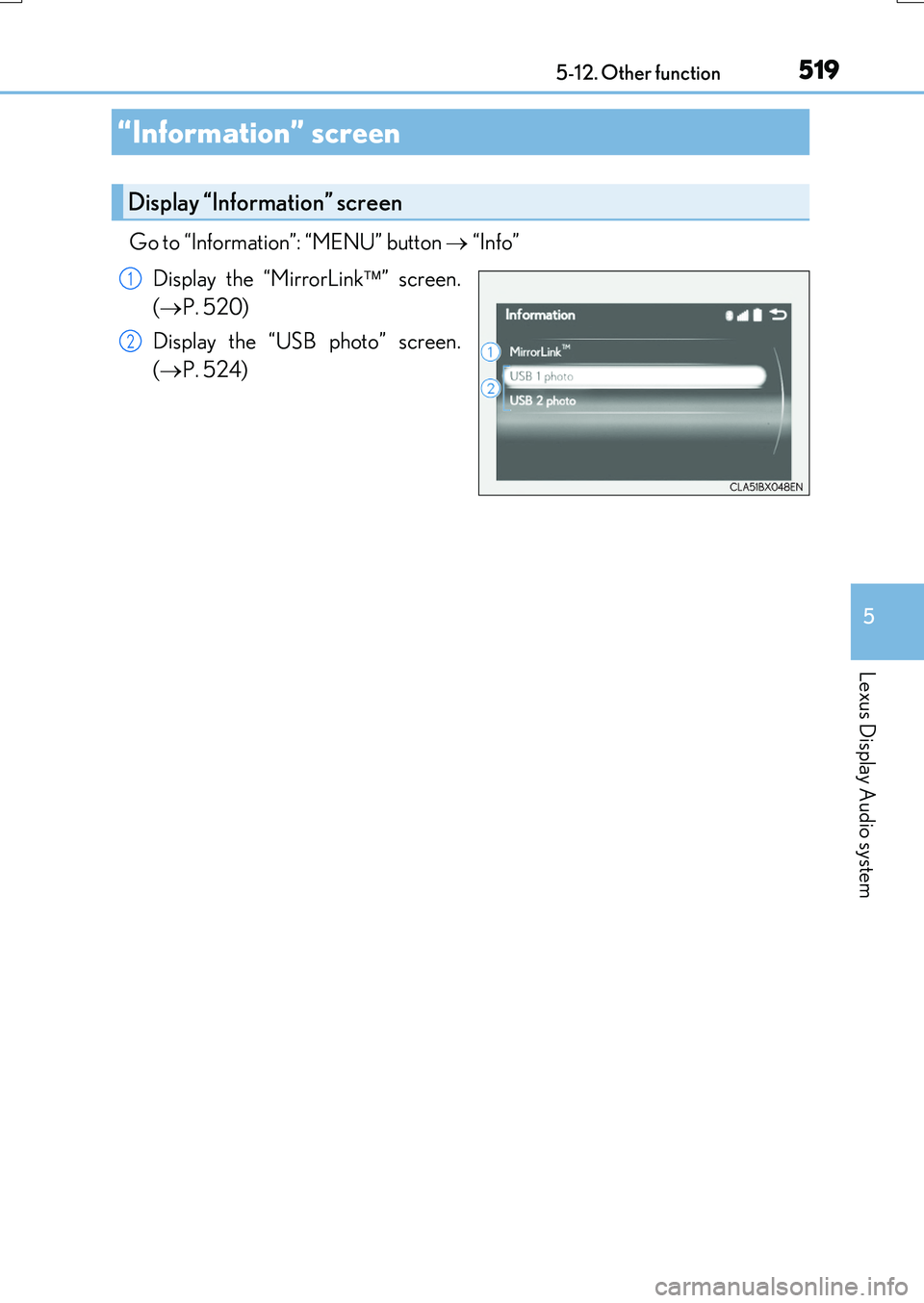
Go to “Information”: “MENU” button “Info”
Display the “MirrorLink ” screen.
( P. 520)
Display the “USB photo” screen.
( P. 524)
“Information” screen
Display “Information” screen
1
2