wheel LEXUS RX200T 2017 Repair Manual
[x] Cancel search | Manufacturer: LEXUS, Model Year: 2017, Model line: RX200T, Model: LEXUS RX200T 2017Pages: 776, PDF Size: 44.51 MB
Page 353 of 776
3534-5. Using the driving support systems
4
Driving
RX350/RX200t_EE_OM48F32E
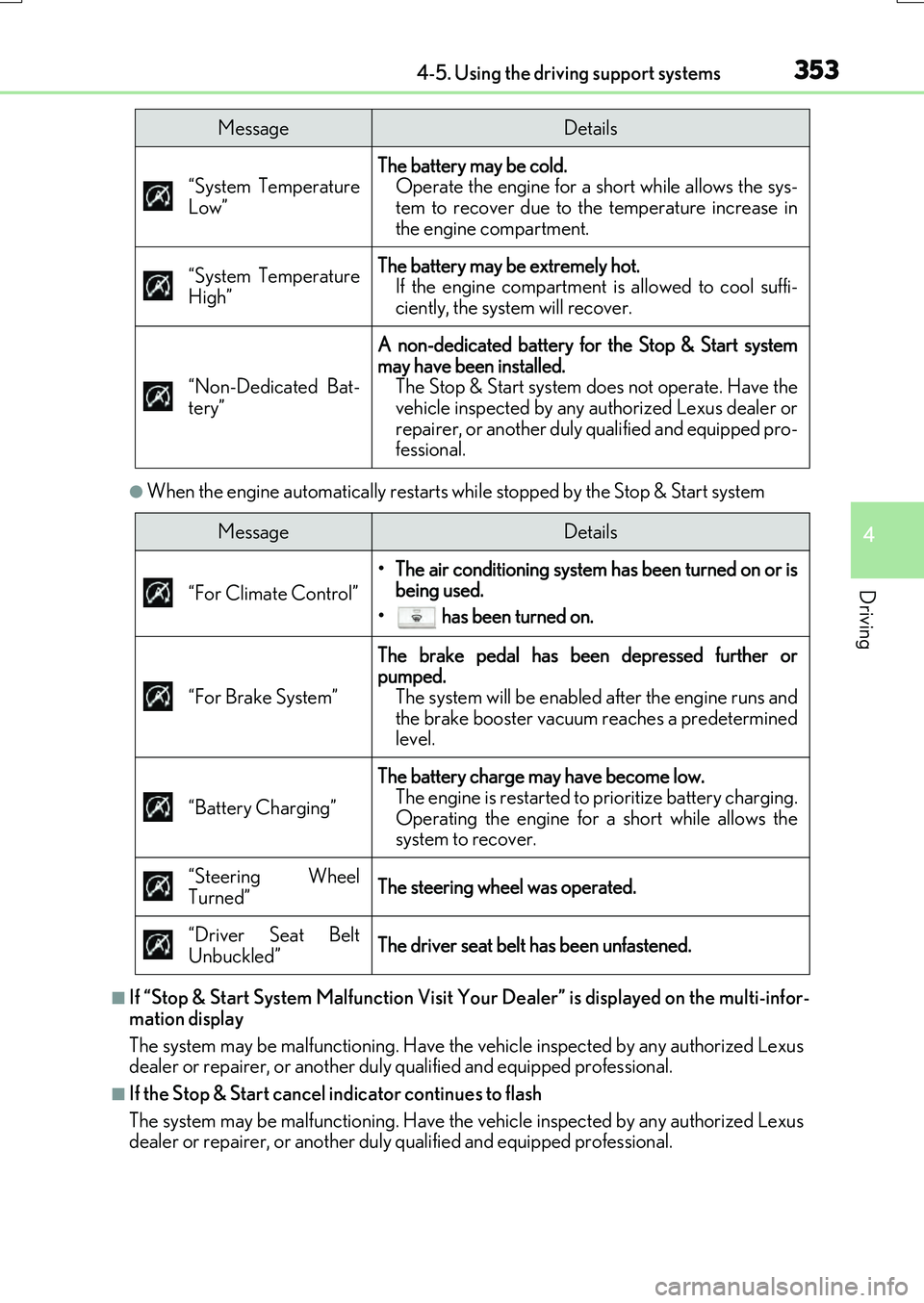
●When the engine automatically restarts while stopped by the Stop & Start system
■If “Stop & Start System Malfunction Visit Your Dealer” is displayed on the multi-infor-
mation display
The system may be malfunctioning. Have the vehicle inspected by any authorized Lexus
dealer or repairer, or another duly qualified and equipped professional.
■If the Stop & Start cancel indicator continues to flash
The system may be malfunctioning. Have the vehicle inspected by any authorized Lexus
dealer or repairer, or another duly qualified and equipped professional.
“System Temperature
Low”
The battery may be cold. Operate the engine for a short while allows the sys-
tem to recover due to the temperature increase in
the engine compartment.
“System Temperature
High”
The battery may be extremely hot. If the engine compartment is allowed to cool suffi-
ciently, the system will recover.
“Non-Dedicated Bat-
tery”
A non-dedicated battery for the Stop & Start system
may have been installed. The Stop & Start system does not operate. Have the
vehicle inspected by any authorized Lexus dealer or
repairer, or another duly qualified and equipped pro-
fessional.
MessageDetails
MessageDetails
“For Climate Control”
• The air conditioning system has been turned on or is being used.
• has been turned on.
“For Brake System”
The brake pedal has been depressed further or
pumped. The system will be enabled after the engine runs and
the brake booster vacuum reaches a predetermined
level.
“Battery Charging”
The battery charge may have become low. The engine is restarted to prioritize battery charging.
Operating the engine for a short while allows the
system to recover.
“Steering Wheel
Turned”
The steering wheel was operated.
“Driver Seat Belt
Unbuckled”
The driver seat belt has been unfastened.
Page 402 of 776
4024-5. Using the driving support systems
RX350/RX200t_EE_OM48F32E
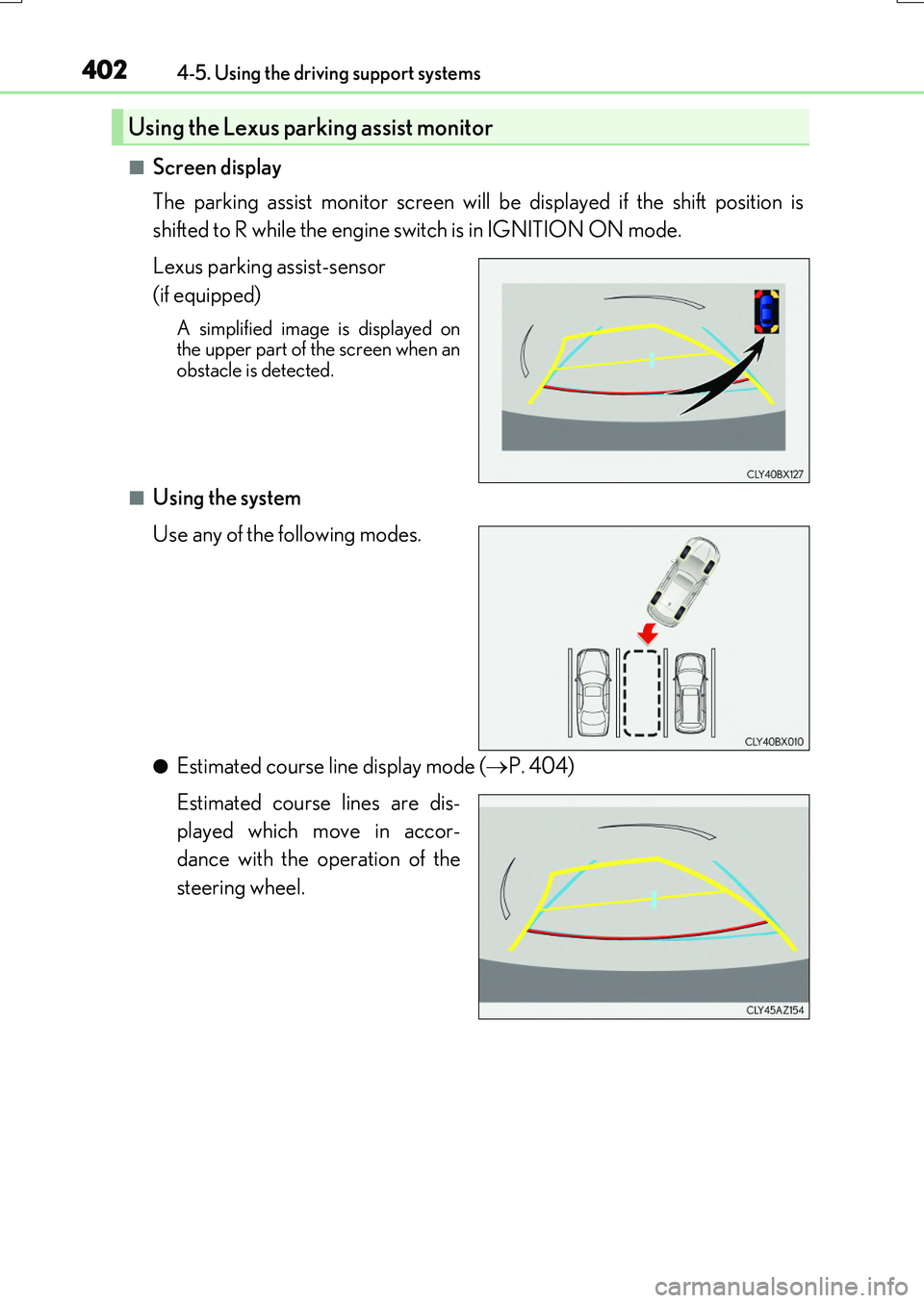
■Screen display
The parking assist monitor screen will be displayed if the shift position is
shifted to R while the engine switch is in IGNITION ON mode.
Lexus parking assist-sensor
(if equipped)
A simplified image is displayed on the upper part of the screen when anobstacle is detected.
■Using the system
Use any of the following modes.
●Estimated course line display mode ( P. 404)
Estimated course lines are dis-
played which move in accor-
dance with the operation of the
steering wheel.
Using the Lexus parking assist monitor
Page 403 of 776
4034-5. Using the driving support systems
4
Driving
RX350/RX200t_EE_OM48F32E
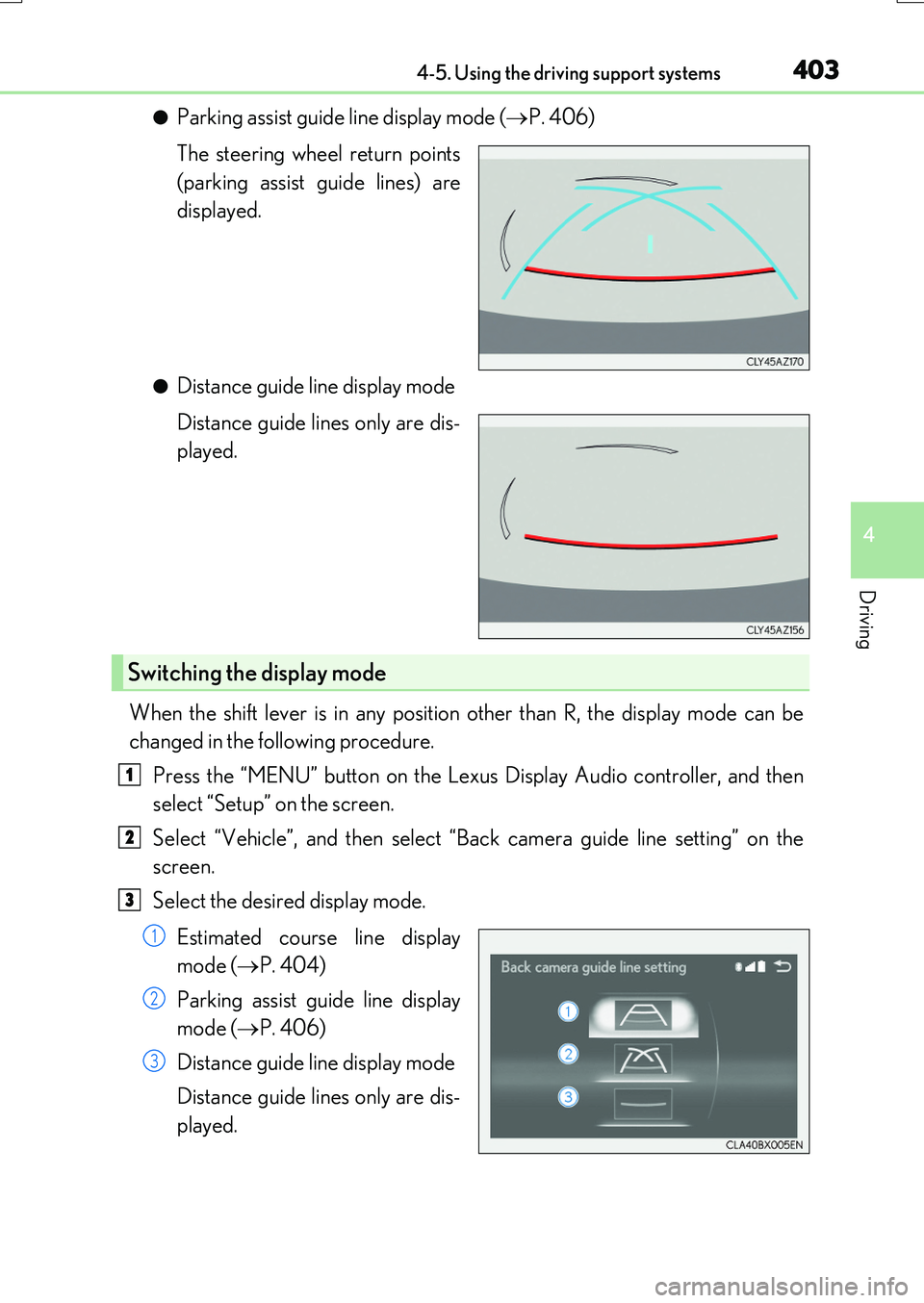
●Parking assist guide line display mode (P. 406)
The steering wheel return points
(parking assist guide lines) are
displayed.
●Distance guide line display mode
Distance guide lines only are dis-
played.
When the shift lever is in any position other than R, the display mode can be
changed in the following procedure.
Press the “MENU” button on the Lexus Display Audio controller, and then
select “Setup” on the screen.
Select “Vehicle”, and then select “Back camera guide line setting” on the
screen.
Select the desired display mode.
Estimated course line display
mode ( P. 404)
Parking assist guide line display
mode ( P. 406)
Distance guide line display mode
Distance guide lines only are dis-
played.
Switching the display mode
1
2
3
1
2
3
Page 404 of 776
4044-5. Using the driving support systems
RX350/RX200t_EE_OM48F32E
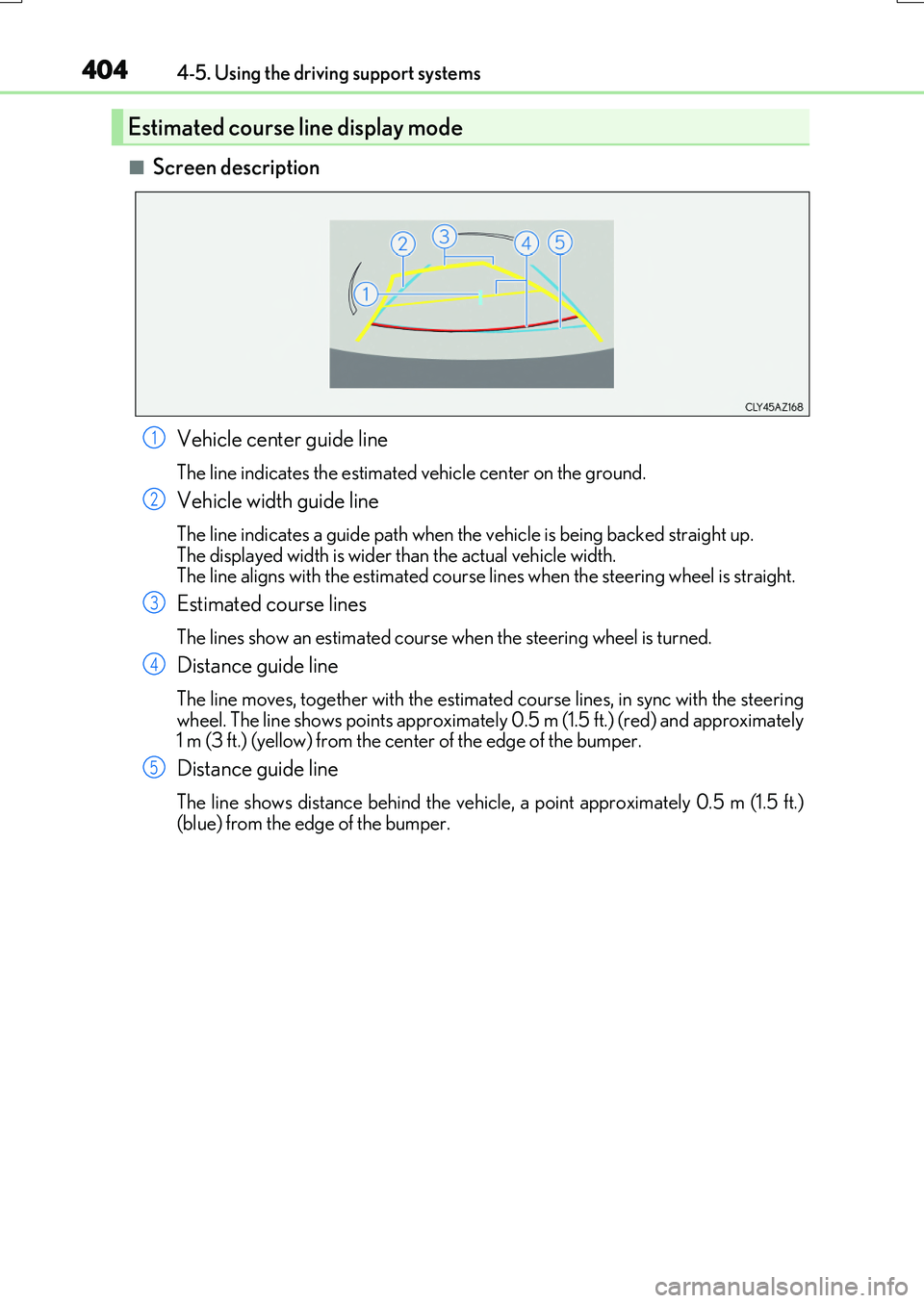
■Screen description
Vehicle center guide line
The line indicates the estimated vehicle center on the ground.
Vehicle width guide line
The line indicates a guide path when the vehicle is being backed straight up.
The displayed width is wider than the actual vehicle width. The line aligns with the estimated course lines when the steering wheel is straight.
Estimated course lines
The lines show an estimated course when the steering wheel is turned.
Distance guide line
The line moves, together with the estimated course lines, in sync with the steering wheel. The line shows points approximately 0.5 m (1.5 ft.) (red) and approximately 1 m (3 ft.) (yellow) from the cent er of the edge of the bumper.
Distance guide line
The line shows distance behind the vehicle, a point approximately 0.5 m (1.5 ft.) (blue) from the edge of the bumper.
Estimated course line display mode
1
2
3
4
5
Page 405 of 776
4054-5. Using the driving support systems
4
Driving
RX350/RX200t_EE_OM48F32E
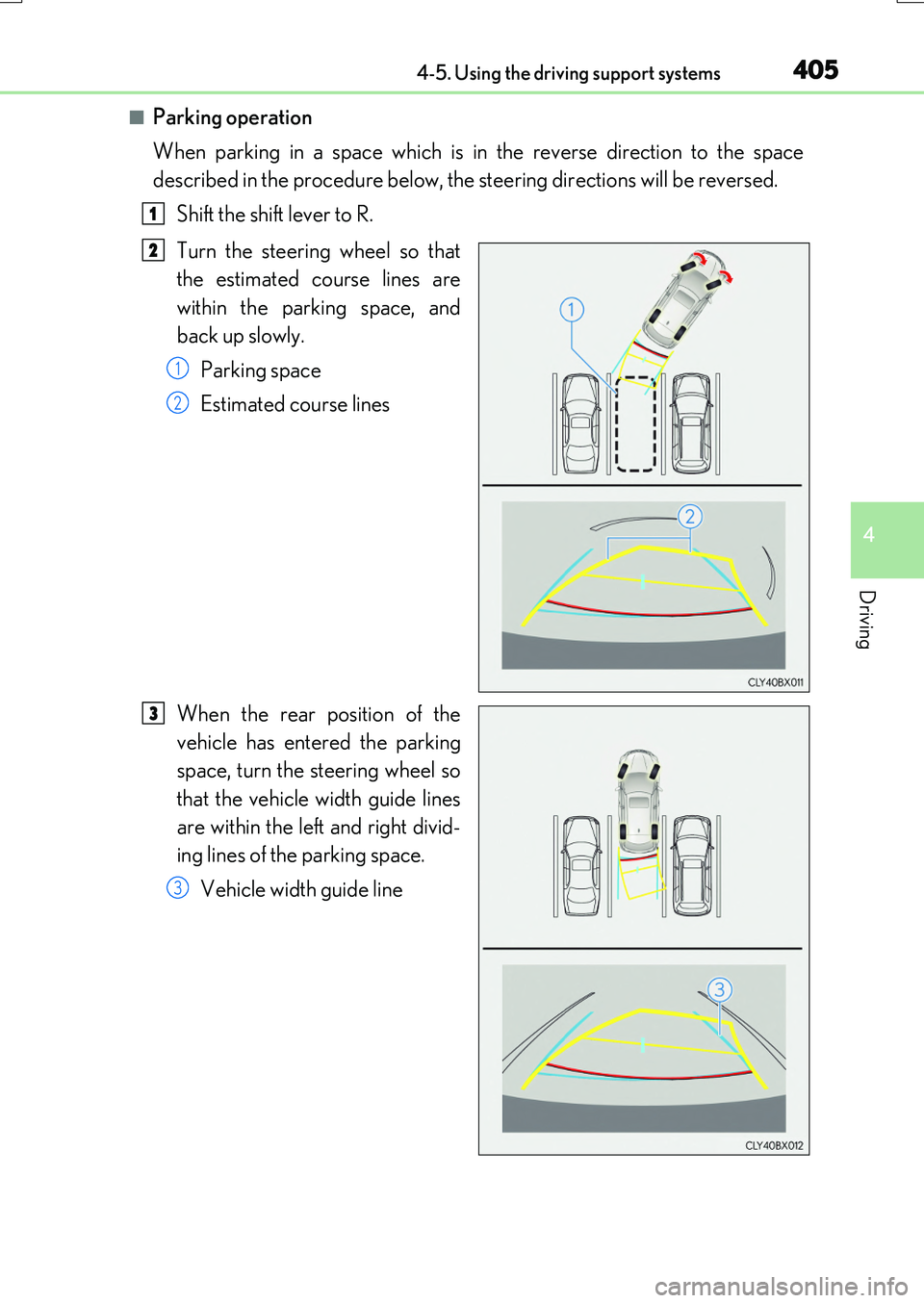
■Parking operation
When parking in a space which is in the reverse direction to the space
described in the procedure below, the steering directions will be reversed.
Shift the shift lever to R.
Turn the steering wheel so that
the estimated course lines are
within the parking space, and
back up slowly.
Parking space
Estimated course lines
When the rear position of the
vehicle has entered the parking
space, turn the steering wheel so
that the vehicle width guide lines
are within the left and right divid-
ing lines of the parking space.
Vehicle width guide line
1
2
1
2
3
3
Page 406 of 776
4064-5. Using the driving support systems
RX350/RX200t_EE_OM48F32E
Once the vehicle width guide lines and the parking space lines are parallel,
straighten the steering wheel and back up slowly until the vehicle has com-
pletely entered the parking space.
Stop the vehicle in an appropriate place, and finish parking.
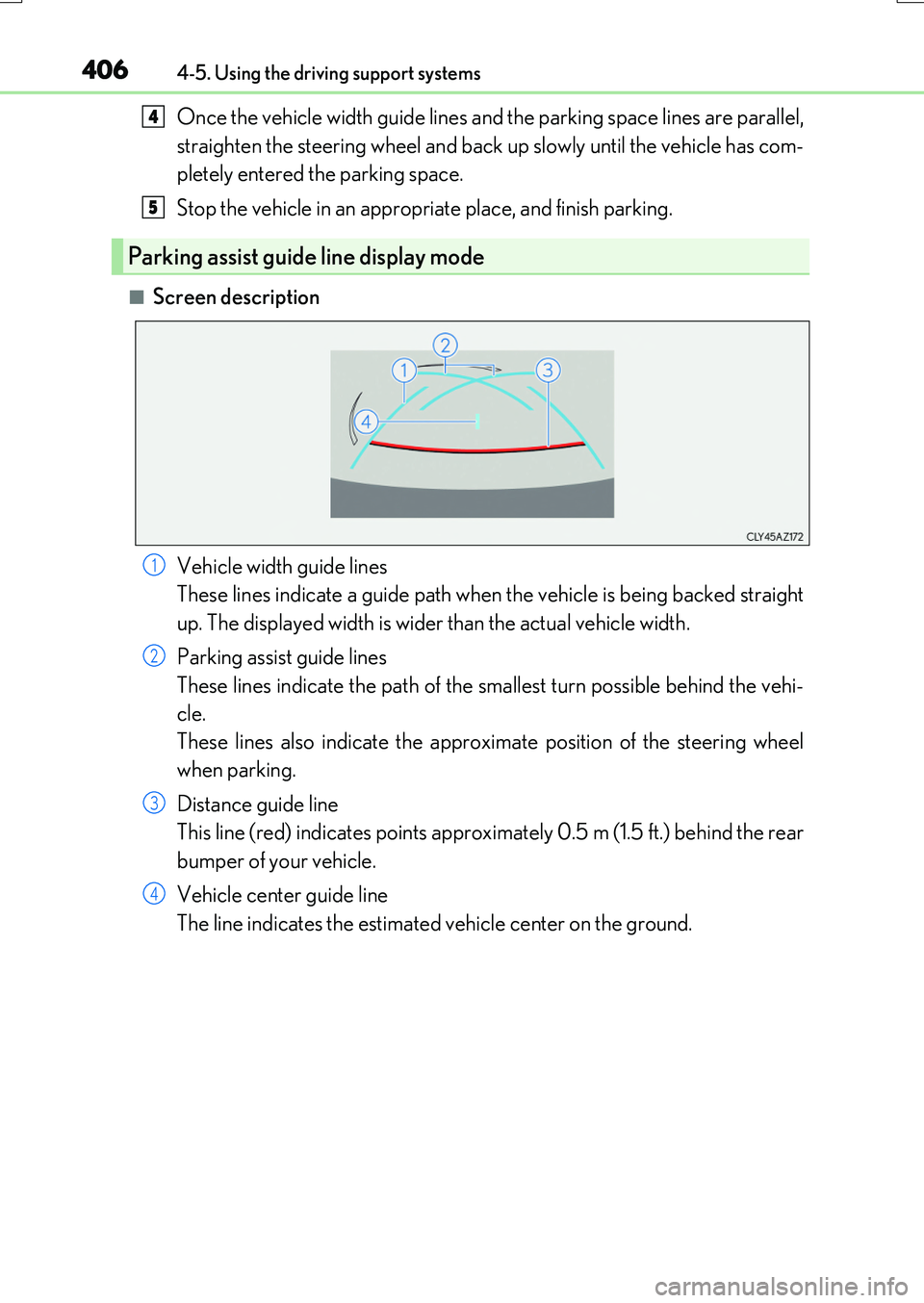
■Screen description
Vehicle width guide lines
These lines indicate a guide path when the vehicle is being backed straight
up. The displayed width is wider than the actual vehicle width.
Parking assist guide lines
These lines indicate the path of the smallest turn possible behind the vehi-
cle.
These lines also indicate the approximate position of the steering wheel
when parking.
Distance guide line
This line (red) indicates points approximately 0.5 m (1.5 ft.) behind the rear
bumper of your vehicle.
Vehicle center guide line
The line indicates the estimated vehicle center on the ground.
Parking assist guide line display mode
4
5
1
2
3
4
Page 407 of 776
4074-5. Using the driving support systems
4
Driving
RX350/RX200t_EE_OM48F32E
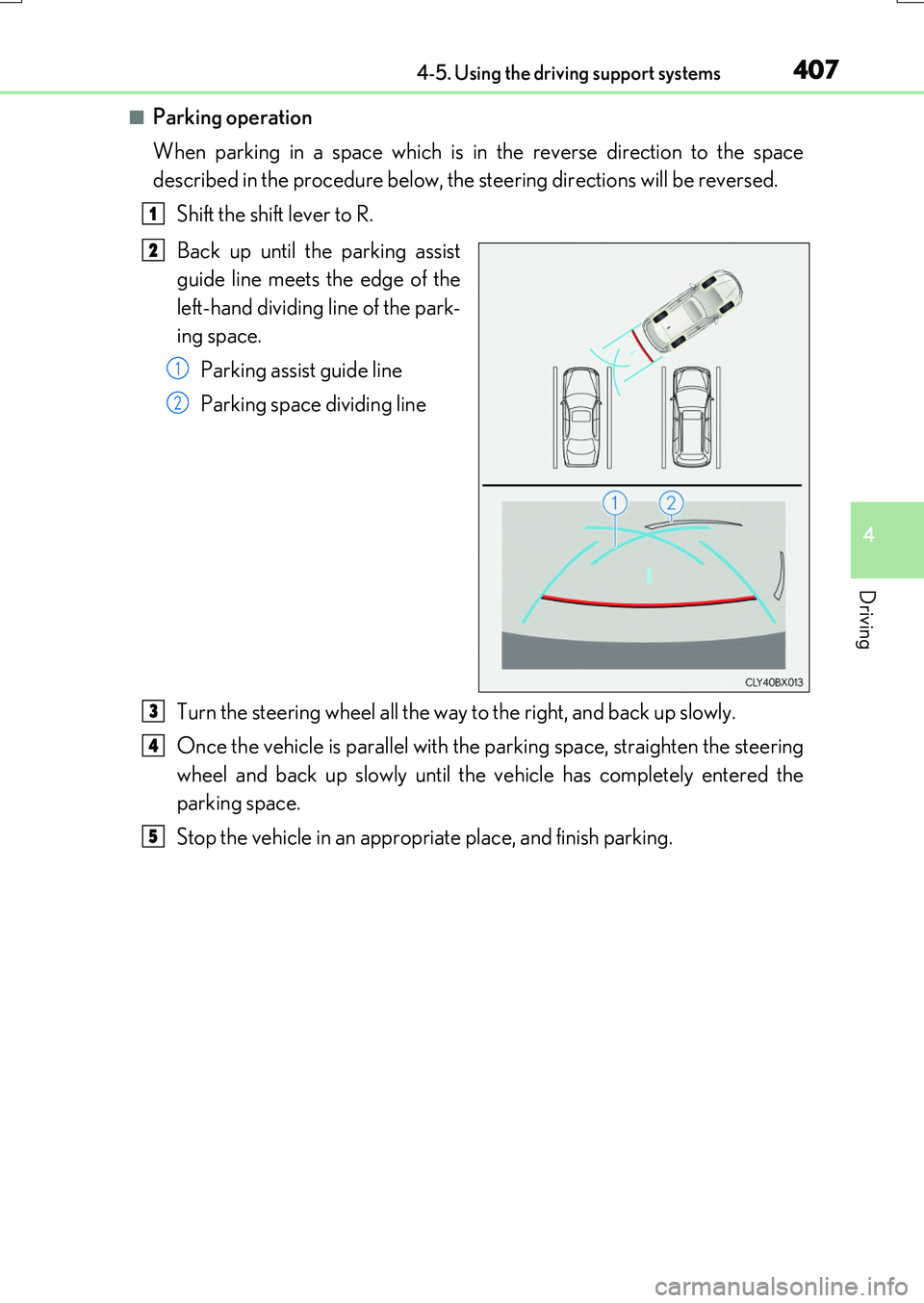
■Parking operation
When parking in a space which is in the reverse direction to the space
described in the procedure below, the steering directions will be reversed.
Shift the shift lever to R.
Back up until the parking assist
guide line meets the edge of the
left-hand dividing line of the park-
ing space.
Parking assist guide line
Parking space dividing line
Turn the steering wheel all the way to the right, and back up slowly.
Once the vehicle is parallel with the parking space, straighten the steering
wheel and back up slowly until the vehicle has completely entered the
parking space.
Stop the vehicle in an appropriate place, and finish parking.
1
2
1
2
3
4
5
Page 414 of 776
4144-5. Using the driving support systems
RX350/RX200t_EE_OM48F32E
The estimated course lines move even though the steering wheel is straight
There is a malfunction in the signals being
output by the steering sensor.
Have the vehicle inspected by any autho- rized Lexus dealer or repairer, or anotherduly qualified and equipped professional.
Guide lines are not displayed
The back door is open.
Close the back door.
If this does not resolve the symptom, have the vehicle inspected by any authorizedLexus dealer or repairer, or another duly
qualified and equipped professional.
The estimated course lines are not displayed
• The steering wheel has been moved while the battery was being reinstalled.• Battery power is low.
• The steering sensor has been rein- stalled.• There is a malfunct ion in the signals
being output by the steering sensor.
Stop the vehicle, and turn the steering wheel as far as it will go to the left andright.
If this does not resolve the symptom, have the vehicle inspected by any authorizedLexus dealer or repairer, or another duly
qualified and equipped professional.
Likely causeSolution
Page 415 of 776
4154-5. Using the driving support systems
4
Driving
RX350/RX200t_EE_OM48F32E
WARNING
■When using the Lexus parking assist monitor system
The parking assist monitor is a supplemental device intended to assist the driver when backing up. When backing up, be sure to check visually behind and all around the vehi-
cle before proceeding.
Observe the following precautions to avoid an accident that could result in death or serious injuries.
●Never depend on the parking assist monitor entirely when backing up. The imageand the position of the guide lines displayed on the screen may differ from the actualstate.
Use caution, just as you would when backing up any vehicle.
●Be sure to back up slowly, depressing the brake pedal to control vehicle speed.
●If you seem likely to hit nearby vehicles , obstacles, people or mount the shoulder,
depress the brake pedal to stop the vehicle.
●The instructions given are only guidelines. When and how much to turn the steering wheel will vary according to traffic condi-
tions, road surface conditions, vehicle condition, etc. when parking. It is necessary to be fully aware of this before using the parking assist system.
●When parking, be sure to check that th e parking space will accommodate your vehi-
cle before maneuvering into it.
●Do not use the parking assist monitor in the following cases:
• On icy or slick road surfaces, or in snow
• When using tire chains or emergency tires • When the back door is not closed completely• On roads that are not flat or straight, such as curves or slopes.
●In low temperatures, the screen may darken or the image may become faint. Theimage could distort when the vehicle is moving, or you may become unable to see the
image on the screen. Be sure to check direct visually and with the mirrors all around the vehicle before proceeding.
●If the tire sizes are changed, the position of the guide lines displayed on the screen
may change.
●The camera uses a special lens. The distances between objects and pedestrians that appear in the image displayed on the screen will differ from the actual distances.
( P. 409)
●Estimated course line display mode: If the steering wheel is straight and the vehicle width guide lines and the estimated course lin es are not in alignment, have the vehicle
inspected by any authorized Lexus dealer or repairer, or another duly qualified and equipped professional.
Page 421 of 776
4214-5. Using the driving support systems
4
Driving
RX350/RX200t_EE_OM48F32E
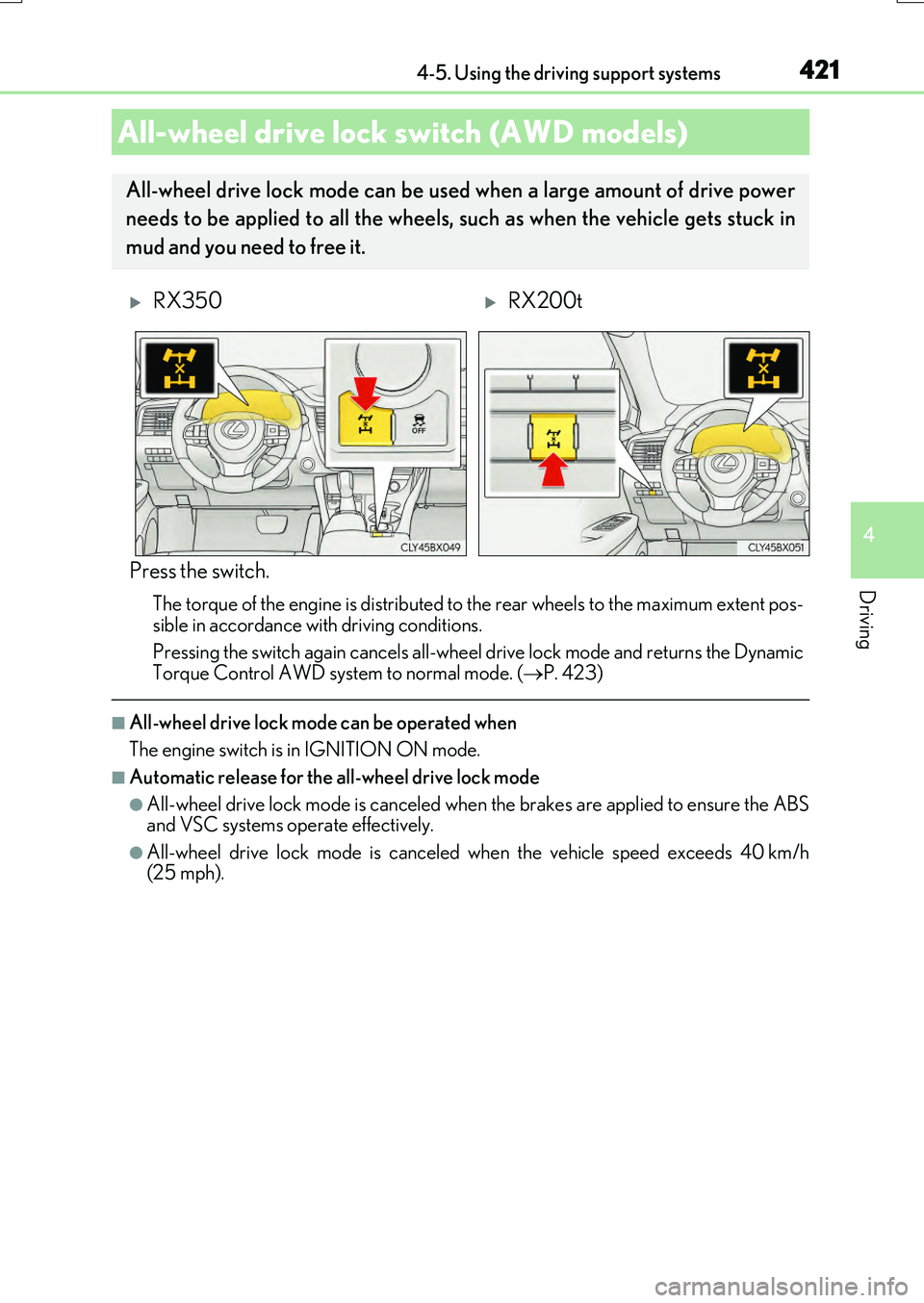
Press the switch.
The torque of the engine is distributed to the rear wheels to the maximum extent pos-
sible in accordance with driving conditions.
Pressing the switch again cancels all-wheel drive lock mode and returns the Dynamic Torque Control AWD system to normal mode. ( P. 423)
■All-wheel drive lock mode can be operated when
The engine switch is in IGNITION ON mode.
■Automatic release for the all-wheel drive lock mode
●All-wheel drive lock mode is canceled when the brakes are applied to ensure the ABS and VSC systems operate effectively.
●All-wheel drive lock mode is canceled when the vehicle speed exceeds 40 km/h(25 mph).
All-wheel drive lock switch (AWD models)
All-wheel drive lock mode can be used when a large amount of drive power
needs to be applied to all the wheels, such as when the vehicle gets stuck in
mud and you need to free it.
RX350RX200t