seat LEXUS RX200T 2017 Manual Online
[x] Cancel search | Manufacturer: LEXUS, Model Year: 2017, Model line: RX200T, Model: LEXUS RX200T 2017Pages: 776, PDF Size: 44.51 MB
Page 352 of 776
3524-5. Using the driving support systems
RX350/RX200t_EE_OM48F32E
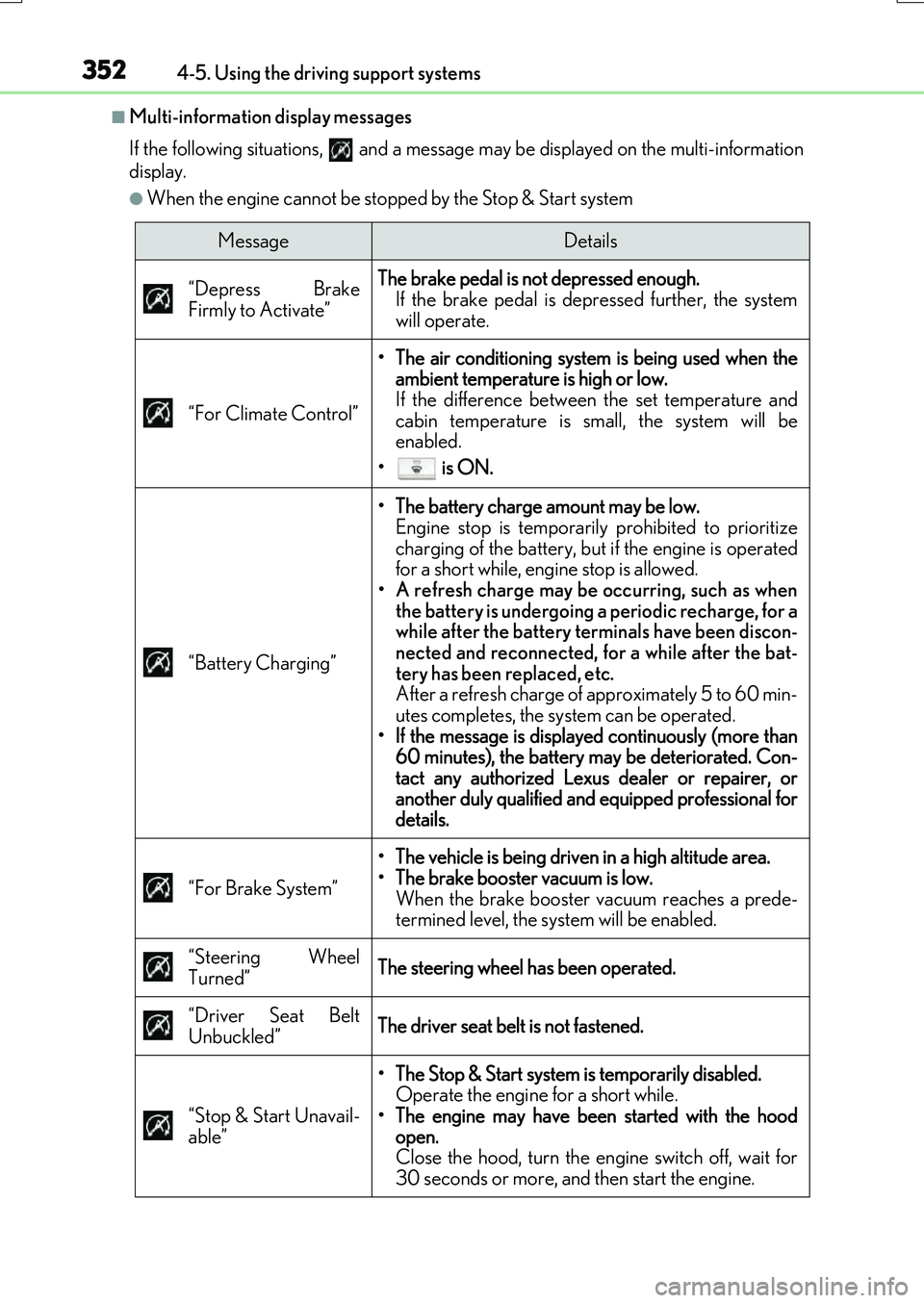
■Multi-information display messages
If the following situations, and a message may be displayed on the multi-information
display.
●When the engine cannot be stopped by the Stop & Start system
MessageDetails
“Depress Brake
Firmly to Activate”
The brake pedal is not depressed enough.
If the brake pedal is depressed further, the system
will operate.
“For Climate Control”
• The air conditioning system is being used when the ambient temperature is high or low.
If the difference between the set temperature and
cabin temperature is small, the system will be
enabled.
• is ON.
“Battery Charging”
• The battery charge amount may be low. Engine stop is temporarily prohibited to prioritize
charging of the battery, but if the engine is operated
for a short while, engine stop is allowed.
• A refresh charge may be occurring, such as when the battery is undergoing a periodic recharge, for a
while after the battery terminals have been discon-
nected and reconnected, for a while after the bat-
tery has been replaced, etc.
After a refresh charge of approximately 5 to 60 min-
utes completes, the system can be operated.
• If the message is displayed continuously (more than 60 minutes), the battery may be deteriorated. Con-
tact any authorized Lexus dealer or repairer, or
another duly qualified and equipped professional for
details.
“For Brake System”
• The vehicle is being driven in a high altitude area.
• The brake booster vacuum is low. When the brake booster vacuum reaches a prede-
termined level, the system will be enabled.
“Steering Wheel
Turned”
The steering wheel has been operated.
“Driver Seat Belt
Unbuckled”
The driver seat belt is not fastened.
“Stop & Start Unavail-
able”
• The Stop & Start system is temporarily disabled. Operate the engine for a short while.
• The engine may have been started with the hood open.
Close the hood, turn the engine switch off, wait for
30 seconds or more, and then start the engine.
Page 353 of 776
3534-5. Using the driving support systems
4
Driving
RX350/RX200t_EE_OM48F32E
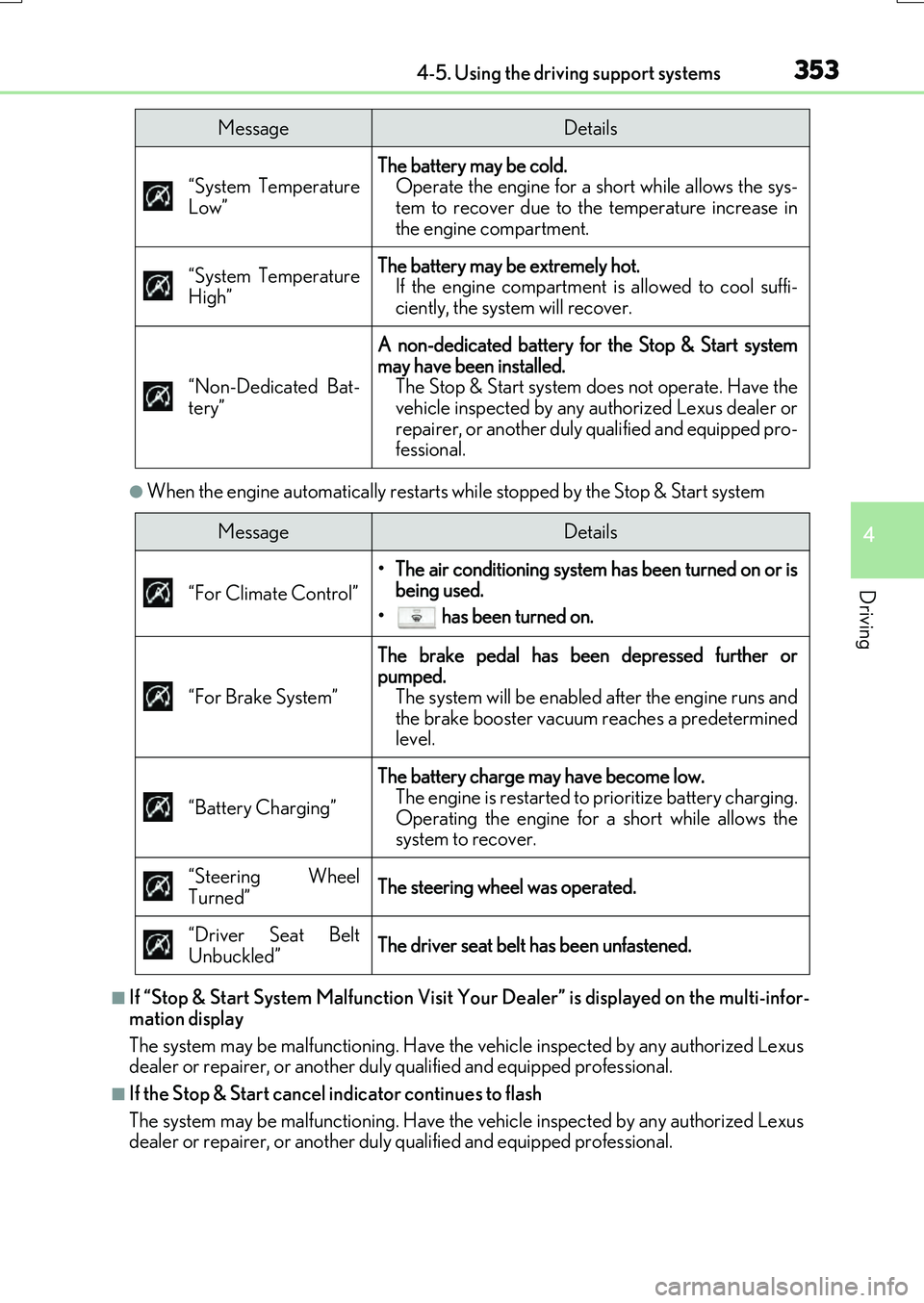
●When the engine automatically restarts while stopped by the Stop & Start system
■If “Stop & Start System Malfunction Visit Your Dealer” is displayed on the multi-infor-
mation display
The system may be malfunctioning. Have the vehicle inspected by any authorized Lexus
dealer or repairer, or another duly qualified and equipped professional.
■If the Stop & Start cancel indicator continues to flash
The system may be malfunctioning. Have the vehicle inspected by any authorized Lexus
dealer or repairer, or another duly qualified and equipped professional.
“System Temperature
Low”
The battery may be cold. Operate the engine for a short while allows the sys-
tem to recover due to the temperature increase in
the engine compartment.
“System Temperature
High”
The battery may be extremely hot. If the engine compartment is allowed to cool suffi-
ciently, the system will recover.
“Non-Dedicated Bat-
tery”
A non-dedicated battery for the Stop & Start system
may have been installed. The Stop & Start system does not operate. Have the
vehicle inspected by any authorized Lexus dealer or
repairer, or another duly qualified and equipped pro-
fessional.
MessageDetails
MessageDetails
“For Climate Control”
• The air conditioning system has been turned on or is being used.
• has been turned on.
“For Brake System”
The brake pedal has been depressed further or
pumped. The system will be enabled after the engine runs and
the brake booster vacuum reaches a predetermined
level.
“Battery Charging”
The battery charge may have become low. The engine is restarted to prioritize battery charging.
Operating the engine for a short while allows the
system to recover.
“Steering Wheel
Turned”
The steering wheel was operated.
“Driver Seat Belt
Unbuckled”
The driver seat belt has been unfastened.
Page 354 of 776
3544-5. Using the driving support systems
RX350/RX200t_EE_OM48F32E
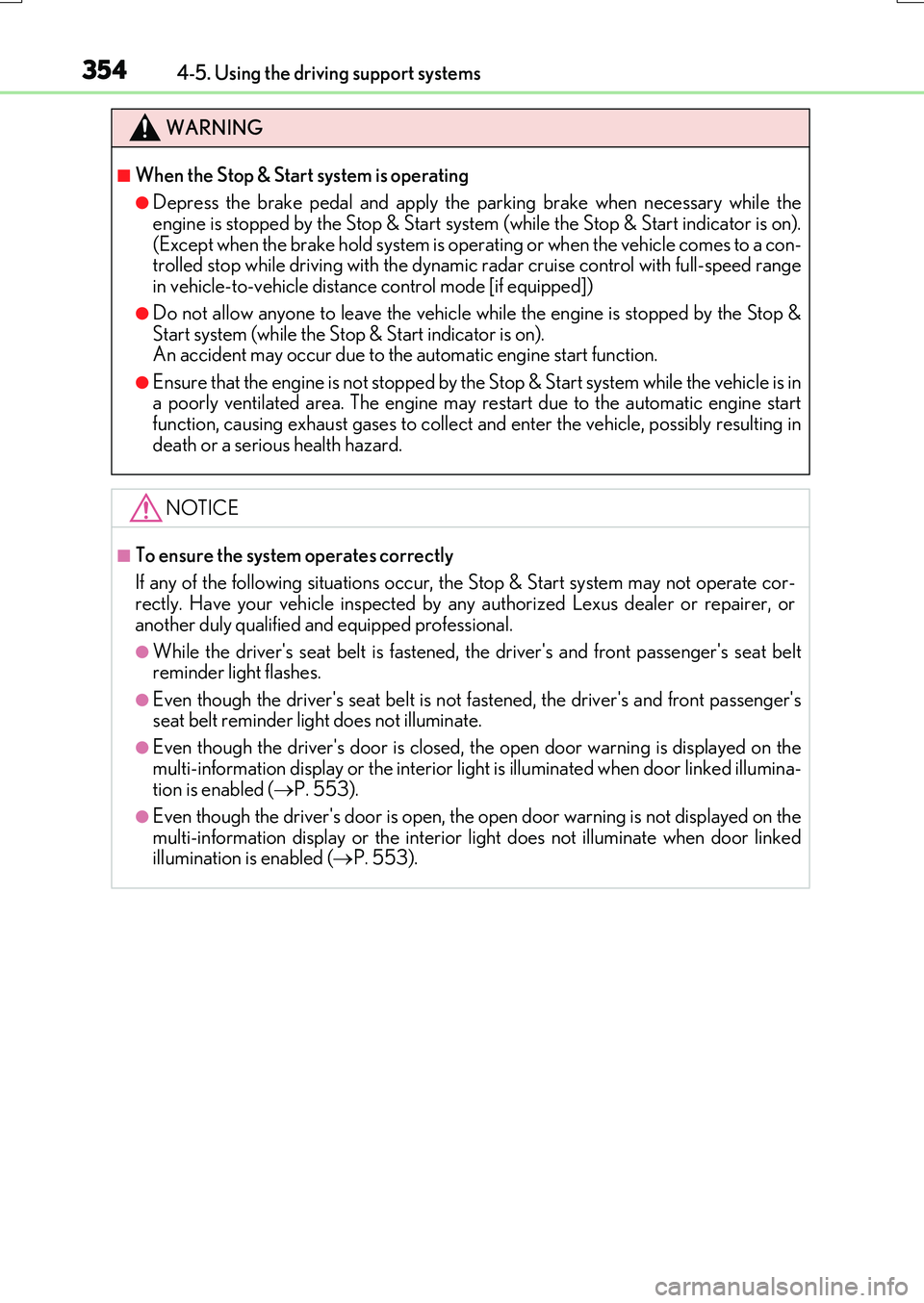
WARNING
■When the Stop & Start system is operating
●Depress the brake pedal and apply the parking brake when necessary while the engine is stopped by the Stop & Start system (while the Stop & Start indicator is on).
(Except when the brake hold system is operating or when the vehicle comes to a con- trolled stop while driving with the dynamic radar cruise control with full-speed range in vehicle-to-vehicle distan ce control mode [if equipped])
●Do not allow anyone to leave the vehicle while the engine is stopped by the Stop & Start system (while the Stop & Start indicator is on).An accident may occur due to the automatic engine start function.
●Ensure that the engine is not stopped by the Stop & Start system while the vehicle is ina poorly ventilated area. The engine may restart due to the automatic engine startfunction, causing exhaust gases to collect and enter the vehicle, possibly resulting in
death or a serious health hazard.
NOTICE
■To ensure the system operates correctly
If any of the following situations occur, the Stop & Start system may not operate cor- rectly. Have your vehicle inspected by any authorized Lexus dealer or repairer, or
another duly qualified and equipped professional.
●While the driver's seat belt is fastened, the driver's and front passenger's seat belt reminder light flashes.
●Even though the driver's seat belt is not fastened, the driver's and front passenger'sseat belt reminder light does not illuminate.
●Even though the driver's door is closed, the open door warning is displayed on the
multi-information display or the interior lig ht is illuminated when door linked illumina- tion is enabled ( P. 553).
●Even though the driver's door is open, the open door warning is not displayed on the
multi-information display or the interior light does not illuminate when door linked illumination is enabled ( P. 553).
Page 433 of 776
4334-6. Driving tips
4
Driving
RX350/RX200t_EE_OM48F32E
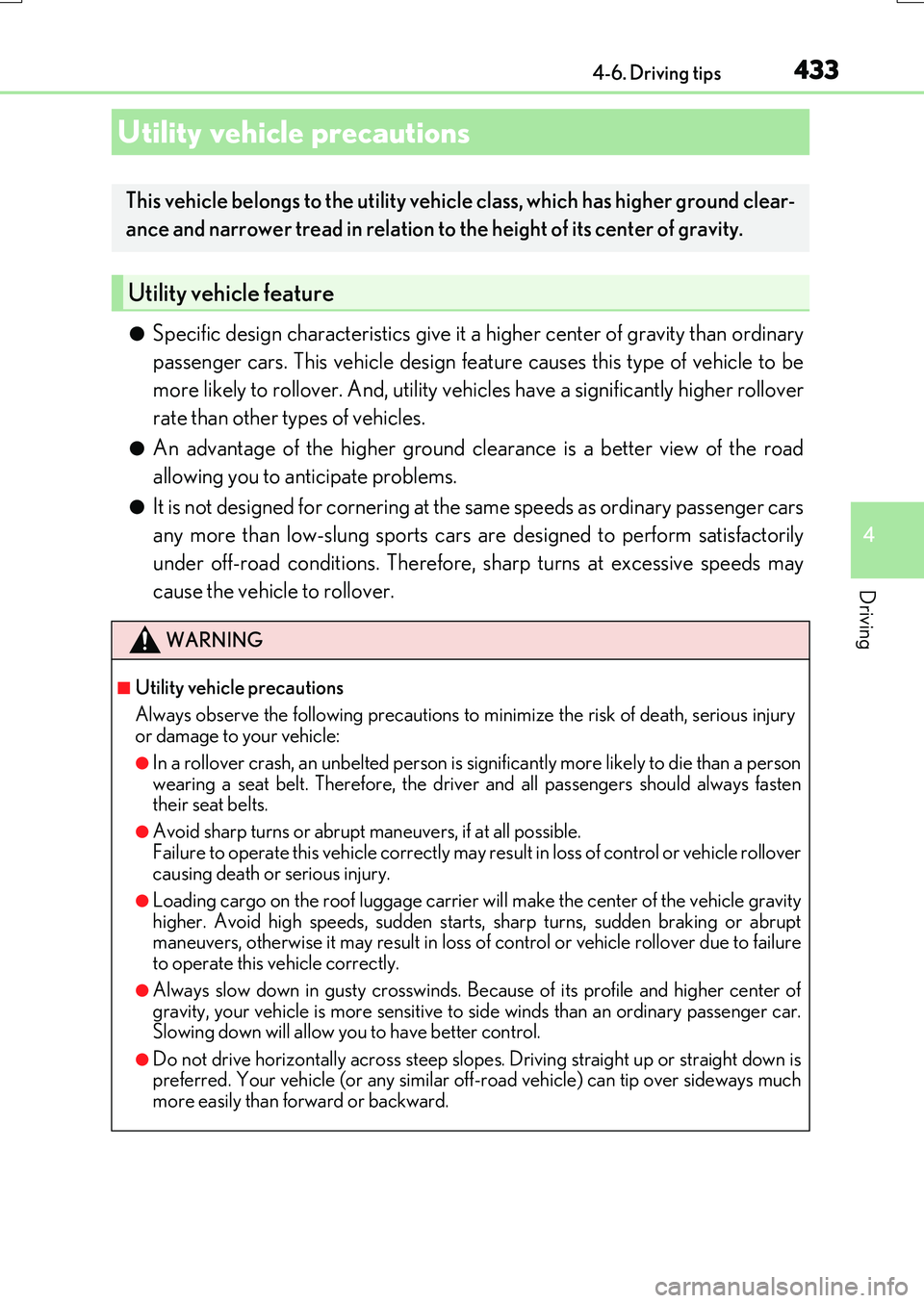
●Specific design characteristics give it a higher center of gravity than ordinary
passenger cars. This vehicle design feature causes this type of vehicle to be
more likely to rollover. And, utility vehicles have a significantly higher rollover
rate than other types of vehicles.
●An advantage of the higher ground clearance is a better view of the road
allowing you to anticipate problems.
●It is not designed for cornering at the same speeds as ordinary passenger cars
any more than low-slung sports cars are designed to perform satisfactorily
under off-road conditions. Therefore, sharp turns at excessive speeds may
cause the vehicle to rollover.
Utility vehicle precautions
This vehicle belongs to the utility vehicle class, which has higher ground clear-
ance and narrower tread in relation to the height of its center of gravity.
Utility vehicle feature
WARNING
■Utility vehicle precautions
Always observe the following precautions to minimize the risk of death, serious injury or damage to your vehicle:
●In a rollover crash, an unbelted person is significantly more likely to die than a person
wearing a seat belt. Therefore, the driver and all passengers should always fasten their seat belts.
●Avoid sharp turns or abrupt maneuvers, if at all possible.
Failure to operate this vehicle correctly may re sult in loss of control or vehicle rollover causing death or serious injury.
●Loading cargo on the roof luggage carrier wi ll make the center of the vehicle gravity
higher. Avoid high speeds, sudden starts, sharp turns, sudden braking or abrupt maneuvers, otherwise it may result in loss of control or vehicle rollover due to failure to operate this vehicle correctly.
●Always slow down in gusty crosswinds. Because of its profile and higher center ofgravity, your vehicle is more sensitive to side winds than an ordinary passenger car.Slowing down will allow you to have better control.
●Do not drive horizontally across steep slopes . Driving straight up or straight down is preferred. Your vehicle (or any similar off- road vehicle) can tip over sideways much
more easily than forward or backward.
Page 514 of 776
5145-11. Bluetooth®
RX350/RX200t_EE_OM48F32E
■Bluetooth® antenna
The antenna is built into the display. If the portable audio player is behind the seat or in the glove box or console box, or is
touching or covered by me tal objects, the connection status may deteriorate. If the cellular phone is behind the seat or in the console box, or touching or covered by metal objects, the connecti on status may deteriorate.
■Battery charge/signal status
●This display may not correspond exactly with the portable audio player or cellular phone itself.
●This system does not have a charging function.
●The portable audio player or cellular phone battery will be depleted quickly when the device is connected to Bluetooth®.
■When using the Bluetooth® audio and hands-free system at the same time
The following problems may occur.
●The Bluetooth® audio connection may be interrupted.
●Noise may be heard during Bluetooth® audio playback.
■About the contact in this system
The following data is stored for every registered cellular phone. When another phone is
connecting, you cannot read the registered data.
●Contact data
●Call history
●Favorite
●Message
When removing a Bluetooth® phone from the system, the above-mentioned data is also deleted.
■About Bluetooth®
The Bluetooth® word mark and logos are regis-tered trademarks owned by the Bluetooth SIG,
Inc. and any use of such marks by FUJITSU TEN LIMITED is under license. Other trademarksand trade names are those of their respective
owners.
Page 529 of 776
529
6Interior features
RX350/RX200t_EE_OM48F32E
6-1. Basic operation of the
Remote Touch screen
Remote Touch ............................ 530
12.3-inch display.........................533
6-2. Using the air conditioning
system and defogger
Lexus Climate Concierge..... 535
Automatic air
conditioning system ...............536
Heated steering wheel/
seat heaters/
seat ventilators .........................549
6-3. Using the interior lights
Interior lights list..........................552
• Interior lights ......................... 553
• Personal lights .......................554
6-4. Using the storage
features
List of storage features ............556
• Glove box ...............................557
• Console box...........................557
• Cup holders .......................... 558
• Door pockets ........................ 559
• Bottle holders ....................... 560
• Coin box ................................. 560
• Auxiliary boxes ...................... 561
Luggage compartment
features........................................562
6-5. Using the other interior
features
Other interior features ............ 567
• Sun visors ................................ 567
• Vanity mirrors ....................... 567
• Clock ........................................568
• Wireless charger .................568
• Power outlets......................... 574
• Front passenger
footwell hooks ....................... 575
• Rear door sunshades ......... 576
• Armrest.................................... 576
• Assist grips ............................. 577
• Coat hooks ............................. 577
ERA-GLONASS ...................... 578
Page 535 of 776
535
RX350/RX200t_EE_OM48F32E
6
Interior features
6-2. Using the air conditioning system and defogger
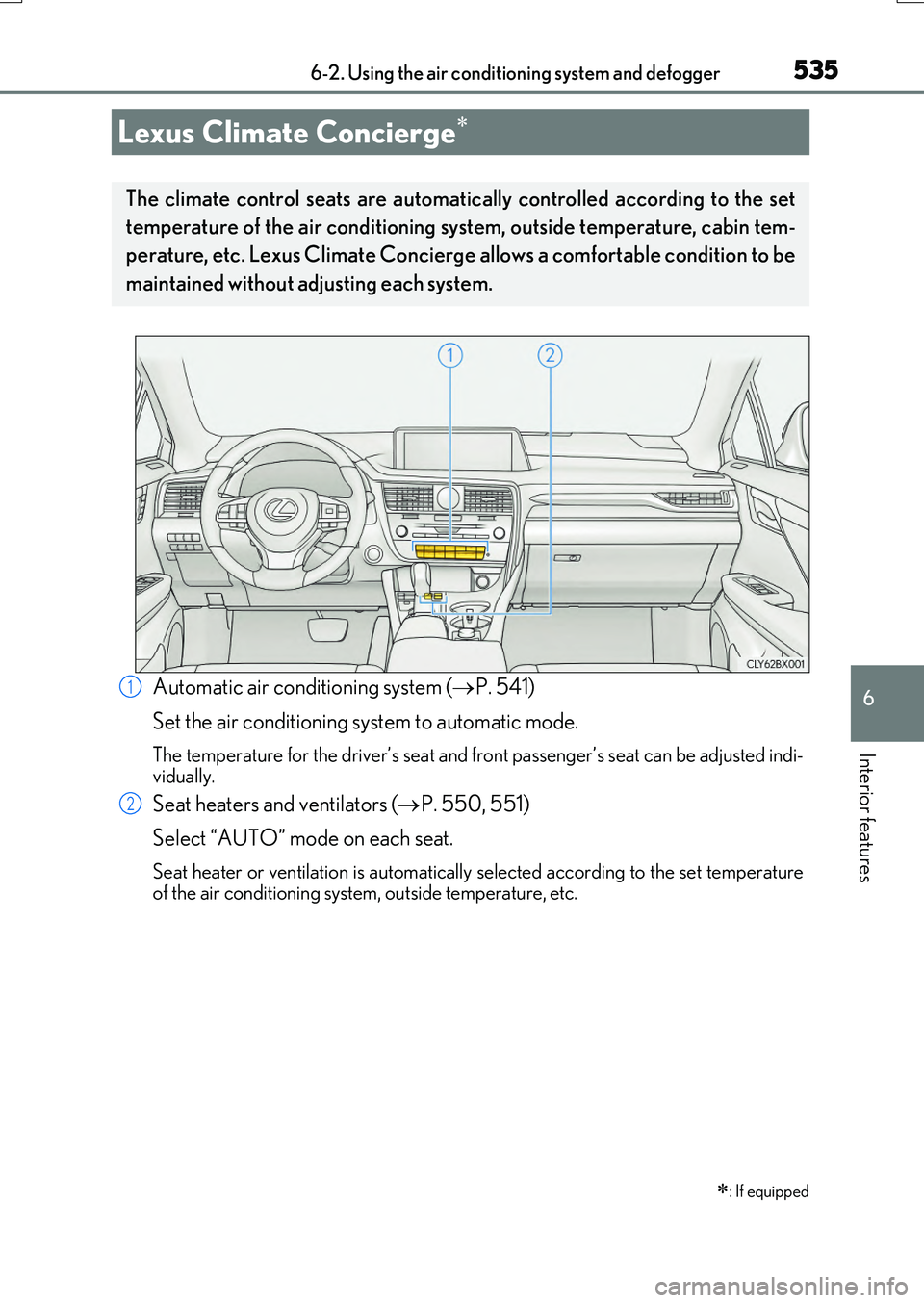
Automatic air conditioning system (P. 541)
Set the air conditioning system to automatic mode.
The temperature for the driver’s seat and front passenger’s seat can be adjusted indi-
vidually.
Seat heaters and ventilators ( P. 550, 551)
Select “AUTO” mode on each seat.
Seat heater or ventilation is automatically selected according to the set temperature of the air conditioning system, outside temperature, etc.
Lexus Climate Concierge
: If equipped
The climate control seats are automatical ly controlled according to the set
temperature of the air conditioning system, outside temperature, cabin tem-
perature, etc. Lexus Climate Concierge allows a comfortable condition to be
maintained without adjusting each system.
1
2
Page 538 of 776
5386-2. Using the air conditioning system and defogger
RX350/RX200t_EE_OM48F32E
■Change the airflow mode
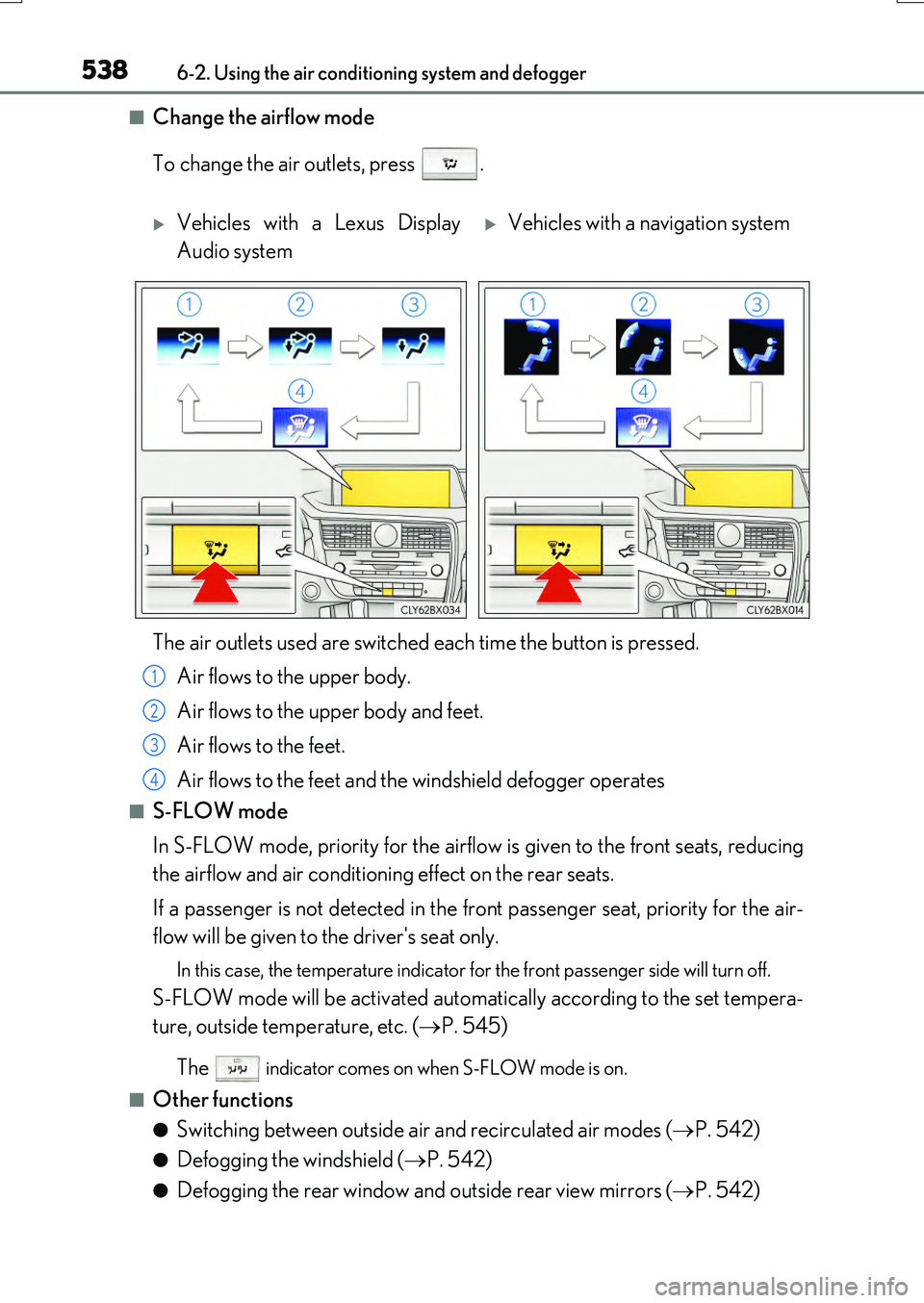
To change the air outlets, press .
■S-FLOW mode
In S-FLOW mode, priority for the airflow is given to the front seats, reducing
the airflow and air conditioning effect on the rear seats.
If a passenger is not detected in the front passenger seat, priority for the air-
flow will be given to the driver's seat only.
In this case, the temperature indicator for the front passenger side will turn off.
S-FLOW mode will be activated automatically according to the set tempera-
ture, outside temperature, etc. ( P. 545)
The indicator comes on when S-FLOW mode is on.
■Other functions
●Switching between outside air and recirculated air modes ( P. 542)
●Defogging the windshield (P. 542)
●Defogging the rear window and outside rear view mirrors (P. 542)
Vehicles with a Lexus Display
Audio system
Vehicles with a navigation system
The air outlets used are switched each time the button is pressed.
Air flows to the upper body.
Air flows to the upper body and feet.
Air flows to the feet.
Air flows to the feet and the windshield defogger operates
1
2
3
4
Page 539 of 776
5396-2. Using the air conditioning system and defogger
6
Interior features
RX350/RX200t_EE_OM48F32E
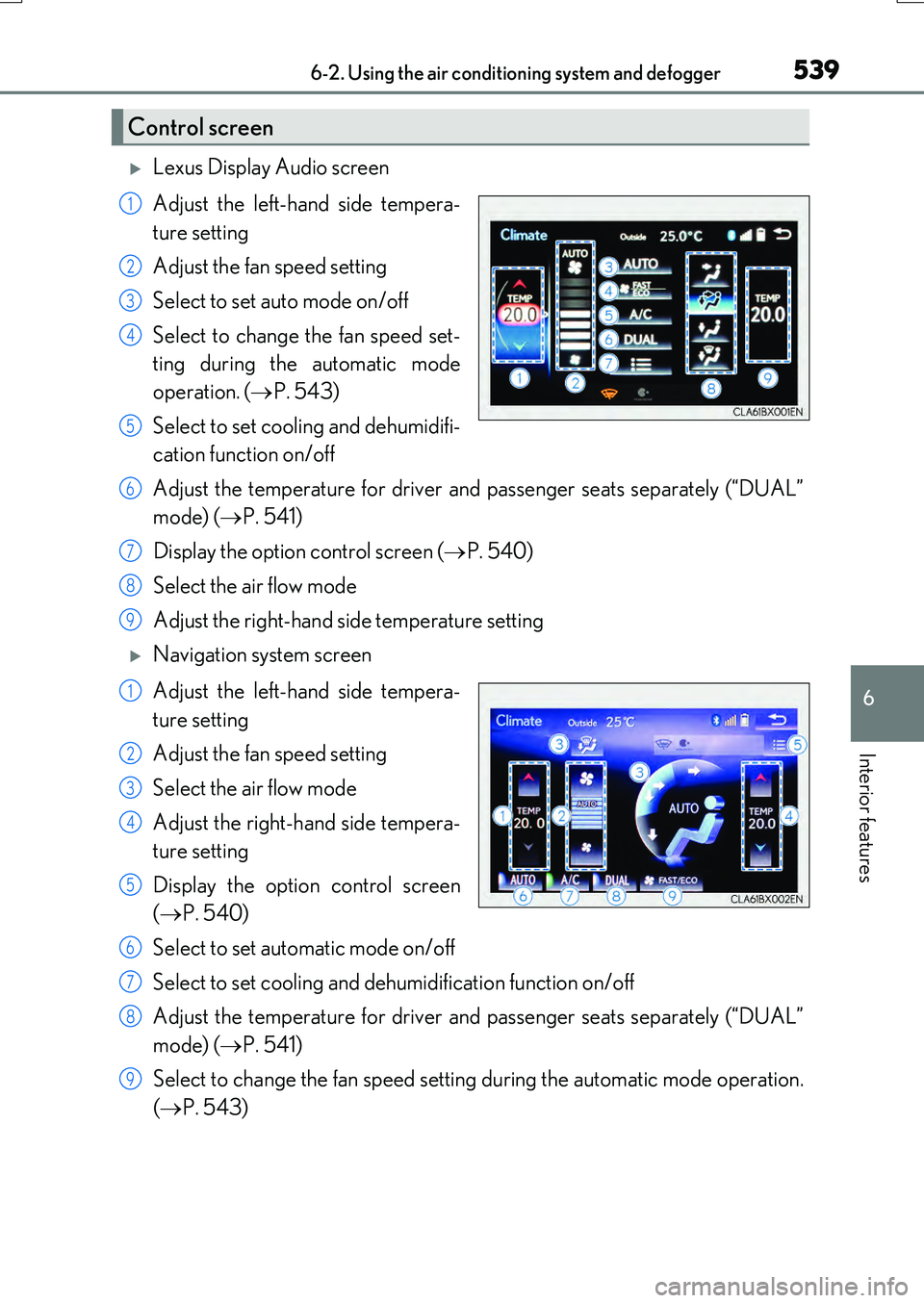
Lexus Display Audio screen
Adjust the left-hand side tempera-
ture setting
Adjust the fan speed setting
Select to set auto mode on/off
Select to change the fan speed set-
ting during the automatic mode
operation. ( P. 543)
Select to set cooling and dehumidifi-
cation function on/off
Adjust the temperature for driver and passenger seats separately (“DUAL”
mode) ( P. 541)
Display the option control screen ( P. 540)
Select the air flow mode
Adjust the right-hand side temperature setting
Navigation system screen
Adjust the left-hand side tempera-
ture setting
Adjust the fan speed setting
Select the air flow mode
Adjust the right-hand side tempera-
ture setting
Display the option control screen
( P. 540)
Select to set automatic mode on/off
Select to set cooling and dehumidification function on/off
Adjust the temperature for driver and passenger seats separately (“DUAL”
mode) ( P. 541)
Select to change the fan speed setting during the automatic mode operation.
( P. 543)
Control screen
1
2
3
4
5
6
7
8
9
1
2
3
4
5
6
7
8
9
Page 540 of 776
5406-2. Using the air conditioning system and defogger
RX350/RX200t_EE_OM48F32E
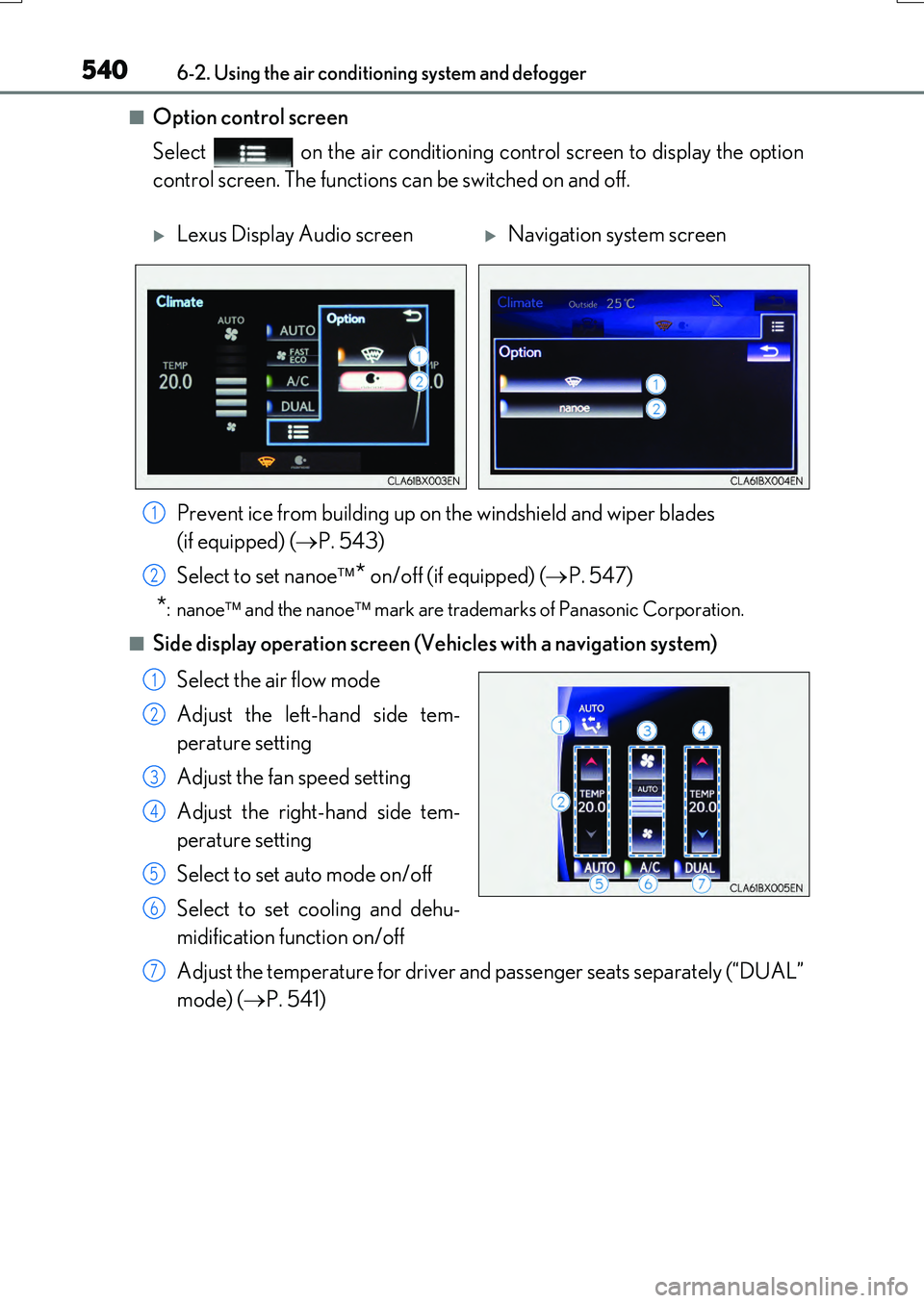
■Option control screen
Select on the air conditioning control screen to display the option
control screen. The functions can be switched on and off.
■Side display operation screen (Vehicles with a navigation system)
Select the air flow mode
Adjust the left-hand side tem-
perature setting
Adjust the fan speed setting
Adjust the right-hand side tem-
perature setting
Select to set auto mode on/off
Select to set cooling and dehu-
midification function on/off
Adjust the temperature for driver an d passenger seats separately (“DUAL”
mode) ( P. 541)
Lexus Display Audio screenNavigation system screen
Prevent ice from building up on the windshield and wiper blades
(if equipped) ( P. 543)
Select to set nanoe * on/off (if equipped) (P. 547)
*:nanoe and the nanoe mark are trademarks of Panasonic Corporation.
1
2
1
2
3
4
5
6
7