buttons LEXUS RX200T 2017 Owners Manual
[x] Cancel search | Manufacturer: LEXUS, Model Year: 2017, Model line: RX200T, Model: LEXUS RX200T 2017Pages: 776, PDF Size: 44.51 MB
Page 20 of 776
20Pictorial index
RX350/RX200t_EE_OM48F32E
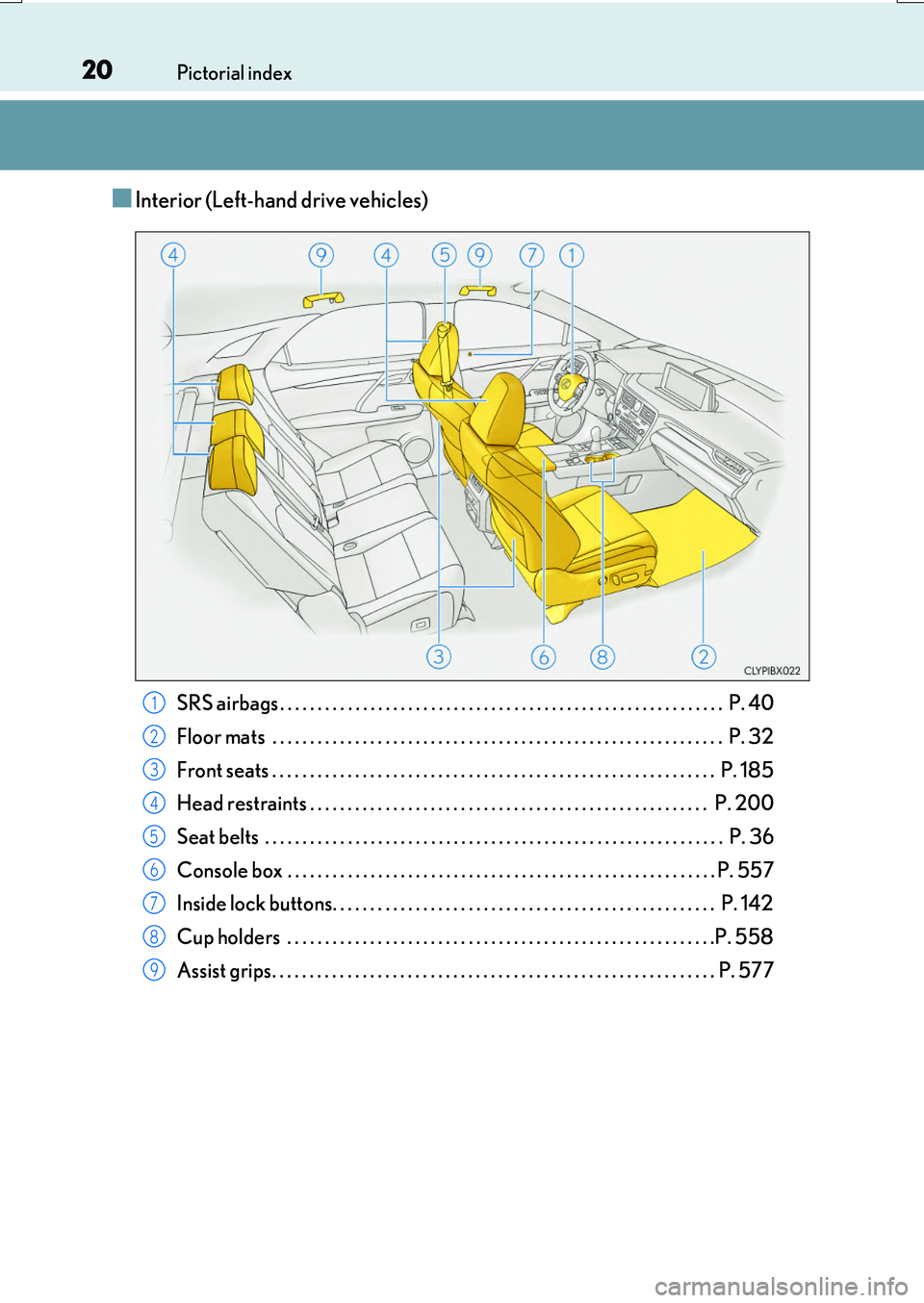
■Interior (Left-hand drive vehicles)
SRS airbags . . . . . . . . . . . . . . . . . . . . . . . . . . . . . . . . . . . . . . . . . . . . . . . . . . . . . . . . . . . P. 40
Floor mats . . . . . . . . . . . . . . . . . . . . . . . . . . . . . . . . . . . . . . . . . . . . . . . . . . . . . . . . . . . . P. 32
Front seats . . . . . . . . . . . . . . . . . . . . . . . . . . . . . . . . . . . . . . . . . . . . . . . . . . . . . . . . . . . P. 185
Head restraints . . . . . . . . . . . . . . . . . . . . . . . . . . . . . . . . . . . . . . . . . . . . . . . . . . . . . P. 200
Seat belts . . . . . . . . . . . . . . . . . . . . . . . . . . . . . . . . . . . . . . . . . . . . . . . . . . . . . . . . . . . . . P. 36
Console box . . . . . . . . . . . . . . . . . . . . . . . . . . . . . . . . . . . . . . . . . . . . . . . . . . . . . . . . . P. 557
Inside lock buttons. . . . . . . . . . . . . . . . . . . . . . . . . . . . . . . . . . . . . . . . . . . . . . . . . . . P. 142
Cup holders . . . . . . . . . . . . . . . . . . . . . . . . . . . . . . . . . . . . . . . . . . . . . . . . . . . . . . . . .P. 558
Assist grips. . . . . . . . . . . . . . . . . . . . . . . . . . . . . . . . . . . . . . . . . . . . . . . . . . . . . . . . . . . P. 577
1
2
3
4
5
6
7
8
9
Page 28 of 776
28Pictorial index
RX350/RX200t_EE_OM48F32E
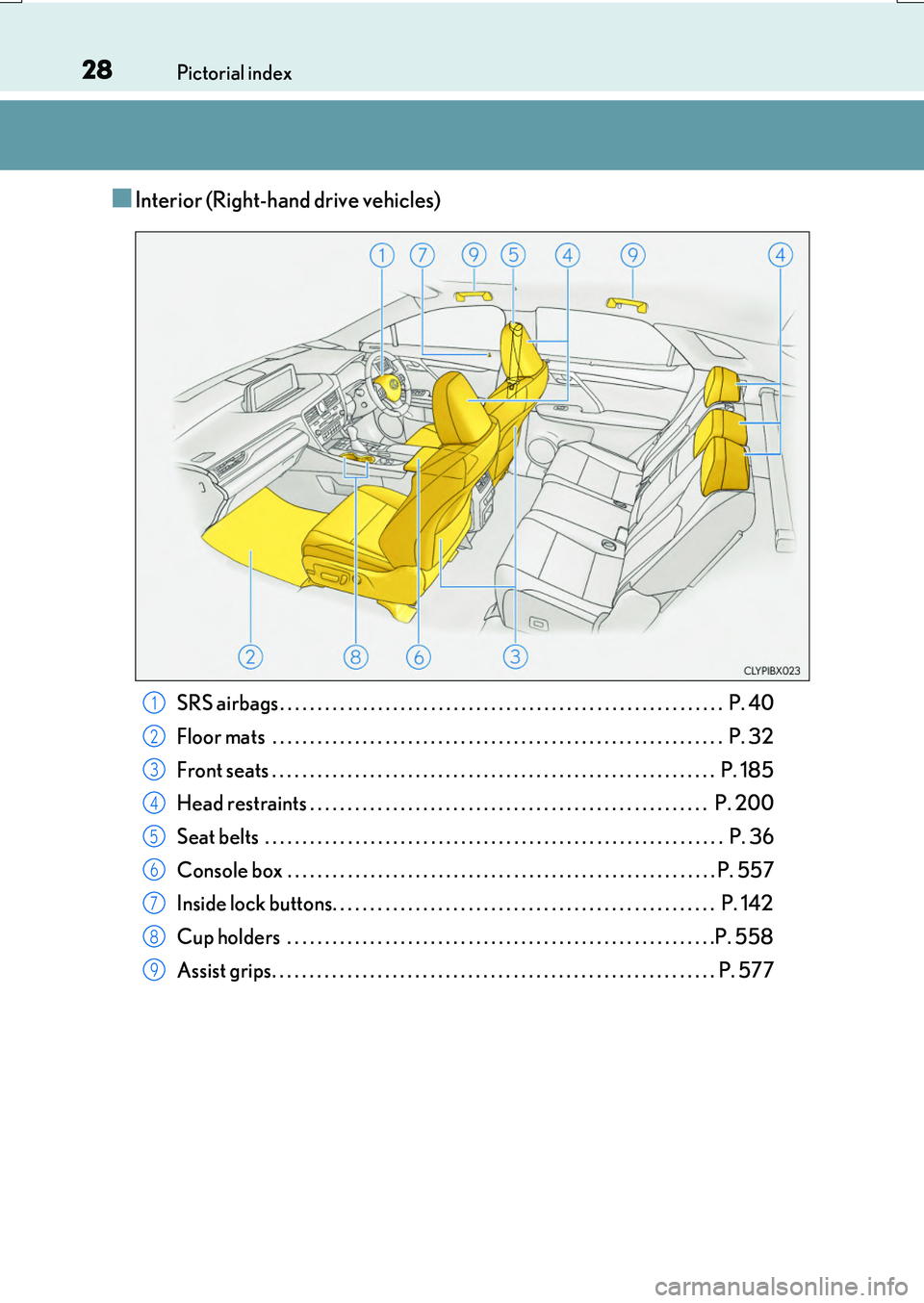
■Interior (Right-hand drive vehicles)
SRS airbags . . . . . . . . . . . . . . . . . . . . . . . . . . . . . . . . . . . . . . . . . . . . . . . . . . . . . . . . . . . P. 40
Floor mats . . . . . . . . . . . . . . . . . . . . . . . . . . . . . . . . . . . . . . . . . . . . . . . . . . . . . . . . . . . . P. 32
Front seats . . . . . . . . . . . . . . . . . . . . . . . . . . . . . . . . . . . . . . . . . . . . . . . . . . . . . . . . . . . P. 185
Head restraints . . . . . . . . . . . . . . . . . . . . . . . . . . . . . . . . . . . . . . . . . . . . . . . . . . . . . P. 200
Seat belts . . . . . . . . . . . . . . . . . . . . . . . . . . . . . . . . . . . . . . . . . . . . . . . . . . . . . . . . . . . . . P. 36
Console box . . . . . . . . . . . . . . . . . . . . . . . . . . . . . . . . . . . . . . . . . . . . . . . . . . . . . . . . . P. 557
Inside lock buttons. . . . . . . . . . . . . . . . . . . . . . . . . . . . . . . . . . . . . . . . . . . . . . . . . . . P. 142
Cup holders . . . . . . . . . . . . . . . . . . . . . . . . . . . . . . . . . . . . . . . . . . . . . . . . . . . . . . . . .P. 558
Assist grips. . . . . . . . . . . . . . . . . . . . . . . . . . . . . . . . . . . . . . . . . . . . . . . . . . . . . . . . . . . P. 577
1
2
3
4
5
6
7
8
9
Page 136 of 776
1363-1. Key information
RX350/RX200t_EE_OM48F32E
■Card key (if equipped)
●The card key is not waterproof.
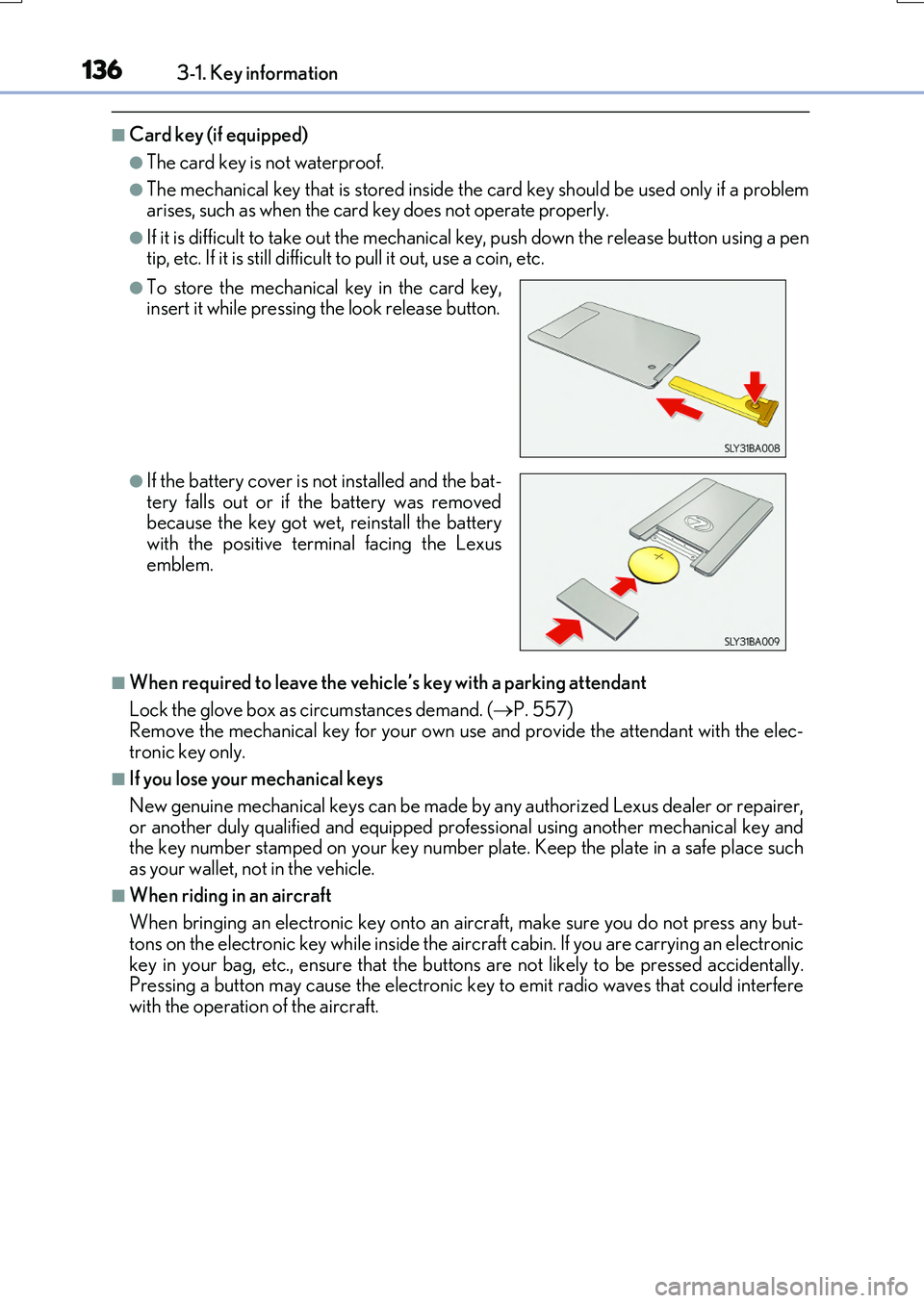
●The mechanical key that is stored inside the card key should be used only if a problem arises, such as when the card key does not operate properly.
●If it is difficult to take out the mechanical key, push down the release button using a pentip, etc. If it is still difficult to pull it out, use a coin, etc.
■When required to leave the vehicle’s key with a parking attendant
Lock the glove box as circumstances demand. ( P. 557) Remove the mechanical key for your own use and provide the attendant with the elec-
tronic key only.
■If you lose your mechanical keys
New genuine mechanical keys can be made by any authorized Lexus dealer or repairer,
or another duly qualified and equipped prof essional using another mechanical key and the key number stamped on your key number plate. Keep the plate in a safe place suchas your wallet, not in the vehicle.
■When riding in an aircraft
When bringing an electronic key onto an aircraft, make sure you do not press any but- tons on the electronic key while inside the ai rcraft cabin. If you are carrying an electronic
key in your bag, etc., ensure that the buttons are not likely to be pressed accidentally. Pressing a button may cause the electronic key to emit radio waves that could interferewith the operation of the aircraft.
●To store the mechanical key in the card key,insert it while pressing the look release button.
●If the battery cover is not installed and the bat- tery falls out or if the battery was removedbecause the key got wet, reinstall the battery
with the positive terminal facing the Lexus emblem.
Page 142 of 776
1423-2. Opening, closing and locking the doors
RX350/RX200t_EE_OM48F32E
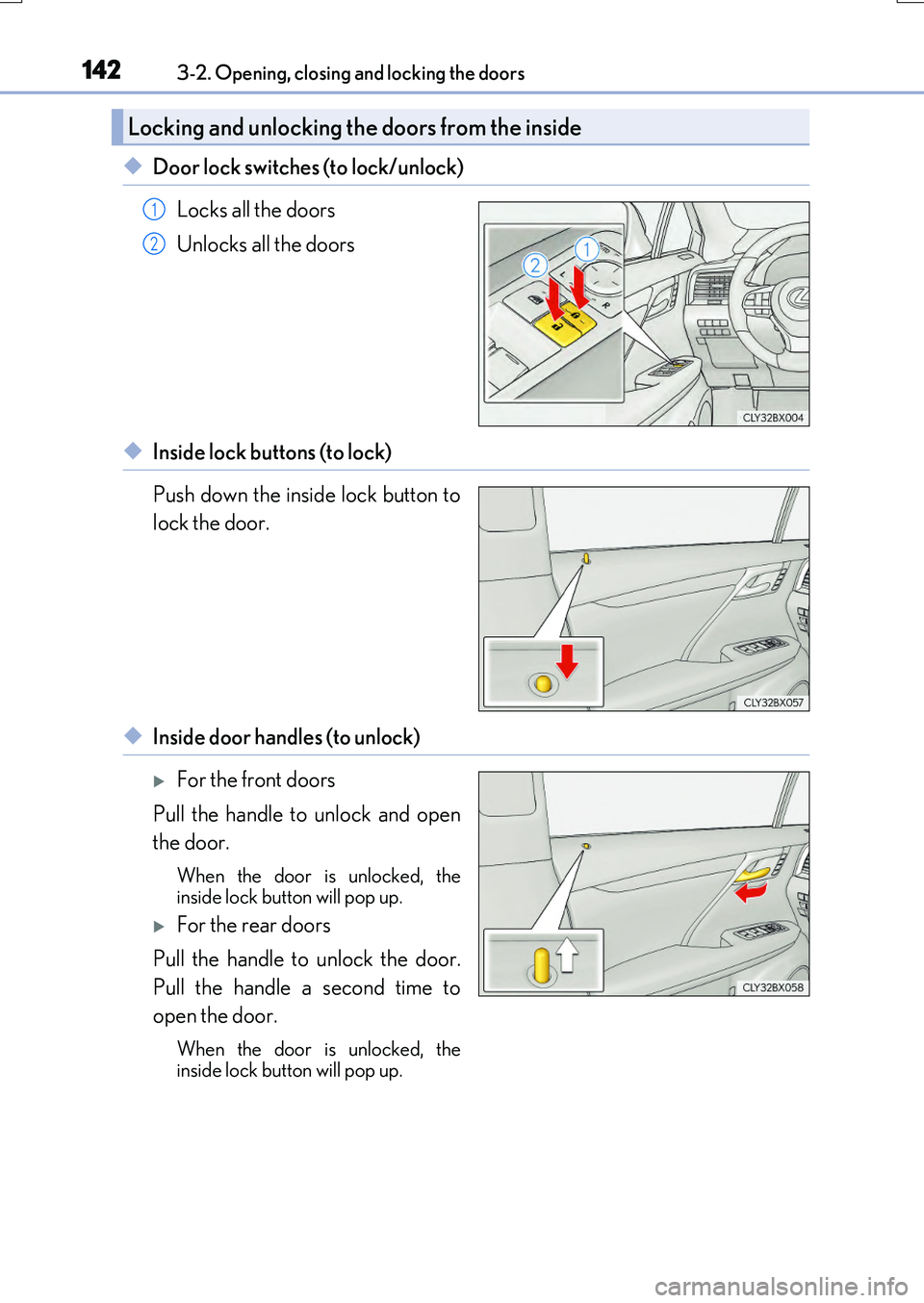
◆Door lock switches (to lock/unlock)
Locks all the doors
Unlocks all the doors
◆Inside lock buttons (to lock)
Push down the inside lock button to
lock the door.
◆Inside door handles (to unlock)
For the front doors
Pull the handle to unlock and open
the door.
When the door is unlocked, the inside lock button will pop up.
For the rear doors
Pull the handle to unlock the door.
Pull the handle a second time to
open the door.
When the door is unlocked, the
inside lock button will pop up.
Locking and unlocking the doors from the inside
1
2
Page 144 of 776
1443-2. Opening, closing and locking the doors
RX350/RX200t_EE_OM48F32E
■Switching the door unlock function
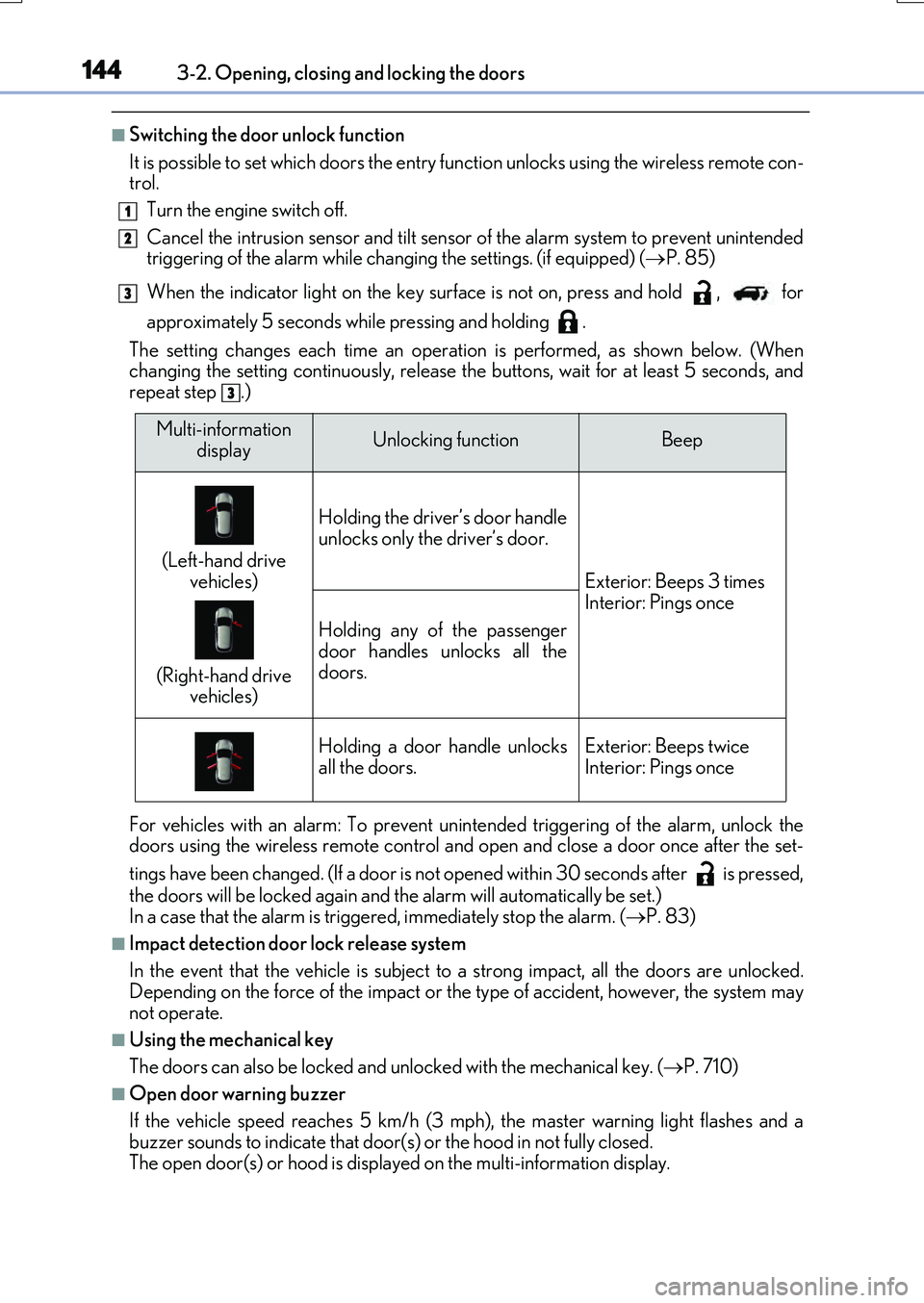
It is possible to set which doors the entry function unlocks using the wireless remote con- trol.
Turn the engine switch off.
Cancel the intrusion sensor and tilt sensor of the alarm system to prevent unintended triggering of the alarm while changing the settings. (if equipped) ( P. 85)
When the indicator light on the key surface is not on, press and hold , for
approximately 5 seconds while pressing and holding .
The setting changes each time an operatio n is performed, as shown below. (When changing the setting continuously, release the buttons, wait for at least 5 seconds, andrepeat step .)
For vehicles with an alarm: To prevent unin tended triggering of the alarm, unlock the doors using the wireless remote control and op en and close a door once after the set-
tings have been changed. (If a door is not opened within 30 seconds after is pressed,
the doors will be locked again and the alarm will automatically be set.) In a case that the alarm is triggered, immediately stop the alarm. ( P. 83)
■Impact detection door lock release system
In the event that the vehicle is subject to a strong impact, all the doors are unlocked. Depending on the force of the impact or the type of accident, however, the system may
not operate.
■Using the mechanical key
The doors can also be locked and unlocked with the mechanical key. ( P. 710)
■Open door warning buzzer
If the vehicle speed reaches 5 km/h (3 mph), the master warning light flashes and a buzzer sounds to indicate that door (s) or the hood in not fully closed.
The open door(s) or hood is displa yed on the multi-information display.
1
2
3
3
Multi-information
displayUnlocking functionBeep
(Left-hand drive
vehicles)
(Right-hand drive vehicles)
Holding the driver’s door handle
unlocks only the driver’s door.
Exterior: Beeps 3 times Interior: Pings once
Holding any of the passenger
door handles unlocks all the doors.
Holding a door handle unlocksall the doors.Exterior: Beeps twiceInterior: Pings once
Page 145 of 776
1453-2. Opening, closing and locking the doors
3
Operation of each component
RX350/RX200t_EE_OM48F32E
■Conditions affecting the operation of the smart entry & start system or wireless remote control
P. 170
■Customization
Some functions can be customized. ( P. 740)
WARNING
■To prevent an accident
Observe the following precautions while driving the vehicle.
Failure to do so may result in a door open ing and an occupant falling out, resulting in death or serious injury.
●Ensure that all doors are properly closed and locked.
●Do not pull the inside handle of the doors while driving.
Be especially careful for the front doors, as the doors may be opened even if the inside lock buttons are in locked position.
●Set the rear door child-protector locks wh en children are seated in the rear seats.
■When opening or closing a door
Check the surroundings of the vehicle such as whether the vehicle is on an incline,
whether there is enough space for a door to open and whether a strong wind is blow- ing. When opening or closing the door, hold the door handle tightly to prepare for any unpredictable movement.
■When using the wireless remote control and operating the power windows or themoon roof or panoramic moon roof
Operate the power windows or the moon roof or panoramic moon roof after checking
to make sure that there is no possibility of any passenger having any of their body parts caught in the windows or the moon roof or panoramic moon roof. Also, do not allow children to operate the wireless remote contro l. It is possible for children and other
passengers to get caught in the power windows or the moon roof or panoramic moon roof.
Page 197 of 776
1973-3. Adjusting the seats
3
Operation of each component
RX350/RX200t_EE_OM48F32E
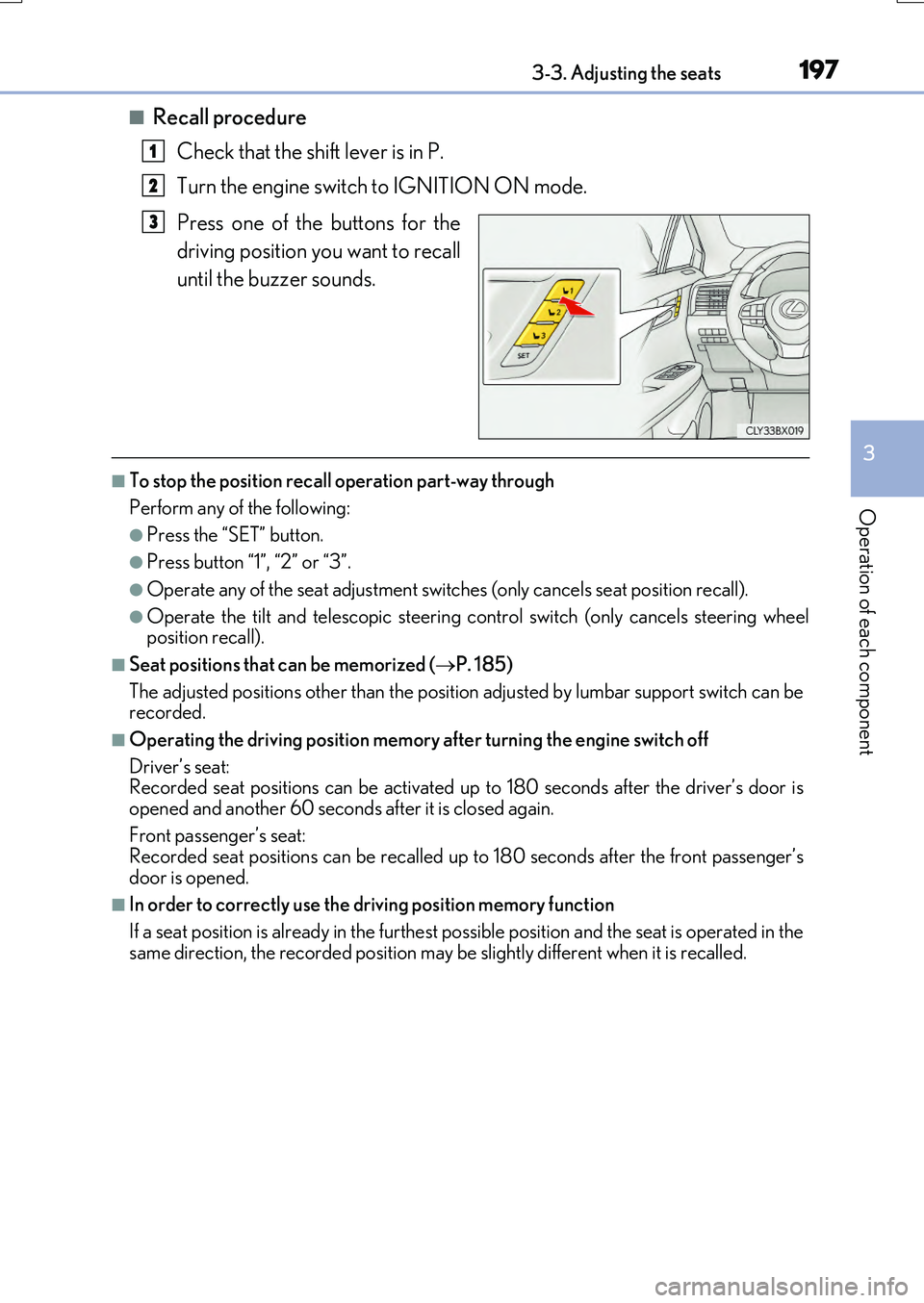
■Recall procedure
Check that the shift lever is in P.
Turn the engine switch to IGNITION ON mode.
Press one of the buttons for the
driving position you want to recall
until the buzzer sounds.
■To stop the position recall operation part-way through
Perform any of the following:
●Press the “SET” button.
●Press button “1”, “2” or “3”.
●Operate any of the seat adjustment switches (only cancels seat position recall).
●Operate the tilt and telescopic steering control switch (only cancels steering wheel position recall).
■Seat positions that can be memorized ( P. 185)
The adjusted positions other than the position adjusted by lumbar support switch can be recorded.
■Operating the driving position memory after turning the engine switch off
Driver’s seat: Recorded seat positions can be activated up to 180 seconds after the driver’s door is
opened and another 60 seconds after it is closed again.
Front passenger’s seat: Recorded seat positions can be recalled up to 180 seconds after the front passenger’s
door is opened.
■In order to correctly use the driving position memory function
If a seat position is already in the furthest possible position and the seat is operated in the
same direction, the recorded position may be slightly different when it is recalled.
1
2
3
Page 438 of 776
438
RX350/RX200t_EE_OM48F32E
5-1. Basic Operations
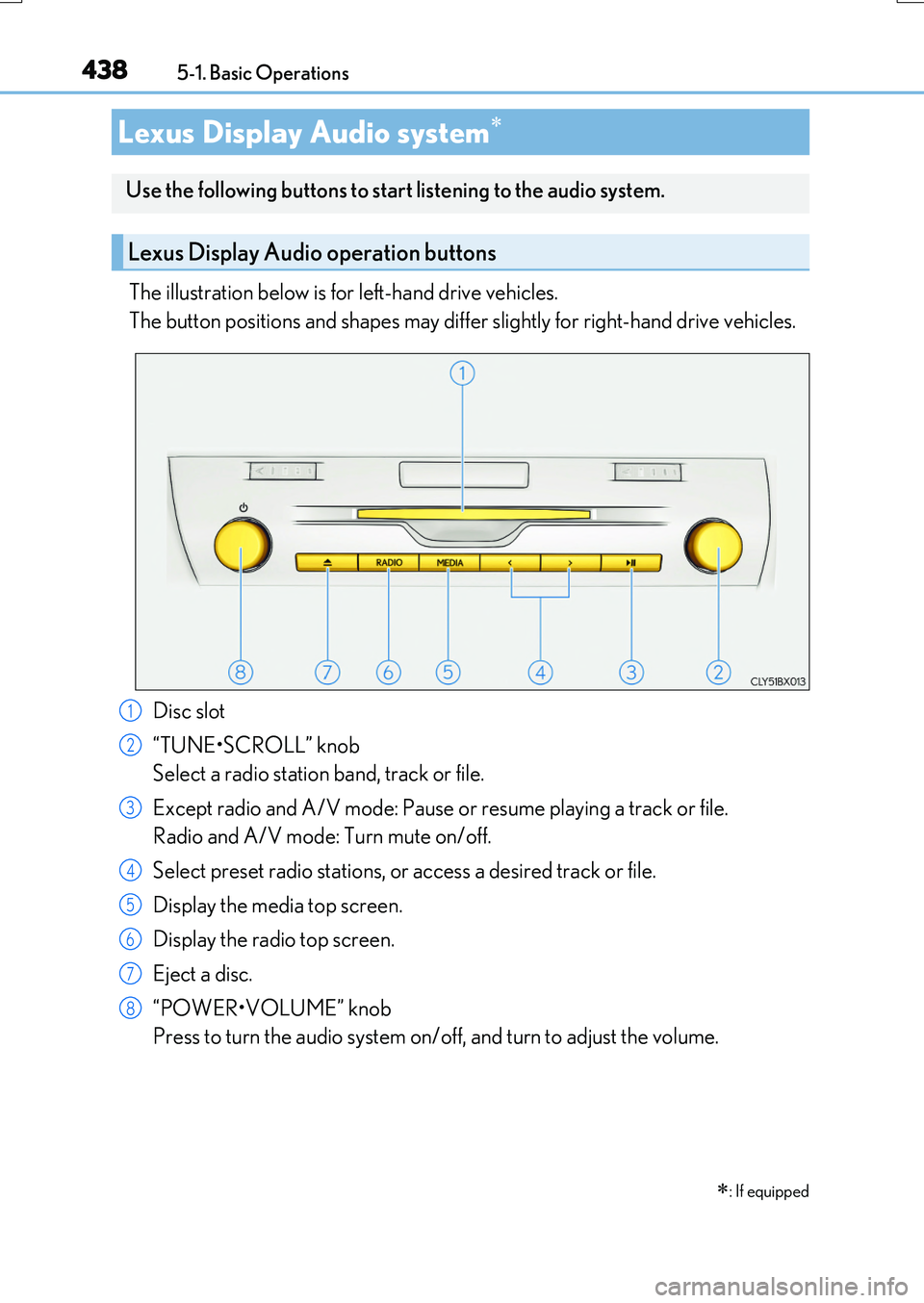
The illustration below is for left-hand drive vehicles.
The button positions and shapes may differ slightly for right-hand drive vehicles.
Disc slot
“TUNE•SCROLL” knob
Select a radio station band, track or file.
Except radio and A/V mode: Pause or resume playing a track or file.
Radio and A/V mode: Turn mute on/off.
Select preset radio stations, or access a desired track or file.
Display the media top screen.
Display the radio top screen.
Eject a disc.
“POWER•VOLUME” knob
Press to turn the audio system on/off, and turn to adjust the volume.
Lexus Display Audio system
: If equipped
Use the following buttons to start listening to the audio system.
Lexus Display Audio operation buttons
1
2
3
4
5
6
7
8
Page 521 of 776
5215-12. Other function
5
Lexus Display Audio system
RX350/RX200t_EE_OM48F32E
Go to “MirrorLink”: “MENU” button “Info” “MirrorLink”
Select the desired application on the application list screen.
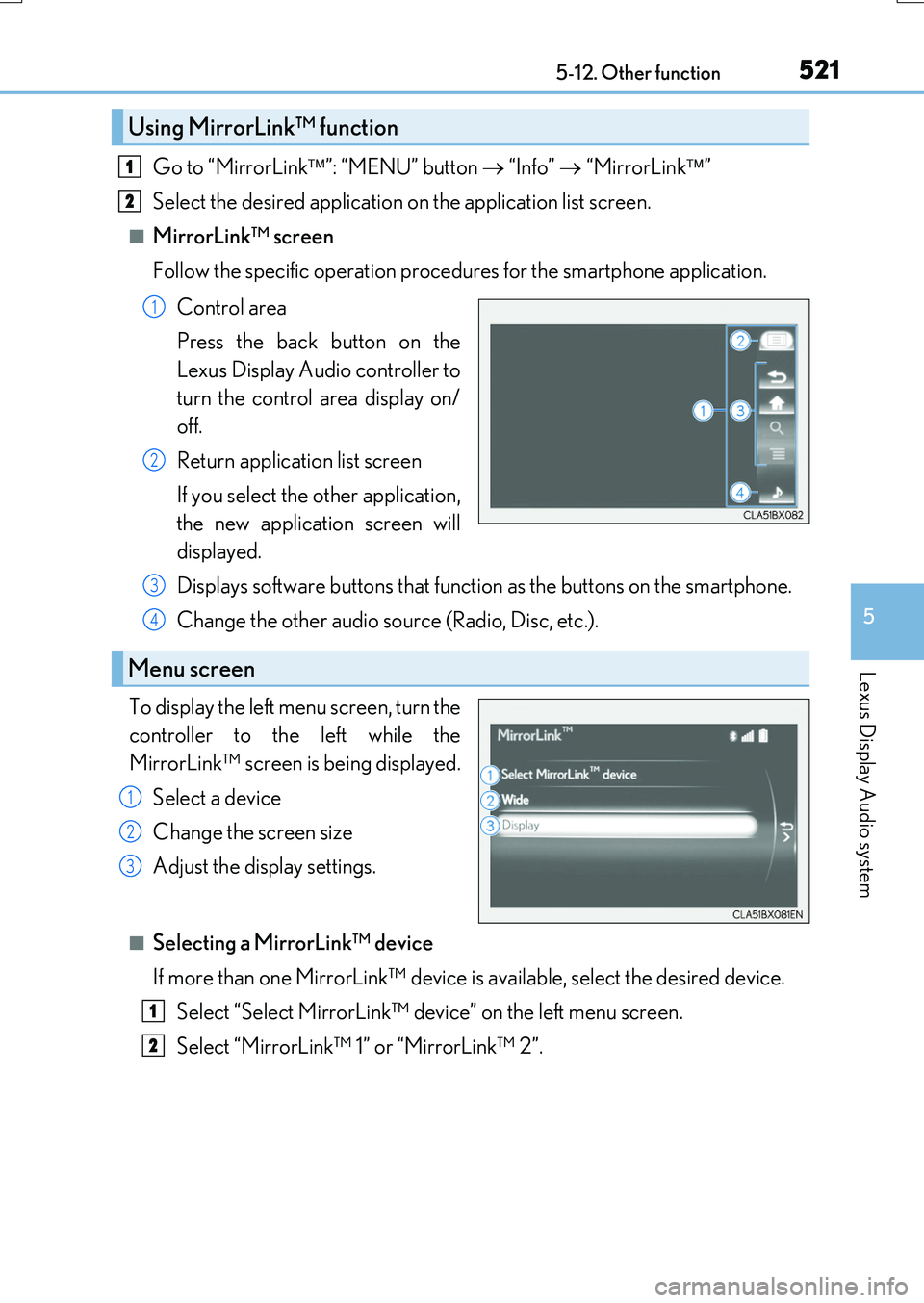
■MirrorLink™ screen
Follow the specific operation procedures for the smartphone application.
Control area
Press the back button on the
Lexus Display Audio controller to
turn the control area display on/
off.
Return application list screen
If you select the other application,
the new application screen will
displayed.
Displays software buttons that function as the buttons on the smartphone.
Change the other audio source (Radio, Disc, etc.).
To display the left menu screen, turn the
controller to the left while the
MirrorLink™ screen is being displayed.
Select a device
Change the screen size
Adjust the display settings.
■Selecting a MirrorLink™ device
If more than one MirrorLink™ device is available, select the desired device.
Select “Select MirrorLink™ device” on the left menu screen.
Select “MirrorLink™ 1” or “MirrorLink™ 2”.
Using MirrorLink™ function
1
2
1
2
Menu screen
3
4
1
2
3
1
2
Page 534 of 776
5346-1. Basic operation of the Remote Touch screen
RX350/RX200t_EE_OM48F32E
■Selecting the operation screen
When selecting the main display, move the Remote Touch knob to the left.
When selecting the side display, move the Remote Touch knob to the right.
■ Main display
For details about the functions and operation of the main display, refer to the
respective section and “NAVIGATION SYSTEM OWNER’S MANUAL”.
■Side display
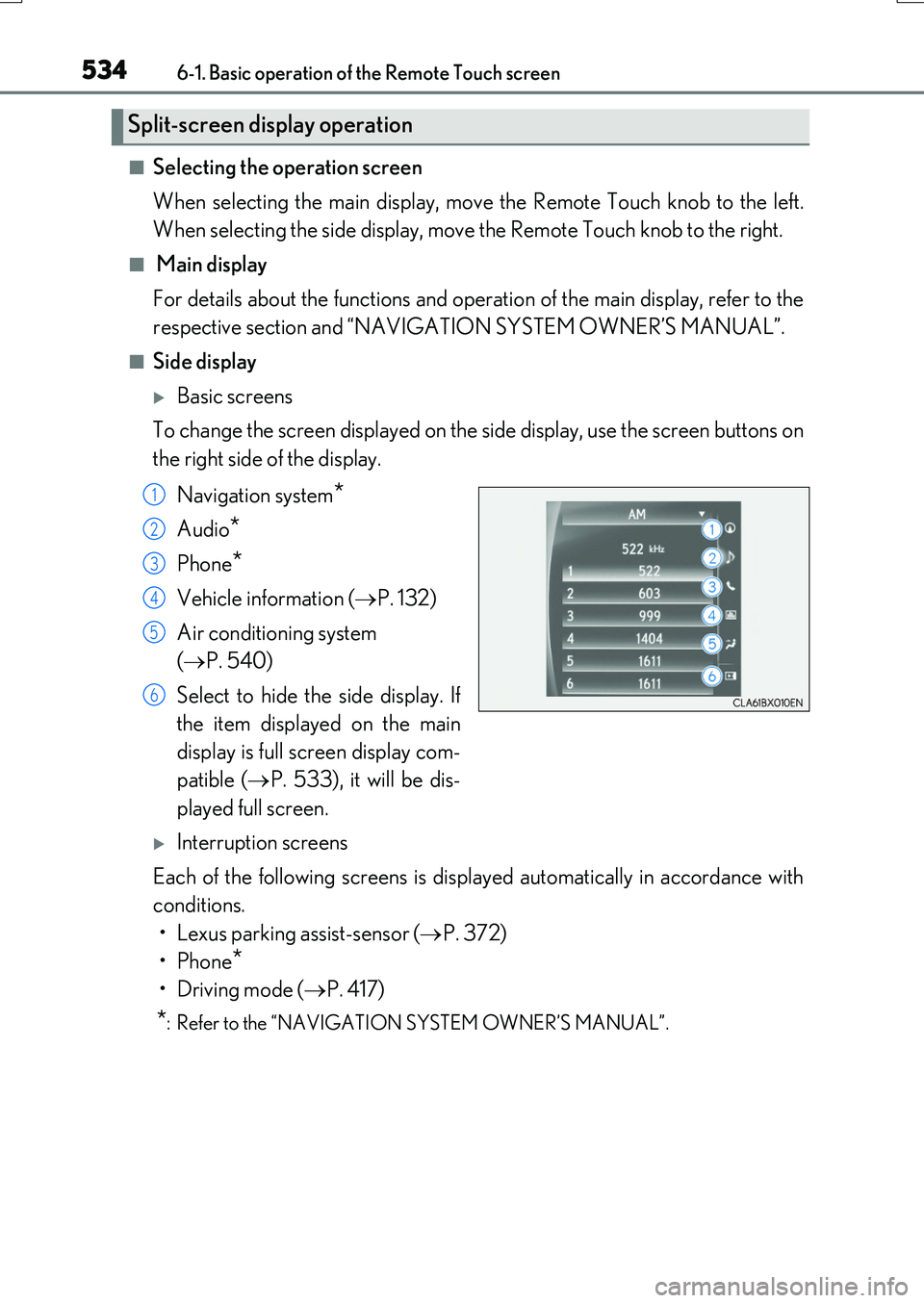
Basic screens
To change the screen displayed on the side display, use the screen buttons on
the right side of the display.
Navigation system*
Audio*
Phone*
Vehicle information ( P. 132)
Air conditioning system
( P. 540)
Select to hide the side display. If
the item displayed on the main
display is full screen display com-
patible ( P. 533), it will be dis-
played full screen.
Interruption screens
Each of the following screens is displayed automatically in accordance with
conditions.
• Lexus parking assist-sensor ( P. 372)
•Phone*
•Driving mode ( P. 417)
*: Refer to the “NAVIGATION SYSTEM OWNER’S MANUAL”.
Split-screen display operation
1
2
3
4
5
6