radio LEXUS RX200T 2017 Owners Manual
[x] Cancel search | Manufacturer: LEXUS, Model Year: 2017, Model line: RX200T, Model: LEXUS RX200T 2017Pages: 776, PDF Size: 44.51 MB
Page 4 of 776
TABLE OF CONTENTS4
RX350/RX200t_EE_OM48F32E
5-1. Basic Operations
Lexus Display Audio
system ......................................... 438
Steering wheel audio
switches....................................... 444
USB/AUX ports ........................445
5-2. Setup
Setup menu...................................448
General settings .........................449
Voice settings ..............................452
Display settings ...........................453
5-3. Using the audio system
Selecting the audio source.....455
Optimal use of the audio
system ..........................................456
Audio settings.............................. 457
Audio menu screen
operation ..................................... 461
5-4. Using the radio
Radio operation ..........................464
5-5. Playing an audio CD and
MP3/WMA/AAC discs
CD player operation ................466
5-6. Using an external device
Listening to an iPod ................... 472
Using USB memory
device........................................... 476
Using the AUX port .................. 481
5-7. Connecting Bluetooth®
Steps for using Bluetooth®
devices.........................................482
Registering a Bluetooth®
device...........................................484
Selecting a Bluetooth®
device.......................................... 485
Connecting a Bluetooth®
audio player...............................486
Connecting a Bluetooth®
phone ...........................................487
Displaying a Bluetooth®
device details ........................... 488
Detailed Bluetooth®
settings........................................ 489
5-8. Bluetooth® Audio
Listening to Bluetooth®
Audio............................................490
5Lexus Display Audio system
Page 46 of 776
461-1. For safe use
RX350/RX200t_EE_OM48F32E
■If the SRS airbags deploy (inflate)
●Slight abrasions, burns, bruising etc., may be sustained from SRS airbags, due to the extremely high speed deployment (inflation) by hot gases.
●A loud noise and white powder will be emitted.
●Parts of the airbag module (steering wheel hub, airbag cover and inflator) as well as thefront seats, parts of the front and rear pillars , and roof side rails, may be hot for several
minutes. The airbag itself may also be hot.
●The windshield may crack.
●Vehicles with ERA-GLONASS: If the SRS ai rbags deploy, the system is designed to
send an emergency call* to the Public Safety Answer ing Point (PSAP), notifying them of the vehicle’s location (without needing to push the “SOS” button) and an agent willattempt to speak with the occupants to ascertain the level of emergency and assistance
required. If the occupants are unable to communicate, the agent automatically treats the call as an emergency and helps to di spatch the necessary emergency services. ( P. 578)
*: In some cases, the call cannot be made.(P. 580)
WARNING
■SRS airbag precautions
●If breathing becomes difficult after the SRS airbags have deployed, open a door or window to allow fresh air in, or leave the vehicle if it is safe to do so. Wash off any resi-
due as soon as possible to prevent skin irritation.
●If the areas where the SRS airbags are stored, such as the steering wheel pad and front and rear pillar garnishes, are damage d or cracked, have them replaced by any
authorized Lexus dealer or repairer, or an other duly qualified and equipped profes- sional.
■Modification and disposal of SRS airbag system components
Do not dispose of your vehicle or perform any of the following modifications without consulting any authorized Lexus dealer or repairer, or another duly qualified and equipped professional. The SRS airbags may malfunction or deploy (inflate) acciden-
tally, causing death or serious injury.
●Installation, removal, disassembly and repair of the SRS airbags
●Repairs, modifications, removal or repl acement of the steering wheel, instrument
panel, dashboard, seats or seat upholstery, fr ont, side and rear pillars, roof side rails, front door panels, front door trims, or front door speakers
●Modifications to the front door panel (such as making a hole in it)
●Repairs or modifications of the front fender, front bumper, or side of the occupant compartment
●Installation of a grille guard (bull bars, ka ngaroo bar, etc.), snow plows or winches
●Modifications to the vehicle’s suspension system
●Installation of electronic devices such as mobile two-way radios (RF-transmitter) and CD players
●Modifications to your vehicle for a person with a physical disability
Page 121 of 776
1212. Instrument cluster
2
Instrument cluster
RX350/RX200t_EE_OM48F32E
■Tire pressure
●It may take a few minutes to display the tire inflation pressure after the engine switch is turned to IGNITION ON mode. It may also take a few minutes to display the tire infla-
tion pressure after inflation pressure has been adjusted.
●“---” may be displayed if the tire position information cannot be determined due to unfavorable radio wave conditions.
●Tire inflation pressure changes with temperature. The displayed values may also be dif-ferent from the values measured using a tire pressure gauge.
■Liquid crystal display
Small spots or light spots may appear on th e display. This phenomenon is characteristic of liquid crystal displays, and there is no problem continuing to use the display.
■Customization
Some functions can be customized. ( P. 110, 740)
WARNING
■Caution for use while driving
●When operating the multi-information display while driving, pay extra attention to the safety of the area around the vehicle.
●Do not look continuously at the multi-info rmation display while driving as you may fail to see pedestrians, objects on the road, etc. ahead of the vehicle.
■The information display at low temperatures
Allow the interior of the vehicle to warm up before using the liquid crystal information display. At extremely low temperatures, th e information display monitor may respond slowly, and display changes may be delayed.
For example, there is a lag between the dr iver’s shifting and the new gear number appearing on the display. This lag could cau se the driver to downshift again, causing rapid and excessive engine braking and po ssibly an accident resulting in death or
injury.
■Cautions during setting up the display
As the engine needs to be running during setting up the display, ensure that the vehicle
is parked in a place with adequate ventilation. In a closed area such as a garage, exhaust gases including harmful carbon monoxide (CO) may collect and enter thevehicle. This may lead to death or a serious health hazard.
NOTICE
■While setting up the display
To prevent battery discharge, ensure that the engine is running while setting up the dis- play features.
Page 136 of 776
1363-1. Key information
RX350/RX200t_EE_OM48F32E
■Card key (if equipped)
●The card key is not waterproof.
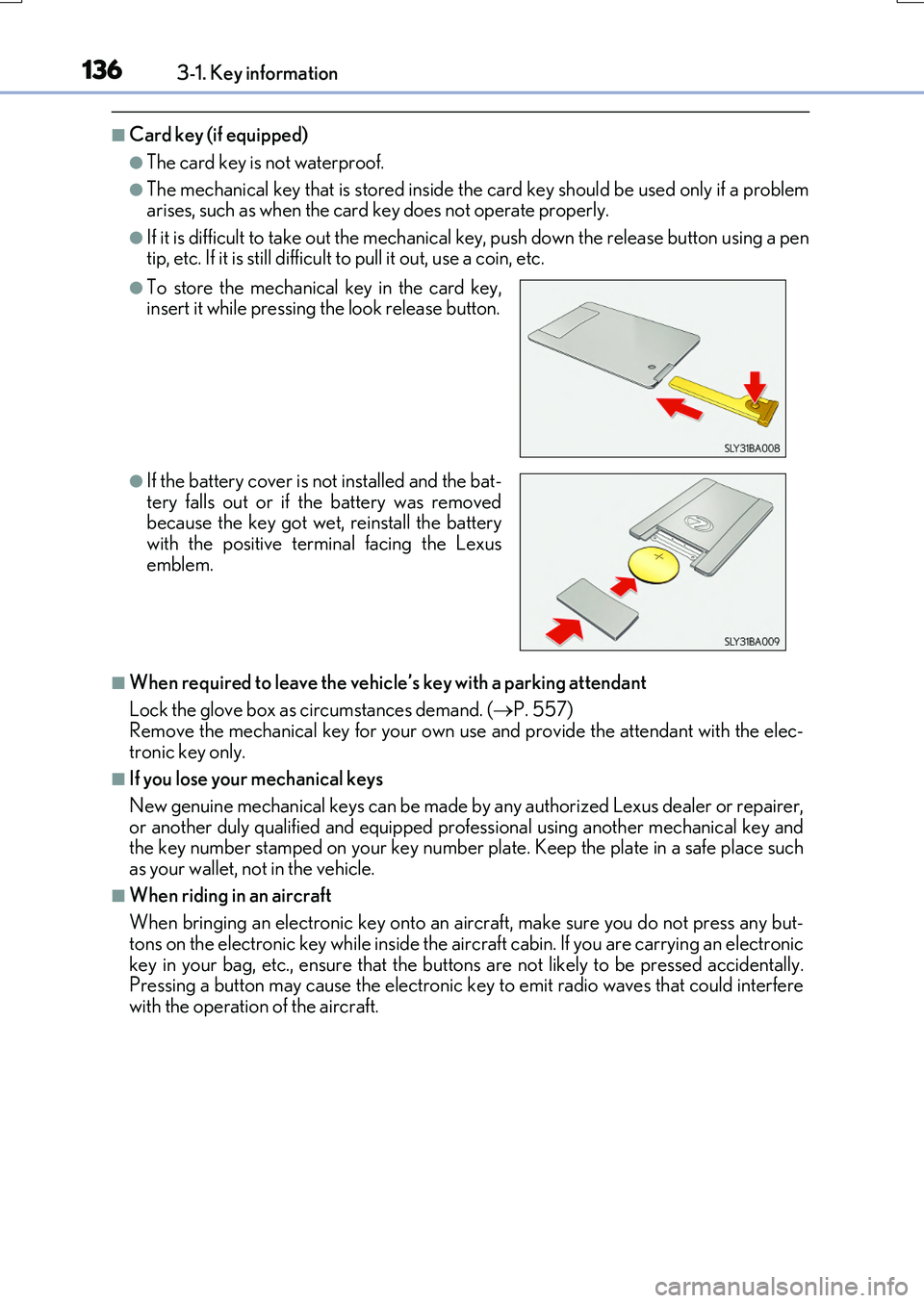
●The mechanical key that is stored inside the card key should be used only if a problem arises, such as when the card key does not operate properly.
●If it is difficult to take out the mechanical key, push down the release button using a pentip, etc. If it is still difficult to pull it out, use a coin, etc.
■When required to leave the vehicle’s key with a parking attendant
Lock the glove box as circumstances demand. ( P. 557) Remove the mechanical key for your own use and provide the attendant with the elec-
tronic key only.
■If you lose your mechanical keys
New genuine mechanical keys can be made by any authorized Lexus dealer or repairer,
or another duly qualified and equipped prof essional using another mechanical key and the key number stamped on your key number plate. Keep the plate in a safe place suchas your wallet, not in the vehicle.
■When riding in an aircraft
When bringing an electronic key onto an aircraft, make sure you do not press any but- tons on the electronic key while inside the ai rcraft cabin. If you are carrying an electronic
key in your bag, etc., ensure that the buttons are not likely to be pressed accidentally. Pressing a button may cause the electronic key to emit radio waves that could interferewith the operation of the aircraft.
●To store the mechanical key in the card key,insert it while pressing the look release button.
●If the battery cover is not installed and the bat- tery falls out or if the battery was removedbecause the key got wet, reinstall the battery
with the positive terminal facing the Lexus emblem.
Page 137 of 776
1373-1. Key information
3
Operation of each component
RX350/RX200t_EE_OM48F32E
■Electronic key battery depletion
●The standard battery life is 1 to 2 years. (The card key battery life is about a year and a half.)
●If the battery becomes low, an alarm will soun d in the cabin when the engine is stopped. ( P. 638)
●As the electronic key always receives radio waves, the battery will become depleted
even if the electronic key is not used. The following symptoms indicate that the elec- tronic key battery may be depleted. Replace the battery when necessary. ( P. 638)
• The smart entry & start system or the wireless remote control does not operate.
• The detection area becomes smaller. • The LED indicator on the key surface does not turn on.
●To avoid serious deterioration, do not leave the electronic key within 1 m (3 ft.) of thefollowing electrical appliances that produce a magnetic field:
•TVs
• Personal computers • Cellular phones, cordless phones and battery chargers• Recharging cellular phones or cordless phones
• Induction cookers • Table lamps
■Replacing the battery
P. 638
■Confirmation of the registered key number
The number of keys already registered to the vehicle can be confirmed. Ask any autho-
rized Lexus dealer or repairer, or another du ly qualified and equipped professional for details.
■If a wrong key is used
The key cylinder rotates freely, isolated from the internal mechanism.
Page 138 of 776

1383-1. Key information
RX350/RX200t_EE_OM48F32E
NOTICE
■To prevent key damage
●Do not drop the keys, subject them to strong shocks or bend them.
●Do not expose the keys to high temperatures for long periods of time.
●Do not get the keys wet or wash them in an ultrasonic washer, etc.
●Do not attach metallic or magnetic materials to the keys or place the keys close to such materials.
●Do not disassemble the keys.
●Do not attach a sticker or anything else to the surface of the electronic key.
●Do not place the keys near objects that produce magnetic fields, such as TVs, audio
systems and induction cookers, or medical electrical equipment, such as low-fre- quency therapy equipment.
■Carrying the electronic key on your person
Carry the electronic key 10 cm (3.9 in.) or more away from electric appliances that are turned on. Radio waves emitted from electric a ppliances within 10 cm (3.9 in.) of the electronic key may interfere with the key, causing the key to not function properly.
■In case of a smart entry & start system malfunction or other key-related problems
Take your vehicle with all the electronic keys provided with your vehicle, including the card key, to any authorized Lexus dealer or repairer, or another duly qualified and
equipped professional.
■When an electronic key is lost
If the electronic key remains lost, the risk of vehicle theft increases significantly. Visit
any authorized Lexus dealer or repairer, or another duly qualified and equipped pro- fessional immediately with all remaining el ectronic keys and the card key that were provided with your vehicle.
Page 160 of 776
1603-2. Opening, closing and locking the doors
RX350/RX200t_EE_OM48F32E
■Situations in which the touchless sensor may malfunction (vehicles with a touchless power back door)
In the following situations, the touchless sensor may operate unintentionally.
To prevent unintentional operation, keep the electronic key out of the operational range or disable the touchless sensor operation. ( P. 115)
●When a large amount of water is applied to the rear emblem, such as in heavy rain
●When the vehicle is being washed and water is applied to the rear emblem
●When dirt is wiped off the rear emblem
●If someone leans toward or against the rear emblem
●When a metal object is brought near the rear emblem
●When a vehicle cover is installed or removed near the rear emblem
■Situations in which the touchless sensor may not operate properly (vehicles with a
touchless power back door)
If the touchless sensor does not operate in the following situations, use the back door opener switch to open the power back door. ( P. 154)
●In the following situations, the sensitivity of the touchless sensor may be temporarily reduced and the touchless sensor may not operate:
• When a large amount of wate r is applied to the rear emblem, such as in heavy rain
• When the vehicle is being washed and water is applied to the rear emblem • For several seconds after dirt is wiped off the rear emblem • When the rear emblem is covered with mud, snow, ice, etc.
• When the vehicle has been parked for a while near objects that may move and con- tact the rear emblem, such as tall grass or trees• When an external radio wave sour ce is near the touchless sensor
●The touchless sensor may not operate in the following situations:
• When an electronic key is not being carried • When an electronic key is no t within the operational range • When an external radio wave source interferes with the communication between
the vehicle and electronic key ( P. 170) • When the power back door is not fully closed• When a hand is held pa rallel to the rear emblem*
*: The detection settings can be changed by any authorized Lexus dealer or repairer,
or another duly qualified and equipped professional. ( P. 742)
■Customization
Some functions can be customized. ( P. 110, 740)
Page 170 of 776
1703-2. Opening, closing and locking the doors
RX350/RX200t_EE_OM48F32E
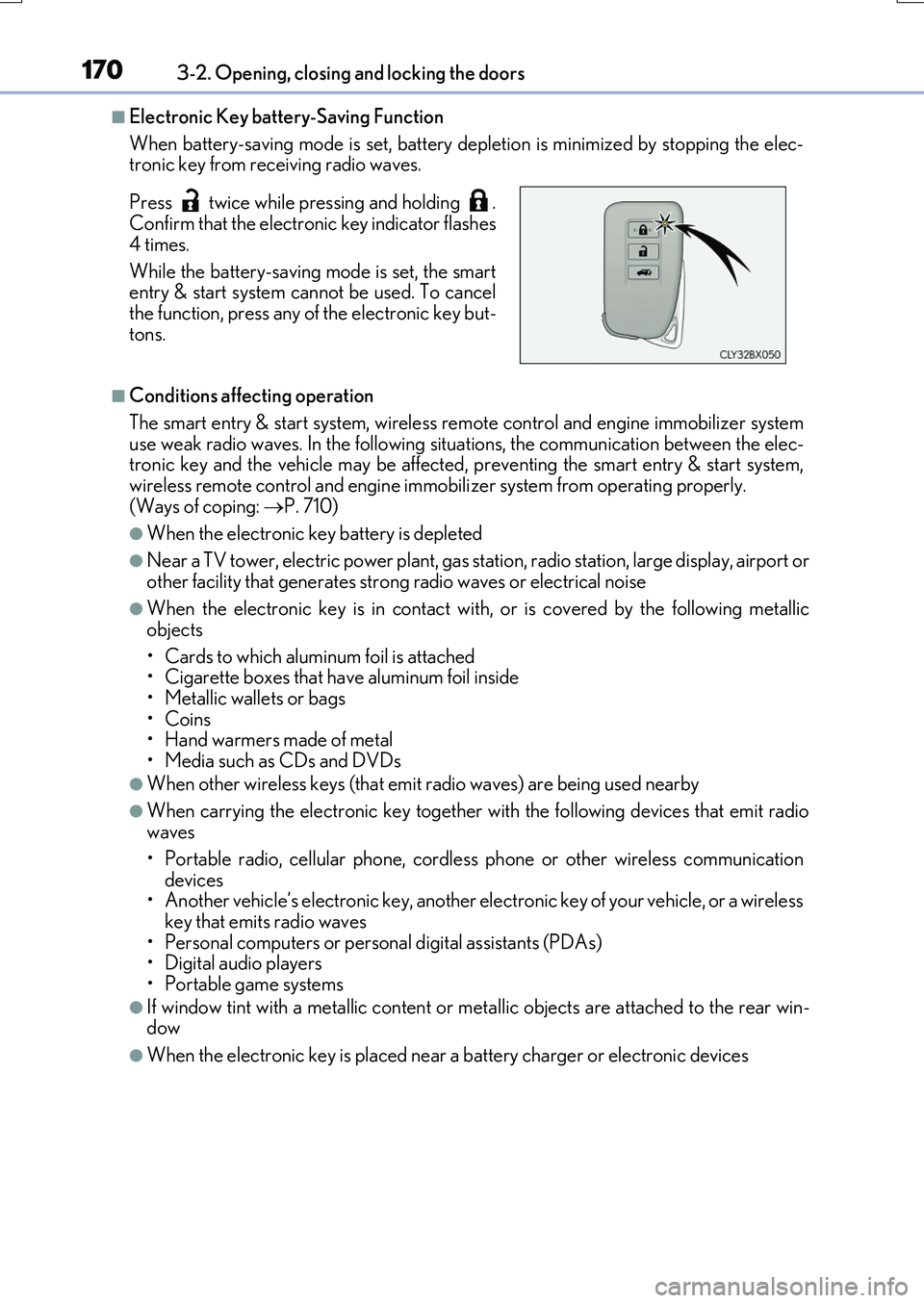
■Electronic Key battery-Saving Function
When battery-saving mode is set, battery depl etion is minimized by stopping the elec- tronic key from receiving radio waves.
■Conditions affecting operation
The smart entry & start system, wireless re mote control and engine immobilizer system use weak radio waves. In the following si tuations, the communication between the elec- tronic key and the vehicle may be affected, preventing the smart entry & start system,
wireless remote control and engine immob ilizer system from operating properly. (Ways of coping: P. 710)
●When the electronic key battery is depleted
●Near a TV tower, electric power plant, gas station, radio station, large display, airport or other facility that gene rates strong radio waves or electrical noise
●When the electronic key is in contact with, or is covered by the following metallic
objects
• Cards to which aluminum foil is attached • Cigarette boxes that have aluminum foil inside
• Metallic wallets or bags •Coins• Hand warmers made of metal
• Media such as CDs and DVDs
●When other wireless keys (that emit radio waves) are being used nearby
●When carrying the electronic key together with the following devices that emit radio waves
• Portable radio, cellular phone, cordle ss phone or other wireless communication
devices • Another vehicle’s electronic key, another electronic key of your vehicle, or a wirelesskey that emits radio waves
• Personal computers or personal digital assistants (PDAs) • Digital audio players• Portable game systems
●If window tint with a metallic content or me tallic objects are attached to the rear win- dow
●When the electronic key is placed near a battery charger or electronic devices
Press twice while pressing and holding . Confirm that the electronic key indicator flashes
4 times.
While the battery-saving mode is set, the smart entry & start system cannot be used. To cancel
the function, press any of the electronic key but- tons.
Page 171 of 776

1713-2. Opening, closing and locking the doors
3
Operation of each component
RX350/RX200t_EE_OM48F32E
■Note for the entry function
●Even when the electronic key is within the effective range (detection areas), the system may not operate properly in the following cases:
• The electronic key is too close to the window or outside door handle, near the ground, or in a high place when the doors are locked or unlocked.• The electronic key is near the ground or in a high place, or too close to the rear
bumper center when the back door is opened. • The electronic key is on the instrument panel, luggage compartment, floor, or in thedoor pockets or glove box when the engine is started or engine switch modes are
changed.
●Do not leave the electronic key on top of th e instrument panel or near the door pockets
when exiting the vehicle. Depending on the radio wave reception conditions, it may be detected by the antenna outside the cabin and the door will become lockable from theoutside, possibly trapping the electronic key inside the vehicle.
●As long as the electronic key is within the effective range, the doors may be locked orunlocked by anyone.
●Even if the electronic key is not inside the vehicle, it may be possible to start the engine
if the electronic key is near the window.
●The doors may unlock if a large amount of wa ter splashes on the door handle, such as in the rain or in a car wash when the electronic key is within the effective range. (The door
will automatically be locked after approx imately 30 seconds if the doors are not opened and closed.)
●If the wireless remote control is used to lock the doors when the electronic key is near
the vehicle, there is a possibility that the d oor may not be unlocked by the entry func- tion. (Use the wireless remote control to unlock the doors.)
●Touching the door lock sensor while wearin g gloves may delay or prevent lock opera-
tion. Remove the gloves and to uch the lock sensor again.
●If the door handle becomes wet while the electronic key is within the effective range,
the door may lock and unlock repeatedly. In that case, follow the following correction
procedures to wash the vehicle:
• Place the electronic key in a location 2 m (6 ft.) or more away from the vehicle. (Take
care to ensure that the key is not stolen.)
• Set the electronic key to battery-saving mode to disable the smart entry & start sys-
tem. ( P. 170)
●If the electronic key is inside the vehicle and a door handle becomes wet during a car wash, a message may be shown on the mult i-information display and a buzzer will
sound outside the vehicle. To turn off the alarm, lock all the doors.
●The lock sensor may not work properly if it comes into contact with ice, snow, mud, etc. Clean the lock sensor and attempt to operate it again.
●A sudden approach to the effective range or door handle may prevent the doors frombeing unlocked. In this case, return the door handle to the original position and check that the doors unlock before pulling the door handle again.
●If there is another electronic key in the de tection area, it may take slightly longer to unlock the doors after the door handle is gripped.
●Fingernails may scrape against the door duri ng operation of the door handle. Be care-
ful not to injure fingernails or damage the surface of the door.
Page 184 of 776
1843-2. Opening, closing and locking the doors
RX350/RX200t_EE_OM48F32E
WARNING
■Caution regarding interference with electronic devices
●People with implantable cardiac pacemakers, cardiac resynchronization therapy- pacemakers or implantable cardioverter de fibrillators should maintain a reasonable
distance between themselves and the sm art entry & start system antennas. (P. 168) The radio waves may affect the operation of such devices. If necessary, the entryfunction can be disabled. Ask any authoriz ed Lexus dealer or repairer, or another
duly qualified and equipped professional for details, such as the frequency of radio waves and timing of the emitted radio waves. Then, consult your doctor to see if you should disable the entry function.
●Users of any electrical medical device other than implantable cardiac pacemakers,cardiac resynchronization therapy-pacemakers or implantable cardioverterdefibrillators should consult the manufacturer of the device for information about its
operation under the influence of radio waves. Radio waves could have unexpected effects on the operation of such medicaldevices.
Ask any authorized Lexus dealer or repairer, or another duly qualified and equipped professional for details on disabling the entry function.