air condition LEXUS RX270 2014 User Guide
[x] Cancel search | Manufacturer: LEXUS, Model Year: 2014, Model line: RX270, Model: LEXUS RX270 2014Pages: 652, PDF Size: 48.98 MB
Page 247 of 652
247
2-4. Using other driving systems
2
When driving
RX350/270_EE
CAUTION
■Conditions under which the vehicle-to-vehicle distance control may not function
correctly
Apply the brakes as necessary in the following conditions as the radar sensor may
not be able to correctly detect vehicles ahead, and a fatal or serious accident may
result:
●When water or snow thrown up by the surrounding vehicles hinders the function-
ing of the radar sensor
●When your vehicle is pointing upwards (caused by a heavy load in the luggage
compartment etc.)
●When the road curves or when the lanes are narrow
●When steering wheel operation or your position in the lane is unstable
●When the vehicle ahead of you decelerates suddenly
■Handling the radar sensor
Observe the following to ensure the cruise control system can function effectively.
Otherwise, the system may not function correctly and could result in an accident.
●Keep the sensor and grille cover clean at all times.
Clean the sensor and grille cover with a soft cloth so you do not mark or damage
them.
●Do not subject the sensor or surrounding area to a strong impact.
If the sensor moves even slightly off position, the system may malfunction. If the
sensor or surrounding area is subject to a strong impact, always have the area
inspected and adjusted by any authorized Lexus dealer or repairer, or another
duly qualified and equipped professional.
●Do not disassemble the sensor.
●Do not attach accessories or stickers to the sensor, grille cover or surrounding
area.
●Do not modify or paint the sensor and grille cover.
●Do not replace them with non-genuine parts.
RX350_270_EE_48D77E.book 247 ページ 2014年1月24日 金曜日 午前10時4分
Page 254 of 652
254
2-4. Using other driving systems
RX350/270_EE
■Sensor detection information
●Certain vehicle conditions and the surrounding environment may affect the
ability of a sensor to correctly detect an obstacle. Particular instances where this
may occur are listed below.
• There is dirt, snow or ice on a sensor.
• A sensor is frozen.
• A sensor is covered in any way.
• The vehicle is leaning considerably to one side.
• On an extremely bumpy road, on an incline, on gravel, or on grass
• The vicinity of the vehicle is noisy due to vehicle horns, motorcycle engines,
air brakes of large vehicles, or other loud noises producing ultrasonic waves.
• There is another vehicle equipped with parking assist sensors in the vicinity.
• A sensor is coated with a sheet of spray or heavy rain.
• The vehicle is equipped with a fender pole or radio antenna.
• Towing eyelets are installed.
• A bumper or sensor receives a strong impact.
• The vehicle is approaching a tall or right-angled curb.
• In harsh sunlight or intense cold weather.
• A non-genuine Lexus suspension (lowered suspension, etc.) is installed.
In addition to the examples above, there are instances in which, because of their
shapes, signs and other objects may be judged by a sensor to be closer than they
are.
●The shape of the obstacle may prevent a sensor from detecting it. Pay particular
attention to the following obstacles:
• Wires, fences, ropes, etc.
• Cotton, snow and other materials that absorb sound waves
• Sharply-angled objects
• Low obstacles
• Tall obstacles with upper sections projecting outwards in the direction of your
vehicle
■If a message is displayed
→P. 5 5 2
■Customization
Settings (e.g. buzzer volume) can be changed.
(Customizable features →P. 6 2 2 )
RX350_270_EE_48D77E.book 254 ページ 2014年1月24日 金曜日 午前10時4分
Page 255 of 652
255
2-4. Using other driving systems
2
When driving
RX350/270_EE
CAUTION
■Caution when using the Lexus parking assist-sensor
Observe the following precautions.
Failing to do so may result in the vehicle being unable to be driven safely and possi-
bly cause an accident.
●Do not use the sensor at speeds in excess of 10 km/h (6 mph).
●Do not attach any accessories within the sensor range.
NOTICE
■Notes when washing the vehicle
Do not apply intensive bursts of water or steam to the sensor area.
Doing so may result in the sensor malfunctioning.
■Conditions possibly indicating system malfunctions
If any of the following occurs, the system may be malfunctioning due to a sensor fail-
ure etc. Have the vehicle inspected by any authorized Lexus dealer or repairer, or
another duly qualified and equipped professional.
●The buzzer does not sound when the Lexus parking assist-sensor mode is set.
●The sensor operation display flashes and the buzzer sounds even when no obsta-
cle is detected.
●An area of the sensors is hit or subjected to a strong impact.
●Either bumper is hit.
●The sensor operation display remains on even though no buzzer sounds.
RX350_270_EE_48D77E.book 255 ページ 2014年1月24日 金曜日 午前10時4分
Page 256 of 652
256
2-4. Using other driving systems
RX350/270_EE
Electronically modulated air suspension∗
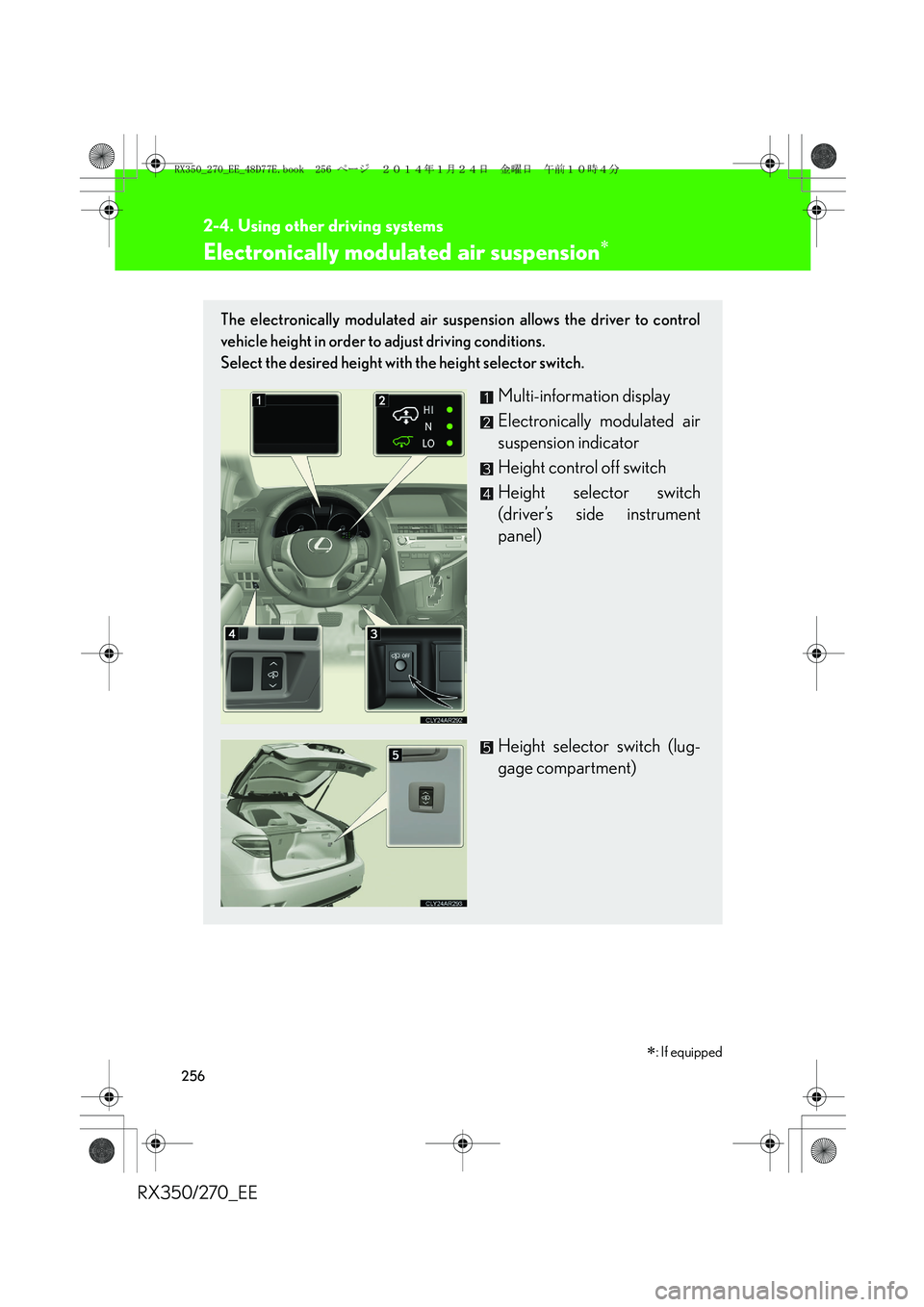
The electronically modulated air suspension allows the driver to control
vehicle height in order to adjust driving conditions.
Select the desired height with the height selector switch.
Multi-information display
Electronically modulated air
suspension indicator
Height control off switch
Height selector switch
(driver’s side instrument
panel)
Height selector switch (lug-
gage compartment)
∗: If equipped
RX350_270_EE_48D77E.book 256 ページ 2014年1月24日 金曜日 午前10時4分
Page 270 of 652
270
2-4. Using other driving systems
RX350/270_EE
NOTICE
■Conditions which may affect the rear view monitor system
●If the back of the vehicle has been hit, the camera’s position and mounting angle
may have changed. Have the vehicle inspected by any authorized Lexus dealer
or repairer, or another duly qualified and equipped professional.
●Rapid temperature changes, such as when hot water is poured on the vehicle in
cold weather, may cause the system to function abnormally.
●If the camera lens is dirty, it cannot transmit a clear image. Rinse with water and
wipe with a soft cloth. If extremely dirty, wash with a mild cleanser and rinse.
●The displayed image may be darker and moving images may be slightly distorted
when the system is cold.
■Camera precautions
●As the camera has a water proof construction, do not detach, disassemble or
modify it. This may cause incorrect operation.
●Do not subject the camera to a strong impact.
●If the camera lens becomes dirty, it cannot transmit a clear image. If water drop-
lets, snow, or mud adhere to the lens, rinse with water and wipe with a soft cloth. If
the lens is extremely dirty, wash it with a mild cleanser and rinse. Do not rub hard.
●Do not allow organic solvent, car wax, window cleaner or glass coat to adhere to
the camera. If this happens, wipe it off as soon as possible.
●Do not strongly rub the camera lens. If the camera lens is scratched, it cannot
transmit a clear image.
●When washing the vehicle, do not apply intensive bursts of water to the camera
or camera area. Doing so may result in the camera malfunctioning.
●When replacing tires, please consult any authorized Lexus dealer or repairer, or
another duly qualified and equipped professional. If you replace the tires, the area
displayed on the screen may change.
RX350_270_EE_48D77E.book 270 ページ 2014年1月24日 金曜日 午前10時4分
Page 274 of 652
274
2-4. Using other driving systems
RX350/270_EE
■When the message is displayed on the multi-information display showing that
TRC has been disabled even if the VSC off switch has not been pressed
TRC and hill-start assist control cannot be operated. Contact your any authorized
Lexus dealer or repairer, or another duly qualified and equipped professional.
■Sounds and vibrations caused by the ABS, VSC, TRC and brake assist
●A sound may be heard from the engine compartment when the engine is
started or just after the vehicle begins to move. This sound does not indicate that
a malfunction has occurred in any of these systems.
●Any of the following conditions may occur when the above systems are operat-
ing. None of these indicates that a malfunction has occurred.
• Vibrations may be felt through the vehicle body and steering.
• A motor sound may be heard after the vehicle comes to a stop.
• The brake pedal may pulsate slightly after the ABS is activated.
• The brake pedal may move down slightly after the ABS is activated.
■EPS operation sound
When the steering wheel is operated, a motor sound (whirring sound) may be
heard. This does not indicate a malfunction.
■Reactivation of the TRC/VSC systems
Turning off the engine after turning off the TRC/VSC systems will automatically
reactivate them.
■Reactivation of the TRC system linked to vehicle speed
When only the TRC system is turned off, the TRC system will turn on when vehicle
speed increases. However, when both TRC and VSC systems are turned off, the
systems will not turn on even when vehicle speed increases.
■Reduced effectiveness of the EPS system
The effectiveness of the EPS system is reduced to prevent the system from over-
heating when there is frequent steering input over an extended period of time. The
steering wheel may feel heavy as a result. Should this occur, refrain from excessive
steering input or stop the vehicle and turn the engine off. The EPS system should
return to normal within 10 minutes.
RX350_270_EE_48D77E.book 274 ページ 2014年1月24日 金曜日 午前10時4分
Page 276 of 652
276
2-4. Using other driving systems
RX350/270_EE
CAUTION
■When the VSC is activated
The slip indicator light flashes. Always drive carefully. Reckless driving may cause
an accident, resulting in death or serious injury. Exercise particular care when the
indicator light flashes.
■When the TRC/VSC systems are turned off
Be especially careful and drive at a speed appropriate to the road conditions. As
these are the systems to help ensure vehicle stability and driving force, do not turn
the TRC/VSC systems off unless necessary.
■Replacing tires
Make sure that all tires are of the same size, brand, tread pattern and total load
capacity. In addition, make sure that the tires are inflated to the recommended tire
inflation pressure level.
The ABS and VSC systems will not function correctly if different tires are installed
on the vehicle.
Contact any authorized Lexus dealer or repairer, or another duly qualified and
equipped professional, for further information when replacing tires or wheels.
■Handling of tires and suspension
Using tires with any kind of problem or modifying the suspension will affect the driv-
ing assist systems, and may cause a system malfunction.
RX350_270_EE_48D77E.book 276 ページ 2014年1月24日 金曜日 午前10時4分
Page 296 of 652
296
2-5. Driving information
RX350/270_EE
Winter driving tips
Carry out the necessary preparations and inspections before driving the
vehicle in winter. Always drive the vehicle in a manner appropriate to the
prevailing weather conditions.
■Pre-winter preparations
●Use fluids that are appropriate to the prevailing outside tempera-
tures.
• Engine oil
• Engine coolant
• Washer fluid
●Have a service technician inspect the condition of the battery.
●Have the vehicle fitted with four snow tires or purchase a set of
tire chains for the front tires.
Ensure that all tires are the same size and brand, and that chains match
the size of the tires.
■Before driving the vehicle
Perform the following according to the driving conditions:
●Do not try to forcibly open a window or move a wiper that is fro-
zen. Pour warm water over the frozen area to melt the ice. Wipe
away the water immediately to prevent it from freezing.
●To ensure proper operation of the climate control system fan,
remove any snow that has accumulated on the air inlet vents in
front of the windshield.
●Check for and remove any excess ice or snow that may have
accumulated on the exterior lights, vehicle's roof, chassis, around
the tires or on the brakes.
●Remove any snow or mud from the bottom of your shoes before
getting in the vehicle.
RX350_270_EE_48D77E.book 296 ページ 2014年1月24日 金曜日 午前10時4分
Page 308 of 652
308
2-5. Driving information
RX350/270_EE■Important points regarding turning
The wheels of the trailer will travel closer to the inside of the curve than
the wheels of the vehicle. To make allowance for this, take the turns
wider than you would normally do.
■Important points regarding stability
Vehicle movement resulting from uneven road surfaces and strong
crosswinds will affect handling. The vehicle may also be rocked by
passing buses or large trucks. Frequently check behind when moving
alongside such vehicles. As soon as such vehicle movement occurs,
immediately start to decelerate smoothly by slowly applying the
brakes. Always steer the vehicle straight ahead while braking.
■Passing other vehicles
Consider the total combined length of your vehicle and trailer and
ensure that the vehicle-to-vehicle distance is sufficient before execut-
ing lane changes.
■Transmission information
Refrain from driving in 6 range in S mode to maintain the effectiveness
of the engine brake and the charge performance of electrical compo-
nents.
■If the engine overheats
Towing a loaded trailer up a long, steep incline in temperatures
exceeding 30°C (85°F) may result in the engine overheating. If the
engine coolant temperature gauge indicates that the engine is over-
heating, turn the air conditioning off immediately, leave the road and
stop the vehicle in a safe place. (→P. 5 9 8 )
■When parking the vehicle
Always place wheel chocks under the wheels of both the vehicle and
trailer. Firmly set the parking brake and shift the shift lever to P.
RX350_270_EE_48D77E.book 308 ページ 2014年1月24日 金曜日 午前10時4分
Page 312 of 652
312
RX350/270_EE
3-1. Using the air
conditioning system
and defogger
Automatic air
conditioning system ............. 314
Rear window defogger
switch ....................................... 321
Windshield wiper
de-icer ................................... 322
3-2. Using the audio system
Audio system .......................... 323
Using the radio........................ 326
Using the CD player ............ 330
Playing MP3 and WMA
discs ......................................... 337
Operating an iPod ................ 344
Operating a USB
memory ................................. 353
Bluetooth
® audio system...... 361
Using the Bluetooth®
audio system ......................... 366
Operating a Bluetooth
®
enabled portable
player ...................................... 369
RX350_270_EE_48D77E.book 312 ページ 2014年1月24日 金曜日 午前10時4分