instrument panel LEXUS RX270 2014 User Guide
[x] Cancel search | Manufacturer: LEXUS, Model Year: 2014, Model line: RX270, Model: LEXUS RX270 2014Pages: 652, PDF Size: 48.98 MB
Page 198 of 652
198
2-2. Instrument cluster
RX350/270_EE
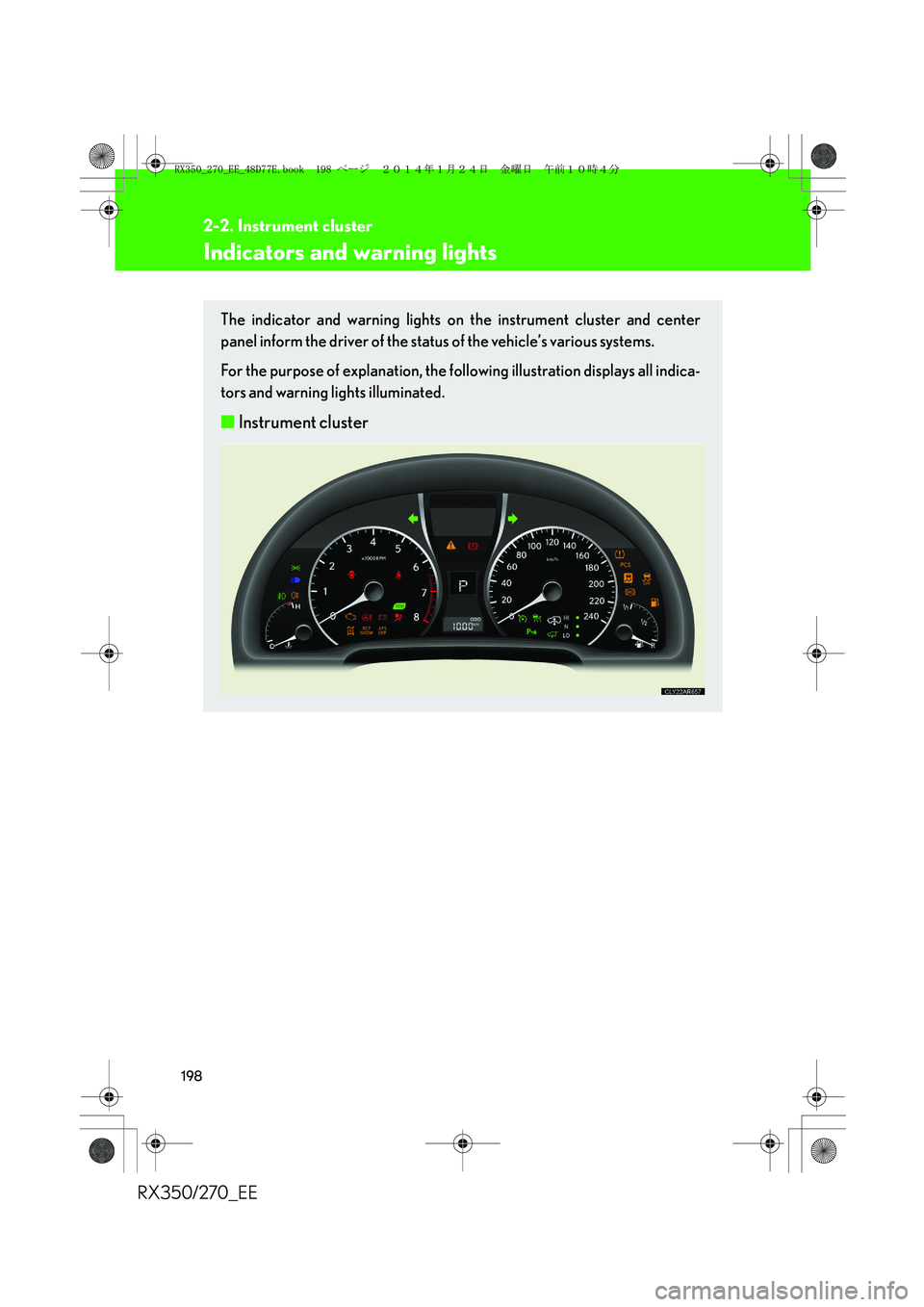
Indicators and warning lights
The indicator and warning lights on the instrument cluster and center
panel inform the driver of the status of the vehicle’s various systems.
For the purpose of explanation, the following illustration displays all indica-
tors and warning lights illuminated.
■Instrument cluster
RX350_270_EE_48D77E.book 198 ページ 2014年1月24日 金曜日 午前10時4分
Page 199 of 652
199
2-2. Instrument cluster
2
When driving
RX350/270_EE
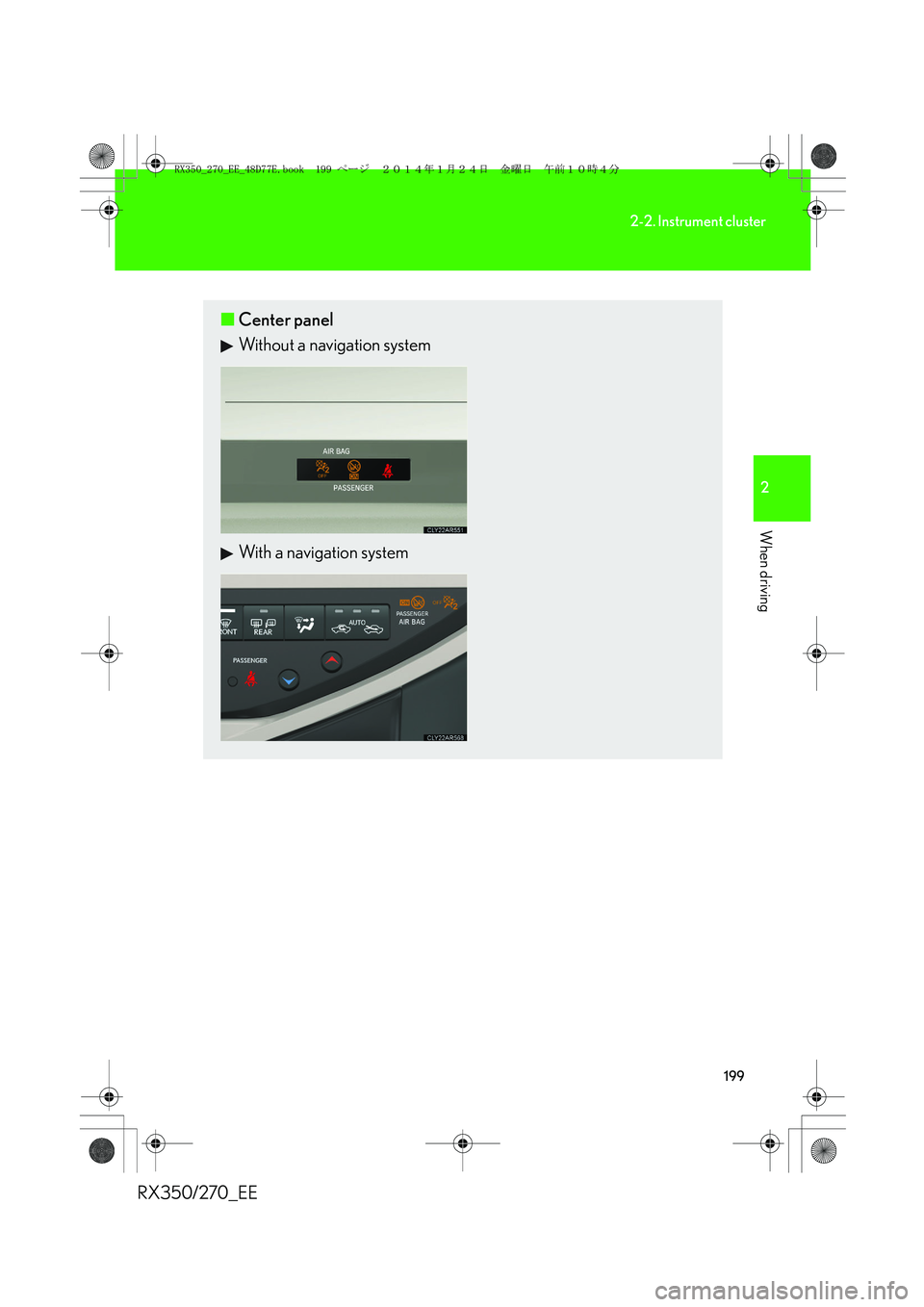
■Center panel
Without a navigation system
With a navigation system
RX350_270_EE_48D77E.book 199 ページ 2014年1月24日 金曜日 午前10時4分
Page 217 of 652
217
2
When driving
RX350/270_EE
2-3. Operating the lights and windshield wipers
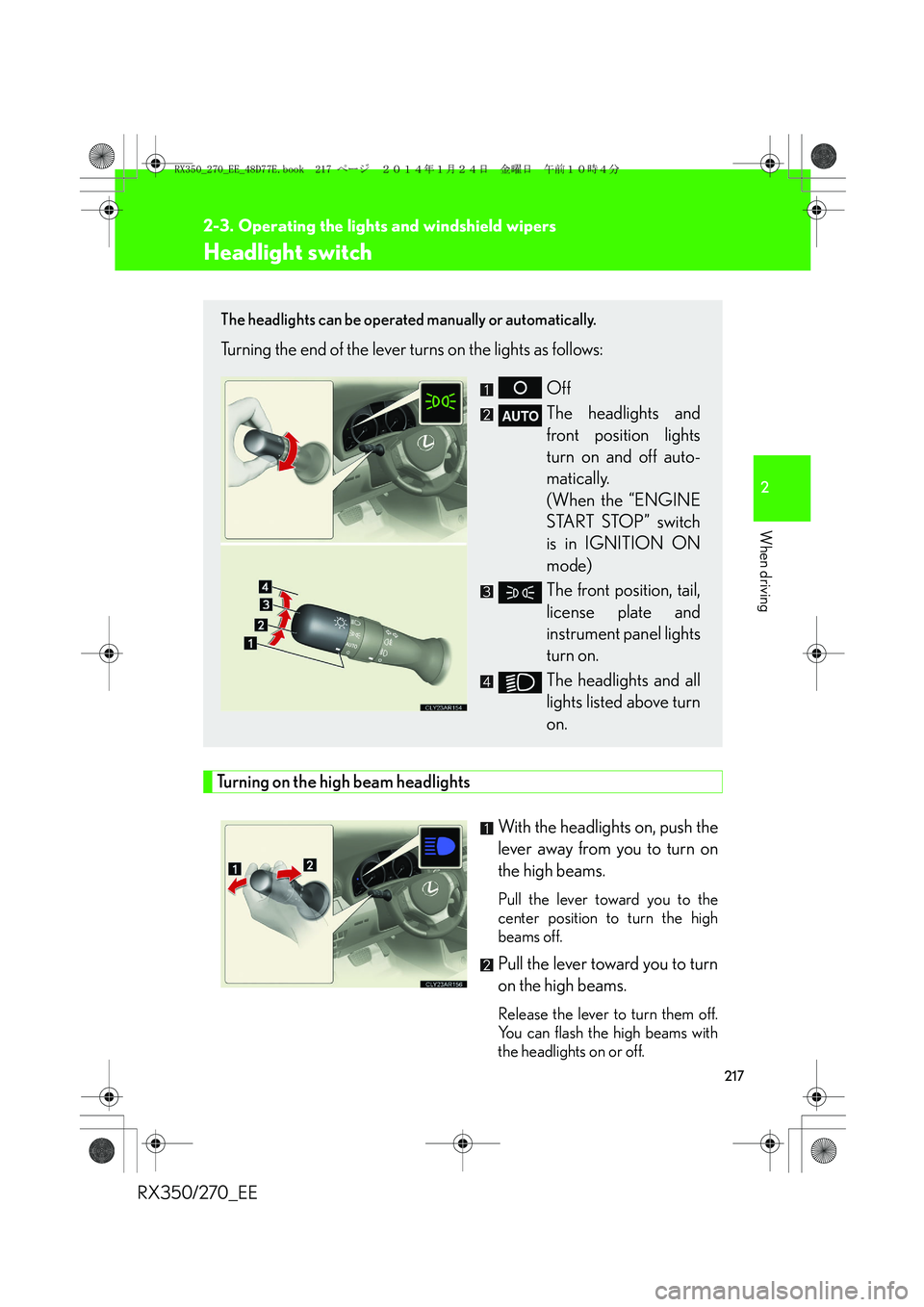
Headlight switch
Turning on the high beam headlights
With the headlights on, push the
lever away from you to turn on
the high beams.
Pull the lever toward you to the
center position to turn the high
beams off.
Pull the lever toward you to turn
on the high beams.
Release the lever to turn them off.
You can flash the high beams with
the headlights on or off.
The headlights can be operated manually or automatically.
Turning the end of the lever turns on the lights as follows:
Off
The headlights and
front position lights
turn on and off auto-
matically.
(When the “ENGINE
START STOP” switch
is in IGNITION ON
mode)
The front position, tail,
license plate and
instrument panel lights
turn on.
The headlights and all
lights listed above turn
on.
RX350_270_EE_48D77E.book 217 ページ 2014年1月24日 金曜日 午前10時4分
Page 256 of 652
256
2-4. Using other driving systems
RX350/270_EE
Electronically modulated air suspension∗
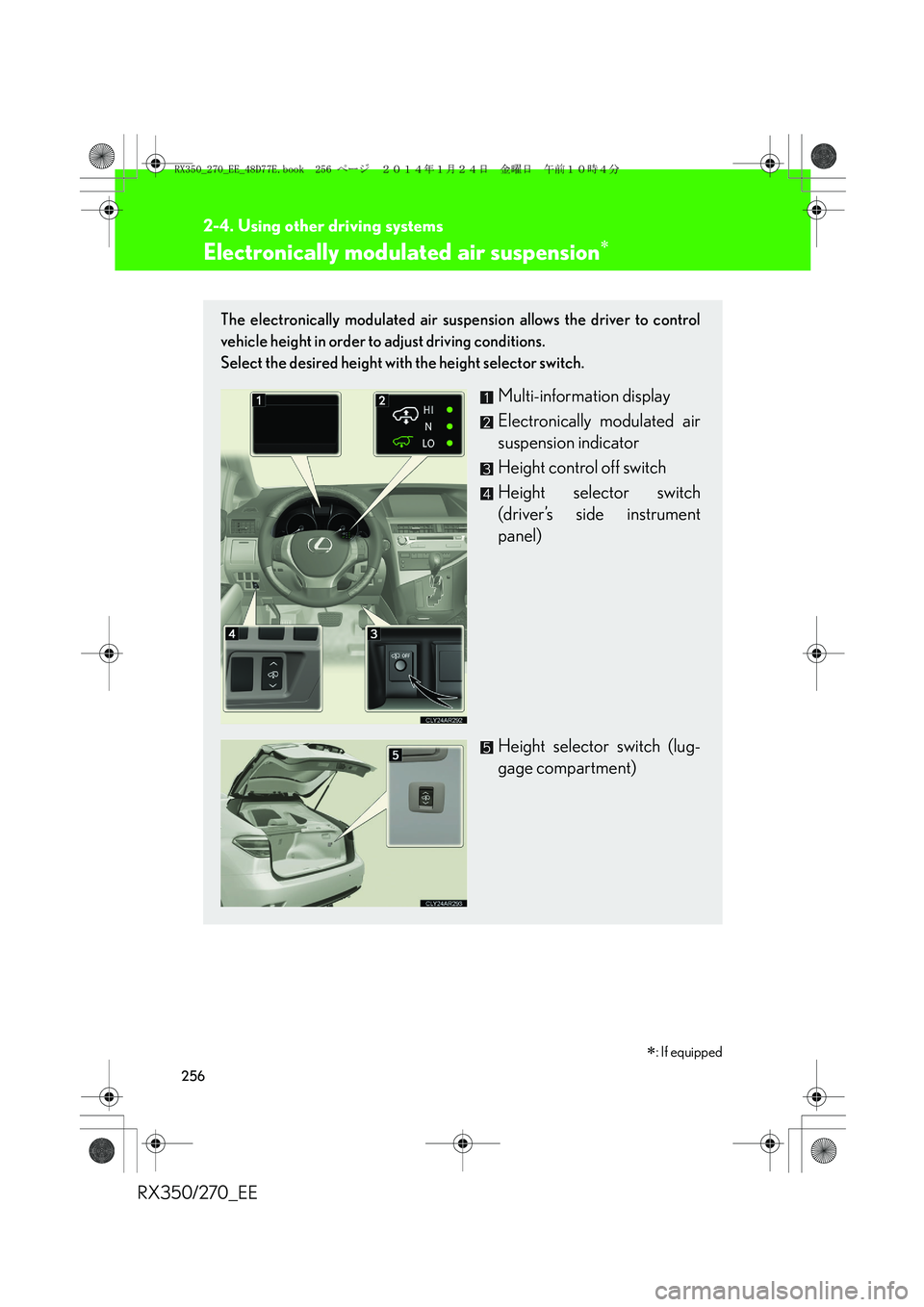
The electronically modulated air suspension allows the driver to control
vehicle height in order to adjust driving conditions.
Select the desired height with the height selector switch.
Multi-information display
Electronically modulated air
suspension indicator
Height control off switch
Height selector switch
(driver’s side instrument
panel)
Height selector switch (lug-
gage compartment)
∗: If equipped
RX350_270_EE_48D77E.book 256 ページ 2014年1月24日 金曜日 午前10時4分
Page 257 of 652
257
2-4. Using other driving systems
2
When driving
RX350/270_EE
Selecting vehicle height
■Height modes
●“HI” mode: For driving on bumpy roads
30 mm (1.2 in.) higher than the normal height
“HI” mode cannot be selected when vehicle speed exceeds 30 km/h (19
mph).
●“N” mode: For ordinary driving
Normal height
●“LO” mode: For sporty driving
Vehicle front: 20 mm (0.8 in.) lower than the normal height
Vehicle rear: 5 mm (0.2 in.) lower than the normal height
●Luggage mode: For easy entry/exit and easy luggage loading/
unloading
30 mm (1.2 in.) lower than the normal height
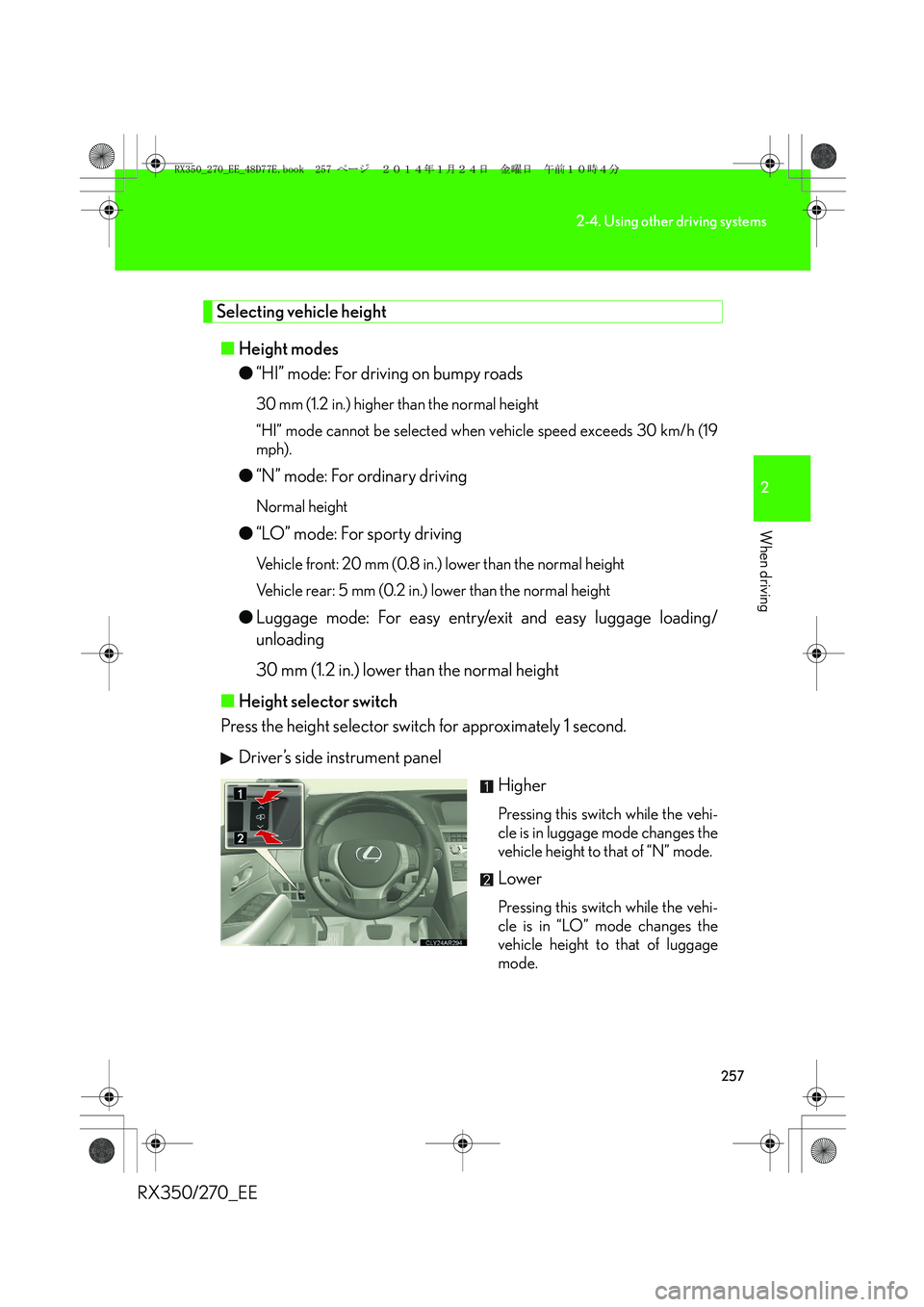
■Height selector switch
Press the height selector switch for approximately 1 second.
Driver’s side instrument panel
Higher
Pressing this switch while the vehi-
cle is in luggage mode changes the
vehicle height to that of “N” mode.
Lower
Pressing this switch while the vehi-
cle is in “LO” mode changes the
vehicle height to that of luggage
mode.
RX350_270_EE_48D77E.book 257 ページ 2014年1月24日 金曜日 午前10時4分
Page 259 of 652
259
2-4. Using other driving systems
2
When driving
RX350/270_EE
■Operating conditions
After stopping the engine, the vehicle will remain lowered for a maximum of 60
seconds.
●Height selector switch (driver's side instrument panel)
• While the engine is running, any vehicle height mode can be selected.
• Luggage mode can only be selected when the shift lever is in P position.
●Height selector switch (luggage compartment)
• When the engine is running and the shift lever is in the P position, any vehicle
height other than “LO” mode can be selected.
• When the “ENGINE START STOP” switch is turned off, the vehicle height
can only be lowered (only the “∨” side of the switch can be operated).
This switch can only be operated when the back door is open.
●Height control off switch
When the vehicle is stopped with the “ENGINE START STOP” switch in IGNI-
TION ON mode, vehicle height control can be disabled/re-enabled.
■When changing vehicle height modes
Before operating the height selector switch to raise/lower the vehicle height,
ensure that there are no objects in the surrounding area that could damage the
vehicle.
■When “N” mode is selected
During high speed driving, the vehicle height will automatically change to that of
“LO” mode.
■When “HI” mode is selected
The vehicle height will change to that of “N” mode when vehicle speed reaches 50
km/h (31 mph) or when vehicle speed has exceeded 30 km/h (19 mph) for approx-
imately 10 seconds. Even if vehicle speed is reduced below 30 km/h (19 mph), the
vehicle height will not automatically return to “HI” mode.
■When “LO” mode is selected
The vehicle height will change to that of “N” mode when the engine is restarted.
RX350_270_EE_48D77E.book 259 ページ 2014年1月24日 金曜日 午前10時4分
Page 294 of 652
294
2-5. Driving information
RX350/270_EE
CAUTION
■Storage precautions
Observe the following precautions.
Failure to do so may result in death or serious injury.
●Stow cargo and luggage in the luggage compartment whenever possible.
●Do not stack cargo and luggage in the luggage compartment higher than the
seatbacks.
Such items may be thrown about and possibly injure people in the vehicle in the
event of sudden braking or in an accident.
●Do not place cargo or luggage in or on the following locations as the items may
get under the brake or accelerator pedal and prevent the pedals from being
depressed properly, block the driver’s vision, or hit the driver or passengers,
causing an accident:
• At the feet of the driver
• On the front passenger or rear seats (when stacking items)
• On the luggage cover
• On the instrument panel
• On the dashboard
●Secure all items in the occupant compartment, as they may shift and injure some-
one in the event of sudden braking, sudden swerving or an accident.
●Never allow anyone to ride in the luggage compartment. It is not designed for
passengers. They should ride in their seats with their seat belts properly fastened.
Otherwise, they are much more likely to suffer death or serious bodily injury, in
the event of sudden braking, sudden swerving or an accident.
■Load and distribution
●Do not overload your vehicle.
●Do not apply loads unevenly.
Improper loading may cause deterioration of steering or braking control which
may cause death or serious injury.
RX350_270_EE_48D77E.book 294 ページ 2014年1月24日 金曜日 午前10時4分
Page 423 of 652
423
3-4. Using the storage features
3
Interior features
RX350/270_EE
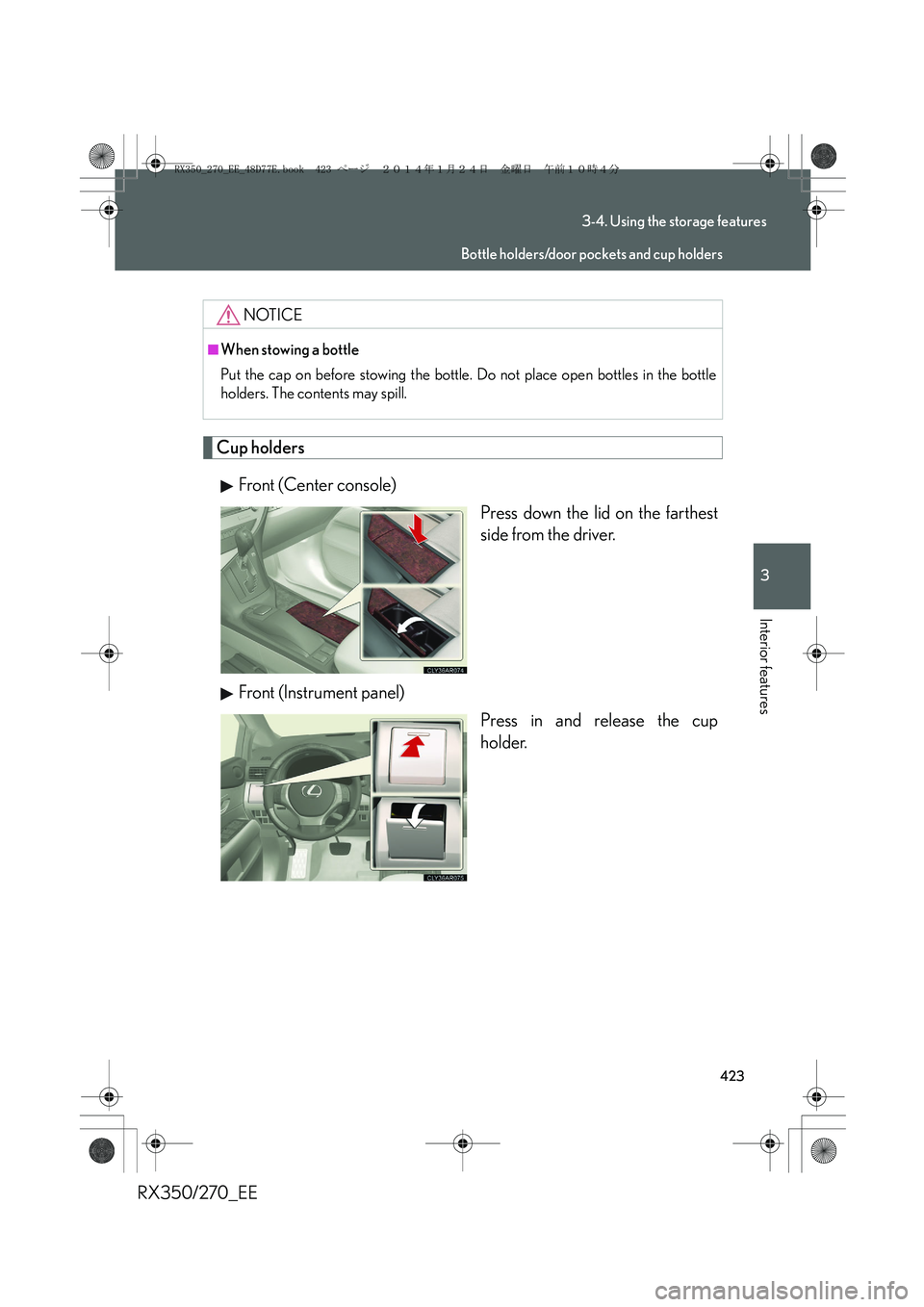
Cup holders
Front (Center console)
Press down the lid on the farthest
side from the driver.
Front (Instrument panel)
Press in and release the cup
holder.
NOTICE
■When stowing a bottle
Put the cap on before stowing the bottle. Do not place open bottles in the bottle
holders. The contents may spill.
Bottle holders/door pockets and cup holders
RX350_270_EE_48D77E.book 423 ページ 2014年1月24日 金曜日 午前10時4分
Page 434 of 652
434
3-5. Other interior features
RX350/270_EE
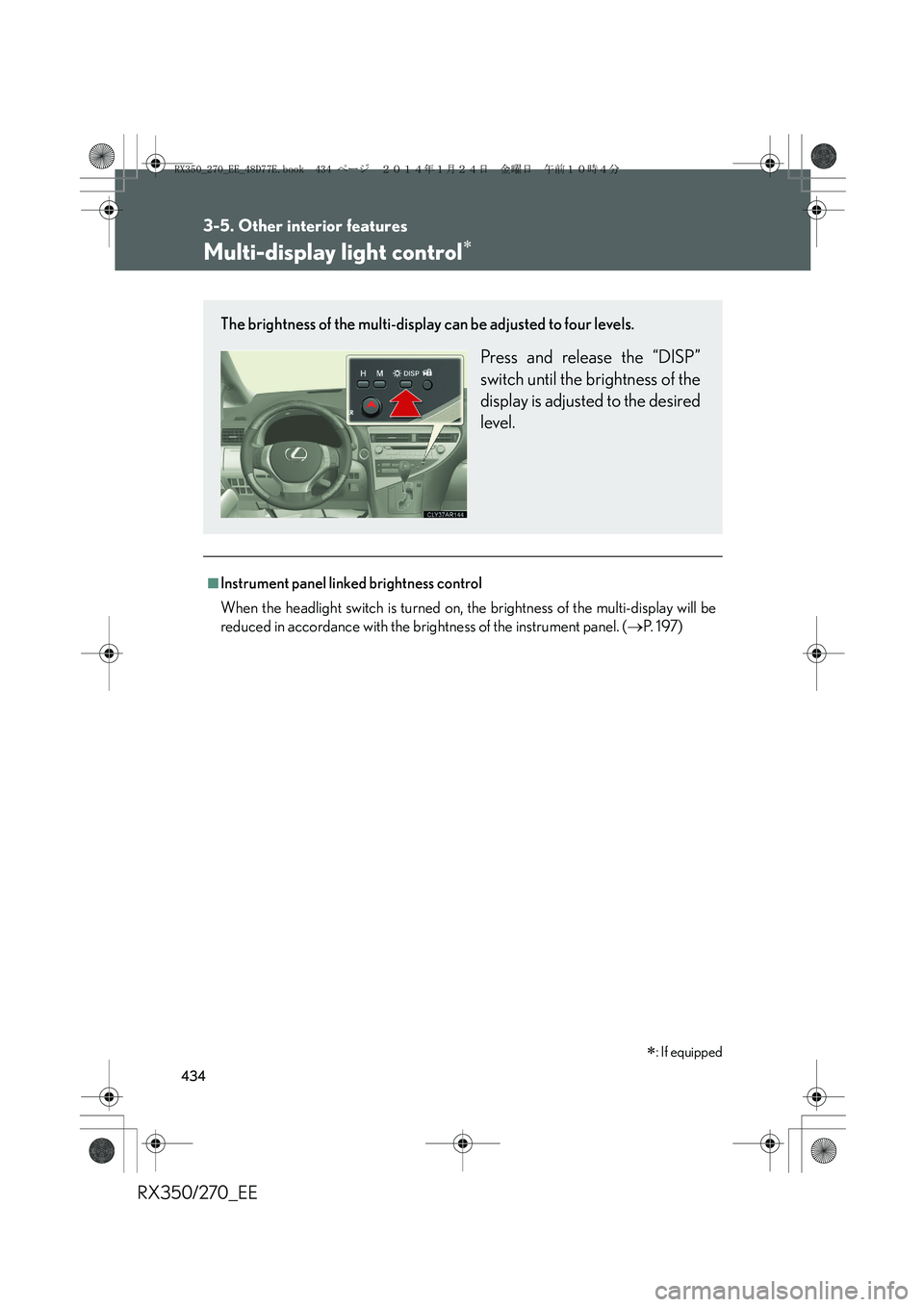
Multi-display light control∗
■Instrument panel linked brightness control
When the headlight switch is turned on, the brightness of the multi-display will be
reduced in accordance with the brightness of the instrument panel. (→P. 1 9 7 )
∗: If equipped
The brightness of the multi-display can be adjusted to four levels.
Press and release the “DISP”
switch until the brightness of the
display is adjusted to the desired
level.
RX350_270_EE_48D77E.book 434 ページ 2014年1月24日 金曜日 午前10時4分
Page 456 of 652
456
4-1. Maintenance and care
RX350/270_EE
■Caring for leather areas
Lexus recommends cleaning the interior of the vehicle at least twice a year to main-
tain the quality of the vehicle’s interior.
■Shampooing the carpets
There are several commercial foaming-type cleaners available. Use a sponge or
brush to apply the foam. Rub in overlapping circles. Do not apply water. Excellent
results are obtained by keeping the carpet as dry as possible.
■Seat belts
Clean with mild soap and lukewarm water using a cloth or sponge. Also check the
belts periodically for excessive wear, fraying or cuts.
CAUTION
■Water in the vehicle
●Do not splash or spill liquid in the vehicle.
●Do not get any of the SRS components or wiring in the vehicle interior wet.
(→P. 1 3 2 )
An electrical malfunction may cause the airbags to deploy or not function prop-
erly, resulting in death or severe injury.
■Cleaning the interior (especially instrument panel)
Do not use polish wax or polish cleaner. The instrument panel may reflect off the
windshield, obstructing the driver's view and leading to an accident, resulting in
death or serious injury.
RX350_270_EE_48D77E.book 456 ページ 2014年1月24日 金曜日 午前10時4分