ECO mode LEXUS RX270 2014 Owner's Manual
[x] Cancel search | Manufacturer: LEXUS, Model Year: 2014, Model line: RX270, Model: LEXUS RX270 2014Pages: 652, PDF Size: 48.98 MB
Page 210 of 652
210
2-2. Instrument cluster
RX350/270_EE
●In the following situations, the window close operation will stop partway:
• The “ENGINE START STOP” switch is turned to IGNITION ON mode.
• The “ENTER” switch was pressed.
• The window lock switch was turned on.
• The jam protection function was activated.
• The windows were opened or closed by the wireless remote control.
If the power window switch of any of the door is operated while in windows close
suggestion mode, the windows close operation of that door will stop partway.
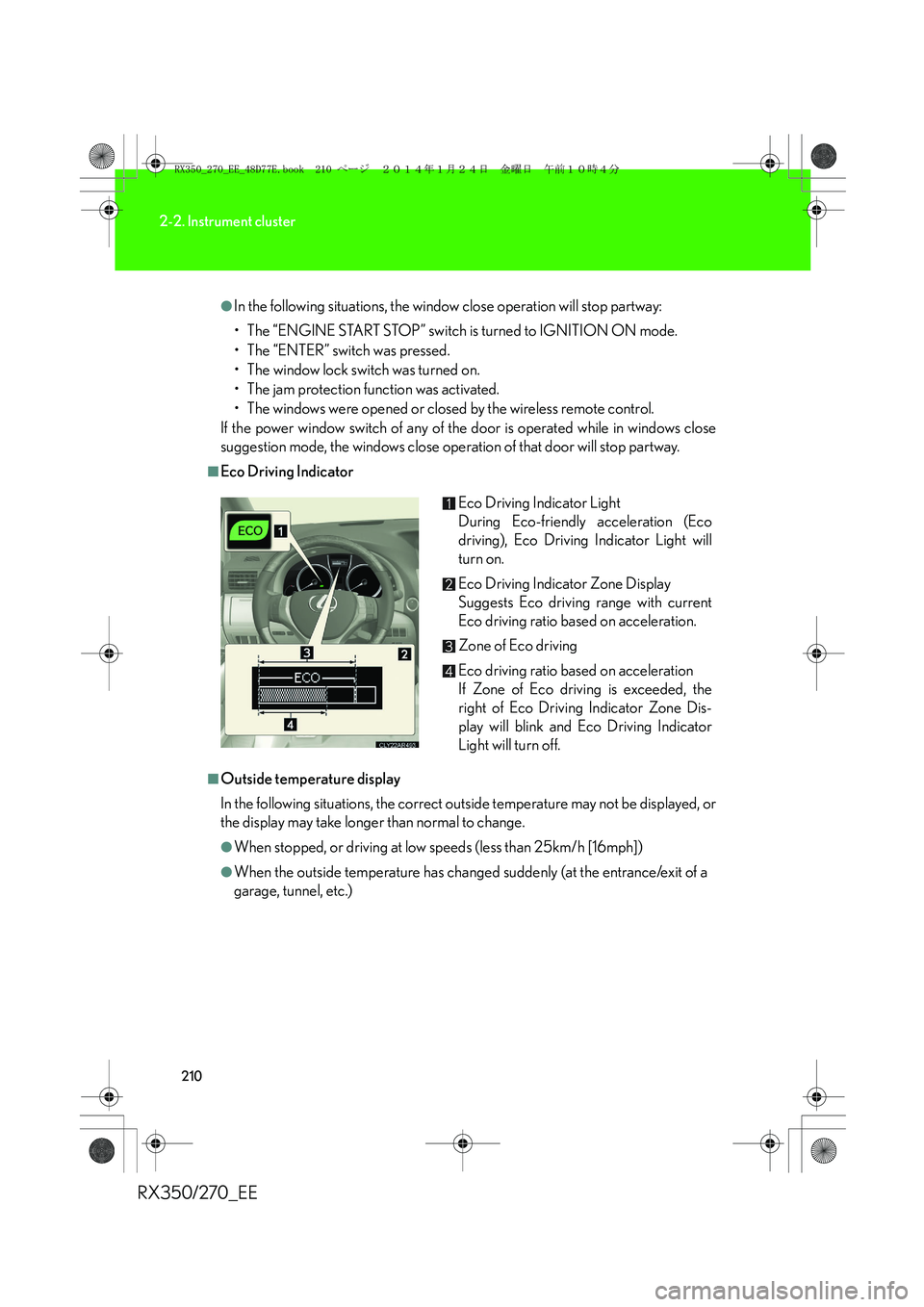
■Eco Driving Indicator
■Outside temperature display
In the following situations, the correct outside temperature may not be displayed, or
the display may take longer than normal to change.
●When stopped, or driving at low speeds (less than 25km/h [16mph])
●When the outside temperature has changed suddenly (at the entrance/exit of a
garage, tunnel, etc.)Eco Driving Indicator Light
During Eco-friendly acceleration (Eco
driving), Eco Driving Indicator Light will
turn on.
Eco Driving Indicator Zone Display
Suggests Eco driving range with current
Eco driving ratio based on acceleration.
Zone of Eco driving
Eco driving ratio based on acceleration
If Zone of Eco driving is exceeded, the
right of Eco Driving Indicator Zone Dis-
play will blink and Eco Driving Indicator
Light will turn off.
RX350_270_EE_48D77E.book 210 ページ 2014年1月24日 金曜日 午前10時4分
Page 211 of 652
211
2-2. Instrument cluster
2
When driving
RX350/270_EE
■The multi-information display at low temperatures
Allow the interior of the vehicle to warm up before using the liquid crystal informa-
tion display. At extremely low temperatures, the information display monitor may
respond slowly, and display changes may be delayed.
■Customization
Settings (e.g. available languages) can be changed.
(Customizable features →P. 6 2 2 )
CAUTION
■Operating the windows close suggestion mode
●Before closing the windows, ensure that there are no objects in the surrounding
area that could become caught in the windows.
●Check that all the windows are closed when exiting the vehicle, as window close
suggestion mode may not operate under certain conditions.
■Caution while driving
When operating the electronic features control while driving, take extra notice of
the vehicle’s surrounding area.
RX350_270_EE_48D77E.book 211 ページ 2014年1月24日 金曜日 午前10時4分
Page 221 of 652
221
2-3. Operating the lights and windshield wipers
2
When driving
RX350/270_EE
■Light reminder buzzer
A buzzer sounds when the “ENGINE START STOP” switch is turned off or turned
to ACCESSORY mode and the driver's door is opened while the lights are turned
on.
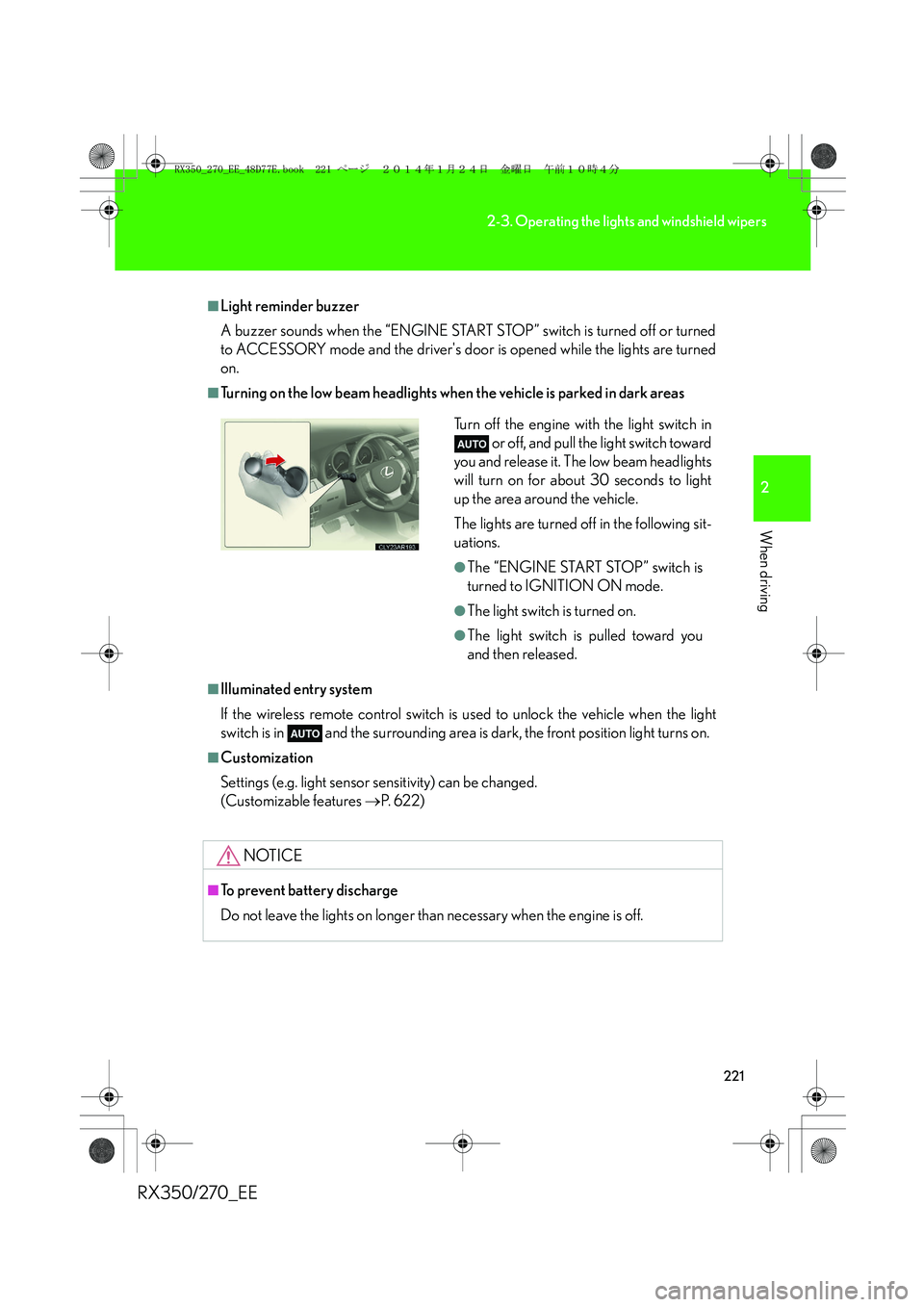
■Turning on the low beam headlights when the vehicle is parked in dark areas
■Illuminated entry system
If the wireless remote control switch is used to unlock the vehicle when the light
switch is in and the surrounding area is dark, the front position light turns on.
■Customization
Settings (e.g. light sensor sensitivity) can be changed.
(Customizable features →P. 6 2 2 )
NOTICE
■To prevent battery discharge
Do not leave the lights on longer than necessary when the engine is off.
Turn off the engine with the light switch in
or off, and pull the light switch toward
you and release it. The low beam headlights
will turn on for about 30 seconds to light
up the area around the vehicle.
The lights are turned off in the following sit-
uations.
●The “ENGINE START STOP” switch is
turned to IGNITION ON mode.
●The light switch is turned on.
●The light switch is pulled toward you
and then released.
RX350_270_EE_48D77E.book 221 ページ 2014年1月24日 金曜日 午前10時4分
Page 225 of 652
225
2-3. Operating the lights and windshield wipers
2
When driving
RX350/270_EE
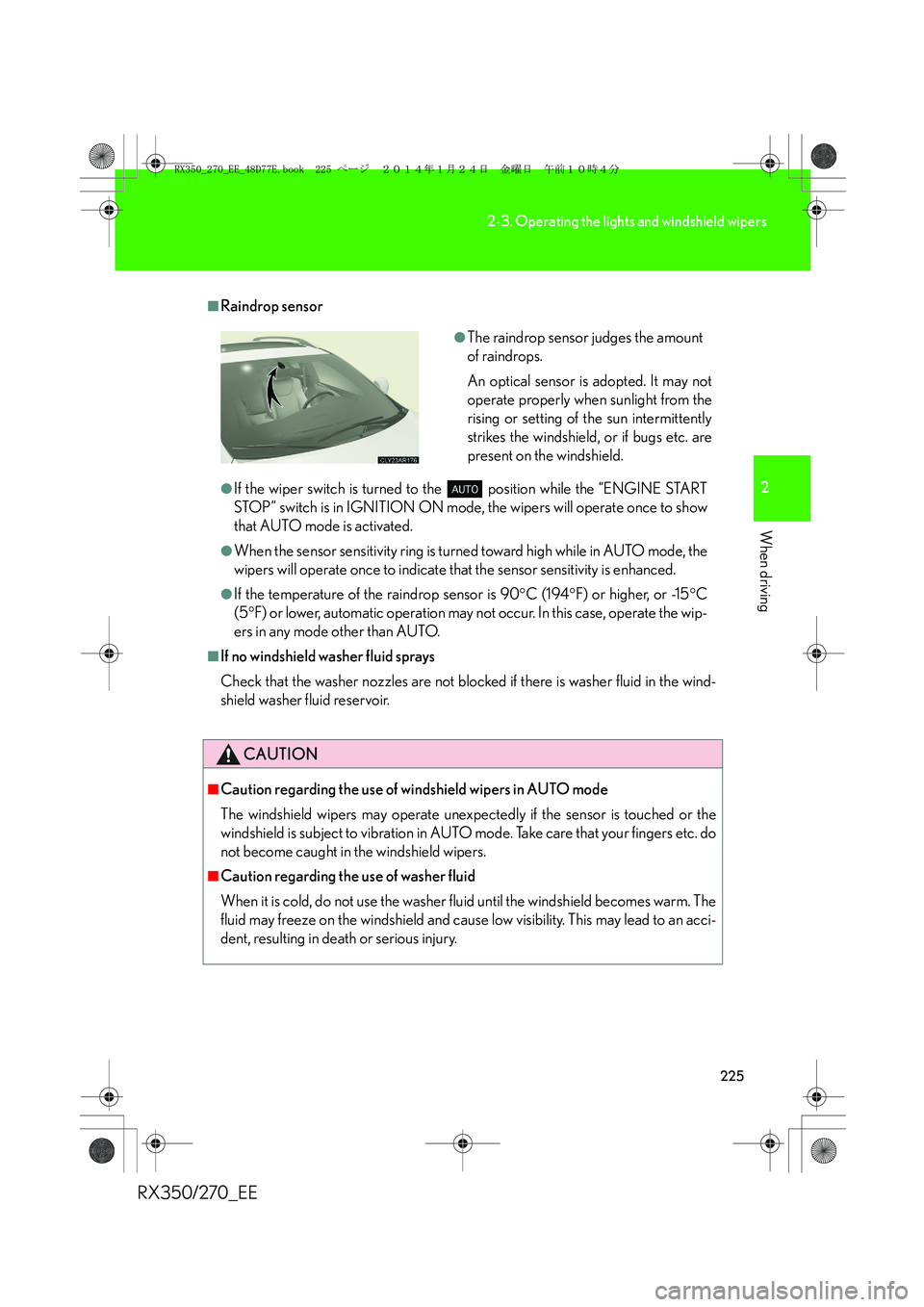
■Raindrop sensor
●If the wiper switch is turned to the position while the “ENGINE START
STOP” switch is in IGNITION ON mode, the wipers will operate once to show
that AUTO mode is activated.
●When the sensor sensitivity ring is turned toward high while in AUTO mode, the
wipers will operate once to indicate that the sensor sensitivity is enhanced.
●If the temperature of the raindrop sensor is 90°C (194°F) or higher, or -15°C
(5°F) or lower, automatic operation may not occur. In this case, operate the wip-
ers in any mode other than AUTO.
■If no windshield washer fluid sprays
Check that the washer nozzles are not blocked if there is washer fluid in the wind-
shield washer fluid reservoir.
CAUTION
■Caution regarding the use of windshield wipers in AUTO mode
The windshield wipers may operate unexpectedly if the sensor is touched or the
windshield is subject to vibration in AUTO mode. Take care that your fingers etc. do
not become caught in the windshield wipers.
■Caution regarding the use of washer fluid
When it is cold, do not use the washer fluid until the windshield becomes warm. The
fluid may freeze on the windshield and cause low visibility. This may lead to an acci-
dent, resulting in death or serious injury.
●The raindrop sensor judges the amount
of raindrops.
An optical sensor is adopted. It may not
operate properly when sunlight from the
rising or setting of the sun intermittently
strikes the windshield, or if bugs etc. are
present on the windshield.
RX350_270_EE_48D77E.book 225 ページ 2014年1月24日 金曜日 午前10時4分
Page 235 of 652
235
2-4. Using other driving systems
2
When driving
RX350/270_EE
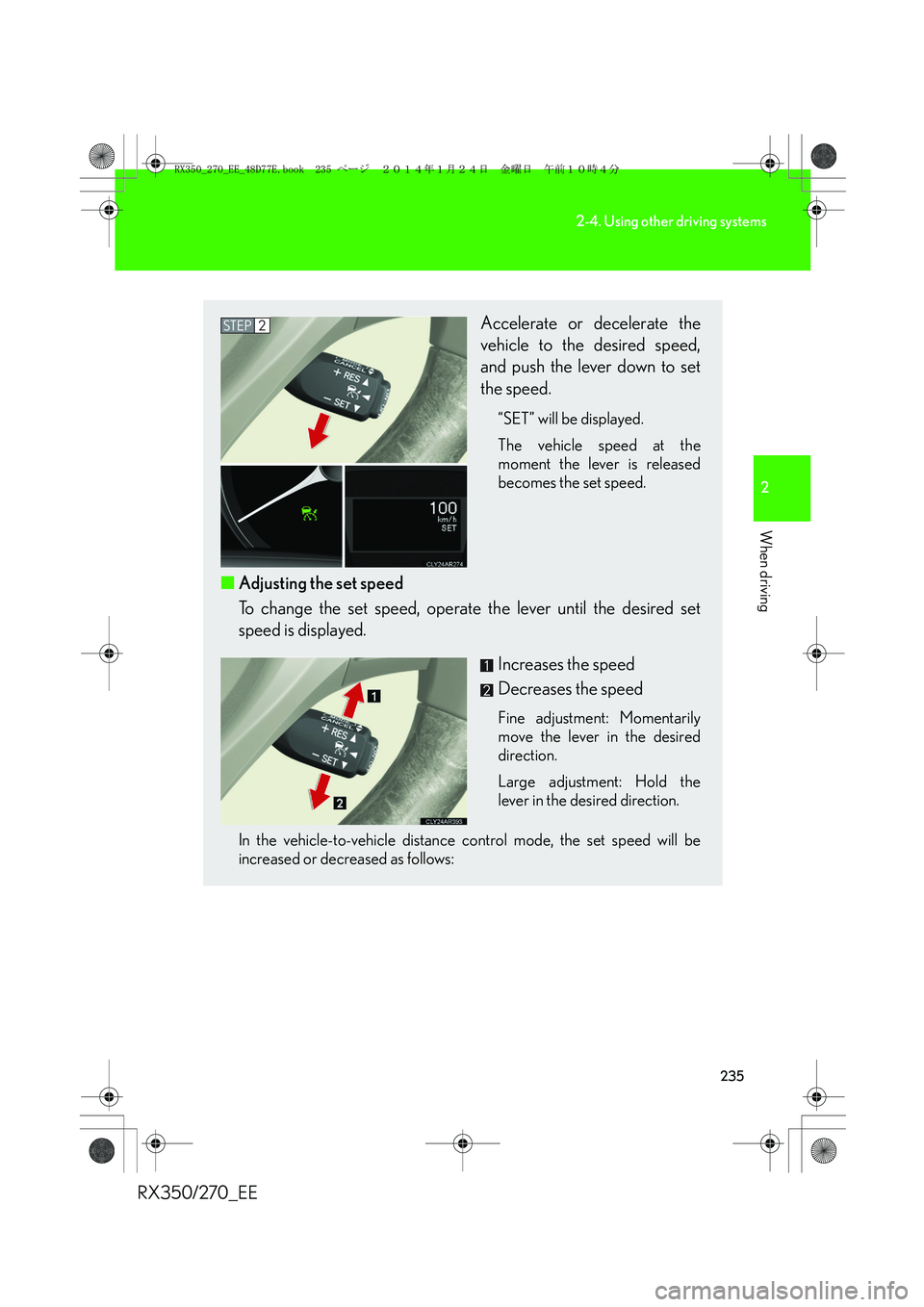
Accelerate or decelerate the
vehicle to the desired speed,
and push the lever down to set
the speed.
“SET” will be displayed.
The vehicle speed at the
moment the lever is released
becomes the set speed.
■Adjusting the set speed
To change the set speed, operate the lever until the desired set
speed is displayed.
Increases the speed
Decreases the speed
Fine adjustment: Momentarily
move the lever in the desired
direction.
Large adjustment: Hold the
lever in the desired direction.
In the vehicle-to-vehicle distance control mode, the set speed will be
increased or decreased as follows:
STEP2
RX350_270_EE_48D77E.book 235 ページ 2014年1月24日 金曜日 午前10時4分
Page 240 of 652
240
2-4. Using other driving systems
RX350/270_EE
Selecting conventional constant speed control mode
Constant speed control mode differs from vehicle-to-vehicle distance
control mode. When constant speed control mode is selected, your vehi-
cle will maintain a set speed regardless of whether or not there are other
vehicles in the lane ahead.
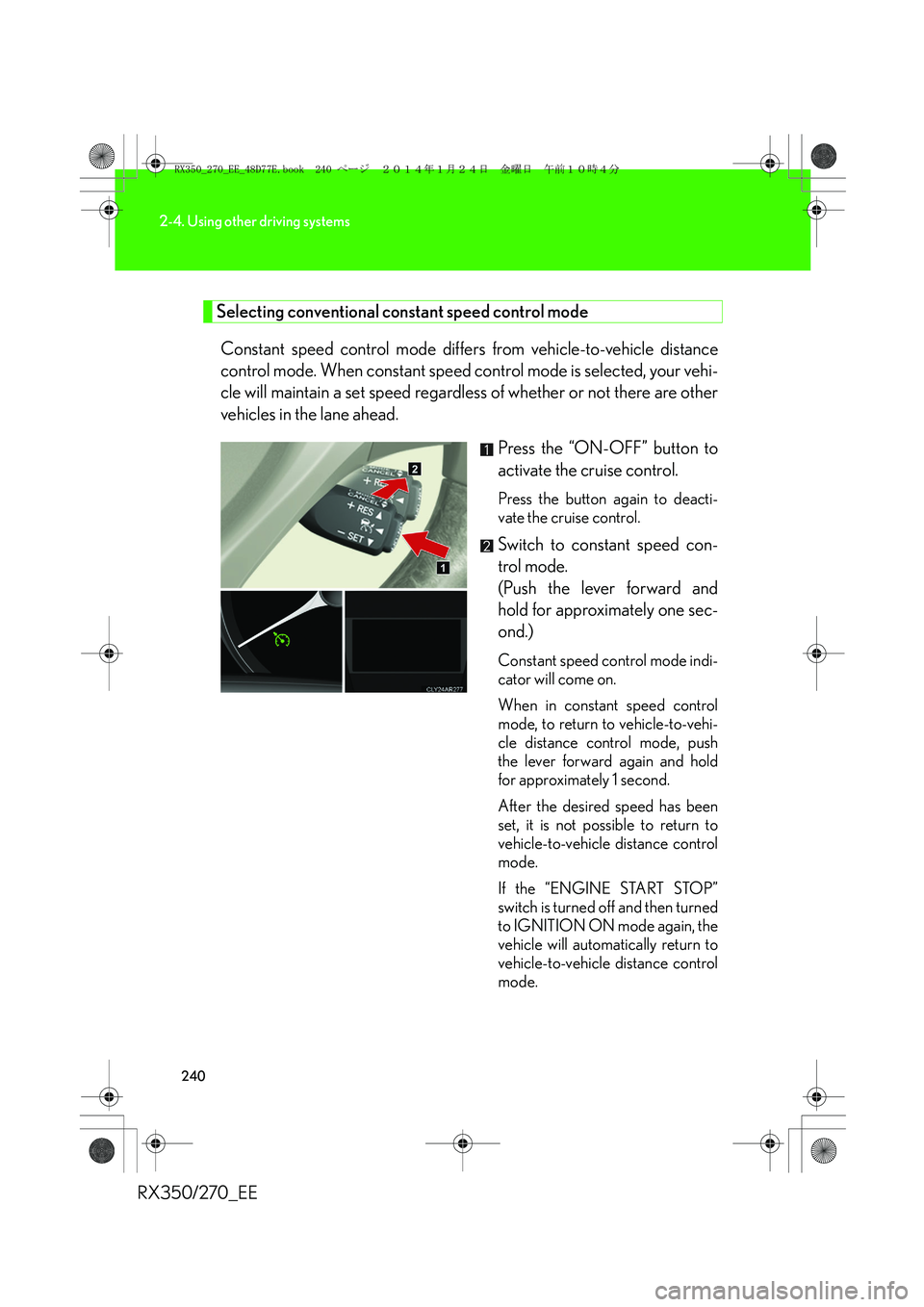
Press the “ON-OFF” button to
activate the cruise control.
Press the button again to deacti-
vate the cruise control.
Switch to constant speed con-
trol mode.
(Push the lever forward and
hold for approximately one sec-
ond.)
Constant speed control mode indi-
cator will come on.
When in constant speed control
mode, to return to vehicle-to-vehi-
cle distance control mode, push
the lever forward again and hold
for approximately 1 second.
After the desired speed has been
set, it is not possible to return to
vehicle-to-vehicle distance control
mode.
If the “ENGINE START STOP”
switch is turned off and then turned
to IGNITION ON mode again, the
vehicle will automatically return to
vehicle-to-vehicle distance control
mode.
RX350_270_EE_48D77E.book 240 ページ 2014年1月24日 金曜日 午前10時4分
Page 257 of 652
257
2-4. Using other driving systems
2
When driving
RX350/270_EE
Selecting vehicle height
■Height modes
●“HI” mode: For driving on bumpy roads
30 mm (1.2 in.) higher than the normal height
“HI” mode cannot be selected when vehicle speed exceeds 30 km/h (19
mph).
●“N” mode: For ordinary driving
Normal height
●“LO” mode: For sporty driving
Vehicle front: 20 mm (0.8 in.) lower than the normal height
Vehicle rear: 5 mm (0.2 in.) lower than the normal height
●Luggage mode: For easy entry/exit and easy luggage loading/
unloading
30 mm (1.2 in.) lower than the normal height
■Height selector switch
Press the height selector switch for approximately 1 second.
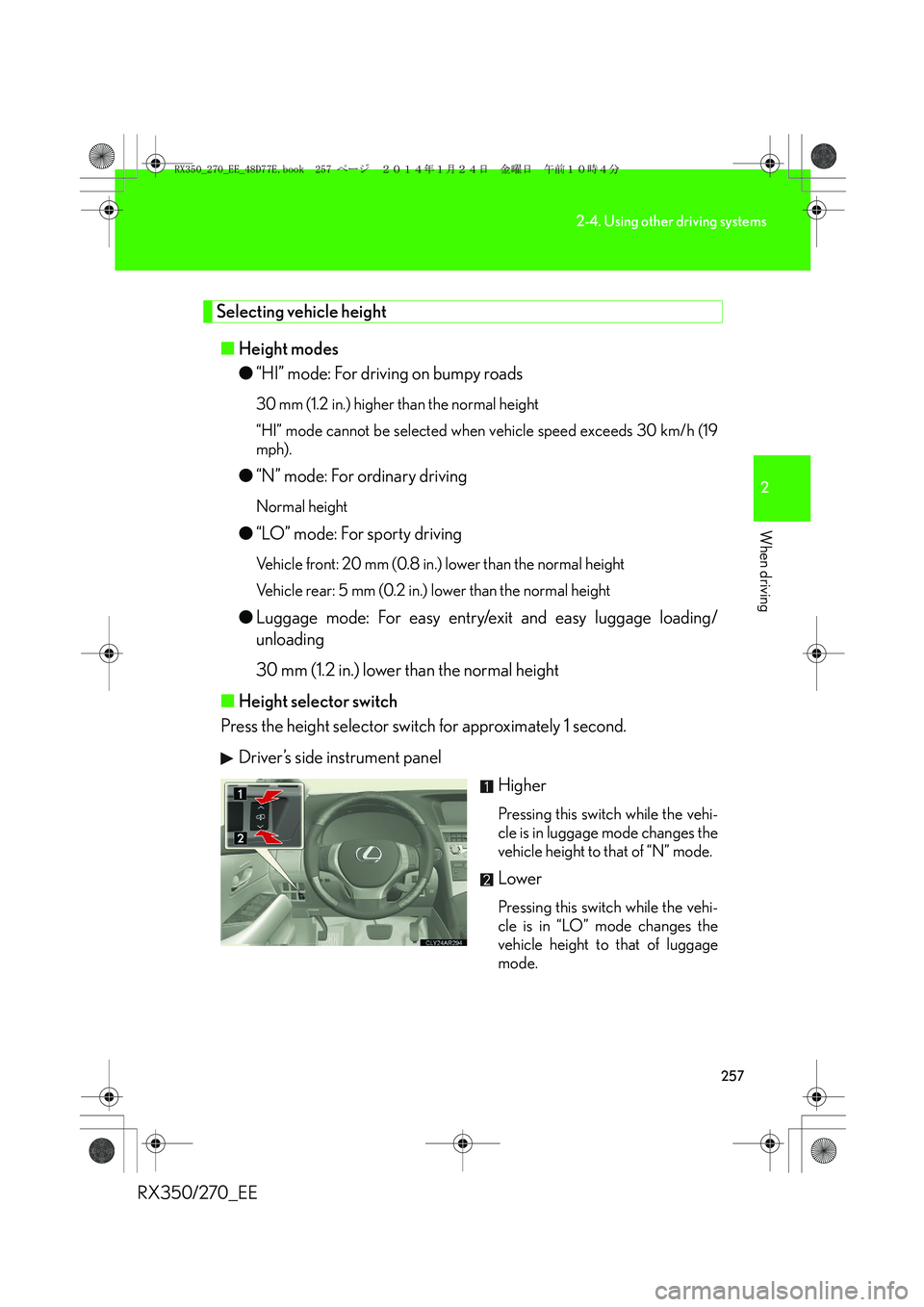
Driver’s side instrument panel
Higher
Pressing this switch while the vehi-
cle is in luggage mode changes the
vehicle height to that of “N” mode.
Lower
Pressing this switch while the vehi-
cle is in “LO” mode changes the
vehicle height to that of luggage
mode.
RX350_270_EE_48D77E.book 257 ページ 2014年1月24日 金曜日 午前10時4分
Page 259 of 652
259
2-4. Using other driving systems
2
When driving
RX350/270_EE
■Operating conditions
After stopping the engine, the vehicle will remain lowered for a maximum of 60
seconds.
●Height selector switch (driver's side instrument panel)
• While the engine is running, any vehicle height mode can be selected.
• Luggage mode can only be selected when the shift lever is in P position.
●Height selector switch (luggage compartment)
• When the engine is running and the shift lever is in the P position, any vehicle
height other than “LO” mode can be selected.
• When the “ENGINE START STOP” switch is turned off, the vehicle height
can only be lowered (only the “∨” side of the switch can be operated).
This switch can only be operated when the back door is open.
●Height control off switch
When the vehicle is stopped with the “ENGINE START STOP” switch in IGNI-
TION ON mode, vehicle height control can be disabled/re-enabled.
■When changing vehicle height modes
Before operating the height selector switch to raise/lower the vehicle height,
ensure that there are no objects in the surrounding area that could damage the
vehicle.
■When “N” mode is selected
During high speed driving, the vehicle height will automatically change to that of
“LO” mode.
■When “HI” mode is selected
The vehicle height will change to that of “N” mode when vehicle speed reaches 50
km/h (31 mph) or when vehicle speed has exceeded 30 km/h (19 mph) for approx-
imately 10 seconds. Even if vehicle speed is reduced below 30 km/h (19 mph), the
vehicle height will not automatically return to “HI” mode.
■When “LO” mode is selected
The vehicle height will change to that of “N” mode when the engine is restarted.
RX350_270_EE_48D77E.book 259 ページ 2014年1月24日 金曜日 午前10時4分
Page 260 of 652
260
2-4. Using other driving systems
RX350/270_EE
■When luggage mode is selected
If the vehicle begins to move while still in luggage mode, the vehicle will automati-
cally change to “N” mode once speed exceeds 8 km/h (5 mph). Even if vehicle
speed is reduced below 8 km/h (5 mph), the vehicle height will not automatically
return to luggage mode.
■Operating sound of the air suspension
When the vehicle height is lowered, such as when entering and loading the vehicle,
or when the height selector switch is operated, the sound of the compressor oper-
ating or the mode changing may be heard. This does not indicate a malfunction.
■Automatic leveling function
Regardless of the number of occupants and the luggage load, vehicle height in any
mode is always adjusted to a fixed height by the automatic leveling function.
■Vehicle height mode change time
●If the height control is operated continuously to lower the vehicle, the suspen-
sion air tank may become full, causing operation of the vehicle height lowering
control to become slow.
●To protect the compressor, the system will only raise the vehicle for a total of
100 consecutive seconds. If it takes longer than this to reach the selected
height, operation may be suspended shortly and then restart. However, it may
not be possible to change the vehicle's height mode at this time.
■The electronically modulated air suspension will not operate when
The vehicle height control may not be able to change modes when the vehicle runs
over a high curb or other rugged surfaces where the suspension is stretched.
RX350_270_EE_48D77E.book 260 ページ 2014年1月24日 金曜日 午前10時4分
Page 261 of 652
261
2-4. Using other driving systems
2
When driving
RX350/270_EE
CAUTION
■The electronically modulated air suspension must be turned off when
The electronically modulated air suspension must be turned off in the following situ-
ations as vehicle height may change due to the automatic leveling function, and, you
may catch part of your body in the vehicle and cause an accident, resulting in death
or serious injury.
●Any of the wheels is stuck in a ditch.
●It is necessary to jack up the vehicle.
●It is necessary to tow the vehicle with part of it lifted.
●When connecting/disconnecting a trailer
For safety, stop the engine if necessary.
■“HI” mode
●“HI” mode should only be used when driving on rough roads, for example when
driving off-road. Because the vehicle's center of gravity will become higher when
in the mode, the vehicle may become unstable when turning abruptly and cause
an accident, resulting in death or serious injury.
●Do not select “HI” mode when loading cargo on the roof luggage carrier.
Because the vehicle's center of gravity will become higher when in the mode, the
vehicle may become unstable when turning abruptly, and cause an accident,
resulting in death or serious injury.
RX350_270_EE_48D77E.book 261 ページ 2014年1月24日 金曜日 午前10時4分