battery LEXUS RX270 2014 Owner's Manual
[x] Cancel search | Manufacturer: LEXUS, Model Year: 2014, Model line: RX270, Model: LEXUS RX270 2014Pages: 652, PDF Size: 48.98 MB
Page 329 of 652
329
3-2. Using the audio system
3
Interior features
RX350/270_EE
■EON (Enhanced Other Network) system (for traffic announcement function)
If the RDS station (with EON data) you are listening to is not broadcasting a traffic
information program and the audio system is in TA (Traffic announcement) mode,
the radio will be switched automatically to a station broadcasting a traffic informa-
tion program in the EON AF list when traffic information begins.
■When the battery is disconnected
All preset stations are erased.
■Reception sensitivity
●It is difficult to maintain perfect radio reception at all times due to the continually
changing position of the antenna, differences in signal strength and surrounding
objects, such as trains and transmitters.
●When is used, automatic station selection and automatic registering of
the stations may not be possible.
●The radio antenna is mounted inside the rear spoiler and the rear window. To
maintain clear radio reception, do not attach metallic window tinting or other
metallic objects to the antenna wire mounted inside the rear window.
■Digital Audio Broadcast (DAB) radio
The optional radio antenna and tuner are necessary for the use of Digital Audio
Broadcast (DAB) radio.
RX350_270_EE_48D77E.book 329 ページ 2014年1月24日 金曜日 午前10時4分
Page 350 of 652
350
3-2. Using the audio system
RX350/270_EE
■iPod functions
●When an iPod is connected and the audio source is changed to iPod mode, the
iPod will resume play from the same point in which it was last used.
●Depending on the iPod that is connected to the system, certain functions may
not be available. If a function is unavailable due to a malfunction (as opposed to
a system specification), disconnecting the device and reconnecting it once
again may resolve the problem.
●While connected to the system, the iPod cannot be operated with its own con-
trols. It is necessary to use the controls of the vehicle's audio system instead.
●When the battery level of an iPod is very low, the iPod may not operate. If so,
charge the iPod before use.
●Supported models (→P. 3 5 1 )
■iPod problems
To resolve most problems encountered when using your iPod, disconnect your iPod
from the vehicle iPod connection and reset it.
For instructions on how to reset your iPod, refer to your iPod Owner’s Manual.
■Display
→P. 3 3 4
■Error messages
“ERROR”: This indicates a problem in the iPod or its connection.
“NO MUSIC”: This indicates that there is no music data in the iPod.
“EMPTY”: This indicates that some available songs are not found in a selected
playlist.
“UPDATE”: This indicates that the version of the iPod is not compatible.
Upgrade your iPod software to the latest version.
RX350_270_EE_48D77E.book 350 ページ 2014年1月24日 金曜日 午前10時4分
Page 361 of 652
361
3-2. Using the audio system
3
Interior features
RX350/270_EE
Bluetooth® audio system
■Conditions under which the system will not operate
●If using a portable player that does not support Bluetooth®
●If the portable player is switched off
●If the portable player is not connected
●If the portable player’s battery is low
●If the portable player is behind the seat or in the glove box or console box
●If metal is covering or touching the portable player
The Bluetooth® audio system enables you to enjoy music played on a por-
table digital audio player (portable player) from the vehicle speakers via
wireless communication.
This audio system supports Bluetooth
®, a wireless data system capable of
playing portable audio music without cables. If your portable player does
not support Bluetooth
®, the Bluetooth® audio system will not function.
Ti t l ePa g e
Using the Bluetooth® audio systemP. 3 6 6
Operating a Bluetooth® enabled portable playerP. 3 6 9
Setting up a Bluetooth® enabled portable playerP. 3 7 2
Bluetooth® audio system setupP. 3 76
RX350_270_EE_48D77E.book 361 ページ 2014年1月24日 金曜日 午前10時4分
Page 386 of 652
386
3-2. Using the audio system
RX350/270_EE
■Conditions under which the system will not operate
●If using a mobile phone that does not support Bluetooth®
●If the mobile phone is switched off
●If you are outside service range
●If the mobile phone is not connected
●If the mobile phone's battery is low
●If the mobile phone is behind the seat or in the glove box or console box
●If metal is covering or touching the phone
■When using the hands-free system
●The audio system and voice guidance are muted when making a call.
●If both parties speak at the same time, it may be difficult to hear.
●If the incoming call volume is overly loud, an echo may be heard.
●Try to face toward the microphone as much as possible when speaking.
●In the following circumstances, it may be difficult to hear the other party:
• When driving on unpaved roads
• When driving at high speeds
•When a window is open
• When the air conditioning is blowing directly on the microphone
• When the air conditioning is set to high
Ti t l ePa g e
Using the phone book
■Adding a new phone number
■Changing the registered name in the phone
book
■Listing the registered data
■Setting speed dials
■Deleting the registered data
■Deleting speed dials
P. 4 1 1
RX350_270_EE_48D77E.book 386 ページ 2014年1月24日 金曜日 午前10時4分
Page 419 of 652
419
3-3. Using the interior lights
3
Interior features
RX350/270_EE
■Illuminated entry system
The lights automatically turn on/off according to “ENGINE START STOP” switch
mode, the presence of the electronic key, whether the doors are locked/unlocked,
and whether the doors are open/closed.
■To prevent battery discharge
When the “ENGINE START STOP” switch is turned off, the lights will go off auto-
matically after 20 minutes.
●Personal lights
●Interior lights
●Door courtesy lights
●Scuff lights (if equipped)
●Footwell lights
■Customization
Settings (e.g. the time elapsed before the lights turn off) can be changed.
(Customizable features →P. 6 2 2 )
Interior lights and personal lights
RX350_270_EE_48D77E.book 419 ページ 2014年1月24日 金曜日 午前10時4分
Page 431 of 652
431
3-5. Other interior features
3
Interior features
RX350/270_EE
Vanity mirror
■ To prevent battery discharge
When the “ENGINE START STOP” switch is turned off, the lights will go off auto-
matically after 20 minutes.
NOTICE
■When not in use
Keep the vanity mirror closed.
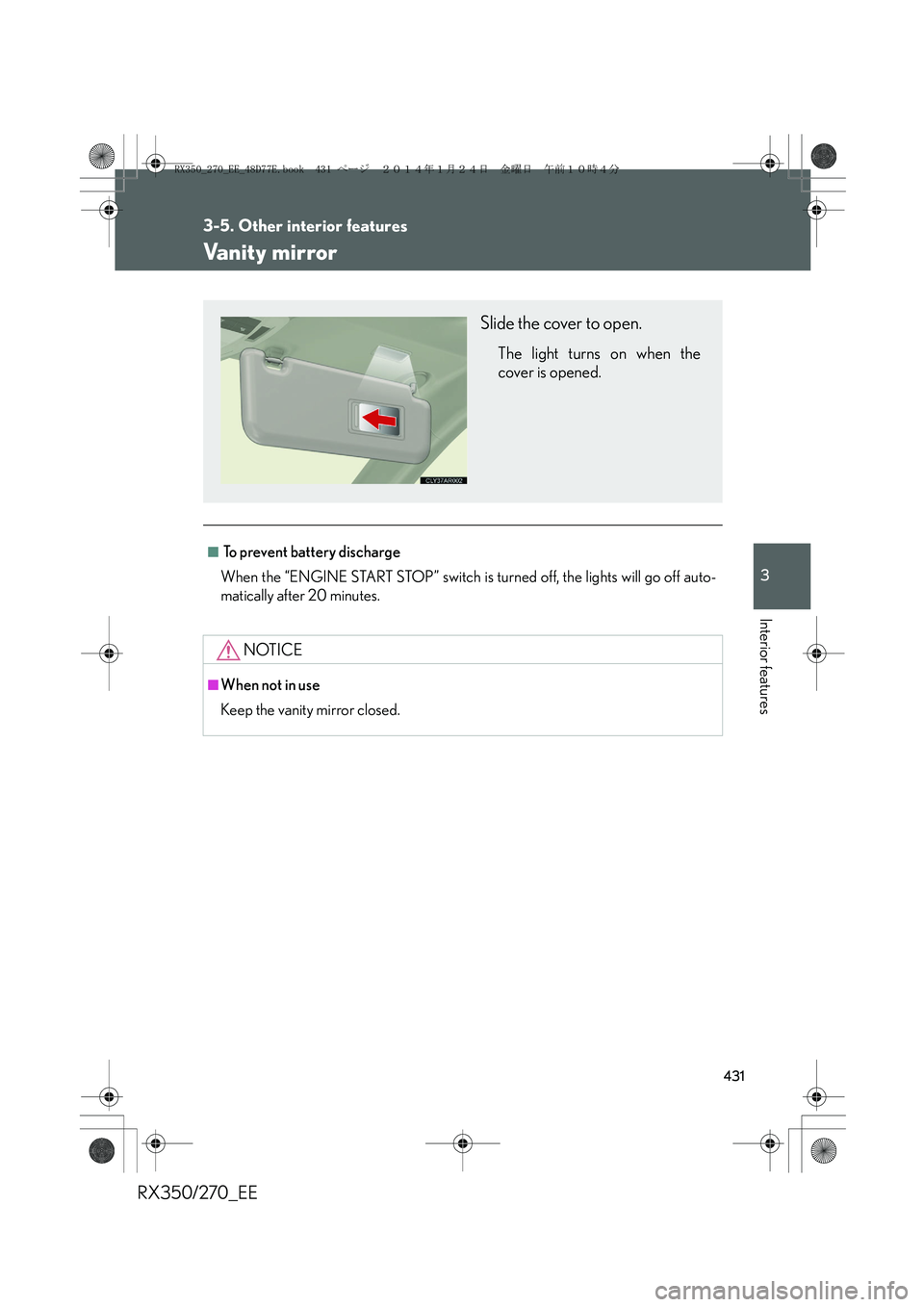
Slide the cover to open.
The light turns on when the
cover is opened.
RX350_270_EE_48D77E.book 431 ページ 2014年1月24日 金曜日 午前10時4分
Page 432 of 652
432
3-5. Other interior features
RX350/270_EE
Clock
■The clock is displayed when
The clock is displayed when the “ENGINE START STOP” switch is in ACCES-
SORY or IGNITION ON mode.
■When the battery is disconnected
The time display will automatically be set to 1:00.
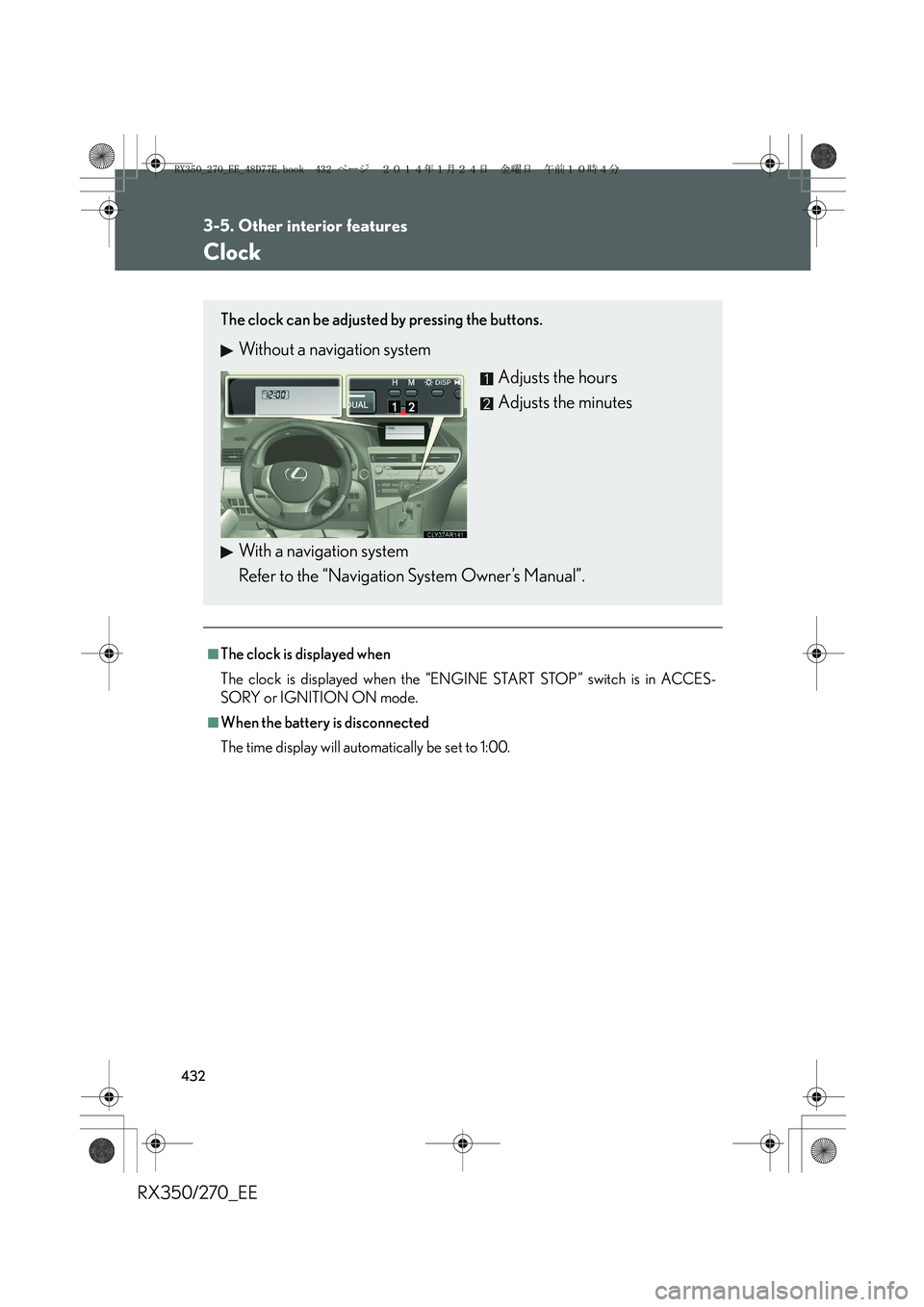
The clock can be adjusted by pressing the buttons.
Without a navigation system
Adjusts the hours
Adjusts the minutes
With a navigation system
Refer to the “Navigation System Owner’s Manual”.
RX350_270_EE_48D77E.book 432 ページ 2014年1月24日 金曜日 午前10時4分
Page 436 of 652
436
3-5. Other interior features
RX350/270_EE
■The power outlet can be used when
The “ENGINE START STOP” switch is in ACCESSORY or IGNITION ON mode.
NOTICE
■To avoid damaging the power outlets
Close the power outlet lid when the power outlet is not in use.
Foreign objects or liquids that enter the power outlet may cause a short circuit.
■To prevent the fuse from being blown
Do not use an accessory that uses more than 12 V 10 A.
■To prevent battery discharge
Do not use the power outlets longer than necessary when the engine is off.
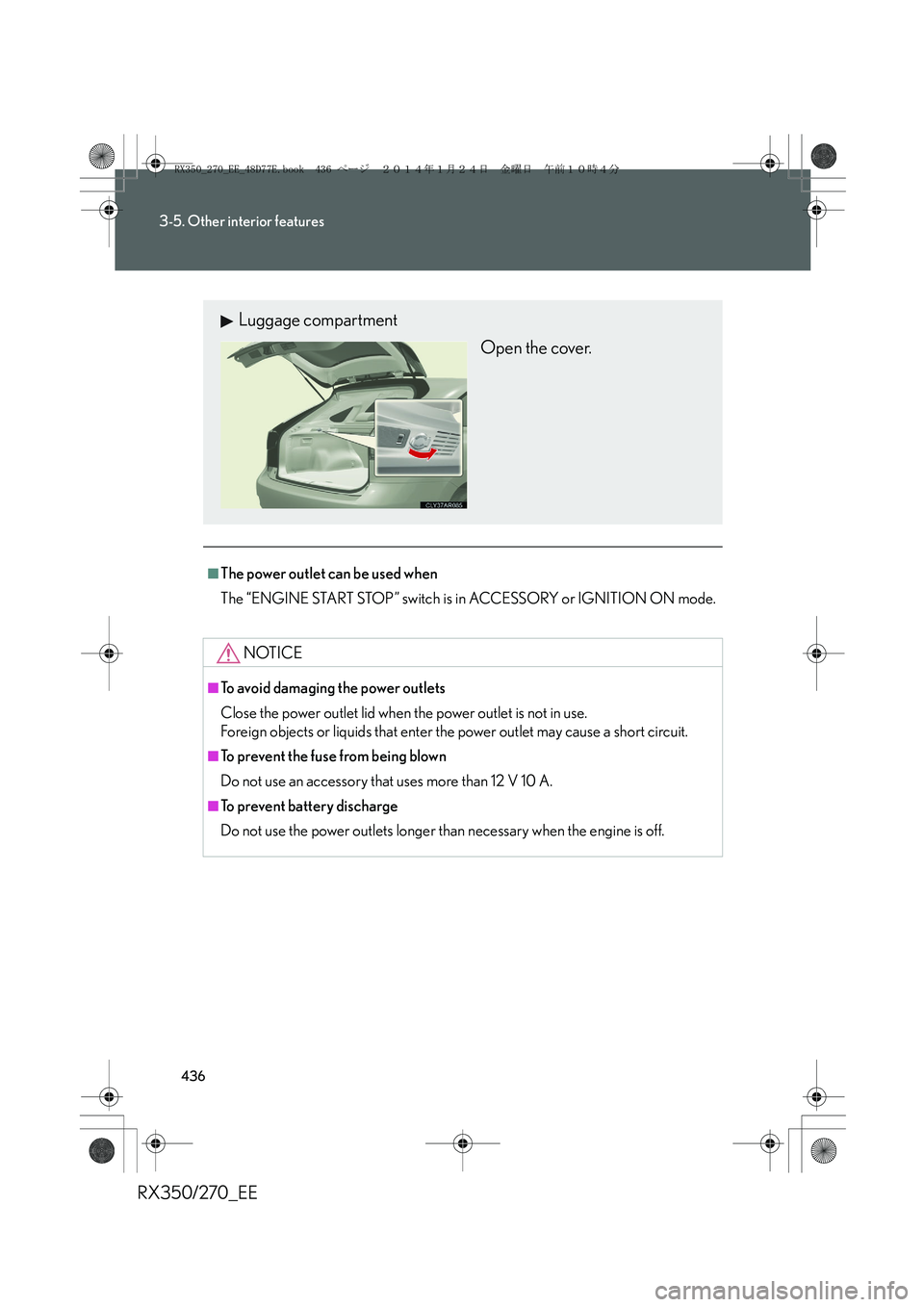
Luggage compartment
Open the cover.
RX350_270_EE_48D77E.book 436 ページ 2014年1月24日 金曜日 午前10時4分
Page 437 of 652
437
3-5. Other interior features
3
Interior features
RX350/270_EE
Heated steering wheel∗
■The heated steering wheel can be used when
The “ENGINE START STOP” switch is in IGNITION ON mode.
■To prevent battery discharge
The heated steering wheel will automatically turn off after about 30 minutes.
■If the indicator light does not come on
If the indicator light does not come on when the switch is pressed, a malfunction
may have occurred in the system. Have the vehicle inspected by any authorized
Lexus dealer or repairer, or another duly qualified and equipped professional.
∗: If equipped
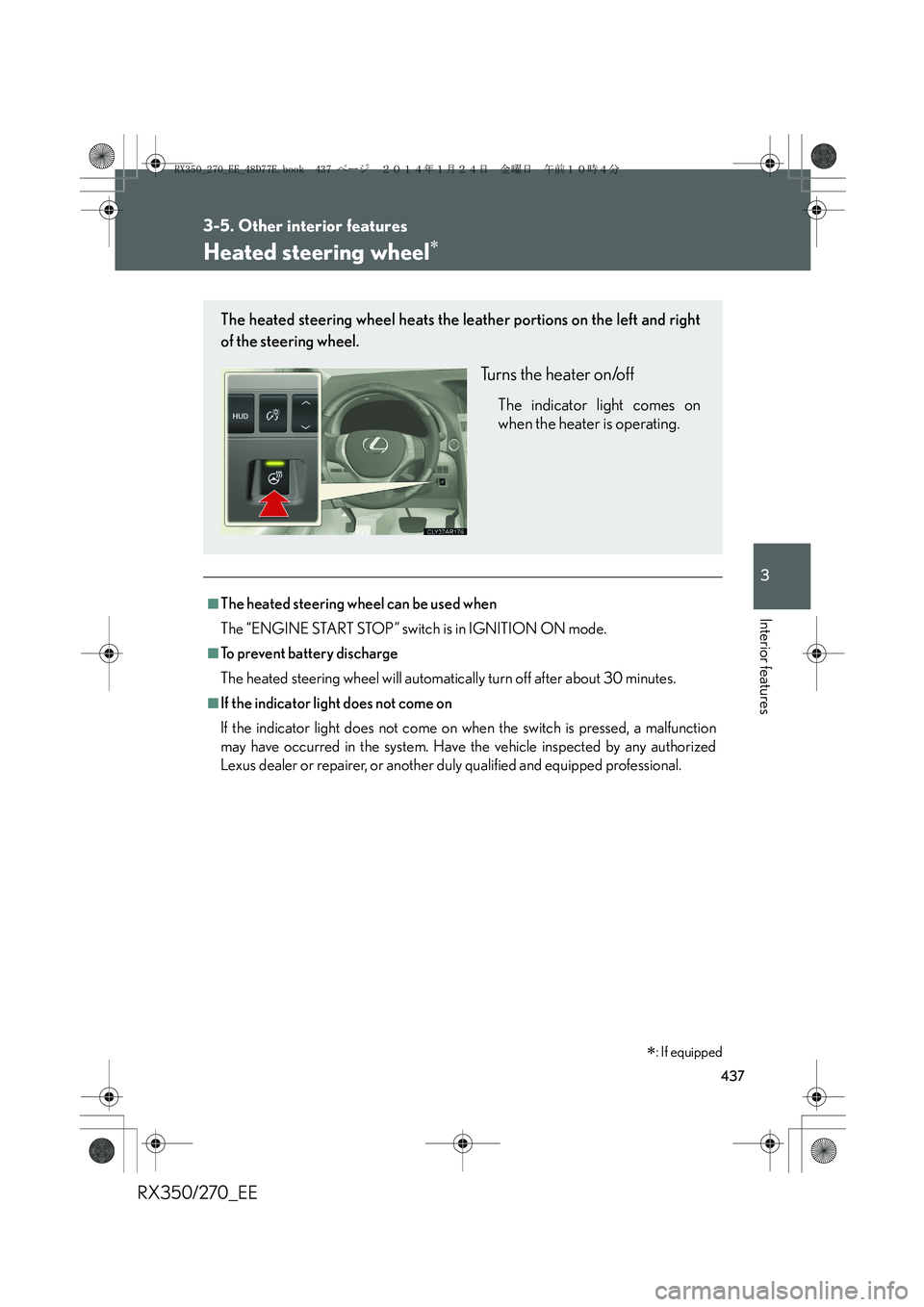
The heated steering wheel heats the leather portions on the left and right
of the steering wheel.
Turns the heater on/off
The indicator light comes on
when the heater is operating.
RX350_270_EE_48D77E.book 437 ページ 2014年1月24日 金曜日 午前10時4分
Page 440 of 652
440
3-5. Other interior features
RX350/270_EE
CAUTION
■Burns
●Use caution when seating the following persons in a seat with the seat heater on
to avoid the possibility of burns:
• Babies, small children, the elderly, the sick and the physically challenged
• Persons with sensitive skin
• Persons who are fatigued
• Persons who have taken alcohol or drugs that induce sleep (sleeping drugs,
cold remedies, etc.)
●Do not cover the seat with anything when using the seat heater.
Using the seat heater with a blanket or cushion increases the temperature of the
seat and may lead to overheating.
NOTICE
■To prevent damage to the seat heaters/ventilators
Do not put heavy objects that have an uneven surface on the seat and do not stick
sharp objects (needles, nails, etc.) into the seat.
■To prevent the battery discharged
Do not leave the system on longer than necessary when the engine is off.
RX350_270_EE_48D77E.book 440 ページ 2014年1月24日 金曜日 午前10時4分