brake LEXUS RX270 2014 Owner's Manual
[x] Cancel search | Manufacturer: LEXUS, Model Year: 2014, Model line: RX270, Model: LEXUS RX270 2014Pages: 652, PDF Size: 48.98 MB
Page 184 of 652
184
2-1. Driving procedures
RX350/270_EE
CAUTION
■When starting the engine
Always start the engine while sitting in the driver's seat. Do not depress the acceler-
ator pedal while starting the engine under any circumstances.
Doing so may cause an accident resulting in death or serious injury.
■Caution while driving
If the vehicle begins to slide due to engine failure or other circumstances, do not
lock or open the doors until the vehicle reaches a safe and complete stop. Activa-
tion of the steering lock in this circumstance may lead to an accident, resulting in
death or serious injury.
■Stopping the engine in an emergency
If you want to stop the engine in an emergency while driving the vehicle, press and
hold the “ENGINE START STOP” switch for more than 2 seconds, or press it
briefly 3 times or more in succession. (→P. 6 0 3 )
However, do not touch the “ENGINE START STOP” switch while driving except in
an emergency. Turning the engine off while driving will not cause loss of steering or
braking control, but the power assist to these systems will be lost. This will make it
more difficult to steer and brake, so you should pull over and stop the vehicle as
soon as it is safe to do so.
RX350_270_EE_48D77E.book 184 ページ 2014年1月24日 金曜日 午前10時4分
Page 186 of 652
186
2-1. Driving procedures
RX350/270_EE
Automatic transmission
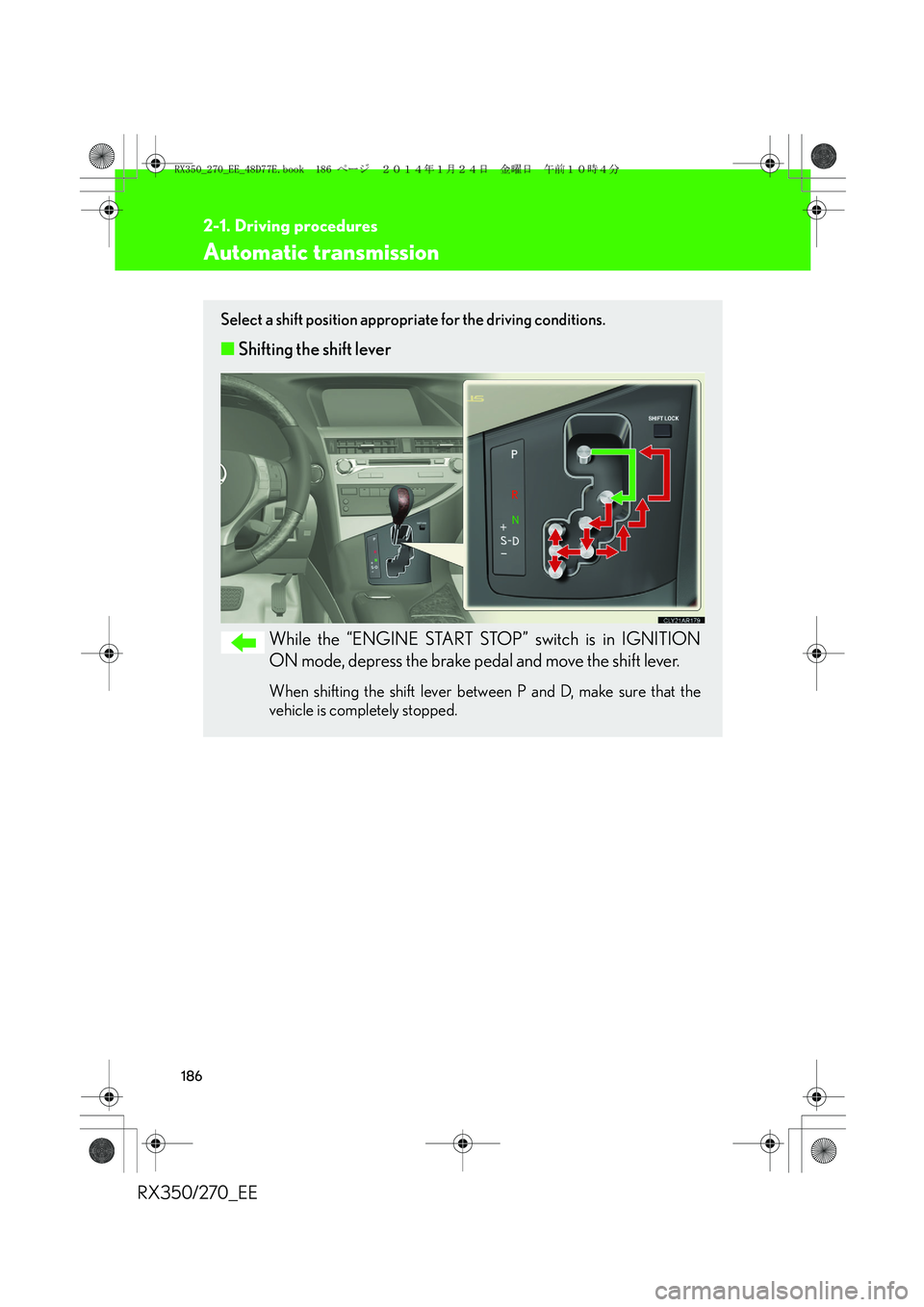
Select a shift position appropriate for the driving conditions.
■Shifting the shift lever
While the “ENGINE START STOP” switch is in IGNITION
ON mode, depress the brake pedal and move the shift lever.
When shifting the shift lever between P and D, make sure that the
vehicle is completely stopped.
RX350_270_EE_48D77E.book 186 ページ 2014年1月24日 金曜日 午前10時4分
Page 194 of 652
194
2-1. Driving procedures
RX350/270_EE
Parking brake
■Usage in winter time
→P. 2 9 6
NOTICE
■Before driving
Fully release the parking brake.
Driving the vehicle with the parking brake set will lead to brake components over-
heating, which may affect braking performance and increase brake wear.
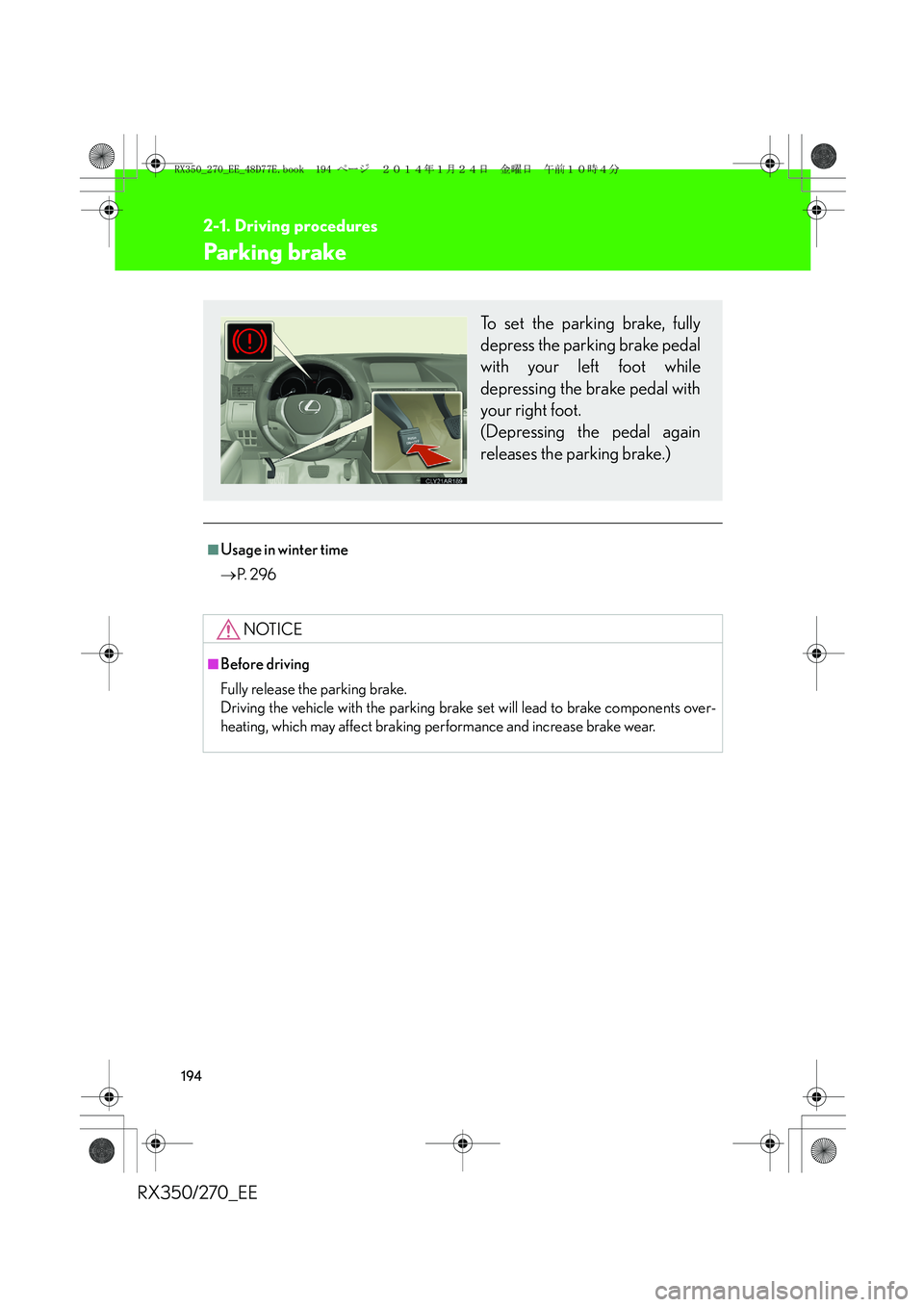
To set the parking brake, fully
depress the parking brake pedal
with your left foot while
depressing the brake pedal with
your right foot.
(Depressing the pedal again
releases the parking brake.)
RX350_270_EE_48D77E.book 194 ページ 2014年1月24日 金曜日 午前10時4分
Page 213 of 652
213
2-2. Instrument cluster
2
When driving
RX350/270_EE
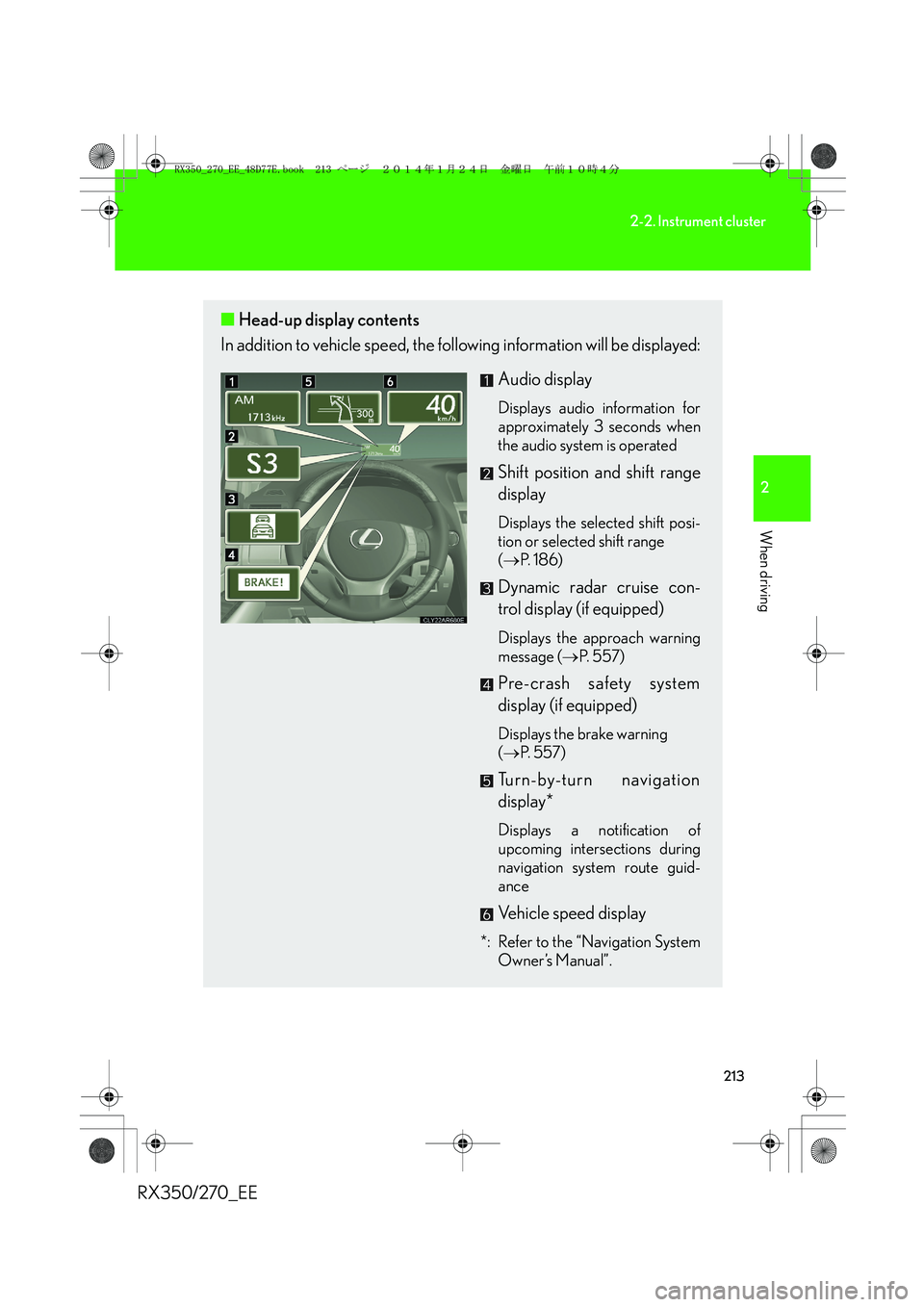
■Head-up display contents
In addition to vehicle speed, the following information will be displayed:
Audio display
Displays audio information for
approximately 3 seconds when
the audio system is operated
Shift position and shift range
display
Displays the selected shift posi-
tion or selected shift range
(→P. 1 8 6 )
Dynamic radar cruise con-
trol display (if equipped)
Displays the approach warning
message (→P. 5 5 7 )
Pre-crash safety system
display (if equipped)
Displays the brake warning
(→P. 5 5 7 )
Turn-by-turn navigation
display*
Displays a notification of
upcoming intersections during
navigation system route guid-
ance
Vehicle speed display
*: Refer to the “Navigation System
Owner’s Manual”.
RX350_270_EE_48D77E.book 213 ページ 2014年1月24日 金曜日 午前10時4分
Page 232 of 652
232
2-4. Using other driving systems
RX350/270_EE
■Cruise control can be set when
●The shift lever is in the D or range 4 or higher of S has been selected.
●Range 4 or higher has been selected by using the paddle shift.
(vehicles with paddle shift switch)
●Vehicle speed is above approximately 40 km/h (25 mph).
■Accelerating after setting the vehicle speed
●The vehicle can be accelerated normally. After acceleration, the set speed
resumes.
●Even without canceling the cruise control, the set speed can be increased by
first accelerating the vehicle to the desired speed and then pushing the lever
down to set the new speed.
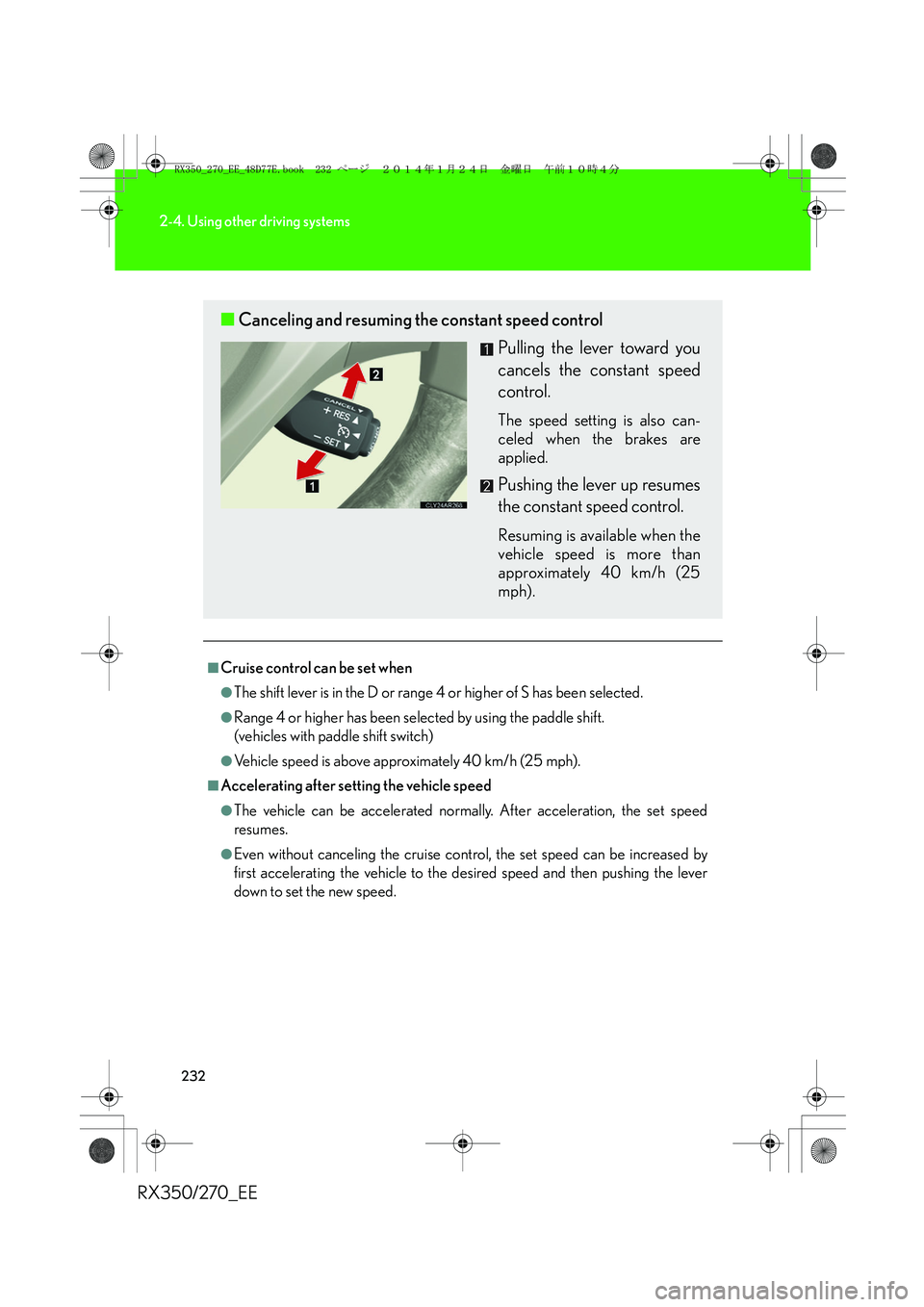
■Canceling and resuming the constant speed control
Pulling the lever toward you
cancels the constant speed
control.
The speed setting is also can-
celed when the brakes are
applied.
Pushing the lever up resumes
the constant speed control.
Resuming is available when the
vehicle speed is more than
approximately 40 km/h (25
mph).
RX350_270_EE_48D77E.book 232 ページ 2014年1月24日 金曜日 午前10時4分
Page 237 of 652
237
2-4. Using other driving systems
2
When driving
RX350/270_EE
■Vehicle-to-vehicle distance settings
Select a distance from the table below. Note that the distances
shown correspond to a vehicle speed of 80 km/h (50 mph). Vehi-
cle-to-vehicle distance increases/decreases in accordance with
vehicle speed.
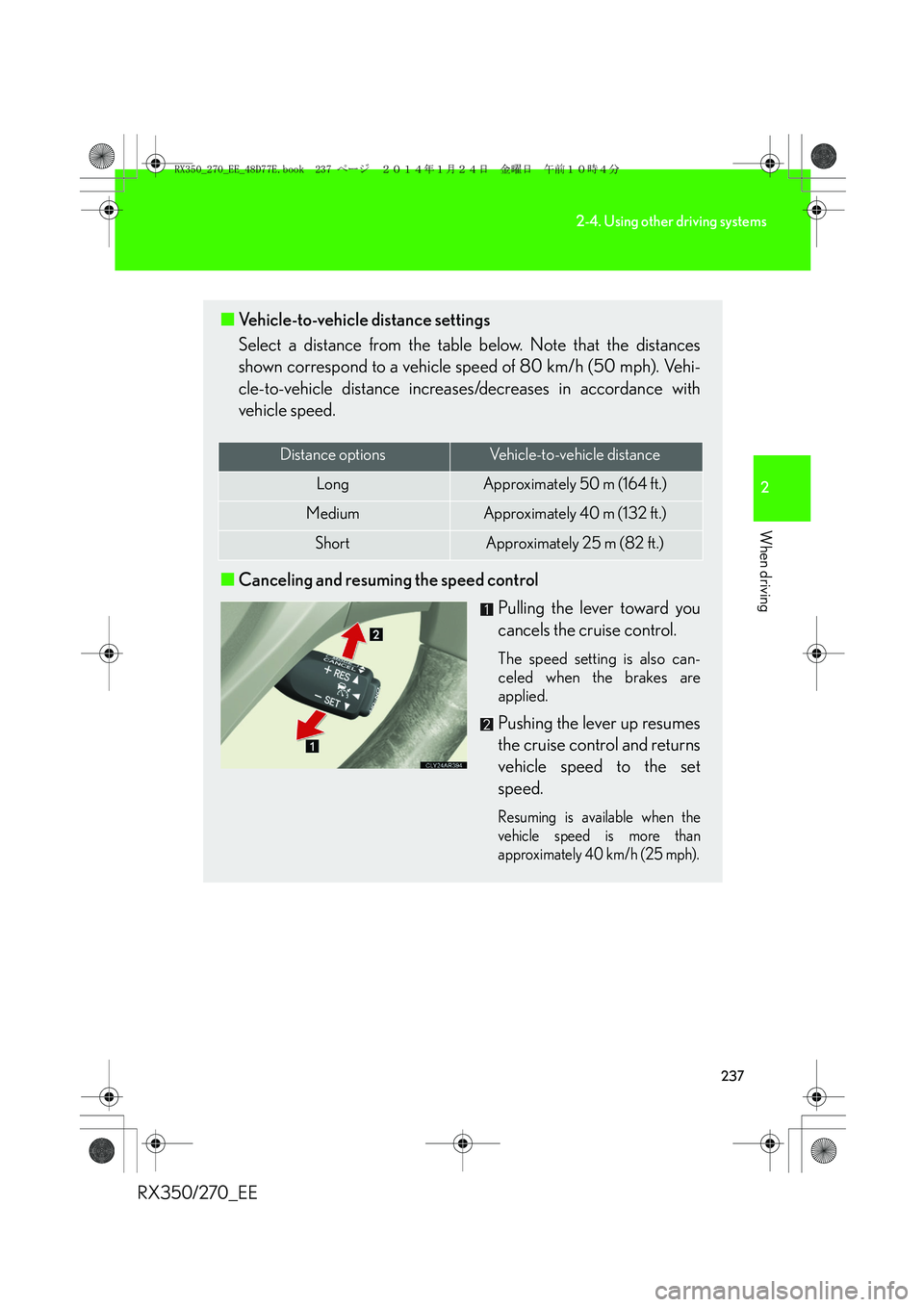
■Canceling and resuming the speed control
Pulling the lever toward you
cancels the cruise control.
The speed setting is also can-
celed when the brakes are
applied.
Pushing the lever up resumes
the cruise control and returns
vehicle speed to the set
speed.
Resuming is available when the
vehicle speed is more than
approximately 40 km/h (25 mph).
Distance optionsVehicle-to-vehicle distance
LongApproximately 50 m (164 ft.)
MediumApproximately 40 m (132 ft.)
ShortApproximately 25 m (82 ft.)
RX350_270_EE_48D77E.book 237 ページ 2014年1月24日 金曜日 午前10時4分
Page 238 of 652
238
2-4. Using other driving systems
RX350/270_EE
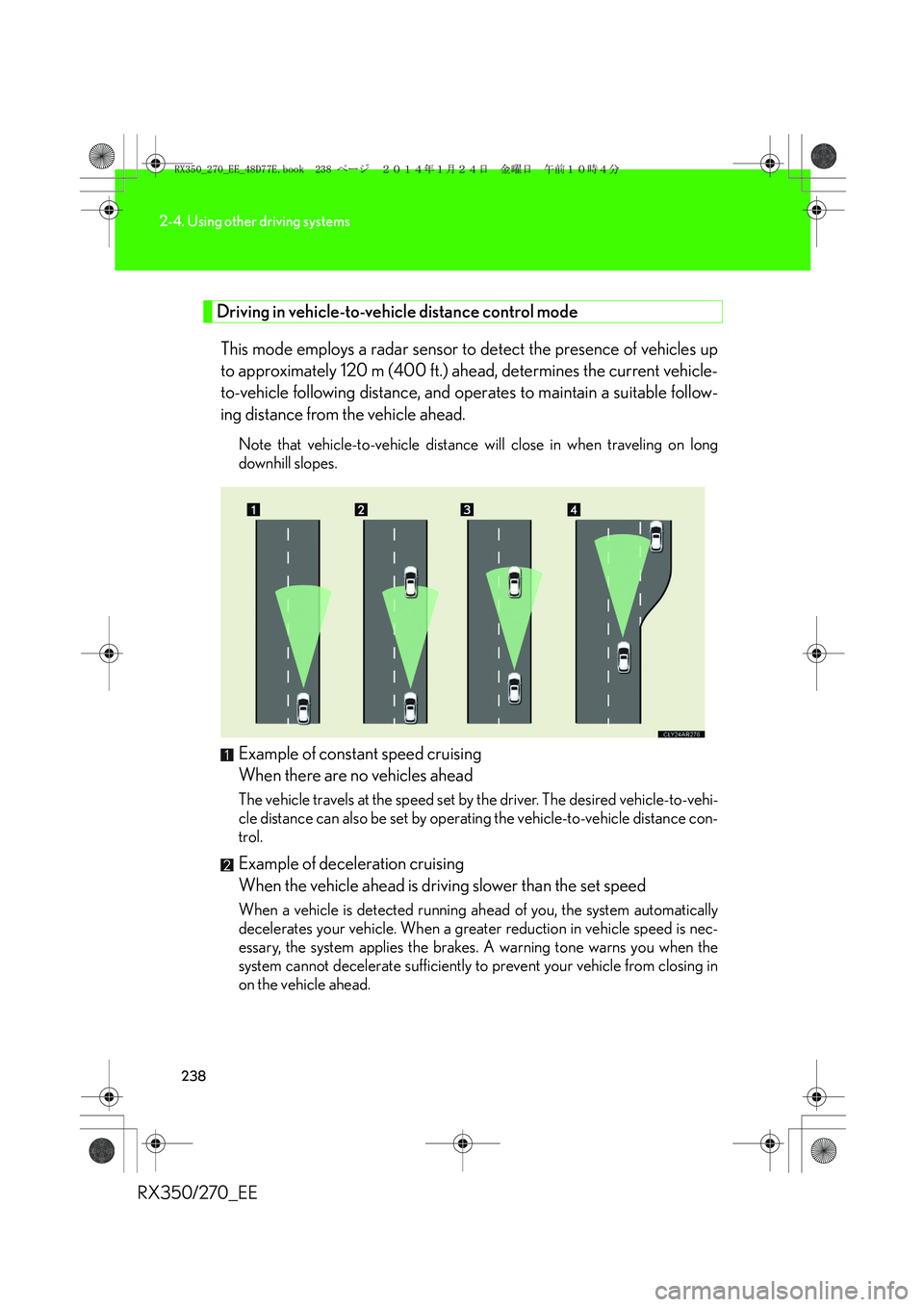
Driving in vehicle-to-vehicle distance control mode
This mode employs a radar sensor to detect the presence of vehicles up
to approximately 120 m (400 ft.) ahead, determines the current vehicle-
to-vehicle following distance, and operates to maintain a suitable follow-
ing distance from the vehicle ahead.
Note that vehicle-to-vehicle distance will close in when traveling on long
downhill slopes.
Example of constant speed cruising
When there are no vehicles ahead
The vehicle travels at the speed set by the driver. The desired vehicle-to-vehi-
cle distance can also be set by operating the vehicle-to-vehicle distance con-
trol.
Example of deceleration cruising
When the vehicle ahead is driving slower than the set speed
When a vehicle is detected running ahead of you, the system automatically
decelerates your vehicle. When a greater reduction in vehicle speed is nec-
essary, the system applies the brakes. A warning tone warns you when the
system cannot decelerate sufficiently to prevent your vehicle from closing in
on the vehicle ahead.
RX350_270_EE_48D77E.book 238 ページ 2014年1月24日 金曜日 午前10時4分
Page 239 of 652
239
2-4. Using other driving systems
2
When driving
RX350/270_EEExample of follow-up cruising
When following a vehicle driving slower than the set speed
The system continues follow-up cruising while adjusting for changes in the
speed of the vehicle ahead in order to maintain the vehicle-to-vehicle dis-
tance set by the driver.
Example of acceleration
When there are no longer any vehicles ahead driving slower than the
set speed
The system accelerates until the set speed is reached. The system then
returns to constant speed cruising.
Approach warning
When your vehicle is too close to a vehicle ahead, and sufficient auto-
matic deceleration via the cruise control is not possible, the display will
flash and the buzzer will sound to alert the driver. An example of this
would be if another driver cuts in front of you while you are following a
vehicle. Apply the brakes to ensure an appropriate vehicle-to-vehicle dis-
tance.
■Warnings may not occur when
In the following instances, there is a possibility that the warnings will not
occur:
●When the speed of the vehicle ahead matches or exceeds your
vehicle speed
●When the vehicle ahead is traveling at an extremely slow speed
●Immediately after the cruise control speed was set
●At the instant the accelerator is applied
RX350_270_EE_48D77E.book 239 ページ 2014年1月24日 金曜日 午前10時4分
Page 245 of 652
245
2-4. Using other driving systems
2
When driving
RX350/270_EE
CAUTION
■Before using dynamic radar cruise control
Do not overly rely on vehicle-to-vehicle distance control.
Be aware of the set speed. If automatic deceleration/acceleration is not appropri-
ate, adjust the vehicle speed, as well as the distance between your vehicle and vehi-
cles ahead by applying the brakes etc.
■Cautions regarding the driving assist systems
Observe the following precautions.
Failure to do so may cause an accident resulting in death or serious injury.
●Assisting the driver to measure following distance
The dynamic radar cruise control is only intended to help the driver in determin-
ing the following distance between the driver's own vehicle and a designated
vehicle traveling ahead. It is not a mechanism that allows careless or inattentive
driving, and it is not a system that can assist the driver in low-visibility conditions. It
is still necessary for driver to pay close attention to the vehicle's surroundings.
●Assisting the driver to judge proper following distance
The dynamic radar cruise control determines whether the following distance
between the driver's own vehicle and a designated vehicle traveling ahead is
appropriate or not. It is not capable of making any other type of judgement.
Therefore, it is absolutely necessary for the driver to remain vigilant and to deter-
mine whether or not there is a possibility of danger in any given situation.
●Assisting the driver to operate the vehicle
The dynamic radar cruise control has no capability to prevent or avoid a collision
with a vehicle traveling ahead. Therefore, if there is ever any danger, the driver
must take immediate and direct control of the vehicle and act appropriately in
order to ensure the safety of all involved.
■To avoid inadvertent dynamic radar cruise control activation
Switch the cruise control off using the “ON-OFF” button when not in use.
RX350_270_EE_48D77E.book 245 ページ 2014年1月24日 金曜日 午前10時4分
Page 246 of 652
246
2-4. Using other driving systems
RX350/270_EE
CAUTION
■Situations unsuitable for dynamic radar cruise control
Do not use dynamic radar cruise control in any of the following situations.
Doing so may result in inappropriate speed control and could cause an accident
resulting in death or serious injury.
●In heavy traffic
●On roads with sharp bends
●On winding roads
●On slippery roads, such as those covered with rain, ice or snow
●On steep downhills, or where there are sudden changes between sharp up and
down gradients
Vehicle speed may exceed the set speed when driving down a steep hill.
●At entrances to expressways
●When weather conditions are bad enough that they may prevent the sensors
from functioning correctly (fog, snow, sandstorm, heavy rain, etc.)
●When an approach warning buzzer is heard often
●When your vehicle is towing a trailer or during emergency towing
■When the sensor may not be correctly detecting the vehicle ahead
Apply the brakes as necessary when any of the following types of vehicles are in
front of you.
As the sensor may not be able to correctly detect these types of vehicles, the
approach warning (→P. 239) will not be activated, and a fatal or serious accident
may result.
●Vehicles that cut in suddenly
●Vehicles traveling at low speeds
●Vehicles that are not moving
●Vehicles with small rear ends (trailers with no load on board etc.)
●Motorcycles traveling in the same lane
RX350_270_EE_48D77E.book 246 ページ 2014年1月24日 金曜日 午前10時4分