remote control LEXUS RX270 2014 Owner's Manual
[x] Cancel search | Manufacturer: LEXUS, Model Year: 2014, Model line: RX270, Model: LEXUS RX270 2014Pages: 652, PDF Size: 48.98 MB
Page 210 of 652
210
2-2. Instrument cluster
RX350/270_EE
●In the following situations, the window close operation will stop partway:
• The “ENGINE START STOP” switch is turned to IGNITION ON mode.
• The “ENTER” switch was pressed.
• The window lock switch was turned on.
• The jam protection function was activated.
• The windows were opened or closed by the wireless remote control.
If the power window switch of any of the door is operated while in windows close
suggestion mode, the windows close operation of that door will stop partway.
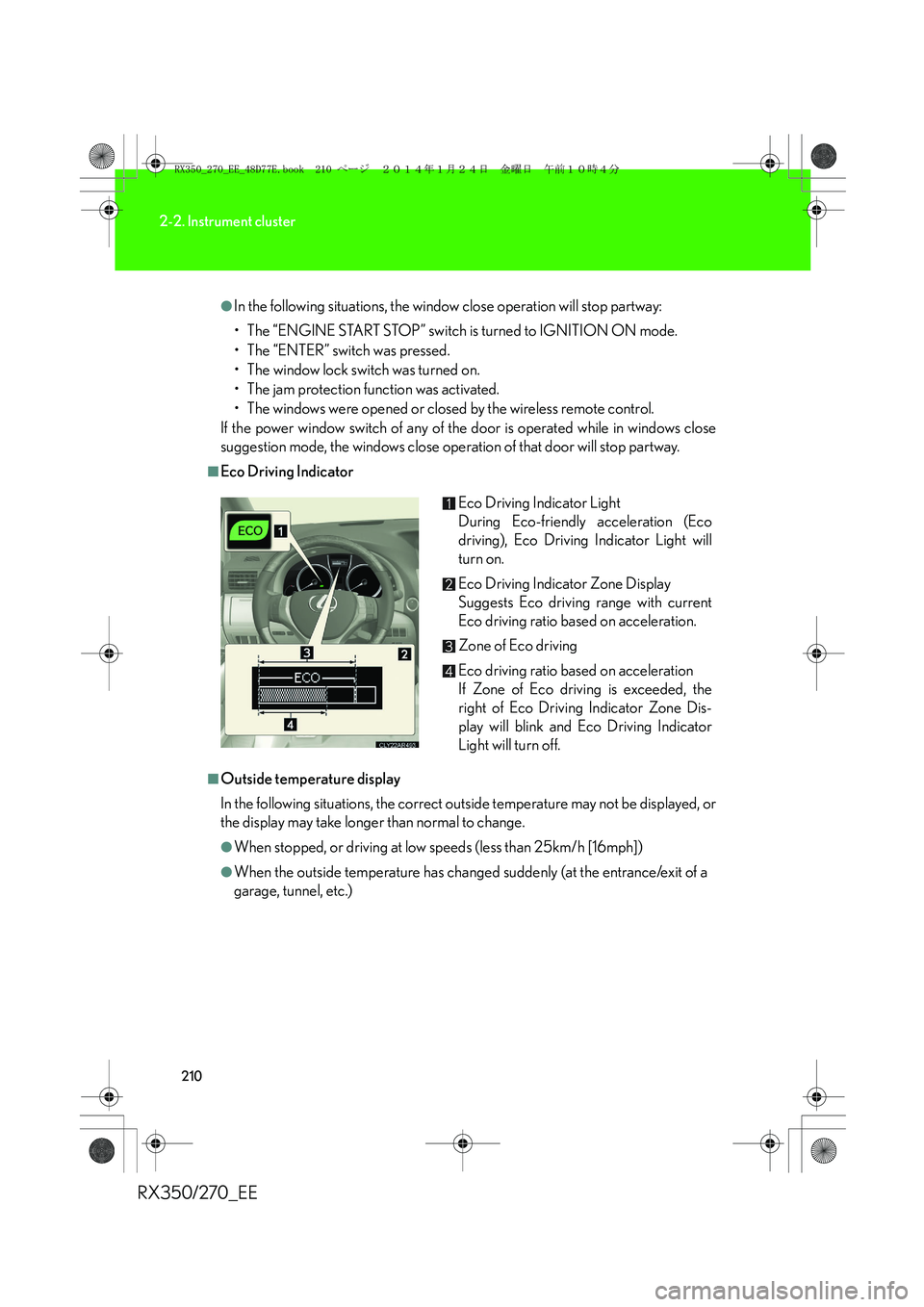
■Eco Driving Indicator
■Outside temperature display
In the following situations, the correct outside temperature may not be displayed, or
the display may take longer than normal to change.
●When stopped, or driving at low speeds (less than 25km/h [16mph])
●When the outside temperature has changed suddenly (at the entrance/exit of a
garage, tunnel, etc.)Eco Driving Indicator Light
During Eco-friendly acceleration (Eco
driving), Eco Driving Indicator Light will
turn on.
Eco Driving Indicator Zone Display
Suggests Eco driving range with current
Eco driving ratio based on acceleration.
Zone of Eco driving
Eco driving ratio based on acceleration
If Zone of Eco driving is exceeded, the
right of Eco Driving Indicator Zone Dis-
play will blink and Eco Driving Indicator
Light will turn off.
RX350_270_EE_48D77E.book 210 ページ 2014年1月24日 金曜日 午前10時4分
Page 221 of 652
221
2-3. Operating the lights and windshield wipers
2
When driving
RX350/270_EE
■Light reminder buzzer
A buzzer sounds when the “ENGINE START STOP” switch is turned off or turned
to ACCESSORY mode and the driver's door is opened while the lights are turned
on.
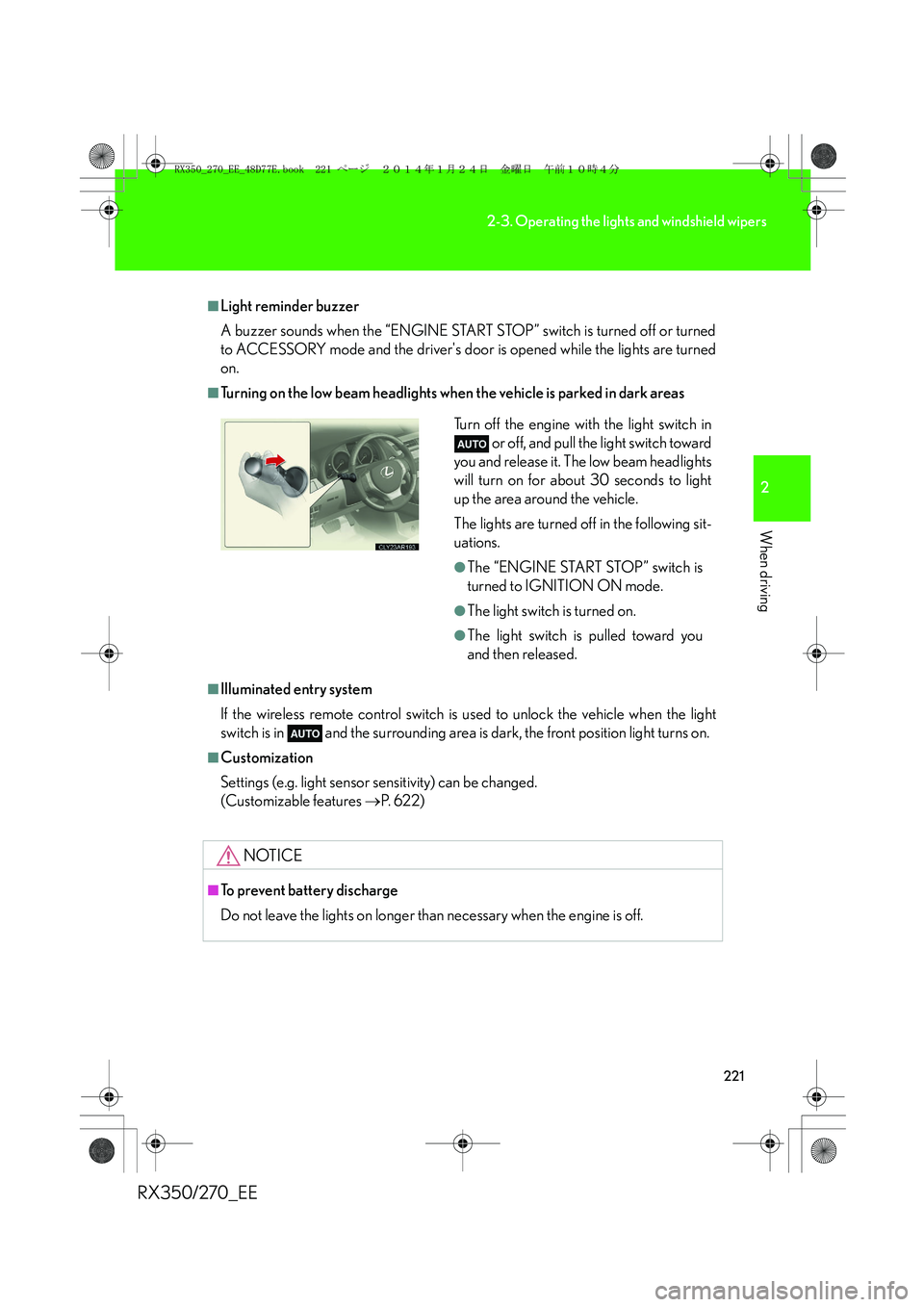
■Turning on the low beam headlights when the vehicle is parked in dark areas
■Illuminated entry system
If the wireless remote control switch is used to unlock the vehicle when the light
switch is in and the surrounding area is dark, the front position light turns on.
■Customization
Settings (e.g. light sensor sensitivity) can be changed.
(Customizable features →P. 6 2 2 )
NOTICE
■To prevent battery discharge
Do not leave the lights on longer than necessary when the engine is off.
Turn off the engine with the light switch in
or off, and pull the light switch toward
you and release it. The low beam headlights
will turn on for about 30 seconds to light
up the area around the vehicle.
The lights are turned off in the following sit-
uations.
●The “ENGINE START STOP” switch is
turned to IGNITION ON mode.
●The light switch is turned on.
●The light switch is pulled toward you
and then released.
RX350_270_EE_48D77E.book 221 ページ 2014年1月24日 金曜日 午前10時4分
Page 362 of 652
362
3-2. Using the audio system
RX350/270_EE
■When transferring ownership of the vehicle
Be sure to initialize the system to prevent personal data from being improperly
accessed. (→P. 4 0 9 )
■About Bluetooth®
■Compatible models
●Bluetooth® specifications:
Ver. 1.1, or higher (Recommended: Ver. 1.2 or higher)
●Following profiles:
• A2DP (Advanced Audio Distribution Profile) Ver. 1.0, or higher (Conformed:
Ve r. 1 . 2
• AVRCP (Audio/Video Remote Control Profile) Ver. 1.0 or higher (Con-
formed: Ver. 1.3)
Portable players must correspond to the above specifications in order to be con-
nected to the Bluetooth
® audio system. However, please note that some functions
may be limited depending on the type of portable player.Bluetooth is a registered trademark of
Bluetooth SIG. Inc.
RX350_270_EE_48D77E.book 362 ページ 2014年1月24日 金曜日 午前10時4分
Page 502 of 652
502
4-3. Do-it-yourself maintenance
RX350/270_EE
■Use a CR1632 lithium battery
●Batteries can be purchased at any authorized Lexus dealer or repairer, or
another duly qualified and equipped professional, local electrical appliance
shops or camera stores.
●Replace only with the same or equivalent type recommended by the manufac-
turer.
●Dispose of used batteries according to the local laws.
■If the electronic key battery is discharged
The following symptoms may occur:
●The smart entry & start system and wireless remote control will not function
properly.
●The operational range is reduced.
■When the card key battery needs to be replaced (if equipped)
The battery for the card key is available only at Lexus dealers. Your Lexus dealer
can replace the battery for you.
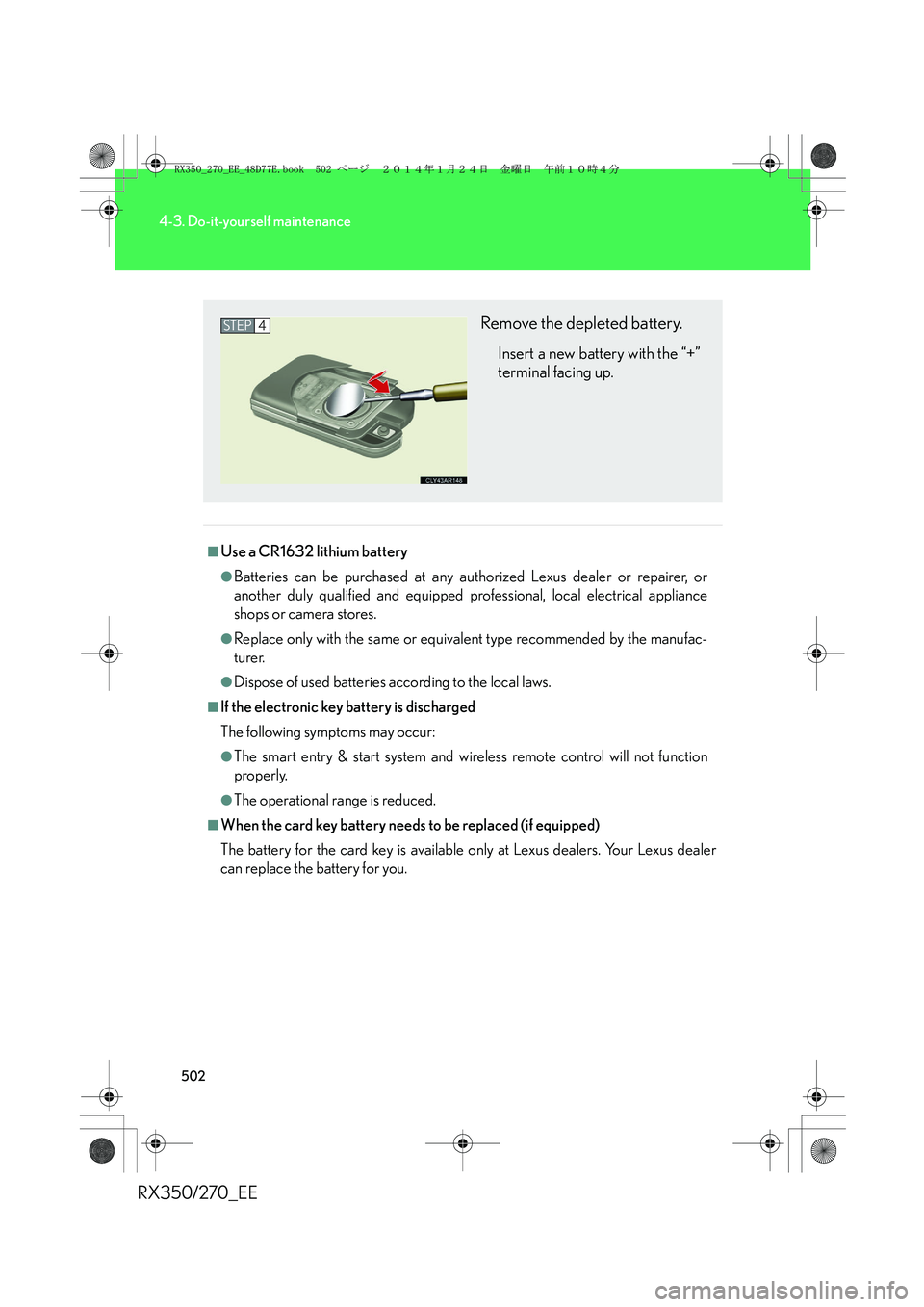
Remove the depleted battery.
Insert a new battery with the “+”
terminal facing up.
STEP4
RX350_270_EE_48D77E.book 502 ページ 2014年1月24日 金曜日 午前10時4分
Page 503 of 652
503
4-3. Do-it-yourself maintenance
4
Maintenance and care
RX350/270_EE
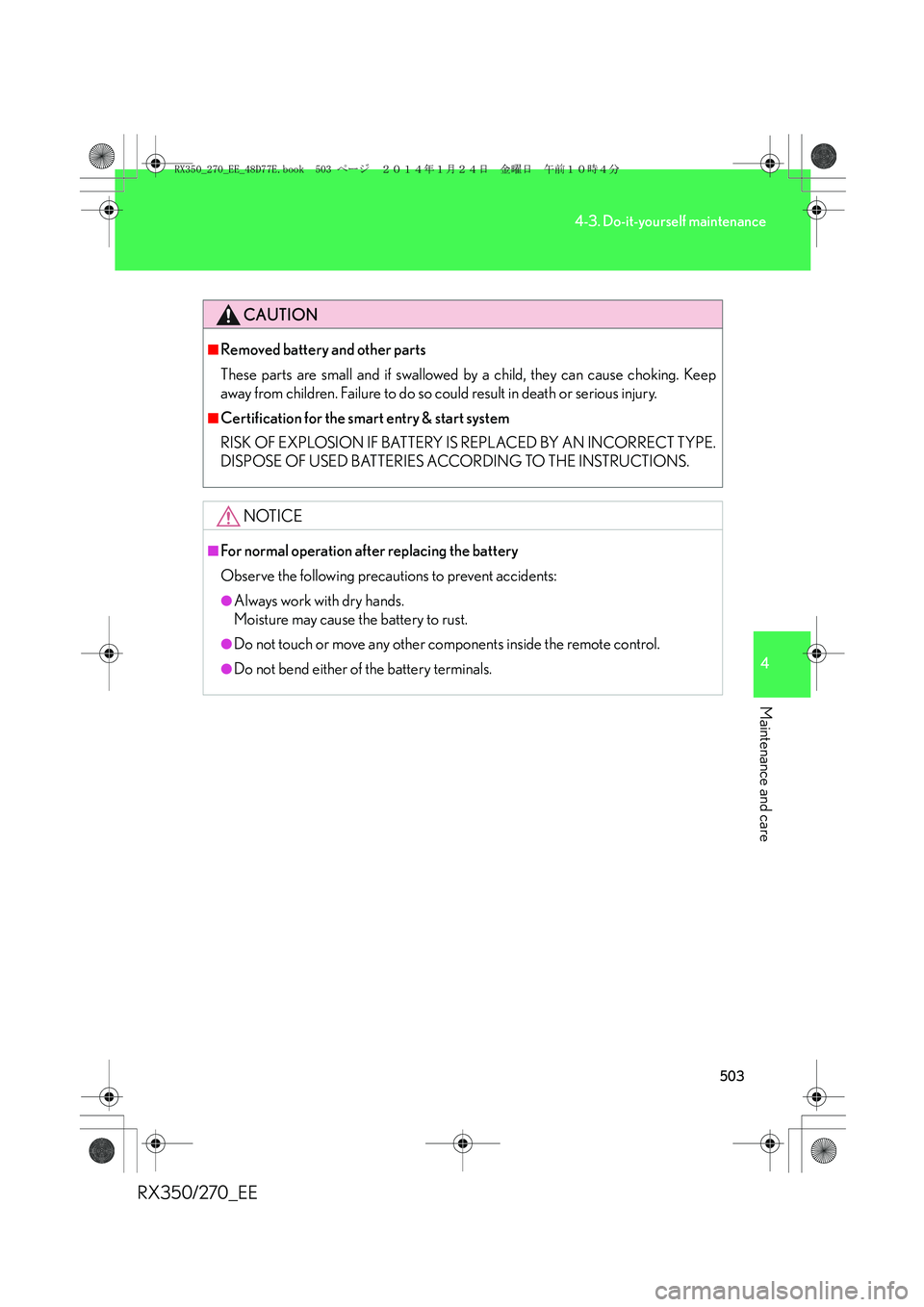
CAUTION
■Removed battery and other parts
These parts are small and if swallowed by a child, they can cause choking. Keep
away from children. Failure to do so could result in death or serious injury.
■Certification for the smart entry & start system
RISK OF EXPLOSION IF BATTERY IS REPLACED BY AN INCORRECT TYPE.
DISPOSE OF USED BATTERIES ACCORDING TO THE INSTRUCTIONS.
NOTICE
■For normal operation after replacing the battery
Observe the following precautions to prevent accidents:
●Always work with dry hands.
Moisture may cause the battery to rust.
●Do not touch or move any other components inside the remote control.
●Do not bend either of the battery terminals.
RX350_270_EE_48D77E.book 503 ページ 2014年1月24日 金曜日 午前10時4分
Page 591 of 652
5
591
5-2. Steps to take in an emergency
When trouble arises
RX350/270_EE
If the electronic key does not operate properly
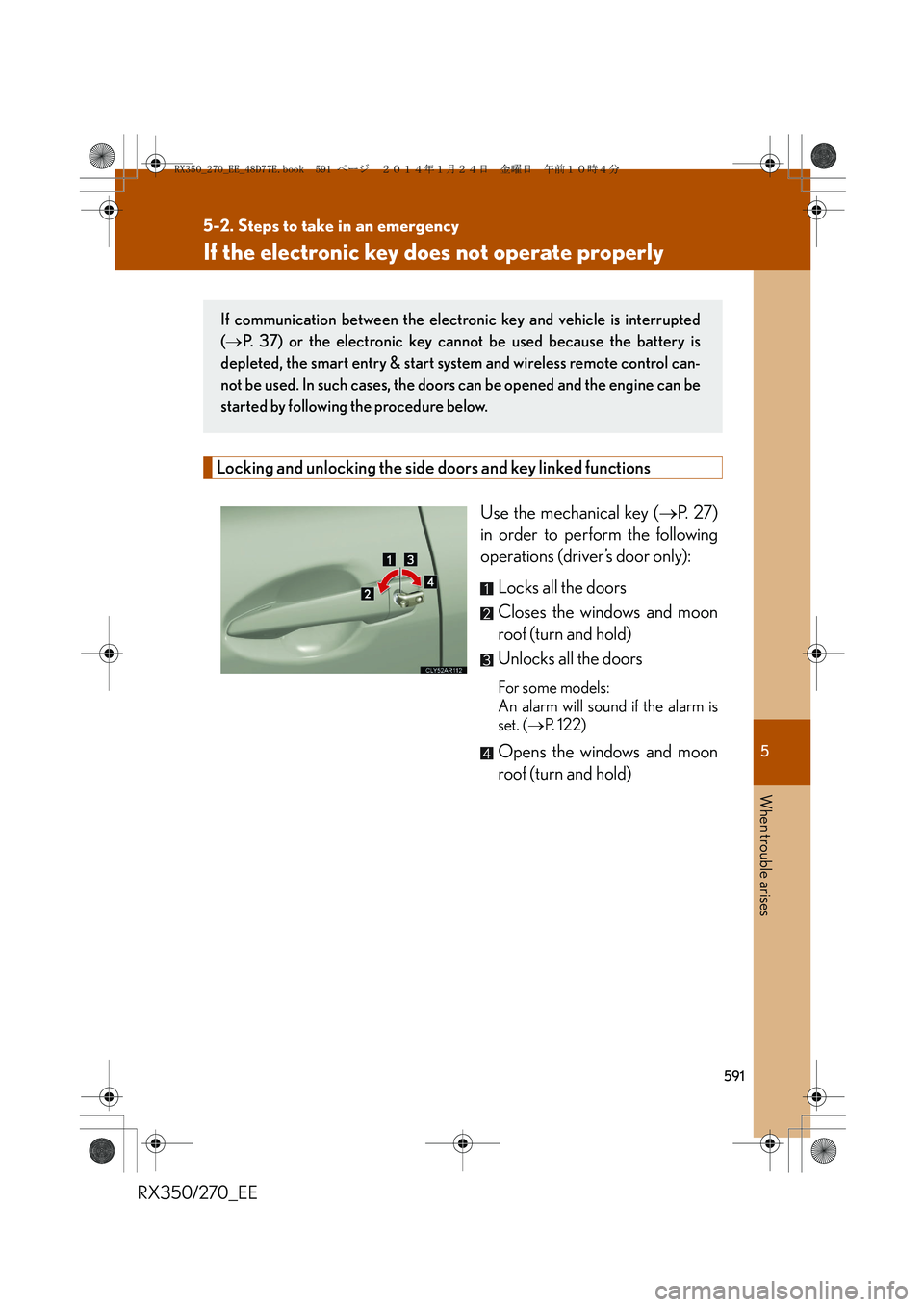
Locking and unlocking the side doors and key linked functions
Use the mechanical key (→P. 2 7 )
in order to perform the following
operations (driver’s door only):
Locks all the doors
Closes the windows and moon
roof (turn and hold)
Unlocks all the doors
For some models:
An alarm will sound if the alarm is
set. (→P. 122)
Opens the windows and moon
roof (turn and hold)
If communication between the electronic key and vehicle is interrupted
(→P. 37) or the electronic key cannot be used because the battery is
depleted, the smart entry & start system and wireless remote control can-
not be used. In such cases, the doors can be opened and the engine can be
started by following the procedure below.
RX350_270_EE_48D77E.book 591 ページ 2014年1月24日 金曜日 午前10時4分
Page 628 of 652
628
6-2. Customization
RX350/270_EE
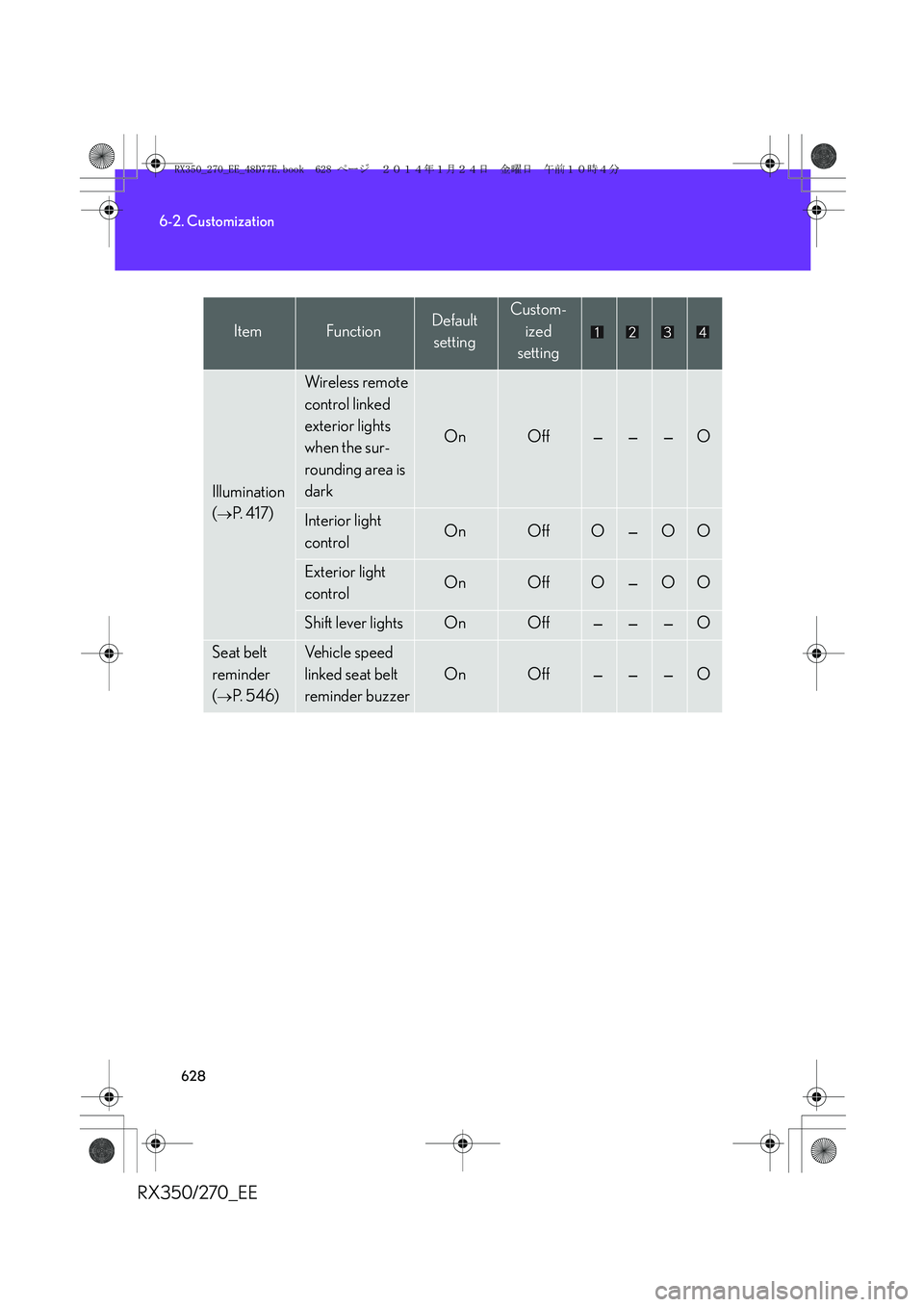
Illumination
(
→P. 4 1 7 )
Wireless remote
control linked
exterior lights
when the sur-
rounding area is
dark
OnOff———O
Interior light
controlOnOffO—OO
Exterior light
controlOnOffO—OO
Shift lever lightsOnOff———O
Seat belt
reminder
(
→P. 5 4 6 )
Vehicle speed
linked seat belt
reminder buzzer
OnOff———O
ItemFunctionDefault
settingCustom-
ized
setting
RX350_270_EE_48D77E.book 628 ページ 2014年1月24日 金曜日 午前10時4分
Page 630 of 652
630
6-2. Customization
RX350/270_EE
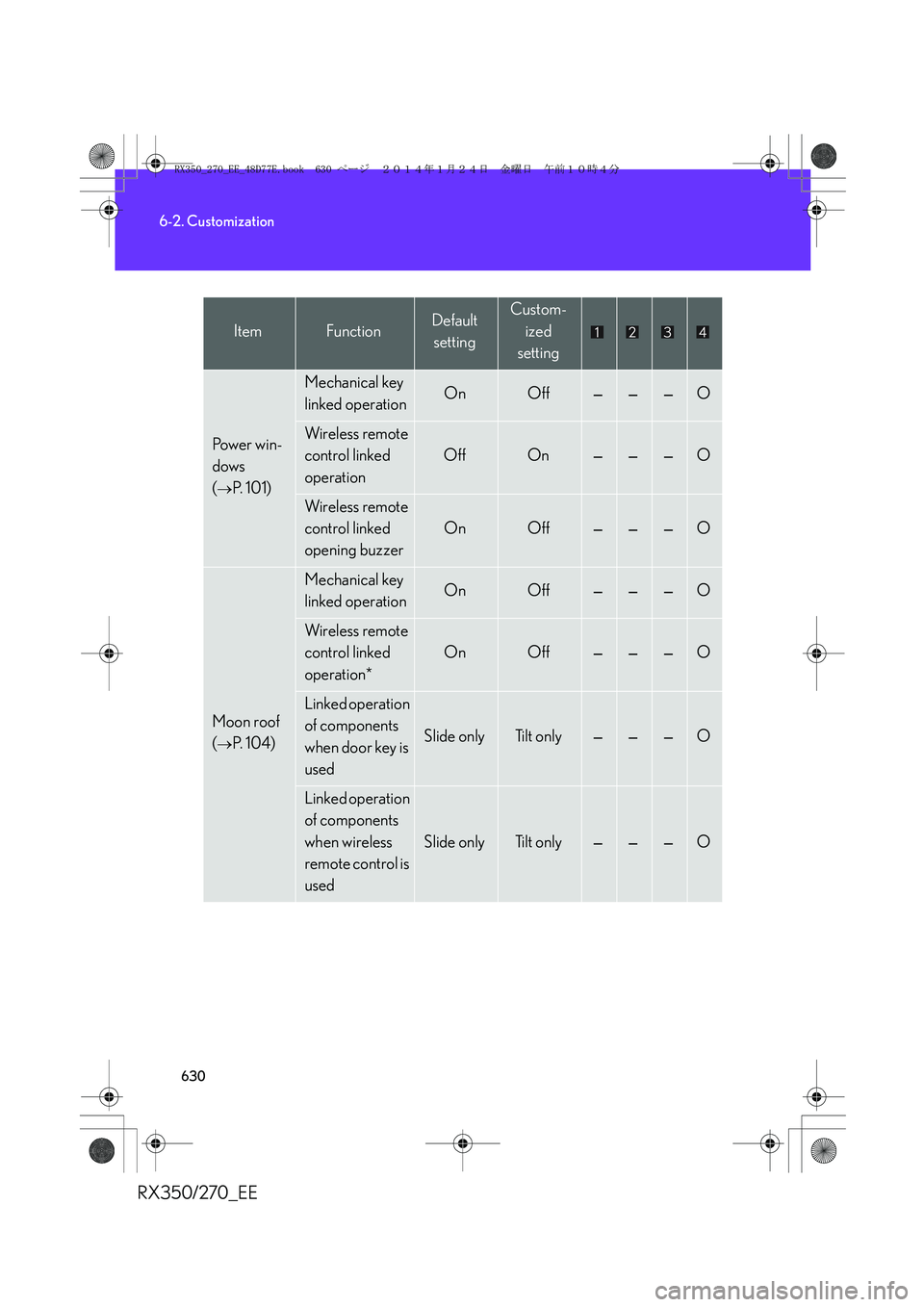
Po w e r w i n -
dows
(
→P. 1 0 1 )
Mechanical key
linked operationOnOff———O
Wireless remote
control linked
operation
OffOn———O
Wireless remote
control linked
opening buzzer
OnOff———O
Moon roof
(
→P. 1 0 4 )
Mechanical key
linked operationOnOff———O
Wireless remote
control linked
operation*
OnOff———O
Linked operation
of components
when door key is
used
Slide onlyTilt only———O
Linked operation
of components
when wireless
remote control is
used
Slide onlyTilt only———O
ItemFunctionDefault
settingCustom-
ized
setting
RX350_270_EE_48D77E.book 630 ページ 2014年1月24日 金曜日 午前10時4分
Page 631 of 652
631
6-2. Customization
6
Vehicle specifications
RX350/270_EE
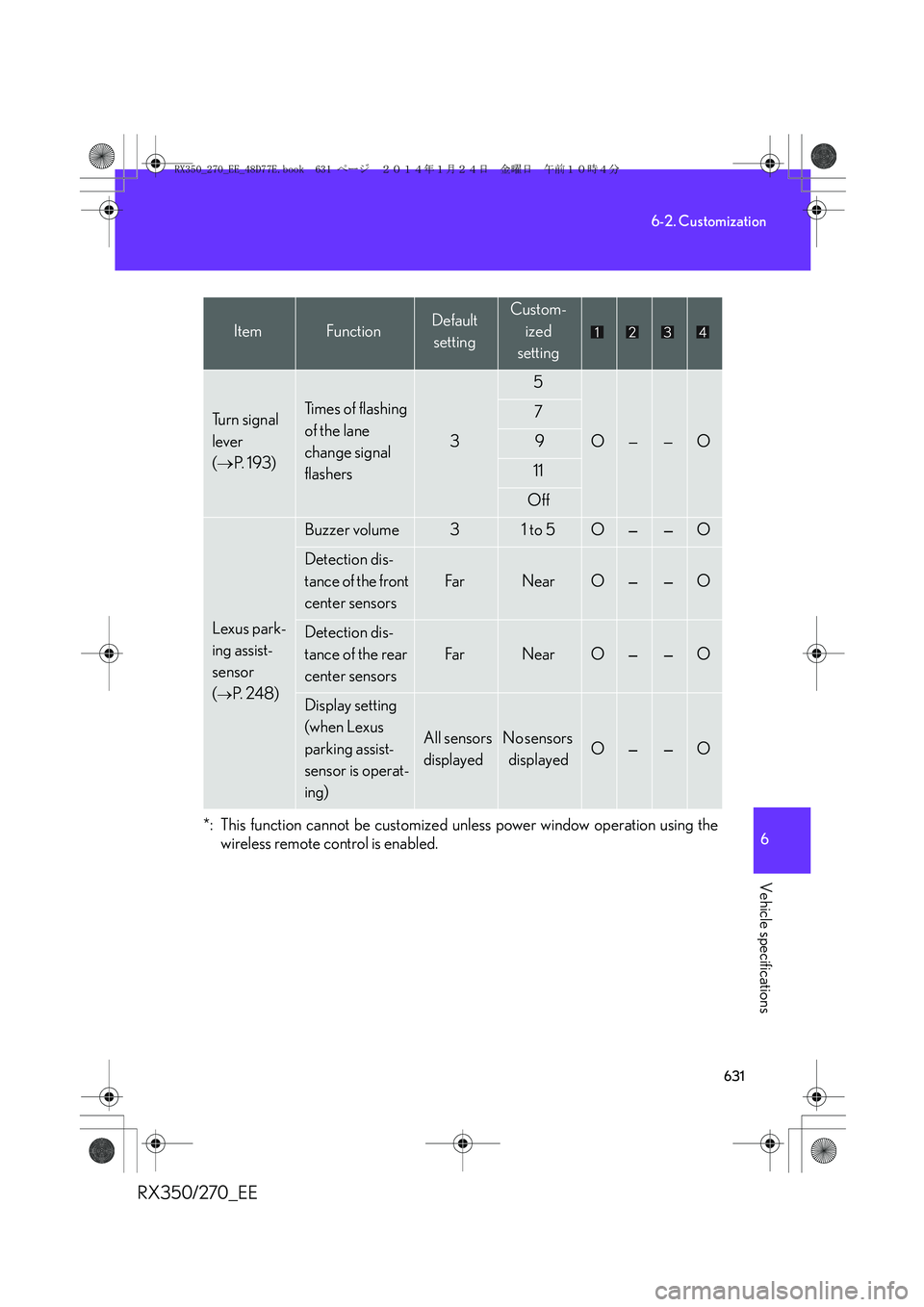
*: This function cannot be customized unless power window operation using the
wireless remote control is enabled.
Tu r n s i g n a l
lever
(→P. 1 9 3 )Ti m e s o f f l a s h i n g
of the lane
change signal
flashers
3
5
O——O
7
9
11
Off
Lexus park-
ing assist-
sensor
(
→P. 2 4 8 )
Buzzer volume31 to 5O——O
Detection dis-
tance of the front
center sensors
Fa rNearO——O
Detection dis-
tance of the rear
center sensors
Fa rNearO——O
Display setting
(when Lexus
parking assist-
sensor is operat-
ing)
All sensors
displayedNo sensors
displayedO——O
ItemFunctionDefault
settingCustom-
ized
setting
RX350_270_EE_48D77E.book 631 ページ 2014年1月24日 金曜日 午前10時4分
Page 638 of 652
638
Alphabetical index
RX350/270_EE
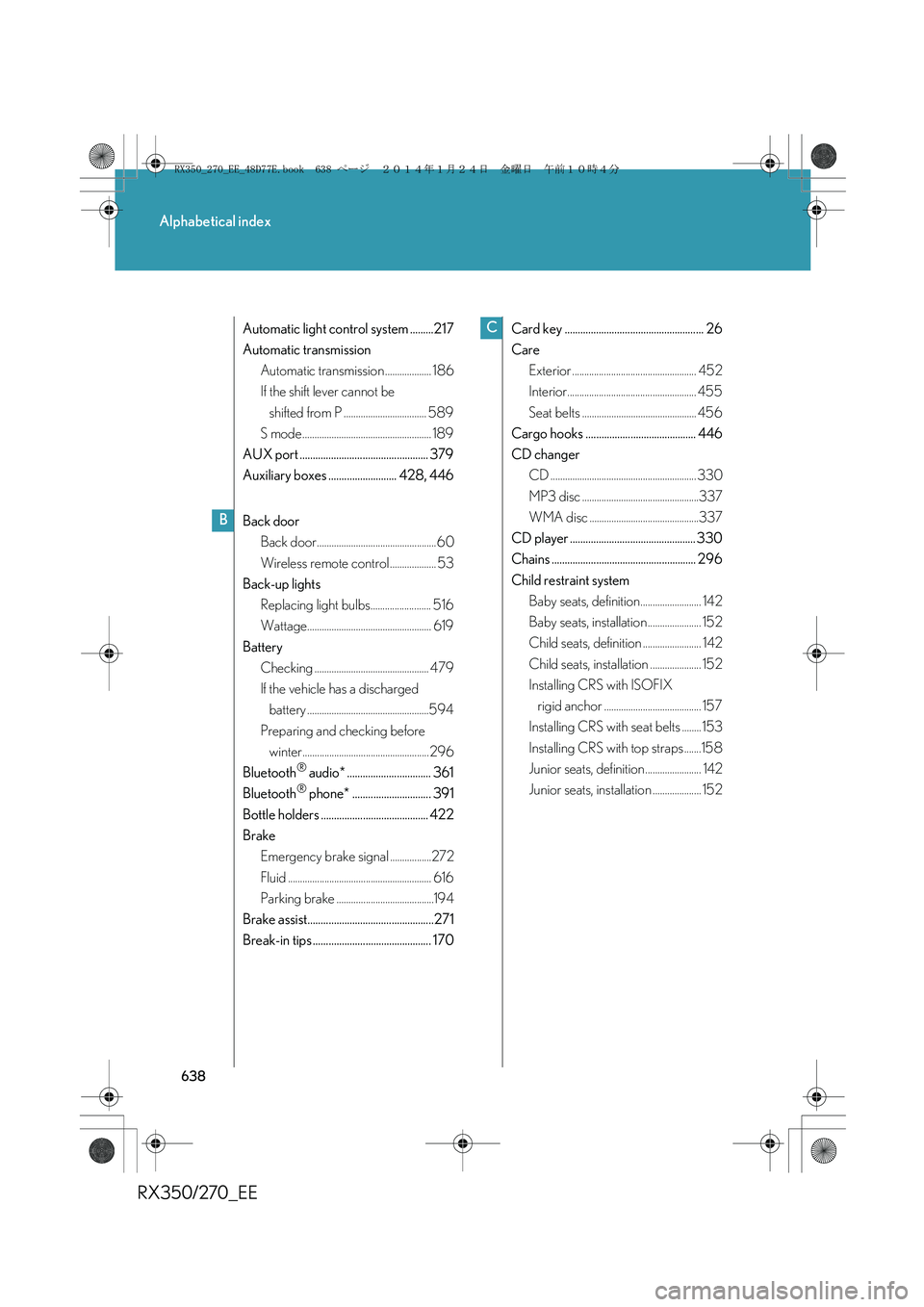
Automatic light control system .........217
Automatic transmission
Automatic transmission ................... 186
If the shift lever cannot be
shifted from P .................................. 589
S mode ..................................................... 189
AUX port ................................................. 379
Auxiliary boxes .......................... 428, 446
Back door
Back door.................................................60
Wireless remote control ................... 53
Back-up lights
Replacing light bulbs......................... 516
Wattage................................................... 619
Battery
Checking ............................................... 479
If the vehicle has a discharged
battery ..................................................594
Preparing and checking before
winter.................................................... 296
Bluetooth
® audio* ................................ 361
Bluetooth® phone* .............................. 391
Bottle holders ......................................... 422
Brake
Emergency brake signal .................272
Fluid ........................................................... 616
Parking brake ........................................194
Brake assist................................................271
Break-in tips ............................................. 170Card key ..................................................... 26
Care
Exterior ................................................... 452
Interior..................................................... 455
Seat belts ............................................... 456
Cargo hooks .......................................... 446
CD changer
CD ............................................................ 330
MP3 disc ................................................337
WMA disc .............................................337
CD player ................................................ 330
Chains ....................................................... 296
Child restraint system
Baby seats, definition......................... 142
Baby seats, installation ...................... 152
Child seats, definition ........................ 142
Child seats, installation ..................... 152
Installing CRS with ISOFIX
rigid anchor ........................................ 157
Installing CRS with seat belts ........ 153
Installing CRS with top straps .......158
Junior seats, definition ....................... 142
Junior seats, installation .................... 152
B
C
RX350_270_EE_48D77E.book 638 ページ 2014年1月24日 金曜日 午前10時4分