Back Door LEXUS RX270 2014 Owner's Guide
[x] Cancel search | Manufacturer: LEXUS, Model Year: 2014, Model line: RX270, Model: LEXUS RX270 2014Pages: 652, PDF Size: 48.98 MB
Page 259 of 652
259
2-4. Using other driving systems
2
When driving
RX350/270_EE
■Operating conditions
After stopping the engine, the vehicle will remain lowered for a maximum of 60
seconds.
●Height selector switch (driver's side instrument panel)
• While the engine is running, any vehicle height mode can be selected.
• Luggage mode can only be selected when the shift lever is in P position.
●Height selector switch (luggage compartment)
• When the engine is running and the shift lever is in the P position, any vehicle
height other than “LO” mode can be selected.
• When the “ENGINE START STOP” switch is turned off, the vehicle height
can only be lowered (only the “∨” side of the switch can be operated).
This switch can only be operated when the back door is open.
●Height control off switch
When the vehicle is stopped with the “ENGINE START STOP” switch in IGNI-
TION ON mode, vehicle height control can be disabled/re-enabled.
■When changing vehicle height modes
Before operating the height selector switch to raise/lower the vehicle height,
ensure that there are no objects in the surrounding area that could damage the
vehicle.
■When “N” mode is selected
During high speed driving, the vehicle height will automatically change to that of
“LO” mode.
■When “HI” mode is selected
The vehicle height will change to that of “N” mode when vehicle speed reaches 50
km/h (31 mph) or when vehicle speed has exceeded 30 km/h (19 mph) for approx-
imately 10 seconds. Even if vehicle speed is reduced below 30 km/h (19 mph), the
vehicle height will not automatically return to “HI” mode.
■When “LO” mode is selected
The vehicle height will change to that of “N” mode when the engine is restarted.
RX350_270_EE_48D77E.book 259 ページ 2014年1月24日 金曜日 午前10時4分
Page 268 of 652
268
2-4. Using other driving systems
RX350/270_EE
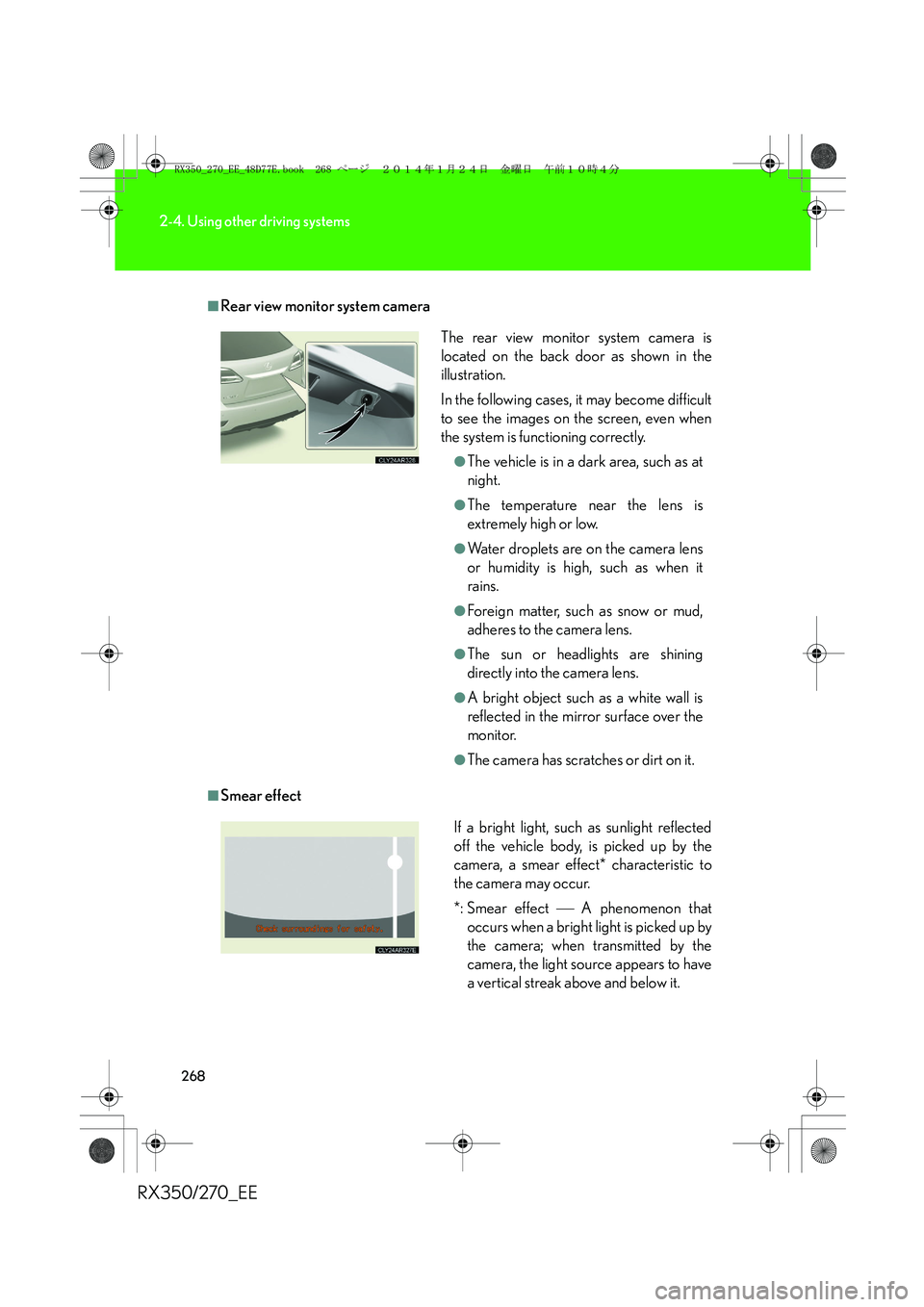
■Rear view monitor system camera
■Smear effectThe rear view monitor system camera is
located on the back door as shown in the
illustration.
In the following cases, it may become difficult
to see the images on the screen, even when
the system is functioning correctly.
●The vehicle is in a dark area, such as at
night.
●The temperature near the lens is
extremely high or low.
●Water droplets are on the camera lens
or humidity is high, such as when it
rains.
●Foreign matter, such as snow or mud,
adheres to the camera lens.
●The sun or headlights are shining
directly into the camera lens.
●A bright object such as a white wall is
reflected in the mirror surface over the
monitor.
●The camera has scratches or dirt on it.
If a bright light, such as sunlight reflected
off the vehicle body, is picked up by the
camera, a smear effect* characteristic to
the camera may occur.
*: Smear effect A phenomenon that
occurs when a bright light is picked up by
the camera; when transmitted by the
camera, the light source appears to have
a vertical streak above and below it.
RX350_270_EE_48D77E.book 268 ページ 2014年1月24日 金曜日 午前10時4分
Page 269 of 652
269
2-4. Using other driving systems
2
When driving
RX350/270_EE
■Flicker effect
When the camera is used under fluorescent light, sodium lights, or mercury lights
etc., the lights and the illuminated areas may appear to flicker.
CAUTION
■When using the rear view monitor system, observe the following precautions to
avoid an accident that could result in death or serious injuries:
●Never depend solely on the monitor system when reversing.
●Always check visually and with the mirrors to confirm your intended path is clear.
●Use your own eyes to confirm the vehicle’s surroundings, as the displayed image
may become faint or dark, and moving images will be distorted, or not entirely
visible when the outside temperature is low. When backing up, be sure to check
behind and all around the vehicle visually and with the mirrors before proceeding.
●Always check the vehicle surrounding area, because the guide lines are ancillary
lines.
●The guide lines are ancillary lines and do not change even if the steering wheel is
turned.
●Depicted distances between objects and flat surfaces differ from actual dis-
tances.
●Do not use the system if the back door is open.
RX350_270_EE_48D77E.book 269 ページ 2014年1月24日 金曜日 午前10時4分
Page 421 of 652
421
3-4. Using the storage features
3
Interior features
RX350/270_EE
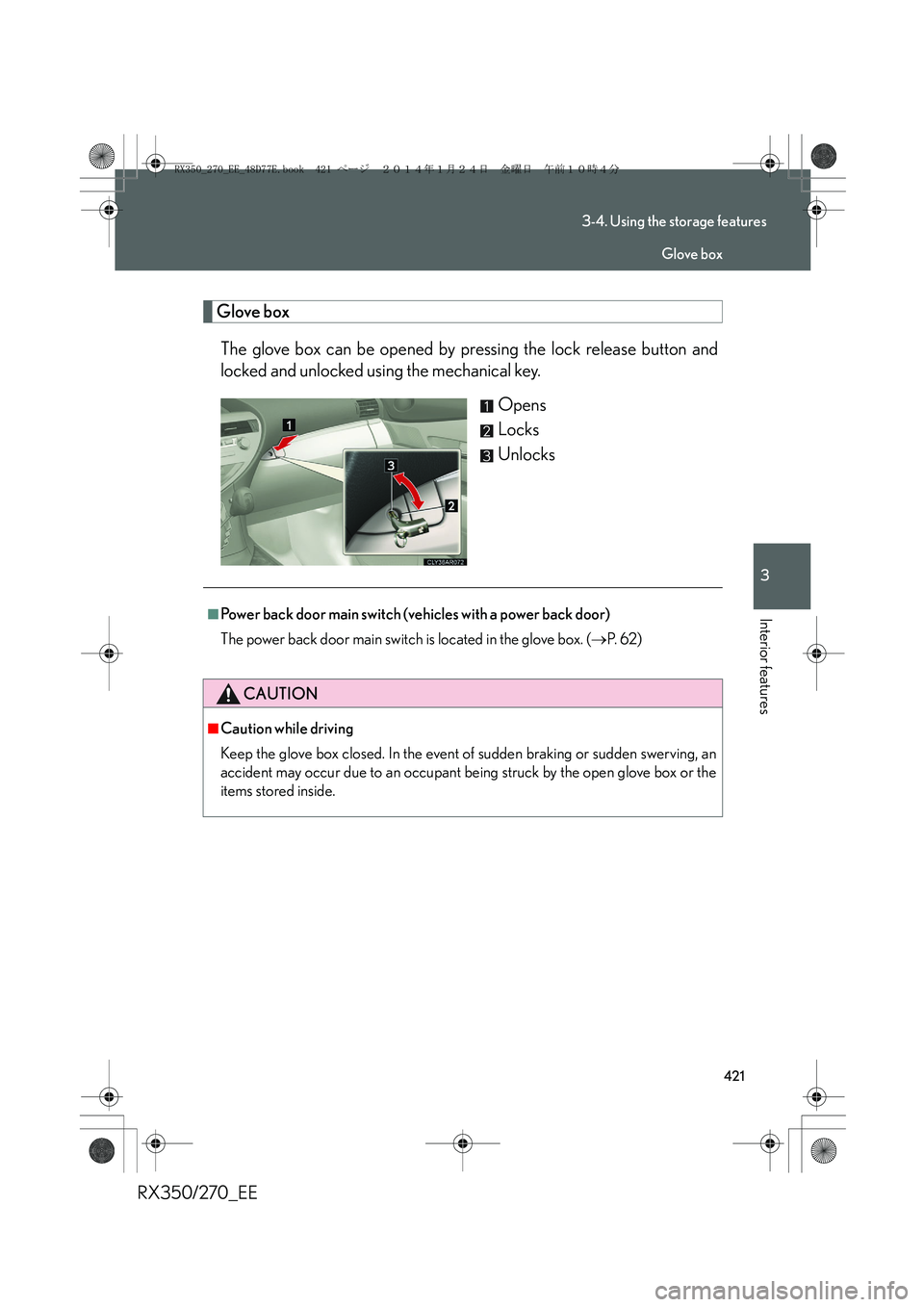
Glove box
The glove box can be opened by pressing the lock release button and
locked and unlocked using the mechanical key.
Opens
Locks
Unlocks
■Power back door main switch (vehicles with a power back door)
The power back door main switch is located in the glove box. (→P. 6 2 )
CAUTION
■Caution while driving
Keep the glove box closed. In the event of sudden braking or sudden swerving, an
accident may occur due to an occupant being struck by the open glove box or the
items stored inside.
Glove box
RX350_270_EE_48D77E.book 421 ページ 2014年1月24日 金曜日 午前10時4分
Page 426 of 652
426
3-4. Using the storage features
RX350/270_EE
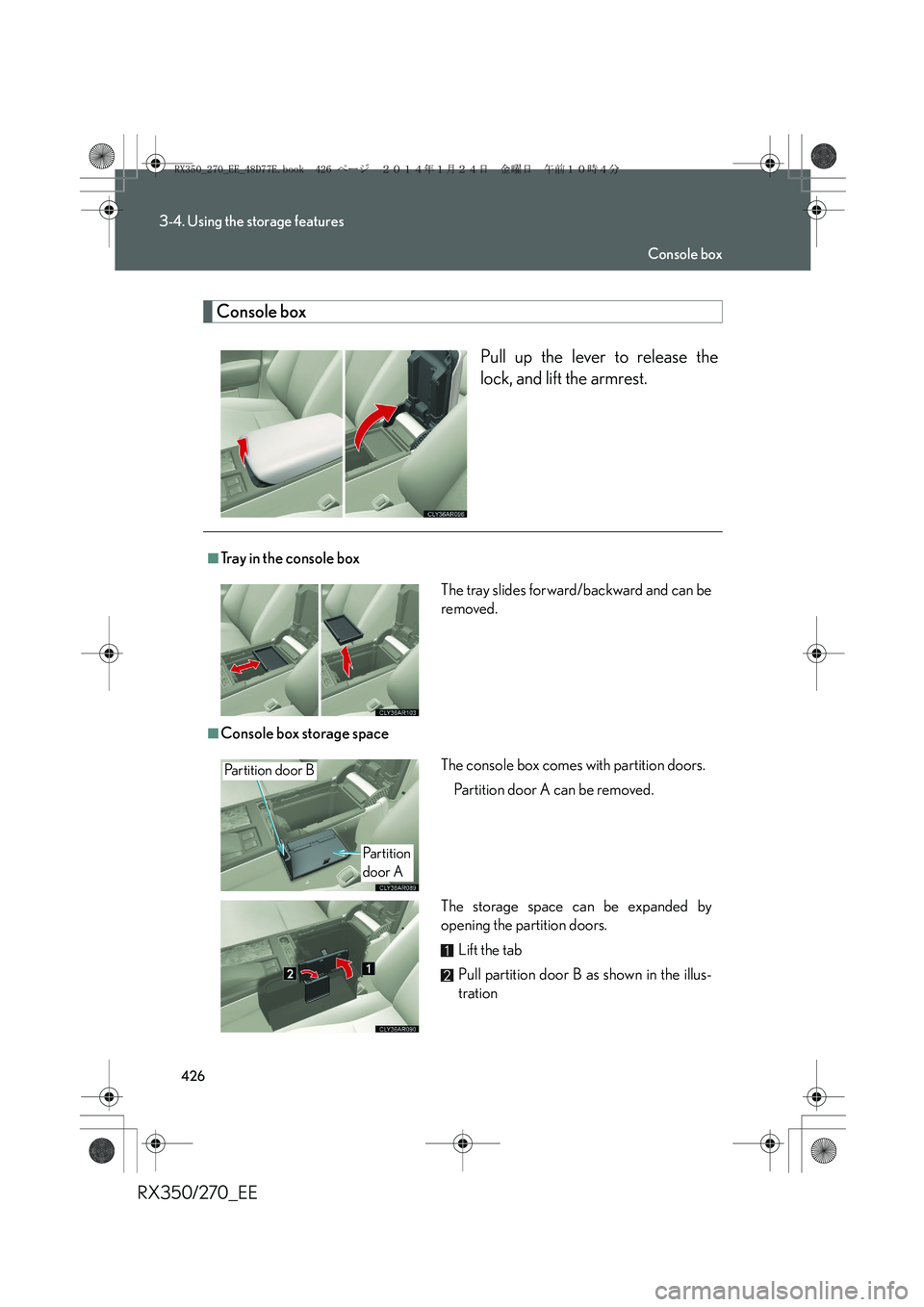
Console box
Pull up the lever to release the
lock, and lift the armrest.
■Tray in the console box
■Console box storage space The tray slides forward/backward and can be
removed.
The console box comes with partition doors.
Partition door A can be removed.
The storage space can be expanded by
opening the partition doors.
Lift the tab
Pull partition door B as shown in the illus-
trationPartition door B
Partition
door A
Console box
RX350_270_EE_48D77E.book 426 ページ 2014年1月24日 金曜日 午前10時4分
Page 449 of 652
449
3-5. Other interior features
3
Interior features
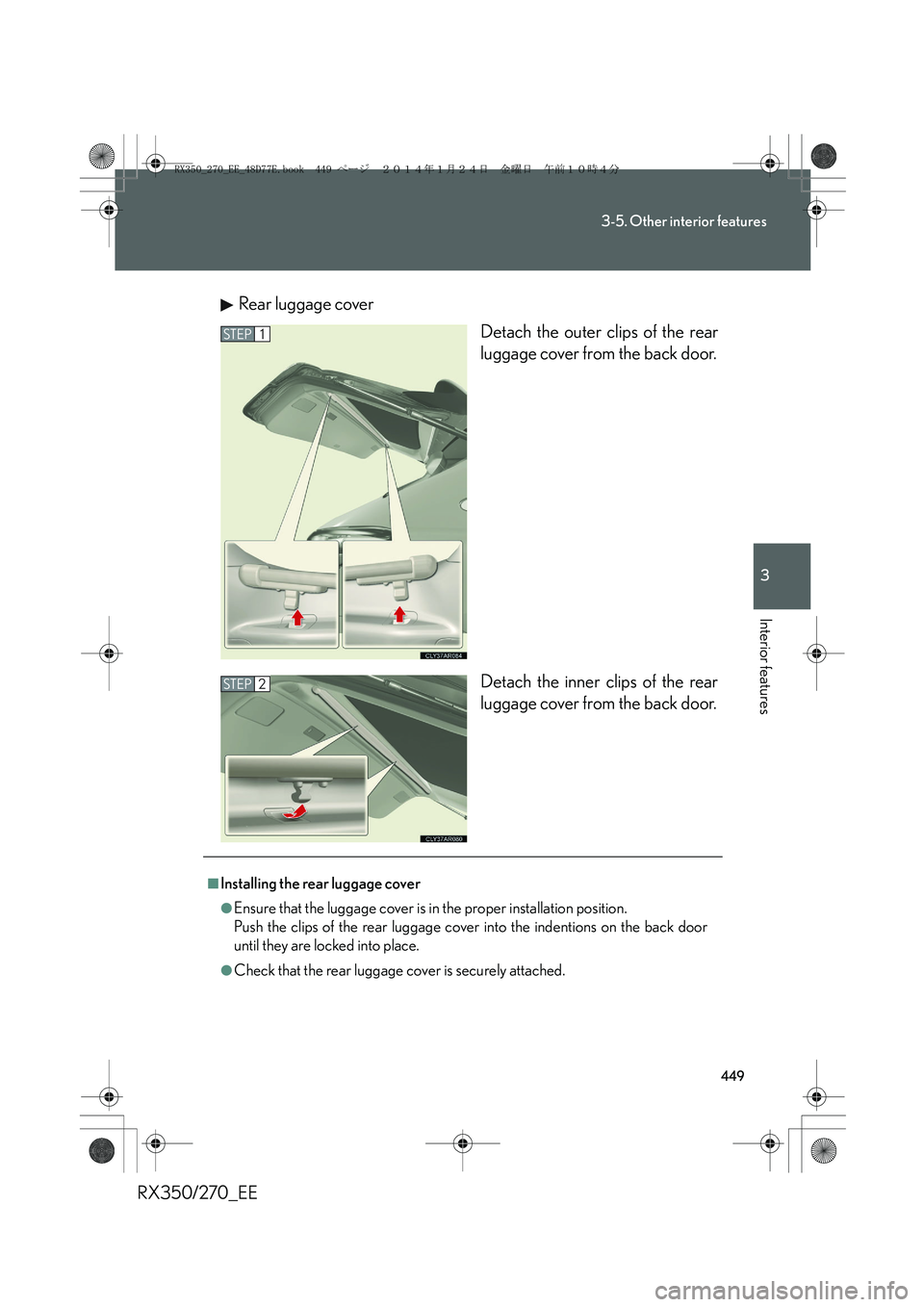
RX350/270_EERear luggage cover
Detach the outer clips of the rear
luggage cover from the back door.
Detach the inner clips of the rear
luggage cover from the back door.
STEP1
STEP2
■Installing the rear luggage cover
●Ensure that the luggage cover is in the proper installation position.
Push the clips of the rear luggage cover into the indentions on the back door
until they are locked into place.
●Check that the rear luggage cover is securely attached.
RX350_270_EE_48D77E.book 449 ページ 2014年1月24日 金曜日 午前10時4分
Page 452 of 652
452
RX350/270_EE
4-1. Maintenance and care
Cleaning and protecting the vehicle exterior
■Automatic car washes
●Before washing the vehicle:
•Fold the mirrors.
• Turn off the power back door system (if equipped).
●Brushes used in automatic car washes may scratch the vehicle surface and
harm your vehicle’s paint.
●In certain automatic car washes, the rear spoiler may interfere with machine
operation. This may prevent the vehicle from being cleaned properly or result in
damage to the rear spoiler.
■High pressure car washes
●Do not allow the nozzles of the car wash to come within close proximity of the
windows and the air suspension unit (if equipped).
●Before using the car wash, check that the fuel filler door on your vehicle is
closed properly.
Perform the following to protect the vehicle and maintain it in prime condi-
tion:
●Working from top to bottom, liberally apply water to the vehicle
body, wheel wells and underside of the vehicle to remove any dirt
and dust.
●Wash the vehicle body using a sponge or soft cloth, such as a
chamois.
●For hard-to-remove marks, use car wash soap and rinse thor-
oughly with water.
●Wipe away any water.
●Wax the vehicle when the waterproof coating deteriorates.
If water does not bead on a clean surface, apply wax when the vehicle
body is cool.
RX350_270_EE_48D77E.book 452 ページ 2014年1月24日 金曜日 午前10時4分
Page 507 of 652
507
4-3. Do-it-yourself maintenance
4
Maintenance and care
RX350/270_EE
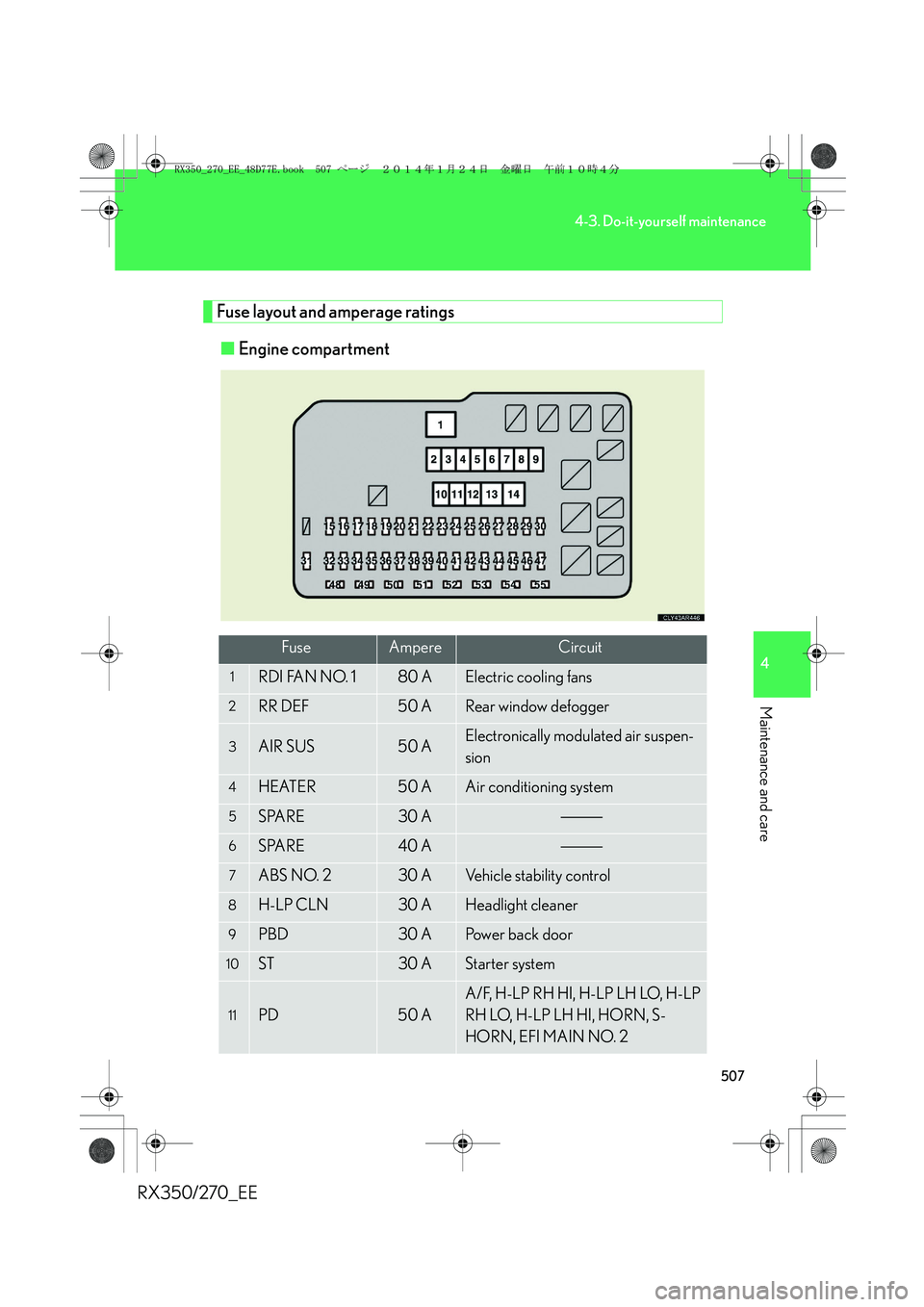
Fuse layout and amperage ratings
■Engine compartment
FuseAmpereCircuit
1RDI FAN NO. 180 AElectric cooling fans
2RR DEF50 ARear window defogger
3AIR SUS50 AElectronically modulated air suspen-
sion
4HEATER50 AAir conditioning system
5SPARE30 A
6SPARE40 A
7ABS NO. 230 AVehicle stability control
8H-LP CLN30 AHeadlight cleaner
9PBD30 APower back door
10ST30 AStarter system
11PD50 A
A/F, H-LP RH HI, H-LP LH LO, H-LP
RH LO, H-LP LH HI, HORN, S-
HORN, EFI MAIN NO. 2
RX350_270_EE_48D77E.book 507 ページ 2014年1月24日 金曜日 午前10時4分
Page 509 of 652
509
4-3. Do-it-yourself maintenance
4
Maintenance and care
RX350/270_EE
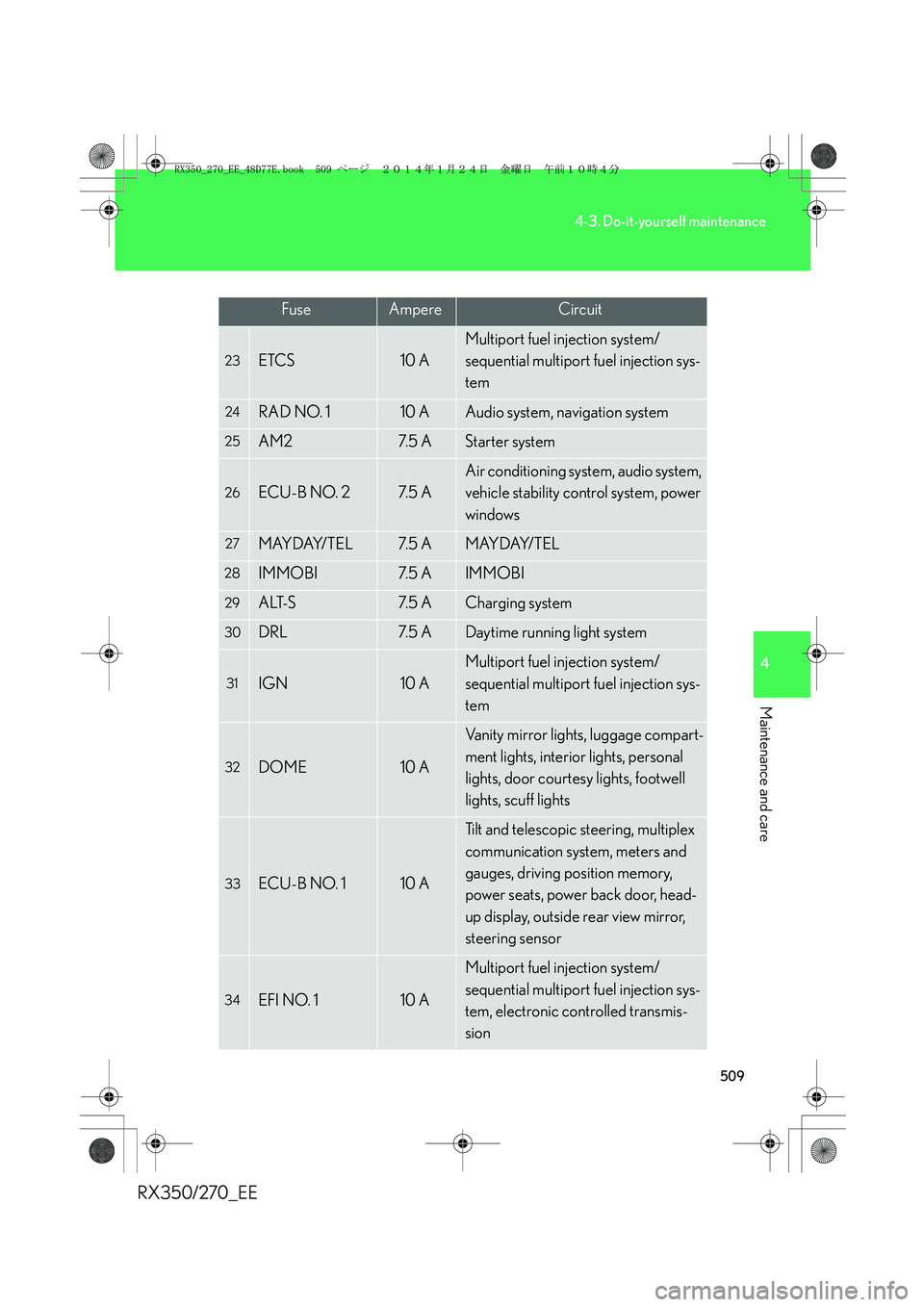
23ETCS10 A
Multiport fuel injection system/
sequential multiport fuel injection sys-
tem
24RAD NO. 110 AAudio system, navigation system
25AM27. 5 AStarter system
26ECU-B NO. 27. 5 A
Air conditioning system, audio system,
vehicle stability control system, power
windows
27MAYDAY/TEL7. 5 AMAYDAY/TEL
28IMMOBI7. 5 AIMMOBI
29ALT-S7. 5 ACharging system
30DRL7. 5 ADaytime running light system
31IGN10 A
Multiport fuel injection system/
sequential multiport fuel injection sys-
tem
32DOME10 A
Vanity mirror lights, luggage compart-
ment lights, interior lights, personal
lights, door courtesy lights, footwell
lights, scuff lights
33ECU-B NO. 110 A
Tilt and telescopic steering, multiplex
communication system, meters and
gauges, driving position memory,
power seats, power back door, head-
up display, outside rear view mirror,
steering sensor
34EFI NO. 110 A
Multiport fuel injection system/
sequential multiport fuel injection sys-
tem, electronic controlled transmis-
sion
FuseAmpereCircuit
RX350_270_EE_48D77E.book 509 ページ 2014年1月24日 金曜日 午前10時4分
Page 513 of 652
513
4-3. Do-it-yourself maintenance
4
Maintenance and care
RX350/270_EE
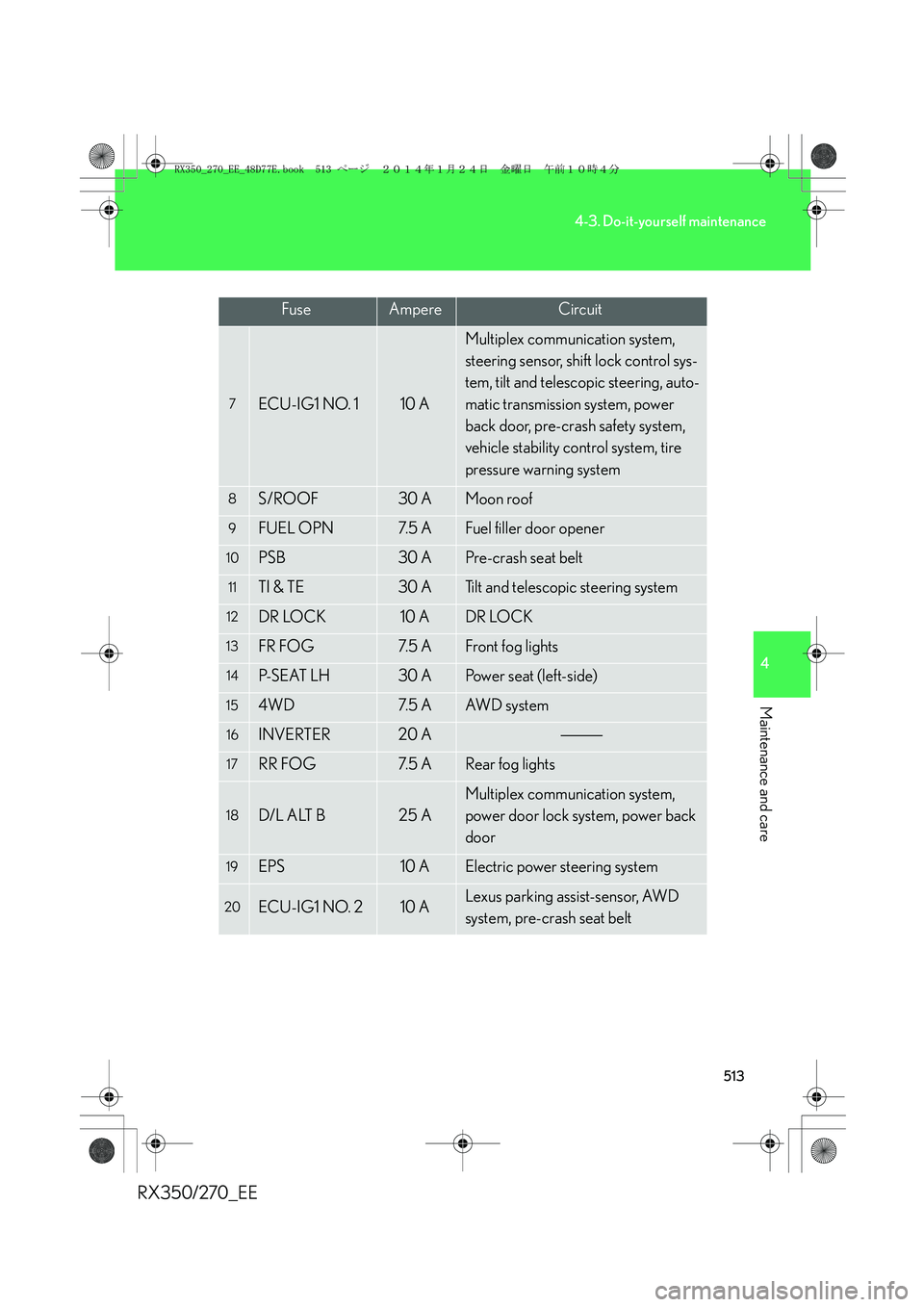
7ECU-IG1 NO. 110 A
Multiplex communication system,
steering sensor, shift lock control sys-
tem, tilt and telescopic steering, auto-
matic transmission system, power
back door, pre-crash safety system,
vehicle stability control system, tire
pressure warning system
8S/ROOF30 AMoon roof
9FUEL OPN7. 5 AFuel filler door opener
10PSB30 APre-crash seat belt
11TI & TE30 ATilt and telescopic steering system
12DR LOCK10 ADR LOCK
13FR FOG7. 5 AFront fog lights
14P- S E AT L H30 APower seat (left-side)
154WD7. 5 AAW D s y s t e m
16INVERTER20 A
17RR FOG7. 5 ARear fog lights
18D/L ALT B25 A
Multiplex communication system,
power door lock system, power back
door
19EPS10 AElectric power steering system
20ECU-IG1 NO. 210 ALexus parking assist-sensor, AWD
system, pre-crash seat belt
FuseAmpereCircuit
RX350_270_EE_48D77E.book 513 ページ 2014年1月24日 金曜日 午前10時4分