ECU LEXUS RX270 2014 Owner's Guide
[x] Cancel search | Manufacturer: LEXUS, Model Year: 2014, Model line: RX270, Model: LEXUS RX270 2014Pages: 652, PDF Size: 48.98 MB
Page 307 of 652
307
2-5. Driving information
2
When driving
RX350/270_EE
Guidance
Your vehicle will handle differently when towing a trailer. In order to avoid
accident, death or serious injury, keep the following in mind when towing:
■Checking connections between trailer and lights
Stop the vehicle and check the operation of the connection between
the trailer and lights after driving for a brief period as well as before
starting off.
■Practicing driving with a coupled trailer
●Get the feel for turning, stopping and reversing with the trailer cou-
pled by practicing in an area with no or light traffic.
●When reversing with a coupled trailer, hold the section of the steer-
ing wheel nearest to you and rotate clockwise to turn the trailer left
or counterclockwise to turn it right. Always rotate a little at a time to
prevent steering error. Have someone guide you when reversing to
lessen the risk of an accident.
■Increasing vehicle-to-vehicle distance
At a speed of 10 km/h (6 mph), the distance to the vehicle running
ahead of you should be equivalent to or greater than the combined
length of your vehicle and trailer. Avoid sudden braking that may cause
skidding. Otherwise, the vehicle may spin out of control. This is espe-
cially true when driving on wet or slippery road surfaces.
■Sudden acceleration/steering input/cornering
Executing sharp turns when towing may result in the trailer colliding
with your vehicle. Decelerate well in advance when approaching turns
and take them slowly and carefully to avoid sudden braking.
RX350_270_EE_48D77E.book 307 ページ 2014年1月24日 金曜日 午前10時4分
Page 308 of 652
308
2-5. Driving information
RX350/270_EE■Important points regarding turning
The wheels of the trailer will travel closer to the inside of the curve than
the wheels of the vehicle. To make allowance for this, take the turns
wider than you would normally do.
■Important points regarding stability
Vehicle movement resulting from uneven road surfaces and strong
crosswinds will affect handling. The vehicle may also be rocked by
passing buses or large trucks. Frequently check behind when moving
alongside such vehicles. As soon as such vehicle movement occurs,
immediately start to decelerate smoothly by slowly applying the
brakes. Always steer the vehicle straight ahead while braking.
■Passing other vehicles
Consider the total combined length of your vehicle and trailer and
ensure that the vehicle-to-vehicle distance is sufficient before execut-
ing lane changes.
■Transmission information
Refrain from driving in 6 range in S mode to maintain the effectiveness
of the engine brake and the charge performance of electrical compo-
nents.
■If the engine overheats
Towing a loaded trailer up a long, steep incline in temperatures
exceeding 30°C (85°F) may result in the engine overheating. If the
engine coolant temperature gauge indicates that the engine is over-
heating, turn the air conditioning off immediately, leave the road and
stop the vehicle in a safe place. (→P. 5 9 8 )
■When parking the vehicle
Always place wheel chocks under the wheels of both the vehicle and
trailer. Firmly set the parking brake and shift the shift lever to P.
RX350_270_EE_48D77E.book 308 ページ 2014年1月24日 金曜日 午前10時4分
Page 313 of 652
3Interior features
313
RX350/270_EE
Setting up a Bluetooth®
enabled portable
player...................................... 372
Bluetooth
® audio system
setup ........................................ 376
Optimal use of the audio
system...................................... 377
Using the AUX port............... 379
Using the steering wheel
audio switches....................... 381
Hands-free system
for mobile phones ............... 384
Using the hands-free
system (for mobile
phones) ................................... 391
Making a phone call............... 397
Setting a mobile phone ......... 401
Security and system
setup ....................................... 405
Using the phone book ............. 411
3-3. Using the interior lights
Interior lights list ...................... 417
• Interior lights .......................... 418
• Personal lights ....................... 4183-4. Using the storage
features
List of storage features ........ 420
• Glove box ................................421
• Bottle holders/
door pockets ......................... 422
• Cup holders .......................... 423
• Console box .......................... 426
• Coin holder ............................427
• Auxiliary box......................... 428
• Under tray ............................. 429
3-5. Other interior features
Sun visors ................................. 430
Vanity mirror............................. 431
Clock ........................................ 432
Outside temperature
display .................................... 433
Multi-display light
control.................................... 434
Power outlets........................... 435
Heated steering wheel ......... 437
Seat heaters and
ventilators ............................. 439
Armrest ...................................... 441
Coat hooks ............................... 442
Assist grips .............................. 443
Floor mat................................... 444
Luggage compartment
features .................................. 446
RX350_270_EE_48D77E.book 313 ページ 2014年1月24日 金曜日 午前10時4分
Page 385 of 652
385
3-2. Using the audio system
3
Interior features
RX350/270_EE
Ti t l ePa g e
Using the hands-free system
■Using the hands-free phone system for the
first time
P. 3 9 3
Making a phone call
■Making a phone call
• Dialing by inputting a name
• Speed dialing
•Redial
• Call back
■Receiving a phone call
• Answering a phone call
• Refusing a phone call
■Transferring a phone call
■Using the call history memory
• Dialing
• Storing data in the phone book
•Deleting
P. 3 9 7
Setting a mobile phone
■Functions and operation proceduresP. 4 0 1
Security and system setup
■Security setting items and operation
procedures
■System setup items and operation
procedures
P. 4 0 5
RX350_270_EE_48D77E.book 385 ページ 2014年1月24日 金曜日 午前10時4分
Page 395 of 652
395
3-2. Using the audio system
3
Interior features
RX350/270_EE
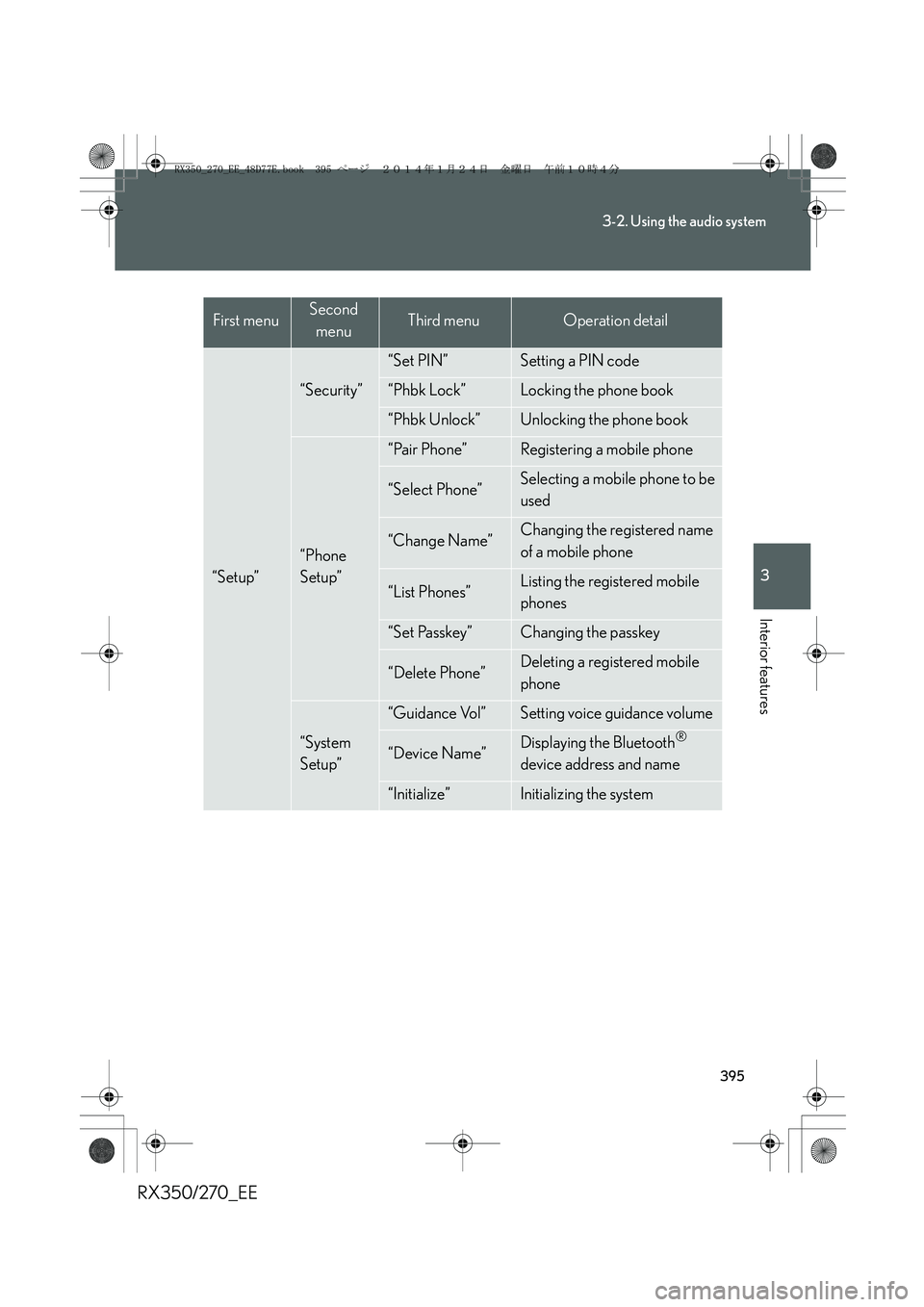
“Setup”
“Security”
“Set PIN”Setting a PIN code
“Phbk Lock”Locking the phone book
“Phbk Unlock”Unlocking the phone book
“Phone
Setup”
“Pair Phone”Registering a mobile phone
“Select Phone”Selecting a mobile phone to be
used
“Change Name”Changing the registered name
of a mobile phone
“List Phones”Listing the registered mobile
phones
“Set Passkey”Changing the passkey
“Delete Phone”Deleting a registered mobile
phone
“System
Setup”
“Guidance Vol”Setting voice guidance volume
“Device Name”Displaying the Bluetooth®
device address and name
“Initialize”Initializing the system
First menuSecond
menuThird menuOperation detail
RX350_270_EE_48D77E.book 395 ページ 2014年1月24日 金曜日 午前10時4分
Page 405 of 652
405
3-2. Using the audio system
3
Interior features
RX350/270_EE
Security and system setup
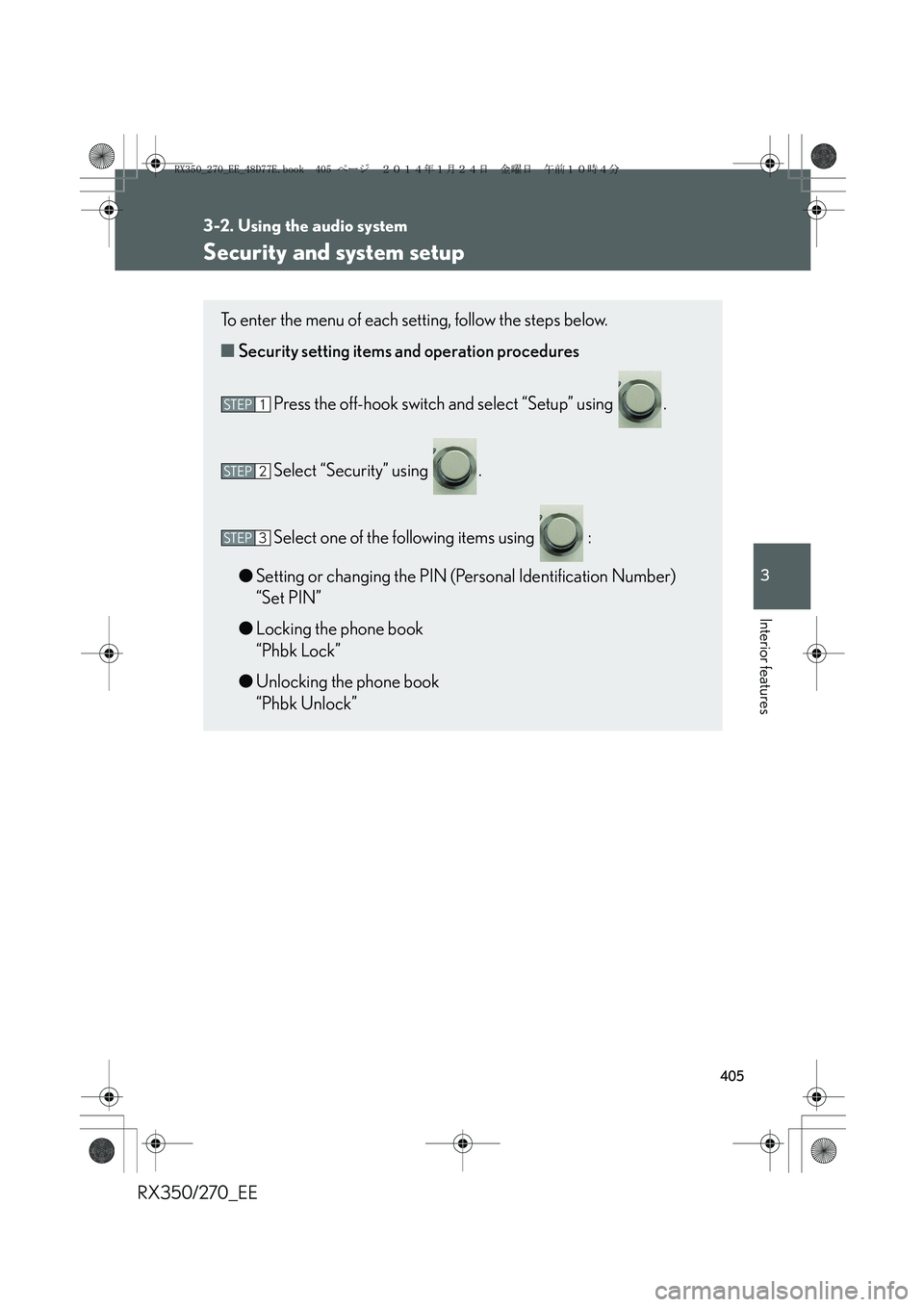
To enter the menu of each setting, follow the steps below.
■Security setting items and operation procedures
Press the off-hook switch and select “Setup” using .
Select “Security” using .
Select one of the following items using :
●Setting or changing the PIN (Personal Identification Number)
“Set PIN”
●Locking the phone book
“Phbk Lock”
●Unlocking the phone book
“Phbk Unlock”
STEP1
STEP2
STEP3
RX350_270_EE_48D77E.book 405 ページ 2014年1月24日 金曜日 午前10時4分
Page 410 of 652
410
3-2. Using the audio system
RX350/270_EE
■Initialization
●The following data in the system can be initialized:
• Phone book
• Outgoing and incoming call history
• Speed dials
• Registered mobile phone data
•Security code
• Registered Bluetooth
® enabled portable player data
• Passkeys for the mobile phones
• Passkey for the Bluetooth
® audio players
•Guidance volume
• Receiver volume
• Ring tone volume
●Once the initialization has been completed, the data cannot be restored to its
original state.
■When the phone book is locked
The following functions cannot be used:
●Dialing by inputting a name
●Speed dialing
●Dialing a number stored in the call history memory
●Using the phone book
RX350_270_EE_48D77E.book 410 ページ 2014年1月24日 金曜日 午前10時4分
Page 444 of 652
444
3-5. Other interior features
RX350/270_EE
Floor mat
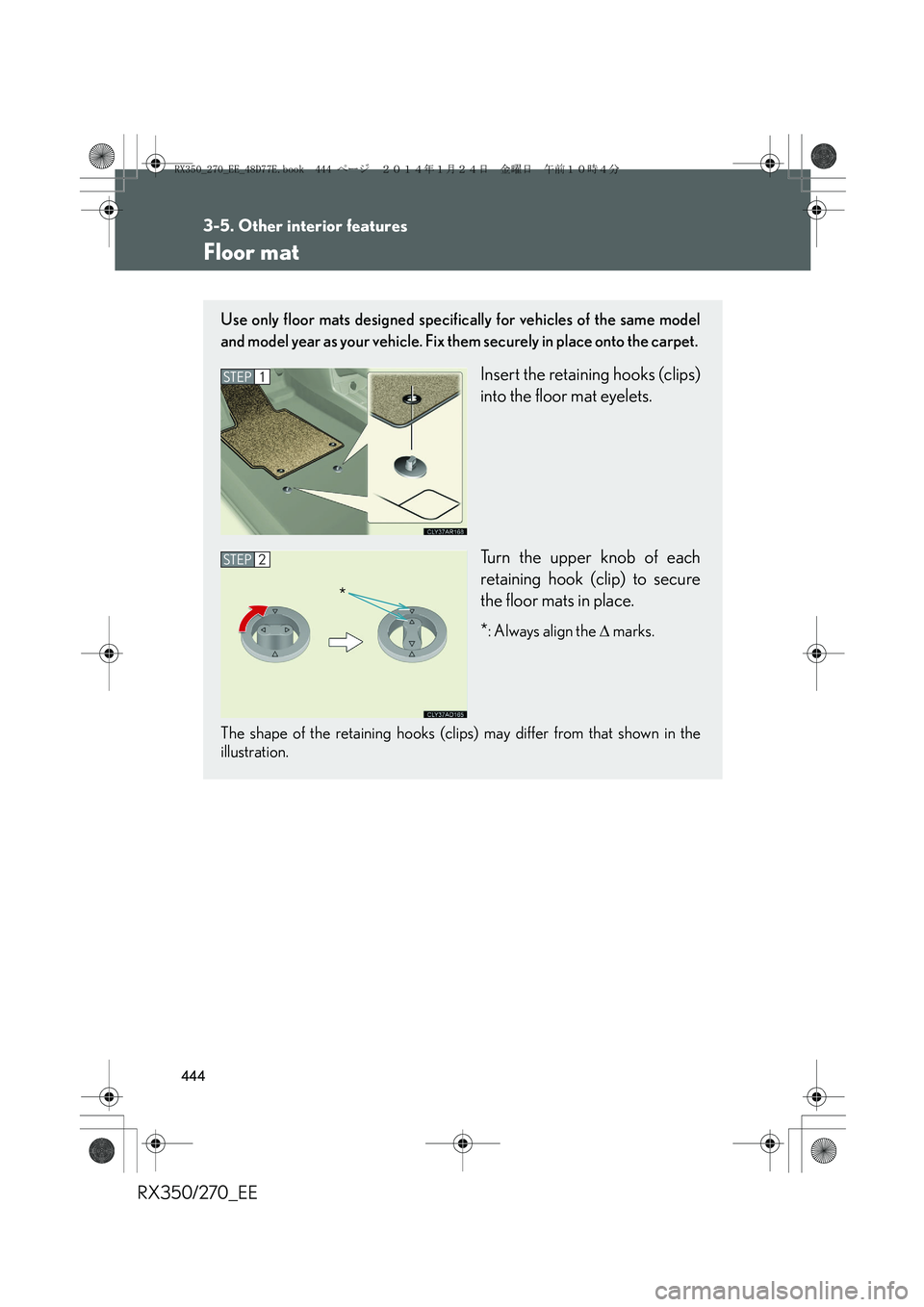
Use only floor mats designed specifically for vehicles of the same model
and model year as your vehicle. Fix them securely in place onto the carpet.
Insert the retaining hooks (clips)
into the floor mat eyelets.
Turn the upper knob of each
retaining hook (clip) to secure
the floor mats in place.
*
: Always align the ∆ marks.
The shape of the retaining hooks (clips) may differ from that shown in the
illustration.
STEP1
STEP2
*
RX350_270_EE_48D77E.book 444 ページ 2014年1月24日 金曜日 午前10時4分
Page 445 of 652
445
3-5. Other interior features
3
Interior features
RX350/270_EE
CAUTION
Observe the following precautions.
Failure to do so may cause the driver's floor mat to slip, possibly interfering with the
pedals while driving. An unexpectedly high speed may result or it may become diffi-
cult to stop the vehicle, leading to a serious accident.
■When installing the driver's floor mat
●Do not use floor mats designed for other models or different model year vehicles,
even if they are Lexus Genuine floor mats.
●Only use floor mats designed for the driver's seat.
●Always install the floor mat securely using the retaining hooks (clips) provided.
●Do not use two or more floor mats on top of each other.
●Do not place the floor mat bottom-side up or upside-down.
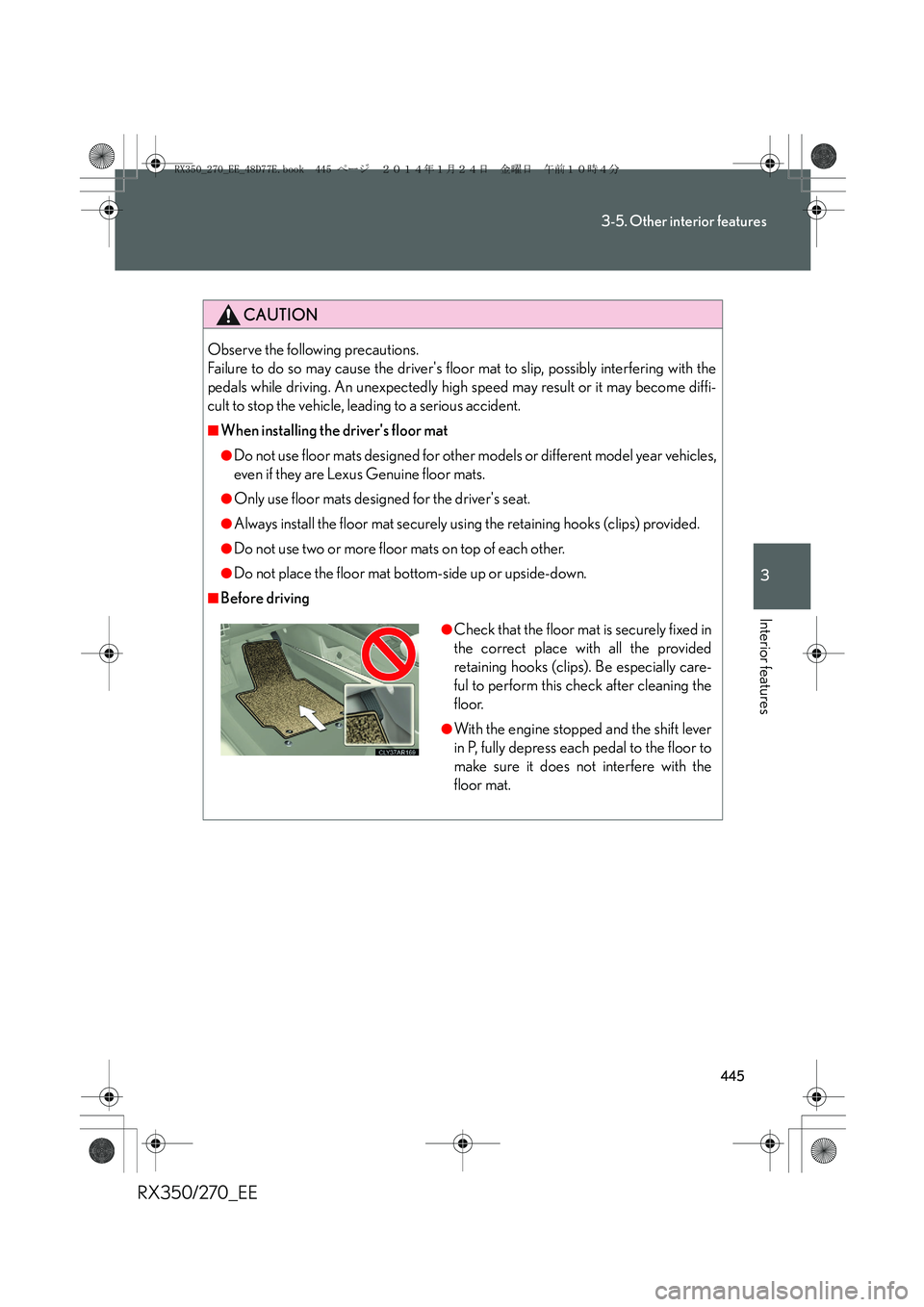
■Before driving
●Check that the floor mat is securely fixed in
the correct place with all the provided
retaining hooks (clips). Be especially care-
ful to perform this check after cleaning the
floor.
●With the engine stopped and the shift lever
in P, fully depress each pedal to the floor to
make sure it does not interfere with the
floor mat.
RX350_270_EE_48D77E.book 445 ページ 2014年1月24日 金曜日 午前10時4分
Page 446 of 652
446
3-5. Other interior features
RX350/270_EE
Luggage compartment features
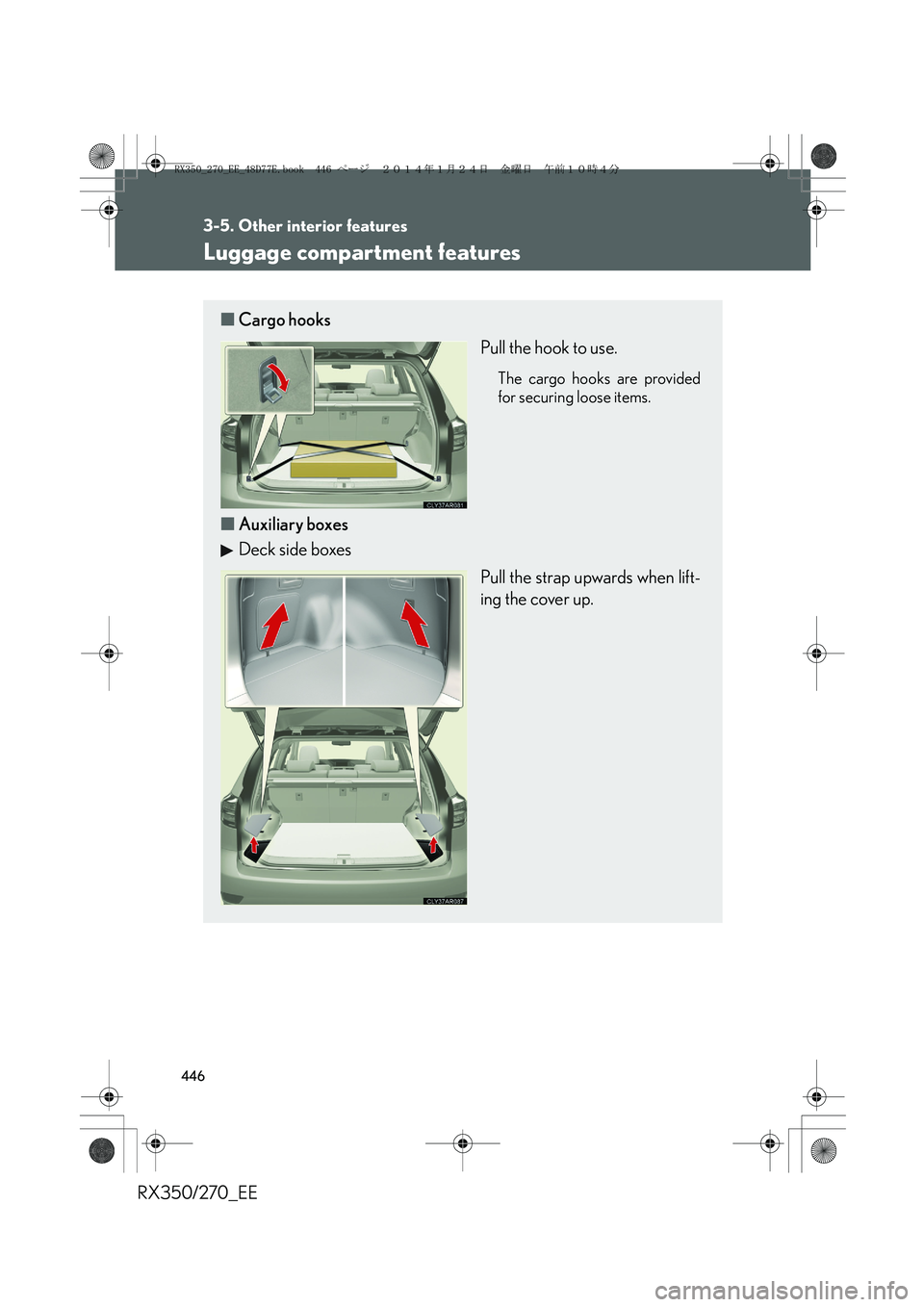
■Cargo hooks
Pull the hook to use.
The cargo hooks are provided
for securing loose items.
■Auxiliary boxes
Deck side boxes
Pull the strap upwards when lift-
ing the cover up.
RX350_270_EE_48D77E.book 446 ページ 2014年1月24日 金曜日 午前10時4分