steering LEXUS RX270 2014 Workshop Manual
[x] Cancel search | Manufacturer: LEXUS, Model Year: 2014, Model line: RX270, Model: LEXUS RX270 2014Pages: 652, PDF Size: 48.98 MB
Page 247 of 652
247
2-4. Using other driving systems
2
When driving
RX350/270_EE
CAUTION
■Conditions under which the vehicle-to-vehicle distance control may not function
correctly
Apply the brakes as necessary in the following conditions as the radar sensor may
not be able to correctly detect vehicles ahead, and a fatal or serious accident may
result:
●When water or snow thrown up by the surrounding vehicles hinders the function-
ing of the radar sensor
●When your vehicle is pointing upwards (caused by a heavy load in the luggage
compartment etc.)
●When the road curves or when the lanes are narrow
●When steering wheel operation or your position in the lane is unstable
●When the vehicle ahead of you decelerates suddenly
■Handling the radar sensor
Observe the following to ensure the cruise control system can function effectively.
Otherwise, the system may not function correctly and could result in an accident.
●Keep the sensor and grille cover clean at all times.
Clean the sensor and grille cover with a soft cloth so you do not mark or damage
them.
●Do not subject the sensor or surrounding area to a strong impact.
If the sensor moves even slightly off position, the system may malfunction. If the
sensor or surrounding area is subject to a strong impact, always have the area
inspected and adjusted by any authorized Lexus dealer or repairer, or another
duly qualified and equipped professional.
●Do not disassemble the sensor.
●Do not attach accessories or stickers to the sensor, grille cover or surrounding
area.
●Do not modify or paint the sensor and grille cover.
●Do not replace them with non-genuine parts.
RX350_270_EE_48D77E.book 247 ページ 2014年1月24日 金曜日 午前10時4分
Page 269 of 652
269
2-4. Using other driving systems
2
When driving
RX350/270_EE
■Flicker effect
When the camera is used under fluorescent light, sodium lights, or mercury lights
etc., the lights and the illuminated areas may appear to flicker.
CAUTION
■When using the rear view monitor system, observe the following precautions to
avoid an accident that could result in death or serious injuries:
●Never depend solely on the monitor system when reversing.
●Always check visually and with the mirrors to confirm your intended path is clear.
●Use your own eyes to confirm the vehicle’s surroundings, as the displayed image
may become faint or dark, and moving images will be distorted, or not entirely
visible when the outside temperature is low. When backing up, be sure to check
behind and all around the vehicle visually and with the mirrors before proceeding.
●Always check the vehicle surrounding area, because the guide lines are ancillary
lines.
●The guide lines are ancillary lines and do not change even if the steering wheel is
turned.
●Depicted distances between objects and flat surfaces differ from actual dis-
tances.
●Do not use the system if the back door is open.
RX350_270_EE_48D77E.book 269 ページ 2014年1月24日 金曜日 午前10時4分
Page 271 of 652
271
2-4. Using other driving systems
2
When driving
RX350/270_EE
Driving assist systems
To help enhance driving safety and performance, the following systems
operate automatically in response to various driving situations. Be aware,
however, that these systems are supplementary and should not be relied
upon too heavily when operating the vehicle.
■ABS (Anti-lock Brake System)
Helps to prevent wheel lock when the brakes are applied suddenly, or if
the brakes are applied while driving on a slippery road surface
■Brake assist
Generates an increased level of braking force after the brake pedal is
depressed, when the system detects a panic stop situation
■VSC (Vehicle Stability Control)
Helps the driver to control skidding when swerving suddenly or turning on
slippery road surfaces
■TRC (Traction Control)
Helps to maintain drive power and prevent any of the drive wheels from
spinning when starting the vehicle or accelerating on slippery roads
■Hill-start assist control
→P. 2 7 8
■EPS (Electric Power Steering)
Employs an electric motor to reduce the amount of effort needed to turn
the steering wheel
■Active Torque Control 4WD system (AWD models)
Automatically switches from front-wheel drive to AWD (All-Wheel Drive)
according to driving conditions, helping to ensure reliable handling and
stability. Examples of conditions where the system will switch to AWD are
when cornering, going uphill, starting off or accelerating, and when the
road surface is slippery due to snow or rain etc.
■VSC+ (Vehicle Stability Control +) (if equipped)
Provides cooperative control of the ABS, TRC, VSC and EPS.
Helps to maintain directional stability when swerving on slippery road sur-
faces by controlling steering performance
RX350_270_EE_48D77E.book 271 ページ 2014年1月24日 金曜日 午前10時4分
Page 274 of 652
274
2-4. Using other driving systems
RX350/270_EE
■When the message is displayed on the multi-information display showing that
TRC has been disabled even if the VSC off switch has not been pressed
TRC and hill-start assist control cannot be operated. Contact your any authorized
Lexus dealer or repairer, or another duly qualified and equipped professional.
■Sounds and vibrations caused by the ABS, VSC, TRC and brake assist
●A sound may be heard from the engine compartment when the engine is
started or just after the vehicle begins to move. This sound does not indicate that
a malfunction has occurred in any of these systems.
●Any of the following conditions may occur when the above systems are operat-
ing. None of these indicates that a malfunction has occurred.
• Vibrations may be felt through the vehicle body and steering.
• A motor sound may be heard after the vehicle comes to a stop.
• The brake pedal may pulsate slightly after the ABS is activated.
• The brake pedal may move down slightly after the ABS is activated.
■EPS operation sound
When the steering wheel is operated, a motor sound (whirring sound) may be
heard. This does not indicate a malfunction.
■Reactivation of the TRC/VSC systems
Turning off the engine after turning off the TRC/VSC systems will automatically
reactivate them.
■Reactivation of the TRC system linked to vehicle speed
When only the TRC system is turned off, the TRC system will turn on when vehicle
speed increases. However, when both TRC and VSC systems are turned off, the
systems will not turn on even when vehicle speed increases.
■Reduced effectiveness of the EPS system
The effectiveness of the EPS system is reduced to prevent the system from over-
heating when there is frequent steering input over an extended period of time. The
steering wheel may feel heavy as a result. Should this occur, refrain from excessive
steering input or stop the vehicle and turn the engine off. The EPS system should
return to normal within 10 minutes.
RX350_270_EE_48D77E.book 274 ページ 2014年1月24日 金曜日 午前10時4分
Page 291 of 652
291
2-5. Driving information
2
When driving
RX350/270_EE●Stay on established roads. When conditions are wet, driving tech-
niques should be changed or travel delayed to prevent damage to
roads.
CAUTION
■Off-road driving precautions
Always observe the following precautions to minimize the risk of death or serious
injury or damage to your vehicle:
●Drive carefully when off the road. Do not take unnecessary risks by driving in
dangerous places.
●Do not grip the steering wheel spokes when driving off-road. A bad bump could
jerk the wheel and injure your hands. Keep both hands and especially your
thumbs on the outside of the rim.
●Always check your brakes for effectiveness immediately after driving in sand,
mud, water or snow.
●After driving through tall grass, mud, rock, sand, water, etc., check that there is no
grass, bush, paper, rags, stone, sand, etc. adhering or trapped to the underbody.
Clear off any such matter from the underbody. If the vehicle is used with these
materials trapped or adhering to the underbody, a breakdown or fire could occur.
●When driving off-road or in rugged terrain, do not drive at excessive speeds,
jump, make sharp turns, strike objects, etc. This may cause loss of control or vehi-
cle rollover causing death or serious injury. You are also risking expensive dam-
age to your vehicle’s suspension and chassis.
RX350_270_EE_48D77E.book 291 ページ 2014年1月24日 金曜日 午前10時4分
Page 294 of 652
294
2-5. Driving information
RX350/270_EE
CAUTION
■Storage precautions
Observe the following precautions.
Failure to do so may result in death or serious injury.
●Stow cargo and luggage in the luggage compartment whenever possible.
●Do not stack cargo and luggage in the luggage compartment higher than the
seatbacks.
Such items may be thrown about and possibly injure people in the vehicle in the
event of sudden braking or in an accident.
●Do not place cargo or luggage in or on the following locations as the items may
get under the brake or accelerator pedal and prevent the pedals from being
depressed properly, block the driver’s vision, or hit the driver or passengers,
causing an accident:
• At the feet of the driver
• On the front passenger or rear seats (when stacking items)
• On the luggage cover
• On the instrument panel
• On the dashboard
●Secure all items in the occupant compartment, as they may shift and injure some-
one in the event of sudden braking, sudden swerving or an accident.
●Never allow anyone to ride in the luggage compartment. It is not designed for
passengers. They should ride in their seats with their seat belts properly fastened.
Otherwise, they are much more likely to suffer death or serious bodily injury, in
the event of sudden braking, sudden swerving or an accident.
■Load and distribution
●Do not overload your vehicle.
●Do not apply loads unevenly.
Improper loading may cause deterioration of steering or braking control which
may cause death or serious injury.
RX350_270_EE_48D77E.book 294 ページ 2014年1月24日 金曜日 午前10時4分
Page 298 of 652
298
2-5. Driving information
RX350/270_EE
■Tire chain installation
Observe the following precautions when installing and removing chains:
●Install and remove tire chains in a safe location.
●Install tire chains on the front tires only. Do not install tire chains on the rear tires.
●Install tire chains on front tires as tightly as possible. Retighten chains after driv-
ing 0.5 1.0 km (1 /4 1 /2 mile).
●Install tire chains following the instructions provided with the tire chains.
CAUTION
■Driving with snow tires
Observe the following precautions to reduce the risk of accidents.
Failure to do so may result in a loss of vehicle control and cause death or serious
injury.
●Use tires of the specified size.
●Maintain the recommended level of air pressure.
●Do not drive at speeds in excess of the speed limit or the speed limit specified for
the snow tires being used.
●Use snow tires on all, not just some wheels.
■Driving with tire chains
Observe the following precautions to reduce the risk of accidents.
Failure to do so may result in the vehicle being unable to be driven safely, and may
cause death or serious injury.
●Do not drive in excess of the speed limit specified for the tire chains being used,
or 50 km/h (30 mph), whichever is lower.
●Avoid driving on bumpy road surfaces or over potholes.
●Avoid sudden acceleration, abrupt steering, sudden braking and shifting opera-
tions that cause sudden engine braking.
●Slow down sufficiently before entering a curve to ensure that vehicle control is
maintained.
RX350_270_EE_48D77E.book 298 ページ 2014年1月24日 金曜日 午前10時4分
Page 307 of 652
307
2-5. Driving information
2
When driving
RX350/270_EE
Guidance
Your vehicle will handle differently when towing a trailer. In order to avoid
accident, death or serious injury, keep the following in mind when towing:
■Checking connections between trailer and lights
Stop the vehicle and check the operation of the connection between
the trailer and lights after driving for a brief period as well as before
starting off.
■Practicing driving with a coupled trailer
●Get the feel for turning, stopping and reversing with the trailer cou-
pled by practicing in an area with no or light traffic.
●When reversing with a coupled trailer, hold the section of the steer-
ing wheel nearest to you and rotate clockwise to turn the trailer left
or counterclockwise to turn it right. Always rotate a little at a time to
prevent steering error. Have someone guide you when reversing to
lessen the risk of an accident.
■Increasing vehicle-to-vehicle distance
At a speed of 10 km/h (6 mph), the distance to the vehicle running
ahead of you should be equivalent to or greater than the combined
length of your vehicle and trailer. Avoid sudden braking that may cause
skidding. Otherwise, the vehicle may spin out of control. This is espe-
cially true when driving on wet or slippery road surfaces.
■Sudden acceleration/steering input/cornering
Executing sharp turns when towing may result in the trailer colliding
with your vehicle. Decelerate well in advance when approaching turns
and take them slowly and carefully to avoid sudden braking.
RX350_270_EE_48D77E.book 307 ページ 2014年1月24日 金曜日 午前10時4分
Page 313 of 652
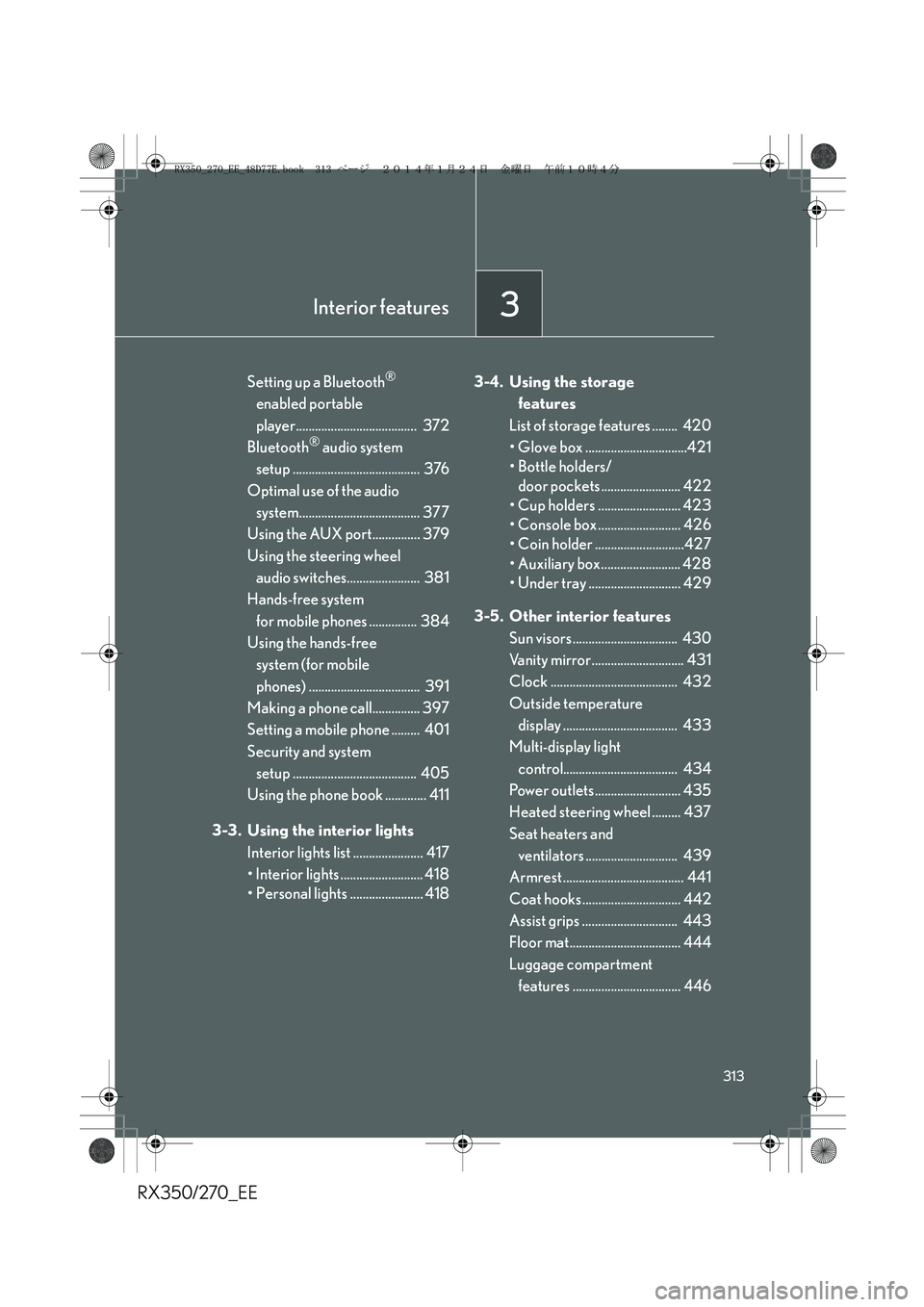
3Interior features
313
RX350/270_EE
Setting up a Bluetooth®
enabled portable
player...................................... 372
Bluetooth
® audio system
setup ........................................ 376
Optimal use of the audio
system...................................... 377
Using the AUX port............... 379
Using the steering wheel
audio switches....................... 381
Hands-free system
for mobile phones ............... 384
Using the hands-free
system (for mobile
phones) ................................... 391
Making a phone call............... 397
Setting a mobile phone ......... 401
Security and system
setup ....................................... 405
Using the phone book ............. 411
3-3. Using the interior lights
Interior lights list ...................... 417
• Interior lights .......................... 418
• Personal lights ....................... 4183-4. Using the storage
features
List of storage features ........ 420
• Glove box ................................421
• Bottle holders/
door pockets ......................... 422
• Cup holders .......................... 423
• Console box .......................... 426
• Coin holder ............................427
• Auxiliary box......................... 428
• Under tray ............................. 429
3-5. Other interior features
Sun visors ................................. 430
Vanity mirror............................. 431
Clock ........................................ 432
Outside temperature
display .................................... 433
Multi-display light
control.................................... 434
Power outlets........................... 435
Heated steering wheel ......... 437
Seat heaters and
ventilators ............................. 439
Armrest ...................................... 441
Coat hooks ............................... 442
Assist grips .............................. 443
Floor mat................................... 444
Luggage compartment
features .................................. 446
RX350_270_EE_48D77E.book 313 ページ 2014年1月24日 金曜日 午前10時4分
Page 324 of 652
324
3-2. Using the audio system
RX350/270_EE
■Using mobile phones
Interference may be heard through the audio system’s speakers if a mobile phone is
being used inside or close to the vehicle while the audio system is operating.
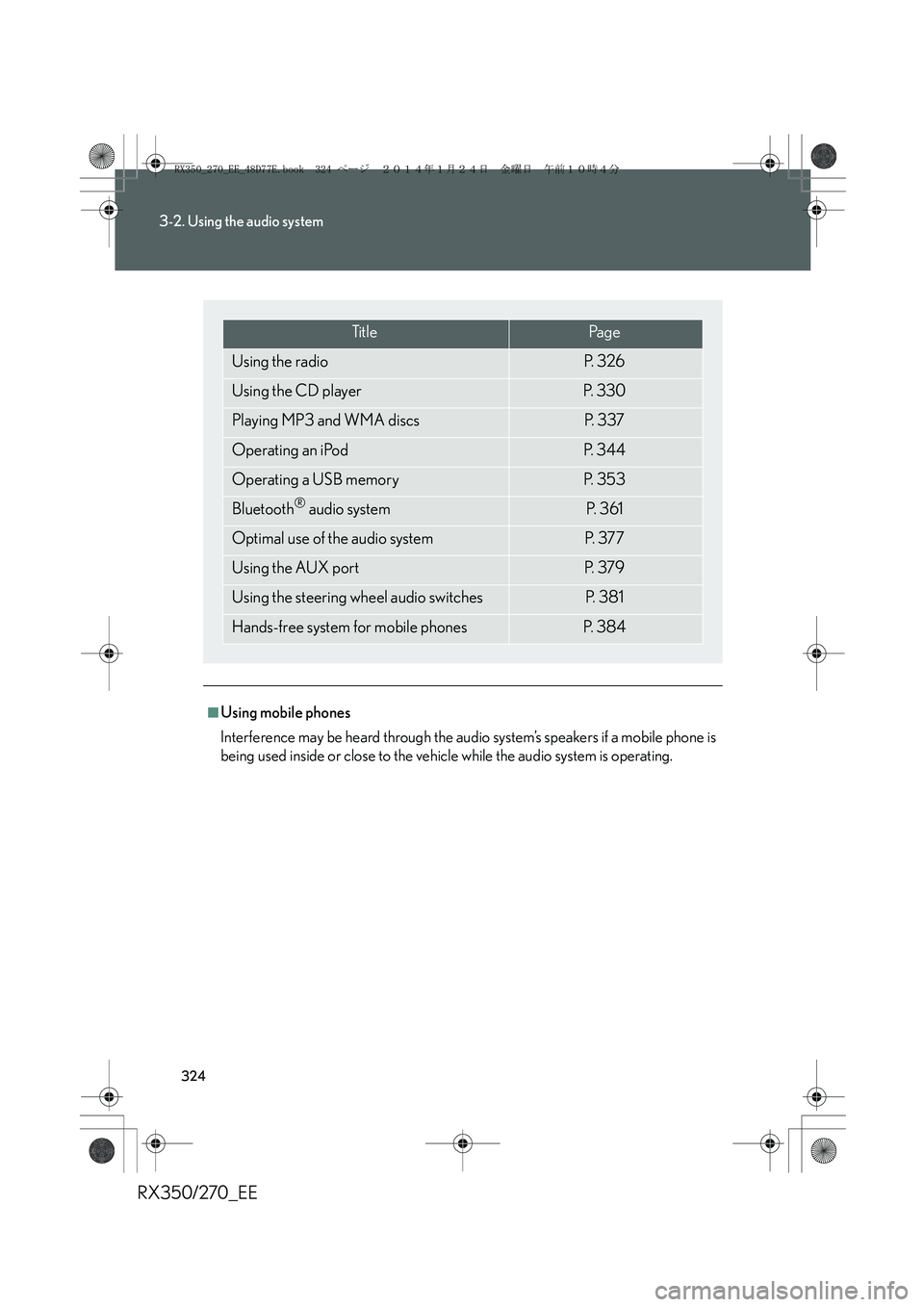
Ti t l ePa g e
Using the radioP. 3 2 6
Using the CD playerP. 3 3 0
Playing MP3 and WMA discsP. 3 3 7
Operating an iPodP. 3 4 4
Operating a USB memoryP. 3 5 3
Bluetooth® audio systemP. 3 6 1
Optimal use of the audio systemP. 3 7 7
Using the AUX portP. 3 7 9
Using the steering wheel audio switchesP. 3 8 1
Hands-free system for mobile phonesP. 3 8 4
RX350_270_EE_48D77E.book 324 ページ 2014年1月24日 金曜日 午前10時4分