instrument panel LEXUS RX350 2015 User Guide
[x] Cancel search | Manufacturer: LEXUS, Model Year: 2015, Model line: RX350, Model: LEXUS RX350 2015Pages: 886, PDF Size: 11 MB
Page 194 of 886
1942-2. Instrument cluster
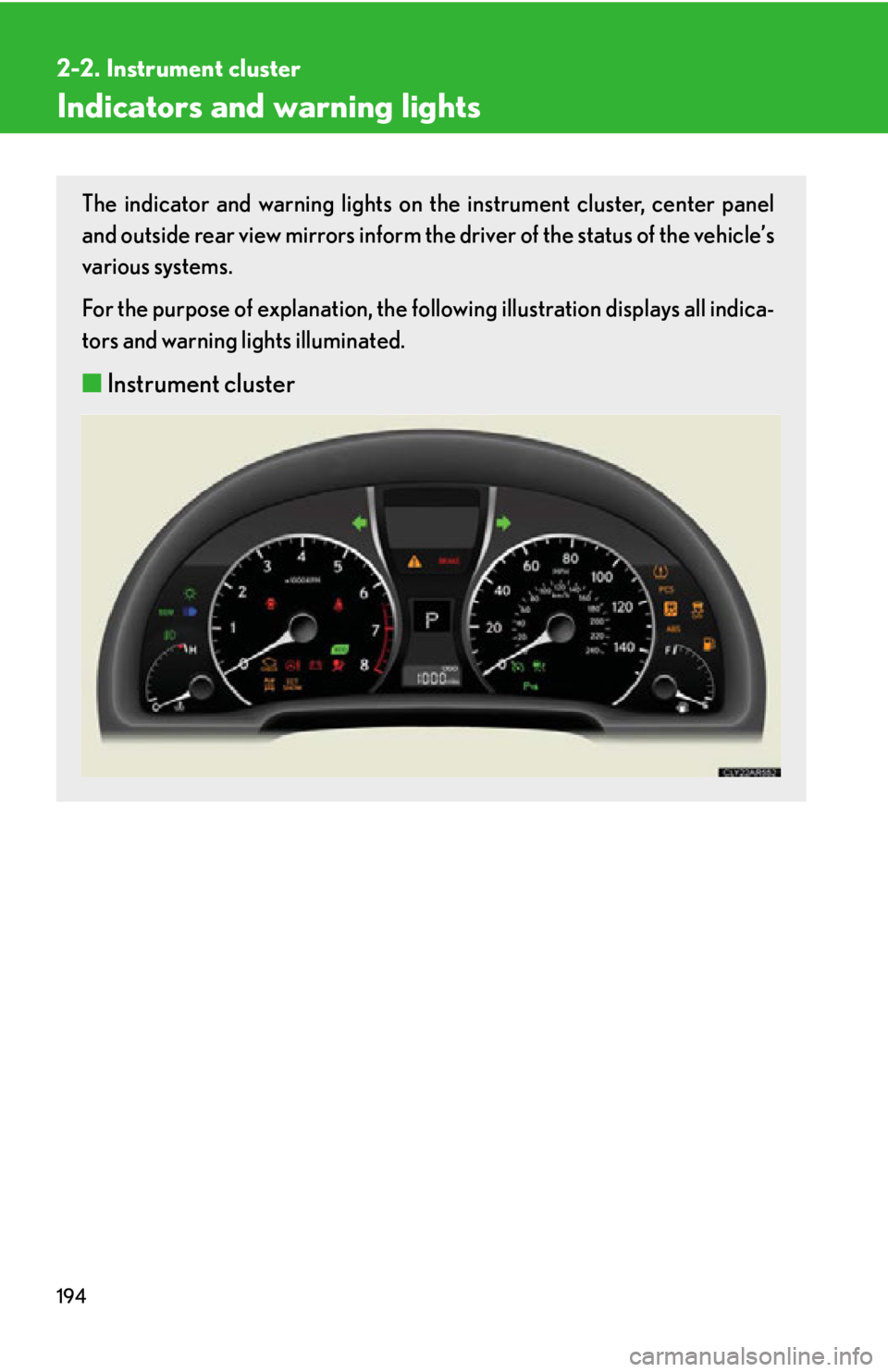
Indicators and warning lights The indicator and warning lights on th e instrument cluster, center panel
and outside rear view mirrors inform the driver of the status of the vehicle’s
various systems.
For the purpose of explanation, the following illustration displays all indica-
tors and warning lights illuminated.
■ Instrument cluster
Page 195 of 886
1952-2. Instrument cluster
2
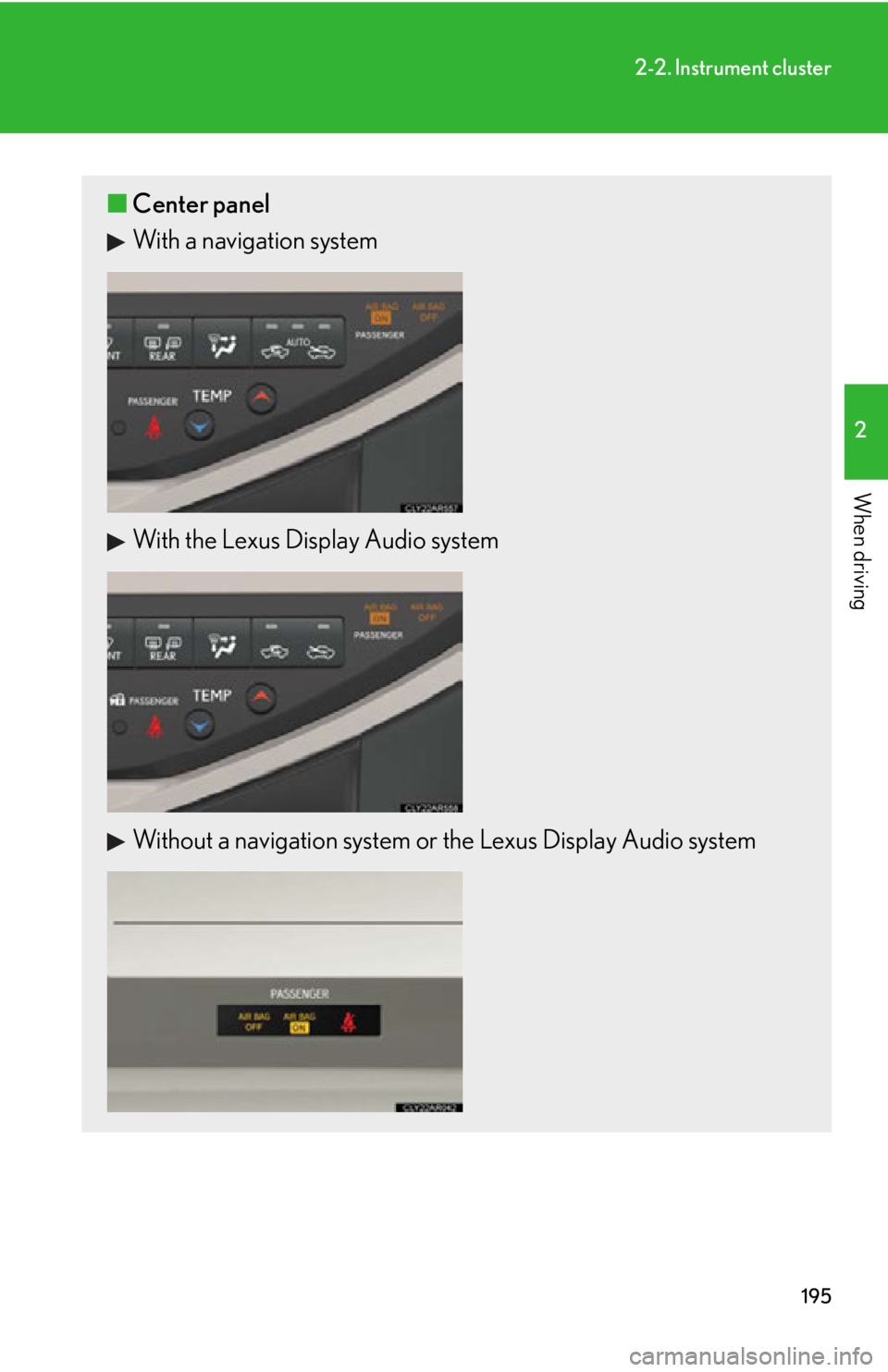
When driving ■ Center panel
With a navigation system
With the Lexus Display Audio system
Without a navigation system or the Lexus Display Audio system
Page 211 of 886
2112
When driving 2-3. Operating the lights and windshield wipers
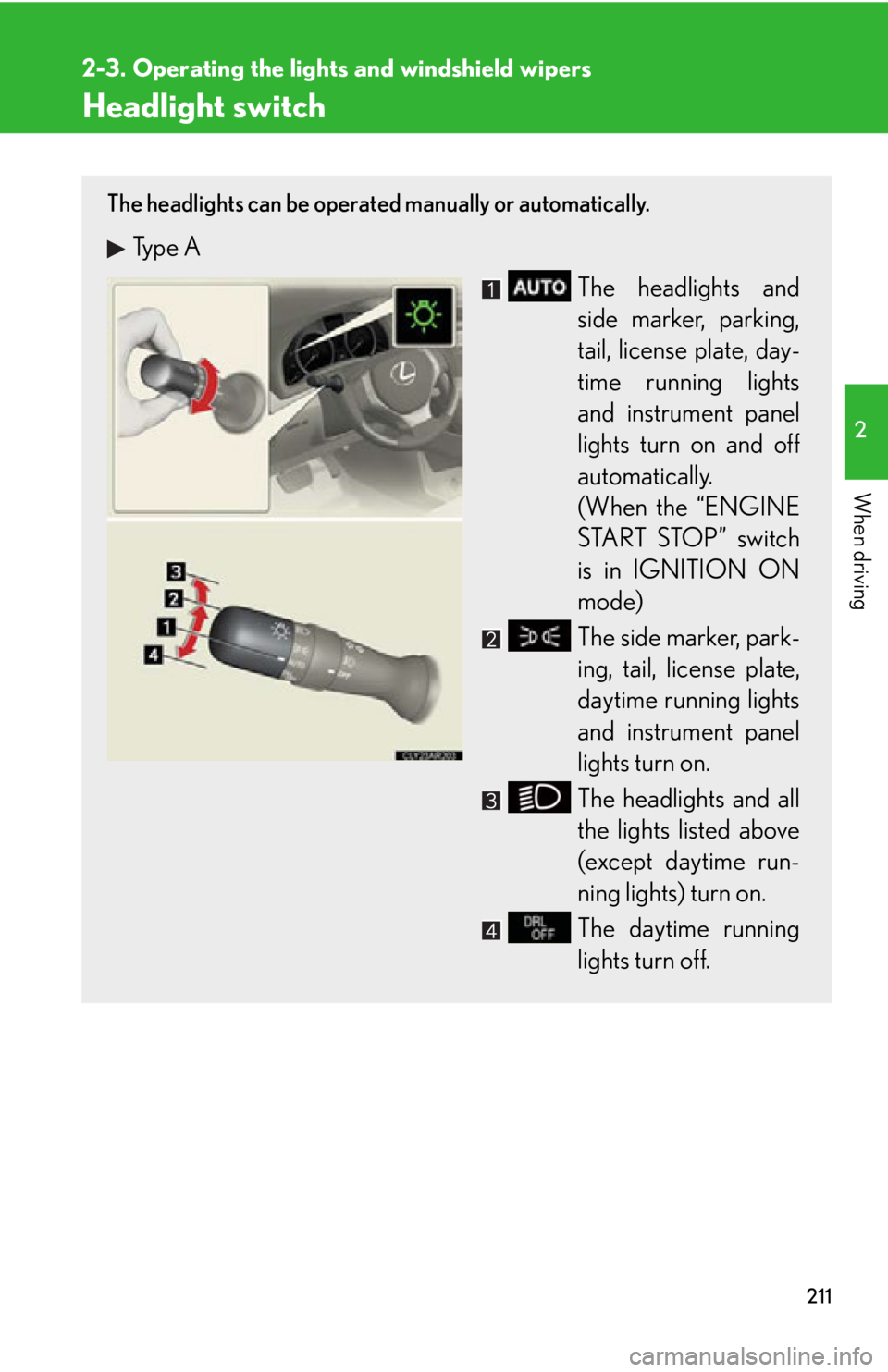
Headlight switch The headlights can be operated manually or automatically.
Type A
The headlights and
side marker, parking,
tail, license plate, day-
time running lights
and instrument panel
lights turn on and off
automatically.
(When the “ENGINE
START STOP” switch
is in IGNITION ON
mode)
The side marker, park-
ing, tail, license plate,
daytime running lights
and instrument panel
lights turn on.
The headlights and all
the lights listed above
(except daytime run-
ning lights) turn on.
The daytime running
lights turn off.
Page 212 of 886
2122-3. Operating the lights and windshield wipers
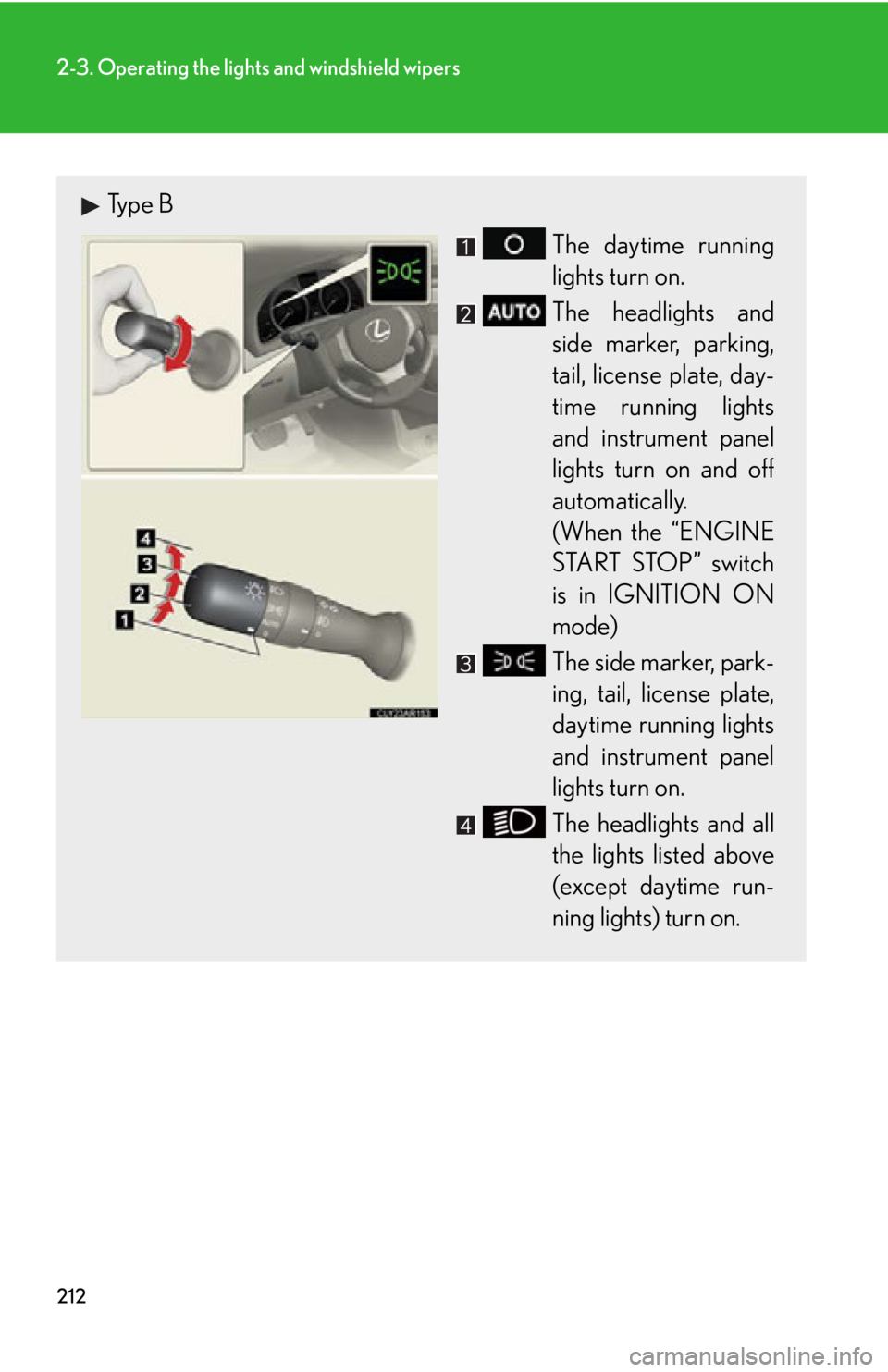
Type B
The daytime running
lights turn on.
The headlights and
side marker, parking,
tail, license plate, day-
time running lights
and instrument panel
lights turn on and off
automatically.
(When the “ENGINE
START STOP” switch
is in IGNITION ON
mode)
The side marker, park-
ing, tail, license plate,
daytime running lights
and instrument panel
lights turn on.
The headlights and all
the lights listed above
(except daytime run-
ning lights) turn on.
Page 298 of 886
2982-5. Driving information
As shown in the example above, if the number of occupants increases,
the cargo and luggage load will be re duced by an amount that equals the
increased weight due to the addition al occupants. In other words, if an
increase in the number of occupants ca uses an excess of the total load
capacity (combined weight of occupants plus cargo and luggage load),
you must reduce the cargo and luggage on your vehicle. CAUTION■
Things that must not be carri ed in the luggage compartment
The following things may cause a fire if loaded in the luggage compartment: ●
Receptacles containing gasoline●
Aerosol cans■
Storage precautions
Observe the following precautions.
Failure to do so may result in death or serious injury. ●
Stow cargo and luggage in the lugga ge compartment whenever possible.●
Do not stack cargo and luggage in the luggage compartment higher than the
seatbacks.
Such items may be thrown about and possib ly injure people in the vehicle in the
event of sudden braking or in an accident.●
Do not place cargo or luggage in or on the following locations as the items may
get under the brake or accelerator pedal and prevent the pedals from being
depressed properly, block the driver’s vision, or hit the driver or passengers,
causing an accident:
• At the feet of the driver
• On the front passenger or rear seats (when stacking items)
• On the luggage cover
• On the instrument panel
•On the dashboard
●
Secure all items in the occupant compartment, as they may shift and injure some-
one in the event of sudden braking, sudden swerving or an accident.
Page 601 of 886
6013-6. Using the storage features
3
Interior features
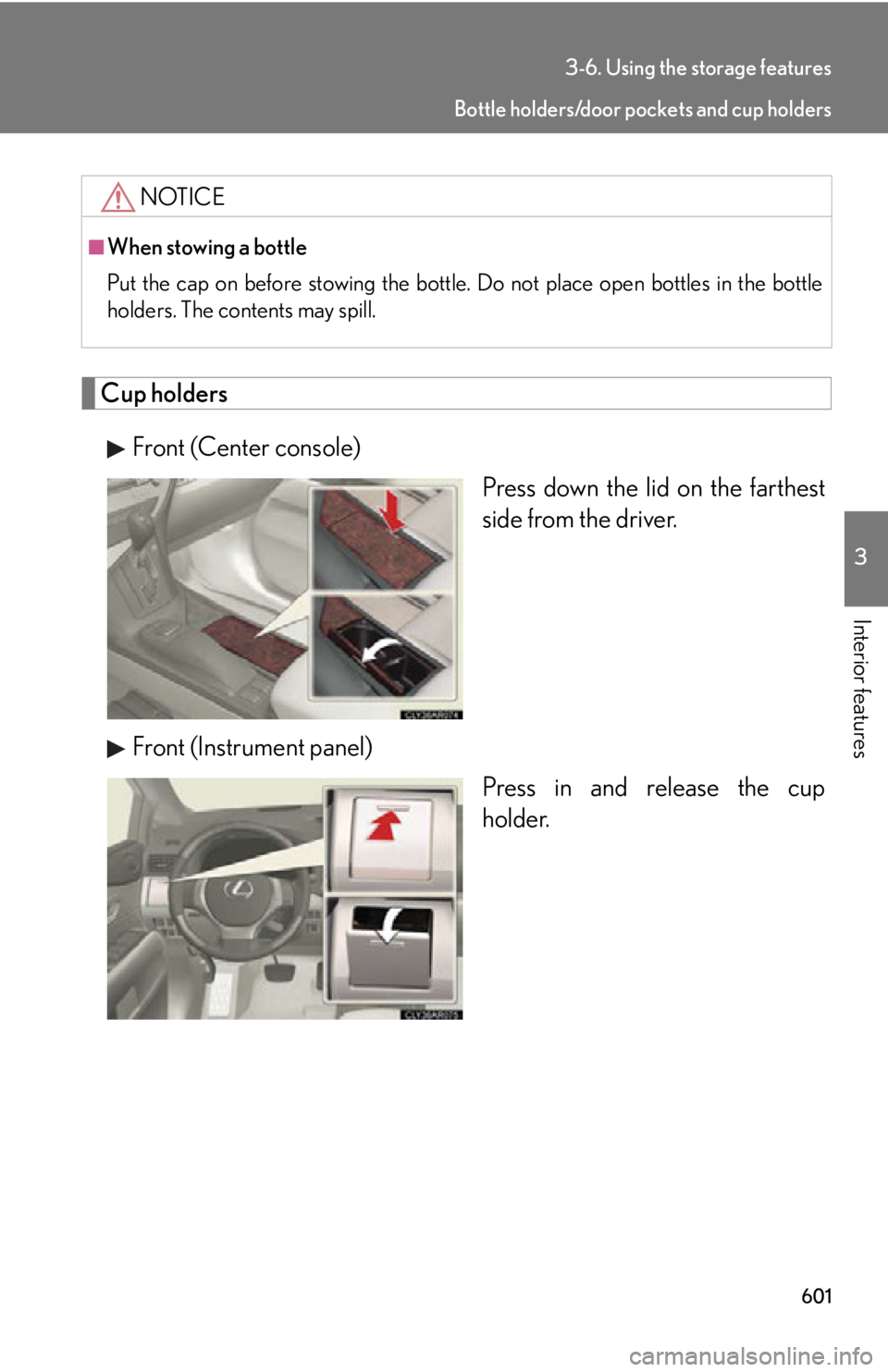
Cup holders
Front (Center console)
Press down the lid on the farthest
side from the driver.
Front (Instrument panel)
Press in and re lease the cup
holder.NOTICE■
When stowing a bottle
Put the cap on before stowing the bottle. Do not place open bottles in the bottle
holders. The contents may spill. Bottle holders/door pockets and cup holders
Page 615 of 886
6153-7. Other interior features
3
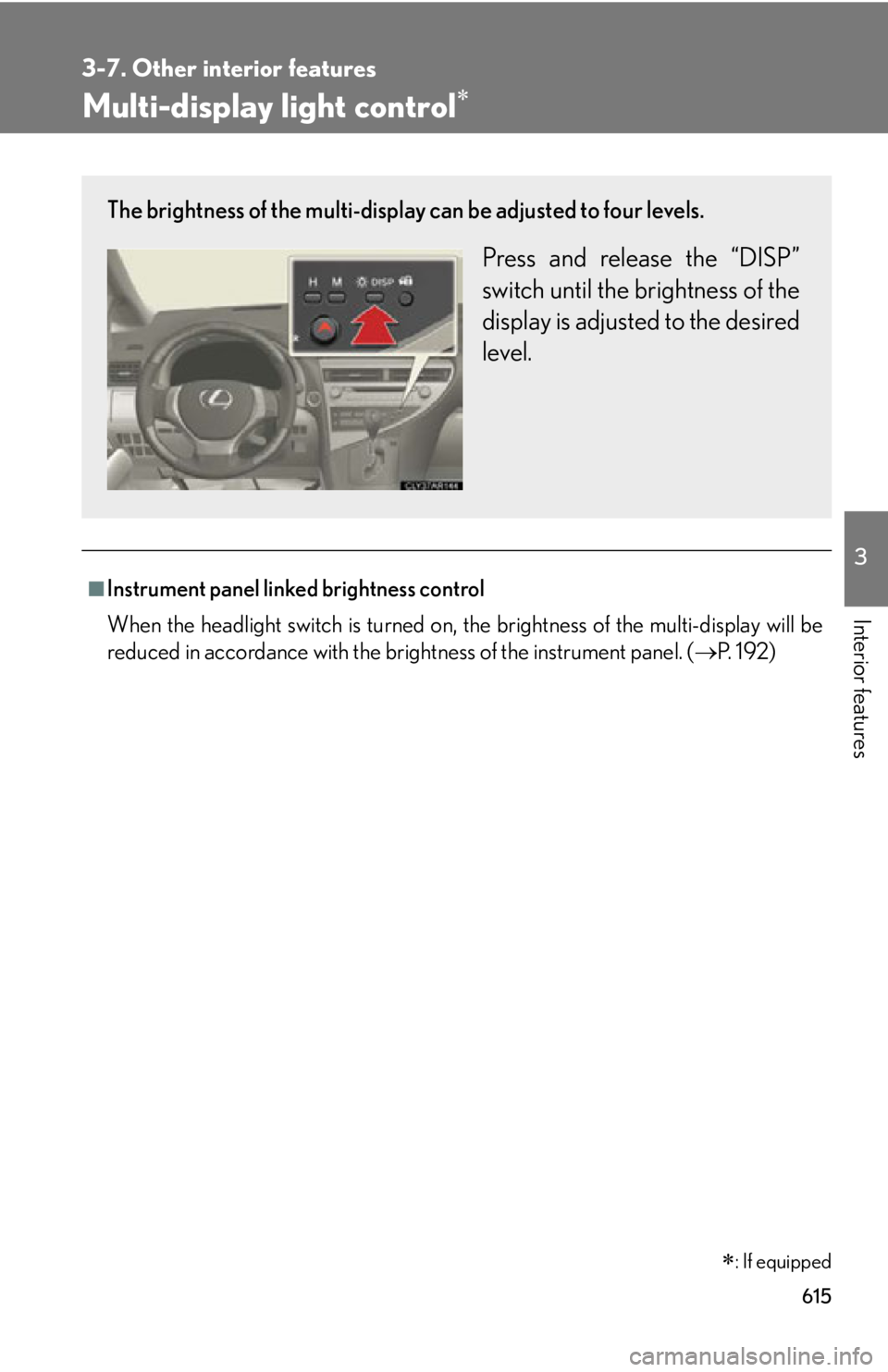
Interior features Multi-display light control
■
Instrument panel linked brightness control
When the headlight switch is turned on, the brightness of the multi-display will be
reduced in accordance with the brig htness of the instrument panel. ( P. 1 9 2 )
: If equippedThe brightness of the multi-display can be adjusted to four levels.
Press and release the “DISP”
switch until the brightness of the
display is adjusted to the desired
level.
Page 654 of 886
6544-1. Maintenance and care
■
Caring for leather areas
Lexus recommends cleaning the interior of the vehicle at least twice a year to main-
tain the quality of the vehicle’s interior.■
Shampooing the carpets
There are several commercial foaming-type cleaners available. Use a sponge or
brush to apply the foam. Rub in overlappin g circles. Do not apply water. Excellent
results are obtained by keeping the carpet as dry as possible.■
Seat belts
Clean with mild soap and lukewarm water using a cloth or sponge. Also check the
belts periodically for excessive wear, fraying or cuts.
CAUTION■
Water in the vehicle ●
Do not splash or spill liquid in the vehicle.
Doing so may cause electrical components etc. to malfunction or catch fire.●
Do not get any of the SRS components or wiring in the vehicle interior wet.
( P. 121)
An electrical malfunction may cause the airbags to deploy or not function prop-
erly, resulting in death or severe injury.■
Cleaning the interior (especially instrument panel)
Do not use polish wax or polish cleaner. The instrument panel may reflect off the
windshield, obstructing the driver's view and leading to an accident, resulting in
death or serious injury.
Page 655 of 886
6554-1. Maintenance and care
4
Maintenance and care NOTICE■
Cleaning detergents ●
Do not use the following types of detergent, as they may discolor the vehicle inte-
rior or cause streaks or damage to painted surfaces:
• Non-seat portions: Organic substances such as benzene or gasoline, alkaline
or acidic solutions, dye, or bleach
• Seats: Acidic solutions, such as thinner, benzene, or alcohol●
Do not use polish wax or polish cleaner. The instrument panel's or other interior
part’s painted surface may be damaged.■
Preventing damage to leather surfaces
Observe the following precautions to avoid damage to and deterioration of leather
surfaces: ●
Remove any dust or dirt from leather surfaces immediately.●
Do not expose the vehicle to direct sunlight for extended pe riods of time. Park
the vehicle in the shade, especially during summer.●
Do not place items made of vinyl, plastic, or that contain wax on the upholstery, as
they may stick to the leather surface if th e vehicle interior heats up significantly.■
Water on the floor
Do not wash the vehicle floor with water.
Vehicle systems such as the audio syst em may be damaged if water comes into
contact with electrical components under the floor of vehicle. Water may also
cause the body to rust.■
Cleaning the inside of the rear window ●
Do not use glass cleaner to clean the re ar window, as this may cause damage to
the rear window defogger heater wires or antenna. Use a cloth dampened with
lukewarm water to gently wipe the window clean. Wipe the window in strokes
running parallel to the heater wires or antenna.
●
Be careful not to scratch or damage the heater wires or antenna.
Page 703 of 886
7034-3. Do-it-yourself maintenance
4
Maintenance and care Checking and replacing fuses If any of the electrical components do not operate, a fuse may have blown.
If this happens, check and re place the fuses as necessary.
Turn the “ENGINE START STOP” switch off.
After a system failure, see “Fuse layout and amperage ratings”
for details about which fuse to check. ( P. 7 0 6 )
Remove the engine compartment cover. ( P. 671)
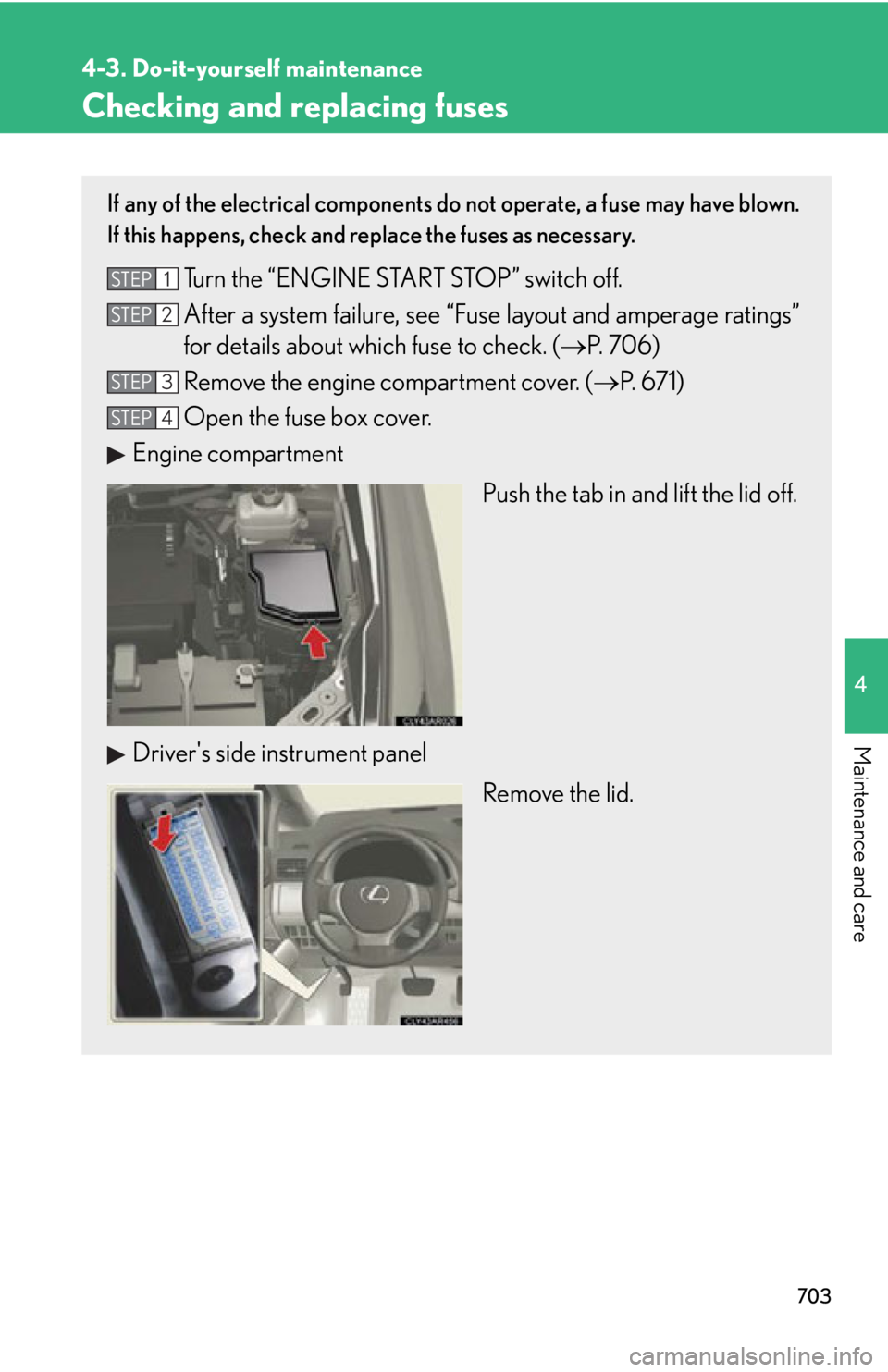
Open the fuse box cover.
Engine compartment
Push the tab in and lift the lid off.
Driver's side instrument panel
Remove the lid.STEP 1
STEP 2
STEP 3
STEP 4