radio LEXUS RX350 2015 User Guide
[x] Cancel search | Manufacturer: LEXUS, Model Year: 2015, Model line: RX350, Model: LEXUS RX350 2015Pages: 886, PDF Size: 11 MB
Page 131 of 886

1311-7. Safety information
1
Before driving CAUTION■
SRS airbag precautions ●
Do not place anything, such as a cushion, on the front passenger's seat. Doing so
will disperse the passenger's weight, wh ich prevents the sensor from detecting
the passenger's weight properly. As a re sult, the SRS front passenger airbag may
not deploy in the event of a collision.■
Modification and disposal of SRS airbag system components
Do not dispose of your vehicle or perfor m any of the following modifications with-
out consulting your Lexus dealer.
The SRS airbags may malfunction or deploy (inflate) accidentally, causing death or
serious injury. ●
Installation, removal, disassembly and repair of the SRS airbags●
Repairs, modifications, removal or replace ment of the steering wheel, instrument
panel, dashboard, seats or seat upholstery, front, side and rear pillars or roof side
rails●
Repairs or modifications of the front fend er, front bumper, or side of the occupant
compartment●
Installation of a grille guard (bull bars, kangaroo bar, etc.), snow plows or winches●
Modifications to the vehi cle's suspension system●
Installation of elec tronic devices such as mobile two-way radios or CD players●
Modifications to your vehicle for a person with a physical disability
Page 241 of 886

2412-4. Using other driving systems
2
When driving ■
Certification
For vehicles sold in the U.S.A.
FCC ID: HYQDNMWR004
This device complies with part 15 of the FCC Rules. Operation is subject to the fol-
lowing two conditions: (1) This device may not cause harmful interference, and (2)
this device must accept any interference received, including interference that may
cause undesired operation.
FCC WARNING
Changes or modifications not expressly approved by the party responsible for
compliance could void the user’s authority to operate the equipment.
Radiofrequency radiation exposure Information:
This equipment complies with FCC radiatio n exposure limits set forth for an uncon-
trolled environment.
This equipment should be in stalled and operated with minimum distance of 20 cm
between the radiator (antenna) and your body.
This transmitter must not be co-located or operating in conjunction with any other
antenna or transmitter.
For vehicles sold in Canada
Operation is subject to the following two conditions: (1) this device may not cause
interference, and (2) this device must a ccept any interference, including interfer-
ence that may cause undesired operation of the device.
Page 253 of 886

2532-4. Using other driving systems
2
When driving ■
Sensor detection information ●
Certain vehicle conditions and the su rrounding environment may affect the
ability of a sensor to correctly detect an obstacle. Particular instances where this
may occur are listed below.
• There is dirt, snow or ice on a sensor.
• A sensor is frozen.
• A sensor is covered in any way.
• The vehicle is leaning considerably to one side.
• On an extremely bumpy road, on an incline, on gravel, or on grass
• The vicinity of the vehicle is noisy due to vehicle horns, motorcycle engines,
air brakes of large vehicles, or other loud noises producing ultrasonic waves.
• There is another vehicle equipped with parking assist sensor s in the vicinity.
• A sensor is coated with a sheet of spray or heavy rain.
• The vehicle is equipped with a fender pole or radio antenna.
• Towing eyelets are installed.
• A bumper or sensor receives a strong impact.
• The vehicle is approaching a tall or right-angled curb.
• In harsh sunlight or intense cold weather.
• A non-genuine Lexus suspension (low ered suspension, etc.) is installed.
In addition to the examples above, there are instances in which, because of their
shapes, signs and other objects may be judg ed by a sensor to be closer than they
are. ●
The shape of the obstacle may prevent a sensor from detecting it. Pay particular
attention to the following obstacles:
• Wires, fences, ropes, etc.
• Cotton, snow and other materi als that absorb sound waves
• Sharply-angled objects
•Low obstacles
• Tall obstacles with upper sections projec ting outwards in the direction of your
vehicle
■
If a message is displayed
P. 7 5 4
Page 283 of 886

2832-4. Using other driving systems
2
When driving ■
Certification
For vehicles sold in the U.S.A.
FCC ID: HYQDNMWR004
This device complies with part 15 of the FCC Rules. Operation is subject to the fol-
lowing two conditions: (1) This device may not cause harmful interference, and (2)
this device must accept any interference received, including interference that may
cause undesired operation.
FCC WARNING
Changes or modifications not expressly approved by the party responsible for
compliance could void the user's authority to operate the equipment.
Radiofrequency radiation exposure Information:
This equipment complies with FCC radiatio n exposure limits set forth for an uncon-
trolled environment.
This equipment should be in stalled and operated with minimum distance of 20 cm
between the radiator (antenna) and your body.
This transmitter must not be co-located or operating in conjunction with any other
antenna or transmitter.
For vehicles sold in Canada
Operation is subject to the following two conditions: (1) this device may not cause
interference, and (2) this device must a ccept any interference, including interfer-
ence that may cause undesired operation of the device.
Page 326 of 886
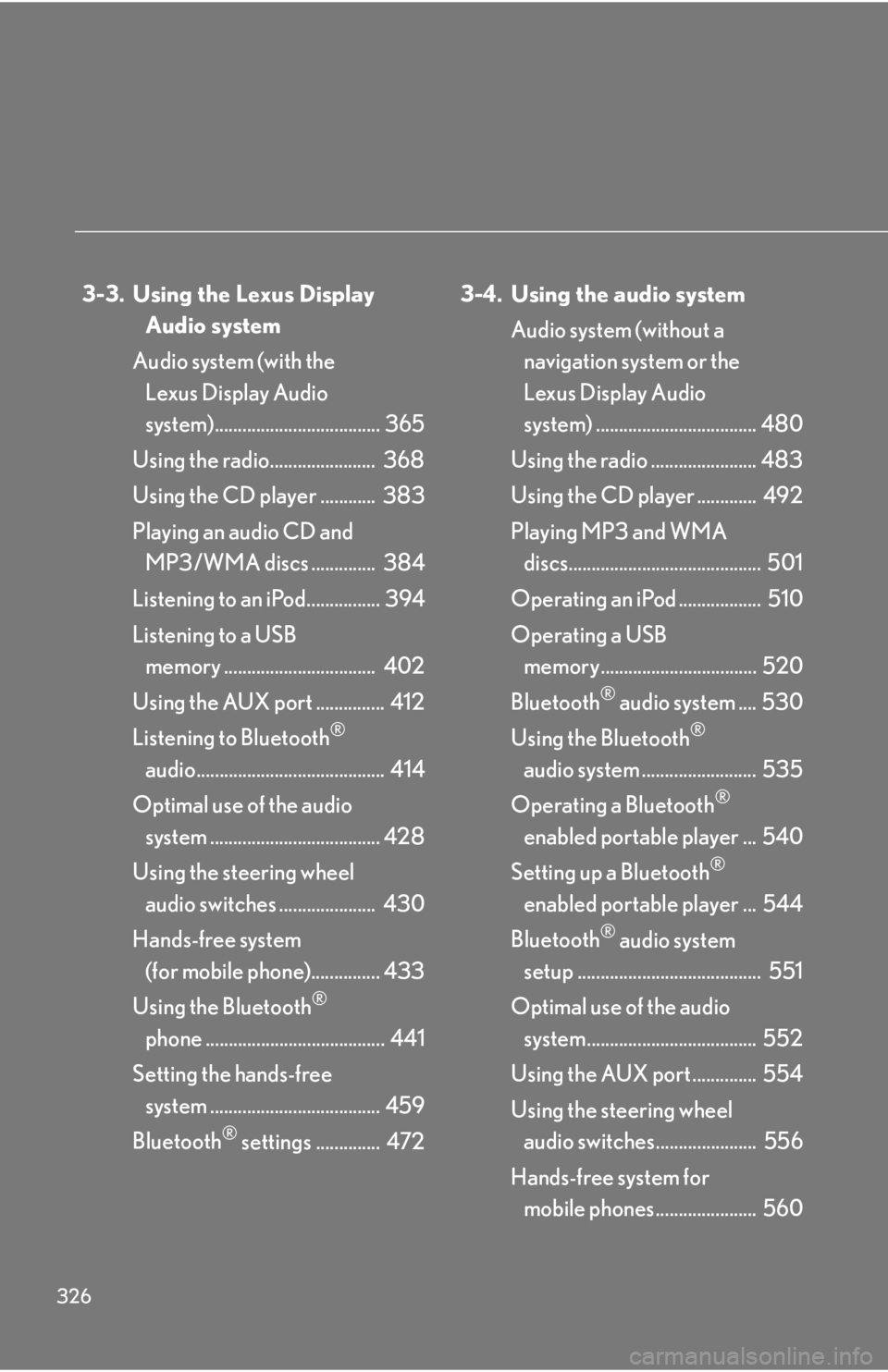
326 3-3. Using the Lexus Display
Audio system
Audio system (with the
Lexus Display Audio
system).................................... 365
Using the radio....................... 368
Using the CD player ............ 383
Playing an audio CD and
MP3/WMA discs .............. 384
Listening to an iPod................ 394
Listening to a USB
memory ................................. 402
Using the AUX port ............... 412
Listening to Bluetooth ®
audio......................................... 414
Optimal use of the audio
system ..................................... 428
Using the steering wheel
audio switches ..................... 430
Hands-free system
(for mobile phone)............... 433
Using the Bluetooth ®
phone ....................................... 441
Setting the hands-free
system ..................................... 459
Bluetooth ®
settings .............. 472 3-4. Using the audio system
Audio system (without a
navigation system or the
Lexus Display Audio
system) ................................... 480
Using the radio ....................... 483
Using the CD player ............. 492
Playing MP3 and WMA
discs.......................................... 501
Operating an iPod .................. 510
Operating a USB
memory.................................. 520
Bluetooth ®
audio system .... 530
Using the Bluetooth ®
audio system ......................... 535
Operating a Bluetooth ®
enabled portable player ... 540
Setting up a Bluetooth ®
enabled portable player ... 544
Bluetooth ®
audio system
setup ........................................ 551
Optimal use of the audio
system..................................... 552
Using the AUX port .............. 554
Using the steering wheel
audio switches...................... 556
Hands-free system for
mobile phones...................... 560
Page 336 of 886
3363-1. Lexus Display Audio system
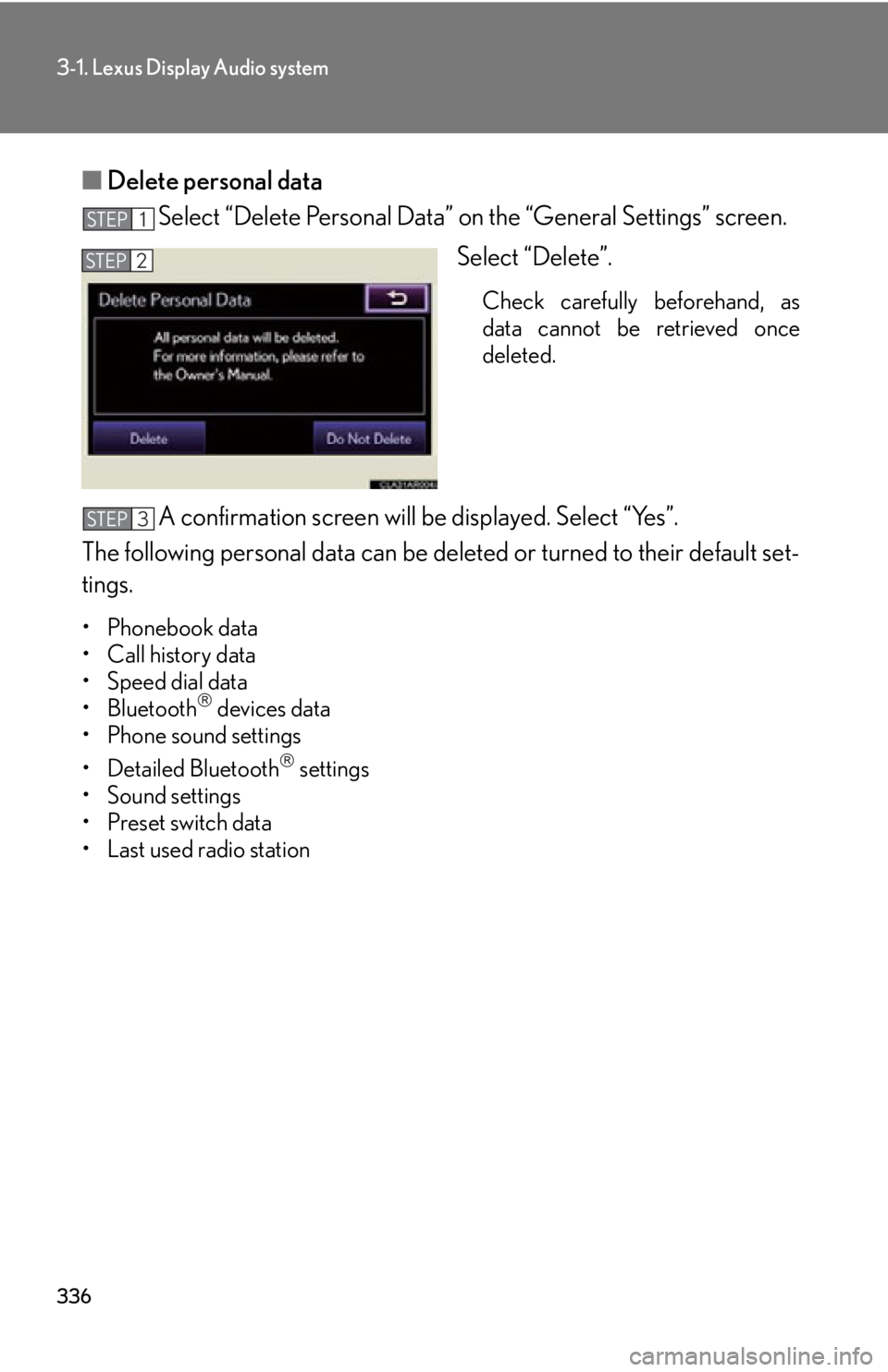
■ Delete personal data
Select “Delete Personal Data” on the “General Settings” screen.
Select “Delete”. Check carefully beforehand, as
data cannot be retrieved once
deleted.
A confirmation screen will be displayed. Select “Yes”.
The following personal data can be deleted or turn ed to their default set-
tings. •Phonebook data
• Call history data
• Speed dial data
•Bluetooth
devices data
• Phone sound settings
• Detailed Bluetooth
settings
• Sound settings
• Preset switch data
• Last used radio station STEP 1
STEP 2
STEP 3
Page 338 of 886
3383-1. Lexus Display Audio system
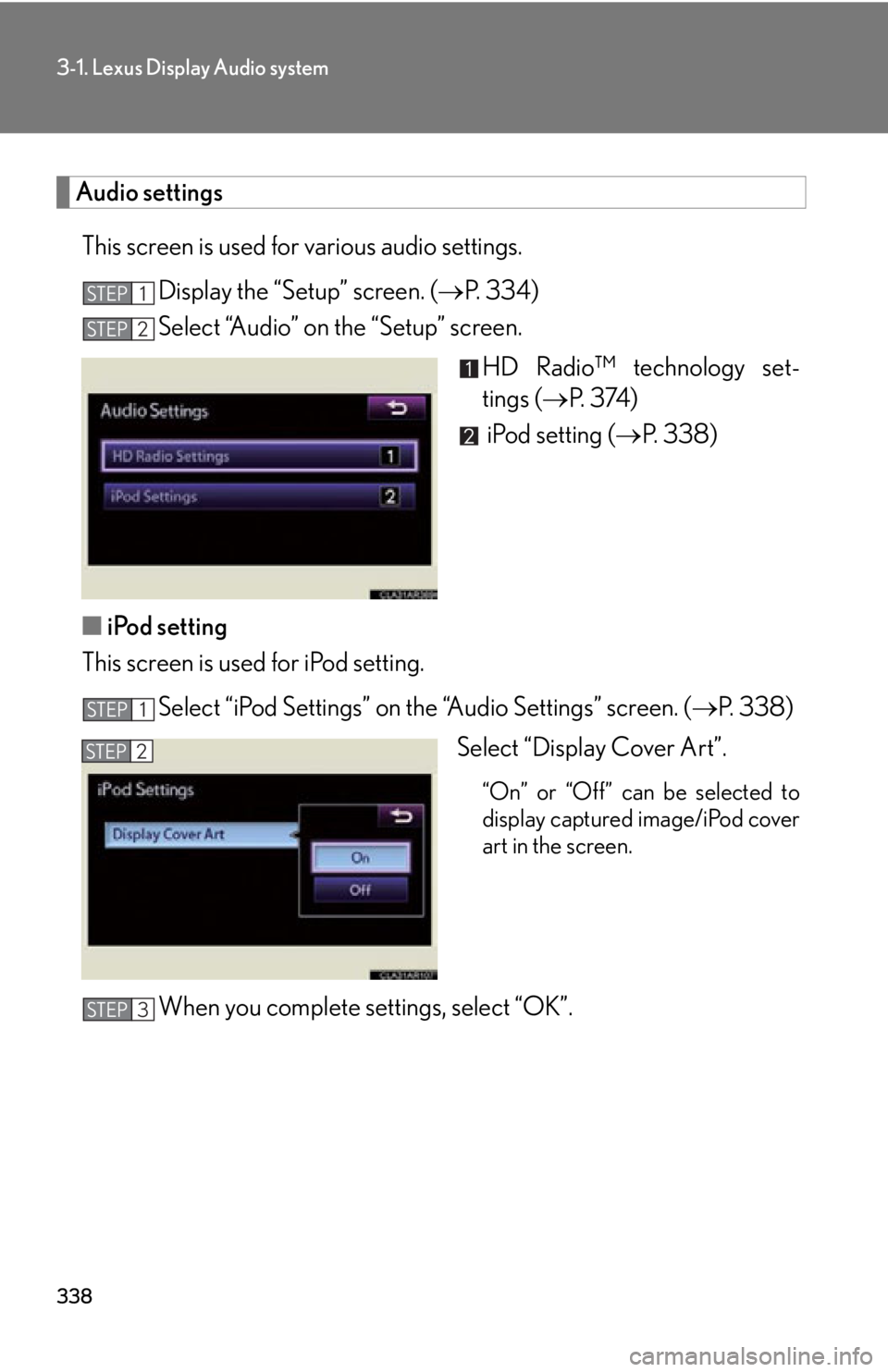
Audio settings
This screen is used for various audio settings.
Display the “Setup” screen. ( P. 3 3 4 )
Select “Audio” on the “Setup” screen.
HD Radio™ technology set-
tings ( P. 3 74 )
iPod setting ( P. 3 3 8 )
■ iPod setting
This screen is used for iPod setting.
Select “iPod Settings” on the “Audio Settings” screen. ( P. 3 3 8 )
Select “Display Cover Art”. “On” or “Off” can be selected to
display captured image/iPod cover
art in the screen.
When you complete settings, select “OK”.STEP 1
STEP 2
STEP 1
STEP 2
STEP 3
Page 365 of 886
3653
Interior features 3-3. Using the Lexus Display Audio system
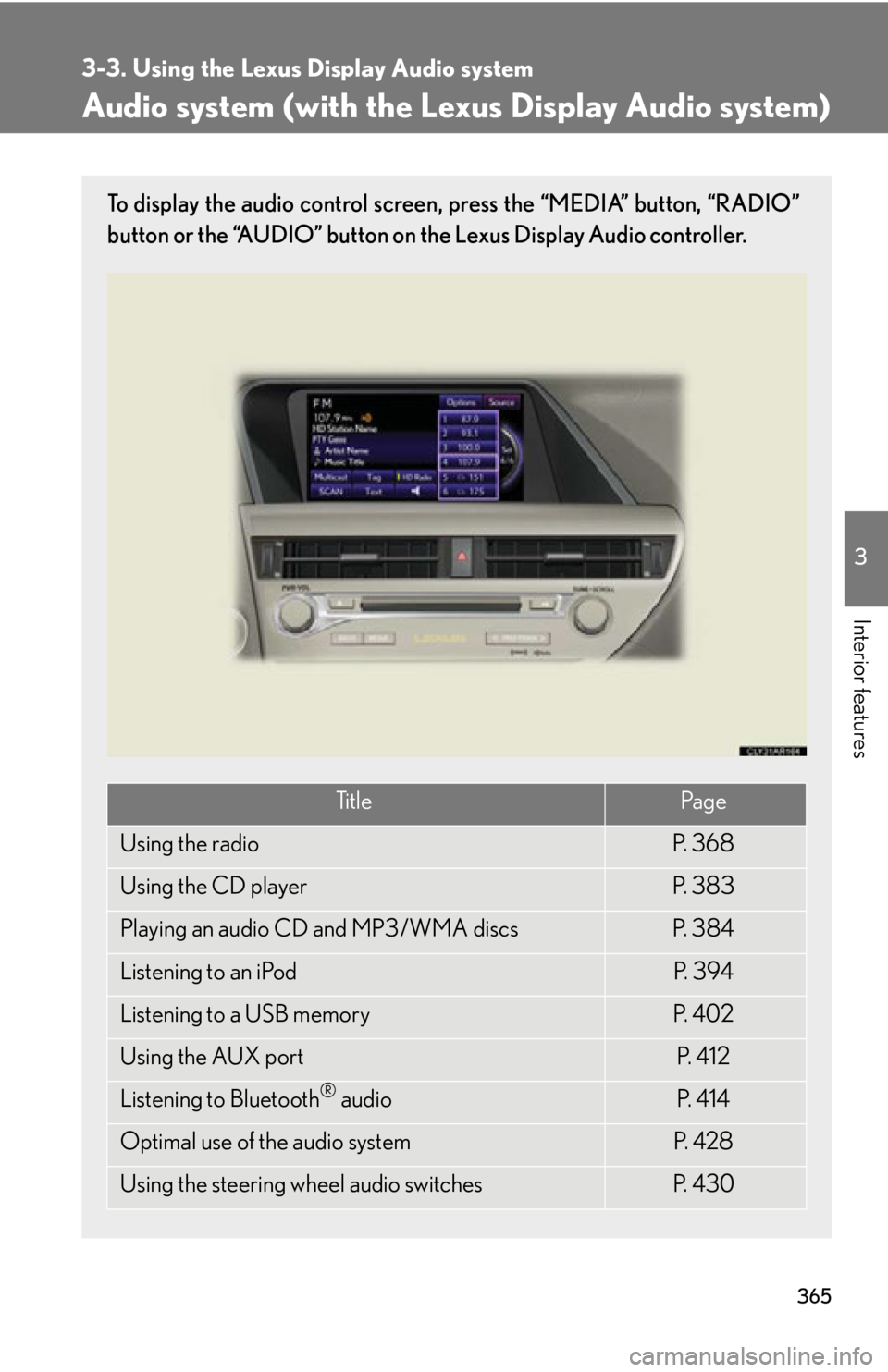
Audio system (with the Lexus Display Audio system) To display the audio control screen, press the “MEDIA” button, “RADIO”
button or the “AUDIO” button on the Lexus Display Audio controller.
Ti t l e Pa g e
Using the radio P. 3 6 8
Using the CD player P. 3 8 3
Playing an audio CD and MP3/WMA discs P. 3 8 4
Listening to an iPod P. 3 9 4
Listening to a USB memory P. 4 0 2
Using the AUX port P. 4 1 2
Listening to Bluetooth ®
audio P. 4 1 4
Optimal use of the audio system P. 4 2 8
Using the steering wheel audio switches P. 4 3 0
Page 366 of 886
3663-3. Using the Lexus Display Audio system
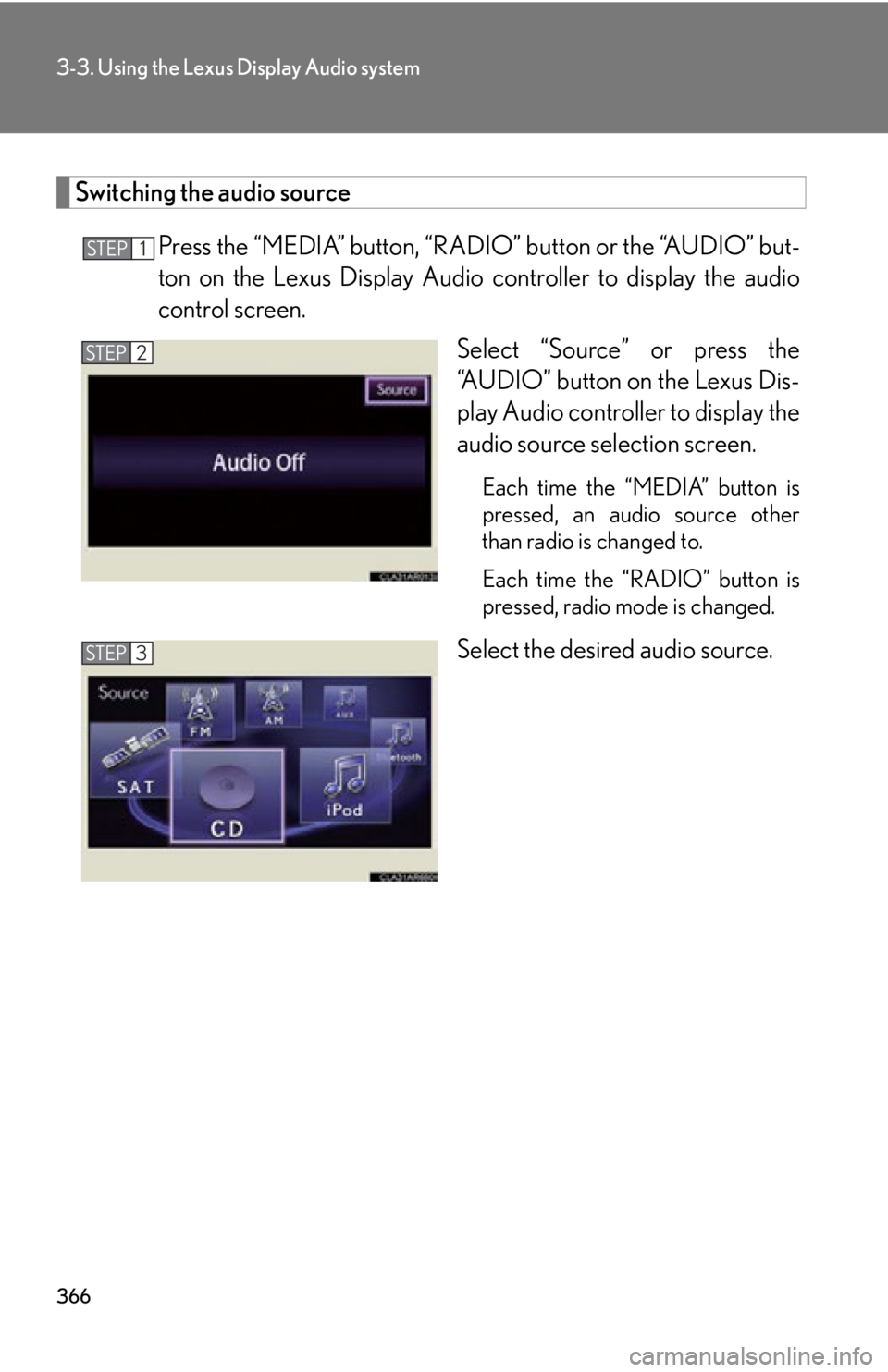
Switching the audio source
Press the “MEDIA” button, “RAD IO” button or the “AUDIO” but-
ton on the Lexus Display Audio controller to display the audio
control screen.
Select “Source” or press the
“AUDIO” button on the Lexus Dis-
play Audio controller to display the
audio source selection screen. Each time the “MEDIA” button is
pressed, an audio source other
than radio is changed to.
Each time the “RADIO” button is
pressed, radio mode is changed.
Select the desired audio source.STEP 1
STEP 2
STEP 3
Page 368 of 886
3683-3. Using the Lexus Display Audio system
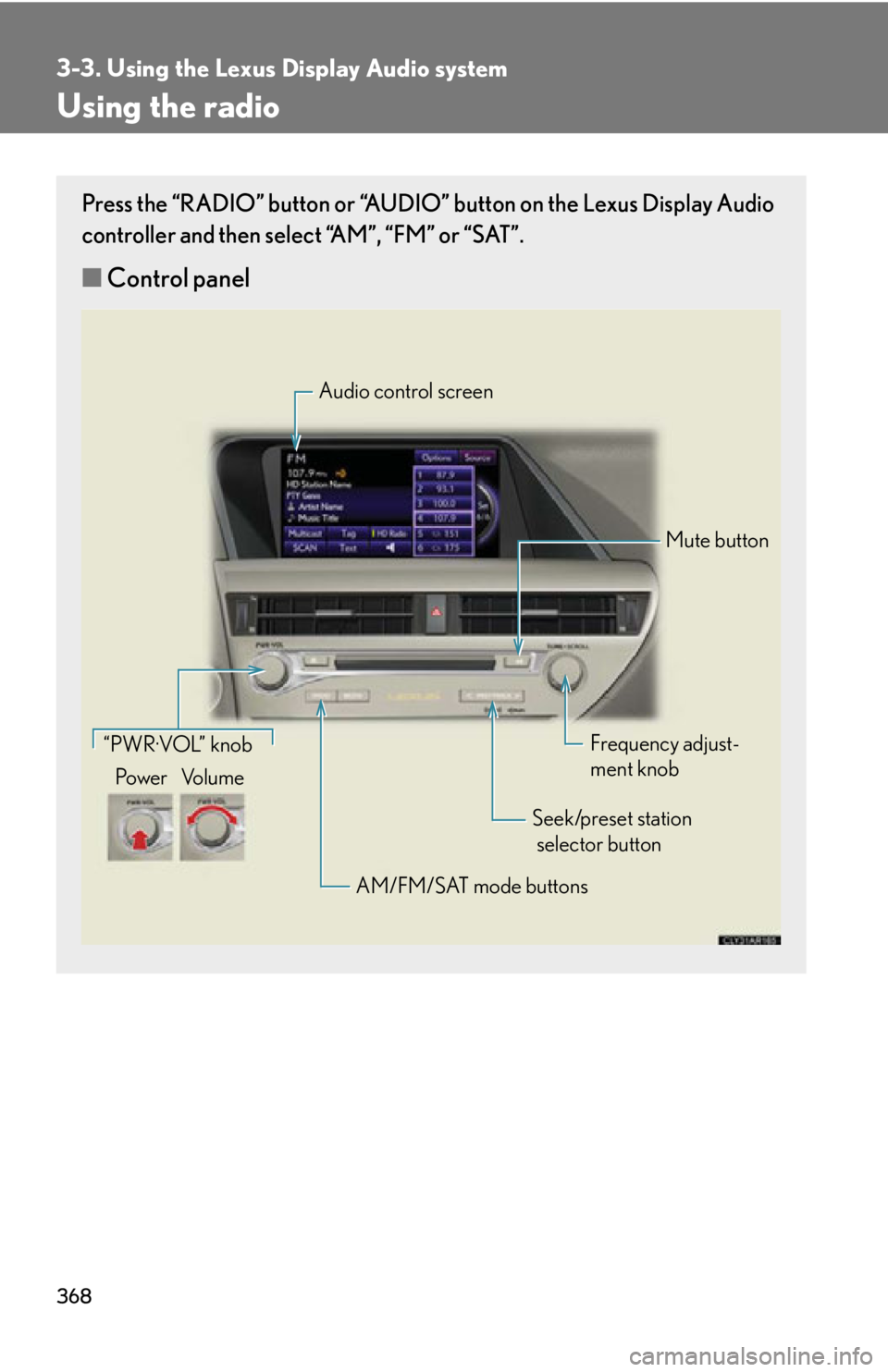
Using the radio Press the “RADIO” button or “AUDIO” button on the Lexus Display Audio
controller and then select “AM”, “FM” or “SAT”.
■ Control panel Audio control screen
Mute button
Frequency adjust-
ment knob
Seek/preset station
selector button
AM/FM/SAT mode buttons“PWR·VOL” knob
Po w e r Vo l u m e