turn signal LEXUS RX350 2015 User Guide
[x] Cancel search | Manufacturer: LEXUS, Model Year: 2015, Model line: RX350, Model: LEXUS RX350 2015Pages: 886, PDF Size: 11 MB
Page 188 of 886
1882-1. Driving procedures
■
Turn signals can be operated when
The “ENGINE START STOP” switch is in IGNITION ON mode.■
If the indicators flash faster than usual
Check that a light bulb in the front or re ar turn signal lights has not burned out.■
If the turn signals stop flashing before a lane change has been performed
Operate the lever again.
■
To discontinue flashing of the tu rn signals during a lane change
Operate the lever in the opposite direction.
■
Customization
The number of times the turn signals flash during a lane change can be changed.
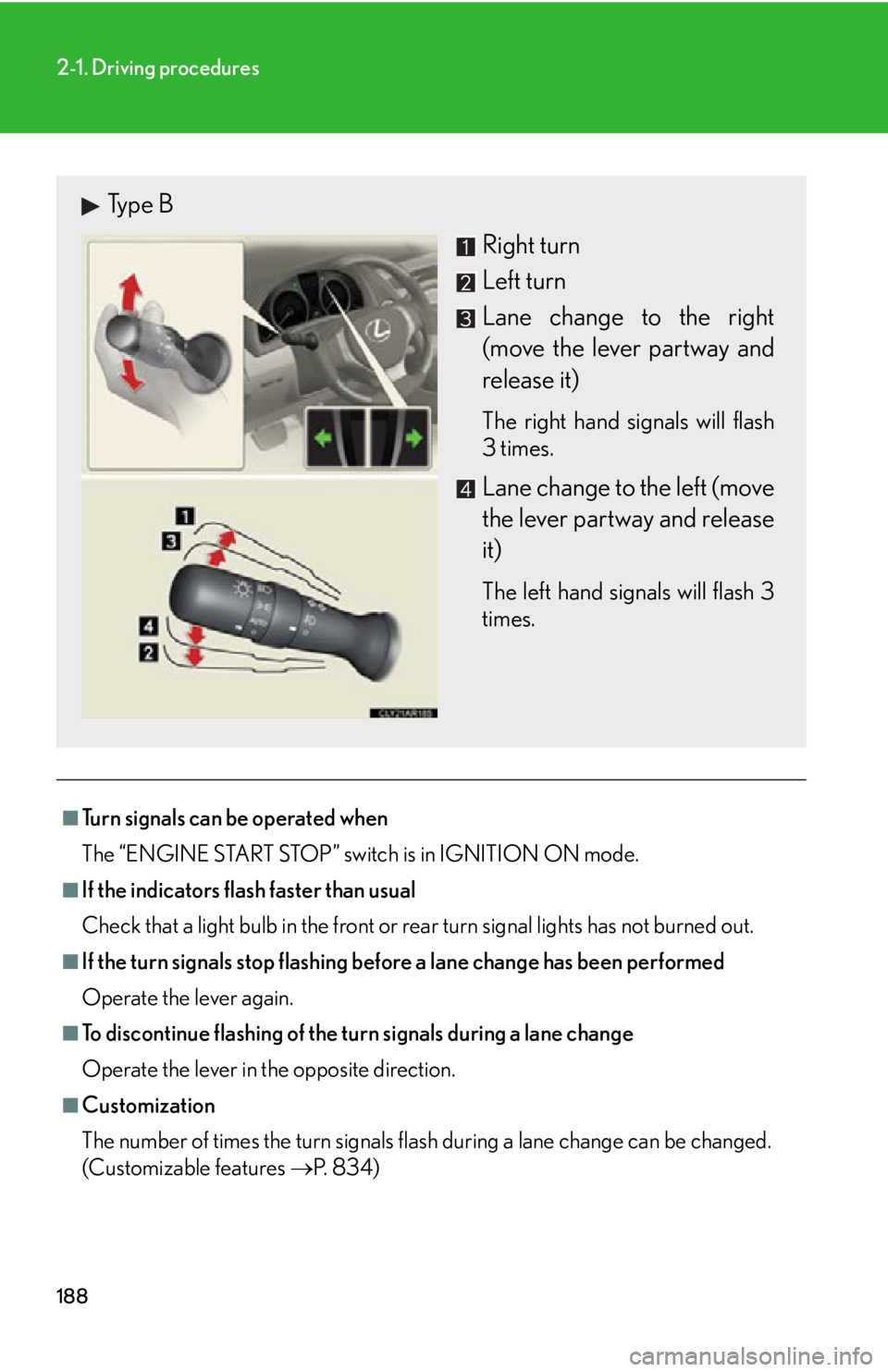
(Customizable features P. 8 3 4 )Type B
Right turn
Left turn
Lane change to the right
(move the lever partway and
release it) The right hand signals will flash
3 times.
Lane change to the left (move
the lever partway and release
it) The left hand signals will flash 3
times.
Page 197 of 886
1972-2. Instrument cluster
2
When driving ■ Indicators
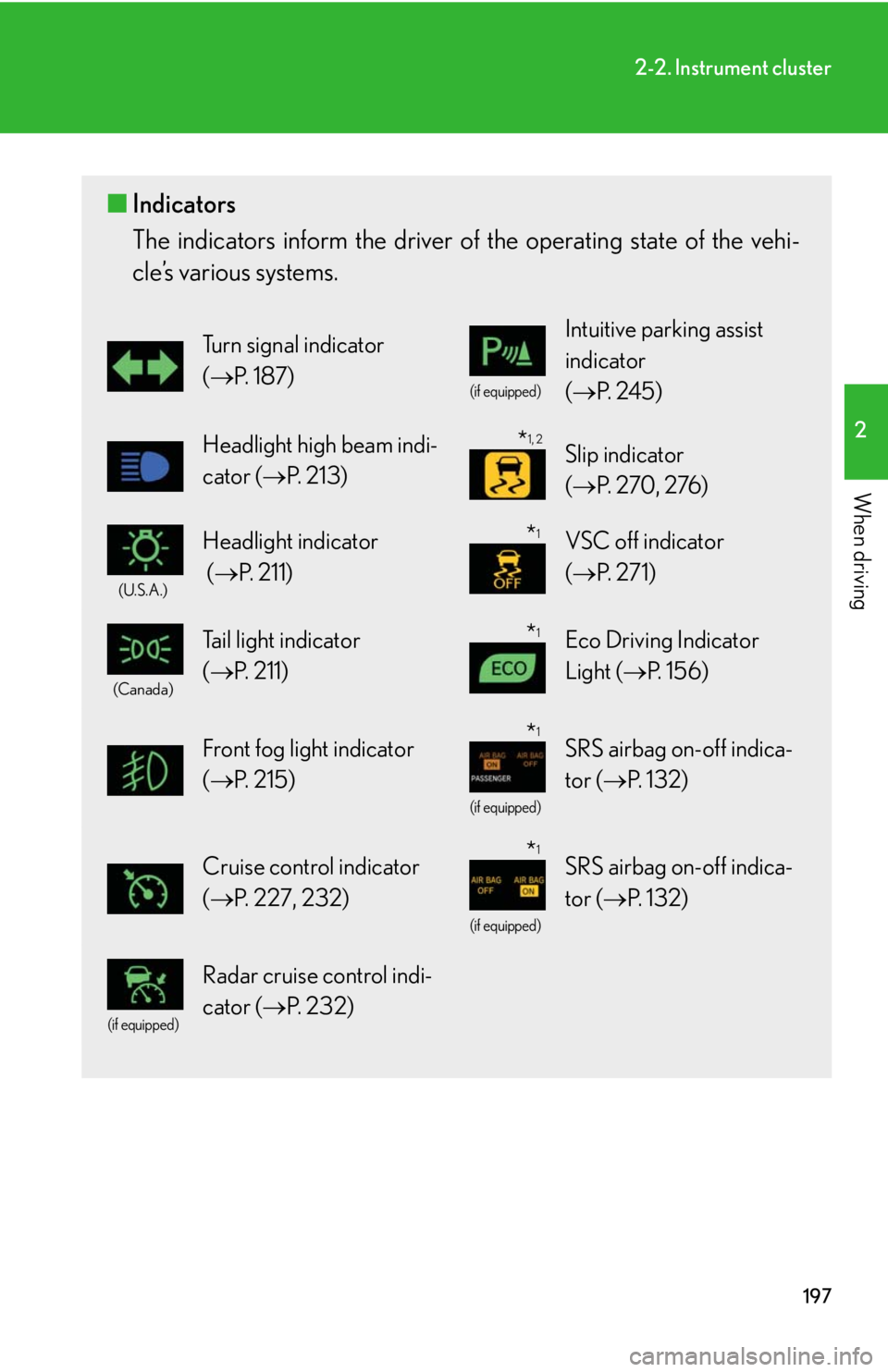
The indicators inform the driver of th e operating state of the vehi-
cle’s various systems. Turn signal indicator
( P. 1 8 7 ) (if equipped)
Intuitive parking assist
indicator
( P. 2 4 5 )
Headlight high beam indi-
cator ( P. 2 1 3 ) Slip indicator
( P. 270, 276)(U.S.A.)
Headlight indicator
( P. 2 1 1 ) VSC off indicator
( P. 2 7 1 )(Canada)
Tail light indicator
( P. 211) Eco Driving Indicator
Light ( P. 1 5 6 )
Front fog light indicator
( P. 2 1 5 ) (if equipped)
SRS airbag on-off indica-
tor ( P. 1 3 2 )
Cruise control indicator
( P. 227, 232) (if equipped)
SRS airbag on-off indica-
tor ( P. 1 3 2 ) (if equipped)
Radar cruise control indi-
cator ( P. 232) * 1, 2
* 1
* 1
* 1
* 1
Page 286 of 886

2862-4. Using other driving systems
BSM (Blind Spot Monitor)
: If equippedThe Blind Spot Monitor is a system that assists the driver in making the
decision to change lanes.
The system uses radar sensors to detect vehicles that are traveling in an
adjacent lane in the area that is not reflected in the outside rear view mirror
(the blind spot), and advises the driver of the vehicles existence via the out-
side rear view mirror indicator.
BSM main switch Pressing the switch turns the system on or off.
Outside rear view mirror indicator When a vehicle is detected in the blind spot, the outside rear view mirror
indicator on that side illuminates. If the turn signal lever is operated when a
vehicle is in the blind spot, the outsid e rear view mirror indicator flashes.
BSM indicator
When the system is on, the indicator will come on.
Page 315 of 886
3152-5. Driving information
2
When driving ■
Auto current cut-off function
In case of over current, the auto cut-off function stops the power flowing to the
trailer lights to prevent damage to the vehicle’s electrical system.
This function is activated when the rated current of any of the following trailer light
circuit components is exceeded: ●
Tail lights: maximum 7.8 A ●
Stop/turn signal light (right): maximum 4.5 A●
Stop/turn signal light (left): maximum 4.5 A■
When the auto current cut function is activated
If a trailer light does not come on due to the activation of the auto current cut func-
tion, the light system will need to be reset.
Follow the reset procedure shown below. ●
If a tail light does not come on, turn off the headlight switch.●
If the right-side stop/turn signal light does not come on, put the turn signal in the
off position or remove foot from the brake pedal.●
If the left-side stop/turn signal light does not come on, put the turn signal in the
off position or remove foot from the brake pedal.
If the emergency flashers do not operate, press the emergency flasher switch to
turn them off.
After the light system is reset, operate the light switches again to see if the lights
operate normally.
If the lights do not operate normally, have the vehicle inspected by your Lexus
dealer.
Page 374 of 886
3743-3. Using the Lexus Display Audio system
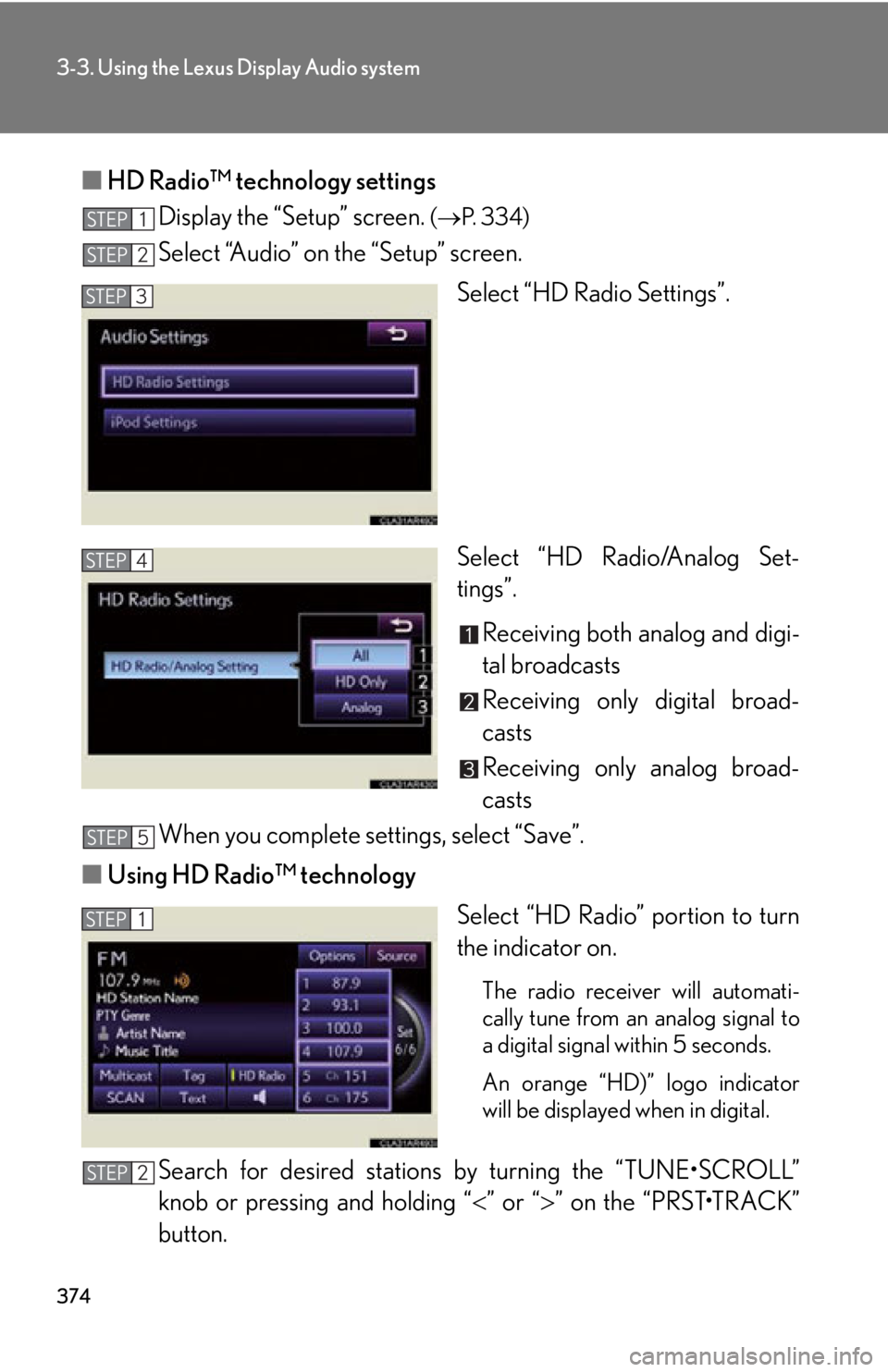
■ HD Radio™ technology settings
Display the “Setup” screen. ( P. 3 3 4 )
Select “Audio” on the “Setup” screen.
Select “HD Radio Settings”.
Select “HD Radio/Analog Set-
tings”.
Receiving both analog and digi-
tal broadcasts
Receiving only digital broad-
casts
Receiving only analog broad-
casts
When you complete settings, select “Save”.
■ Using HD Radio™ technology
Select “HD Radio” portion to turn
the indicator on.
The radio receiver will automati-
cally tune from an analog signal to
a digital signal within 5 seconds.
An orange “HD)” logo indicator
will be displayed when in digital.
Search for desired stations by turning the “TUNE•SCROLL”
knob or pressing and holding “ ” or “ ” on the “PRST•TRACK”
button.STEP 1
STEP 2
STEP 3
STEP 4
STEP 5
STEP 1
STEP 2
Page 377 of 886
3773-3. Using the Lexus Display Audio system
3
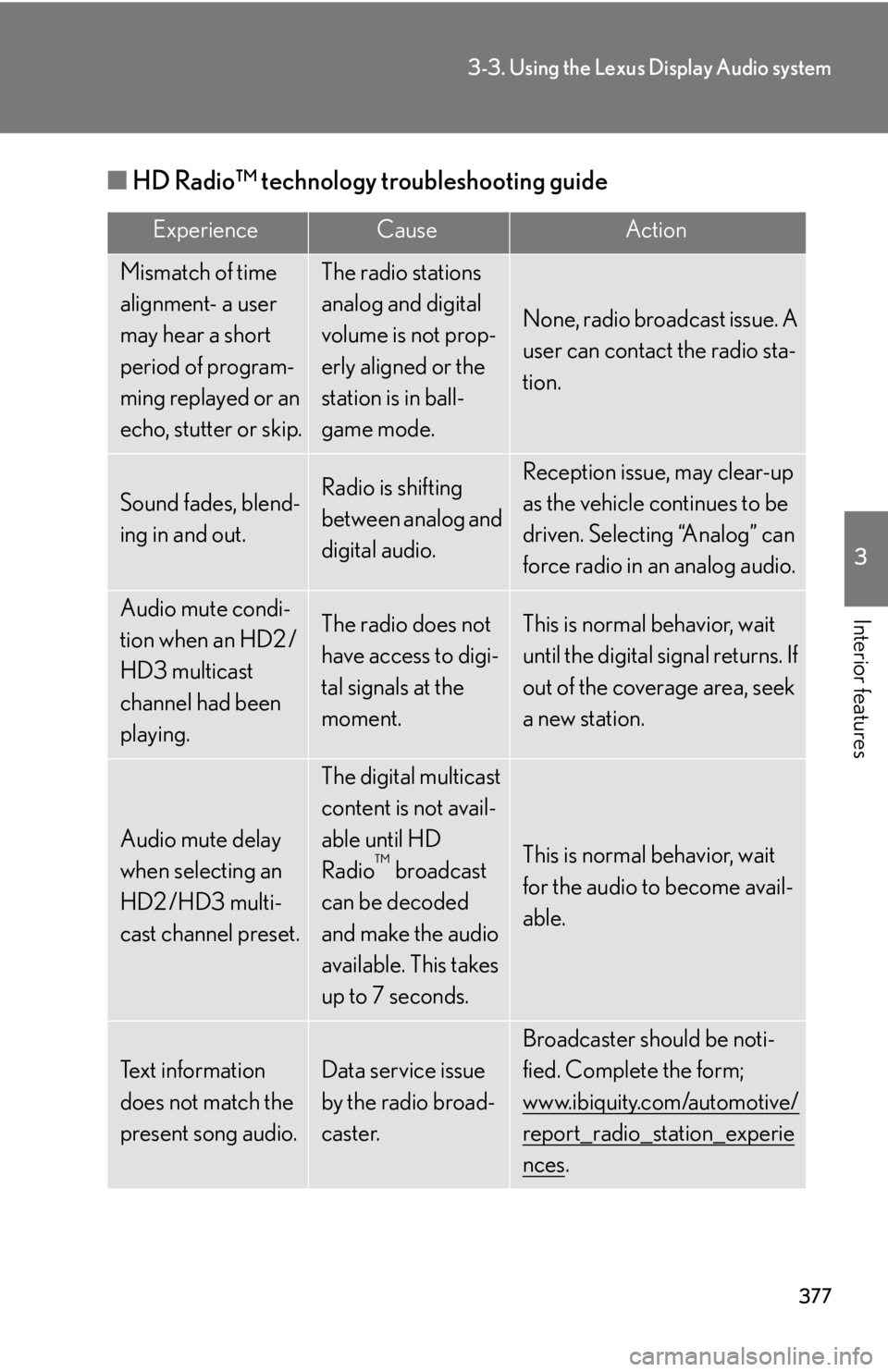
Interior features ■ HD Radio™ technology troubleshooting guide Experience Cause Action
Mismatch of time
alignment- a user
may hear a short
period of program-
ming replayed or an
echo, stutter or skip. The radio stations
analog and digital
volume is not prop-
erly aligned or the
station is in ball-
game mode. None, radio broadcast issue. A
user can contact the radio sta-
tion.
Sound fades, blend-
ing in and out. Radio is shifting
between analog and
digital audio. Reception issue, may clear-up
as the vehicle continues to be
driven. Selecting “Analog” can
force radio in an analog audio.
Audio mute condi-
tion when an HD2 /
HD3 multicast
channel had been
playing. The radio does not
have access to digi-
tal signals at the
moment. This is normal behavior, wait
until the digital signal returns. If
out of the coverage area, seek
a new station.
Audio mute delay
when selecting an
HD2 /HD3 multi-
cast channel preset. The digital multicast
content is not avail-
able until HD
Radio ™
broadcast
can be decoded
and make the audio
available. This takes
up to 7 seconds. This is normal behavior, wait
for the audio to become avail-
able.
Text information
does not match the
present song audio. Data service issue
by the radio broad-
caster. Broadcaster should be noti-
fied. Complete the form;
www.ibiquity.com/automotive/
report_radio_station_experie
nces .
Page 381 of 886
3813-3. Using the Lexus Display Audio system
3
Interior features ■
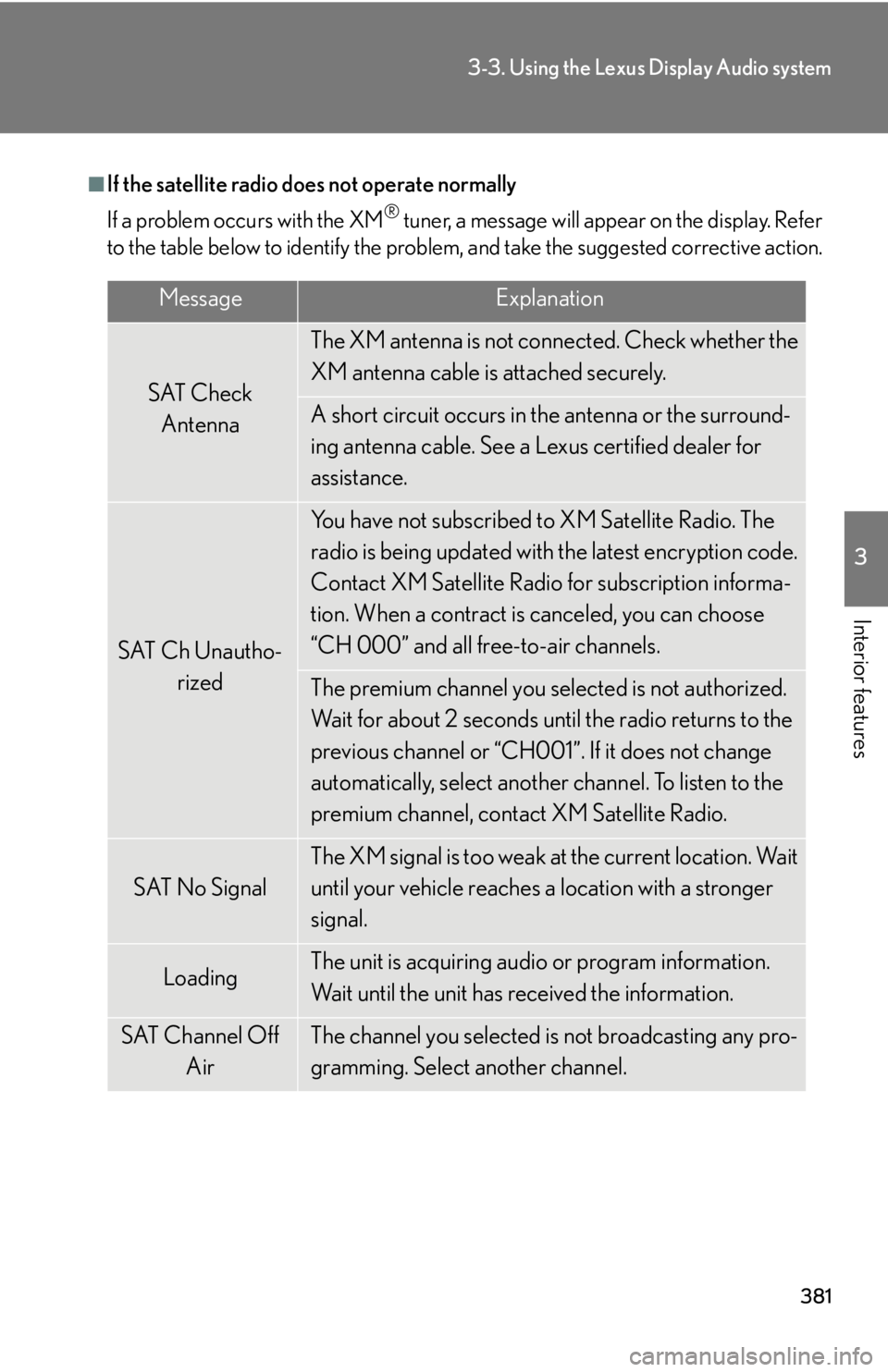
If the satellite radio does not operate normally
If a problem occurs with the XM ®
tuner, a message will appear on the display. Refer
to the table below to identify the problem, and take the suggested corrective action.
Message Explanation
SAT Check
Antenna The XM antenna is not co nnected. Check whether the
XM antenna cable is attached securely.
A short circuit occurs in the antenna or the surround-
ing antenna cable. See a Lexus certified dealer for
assistance.
SAT Ch Unautho-
rized You have not subscribed to XM Satellite Radio. The
radio is being updated with the latest encryption code.
Contact XM Satellite Radio for subscription informa-
tion. When a contract is canceled, you can choose
“CH 000” and all free-to-air channels.
The premium channel you selected is not authorized.
Wait for about 2 seconds until the radio returns to the
previous channel or “CH001”. If it does not change
automatically, select another channel. To listen to the
premium channel, contact XM Satellite Radio.
SAT No Signal The XM signal is too weak at the current location. Wait
until your vehicle reaches a location with a stronger
signal.
Loading The unit is acquiring audio or program information.
Wait until the unit has received the information.
SAT Channel Off
Air The channel you selected is not broadcasting any pro-
gramming. Select another channel.
Page 423 of 886
4233-3. Using the Lexus Display Audio system
3
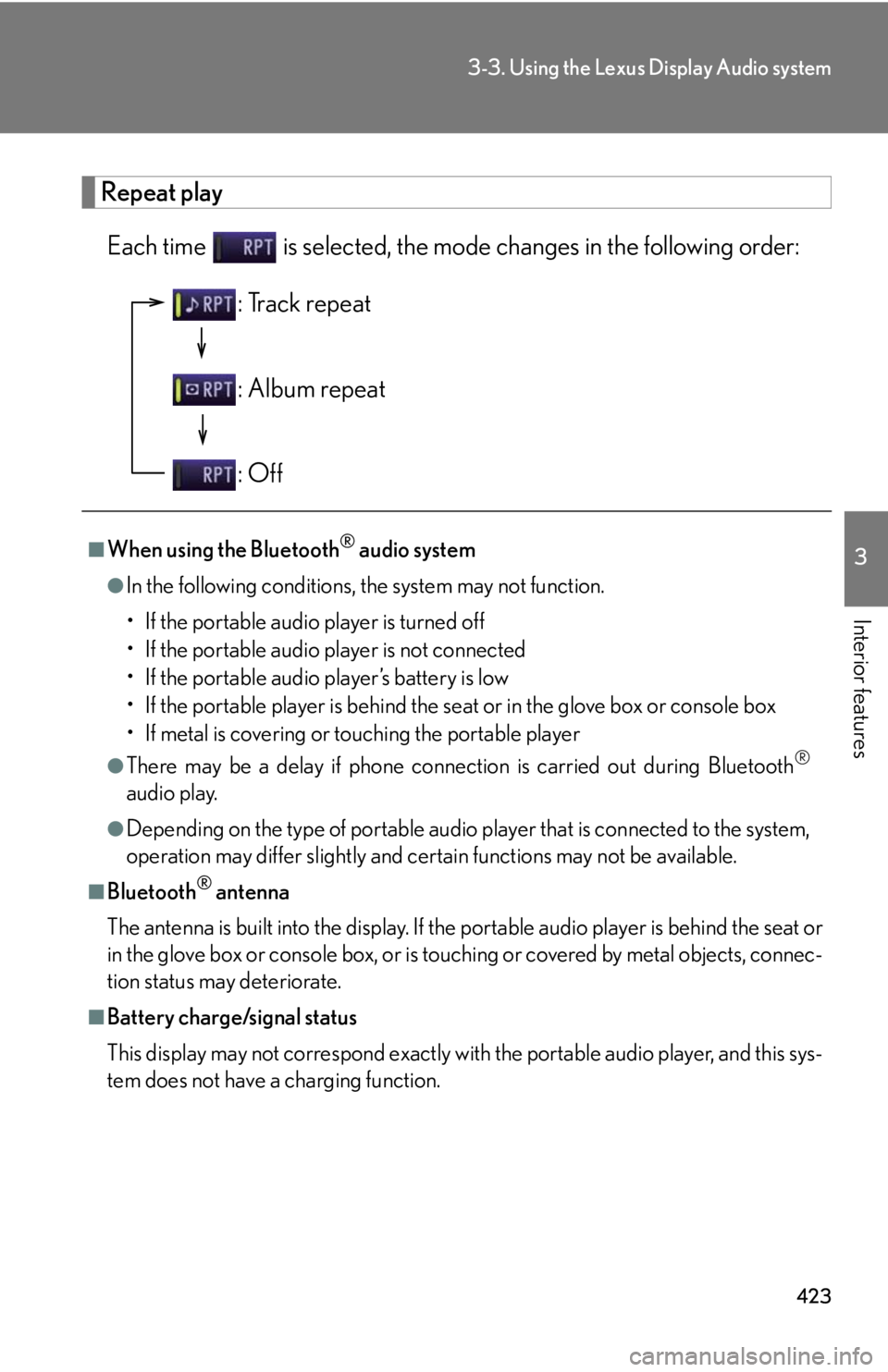
Interior features Repeat play
Each time is selected, the mode changes in the following order:
■
When using the Bluetooth ®
audio system●
In the following conditions, the system may not function.
• If the portable audio player is turned off
• If the portable audio player is not connected
• If the portable audio player’s battery is low
• If the portable player is behind the se at or in the glove box or console box
• If metal is covering or touching the portable player●
There may be a delay if phone connecti on is carried out during Bluetooth ®
audio play.●
Depending on the type of portable audio player that is connected to the system,
operation may differ slightly and ce rtain functions may not be available.■
Bluetooth ®
antenna
The antenna is built into the display. If the portable audio player is behind the seat or
in the glove box or console box, or is touching or covered by metal objects, connec-
tion status may deteriorate.■
Battery charge/signal status
This display may not correspond exactly with the portable audio player, and this sys-
tem does not have a charging function. : Track repeat
: Album repeat
: Off
Page 446 of 886
4463-3. Using the Lexus Display Audio system
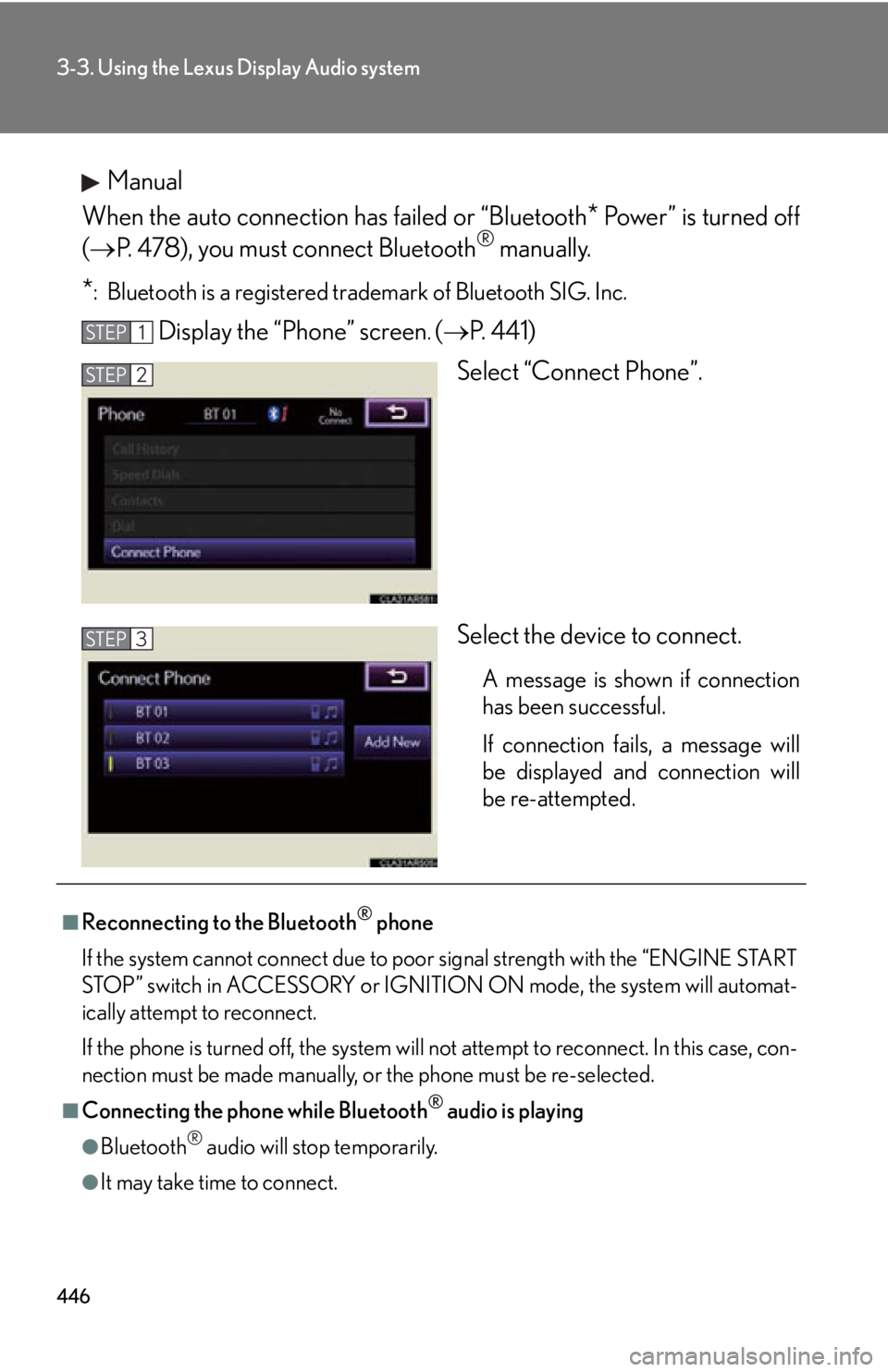
Manual
When the auto connection has failed or “Bluetooth
* Power” is turned off
( P. 478), you must connect Bluetooth ®
manually.
* : Bluetooth is a registered tr ademark of Bluetooth SIG. Inc.
Display the “Phone” screen .
( P. 4 4 1 )
Select “Connect Phone”.
Select the device to connect. A message is shown if connection
has been successful.
If connection fails, a message will
be displayed and connection will
be re-attempted.STEP 1
STEP 2
STEP 3
■
Reconnecting to the Bluetooth ®
phone
If the system cannot connect due to poor signal strength with the “ENGINE START
STOP” switch in ACCESSORY or IGNITION ON mode, the system will automat-
ically attempt to reconnect.
If the phone is turned off, the system will not attempt to reconnect. In this case, con-
nection must be made manually, or the phone must be re-selected.
■
Connecting the phone while Bluetooth ®
audio is playing
●
Bluetooth ®
audio will stop temporarily.
●
It may take time to connect.
Page 490 of 886
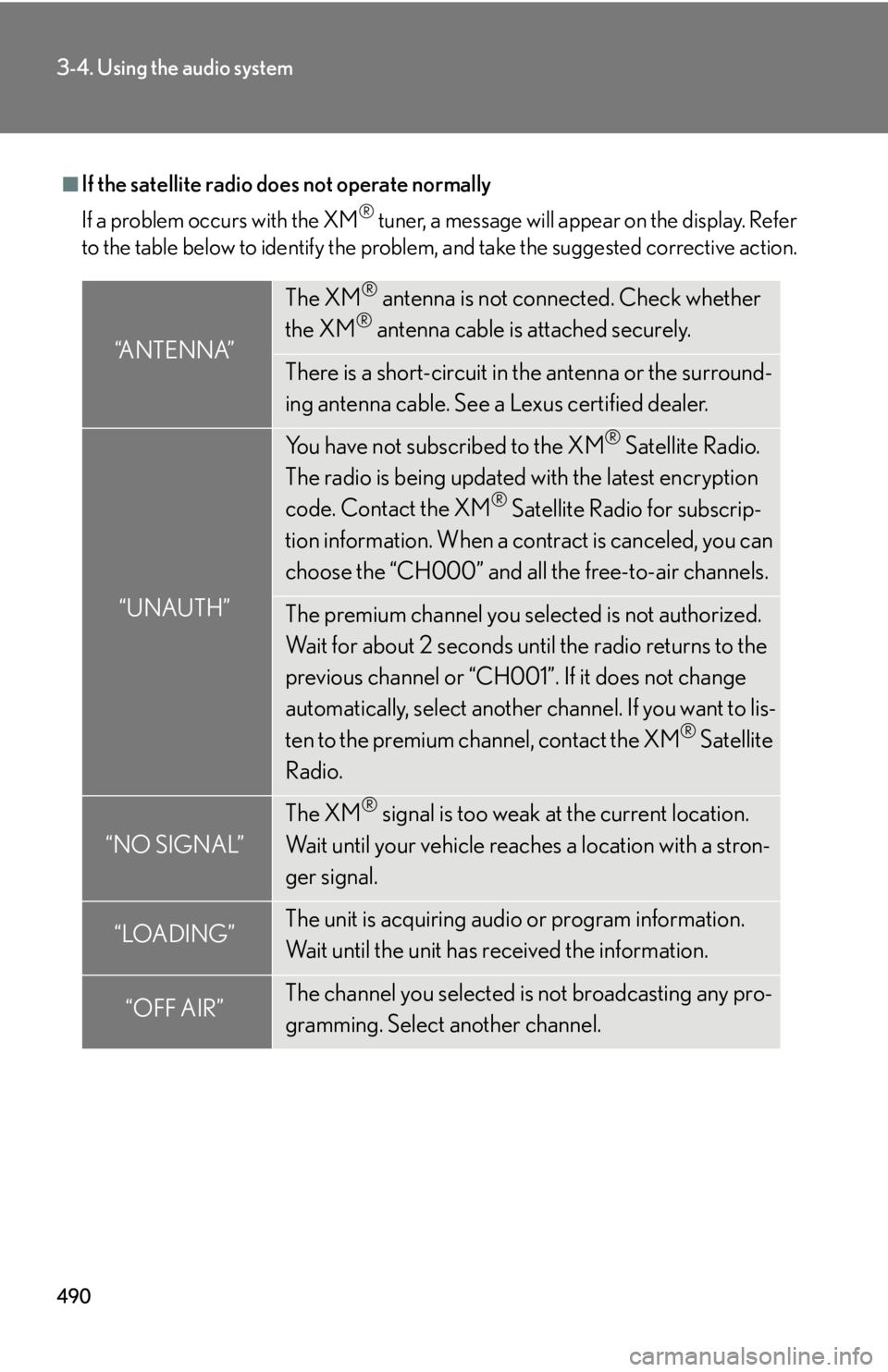
4903-4. Using the audio system
■
If the satellite radio does not operate normally
If a problem occurs with the XM ®
tuner, a message will appear on the display. Refer
to the table below to identify the problem, and take the suggested corrective action.
“ANTENNA” The XM ®
antenna is not connected. Check whether
the XM ®
antenna cable is attached securely.
There is a short-circuit in the antenna or the surround-
ing antenna cable. See a Lexus certified dealer.
“UNAUTH” You have not subscribed to the XM ®
Satellite Radio.
The radio is being updated with the latest encryption
code. Contact the XM ®
Satellite Radio for subscrip-
tion information. When a co ntract is canceled, you can
choose the “CH000” and all the free-to-air channels.
The premium channel you selected is not authorized.
Wait for about 2 seconds until the radio returns to the
previous channel or “CH001”. If it does not change
automatically, select another channel. If you want to lis-
ten to the premium channel, contact the XM ®
Satellite
Radio.
“NO SIGNAL” The XM ®
signal is too weak at the current location.
Wait until your vehicle reaches a location with a stron-
ger signal.
“LOADING” The unit is acquiring audio or program information.
Wait until the unit has received the information.
“OFF AIR” The channel you selected is not broadcasting any pro-
gramming. Select another channel.