warning LEXUS RX350 2015 Owner's Manual
[x] Cancel search | Manufacturer: LEXUS, Model Year: 2015, Model line: RX350, Model: LEXUS RX350 2015Pages: 886, PDF Size: 11 MB
Page 207 of 886
2072-2. Instrument cluster
2
When driving ■ Head-up display contents
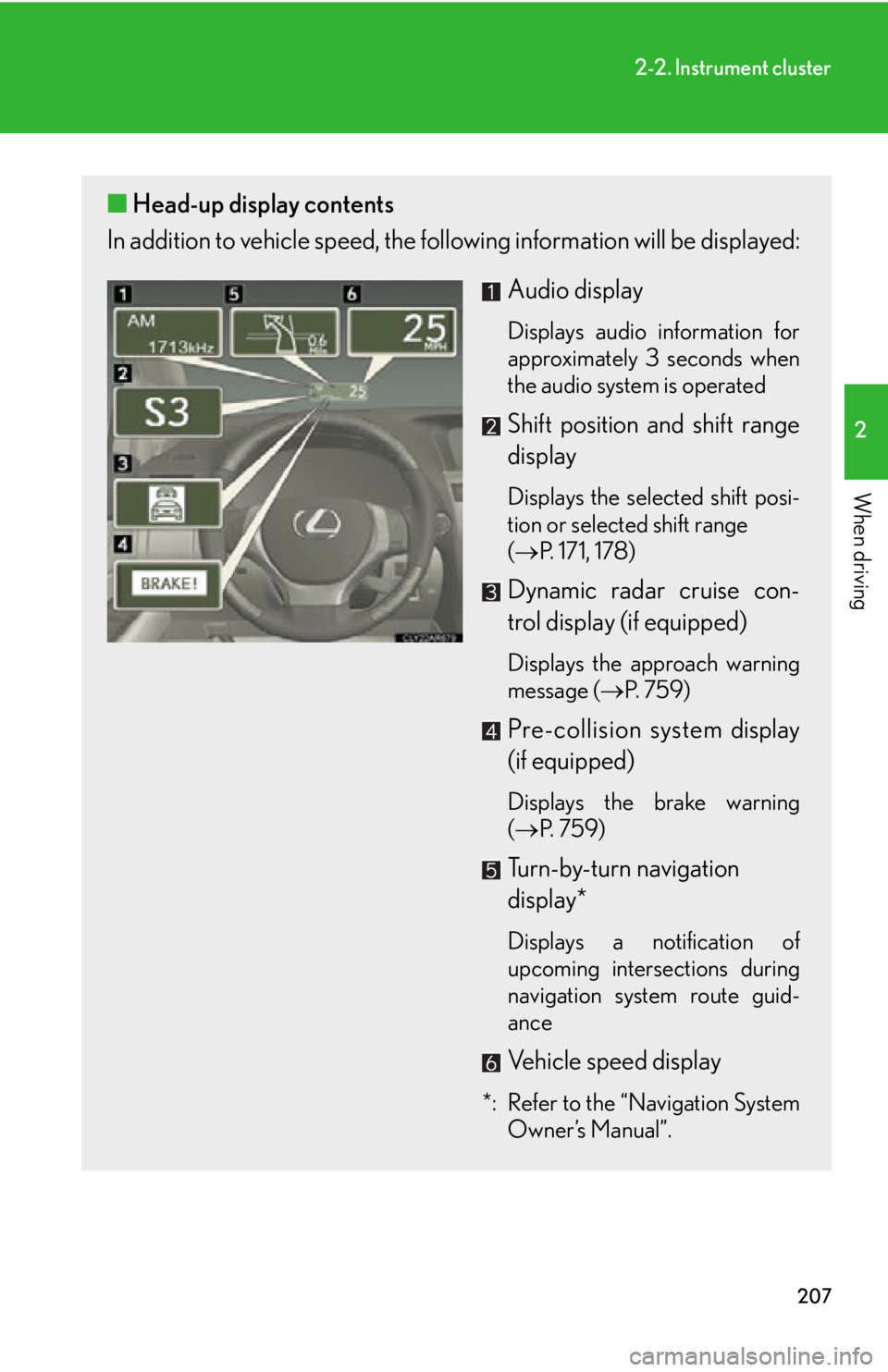
In addition to vehicle sp eed, the following informa tion will be displayed:
Audio display Displays audio information for
approximately 3 seconds when
the audio system is operated
Shift position and shift range
display Displays the selected shift posi-
tion or selected shift range
( P. 171, 178)
Dynamic radar cruise con-
trol display (if equipped) Displays the approach warning
message ( P. 7 5 9 )
Pre-collision system display
(if equipped) Displays the brake warning
( P. 7 5 9 )
Turn-by-turn navigation
display*
Displays a notification of
upcoming intersections during
navigation system route guid-
ance
Vehicle speed display
*: Refer to the “Navigation System
Owner’s Manual”.
Page 230 of 886

2302-4. Using other driving systems
■
Cruise control can be set when ●
The shift lever is in D or range 4 or higher of S has been selected. (vehicles with-
out paddle shift switch)●
The shift lever is in D or range 4 or higher of D has been selected by using the
paddle shift. (vehicles with paddle shift switch)●
Vehicle speed is above 25 mph (40 km/h). ■
Accelerating after setting the vehicle speed ●
The vehicle can be accelerated normally. After acceleration, the set speed
resumes.●
Even without canceling the cruise cont rol, the set speed can be increased by
first accelerating the vehicle to the desired speed and then pushing the lever
down to set the new speed.■
Automatic cruise control cancelation
Cruise control will stop maintaining the ve hicle speed in any of the following situa-
tions. ●
Actual vehicle speed falls more than approximately 10 mph (16 km/h) below the
preset vehicle speed.
At this time, the memorized set speed is not retained.●
Actual vehicle speed is below approximately 25 mph (40 km/h).●
Enhanced VSC is activated. (vehicles with enhanced VSC)●
VSC is activated. (vehicles with VSC)■
If a warning message is shown on the multi-information display
Press the “ON-OFF” button once to deactivate the system, and then press the but-
ton again to reactivate the system.
If the cruise control speed cannot be set or if the cruise control cancels immediately
after being activated, there may be a malfun ction in the cruise control system. Have
the vehicle inspected by your Lexus dealer.
Page 236 of 886

2362-4. Using other driving systems
Driving in vehicle-to-vehicle distance control mode
This mode employs a radar sensor to detect the presence of vehicles up
to approximately 400 ft. (120 m) ah ead, determines the current vehicle-
to-vehicle following distance, and op erates to maintain a suitable follow-
ing distance from the vehicle ahead. Note that vehicle-to-vehicle distance will close in when traveling on long
downhill slopes.
Example of constant speed cruising
When there are no vehicles ahead The vehicle travels at the speed set by the driver. The desired vehicle-to-vehi-
cle distance can also be set by operat ing the vehicle-to-vehicle distance con-
trol.
Example of deceleration cruising
When the vehicle ahead is driving slower than the set speed
When a vehicle is detected running ahead of you, the system automatically
decelerates your vehicle. When a grea ter reduction in vehicle speed is nec-
essary, the system applies the brakes. A warning tone warns you when the
system cannot decelerate sufficiently to prevent your vehicle from closing in
on the vehicle ahead.
Page 237 of 886
2372-4. Using other driving systems
2
When driving Example of follow-up cruising
When following a vehicle driving slower than the set speed The system continues follow-up cruising while adjusting for changes in the
speed of the vehicle ahead in order to maintain the vehicle-to-vehicle dis-
tance set by the driver.
Example of acceleration
When there are no longer any vehicl es ahead driving slower than the
set speed The system accelerates until the set speed is reached. The system then
returns to constant speed cruising.
Approach warning
When your vehicle is too close to a vehicle ahead, and sufficient auto-
matic deceleration via the cruise co ntrol is not possible, the display will
flash and the buzzer will sound to al ert the driver. An example of this
would be if another driver cuts in fron t of you while you are following a
vehicle. Apply the brakes to ensure an appropria te vehicle-to-vehicle dis-
tance.
■ Warnings may not occur when
In the following instances, there is a possibility that the warnings will not
occur:
● When the speed of the vehicle ahead matches or exceeds your
vehicle speed
● When the vehicle ahead is traveling at an extremely slow speed
● Immediately after the cruise control speed was set
● At the instant the accelerator is applied
Page 240 of 886
2402-4. Using other driving systems
■
Automatic cancelation of constant speed control
The cruise control will stop maintaining the vehicle speed in the following situations: ●
Actual vehicle speed is more than approximately 10 mph (16 km/h) below the
set vehicle speed.
At this time, the memorized set speed is not retained.●
Actual vehicle speed falls below approximately 25 mph (40 km/h).●
Enhanced VSC is activated. (vehicles with enhanced VSC)●
VSC is activated. (vehicles with VSC)■
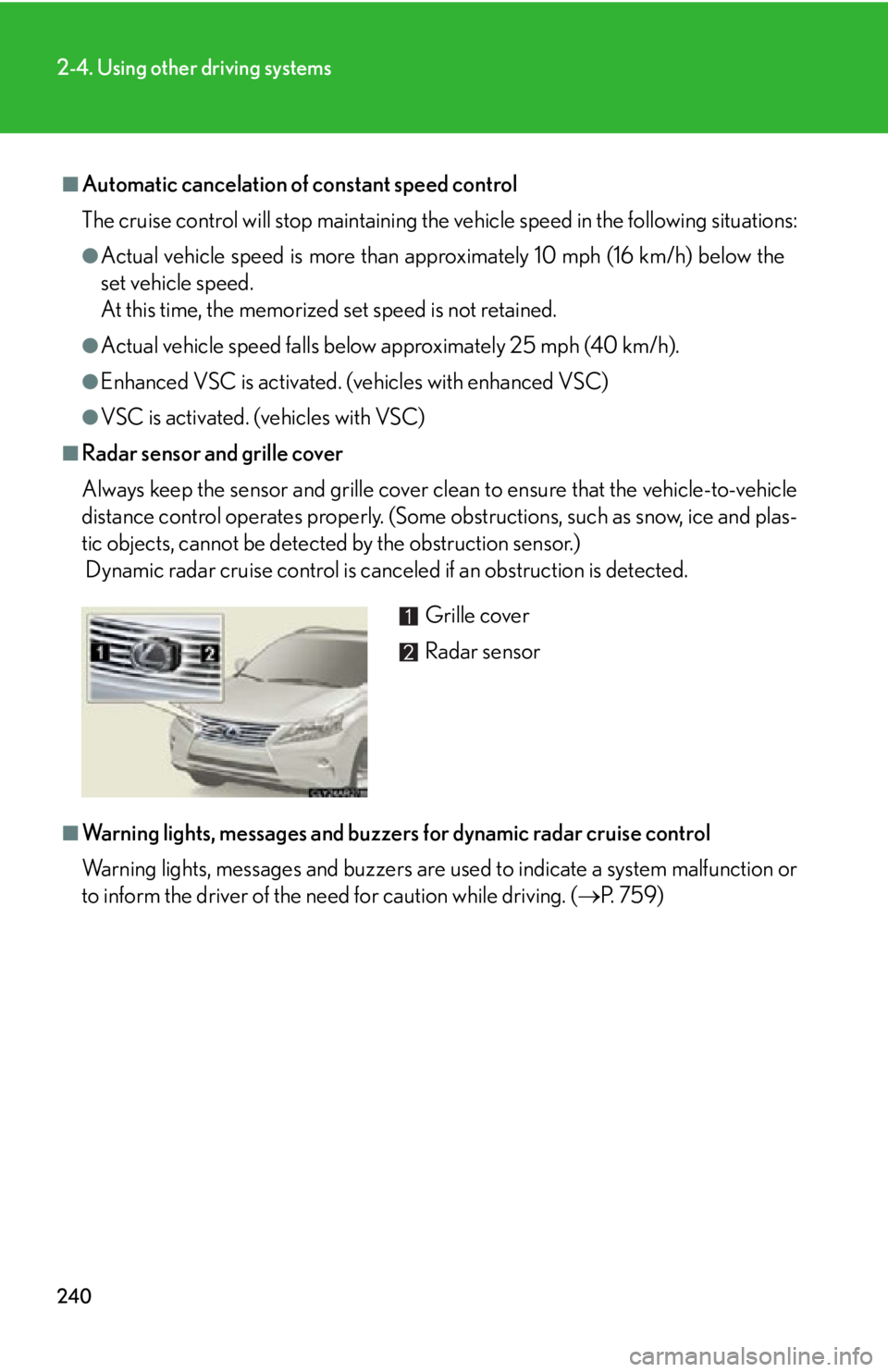
Radar sensor and grille cover
Always keep the sensor and grille cover clean to ensure that the vehicle-to-vehicle
distance control operates properly. (Some obstructions, such as snow, ice and plas-
tic objects, cannot be detected by the obstruction sensor.)
Dynamic radar cruise control is canc eled if an obstruction is detected.
■
Warning lights, messages and buzzer s for dynamic radar cruise control
Warning lights, messages and buzzers are us ed to indicate a system malfunction or
to inform the driver of the need for caution while driving. ( P. 7 5 9 )Grille cover
Radar sensor
Page 241 of 886

2412-4. Using other driving systems
2
When driving ■
Certification
For vehicles sold in the U.S.A.
FCC ID: HYQDNMWR004
This device complies with part 15 of the FCC Rules. Operation is subject to the fol-
lowing two conditions: (1) This device may not cause harmful interference, and (2)
this device must accept any interference received, including interference that may
cause undesired operation.
FCC WARNING
Changes or modifications not expressly approved by the party responsible for
compliance could void the user’s authority to operate the equipment.
Radiofrequency radiation exposure Information:
This equipment complies with FCC radiatio n exposure limits set forth for an uncon-
trolled environment.
This equipment should be in stalled and operated with minimum distance of 20 cm
between the radiator (antenna) and your body.
This transmitter must not be co-located or operating in conjunction with any other
antenna or transmitter.
For vehicles sold in Canada
Operation is subject to the following two conditions: (1) this device may not cause
interference, and (2) this device must a ccept any interference, including interfer-
ence that may cause undesired operation of the device.
Page 243 of 886
2432-4. Using other driving systems
2
When driving CAUTION■
Situations unsuitable for dynamic radar cruise control
Do not use dynamic radar cruise contro l in any of the following situations.
Doing so may result in inappropriate sp eed control and could cause an accident
resulting in death or serious injury. ●
In heavy traffic●
On roads with sharp bends●
On winding roads●
On slippery roads, such as thos e covered with rain, ice or snow●
On steep downhills, or where there are sudden changes between sharp up and
down gradients
Vehicle speed may exceed the set speed when driving down a steep hill.●
At entrances to expressways●
When weather conditions are bad enough that they may prevent the sensors
from functioning correctly (fog, sn ow, sandstorm, heavy rain, etc.)●
When an approach warning buzzer is heard often●
When your vehicle is towing a trailer or during emergency towing■
When the sensor may not be correctly detecting the vehicle ahead
Apply the brakes as necessary when any of the following types of vehicles are in
front of you.
As the sensor may not be able to correctly detect these types of vehicles, the
approach warning ( P. 237) will not be activated, and a fatal or serious accident
may result. ●
Vehicles that cut in suddenly●
Vehicles traveling at low speeds●
Vehicles that are not moving
●
Vehicles with small rear ends (tra ilers with no load on board etc.)
●
Motorcycles traveling in the same lane
Page 278 of 886

2782-4. Using other driving systems
Pre-Collision System When the radar sensor detects the possib ility of a frontal collision, the pre-
collision system such as the brakes and seat belts are automatically
engaged to lessen impact as well as vehicle damage.
■ Pre-collision seat belts (front seat belts only) If the pre-collision sensor detects that a collision is unavoidable, the pre-
collision system will retract the seat belt before the collision occurs.
The same will happen if the driver makes an emergency braking or loses
control of the vehicle. ( P. 8 5 )
However, the system will not operate in the event of skidding when the
VSC system is disabled.
■ Pre-collision brake assist When there is a high possibility of a frontal collision, the system applies
greater braking force in relation to how strongly the brake pedal is
depressed. The system may not warn the driver using a warning light,
warning display and buzzer when the system detects and judges braking
operations.
■ Pre-collision braking When there is a high possibility of a frontal collision, the system warns the
driver using a warning light, warnin g display and buzzer. If the system
determines that a collision is unavoidable, the brakes are automatically
applied to reduce the collision speed. Pre-collision braking can be dis-
abled using the pre-collision braking off switch.
: If equipped
Page 279 of 886

2792-4. Using other driving systems
2
When driving Disabling pre-collision braking
Pre-collision braking disabled
Pre-collision braking enabled The pre-collision system warning
light turn on when pre-collision
braking is disabled.
Radar sensor
The radar sensor detects vehicles
or other obstacles on or near the
road ahead and determines
whether a collision is imminent
based on the posit ion, speed, and
heading of the obstacles.
Page 282 of 886

2822-4. Using other driving systems
■
Obstacles not detected
The sensor cannot detect plastic obstacles such as traffic cones. There may also be
occasions when the sensor cannot detect pedestrians, animals, bicycles, motorcy-
cles, trees, or snowdrifts. ■
Situations in which the pre-collision system does not function properly
The system may not function effectively in situations such as the following: ●
On roads with sharp be nds or uneven surfaces●
If a vehicle suddenly moves in front of your vehicle, such as at an intersection●
If a vehicle suddenly cuts in front of your vehicle, such as when overtaking●
In inclement weather such as heav y rain, fog, snow or sand storms●
When your vehicle is skiddi ng with the VSC system off●
When an extreme change in vehicle height occurs●
When the axis of the radar is out of adjustment■
Automatic cancelation of the pre-collision system
When a malfunction occurs due to sensor contamination, etc. that results in the
sensors being unable to detect obstacles, the pre-collision system will be automati-
cally disabled. In this case, the system will not activate even if there is a collision pos-
sibility.■
When there is a malfunction in the system, or if the system is temporarily unus-
able
Warning lights and/or warning messages will turn on or flash. ( P. 744, 754)