window LEXUS RX350 2015 Workshop Manual
[x] Cancel search | Manufacturer: LEXUS, Model Year: 2015, Model line: RX350, Model: LEXUS RX350 2015Pages: 886, PDF Size: 11 MB
Page 507 of 886

5073-4. Using the audio system
3
Interior features ■
MP3 and WMA files
MP3 (MPEG Audio LAYER 3) is a standard audio compression format.
Files can be compressed to approximately 1 /10 of their original size by using MP3
compression.
WMA (Windows Media Audio) is a Microsoft audio compression format.
This format compresses audio data to a size smaller than that of the MP3 format.
There is a limit to the MP3 and WMA file standards that can be used and to the
media/formats on which the files are recorded. ●
MP3 file compatibility
• Compatible standards
MP3 (MPEG1 LAYER3, MPEG2 LSF LAYER3)
• Compatible sampling frequencies
MPEG1 LAYER3: 32, 44.1, 48 (kHz)
MPEG2 LSF LAYER3: 16, 22.05, 24 (kHz)
• Compatible bit rates (compatible with VBR)
MPEG1 LAYER3: 64, 80, 96, 112, 128, 160, 192, 224, 256, 320 (kbps)
MPEG2 LSF LAYER3: 64, 80, 96, 112, 128, 144, 160 (kbps)
• Compatible channel modes: stereo, joint stereo, dual channel and monaural●
WMA file compatibility
• Compatible standards
WMA Ver. 7, 8, 9
• Compatible sampling frequencies
32, 44.1, 48 (kHz)
• Compatible bit rates (only compat ible with 2-channel playback)
Ver. 7, 8: CBR 48, 64, 80, 96, 128, 160, 192 (kbps)
Ver. 9: CBR 48, 64, 80, 96, 128, 160, 192, 256, 320 (kbps)●
Compatible media
Media that can be used for MP3 and WMA playback are CD-Rs and CD-RWs.
Playback in some instances may not be possible if the CD-R or CD-RW is not
finalized. Playback may not be possible or the audio may jump if the disc is
scratched or marked with fingerprints.
Page 509 of 886
5093-4. Using the audio system
3
Interior features ●
MP3 and WMA playback
When a disc containing MP3 or WMA files is inserted, all files on the disc are first
checked. Once the file check is finished, the first MP3 or WMA file is played. To
make the file check finish more quickly, we recommend you do not write in any
files other than MP3 or WMA files or create any unnecessary folders.
Discs that contain a mixture of music data and MP3 or WMA format data cannot
be played.●
Extensions
If the file extensions .mp3 and .wma are used for files other than MP3 and WMA
files, they will be mistakenly recognized and played as MP3 and WMA files. This
may result in large amounts of interference and damage to the speakers.●
Playback
• To play MP3 files with steady sound quality, we recommend a fixed bit rate
of at least 128 kbps and a sampling frequency of 44.1 kHz.
• CD-R or CD-RW playback may not be po ssible in some instances, depend-
ing on the characteristics of the disc.
• There is a wide variety of freeware and other encoding software for MP3
and WMA files on the market, and depend ing on the status of the encoding
and the file format, poor sound quality or noise at the start of playback may
result. In some cases, playback may not be possible at all.
• When files other than MP3 or WMA files are recorded on a disc, it may take
more time to recognize the disc and in some cases, playback may not be
possible at all.
• Microsoft, Windows, and Windows Media are registered trademarks of
Microsoft Corporation in the U.S.A. and other countries.
NOTICE
■
CDs and adapters that cannot be used
P. 4 9 9
■
CD player precautions
P. 5 0 0
Page 526 of 886

5263-4. Using the audio system
■
USB memory ●
Compatible devices
USB memories that can be used for MP3 and WMA playback●
Compatible device formats
The following device formats can be used:
• USB communication formats: USB2.0 FS (12 Mbps)
• File formats: FAT16/32 (Windows)
• Correspondence class: Mass storage class MP3 and WMA files written in any format other than those listed above may not
play correctly, and their file names an d folder names may not be displayed cor-
rectly.
Items related to standards and limitations are as follows:
• Maximum directory hierarchy: 8 levels
• Maximum number of folders in a device: 999 (including the root)
• Maximum number of files in a device: 65025
• Maximum number of files per folder: 255●
MP3 and WMA files
MP3 (MPEG Audio LAYER 3) is a standard audio compression format.
Files can be compressed to approximately 1 /10 of their original size using MP3
compression.
WMA (Windows Media Audio) is a Microsoft audio compression format.
This format compresses audio data to a size smaller than that of the MP3 format.
There is a limit to the MP3 and WMA file standards that can be used and to the
media/formats on which the files are recorded.
Page 528 of 886
5283-4. Using the audio system
●
MP3 and WMA playback
• When a device containing MP3 or WMA files is connected, all files in the
USB memory device are checked. Once the file check is finished, the first
MP3 or WMA file is played. To make th e file check finish more quickly, we
recommend that you do not include any files other than MP3 or WMA files
or create any unnecessary folders.
• When the USB device is connected and the audio source is changed to
USB memory mode, the USB device will start playing the first file in the first
folder. If the same device is removed and reinserted (and the contents have
not been changed), the USB device will resume play from the same point in
which it was last used.●
Extensions
If the file extensions .mp3 and .wma are used for files other than MP3 and WMA
files, they will be skipped (not played).●
Playback
• To play MP3 files with steady sound quality, we recommend a fixed bit rate
of at least 128 kbps and a sampling frequency of 44.1 kHz.
• There is a wide variety of freeware and other encoding software for MP3
and WMA files on the market, and depend ing on the status of the encoding
and the file format, poor sound quality or noise at the start of playback may
result. In some cases, playback may not be possible at all.
• Microsoft, Windows, and Windows Media are registered trademarks of
Microsoft Corporation in the U.S.A. and other countries.
CAUTION■
Caution while driving
Do not connect USB memories or operate the controls.
Page 561 of 886
5613-4. Using the audio system
3
Interior features ■
Conditions under which the system will not operate ●
If using a mobile phone that does not support Bluetooth ®
●
If the mobile phone is switched off●
If you are outside service range●
If the mobile phon e is not connected●
If the mobile phon e's battery is low●
If the mobile phone is be hind the seat or in the glove box or console box●
If metal is covering or touching the phone■
When using the hands-free system ●
The audio system and voice guidance are muted when making a call.●
If both parties speak at the same time, it may be difficult to hear.●
If the incoming call volume is overly loud, an echo may be heard.●
Try to face toward the microphone as much as possible when speaking.●
In the following circumstances, it may be difficult to hear the other party:
• When driving on unpaved roads
• When driving at high speeds
• When a window is open
• When the air conditioning is blowing directly on the microphone
• When the air conditioning is set to high■
When transferring ownership of the vehicle
Be sure to initialize the system to prevent personal data from being improperly
accessed. ( P. 5 8 7 )■
About Bluetooth ®
Bluetooth is a registered trademark of
Bluetooth SIG. Inc.
Page 641 of 886

6413-7. Other interior features
3
Interior features CAUTION■
While driving the vehicle
Do not adjust the display. Adjust the di splay only when the vehicle is stopped.■
When doing the circling calibration
Secure a wide space, and watch out for people and vehicles in the vicinity. Do not
violate any local traffic rules while performing circling calibration.
NOTICE■
To avoid compass malfunctions
Do not place magnets or any metal objects near the inside rear view mirror.
Doing this may cause the compass sensor to malfunction.■
To ensure normal operation of the compass ●
Do not perform a circling calibration of the compass in a place where the earth's
magnetic field is subject to interference by artificial magnetic fields.●
During calibration, do not operate elec tric systems (moon roof, power windows,
etc.) as they may interfere with the calibration.
Page 650 of 886
6504-1. Maintenance and care
Cleaning and protecting the vehicle exterior
■
Automatic car washes ●
Before washing the vehicle:
•Fold the mirrors.
• Turn off the power back door system.●
Brushes used in automatic car washes may scratch the vehicle surface and
harm your vehicle’s paint.●
In certain automatic car washes, the re ar spoiler may interfere with machine
operation. This may prevent the vehicle fr om being cleaned properly or result in
damage to the rear spoiler.
■
High pressure car washes
●
Do not allow the nozzles of the car wash to come within close proximity of the
windows.
●
Before using the car wash, check that the fuel filler door on your vehicle is closed
properly.Perform the following to protect the vehicle and maintain it in prime condi-
tion:
● Working from top to bottom, liber ally apply water to the vehicle
body, wheel wells and underside of the vehicle to remove any dirt
and dust.
● Wash the vehicle body using a sponge or soft cloth, such as a
chamois.
● For hard-to-remove marks, use car wash soap and rinse thor-
oughly with water.
● Wipe away any water.
● Wax the vehicle when the waterproof coating deteriorates.If water does not bead on a clean surface, apply wax when the vehicle
body is cool.
Page 655 of 886

6554-1. Maintenance and care
4
Maintenance and care NOTICE■
Cleaning detergents ●
Do not use the following types of detergent, as they may discolor the vehicle inte-
rior or cause streaks or damage to painted surfaces:
• Non-seat portions: Organic substances such as benzene or gasoline, alkaline
or acidic solutions, dye, or bleach
• Seats: Acidic solutions, such as thinner, benzene, or alcohol●
Do not use polish wax or polish cleaner. The instrument panel's or other interior
part’s painted surface may be damaged.■
Preventing damage to leather surfaces
Observe the following precautions to avoid damage to and deterioration of leather
surfaces: ●
Remove any dust or dirt from leather surfaces immediately.●
Do not expose the vehicle to direct sunlight for extended pe riods of time. Park
the vehicle in the shade, especially during summer.●
Do not place items made of vinyl, plastic, or that contain wax on the upholstery, as
they may stick to the leather surface if th e vehicle interior heats up significantly.■
Water on the floor
Do not wash the vehicle floor with water.
Vehicle systems such as the audio syst em may be damaged if water comes into
contact with electrical components under the floor of vehicle. Water may also
cause the body to rust.■
Cleaning the inside of the rear window ●
Do not use glass cleaner to clean the re ar window, as this may cause damage to
the rear window defogger heater wires or antenna. Use a cloth dampened with
lukewarm water to gently wipe the window clean. Wipe the window in strokes
running parallel to the heater wires or antenna.
●
Be careful not to scratch or damage the heater wires or antenna.
Page 662 of 886
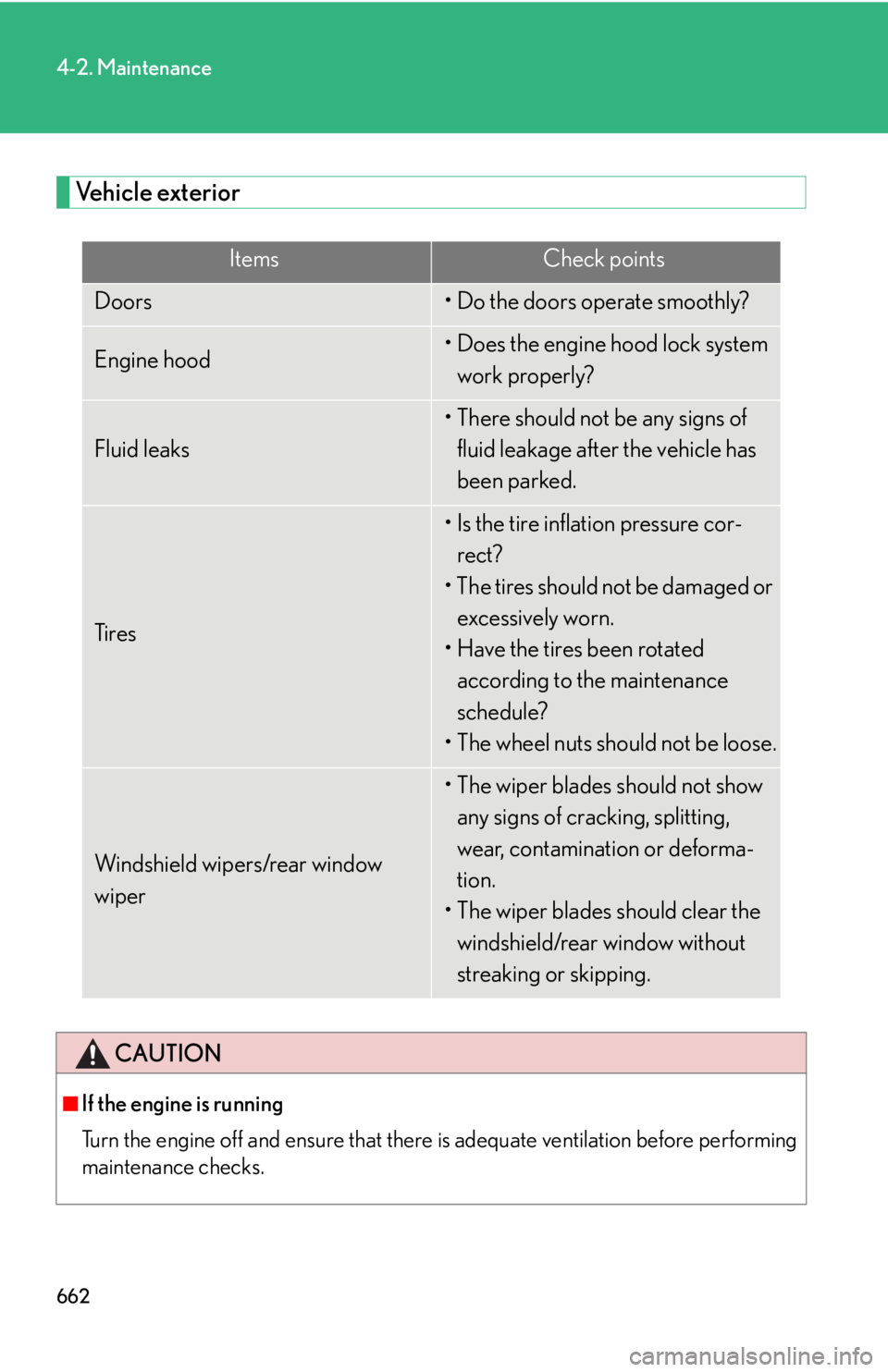
6624-2. Maintenance
Vehicle exterior Items Check points
Doors • Do the doors operate smoothly?
Engine hood • Does the engine hood lock system
work properly?
Fluid leaks • There should not be any signs of
fluid leakage after the vehicle has
been parked.
Ti r e s • Is the tire inflation pressure cor-
rect?
• The tires should not be damaged or
excessively worn.
• Have the tires been rotated
according to the maintenance
schedule?
• The wheel nuts should not be loose.
Windshield wipers/rear window
wiper • The wiper blades should not show
any signs of cracking, splitting,
wear, contamination or deforma-
tion.
• The wiper blades should clear the
windshield/rear window without
streaking or skipping.
CAUTION
■
If the engine is running
Turn the engine off and ensure that there is adequate ventilation before performing
maintenance checks.
Page 706 of 886
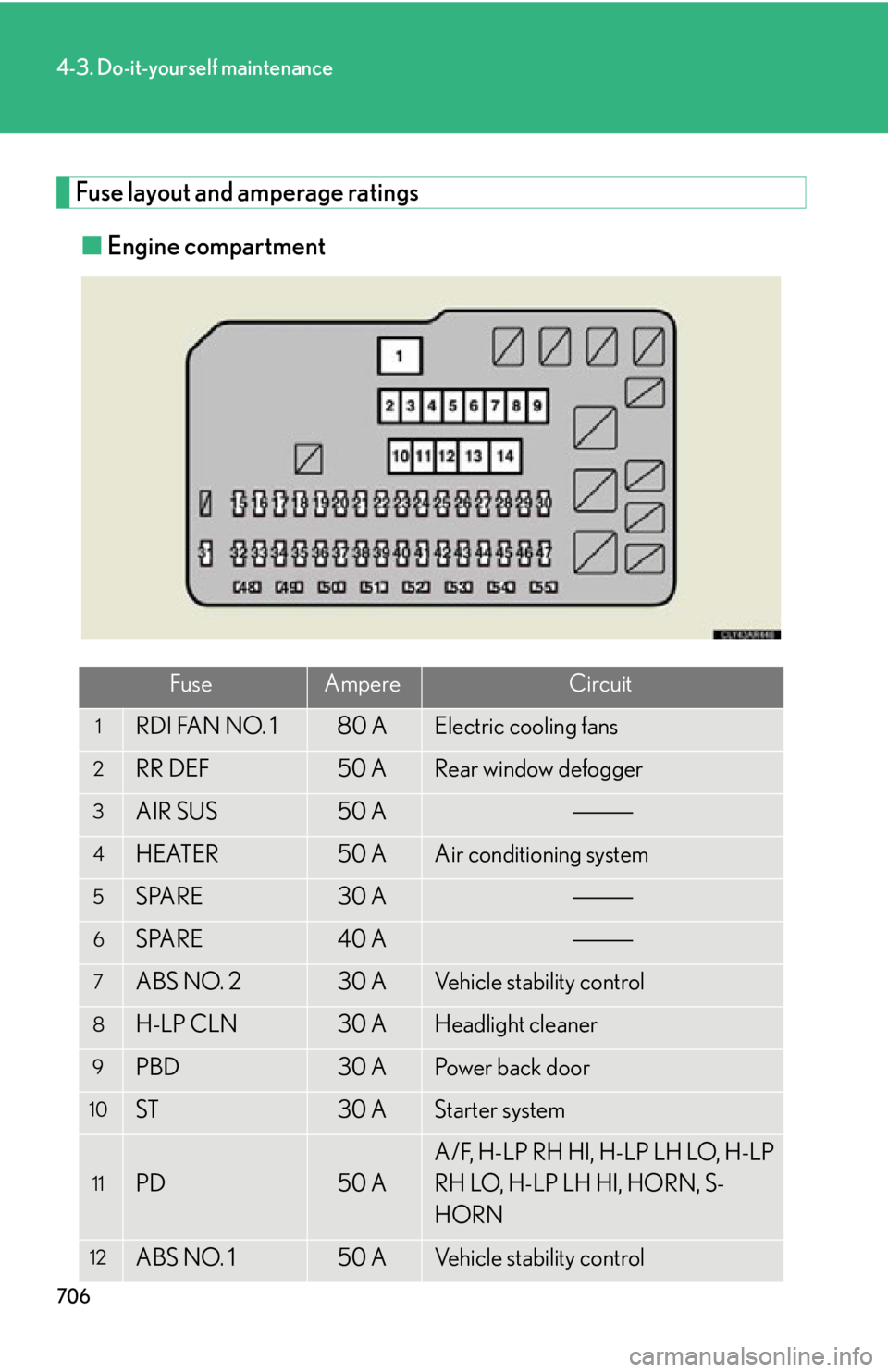
7064-3. Do-it-yourself maintenance
Fuse layout and amperage ratings
■ Engine compartment
Fuse Ampere Circuit1
RDI FAN NO. 1 80 A Electric cooling fans2
RR DEF 50 A Rear window defogger3
AIR SUS 50 A4
HEATER 50 A Air conditioning system5
SPARE 30 A6
SPARE 40 A7
ABS NO. 2 30 A Vehicle stability control8
H-LP CLN 30 A Headlight cleaner9
PBD 30 A Power back door10
ST 30 A Starter system
11
PD 50 A A/F, H-LP RH HI, H-LP LH LO, H-LP
RH LO, H-LP LH HI, HORN, S-
HORN
12
ABS NO. 1 50 A Vehicle stability control