Dynamic radar cruise control LEXUS RX350 2015 Owners Manual
[x] Cancel search | Manufacturer: LEXUS, Model Year: 2015, Model line: RX350, Model: LEXUS RX350 2015Pages: 886, PDF Size: 11 MB
Page 3 of 886

1
2
3
4
5
6
7
32-1. Driving procedures
Driving the vehicle ........................ 154
Engine (ignition) switch .............. 165
Automatic transmission
(6-speed models) ........................ 171
Automatic transmission
(8-speed models) ...................... 178
Turn signal lever ............................ 187
Parking brake ................................. 189
Horn.................................................... 190
2-2. Instrument cluster
Gauges and meters ....................... 191
Indicators and warning
lights................................................. 194
Multi-information display......... 200
Head-up display ........................... 206
2-3. Operating the lights and
windshield wipers
Headlight switch .............................. 211
Fog light switch .............................. 215
Windshield wipers and
washer.............................................. 217
Rear window wiper and
washer............................................ 224
Headlight cleaner switch .......... 226 2-4. Using other driving systems
Cruise control ............................... 227
Dynamic radar cruise
control............................................ 232
Intuitive parking assist ................ 245
Rear view monitor system
(rear view mirror-attached
type) ................................................ 255
Rear view monitor system
(vehicles with the Lexus
Display Audio system) ............ 264
Driving assist systems................. 269
All-wheel drive lock switch ...... 275
Hill-start assist control ............... 276
Pre-Collision System.................. 278
BSM (Blind Spot Monitor) ....... 286
2-5. Driving information
Utility vehicle pre cautions ........ 292
Cargo and luggage ..................... 296
Vehicle load limits ......................... 301
Winter driving tips ....................... 302
Trailer towing ................................ 306
Dinghy towing ............................... 3232
When driving
Page 24 of 886

24 Installation of a mobile two-way radio system The installation of a mobile two-way radio system in your vehicle could affect elec-
tronic systems such as: ●
Multiport fuel injection system/sequential multiport fuel injection system●
Cruise control system●
Dynamic radar cruise control system●
Anti-lock brake system●
SRS airbag system●
Seat belt pretensioner system
Be sure to check with your Lexus dealer for precautionary measures or special
instructions regarding installation of a mobile two-way radio system.
Vehicle data recordings Your Lexus is equipped with several soph isticated computers that will record cer-
tain data, such as:
•Engine speed
• Accelerator status
•Brake status
• Vehicle speed
•Shift position
The recorded data varies according to the vehicle grade level and options with
which it is equipped. Furthermore, these computers do not record conversations,
sounds or pictures.
Page 153 of 886
When driving
2
1532-1. Driving procedures
Driving the vehicle.................. 154
Engine (ignition) switch ......... 165
Automatic transmission
(6-speed models) .................. 171
Automatic transmission
(8-speed models) ................. 178
Turn signal lever ....................... 187
Parking brake ........................... 189
Horn ............................................ 190
2-2. Instrument cluster
Gauges and meters ................. 191
Indicators and warning
lights ......................................... 194
Multi-information
display .................................... 200
Head-up display ..................... 206
2-3. Operating the lights and
windshield wipers
Headlight switch....................... 211
Fog light switch ........................ 215
Windshield wipers and
washer ..................................... 217
Rear window wiper and
washer .................................... 224
Headlight cleaner switch..... 226 2-4. Using other driving
systems
Cruise control......................... 227
Dynamic radar cruise
control .................................... 232
Intuitive parking assist .......... 245
Rear view monitor system
(rear view mirror-attached
type) ........................................ 255
Rear view monitor system
(vehicles with the Lexus
Display Audio system) ....... 264
Driving assist systems ........... 269
All-wheel drive lock
switch ....................................... 275
Hill-start assist control .......... 276
Pre-Collision System ............ 278
BSM
(Blind Spot Monitor) .......... 286
2-5. Driving information
Utility vehicle
precautions ........................... 292
Cargo and luggage ............... 296
Vehicle load limits ................... 301
Winter driving tips ................. 302
Trailer towing .......................... 306
Dinghy towing ......................... 323
Page 202 of 886
2022-2. Instrument cluster
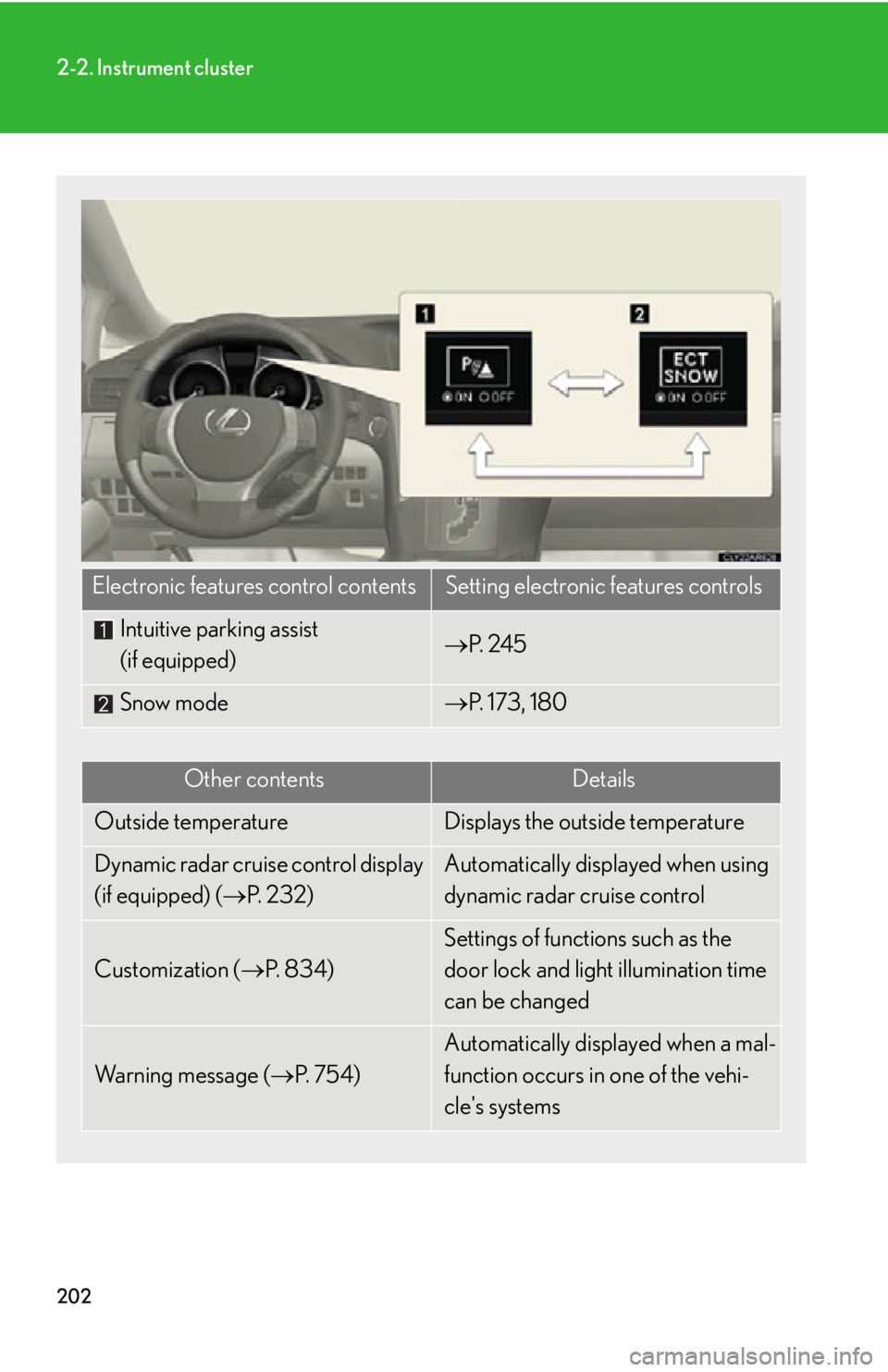
Electronic features control contents Setting electronic features controls
Intuitive parking assist
(if equipped) P. 2 4 5
Snow mode P. 173, 180
Other contents Details
Outside temperature Displays the outside temperature
Dynamic radar cruise control display
(if equipped) ( P. 232) Automatically displayed when using
dynamic radar cruise control
Customization ( P. 8 3 4 ) Settings of functions such as the
door lock and light illumination time
can be changed
Wa r n i n g m e s s a g e ( P. 7 5 4 ) Automatically displayed when a mal-
function occurs in one of the vehi-
cle's systems
Page 204 of 886
2042-2. Instrument cluster
■
Electronic features control can be turned on/off when
The “ENGINE START STOP” switch is in IGNITION ON mode.■
Conditions for ending electronic features control
In the following situations, the electronic features control will end: ●
The menu switch is pressed.●
The dynamic radar cruise control is operated (if equipped).●
Intuitive parking assist starts operating (if equipped).●
No action is performed for some time after the electronic features control
screen is displayed.●
A warning message appears after the electronic features control screen is dis-
played.■
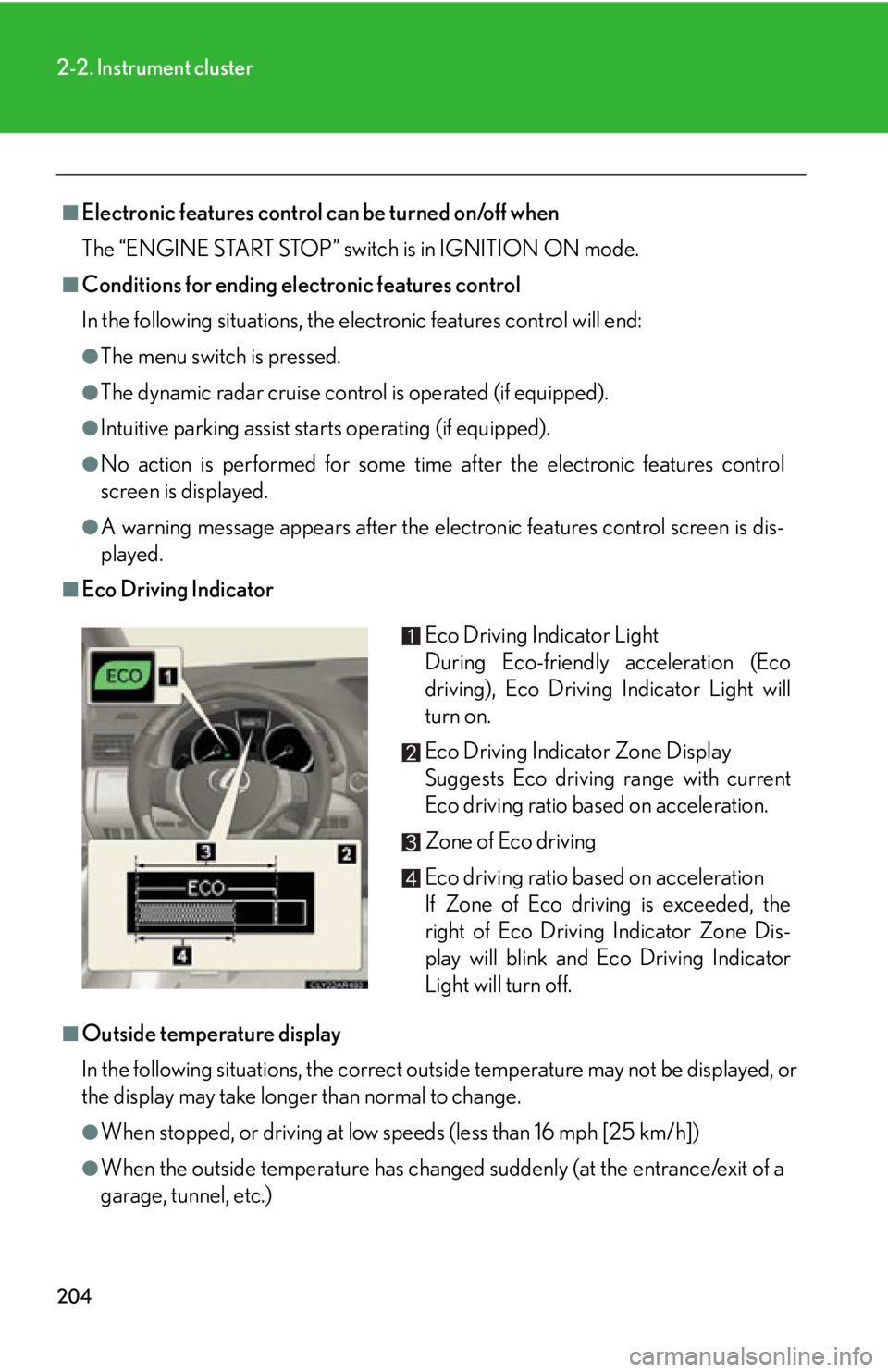
Eco Driving Indicator
■
Outside temperature display
In the following situations, the correct outside temperature may not be displayed, or
the display may take longer than normal to change.
●
When stopped, or driving at low speeds (less than 16 mph [25 km/h])
●
When the outside temperature has changed suddenly (at the entrance/exit of a
garage, tunnel, etc.) Eco Driving Indicator Light
During Eco-friendly acceleration (Eco
driving), Eco Driving Indicator Light will
turn on.
Eco Driving Indicator Zone Display
Suggests Eco driving range with current
Eco driving ratio based on acceleration.
Zone of Eco driving
Eco driving ratio based on acceleration
If Zone of Eco driving is exceeded, the
right of Eco Driving Indicator Zone Dis-
play will blink and Eco Driving Indicator
Light will turn off.
Page 232 of 886
2322-4. Using other driving systems
Dynamic radar cruise control
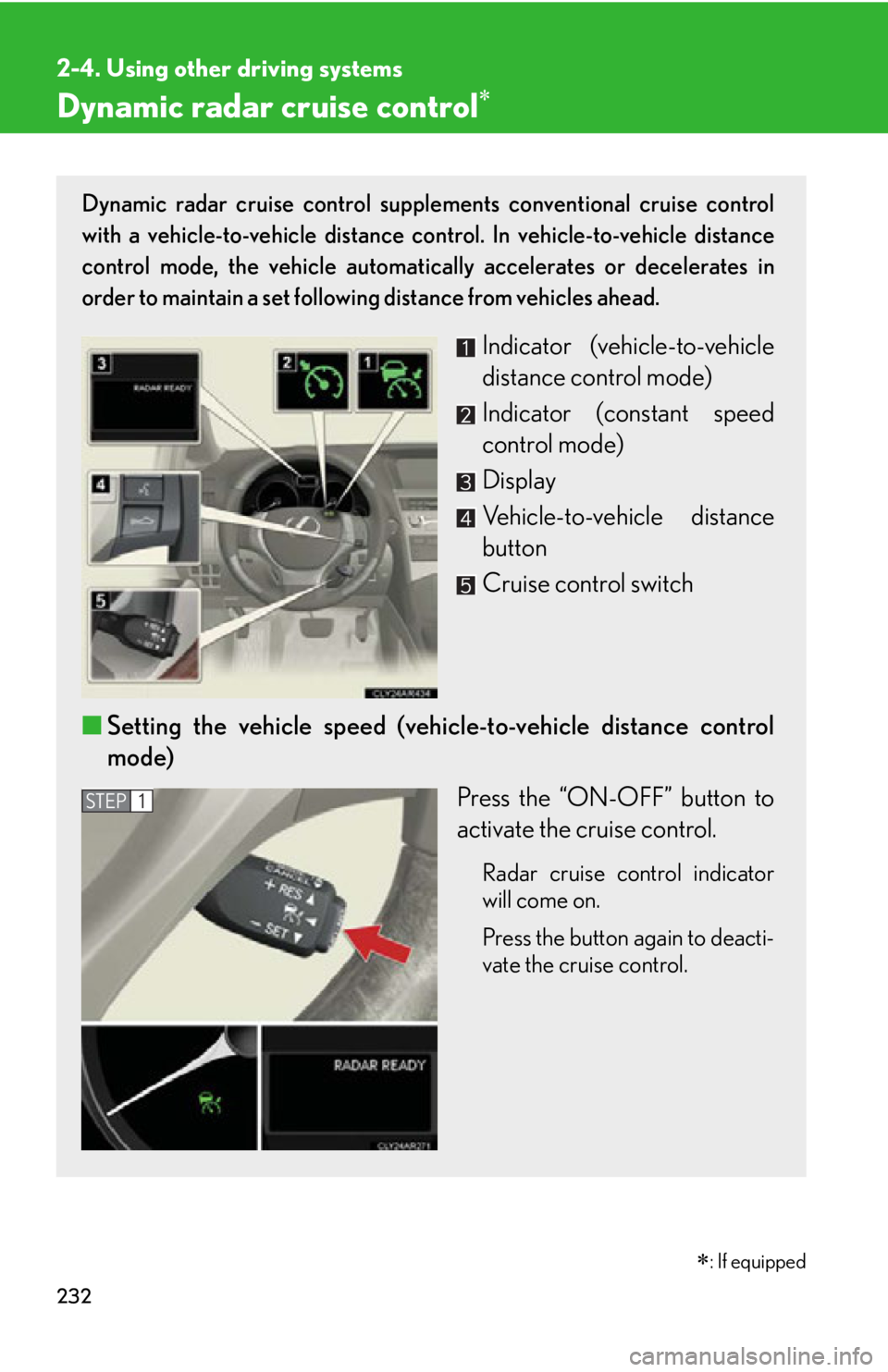
: If equippedDynamic radar cruise control supple ments conventional cruise control
with a vehicle-to-vehicle distance control. In vehicle-to-vehicle distance
control mode, the vehicle automatically accelerates or decelerates in
order to maintain a set following distance from vehicles ahead.
Indicator (vehicle-to-vehicle
distance control mode)
Indicator (constant speed
control mode)
Display
Vehicle-to-vehicle distance
button
Cruise control switch
■ Setting the vehicle speed (vehicle-to-vehicle distance control
mode)
Press the “ON-OFF” button to
activate the cruise control. Radar cruise control indicator
will come on.
Press the button again to deacti-
vate the cruise control. STEP 1
Page 239 of 886

2392-4. Using other driving systems
2
When driving If the “ENGINE START STOP”
switch is turned off and then turned
to IGNITION ON mode again, the
vehicle will automatically return to
vehicle-to-vehicle distance control
mode.
Adjusting the speed setting:
P. 2 3 3
Canceling and resuming the speed
setting: P. 2 3 5■
Dynamic radar cruise co ntrol can be set when●
The shift lever is in D or range 4 or higher of S has been selected.●
Range 4 or higher has been sele cted by using the paddle shift.
(vehicles with paddle shift switch)●
Vehicle speed is above approximately 30 mph (50 km/h).■
Accelerating after setting the vehicle speed
The vehicle can accelerate normally. After acceleration, the set speed resumes.
However, during vehicle-to-vehicle distance control mode, the vehicle speed may
decrease below the set speed in order to maintain the distance to the vehicle
ahead.■
Automatic cancelation of vehicle-to-vehicle distance control
Vehicle-to-vehicle distance control driving is automatically canceled in the follow-
ing situations: ●
Actual vehicle speed falls below approximately 25 mph (40 km/h).●
Enhanced VSC is activated. (vehicles with enhanced VSC)●
VSC is activated. (vehicles with VSC)
●
The sensor cannot operate correctly because it is covered in some way.
●
The windshield wipers are operating at high speed (when the wiper switch is set
to the AUTO mode or the high speed wiper operation position).
●
When the snow mode is set.
If vehicle-to-vehicle distance control driving is automatically canceled for any other
reason, there may be a malfunction in the system. Contact your Lexus dealer.
Page 240 of 886
2402-4. Using other driving systems
■
Automatic cancelation of constant speed control
The cruise control will stop maintaining the vehicle speed in the following situations: ●
Actual vehicle speed is more than approximately 10 mph (16 km/h) below the
set vehicle speed.
At this time, the memorized set speed is not retained.●
Actual vehicle speed falls below approximately 25 mph (40 km/h).●
Enhanced VSC is activated. (vehicles with enhanced VSC)●
VSC is activated. (vehicles with VSC)■
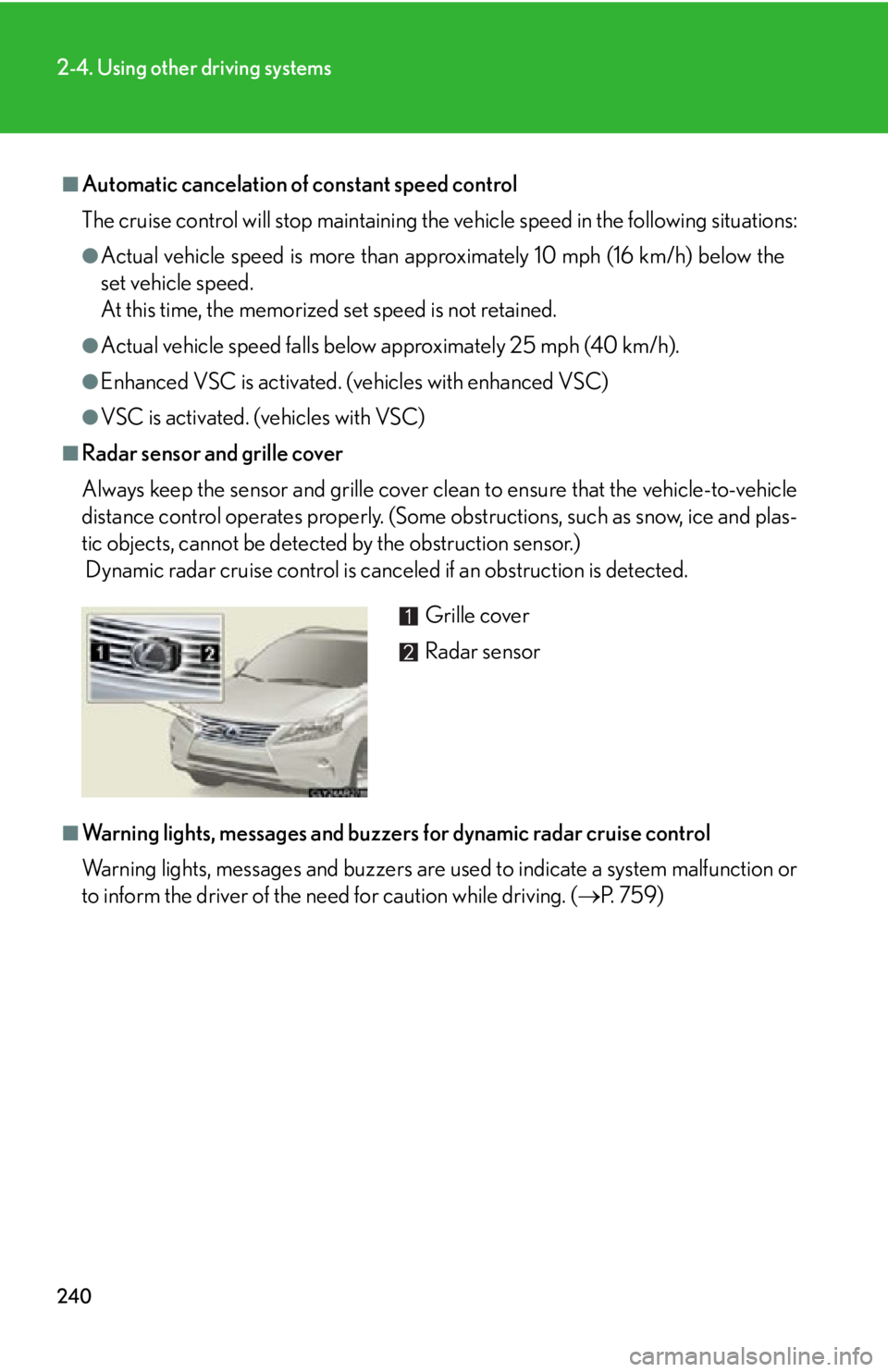
Radar sensor and grille cover
Always keep the sensor and grille cover clean to ensure that the vehicle-to-vehicle
distance control operates properly. (Some obstructions, such as snow, ice and plas-
tic objects, cannot be detected by the obstruction sensor.)
Dynamic radar cruise control is canc eled if an obstruction is detected.
■
Warning lights, messages and buzzer s for dynamic radar cruise control
Warning lights, messages and buzzers are us ed to indicate a system malfunction or
to inform the driver of the need for caution while driving. ( P. 7 5 9 )Grille cover
Radar sensor
Page 242 of 886
2422-4. Using other driving systems
CAUTION■
Before using dynamic radar cruise control
Do not overly rely on vehicle- to-vehicle distance control.
Be aware of the set speed. If automatic deceleration/acceleration is not appropri-
ate, adjust the vehicle speed, as well as the distance between your vehicle and vehi-
cles ahead by applying the brakes etc.■
Cautions regarding the driving assist systems
Observe the following precautions.
Failure to do so may cause an accident resulting in death or serious injury.●
Assisting the driver to measure following distance
The dynamic radar cruise control is only in tended to help the driver in determin-
ing the following distance between the driver's own vehicle and a designated
vehicle traveling ahead. It is not a mechanism that allows careless or inattentive
driving, and it is not a system that can assi st the driver in low-visibility conditions. It
is still necessary for driver to pay clos e attention to the vehicle's surroundings.●
Assisting the driver to judge proper following distance
The dynamic radar cruise control determines whether the following distance
between the driver's own vehicle and a designated vehicle traveling ahead is
appropriate or not. It is not capable of making any other type of judgement.
Therefore, it is absolutely necessary for the driver to remain vigilant and to deter-
mine whether or not there is a possibil ity of danger in any given situation.●
Assisting the driver to operate the vehicle
The dynamic radar cruise control has no capability to prevent or avoid a collision
with a vehicle traveling ahead. Therefore, if there is ever any danger, the driver
must take immediate and direct control of the vehicle and act appropriately in
order to ensure the safety of all involved.■
To avoid inadvertent cruise control activation
Switch the cruise control off using the “ON-OFF” button when not in use.
Page 243 of 886
2432-4. Using other driving systems
2
When driving CAUTION■
Situations unsuitable for dynamic radar cruise control
Do not use dynamic radar cruise contro l in any of the following situations.
Doing so may result in inappropriate sp eed control and could cause an accident
resulting in death or serious injury. ●
In heavy traffic●
On roads with sharp bends●
On winding roads●
On slippery roads, such as thos e covered with rain, ice or snow●
On steep downhills, or where there are sudden changes between sharp up and
down gradients
Vehicle speed may exceed the set speed when driving down a steep hill.●
At entrances to expressways●
When weather conditions are bad enough that they may prevent the sensors
from functioning correctly (fog, sn ow, sandstorm, heavy rain, etc.)●
When an approach warning buzzer is heard often●
When your vehicle is towing a trailer or during emergency towing■
When the sensor may not be correctly detecting the vehicle ahead
Apply the brakes as necessary when any of the following types of vehicles are in
front of you.
As the sensor may not be able to correctly detect these types of vehicles, the
approach warning ( P. 237) will not be activated, and a fatal or serious accident
may result. ●
Vehicles that cut in suddenly●
Vehicles traveling at low speeds●
Vehicles that are not moving
●
Vehicles with small rear ends (tra ilers with no load on board etc.)
●
Motorcycles traveling in the same lane