brakes LEXUS RX350 2015 Owners Manual
[x] Cancel search | Manufacturer: LEXUS, Model Year: 2015, Model line: RX350, Model: LEXUS RX350 2015Pages: 886, PDF Size: 11 MB
Page 155 of 886

1552-1. Driving procedures
2
When driving ■
When starting off on an uphill
The hill-start assist control is available. ( P. 2 76 )■
Driving in the rain ●
Drive carefully when it is raining, becaus e visibility will be reduced, the windows
may become fogged-up, and the road will be slippery.●
Drive carefully when it starts to rain, be cause the road surface will be especially
slippery.●
Refrain from high speeds when driving on an expressway in the rain, because
there may be a layer of water between th e tires and the road surface, preventing
the steering and brakes from operating properly.■
Engine speed while driving
In the following conditions, the engine speed may become high while driving. This is
due to automatic up-shifting control or down-shifting implementation to meet driv-
ing conditions. It does not indicate sudden acceleration.●
The vehicle is judged to be driving uphill or downhill●
When the accelerator pedal is released■
Breaking in your new Lexus
To extend the life of the vehicle, observing the following precautions is recom-
mended: ●
For the first 200 miles (300 km):
Avoid sudden stops.●
For the first 500 miles (800 km):
Do not tow a trailer.●
For the first 1000 miles (1600 km):
• Do not drive at extremely high speeds.
• Avoid sudden acceleration.
• Do not drive continuously in low gears.
• Do not drive at a constant speed for extended periods.
Page 158 of 886

1582-1. Driving procedures
CAUTION●
Do not shift the shift lever to R while the vehicle is moving forward.
Doing so can damage the transmission and may result in a loss of vehicle control.●
Do not shift the shift lever to D while the vehicle is moving backward.
Doing so can damage the transmission and may result in a loss of vehicle control.●
Moving the shift lever to N while the vehicle is moving will disengage the engine
from the transmission. Engine braking is not available when N is selected.●
During normal driving, do not turn off the engine. Turning the engine off while
driving will not cause loss of steering or braking control, but the power assist to
these systems will be lost. This will make it more difficult to steer and brake, so you
should pull over and stop the vehicle as soon as it is safe to do so.
However, in the event of an emergency, such as if it becomes impossible to stop
the vehicle in the normal way: P. 8 0 4●
Use engine braking (downshift) to maintain a safe speed when driving down a
steep hill.
Using the brakes continuously may cause the brakes to overheat and lose effec-
tiveness. ( P. 171, 178)●
When stopped on an incline, use the brake pedal and parking brake to prevent
the vehicle from rolling backward or forward, causing an accident. ●
Do not adjust the position of the steering wheel, the seat, or the inside or outside
rear view mirrors while driving.
Doing so may result in a loss of vehicle control that can cause accidents, resulting
in death or serious injury.●
Always check that all passengers' arms, heads or other parts of their body are not
outside the vehicle, as this may result in death or serious injury.●
Do not drive in excess of the speed limit. Even if the legal speed limit permits it, do
not drive over 85 mph (140 km/h) unless your vehicle has high-speed capability
tires. Driving over 85 mph (140 km/h) may result in tire failure, loss of control and
possible injury. Be sure to consult a tire dealer to determine whether the tires on
your vehicle are high-speed capability tires or not before driving at such speeds.
Page 159 of 886
1592-1. Driving procedures
2
When driving CAUTION■
When driving on slippery road surfaces ●
Sudden braking, acceleration and steering may cause tire slippage and reduce
your ability to control the vehi cle, resulting in an accident.●
Sudden acceleration, engine braking due to shift changing, or changes in engine
speed could cause the vehicle to skid, resulting in an accident.●
After driving through a pudd le, lightly depress the brak e pedal to make sure that
the brakes are functioning properly. Wet brake pads may prevent the brakes from
functioning properly. If the brakes on on ly one side are wet and not functioning
properly, steering control may be af fected, resulting in an accident.■
When shifting the shift lever
Be careful not to shift the shift lever with the accelerator pedal depressed.
This may lead to unexpected rapid acceleration of the vehicle that may cause an
accident and result in death or serious injury.■
If you hear a squealing or scraping no ise (brake pad wear limit indicators)
Have your Lexus dealer check and replac e the brake pads as soon as possible.
Rotor damage can result if the pads are not replaced when needed.
It is dangerous to drive the vehicle when the wear limits of the brake pads and/or
those of the brake discs are exceeded.
Page 162 of 886
1622-1. Driving procedures
CAUTION■
Exhaust gases
Exhaust gases include harmfu l carbon monoxide (CO) th at is colorless and odor-
less. Inhaling exhaust gases may lead to death or a serious health hazard. ●
If the vehicle is in a poorly ventilated ar ea, stop the engine. In a closed area, such
as a garage, exhaust gases may collect and enter the vehicle. This may lead to
death or a serious health hazard.●
The exhaust system should be checked occasionally. If there is a hole or crack
caused by corrosion, damage to a joint or abnormal exhaust noise, be sure to
have the vehicle inspected and repaired by your Lexus dealer . Failure to do so
may allow exhaust gases to enter the vehicl e, resulting in death or a serious health
hazard.■
When taking a nap in the vehicle
Always turn the engine off. Otherwise, if you accidentally move the shift lever or
depress the accelerator pedal, this could cause an accident or fire due to engine
overheating. Additionally, if the vehicle is parked in a poorly ventilated area, exhaust
gases may collect and enter th e vehicle, leading to death or a serious health hazard.■
When braking the vehicle ●
When the brakes are wet, drive more cautiously.
Braking distance increases when the brakes are wet, and this may cause one side
of the vehicle to brake differently than the other side. Also, the parking brake may
not securely hold the vehicle.●
If the power brake assist function does not operate, do not follow other vehicles
closely and avoid hills or sharp turns that require braking.
In this case, braking is still possible, but the brake pedal should be depressed
more firmly than usual. Also, the braking distance will increase. Have your brakes
fixed immediately.●
Do not pump the brake pedal if the engine stalls.
Each push on the brake pedal uses up the reserve for the power-assisted brakes.
●
The brake system consists of 2 individual hydraulic systems; if one of the systems
fails, the other will still operate. In this case, the brake pedal should be depressed
more firmly than usual and the braking distance will increase.
Have your brakes fixed immediately.
Page 229 of 886
2292-4. Using other driving systems
2
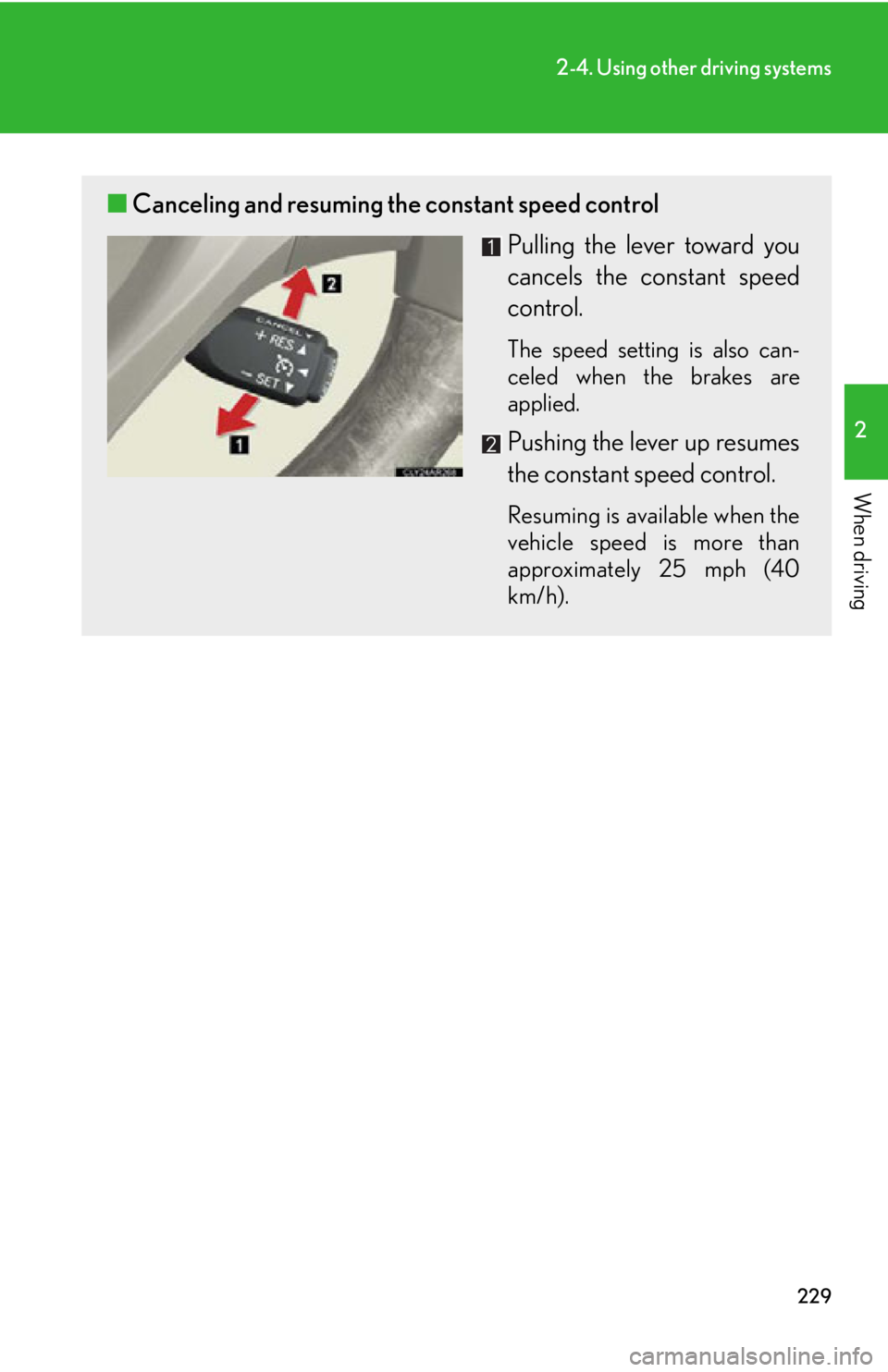
When driving ■ Canceling and resuming the constant speed control
Pulling the lever toward you
cancels the constant speed
control. The speed setting is also can-
celed when the brakes are
applied.
Pushing the lever up resumes
the constant speed control. Resuming is available when the
vehicle speed is more than
approximately 25 mph (40
km/h).
Page 235 of 886
2352-4. Using other driving systems
2
When driving ■ Vehicle-to-vehicle distance settings
Select a distance from the tabl e below. Note that the distances
shown correspond to a vehicle sp eed of 50 mph (80 km/h). Vehi-
cle-to-vehicle distance increases/decreases in accordance with
vehicle speed.
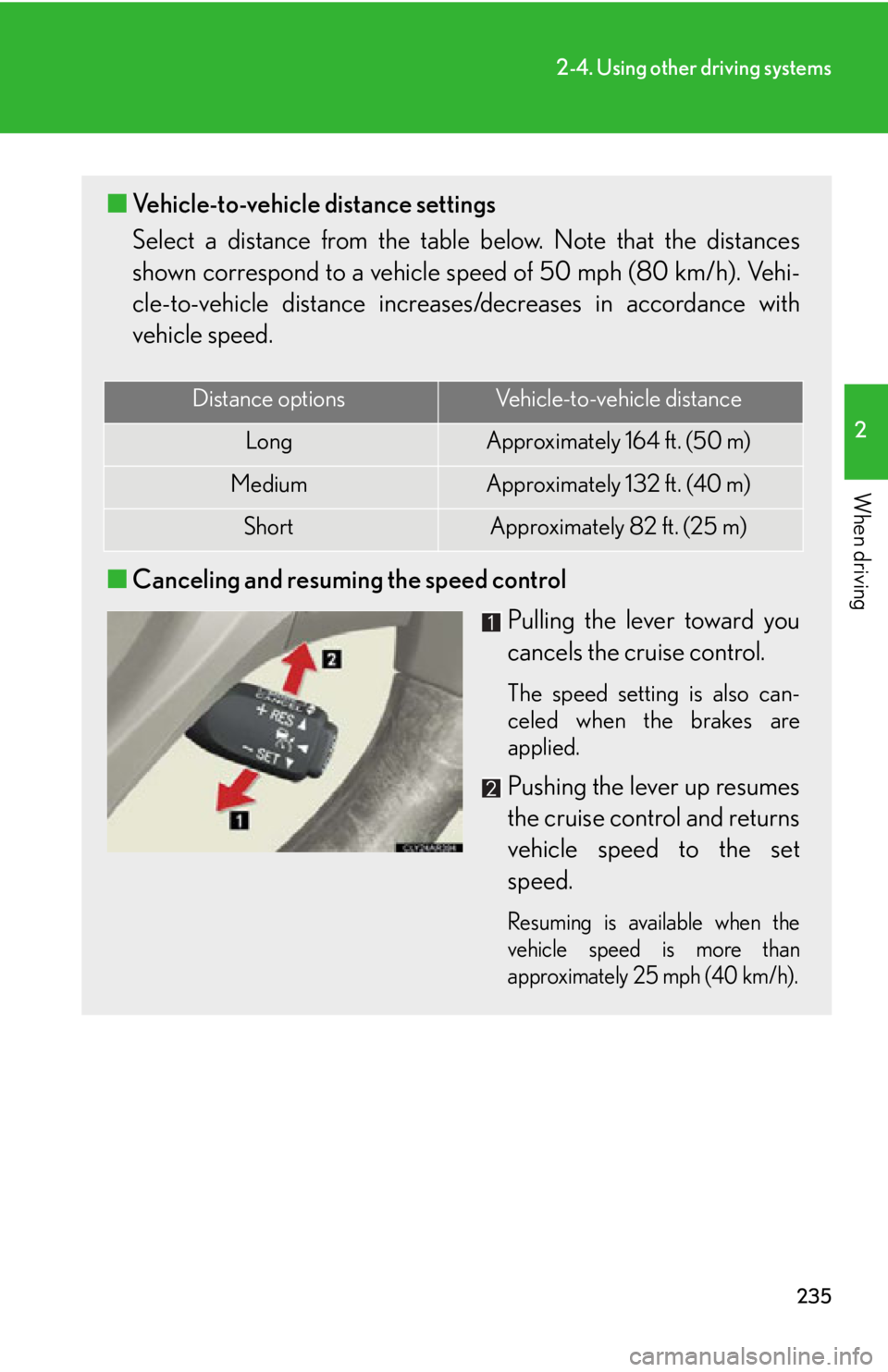
■ Canceling and resuming the speed control
Pulling the lever toward you
cancels the cruise control. The speed setting is also can-
celed when the brakes are
applied.
Pushing the lever up resumes
the cruise control and returns
vehicle speed to the set
speed. Resuming is available when the
vehicle speed is more than
approximately 25 mph (40 km/h).Distance options Vehicle-to-vehicle distance
Long Approximately 164 f t. (50 m)
Medium Approximately 132 ft. (40 m)
Short Approximately 82 ft. (25 m)
Page 236 of 886

2362-4. Using other driving systems
Driving in vehicle-to-vehicle distance control mode
This mode employs a radar sensor to detect the presence of vehicles up
to approximately 400 ft. (120 m) ah ead, determines the current vehicle-
to-vehicle following distance, and op erates to maintain a suitable follow-
ing distance from the vehicle ahead. Note that vehicle-to-vehicle distance will close in when traveling on long
downhill slopes.
Example of constant speed cruising
When there are no vehicles ahead The vehicle travels at the speed set by the driver. The desired vehicle-to-vehi-
cle distance can also be set by operat ing the vehicle-to-vehicle distance con-
trol.
Example of deceleration cruising
When the vehicle ahead is driving slower than the set speed
When a vehicle is detected running ahead of you, the system automatically
decelerates your vehicle. When a grea ter reduction in vehicle speed is nec-
essary, the system applies the brakes. A warning tone warns you when the
system cannot decelerate sufficiently to prevent your vehicle from closing in
on the vehicle ahead.
Page 237 of 886

2372-4. Using other driving systems
2
When driving Example of follow-up cruising
When following a vehicle driving slower than the set speed The system continues follow-up cruising while adjusting for changes in the
speed of the vehicle ahead in order to maintain the vehicle-to-vehicle dis-
tance set by the driver.
Example of acceleration
When there are no longer any vehicl es ahead driving slower than the
set speed The system accelerates until the set speed is reached. The system then
returns to constant speed cruising.
Approach warning
When your vehicle is too close to a vehicle ahead, and sufficient auto-
matic deceleration via the cruise co ntrol is not possible, the display will
flash and the buzzer will sound to al ert the driver. An example of this
would be if another driver cuts in fron t of you while you are following a
vehicle. Apply the brakes to ensure an appropria te vehicle-to-vehicle dis-
tance.
■ Warnings may not occur when
In the following instances, there is a possibility that the warnings will not
occur:
● When the speed of the vehicle ahead matches or exceeds your
vehicle speed
● When the vehicle ahead is traveling at an extremely slow speed
● Immediately after the cruise control speed was set
● At the instant the accelerator is applied
Page 242 of 886
2422-4. Using other driving systems
CAUTION■
Before using dynamic radar cruise control
Do not overly rely on vehicle- to-vehicle distance control.
Be aware of the set speed. If automatic deceleration/acceleration is not appropri-
ate, adjust the vehicle speed, as well as the distance between your vehicle and vehi-
cles ahead by applying the brakes etc.■
Cautions regarding the driving assist systems
Observe the following precautions.
Failure to do so may cause an accident resulting in death or serious injury.●
Assisting the driver to measure following distance
The dynamic radar cruise control is only in tended to help the driver in determin-
ing the following distance between the driver's own vehicle and a designated
vehicle traveling ahead. It is not a mechanism that allows careless or inattentive
driving, and it is not a system that can assi st the driver in low-visibility conditions. It
is still necessary for driver to pay clos e attention to the vehicle's surroundings.●
Assisting the driver to judge proper following distance
The dynamic radar cruise control determines whether the following distance
between the driver's own vehicle and a designated vehicle traveling ahead is
appropriate or not. It is not capable of making any other type of judgement.
Therefore, it is absolutely necessary for the driver to remain vigilant and to deter-
mine whether or not there is a possibil ity of danger in any given situation.●
Assisting the driver to operate the vehicle
The dynamic radar cruise control has no capability to prevent or avoid a collision
with a vehicle traveling ahead. Therefore, if there is ever any danger, the driver
must take immediate and direct control of the vehicle and act appropriately in
order to ensure the safety of all involved.■
To avoid inadvertent cruise control activation
Switch the cruise control off using the “ON-OFF” button when not in use.
Page 243 of 886
2432-4. Using other driving systems
2
When driving CAUTION■
Situations unsuitable for dynamic radar cruise control
Do not use dynamic radar cruise contro l in any of the following situations.
Doing so may result in inappropriate sp eed control and could cause an accident
resulting in death or serious injury. ●
In heavy traffic●
On roads with sharp bends●
On winding roads●
On slippery roads, such as thos e covered with rain, ice or snow●
On steep downhills, or where there are sudden changes between sharp up and
down gradients
Vehicle speed may exceed the set speed when driving down a steep hill.●
At entrances to expressways●
When weather conditions are bad enough that they may prevent the sensors
from functioning correctly (fog, sn ow, sandstorm, heavy rain, etc.)●
When an approach warning buzzer is heard often●
When your vehicle is towing a trailer or during emergency towing■
When the sensor may not be correctly detecting the vehicle ahead
Apply the brakes as necessary when any of the following types of vehicles are in
front of you.
As the sensor may not be able to correctly detect these types of vehicles, the
approach warning ( P. 237) will not be activated, and a fatal or serious accident
may result. ●
Vehicles that cut in suddenly●
Vehicles traveling at low speeds●
Vehicles that are not moving
●
Vehicles with small rear ends (tra ilers with no load on board etc.)
●
Motorcycles traveling in the same lane